

The landscape of search engine optimization has fundamentally changed. We are officially in the era of the “Industrial Revolution of Search.” If your digital marketing strategy still relies on manually writing, formatting, and publishing web pages one by one, you are already falling behind. The modern web demands scale, relevance, and hyper-localization—and achieving this manually is not just inefficient; it is mathematically impossible for growing businesses.
Enter the game-changers of modern digital marketing: the bulk page generator and AI-powered SEO tools.
Whether you are a local service business trying to capture search traffic in 500 different zip codes, an e-commerce brand with thousands of product variations, or a digital agency scaling client campaigns, programmatic SEO (pSEO) is the only path forward.
In this comprehensive, 4,000-word masterclass, we will deconstruct exactly how bulk page generation works, why integrating artificial intelligence is the secret to avoiding Google penalties, and how PageForge—the #1 programmatic SEO WordPress plugin—can help you create thousands of highly targeted, organically ranking pages in a matter of minutes.
Chapter 1: The Evolution of Search & The Rise of Programmatic SEO
To understand the immense power of a bulk page generator, we first need to look at how SEO has evolved.
The Old Way: Manual and Monotonous
A decade ago, ranking for local or long-tail keywords required a tedious, manual workflow. A digital marketing team would:
- Conduct keyword research.
- Manually write a 1,000-word article for a specific keyword (e.g., “Emergency Plumber in Austin”).
- Manually upload it to WordPress.
- Manually add meta tags, configure URLs, and set featured images.
- Repeat this process for Dallas, Houston, San Antonio, and so on.
If a company serviced 100 cities, creating those 100 pages could take weeks of dedicated manpower and cost thousands of dollars in freelance writing fees. Worse, the result was often human error: broken links, inconsistent formatting, and a lack of scalable architecture.
The New Way: Programmatic SEO (pSEO)
Programmatic SEO is a methodology that leverages data and automation to create thousands of landing pages at scale. Instead of writing 100 different pages, you create one master template and connect it to a database (like a CSV file or Google Sheet). The software then dynamically generates unique pages by merging your data with your template.
Companies like Zillow, TripAdvisor, and Yelp built billion-dollar empires using programmatic SEO. Every time you search for “Best Italian Restaurants in [City],” you are landing on a programmatic page.
The Missing Link: Quality Content at Scale
For years, the barrier to entry for programmatic SEO was content quality. Early attempts at mass page creation resulted in “doorway pages”—thin, low-quality pages with spun text that Google quickly penalized.
This is where AI-powered SEO tools have completely revolutionized the industry. By integrating Large Language Models (LLMs) directly into the generation process, modern tools can write completely unique, contextually brilliant, and highly helpful content for every single generated page.
You no longer have to choose between scale and quality. With the right bulk page generator, you get both.
Chapter 2: Deconstructing the Bulk Page Generator
What exactly is a bulk page generator, and how does it function under the hood?
A bulk page generator is a software application or plugin—most commonly used within content management systems like WordPress—designed to automate the creation of web pages in mass quantities.
The Core Mechanics of Bulk Generation
At its core, a high-quality bulk page generator relies on three distinct components:
- The Data Source (The Fuel): This is usually a CSV file, a Microsoft Excel spreadsheet, a Google Sheet, or an API feed. Your data source contains rows and columns of information. For example, a local SEO spreadsheet might have columns for
[City],[Zip Code],[Population],[Local Landmark], and[Base Price]. - The Dynamic Template (The Engine): This is a custom-designed WordPress page that acts as a blueprint. Instead of static text, it uses shortcodes or dynamic placeholders. For example: “Looking for the best roofing repair in
[City]? We proudly serve the[Zip Code]area, right near[Local Landmark].” - The Generation Engine (The Accelerator): The software maps the columns from your data source to the placeholders in your template. With the click of a button, it cycles through hundreds or thousands of rows, generating a physical, SEO-optimized URL for every single row of data.

Why WordPress Needs a Dedicated Generator
WordPress powers over 40% of the internet, but out of the box, it is not built for programmatic SEO. Native WordPress requires you to click “Add New,” type out a post, and hit “Publish.”
To turn WordPress into a programmatic powerhouse, you need a specialized plugin that bypasses the manual editor and injects perfectly formatted pages directly into your site’s database. This requires a tool that respects your existing theme, plays nicely with your page builder (like Elementor, Divi, or Gutenberg), and ensures your site speed isn’t compromised by database bloat.
Chapter 3: The Critical Role of AI-Powered SEO Tools
Scaling your website’s footprint is only half the battle. The other half is ensuring that Google actually indexes and ranks those pages.
In the wake of Google’s Helpful Content Update and continuous core algorithmic shifts, the search engine has drawn a massive line in the sand: Scale without unique value will be penalized.
If you use a basic bulk page generator to swap out city names on identical blocks of text, you will get hit with a duplicate content penalty. This is why standard mass page creators are obsolete. Today, success requires AI-powered SEO tools.
1. Dynamic AI Content Generation
Modern tools don’t just swap variables; they generate entirely new paragraphs based on prompts. By hooking your generator up to an AI engine, you can instruct the software to: “Write a unique, 300-word introduction about plumbing services in [City], mentioning its specific [Population] and referencing [Local Landmark].”
The AI executes this prompt 1,000 times, resulting in 1,000 completely unique introductions. This satisfies Google’s requirement for unique, contextual value.
2. Automated Meta Optimization
Writing compelling title tags and meta descriptions for 5,000 pages manually is soul-crushing. AI-powered SEO tools automate this by generating click-worthy meta data perfectly tailored to the specific variables of that page.
3. Intelligent Schema Markup Injection
Schema markup (JSON-LD) helps search engines understand the context of your page (e.g., LocalBusiness, Product, FAQPage). The best AI-powered SEO tools dynamically generate and inject error-free schema into every page based on the row data, dramatically increasing your chances of securing rich snippets in search results.
Chapter 4: Introducing PageForge – The #1 AI Programmatic SEO Plugin
If you want to merge the raw power of a bulk page generator with the contextual brilliance of AI-powered SEO tools, there is only one industry-leading solution in 2026: PageForge.
PageForge is the ultimate AI programmatic SEO WordPress plugin, trusted by over 500+ active agencies, marketers, and enterprises. It is designed to turn your WordPress website into an automated SEO growth engine, allowing you to rank #1 and rank faster (often within 24 hours of indexing).
Why PageForge Dominates the Market
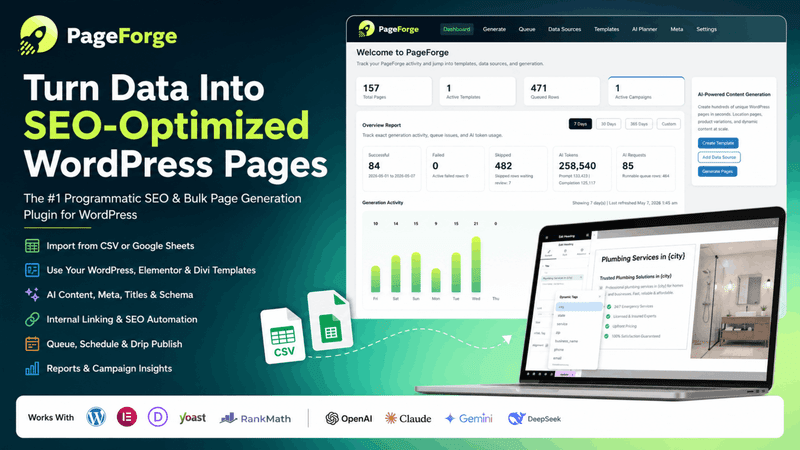
PageForge isn’t just a basic CSV importer; it is a full-stack SEO optimization suite. Let’s break down the features that make it the premier choice for professionals:
1. The Bulk Page Creator Engine
PageForge’s lightning-fast generation engine can create thousands of unique, SEO-optimized WordPress pages in seconds. Whether you need 100 pages or 100,000, PageForge provides the infrastructure to scale without multiplying your workload or crashing your server.
2. Native AI Content Generator
Unlike older plugins where you have to use external tools to spin text, PageForge has AI built directly into its core. You can generate completely unique, SEO-optimized content for every page automatically. It reads your data source, processes your custom AI prompts, and outputs human-quality text that passes AI detectors and satisfies search intent.
3. Deep Integration with Your Favorite Builders
Worried about compatibility? PageForge works seamlessly with all major WordPress page builders, including:
- Elementor
- Gutenberg (Block Editor)
- Divi
- Beaver Builder
- WPBakery
- Oxygen
You don’t have to learn a new design system. Build a beautiful template using the tools you already know, and let PageForge handle the data injection.
4. The SEO Optimization Suite
PageForge goes beyond text. It features built-in meta tag generation, automated URL optimization, and robust schema markup support. It ensures that every page generated isn’t just a live URL, but a perfectly optimized asset ready to be crawled by Googlebot.
5. Dynamic Google Sheets & CSV Integrations
Whether you prefer working in a static CSV file or a live Google Sheet, PageForge connects effortlessly. With the Google Sheets integration (available on higher tiers), you can update a row in your spreadsheet, and PageForge will automatically update the corresponding page on your live website.
6. AI Site Planner & Auto Scheduling
Don’t want to publish 5,000 pages on the exact same day? PageForge features Auto SEO pages scheduling. You can drip-feed your programmatic pages over weeks or months, mimicking natural site growth and keeping search engine crawlers coming back for fresh content.
Chapter 5: Step-by-Step Tutorial: How to Dominate Search with PageForge
Ready to launch your first programmatic SEO campaign? Here is the exact, step-by-step workflow you can use to generate thousands of pages using PageForge as your bulk page generator.
Step 1: The Blueprint (Data Collection)
Everything starts with data. Open Google Sheets or Excel and create your dataset. Let’s assume you run a national chain of pest control services.
Create columns for:
City(e.g., Orlando)State(e.g., FL)Pest_Type(e.g., Termites)Climate_Factor(e.g., high humidity)Service_Price(e.g., $199)
Compile this data for hundreds of variations (Orlando Termites, Dallas Rodents, Seattle Ants). Export this as a CSV file.
Step 2: The Setup (Installing PageForge)
- Navigate to your WordPress dashboard.
- Go to Plugins > Add New.
- Search for “PageForge” or upload the ZIP file from pageforge.pro.
- Activate the plugin and navigate to the PageForge dashboard.
- Upload your CSV file or connect your Google Sheet. PageForge will instantly recognize your columns as dynamic shortcodes (e.g.,
[pf_City]).
Step 3: Designing the Dynamic Template
Create a new template in your favorite page builder (e.g., Elementor). Instead of writing static text, use the PageForge shortcodes.
Example H1: Best [pf_Pest_Type] Control Services in [pf_City], [pf_State] Example Sub-headline: Protect your home from [pf_Pest_Type] starting at just [pf_Service_Price].
Step 4: Injecting AI-Powered Content
This is where the magic of AI-powered SEO tools comes into play. Inside the PageForge template, use the AI content block.
Set up a prompt like this: “Act as an expert exterminator. Write a 400-word localized guide about dealing with [pf_Pest_Type] in [pf_City]. Mention how the [pf_Climate_Factor] of the area makes these pests worse. Use a professional yet friendly tone.”
When you run the generator, PageForge’s AI will write a bespoke essay for every single row. Orlando gets a piece about termites and humidity; Seattle gets a piece about ants and damp weather.
Step 5: SEO Metadata & Schema
Scroll down to the PageForge SEO settings.
- Title Tag:
[pf_Pest_Type] Exterminator in [pf_City] | #1 Rated - Meta Description:
Struggling with [pf_Pest_Type] in [pf_City]? Our expert team offers same-day service starting at [pf_Service_Price]. Get a free quote today! - URL Slug:
[pf_City]-[pf_Pest_Type]-control
Step 6: Generate and Rank
Hit the “Generate Pages” button. In mere seconds, PageForge will process your data, query the AI, inject the shortcodes, configure the metadata, and publish hundreds of perfectly optimized landing pages.
Submit your XML sitemap to Google Search Console, and watch the organic traffic roll in.
Chapter 6: Who Benefits from a Bulk Page Generator? (Use Cases)
The beauty of a modern bulk page generator like PageForge is its versatility. It is not confined to one specific industry. Here is how different sectors are using AI-powered SEO tools to multiply their revenue.
1. Local Businesses & Franchises (Local SEO)
If you are a plumber, roofer, lawyer, or cleaning service, your customers are searching locally (e.g., “Roof repair near me” or “Plumber in Brooklyn”). The Strategy: Use PageForge to create a highly localized landing page for every single city, neighborhood, and county in your service radius. Combine [Service] + [Location] to blanket local search results and drive massive inbound phone calls.
2. E-Commerce Stores (Product Variations)
E-commerce sites often struggle to rank for long-tail product queries. The Strategy: Generate brand-specific category pages or hyper-niche product variation pages. If you sell t-shirts, use PageForge to dynamically generate SEO pages for every color, size, and style combination (e.g., “Men’s V-Neck Cotton T-Shirt in Navy Blue”), capturing low-competition, high-intent buyer traffic.
3. Digital Marketing Agencies (Client Scaling)
Agencies face a constant battle with profit margins. Writing content manually for clients eats into retainer profits. The Strategy: PageForge allows agencies to deliver massive value in a fraction of the time. You can offer a “National SEO Domination” package to clients, utilizing reusable templates and bulk tools. Plus, PageForge offers white-label options on their Agency plans, allowing you to present this powerful tool as your own proprietary software.
4. Real Estate & Directory Sites
Real estate agents and directory builders require massive amounts of data to be displayed elegantly. The Strategy: Automatically generate thousands of property listings, agent profile pages, or neighborhood guides. A directory site can upload a database of 10,000 local businesses and instantly create an SEO-optimized profile page for every single one.
Chapter 7: PageForge vs. The Competition
You might be wondering how PageForge stacks up against older programmatic plugins like MPG (Multiple Pages Generator), LPagery, Page Generator Pro, SEOMatic, or WP All Import.
While these older tools helped pioneer the space, they fundamentally belong to a previous generation of SEO. Here is why PageForge is widely considered the superior bulk page generator:
- Native AI vs. Disconnected Tools: Older plugins require you to use third-party spinners or copy-paste OpenAI outputs into complex CSVs manually. PageForge has the AI engine built directly into the WordPress interface. It generates the content during the build process.
- Modern UI/UX: Many legacy mass page creators look like they were coded in 2010, with clunky, confusing interfaces that require a developer to figure out. PageForge is built for 2026—sleek, intuitive, and completely no-code.
- Speed and Infrastructure: Generating 10,000 pages on legacy plugins often crashes WordPress due to PHP timeouts. PageForge’s optimized bulk generation engine is lightning fast, handling massive datasets without breaking a sweat.
- Pricing & Value: Competing tools often nickel-and-dime you with hidden fees or restrictive page limits. PageForge offers incredibly transparent pricing.
Transparent, Scalable Pricing
PageForge offers simple pricing with NO extra charges and NO hidden fees. Plus, they offer a 14-day free trial and a “Download Free” version with no credit card required to get started.
- Starter ($49/mo): Perfect for startups. Includes 1 site, 500 pages, AI Post Generator, Bulk AI Meta Optimization, and CSV upload.
- Professional ($99/mo – Best Value!): Built for growing agencies. Includes 5 sites, UNLIMITED pages, Google Sheet integrations, and AI content generation.
- Enterprise ($249/mo): Designed for large teams. Unlimited sites, unlimited pages, custom post type support, HTML Snippet Injector, and premium support.
(Pro Tip: You can save 20% on the Starter and Pro plans, and 20% on Enterprise when billed annually).
Chapter 8: Frequently Asked Questions (FAQ)
To ensure you have absolute clarity on utilizing a bulk page generator and AI-powered SEO tools, we have compiled the most frequently asked questions from the SEO community.
Q: Will Google penalize me for using a bulk page generator? A: Google penalizes spam and thin content, not the method of generation. Google’s official guidelines state that AI and automation are acceptable as long as they are used to create helpful, people-first content. Because PageForge uses advanced AI to generate unique, contextually relevant content for every single page, it aligns perfectly with modern SEO best practices.
Q: Which page builders are supported by PageForge? A: PageForge works seamlessly with all major WordPress page builders, including Elementor, Beaver Builder, Divi, Gutenberg, WPBakery, and Oxygen. It also supports the classic editor and any theme utilizing standard WordPress templates.
Q: Can I use my own data sources? A: Absolutely. PageForge supports standard CSV files, live Google Sheets, and direct database connections. Professional and Enterprise plans offer even more advanced API integration options.
Q: How does the AI content generation actually work? A: The AI feature uses advanced large language models (LLMs) right inside your WordPress dashboard. You provide a customized prompt (guidelines, brand voice, tone), include your data shortcodes, and the AI generates completely original text tailored to the specific variables of that page.
Q: What if I need to update my pages later? A: One of the best features of programmatic SEO with PageForge is scalability. If you need to change a price or update an offer across 5,000 pages, you don’t have to edit them one by one. You simply update your data source (or template) and re-sync. The bulk page generator will update all 5,000 pages instantly.
Q: Can I white-label PageForge for my agency clients? A: Yes! The Agency/Enterprise plans include white-label options, allowing you to customize the branding and present the software as your own proprietary tech stack to your clients.
Q: Is there a limit to how many pages I can create? A: The Starter plan allows for up to 500 pages per month (perfect for small local businesses). The Professional and Enterprise plans offer unlimited page generation, allowing you to scale as large as your server can handle.
Conclusion: Stop Typing, Start Scaling
The math of modern digital marketing is simple: The website with the most high-quality, relevant, targeted pages wins the lion’s share of the traffic.
You can continue doing things the hard way—wasting time, draining your budget, and manually creating pages while your competitors use automation to dominate the SERPs (Search Engine Results Pages). Or, you can embrace the future of AI-powered SEO tools.
A robust bulk page generator is no longer a luxury; it is a fundamental requirement for anyone serious about organic growth in 2026.
By leveraging PageForge, you are equipping yourself with the ultimate programmatic SEO weapon. With its seamless dynamic templates, native AI content generation, automated meta tags, and flawless page builder compatibility, you can literally do the work of a 50-person content team with just a few clicks.
It is time to say goodbye to the hassle of old SEO methods. Less manual work. More results.
Ready to Rank Higher?
Join over 500+ SEO professionals, agencies, and businesses who are scaling their strategy and dominating local and global search.
Start Free on WordPress Today — No credit card required. Experience the industrial revolution of search and launch your first programmatic SEO campaign with PageForge right now