


Updated: July 8, 2026
Programmatic SEO is the process of creating search-focused pages at scale using structured data, reusable templates, dynamic variables, and a clear SEO system. For WordPress site owners, agencies, SaaS companies, directories, ecommerce stores, franchises, and local service businesses, it can turn one strong page pattern into hundreds or thousands of useful long-tail landing pages.
But there is a big difference between smart programmatic SEO and low-quality mass page generation. Publishing hundreds of nearly identical pages with only a city name, product name, or keyword changed is not a sustainable SEO strategy. The goal is not to create more URLs. The goal is to create more useful answers, more relevant landing pages, and more search entry points that deserve to exist.
That is where PageForge comes in. PageForge is an AI-powered programmatic SEO and bulk page generator for WordPress that helps you turn CSV data, dynamic tokens, reusable layouts, SEO metadata, schema, and internal links into a scalable WordPress SEO workflow.

Table of Contents
- What Is Programmatic SEO?
- How Programmatic SEO Works
- Programmatic SEO Examples
- When Programmatic SEO Makes Sense
- When Programmatic SEO Can Hurt Your Site
- How to Build Programmatic SEO in WordPress
- How PageForge Helps You Scale pSEO
- How to Make Programmatic Pages AEO and GEO Ready
- Programmatic SEO Launch Checklist
- FAQs
What Is Programmatic SEO?
Programmatic SEO, also called pSEO, is a scalable SEO method where you use data and templates to create many pages that target related search queries. Instead of manually writing every page from scratch, you create a repeatable page structure and use variables to personalize each page.
A simple example is:
- {Service} in {City}
- {Product} for {Industry}
- {Software} alternative for {Use Case}
- {Category} near {Location}
- {Template} for {Profession}
Each page follows the same strategic pattern, but the content should change enough to match the user’s specific intent. The strongest programmatic SEO pages include unique data, local proof, comparisons, FAQs, images, tables, examples, internal links, schema markup, and a clear next step.
In WordPress, programmatic SEO usually means using structured data from a CSV or Google Sheet, connecting that data with a reusable page template, replacing tokens dynamically, and publishing pages with SEO-ready titles, slugs, meta descriptions, and internal links.
Read more: Programmatic SEO for WordPress
How Programmatic SEO Works
Programmatic SEO works by matching a repeatable search pattern with a repeatable content structure. The workflow usually looks like this:
- Find a keyword pattern: Identify a scalable search format such as “best [service] in [city]” or “[tool] alternative for [industry].”
- Build a data source: Create a CSV or spreadsheet with the variables each page needs.
- Create a reusable template: Build one strong page layout with headings, sections, CTAs, tables, FAQs, and schema.
- Insert dynamic tokens: Use variables like
{City},{Service},{Industry},{Price}, or{CTA}. - Generate pages: Turn each data row into a WordPress page, post, or custom post type.
- Review quality: Check that every page has useful, accurate, page-specific value.
- Connect pages internally: Add hub pages, category links, related links, and HTML sitemaps.
- Monitor performance: Track indexation, impressions, clicks, conversions, and crawl issues.
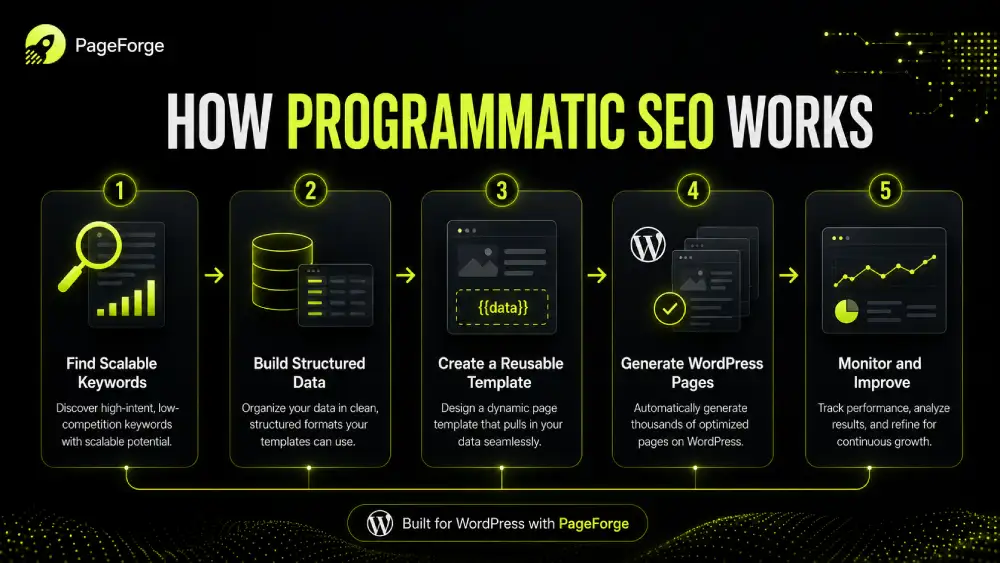
The best programmatic SEO campaigns do not simply swap keywords. They answer specific user needs at scale.
Programmatic SEO Examples
Programmatic SEO is used by some of the biggest websites in the world. The reason it works for them is not just scale. It works because each page gives users something specific and useful.
1. Travel and Location Pages
Travel websites often create pages for “things to do in [city],” “hotels in [destination],” or “best attractions near [location].” These pages work when they include unique destination information, reviews, maps, booking options, photos, and local recommendations.
2. Real Estate and Local Property Pages
Real estate websites use programmatic SEO for city pages, neighborhood pages, property-type pages, rent pages, home-value pages, and school-area pages. These pages work because users need highly specific local information before making a decision.
3. Software Integration Pages
Automation and SaaS companies often create pages like “connect [app] with [app]” or “[software] integration with [platform].” These pages work when they include actual use cases, triggers, actions, setup steps, templates, and product functionality.
4. Ecommerce Category and Use-Case Pages
Ecommerce stores can use pSEO for product categories, product use cases, material pages, collection pages, size pages, comparison pages, and buyer-intent landing pages. For example, a store could create pages for “running shoes for flat feet,” “black office chairs under $200,” or “organic skincare for sensitive skin.”
5. Local Service-Area Pages
Local businesses and agencies can create pages for service and location combinations, such as “roof inspection in Austin,” “emergency plumber in Miami,” or “WordPress development agency in Chicago.” These pages should include local proof, service details, FAQs, case studies, testimonials, contact options, and unique location context.
PageForge use case: If your business has repeatable services, locations, products, audiences, or industries, you can use PageForge’s Programmatic SEO Keyword Generator to plan keyword patterns before building your CSV.
When Programmatic SEO Makes Sense
Programmatic SEO is a good fit when your business has a repeatable search pattern and enough unique information to make every page useful.
Use programmatic SEO when you have:
- Structured data: Locations, services, products, prices, features, categories, comparisons, statistics, reviews, or listings.
- Repeatable search intent: Users search in a predictable format with different modifiers.
- Enough page-level uniqueness: Each page can include details that are not identical across every URL.
- A clear conversion path: Every page has a useful next step, such as booking, signup, quote request, product view, or contact.
- Internal linking capacity: You can connect pages through hubs, directories, breadcrumbs, and related links.
- Editorial review: You can review outputs before publishing or at least launch in controlled batches.
Good pSEO patterns include:
| Business Type | Page Pattern | Example |
|---|---|---|
| Local service business | {Service} in {City} | AC Repair in Phoenix |
| SaaS company | {Software} for {Industry} | CRM Software for Real Estate Teams |
| Agency | {Service} for {Business Type} | WordPress SEO for Dental Clinics |
| Ecommerce store | {Product Category} for {Use Case} | Ergonomic Chairs for Home Offices |
| Directory | Best {Category} in {Location} | Best Coworking Spaces in Austin |
When Programmatic SEO Can Hurt Your Site
Programmatic SEO becomes risky when the pages do not provide meaningful value beyond keyword targeting. Search engines are much better at identifying low-value scaled content, doorway pages, duplicate pages, and thin pages that exist only to capture long-tail traffic.
A bad pSEO campaign looks like this:
- 500 city pages with the same copy and only the city name changed.
- Thousands of AI-generated pages with no original data, proof, or useful detail.
- Pages that target different keywords but answer the same user intent.
- Pages with no internal linking structure.
- Pages published without review, schema validation, canonical checks, or indexation monitoring.
- Pages created only for search engines, not real visitors.
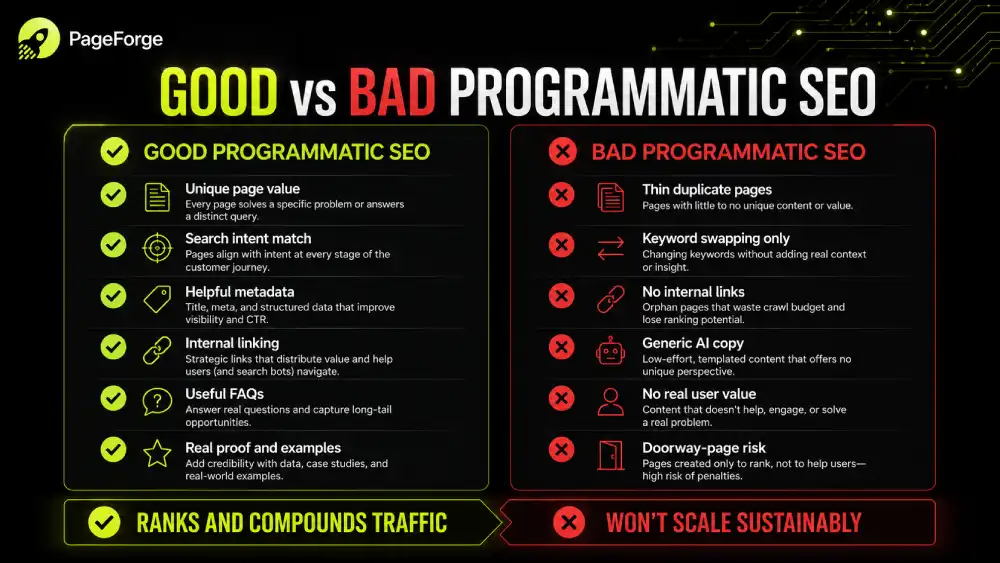
Before launching any programmatic SEO campaign, ask yourself:
- Would this page help a real visitor if they landed on it directly?
- Does this page contain information that changes meaningfully from the other pages?
- Does the page have a clear purpose beyond ranking for a keyword?
- Can Google crawl and understand this page clearly?
- Would we be comfortable sending paid traffic to this page?
If the answer is no, improve the template, improve the data, or reduce the number of pages.
How to Build a Programmatic SEO System in WordPress
WordPress is one of the best platforms for programmatic SEO because it already gives you pages, posts, custom post types, taxonomies, slugs, media, plugins, metadata, schema tools, and sitemap support. The challenge is not whether WordPress can publish pages. The challenge is how to publish them in a structured, controlled, SEO-safe way.
Step 1: Choose the Right Keyword Pattern
Start with a keyword pattern that has consistent intent. Do not chase random keywords. Look for a repeatable format where users expect the same type of answer, but the variables change.
Examples:
- {Service} in {City} for local SEO.
- {Product} for {Use Case} for ecommerce SEO.
- {Software} alternative for {Industry} for SaaS SEO.
- {Template} for {Profession} for template libraries.
- {Course} in {Location} for education directories.
Use the free PageForge Programmatic SEO Keyword Generator to brainstorm page patterns and modifiers.
Step 2: Build Your CSV Data Source
Your data source is the foundation of your campaign. Every row becomes a page. Every column becomes a dynamic token.
Example CSV structure:
| City | State | Service | Primary Benefit | Proof Point | CTA |
|---|---|---|---|---|---|
| Austin | Texas | WordPress SEO | Improve local search visibility | SEO setup for service-area businesses | Book a free SEO review |
| Miami | Florida | WooCommerce SEO | Get more product and category traffic | Technical SEO for ecommerce stores | Request a store audit |
In PageForge, CSV headers become dynamic tokens. That means a column called City can be used as {City} inside titles, slugs, content, metadata, schema fields, and supported builder layouts.
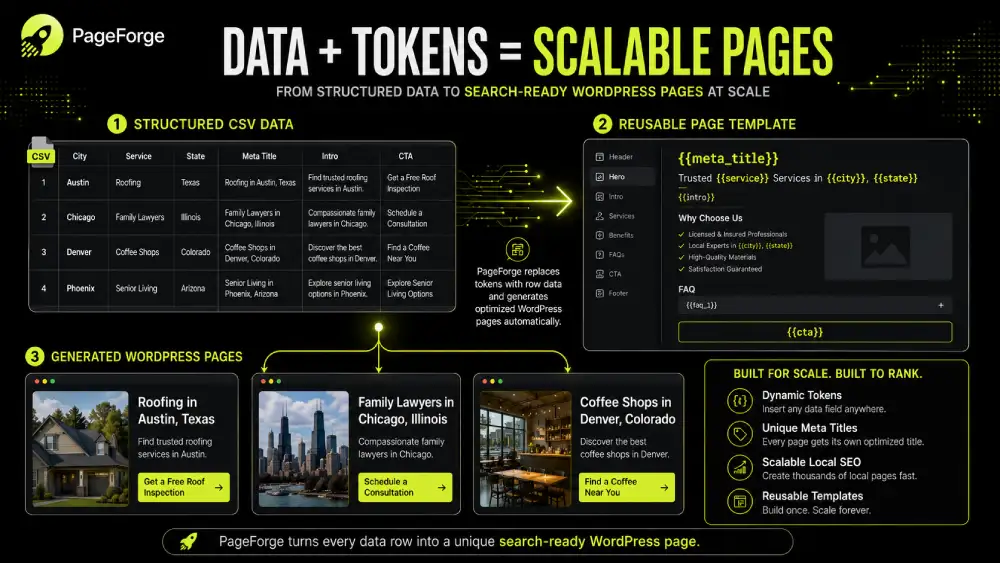
Step 3: Create One Strong WordPress Template
Your template should not be a thin shell. It should be a strong landing page framework that can support hundreds of high-quality variations.
A strong programmatic SEO template includes:
- Clear H1 with the main keyword pattern.
- Short answer section for featured snippets and AI summaries.
- Page-specific intro using dynamic data.
- Service, product, or category details.
- Comparison table or benefits table.
- Local, industry, or use-case proof.
- FAQs with real buyer questions.
- Internal links to related pages.
- Clear CTA above and below the fold.
- Schema markup where appropriate.
Step 4: Generate Pages in Controlled Batches
Do not publish 10,000 URLs on day one. Start with a smaller batch, validate quality, check indexation, review search impressions, and then scale.
With PageForge features, you can generate WordPress pages, posts, or custom post types using dynamic tokens and reusable templates. PageForge Free supports controlled CSV-based generation, while PageForge Pro is built for larger workflows such as Google Sheets sync, queues, scheduling, reporting, and AI article-per-page generation.
Step 5: Build Internal Link Hubs
Large page sets need discovery. If you generate hundreds of pages but hide them deep in your website, users and search crawlers may struggle to find them.
Use hub pages such as:
- Service-area directory pages.
- Location index pages.
- Industry solution hubs.
- Product use-case hubs.
- Comparison page hubs.
- Topic cluster pages.
PageForge includes a native sitemap block and shortcode that can help you display generated content in structured HTML hubs. This is useful for both visitors and crawlers.
Learn how to create hundreds of unique WordPress SEO pages.
How PageForge Helps You Scale Programmatic SEO in WordPress
Most bulk page tools stop at page creation. PageForge is built for the full WordPress programmatic SEO workflow: planning, generating, optimizing, connecting, and improving pages at scale.
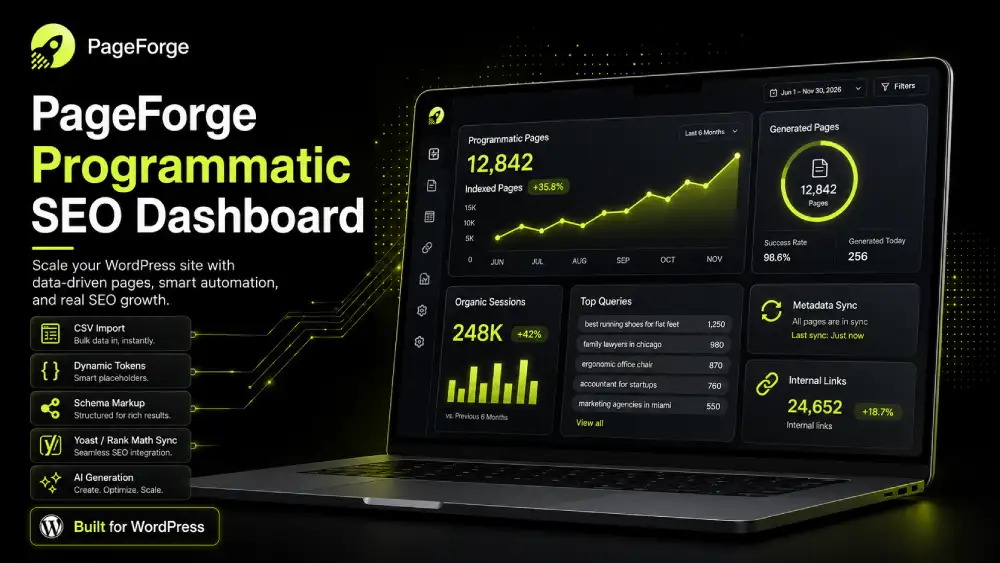
PageForge helps you:
- Import structured CSV data.
- Use any CSV column as a dynamic token.
- Create reusable templates for WordPress pages, posts, or custom post types.
- Generate clean page titles and URL slugs.
- Sync SEO titles and meta descriptions with Yoast SEO or Rank Math.
- Add schema markup to generated pages.
- Clone supported Gutenberg, Elementor, and Divi layouts.
- Prevent duplicate output by checking slugs.
- Create internal-link hubs with a sitemap block or shortcode.
- Use optional AI tools with OpenAI, Claude, Gemini, or DeepSeek API keys.
- Upgrade to Pro for larger automation workflows, Google Sheets sync, scheduling, queue processing, reports, and AI page content workflows.
PageForge Free vs PageForge Pro
| Workflow Need | PageForge Free | PageForge Pro |
|---|---|---|
| Test a pSEO campaign | Yes | Yes |
| Generate pages from CSV | Yes | Yes |
| Use dynamic tokens | Yes | Yes |
| Yoast / Rank Math metadata sync | Yes | Yes |
| Schema support | Yes | Yes |
| Google Sheets sync | Limited / manual workflow | Available in Pro workflows |
| Queue and scheduling | Best for controlled batches | Built for larger automation |
| AI article-per-page generation | Planning and blog support | Available in Pro workflows |
| Agency-scale campaigns | Starter validation | Recommended |
Compare PageForge pricing plans or download PageForge from WordPress.org.
How to Make Programmatic SEO Pages AEO and GEO Ready
Search is no longer only about ranking blue links. Users now discover brands through search snippets, AI Overviews, answer engines, AI assistants, and generative search experiences. That means your programmatic pages should be built for SEO, AEO, and GEO from the start.
For PageForge users, this means every generated page should be easy for humans, search engines, and AI systems to understand.
1. Add a Short Answer Near the Top
After the introduction, include a concise answer that directly explains the page topic. This helps users quickly understand the page and gives search systems a clear summary.
Example: “Programmatic SEO for WordPress is the process of using structured data, reusable templates, and dynamic fields to create search-focused WordPress pages at scale.”
2. Use Clear Entity-Based Headings
Headings should describe the topic clearly. Avoid vague headings like “Overview” or “More Info.” Use headings such as:
- “Best WordPress SEO Services in Austin”
- “Why Local Businesses in Austin Need WordPress SEO”
- “WordPress SEO Pricing for Austin Businesses”
- “FAQs About WordPress SEO in Austin”
3. Add Structured Data
Use JSON-LD schema where it fits the page type. Helpful schema types for programmatic SEO pages can include:
- Article
- FAQPage
- BreadcrumbList
- LocalBusiness
- Service
- Product
- SoftwareApplication
- CollectionPage
Use Google’s structured data documentation and validate your markup before publishing.
4. Add Real Proof
AI search systems and users both reward useful specificity. Add proof such as:
- Case studies.
- Original screenshots.
- Pricing examples.
- Customer reviews.
- Location photos.
- Comparison tables.
- Process screenshots.
- Before-and-after data.
5. Avoid Commodity Content
A page that says the same generic thing as every other page is unlikely to build durable visibility. Your template should make room for original information that changes by page, such as local context, product attributes, industry-specific pain points, or unique recommendations.
See PageForge’s live ranking workflow to understand how structured page systems can be planned and monitored.
Technical SEO Rules for Programmatic WordPress Pages
Technical SEO matters more when you scale. A small mistake in one template can multiply across hundreds of pages.
Before publishing, check:
- Slugs: Keep URLs clean, lowercase, readable, and unique.
- Canonicals: Make sure every indexable page points to the correct canonical URL.
- Meta titles: Use dynamic titles that are helpful and not overstuffed.
- Meta descriptions: Explain the specific page value and include a CTA.
- Index status: Publish only pages that deserve indexation.
- Internal links: Connect pages through hubs, breadcrumbs, related links, and sitemap blocks.
- Schema: Add only structured data that matches visible page content.
- Images: Use descriptive filenames, compressed WebP images, and useful alt text.
- Performance: Keep templates lightweight and mobile-friendly.
- Duplicate content: Avoid pages where only one word changes.
For large websites, Google recommends keeping sitemaps updated and monitoring index coverage. If your site grows into tens of thousands or millions of URLs, crawl budget and content quality become major strategic issues.
Useful external resources:
- Google: Creating helpful, reliable, people-first content
- Google: Spam policies for Google Search
- Google: Crawl budget management
- Google Search Console
Programmatic SEO Launch Checklist
Use this checklist before launching a PageForge campaign.
Strategy Checklist
- Choose one clear keyword pattern.
- Confirm the search intent is consistent across variations.
- Check the SERP for at least 10 keyword variations.
- Confirm your page format can compete with current ranking pages.
- Decide whether pages should be indexed, drafted, or reviewed first.
Data Checklist
- Create a clean CSV file.
- Use clear column names.
- Remove duplicate rows.
- Add page-specific proof, benefits, FAQs, CTAs, and internal-link fields.
- Validate locations, product names, prices, and service details.
Template Checklist
- Create one high-quality WordPress template.
- Add token placeholders in titles, content, slugs, and metadata.
- Include short-answer sections for AEO and AI search.
- Add tables, FAQs, CTAs, and related links.
- Add schema where appropriate.
Publishing Checklist
- Generate a small test batch first.
- Review generated pages manually.
- Check mobile layout and page speed.
- Validate schema.
- Submit important pages through Search Console.
- Monitor indexing, impressions, clicks, and conversions.

Common Programmatic SEO Mistakes
1. Creating Pages Before Validating Search Intent
Do not assume every keyword pattern deserves a page. Check the SERP first. If Google is rewarding detailed guides, tools, calculators, videos, or directories, your template must match that expectation.
2. Using Weak Data
If your CSV has only keyword, city, and title columns, your pages will probably feel thin. Add useful data fields that support real page-level value.
3. Publishing Too Many Pages Too Quickly
Launch in batches. Review quality. Watch indexation. Improve the template. Then scale.
4. Ignoring Internal Links
Programmatic SEO pages need internal discovery. Use hub pages, HTML sitemaps, category pages, related links, breadcrumbs, and contextual links.
5. Treating AI as a Replacement for Strategy
AI can help with planning, metadata, drafts, and page variation. But it should not replace search intent analysis, factual accuracy, brand voice, editorial review, or conversion strategy.
6. Forgetting Conversion
Traffic without a next step is wasted. Every page should guide the user toward a quote, signup, booking, download, product view, audit, or contact action.
Example: A PageForge Programmatic SEO Campaign
Imagine a WordPress agency wants to rank for local service pages across multiple cities.
Keyword pattern: WordPress SEO services in {City}
CSV columns:
- City
- State
- Service
- Primary Benefit
- Local Business Type
- Proof Point
- Starting Price
- CTA
- FAQ 1
- FAQ 2
- Related Service
Page title pattern: {Service} in {City}, {State}
Slug pattern: {service}-{city}-{state}
Meta title pattern: {Service} in {City}, {State} | WordPress SEO Experts
Meta description pattern: Get {Service} in {City}, {State} for {Local Business Type}. Improve rankings, fix SEO issues, and turn WordPress traffic into leads. {CTA}.
Template intro example:
Looking for {Service} in {City}, {State}? PageForge helps agencies and businesses build search-ready WordPress landing pages using structured data, dynamic templates, SEO metadata, schema, and internal links. If your goal is to rank across multiple locations without manually rebuilding every page, PageForge gives you a faster and more controlled workflow.
With PageForge, this campaign can be built as a structured WordPress page system instead of a manual copy-paste operation.
Learn more about Google Sheets to WordPress bulk page generation.
Start Building Programmatic SEO Pages in WordPress
Programmatic SEO is not about flooding Google with pages. It is about building a scalable content system that helps users find the exact page they need.
If your business has repeatable services, products, locations, industries, comparisons, templates, or use cases, PageForge can help you turn that structure into SEO-ready WordPress pages.
Use PageForge when you want to:
- Create local SEO pages faster.
- Generate service-area landing pages.
- Build directory or listing pages.
- Scale ecommerce collection and use-case pages.
- Create SaaS comparison and industry pages.
- Sync metadata with Yoast SEO or Rank Math.
- Add schema and internal-link hubs.
- Use AI to support planning, metadata, blogs, and larger workflows.
Download PageForge Free Upgrade to PageForge Pro
Want help planning your campaign? Use the Programmatic SEO ROI Calculator, run your site through the Free SEO Analyzer, or contact PageForge.
FAQs About Programmatic SEO for WordPress
What is programmatic SEO?
Programmatic SEO is a method of creating search-focused pages at scale using structured data, reusable templates, and dynamic variables. It helps websites target many related long-tail searches without manually building every page from scratch.
Is programmatic SEO safe for Google?
Programmatic SEO is safe when the pages are useful, original, crawlable, and built for users. It becomes risky when pages are thin, duplicated, automatically generated only for rankings, or created without meaningful page-specific value.
Can I do programmatic SEO in WordPress?
Yes. WordPress can support programmatic SEO using pages, posts, custom post types, CSV data, templates, metadata, schema, sitemaps, and internal links. PageForge makes this workflow easier by turning CSV rows and dynamic tokens into WordPress content.
What is the best WordPress plugin for programmatic SEO?
PageForge is built specifically for WordPress programmatic SEO and bulk page generation. It supports CSV imports, dynamic tokens, reusable templates, Yoast SEO and Rank Math metadata sync, schema, sitemap hubs, and optional AI tools.
How many programmatic SEO pages should I publish?
Start with a small, high-quality batch. Review indexation, impressions, clicks, rankings, and conversions before scaling. The right number depends on your data quality, site authority, crawl health, and ability to make each page useful.
Can AI write programmatic SEO pages?
AI can help with planning, metadata, content drafts, FAQs, and page variations. However, AI output should be reviewed for accuracy, originality, brand voice, compliance, and search intent before publishing.
What types of businesses should use programmatic SEO?
Programmatic SEO works well for local service businesses, directories, marketplaces, SaaS companies, ecommerce stores, franchises, real estate websites, affiliate sites, agencies, and any business with repeatable search patterns and structured data.
How does PageForge help with internal linking?
PageForge includes a sitemap block and shortcode that can display generated pages in structured HTML hubs. This helps visitors and search crawlers discover your page sets more easily.
Does PageForge work with Yoast SEO and Rank Math?
Yes. PageForge supports dynamic SEO metadata workflows and can sync supported SEO titles and descriptions with Yoast SEO and Rank Math fields.
What is the difference between programmatic SEO and normal SEO?
Normal SEO usually creates pages one by one. Programmatic SEO uses repeatable templates and structured data to create many related pages faster. The quality requirement is the same: every page must satisfy real user intent.