Creating ten WordPress pages manually is manageable. Creating hundreds of structured landing pages for different services, locations, products, industries, or customer segments is an entirely different challenge.
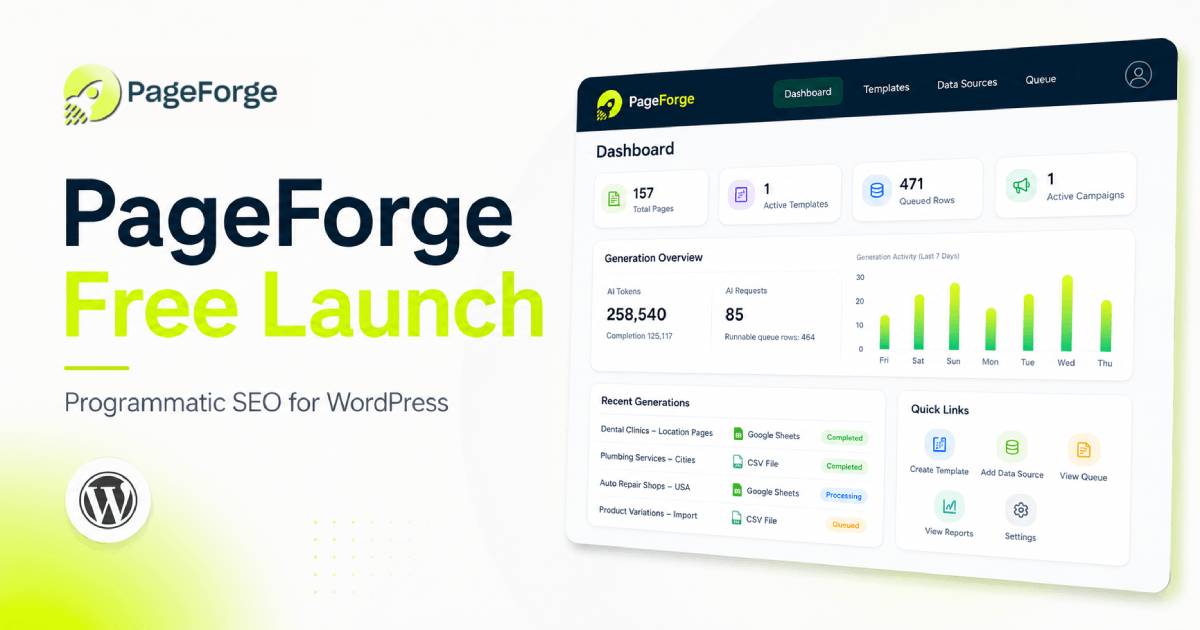
PageForge has launched a free WordPress plugin designed to make that process more structured and manageable.
PageForge is a programmatic SEO and bulk page generation plugin that transforms structured CSV data into WordPress pages, posts, or custom post types. Users can create one reusable template, connect dynamic data fields, and generate targeted content without manually duplicating and editing every page.
The free plugin is available through the official WordPress.org Plugin Directory.
Why PageForge was created
Many WordPress SEO workflows still depend on building and optimizing pages individually.
That approach works well for a small website, but it becomes inefficient when a campaign requires:
- A page for every service and city combination
- Individual pages for hundreds of directory listings
- Product and location landing pages
- Industry-specific service pages
- Real estate neighborhood pages
- Franchise or branch location pages
- SaaS comparison and use-case pages
- Long-tail keyword landing pages
Website owners often respond to this challenge by copying an existing page, replacing a few words, and publishing the duplicate.
That process is slow, difficult to maintain, and prone to mistakes. Teams can accidentally create duplicate URLs, leave incorrect location names inside content, forget to update metadata, or publish pages with inconsistent layouts.
PageForge was developed to replace this repetitive process with a structured WordPress workflow.
Instead of creating every page independently, users organize their information inside a CSV file and use its columns as dynamic content tokens.
What is programmatic SEO?
Programmatic SEO is a structured approach to creating search-focused pages from reusable templates and organized data.
For example, a plumbing company serving 50 cities could create a CSV containing columns such as:
- Service
- City
- State
- Phone
- Description
- Opening hours
A reusable page title could then be written as:
{Service} in {City}, {State}
When PageForge processes each CSV row, it replaces the tokens with the corresponding information.
This could produce pages such as:
- Emergency Plumbing in Austin, Texas
- Drain Cleaning in Dallas, Texas
- Water Heater Repair in Houston, Texas
- Commercial Plumbing in San Antonio, Texas
The same token system can be used throughout the page title, URL, headings, body content, excerpts, SEO metadata, schema fields, and supported page-builder content.
Programmatic SEO is not limited to local businesses. The same workflow can support directories, ecommerce websites, real estate platforms, affiliate projects, SaaS websites, marketplaces, and other sites containing repeatable data patterns.
How the PageForge workflow works
A standard PageForge campaign follows four main steps.
1. Prepare the campaign data
The user begins with a CSV file containing one row for every page they intend to create.
Each column represents a reusable variable. Users are not limited to predefined fields and can turn their own CSV headers into dynamic tokens.
A campaign could include columns such as:
- City
- Service
- State
- Product
- Industry
- Price
- Phone
- Description
- Call to action
This gives website owners control over the information used on every generated page.
2. Create a reusable WordPress template
The next step is to create the layout and content structure that the generated pages will follow.
The template can contain ordinary WordPress content together with dynamic tokens.
For example:
Looking for reliable {Service} in {City}? Our team provides professional {Service} solutions for homes and businesses across {City}, {State}.
The static content maintains a consistent structure while the dynamic fields change according to each CSV row.
PageForge supports standard WordPress content and compatible layouts created with Gutenberg, Elementor, Divi, reusable blocks, and available WordPress templates.
3. Configure titles, URLs, and metadata
Users can define patterns for generated page titles and URL slugs.
A title pattern might be:
Affordable {Service} in {City}
A slug pattern might be:
{service}-{city}
PageForge can also replace tokens inside supported SEO titles and meta descriptions. Metadata can be synchronized with Yoast SEO and Rank Math fields.
This keeps page content, URLs, and SEO metadata connected to the same underlying campaign data.
4. Review and generate the pages
Before generation, users can choose how the new WordPress content should be stored.
Supported post statuses include:
- Published
- Draft
- Pending review
- Private
Using Draft or Pending Review allows teams to check content quality before making a large set of pages publicly available.
PageForge Free can process up to 100 pages in one generation run. Users can create additional controlled batches in later runs when they are ready to expand the campaign.
What PageForge Free includes
The free release is intended to provide a functional programmatic SEO workflow rather than a restricted demonstration.
CSV-powered page generation
Users can upload structured CSV files and generate WordPress Pages, Posts, or PageForge custom post types.
Each CSV row represents a new content item, while each column can be used as a token.
Flexible dynamic tokens
PageForge does not restrict users to a fixed collection of placeholders.
Any properly formatted CSV header can become a dynamic token and can be used across:
- Page titles
- URL slugs
- Headings
- Body content
- Excerpts
- SEO titles
- Meta descriptions
- Supported builder content
- Schema fields
This means the plugin can be adapted to different industries and data structures.
Up to 100 pages per run
PageForge Free can generate up to 100 pages in a single controlled run.
The limit is applied per generation run rather than as a lifetime page allowance, allowing users to review one batch before preparing the next.
Multiple WordPress content types
Generated content can be stored as standard WordPress Pages, Posts, or supported custom post types.
This makes the plugin suitable for more than conventional service landing pages. It can also support blog structures, directory projects, listing websites, and custom WordPress applications.
Post-status control
Users can choose whether generated content should be published immediately or stored for review.
For most new campaigns, generating pages as drafts provides an opportunity to check data, formatting, links, content quality, and search intent before publication.
Duplicate-slug protection
Large campaigns can accidentally produce repeated URL patterns when source data contains duplicate rows or similar values.
PageForge can detect existing slugs and skip duplicates, helping users avoid conflicting WordPress URLs.
Builder-compatible template generation
PageForge can work with standard WordPress content and supported layouts from Gutenberg, Elementor, and Divi.
It can preserve supported builder metadata while replacing tokens inside generated output. This allows users to maintain a consistent visual design without rebuilding every landing page.
Yoast SEO and Rank Math synchronization
Users can create dynamic SEO title and meta-description patterns and synchronize the generated values with supported Yoast SEO and Rank Math fields.
For example:
SEO title:
{Service} in {City} | {Business Name}
Meta description:
Need {Service} in {City}? Contact {Business Name} for professional assistance, transparent pricing, and local support.
Every generated page can receive metadata based on its corresponding data row.
Schema support
PageForge can add structured schema output to generated content.
Schema should still be reviewed to ensure that the selected type and information accurately represent the page, business, product, service, or organization.
Native sitemap block and shortcode
Publishing hundreds of pages is only one part of a programmatic SEO campaign. Visitors and search crawlers also need a practical way to discover and navigate the content.
PageForge includes a native Gutenberg sitemap block and a [pageforge_sitemap] shortcode.
These tools can be used to create:
- Location directories
- Service hubs
- Campaign indexes
- City and state collections
- Browsable lists of generated pages
- Internal navigation sections
Users can organize generated content by relevant fields and display links in a structured format.
Optional AI tools in the free plugin
PageForge also includes optional AI-assisted tools that can be used with the website owner’s own supported API key.
The free version supports OpenAI and DeepSeek providers for selected AI workflows.
AI Site Planner
The AI Site Planner helps users develop an initial campaign structure before preparing their CSV.
It can assist with:
- Keyword patterns
- Page-type ideas
- Topic clusters
- Campaign architecture
- Supporting content concepts
- Potential data columns
The generated plan should be treated as a starting point and validated using actual keyword research, competitor analysis, and customer data.
AI Meta Generator
The AI Meta Generator can draft SEO title and meta-description ideas for pages or campaign patterns.
Users remain responsible for checking character length, accuracy, search intent, and compliance before publishing the generated metadata.
AI Blog Generator
The free AI Blog Generator includes Short, Medium, and Long draft presets, with the Long setting supporting drafts of up to 1,000 words.
These drafts can be used to create supporting articles around the main programmatic page collection.
AI-generated content should always be reviewed for factual accuracy, originality, brand consistency, legal compliance, and usefulness before publication.
The free bulk-page generator remains template-driven. It does not automatically create a completely different long-form AI article for every generated landing page. Article-per-page AI automation is available through supported PageForge Pro workflows.
What can users build with PageForge?
Because PageForge works with custom data columns, it can support many different WordPress publishing models.
Local businesses
Local companies can create service-area landing pages such as:
- Electrician in {City}
- Dentist near {Area}
- Roofing company in {Location}
- Web design services in {City}
- Legal services in {State}
Each page can include relevant business details, services, contact information, operating areas, FAQs, and calls to action.
Digital agencies
Agencies can use reusable templates to produce consistent client campaigns without manually duplicating every landing page.
Generating content as drafts also allows strategists, writers, designers, and clients to review pages before publication.
Directory websites
Directory owners can convert structured listing data into individual WordPress pages.
Possible examples include:
- Business directories
- Agency directories
- Property directories
- Healthcare provider listings
- Restaurant directories
- Professional service directories
Each CSV row can provide the information for one listing page.
Ecommerce websites
Ecommerce teams can build supporting landing pages around combinations such as:
- Product and location
- Category and use case
- Brand and audience
- Product type and industry
- Collection and customer segment
PageForge does not replace WooCommerce product management, but it can support content-led landing page strategies around ecommerce data.
SaaS companies
Software businesses can create structured pages targeting different industries, roles, audiences, integrations, and use cases.
Examples include:
- {Software} for {Industry}
- {Platform} for {Role}
- {Tool} for {Use Case}
- {Competitor} alternative for {Audience}
Real estate businesses
Real estate teams can use structured property or location data to create:
- Neighborhood guides
- City pages
- Property-type pages
- Agent profile pages
- Development pages
- Location-specific service pages
Scaling pages without creating spam
Programmatic SEO should not be treated as a shortcut for publishing hundreds of low-value pages.
Generating pages efficiently does not remove the need for editorial judgment.
Each published page should serve a legitimate and identifiable user need. Changing only a city name while leaving every other sentence identical will rarely provide a strong experience.
A responsible PageForge campaign should include:
- Accurate source data
- A clear search intent for each page
- Useful location, service, product, or industry information
- Meaningful differences between related pages
- Correct titles and URLs
- Relevant internal links
- Appropriate calls to action
- Human review before publication
- Regular checks for outdated information
- Indexing controls for pages that should not appear in search
The objective is not to publish the highest possible number of pages. The objective is to build the appropriate number of useful pages for a structured search opportunity.
PageForge provides the generation workflow, but website owners remain responsible for the strategy, content quality, and information they publish.
PageForge Free and PageForge Pro
PageForge Free is designed for website owners who want to build, test, and validate a programmatic SEO campaign.
It provides the core CSV workflow, reusable templates, flexible tokens, controlled generation batches, SEO metadata support, sitemap tools, builder compatibility, and optional AI planning tools.
PageForge Pro is intended for agencies, growth teams, and larger websites that require deeper automation.
Depending on the active plan and version, Pro capabilities can include:
- Larger or unlimited page-generation workflows
- Google Sheets synchronization
- Queue processing
- Scheduled generation
- Drip publishing
- AI content generation for individual pages
- Bulk AI metadata optimization
- AI SEO and keyword reports
- Expanded content-planning workflows
- Data and template update workflows
- Multi-site and agency campaign management
Users can begin with the free WordPress.org release and upgrade only when their campaign requires additional automation.
Getting started with PageForge
PageForge can be installed directly from the WordPress dashboard.
- Open the WordPress administration area.
- Navigate to Plugins → Add New Plugin.
- Search for PageForge.
- Locate PageForge – AI Programmatic SEO, Bulk Page Generator & Local SEO.
- Select Install Now.
- Activate the plugin.
- Prepare a structured CSV file.
- Build a reusable template using CSV tokens.
- Configure the title, slug, metadata, and publishing status.
- Generate an initial draft batch and review the results.
Starting with a small test batch is recommended. This makes it easier to identify formatting issues, incorrect source data, missing tokens, or URL conflicts before expanding the campaign.
Available through WordPress.org
PageForge is now available as a free download through the official WordPress.org Plugin Directory.
Download PageForge Free:
https://wordpress.org/plugins/pageforge/
Learn more about PageForge:
https://pageforge.pro/
View documentation:
https://pageforge.pro/knowledgebase/
Watch the PageForge tutorial:
https://www.youtube.com/watch?v=tkESUzJPaLg
The free release provides WordPress users with a practical way to test programmatic SEO, create structured page collections, and reduce repetitive page-building work while retaining control of their content inside WordPress.
About PageForge
PageForge is an AI-assisted programmatic SEO and bulk page generation plugin developed for WordPress.
It helps website owners, agencies, SEO professionals, local businesses, ecommerce teams, directories, and SaaS companies transform structured data into targeted WordPress content using reusable templates and dynamic tokens.
PageForge is developed and marketed by Codefreex.