


What Is the Best SEO Plugin for WordPress in 2026?
A rigorous comparison of PageForge, Yoast SEO, Rank Math, All in One SEO, SEOPress and the leading free, lightweight and AI SEO plugins—plus a practical framework for choosing the right stack for one site or one thousand landing pages.
Executive decision
The best WordPress SEO plugin is the one aligned with your operating model
Our 2026 verdict
Choose PageForge when your growth problem is scale: hundreds of location pages, service pages, comparison pages, ecommerce landing pages, directories or repeatable long-tail pages built from structured data. Choose Yoast when your team primarily needs familiar editorial guidance. Choose Rank Math when you want a broad, modular technical SEO suite. Choose AIOSEO when you want an all-in-one business-oriented toolkit. Choose SEOPress for privacy-first agency workflows, and consider The SEO Framework, Slim SEO or SureRank when low configuration and a lightweight footprint are the priority.
The important distinction is that PageForge is not merely another field box for editing one title and one meta description. It is a programmatic SEO production layer. It turns CSV rows and reusable templates into real WordPress pages, posts or custom post types, while supporting dynamic titles, slugs, metadata, schema, builder layouts and internal discovery. For many websites, the strongest stack is PageForge plus one primary technical SEO plugin—not two competing all-in-one plugins.
Selection is based on public feature documentation and WordPress.org listings reviewed in July 2026. Features, plan limits and prices can change; verify the current official listing before purchase.
Foundations
What is the role of an SEO plugin in WordPress?
An SEO plugin is an operational control layer between WordPress content and the signals that search engines, social platforms and AI answer engines read. WordPress already provides a capable publishing foundation, but most organisations need consistent tools for editing metadata, controlling indexation, exposing sitemaps, adding structured data and preventing technical mistakes. The plugin does not “do SEO” by itself; it makes important SEO tasks repeatable, visible and governable.
Traditional WordPress SEO plugins focus on individual URLs. They help an editor optimise a page title, write a meta description, set a canonical URL, select an index or noindex directive, preview a search snippet, add schema and receive content recommendations. More advanced suites add redirections, 404 monitoring, local business data, WooCommerce markup, internal-link suggestions, rank tracking, site audits and AI-assisted writing.
PageForge addresses a different bottleneck. Instead of asking, “How do I optimise this page?”, it asks, “How do I create and manage an entire family of useful pages without rebuilding the same layout and metadata hundreds of times?” That changes the unit of work from one document to a structured campaign.
Technical control
Titles, descriptions, canonicals, robots directives, XML sitemaps, schema, breadcrumbs and social metadata.
Editorial guidance
Focus-keyphrase checks, readability, internal links, SERP previews, image suggestions and content workflows.
Production scale
Data sources, templates, tokens, bulk generation, queues, scheduling and repeatable quality assurance.
An SEO plugin cannot guarantee rankings. It can improve implementation quality and reduce repetitive work, but rankings still depend on search intent, usefulness, originality, authority, links, crawlability, competition, user experience and continuous improvement.
Platform question
Is WordPress good for SEO?
Yes—WordPress is very good for SEO when it is configured and maintained properly. It gives publishers clean content objects, editable URLs, taxonomies, media handling, theme templates, an extensible API and a mature plugin ecosystem. It also makes it possible for non-developers to publish, update and interlink content quickly, which matters because search growth is an ongoing operating process rather than a one-time development task.
WordPress is not automatically optimised simply because it is WordPress. A slow theme, weak hosting, duplicate archive pages, uncompressed images, poor internal architecture, unnecessary plugins, broken canonicals or low-value content can suppress performance. The platform gives you leverage; your stack and governance determine whether that leverage creates growth or technical debt.
WordPress SEO without plugins
It is technically possible to manage WordPress SEO without a plugin. A developer can add title handling, meta descriptions, Open Graph tags, JSON-LD, canonical URLs, robots directives, redirects and sitemap customisations in a theme or custom plugin. WordPress core also includes a basic XML sitemap. The trade-off is maintainability: every requirement must be coded, tested, documented and preserved through theme changes.
For most commercial sites, one reputable SEO plugin is safer and more economical than a patchwork of theme snippets. The exception is a tightly controlled engineering environment where the team deliberately owns all SEO output. Even then, a specialised tool such as PageForge can still be useful for campaign generation while custom code owns the technical layer.
Do I need an SEO plugin for WordPress?
You do not need one in the strictest technical sense, but most teams benefit from one. A plugin creates a standard interface for editors, reduces dependency on developers, provides migration tooling and keeps routine settings in one place. The correct policy is usually: run one primary technical SEO plugin, add specialised tools only when responsibilities do not overlap, and verify the final HTML output rather than trusting dashboard scores alone.
PageForge overview
What is PageForge?
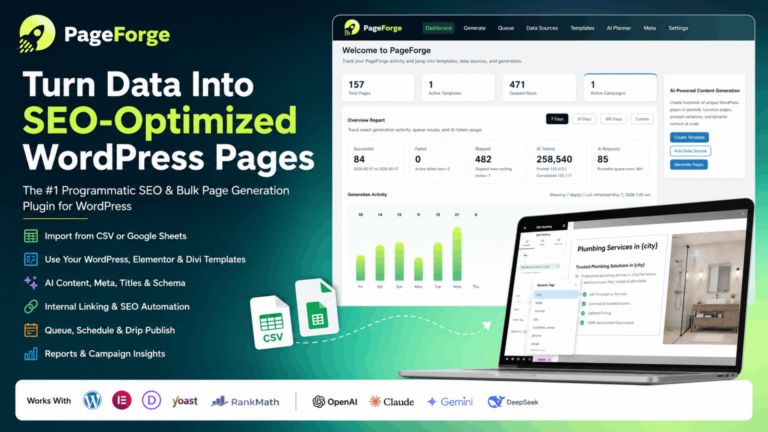
PageForge is an AI-powered programmatic SEO and bulk page generator built for WordPress. It combines structured CSV data with a reusable template so one campaign can produce real WordPress pages, posts or custom post types with dynamic content, URL patterns, excerpts, metadata, schema settings and supported builder layouts. Any CSV header can become a token, allowing the campaign model to reflect the business rather than forcing the business into a fixed set of fields.
A local service company might use columns such as Service, City, State, Phone, Price, Proof and CTA. A SaaS company might use Industry, TeamSize, Integration, PainPoint and Alternative. An ecommerce business could use Product, Brand, UseCase, Material and Location. PageForge maps those data points into the page system.
The free plugin can process up to 100 pages in one generation run and supports additional controlled runs. It can create pages, posts and the PageForge custom post type; select Publish, Private, Draft or Pending Review; clone supported Gutenberg, Elementor and Divi layouts; sync supported metadata with Yoast SEO or Rank Math; add schema output; skip duplicate slugs; and create internal-discovery hubs through a native Sitemap block or shortcode.

Where PageForge fits in the SEO stack
PageForge is strongest before and during publication. It is the system that plans, assembles and creates repeatable pages. Yoast, Rank Math or another technical plugin can continue to own site-wide metadata rules, canonicals, sitemaps or content scoring. Google Search Console, analytics and a crawler then measure the result. This separation prevents a common mistake: expecting one plugin to be a page generator, editorial assistant, technical framework, rank tracker and enterprise crawler at the same time.
Traditional SEO plugin
Optimises existing URLs one at a time and manages site-wide technical output.
- Meta fields and previews
- Canonical and robots controls
- Schema and XML sitemaps
- Content analysis
- Redirects and audits
PageForge
Creates and manages repeatable URL families from structured data and templates.
- CSV-to-page generation
- Dynamic tokens
- Builder layout cloning
- Bulk metadata and schema
- Queues, scheduling and reports in Pro
Visual system
PageForge logo colour combination and brand direction
The PageForge icon uses a high-contrast combination designed to communicate speed, technology and growth: a deep teal field, a neon-lime rocket and white typography. An analysis of the current 256×256 WordPress.org icon identifies the dominant background near #16404B, the primary lime near #E2FE62, white near #FCFCFC and a near-black shadow tone near #091B20. Softer lime and muted teal variants appear through anti-aliasing and highlights.
This article applies the same system. Deep teal provides authority and contrast, lime creates a memorable conversion accent, and generous white space keeps a long technical guide readable. The palette is distinctive enough to stand apart from Yoast purple, Rank Math blue, AIOSEO blue and SEOPress red, while still feeling credible in a B2B software context.
Recommended brand usage
- Use deep teal for large backgrounds, navigation and technical diagrams.
- Reserve neon lime for primary CTAs, highlights and progress indicators.
- Use white or soft mist backgrounds for long-form reading sections.
- Use deep ink for body copy rather than pure black.
- Keep lime text off white backgrounds unless contrast is verified.
- Pair the rocket motif with scale, launch, velocity and automation messages.
Product evolution
PageForge advancements through version 1.1.8
The public changelog shows a rapid shift from a basic CSV generator into a broader WordPress programmatic SEO system. Early releases established tokens and AI-assisted generation. Subsequent updates added builder-aware cloning, configurable post statuses, a native sitemap block, broader AI providers, improved schema output, security hardening and localisation.
1.0.8 — Native internal-discovery layer
PageForge added a Gutenberg Sitemap block and shortcode parity with grouping, columns, counts and styling controls. This matters because generated pages need discoverable hubs, not orphaned URLs.
1.0.9 — Better builder and publishing control
The release added template-level post status choices and improved Elementor cloning, including layout data copying and asset regeneration. Base layouts expanded to Elementor templates, Divi layouts, reusable blocks and WordPress templates where available.
1.1.0–1.1.1 — Stronger free plan
Free AI provider selection expanded, blog length presets reached up to 1,000 words, and the free CSV generator limit was formalised at 100 pages per run.
1.1.4–1.1.6 — Security, AI and schema
Security hardening was followed by an AI Blog navigation item, more model choices across OpenAI, Claude, Gemini and DeepSeek, expanded schema business types and improved front-end JSON-LD output.
1.1.8 — Internationalisation
Bundled German and French translations were added alongside English and Portuguese language files, plus improved text-domain loading and localisation of previously hard-coded interface strings.
Strategic direction: the product is moving from “bulk page creator” toward an operating system for structured WordPress search campaigns: planning, generation, metadata, schema, internal discovery, AI assistance, scheduling and reporting.
Feature deep dive
PageForge features: from CSV data to SEO-ready WordPress pages
1. Structured CSV data sources
The free workflow begins with a CSV file uploaded inside WordPress. Every row represents one output item; every header becomes a potential token. This approach is transparent and portable. The campaign can be reviewed in a spreadsheet, validated by a team member and archived as a source of truth. It also makes large edits safer because mistakes can be caught before they reach hundreds of pages.
2. Unlimited token vocabulary
PageForge is not limited to predefined fields such as city and service. Any valid CSV header can become a token in supported template fields. Tokens can appear in page titles, slugs, body content, excerpts, supported SEO metadata and builder content. This data-agnostic design supports local SEO, directories, products, real estate, affiliate comparisons, SaaS use cases, events, courses and other repeatable content models.
3. Dynamic titles, slugs and content
A template could use {Service} in {City}, {State} as the title and {service}-{city}-{state} as the slug pattern. PageForge replaces each token with the corresponding row value. The same method works inside headings, proof points, price tables, calls to action and supporting copy. The result is a coherent page family with predictable information architecture.
4. Real WordPress content objects
Generated items are stored as standard WordPress content entries. They can be edited, reviewed, published, scheduled or deleted through wp-admin. PageForge supports Pages, Posts and a custom PageForge post type, giving teams flexibility over where campaign content lives and how it appears in archives or site navigation.
5. Builder layout cloning
PageForge can reuse supported Gutenberg, Elementor and Divi layouts, reusable blocks and WordPress templates. The core benefit is brand consistency: design one conversion-ready layout, test it carefully, then populate it with row-specific values. Because page builders store data differently, the responsible workflow is to generate three to five drafts first, inspect desktop and mobile output, and only then run a larger batch.

6. SEO metadata integration
Dynamic title and meta-description patterns can be synced to supported Yoast SEO and Rank Math fields. This is strategically useful because organisations do not need to abandon an established technical SEO plugin to add programmatic production. PageForge creates the campaign and passes metadata into the field structure already used by the site.
7. Schema output
PageForge can add structured-data output based on template and schema settings. Schema should always describe visible page content accurately. A LocalBusiness schema should not be stamped across pages that do not represent real business locations; Review schema should not be generated without eligible, visible review content; and FAQ schema should match questions and answers users can see. Validation is part of publishing, not an optional afterthought.
8. Duplicate-slug protection
Repeated runs can accidentally create conflicting URLs. PageForge checks intended slugs and can skip duplicates, reducing one of the most common operational risks in bulk publishing. Teams should still maintain a campaign registry containing source file, template version, publication date, post type and URL pattern.
9. Internal-link hubs
The native Sitemap block and [pageforge_sitemap] shortcode display structured collections of generated pages. Hub pages can group locations, services, industries or categories, helping users browse the page set and helping crawlers discover URLs through ordinary HTML links. A generated XML sitemap alone is not a substitute for navigable site architecture.
10. Optional AI assistance
The free plugin supports OpenAI, Claude, Gemini and DeepSeek through the user’s own API key. AI tools include a Site Planner, Meta Generator and Blog Generator. The core CSV workflow does not require AI, and external requests only occur when an authorised user configures a provider and invokes an AI action. Free bulk pages remain template-driven; article-per-page automation is positioned as a Pro workflow.
11. Privacy-aware architecture
According to the public listing, normal free CSV generation does not send data to PageForge or Codefreex servers. External requests are made only to explicitly configured services such as an AI provider, Pexels or the user’s own Google Analytics property. Organisations handling confidential or regulated data should still review provider terms, prompt payloads, retention settings and regional requirements before connecting a service.
12. Pro automation
Depending on the active plan and version, PageForge Pro workflows can include unlimited generation, live Google Sheets sync, queue processing, scheduled generation, drip publishing, per-page AI content, bulk AI metadata, campaign reports, larger content presets and source-data update workflows. These features become important when the campaign changes from a one-time build into an ongoing content operation.
Operating model
How PageForge works: a safe end-to-end workflow
Define the page pattern and search intent
Start with a clear user need, not a keyword list. Decide why each generated page deserves to exist and what information must be genuinely specific to that location, product, category or audience.
Build and validate the data source
Create a CSV with stable headers, one row per intended URL and no hidden duplicates. Add proof, practical details, constraints and calls to action—not only the city and service name.
Create one high-quality base layout
Build the page in Gutenberg, Elementor, Divi or a supported WordPress template. Make it responsive, accessible and conversion-focused before cloning it.
Configure tokens, URL patterns and metadata
Map tokens into the visible page and its title, slug, excerpt, SEO title, meta description and schema. Keep slugs short and predictable.
Generate a small draft batch
Use three to five representative rows: a normal case, a long value, a missing optional value, a special character and a potentially duplicate slug.
Run editorial and technical QA
Check every token, title hierarchy, links, mobile layout, forms, schema, canonical, indexation, image alt text and factual claim.
Build hub pages and internal links
Connect generated pages to category, location or service hubs and link back to relevant parent resources. Avoid orphaned URLs.
Publish in controlled batches
Use draft review, queues or drip publishing according to the size and risk of the campaign. Publishing speed should follow quality-control capacity.
Measure and improve
Track indexing, impressions, clicks, conversions, engagement and crawl behaviour. Consolidate or noindex pages that do not justify their place in the site architecture.
Plan selection
PageForge Free vs PageForge Pro
| Capability | PageForge Free | PageForge Pro | Decision signal |
|---|---|---|---|
| Data source | CSV uploaded in WordPress | CSV plus live Google Sheets workflows | Choose Pro when source data changes continuously. |
| Generation capacity | Up to 100 pages per run; additional controlled runs | Designed for larger or unlimited generation, plan-dependent | Free validates the model; Pro removes repetitive batch management. |
| Templates and tokens | Reusable templates and any CSV header as a token | Same foundation with deeper update and automation workflows | Both support structured campaign design. |
| Builders | Supported Gutenberg, Elementor, Divi, reusable blocks and templates | Same plus larger operational workflows | Test compatibility with the exact builder version. |
| AI tools | Site Planner, Meta Generator and Blog Generator with own API key | Per-page AI content, bulk metadata and larger content workflows | Pro is appropriate when AI must operate row by row. |
| Scheduling | Manual controlled generation and normal WordPress statuses | Queues, scheduled generation and drip publishing | Pro reduces timeout risk and operational load on large campaigns. |
| Reporting | Core dashboard and campaign tools | Deeper SEO, keyword, site and content-planning reports | Pro supports teams managing ongoing portfolios. |
| Best for | First campaign, proof of concept, small site, controlled batches | Agencies, multi-location brands, directories and growth teams | Upgrade when process overhead exceeds licence cost. |
Free is not merely a demo. A 100-page run is enough to validate a local campaign, a comparison-page system or a category expansion. Pro becomes compelling when the business needs live data, scheduled operations, unique AI content per page, repeatable updates, larger client portfolios or fewer manual hand-offs.
Market comparison
WordPress SEO plugin comparison for 2026
The table below compares the primary operating purpose of each plugin. It does not treat install count as a quality score and does not assume that the plugin with the longest feature list is automatically the best choice. The best stack minimises overlap while covering the site’s actual risks and workflows.
| Plugin | Primary strength | Free option | AI / automation | Programmatic pages | Best fit |
|---|---|---|---|---|---|
| PageForge Best for scale | CSV-driven bulk generation, dynamic tokens, builder reuse and campaign automation | Yes; up to 100 pages per run | OpenAI, Claude, Gemini and DeepSeek tools; deeper Pro workflows | Native core capability | Agencies, local SEO, directories, ecommerce and landing-page systems |
| Yoast SEO | Editorial feedback, metadata, schema and familiar workflow | Yes | Built-in AI positioned in premium features | No native structured bulk page engine | Publishers and teams wanting guided on-page optimisation |
| Rank Math | Broad modular technical suite, schema and Content AI ecosystem | Yes | Content AI and AI visibility features | No PageForge-style CSV generation core | Users wanting many SEO controls in one modular plugin |
| All in One SEO | Business-focused all-in-one SEO, local, schema, links, audits and WooCommerce | Yes | AI content and metadata tooling in current product | No specialised data-to-page engine | Businesses and agencies wanting a comprehensive suite |
| SEOPress | Privacy-first, white-label, page-builder support and agency value | Yes | Multiple AI providers and AI-search features | No dedicated structured page generator | Agencies, developers and privacy-conscious sites |
| The SEO Framework | Automated, ad-free, white-label technical SEO | Yes | Automation-first rather than content-generation-first | No | Developers and lean sites that dislike dashboard noise |
| Slim SEO | Automatic configuration with minimal setup | Yes | Rules-based automation; Pro adds writing/link tools | No | Small sites and users who prefer zero-config SEO |
| SureRank | Beginner-friendly, lightweight guidance and visual controls | Yes | Smart assistance and Pro research features | No | New WordPress users and straightforward business sites |
| Squirrly SEO | SEO, AEO and GEO guidance for AI search visibility | Yes / plan-dependent features | Strong AI-search positioning | No PageForge-style CSV engine | Marketers prioritising guided optimisation and AI visibility |
| Ahrefs SEO | Content auditing companion connected to Ahrefs data | Plugin available; account/data requirements vary | Audit and data assistance | No | Ahrefs users who want content-audit context in WordPress |
The key architectural difference
Yoast, Rank Math, AIOSEO, SEOPress and similar tools primarily optimise and govern URLs that already exist. PageForge creates the repeatable URL family itself. This is why PageForge can complement one of those plugins. By contrast, installing Yoast and Rank Math together is usually a bad idea because both may output competing titles, canonicals, schema and sitemaps.
Competitor analysis
Yoast SEO plugin for WordPress: who should use it?
Yoast SEO remains the most widely installed dedicated WordPress SEO plugin, with WordPress.org listing more than ten million active installations at the time of research. Its core appeal is familiarity. Editors recognise the traffic-light style feedback, snippet controls and readability checks; agencies can hand a site to a client with a workflow many content teams have already encountered.
The free plugin covers essential on-page and technical needs, while premium products add broader AI and support features. Yoast is particularly effective when the main bottleneck is editorial consistency across a blog, publication or marketing team. It helps writers consider titles, descriptions, internal links and readability while the plugin handles foundational metadata and schema output.
Yoast SEO strengths
- Large user base, extensive documentation and mature migration ecosystem.
- Clear in-editor feedback for writers and non-technical stakeholders.
- Solid metadata, schema and sitemap foundations.
- Broad compatibility across the WordPress ecosystem.
- Premium options for teams wanting integrated AI and support.
Where PageForge is different
Yoast helps optimise a page; PageForge helps manufacture and manage a structured set of pages. PageForge can sync supported dynamic title and description values into Yoast fields, allowing Yoast to remain the primary technical plugin while PageForge handles scale. This is often a cleaner architecture than replacing a familiar SEO layer simply to gain programmatic generation.
Yoast SEO plugin WordPress free download
Download Yoast only from the official WordPress.org plugin directory or the vendor’s official website. Avoid third-party “premium free download” or nulled-plugin websites. Unofficial packages can contain modified code, malware, hidden links or disabled update mechanisms. The same rule applies to PageForge, Rank Math, AIOSEO and every commercial WordPress plugin.
Competitor analysis
Rank Math SEO plugin for WordPress: broad features with modular control
Rank Math has grown into one of the largest WordPress SEO plugins, with WordPress.org listing more than four million active installations at the time of research. Its pitch is breadth: content analysis, schema, sitemaps, redirects, 404 monitoring, link tools, image metadata and AI capabilities inside a modular system. Users can enable the modules they need rather than exposing every feature on every site.
Rank Math is a strong choice for freelancers and technically confident site owners who want many controls in one dashboard. It also integrates directly with popular page builders and provides migration paths from other SEO plugins. Its Content AI and newer AI visibility features place it firmly in the “AI SEO plugin for WordPress” category rather than treating AI as a separate writing product.
Rank Math strengths
- Wide feature coverage in the free and paid ecosystem.
- Modular architecture for selectively enabling capabilities.
- Advanced schema, redirects, 404 monitoring and content checks.
- Strong builder and WooCommerce positioning.
- AI content and visibility workflows.
PageForge vs Rank Math
Rank Math is the stronger all-in-one technical and editorial suite. PageForge is the stronger structured page-production engine. They can work together because PageForge supports metadata sync with Rank Math. A local SEO agency could create service-and-city pages with PageForge, populate Rank Math titles and descriptions dynamically, and then use Rank Math for site-wide schema, canonicals, sitemaps, redirects and content checks.
The division of responsibility should be documented: PageForge owns source data, templates, generation and campaign hubs; Rank Math owns global technical SEO and URL-level controls. Avoid creating duplicate schema types in both systems without checking the rendered page source.
Competitor analysis
All in One SEO plugin for WordPress: complete business toolkit
All in One SEO, commonly called AIOSEO, is one of the oldest major WordPress SEO products and WordPress.org lists more than three million active installations. Its current positioning extends beyond titles and sitemaps into AI content, schema, local SEO, rank tracking, internal linking, redirects, audits, author SEO, Search Console integration and WooCommerce optimisation.
AIOSEO is attractive to business owners and agencies that want one vendor to cover a broad operational surface. The interface is oriented toward guided setup and commercial outcomes rather than a developer-only framework. Its local SEO, ecommerce and link-assistant capabilities can reduce the number of separate plugins required on a complex business site.
How to use All in One SEO plugin in WordPress
- Install the official plugin from WordPress.org and complete the setup wizard.
- Choose the correct organisation or person entity and social profiles.
- Review global title formats, content types, taxonomies and sitemap inclusion.
- Configure schema defaults, then override only when a page genuinely needs a different type.
- Connect Search Console or analytics features when required and authorised.
- Use the on-page panel to edit titles, descriptions, social previews, canonical and robots settings.
- Validate the live source and sitemap before assuming the dashboard configuration is correct.
PageForge vs AIOSEO
AIOSEO governs and optimises the site. PageForge produces repeatable page families. Sites committed to AIOSEO should confirm the exact metadata fields supported by their PageForge version; the public PageForge listing explicitly documents Yoast and Rank Math synchronisation and the integrations page also describes smart handling for AIOSEO. Test with drafts and inspect output before using the combination at scale.
Alternative shortlist
Other SEO plugins for WordPress worth considering
SEOPress
SEOPress is a compelling option for agencies and privacy-conscious developers. Its WordPress.org listing positions it as a fast, privacy-first, white-label plugin with broad builder support, unlimited target keywords in content analysis, XML and HTML sitemaps, metadata, analytics integrations and AI-search features. Current Pro capabilities include AI metadata, audits, redirects, schema, local SEO, WooCommerce, internal linking and performance reports. Its white-label model is especially relevant to agencies delivering client dashboards.
The SEO Framework
The SEO Framework focuses on automated, standards-oriented technical SEO without advertising or prominent branding in wp-admin. It preconfigures critical metadata, canonicals, sitemaps and social tags, and offers extensions for local SEO, monitoring and other needs. It is often recommended by developers who value predictable output, privacy and minimal interface noise. It is a strong answer to searches for the “most lightweight SEO plugin WordPress” when the site does not need extensive content coaching.
Slim SEO
Slim SEO is designed around automatic configuration. It generates titles, descriptions, robots tags, social metadata, XML sitemaps, breadcrumbs and schema with little setup. The plugin is well suited to small websites, client sites where editors should not touch complex SEO controls, or performance-conscious builds that need safe defaults. Slim SEO Pro adds schema, link suggestions, link health and writing assistance.
SureRank
SureRank, from Brainstorm Force, targets users who find traditional SEO dashboards intimidating. It combines meta and social previews, XML sitemaps, schema, Search Console visibility and content checks with a clean, beginner-friendly interface. It is a credible lightweight choice for straightforward company sites and WooCommerce stores.
Squirrly SEO
Squirrly’s current positioning emphasises classic SEO, answer engine optimisation and generative engine optimisation. It is designed for marketers who want guided tasks and visibility across AI assistants as well as Google. The trade-off is a more opinionated platform experience than minimalist plugins. Evaluate it when AI-search guidance is central to the workflow, but do not confuse GEO tooling with a guarantee of citations.
Ahrefs SEO WordPress plugin
The Ahrefs SEO plugin is best understood as a content-audit companion rather than a replacement for Yoast, Rank Math, AIOSEO or another technical plugin. It brings Ahrefs and Search Console context into WordPress to identify underperforming content and suggest actions. It is useful for teams already paying for and operating inside the Ahrefs ecosystem.
Surfer SEO WordPress workflows
Surfer is primarily a cloud content-optimisation platform rather than a conventional WordPress technical SEO plugin. Integrations and publishing workflows may connect the two, but it should not be expected to own canonicals, sitemaps, site-wide schema or redirects in the same way as a native all-in-one plugin. Use Surfer for content research and optimisation, and keep a WordPress SEO plugin for technical output.
Decision matrix
Which SEO plugin is best for each WordPress use case?
Best AI SEO plugin for WordPress
Choose based on the AI job. PageForge is strongest for AI-assisted programmatic production; Rank Math and AIOSEO provide broad in-plugin AI workflows; SEOPress supports multiple AI providers; Squirrly focuses on guided SEO, AEO and GEO.
Best free SEO plugin for WordPress
Rank Math, Yoast, AIOSEO, SEOPress, SureRank, The SEO Framework and Slim SEO all offer capable free foundations. PageForge Free is the standout when “free” must include structured bulk generation up to 100 pages per run.
Best lightweight SEO plugin
The SEO Framework and Slim SEO are the clearest minimalist choices. SureRank is another strong option for a simple interface. PageForge itself is specialised and should be paired carefully with only the modules the site needs.
Best programmatic SEO plugin
PageForge is purpose-built for CSV data, dynamic tokens, reusable templates, builder layouts, metadata, schema, internal hubs and Pro scheduling. Traditional plugins do not provide the same data-to-page workflow.
Best local SEO plugin
Use PageForge to create useful service-area or location page families. Use Rank Math, AIOSEO, Yoast Local SEO, SEOPress Pro or The SEO Framework Local extension for business entity and technical local markup. Many mature sites need both layers.
Best SEO plugin for WooCommerce
Rank Math, AIOSEO, Yoast WooCommerce SEO and SEOPress Pro provide strong product-level technical features. PageForge adds value when the store needs scalable brand, category, material, use-case or location landing pages.
Best SEO plugin for Elementor
Rank Math, Yoast, SEOPress and AIOSEO all support Elementor workflows. PageForge adds supported Elementor layout cloning so one tested design can power a campaign. Always regenerate and inspect Elementor assets after bulk creation.
Best structured data schema plugin
Rank Math, AIOSEO, SEOPress and dedicated schema plugins offer deep control. PageForge can add campaign-level schema, but accuracy matters more than quantity. Avoid duplicate or unsupported markup.
Best WordPress SEO audit plugin
AIOSEO and SEOPress include audit-oriented features; Rank Math offers site analysis; Ahrefs SEO focuses on content audits. For deep technical crawling, use an external crawler in addition to a WordPress plugin.
Best automatic SEO plugin
Slim SEO and The SEO Framework lead for automatic defaults. PageForge automates production rather than merely default metadata. The right answer depends on whether the goal is hands-off technical configuration or scalable page creation.
Best SEO plugin for a WordPress blog
A conventional blog usually benefits most from Yoast, Rank Math, AIOSEO, SEOPress or The SEO Framework. Choose Yoast for writer-friendly feedback, Rank Math for broad controls, AIOSEO for an integrated business suite, SEOPress for white-label privacy, or The SEO Framework for lean automation. Add PageForge only when the blog supports a structured campaign such as an industry glossary, location resource centre, integration directory or comparison library.
Best SEO plugin for a news site
News publishers need fast discovery, clean article schema, author identity, reliable sitemaps, performance and editorial governance. Yoast News SEO, Rank Math, AIOSEO or SEOPress Pro may fit depending on the newsroom’s workflows. The primary risk is not lack of plugin features; it is duplicate archives, thin tag pages, slow templates, unclear authorship and inconsistent publishing controls.
Tutorial
How to install and use an SEO plugin in WordPress
Installing PageForge from WordPress.org
- Sign in to WordPress and open Plugins → Add New Plugin.
- Search for PageForge and verify the author is codefreex.
- Select Install Now, then Activate.
- Open PageForge in the WordPress admin menu.
- Upload a CSV data source with clear, unique headers.
- Create or select a template and add tokens matching the CSV headers.
- Configure title, slug, post type, post status, metadata, schema and base layout.
- Generate three to five drafts and inspect every field.
- Correct the data or template, then generate the remaining controlled batch.
Installing Yoast SEO, Rank Math or AIOSEO
The installation process is similar: search the official WordPress.org directory inside wp-admin, confirm the plugin author, install, activate and complete the onboarding wizard. Before switching from an existing SEO plugin, create a database backup and use the new plugin’s migration tool. Do not deactivate and delete the old plugin until titles, descriptions, canonicals, schema and redirects have been imported and verified.
How to use Yoast SEO plugin in WordPress
Complete the site-representation setup, review content types and taxonomies, then use the Yoast panel on each page to edit the SEO title, meta description, social preview, canonical and robots settings. Treat the analysis indicators as guidance, not an algorithm. A page can be excellent without every indicator turning green, and a fully green page can still be generic or uncompetitive.
How to use Rank Math SEO plugin in WordPress
Run the setup wizard, import data from the previous plugin, connect optional services, and enable only the modules required by the site. Configure titles, sitemaps and schema defaults before editing individual posts. Use the page-level panel for focus keywords, metadata, schema and advanced robots controls. Check the source code after enabling multiple schema modules.
How to use an SEO plugin responsibly
- Keep only one plugin responsible for canonical tags and primary XML sitemaps.
- Back up the database before migration or bulk metadata changes.
- Test staging and production output, not only admin settings.
- Review noindex rules for archives, search pages and thin taxonomies.
- Validate schema against visible content and eligibility rules.
- Monitor Search Console after major template or plugin changes.
Search quality
How to use AI and programmatic SEO without creating scaled-content spam
Google’s current guidance distinguishes useful automation from scaled content created primarily to manipulate rankings. Generative AI can assist research, structure and production, but publishing many pages without added user value can violate scaled-content-abuse policies. The controlling question is not whether a human or AI typed the text. It is whether the page exists to help a user and whether it contributes original, accurate and useful information.
Programmatic SEO is not synonymous with duplicate city pages. The strongest campaigns are data products. They combine a stable template with meaningful row-level information: local regulations, service availability, stock, pricing rules, delivery times, testimonials, branch details, maps, comparisons, product compatibility, calculators, datasets or original insights. The template creates consistency; the data creates differentiation.
A practical page-quality formula
What every generated page should contain
- A clear purpose that differs from neighbouring pages.
- At least one meaningful page-specific data point beyond the keyword.
- Visible proof: examples, inventory, local details, expertise or evidence.
- A concise answer near the top for users and answer engines.
- Helpful links to parent, sibling and supporting resources.
- An accurate call to action aligned with the page’s intent.
- Valid schema that reflects visible content.
- Editorial ownership and an update plan.
Indexation is a portfolio decision
Not every generated URL should be indexed. Some combinations may have no demand, no unique value or no inventory. Generate drafts, score the rows and publish only those that meet a minimum threshold. For low-value combinations, consolidate into a hub page or keep them out of the index. A smaller, stronger page set usually creates a better crawl graph and clearer brand signal than an indiscriminate database dump.
Why drip publishing is operational, not magical
Drip publishing can reduce server load, improve review capacity and make monitoring easier. It does not make thin content safe or “look natural” to search engines. The value of queues and schedules is operational control: fewer timeouts, manageable QA, clear rollback windows and measurable cohorts. Quality must be present before scheduling begins.
Community perspective
Best SEO plugin for WordPress Reddit discussions: how to interpret them
Searches such as “best SEO plugin WordPress Reddit,” “best free SEO plugin for WordPress Reddit” and “SEO plugin for WordPress Reddit” are popular because buyers want candid experience rather than vendor copy. Community discussions are useful, but they should be read as operating-context evidence—not as a universal ranking.
Reddit recommendations often split into predictable camps. Some users prefer Yoast because clients recognise it and documentation is abundant. Others prefer Rank Math because the free version exposes a broad feature set. Developers frequently mention The SEO Framework, Slim SEO or SEOPress when they want fewer notices, less branding or more predictable performance. AIOSEO appeals to users who want a polished commercial suite. The correct conclusion is that priorities differ: editorial familiarity, technical depth, privacy, price, interface and performance are separate buying criteria.
PageForge should be evaluated against a different Reddit question: “How do I create and maintain hundreds of useful WordPress landing pages from structured data?” In that context, comparisons with MPG, LPagery, Page Generator Pro, WP All Import and custom scripts may be more relevant than a conventional Yoast-versus-Rank-Math debate.
How to use community reviews intelligently
- Prioritise recent comments that name plugin versions and site types.
- Separate support complaints from architectural limitations.
- Look for measured outcomes, not claims that a plugin alone increased rankings.
- Check whether the reviewer used caching, WooCommerce, multilingual plugins or a page builder similar to yours.
- Verify every feature on the official listing because product plans change faster than old threads.
Risk management
WordPress SEO plugin vulnerabilities and safe installation
Any popular WordPress plugin can become a security target. The correct response is not to avoid plugins entirely, but to manage software supply-chain risk. Install from the official WordPress.org directory or the vendor’s verified account, keep licences active so updates arrive, remove abandoned plugins, limit administrator access, maintain backups and monitor vulnerability advisories.
Search phrases such as “WordPress Yoast SEO plugin user enumeration,” “Yoast WordPress SEO plugin vulnerability” and “WordPress SEO plugin vulnerability” often surface old advisories, proof-of-concept posts or scanner findings. A historical vulnerability does not prove the current version is unsafe. Verify the affected version range, disclosure date, patch version and exploit requirements. Then compare that information with the version installed on the site.
Security checklist for SEO plugins
- Use official downloads; never install nulled premium ZIP files.
- Enable automatic updates where operationally appropriate.
- Test major releases on staging before production rollout.
- Restrict API keys and store them outside public code repositories.
- Use least-privilege WordPress roles for editors and clients.
- Audit outbound requests when connecting AI or analytics providers.
- Remove deactivated plugins that are no longer required.
- Keep daily backups with an off-site copy and tested restore process.
PageForge’s public changelog records security-hardening releases in versions 1.1.4 and 1.1.5. Its free workflow also states that ordinary CSV generation does not send data to PageForge or Codefreex servers. When an AI feature is used, relevant prompt and page context may be sent to the selected provider, so API and privacy governance remain the site owner’s responsibility.
Search architecture
How to turn hundreds of “SEO plugin WordPress” keywords into a coherent content system
A long keyword export is not an instruction to repeat every phrase inside one page. It is a research asset. The strategic task is to identify which searches express the same intent, which deserve their own supporting page, and which should be answered naturally within a broader section. Google does not need a separate paragraph for every rearrangement of “SEO plugin for WordPress”, “WordPress SEO plugin”, “plugin SEO WordPress” and “SEO WordPress plugins”. Those are close variants of one core topic. Treating them as separate writing assignments makes the article harder to read and can produce obvious keyword stuffing.
This pillar page therefore targets the broad decision intent around the best SEO plugin for WordPress, while organising the supporting terms into semantic clusters. That approach gives search engines a clear subject, gives readers a navigable resource, and creates a scalable editorial roadmap for future comparison, tutorial and use-case pages.
Cluster 1: category and “best plugin” searches
The primary cluster includes terms such as “SEO plugin WordPress”, “best SEO plugin WordPress”, “best SEO plugin for WordPress”, “top WordPress SEO plugin”, “which WordPress SEO plugin is best” and year-modified queries for 2025 or 2026. These searches usually come from users choosing a platform or reconsidering an existing stack. The page must therefore provide a decision framework, not merely a feature list. It should explain the operating model behind each product, compare free and premium boundaries, identify who should choose each option, and be candid about limitations.
The correct target is not maximum repetition of the head term. It is comprehensive decision coverage: technical SEO, on-page workflow, structured data, sitemaps, local SEO, ecommerce, programmatic generation, AI assistance, automation, performance, security, support and price. When those concepts are handled well, the page naturally becomes relevant to the category cluster.
Cluster 2: branded comparison searches
Queries containing Yoast, Rank Math, AIOSEO, All in One SEO Pack, SEOPress, Slim SEO, The SEO Framework, Squirrly, SureRank, Ahrefs or Surfer indicate product-aware users. They often want one of four things: an overview, a download or installation path, a tutorial, or an alternative. A strong pillar can summarise each product and link to dedicated comparisons such as “PageForge vs Yoast”, “PageForge vs Rank Math”, “PageForge vs AIOSEO” and “best lightweight WordPress SEO plugin”. Those supporting pages can examine migration, metadata ownership, schema overlap, feature differences and ideal use cases in more depth.
Do not create deceptive pages that imply another brand’s plugin is available for download from your domain. For searches like “Yoast SEO plugin WordPress free download” or “WordPress SEO plugin download”, explain that plugins should be installed through the official WordPress dashboard or a verified vendor source. This protects users and builds trust.
Cluster 3: free, premium, pricing and lightweight intent
“Best free SEO plugin WordPress”, “SEO plugin WordPress free”, “WordPress SEO plugin price”, “Yoast SEO plugin WordPress price”, “premium SEO plugin for WordPress” and “most lightweight SEO plugin WordPress” are commercially meaningful but different. Free-intent readers need the actual limitations of each free tier. Price-intent readers need to understand the value unit: sites, users, credits, tracked keywords, content generations or support. Lightweight-intent readers care about database footprint, frontend output, background jobs, module control and administrative complexity.
For PageForge, the free story is especially concrete: it allows a user to test structured page generation with a limited batch size before moving to larger automation. The premium decision should be framed around workflow constraints—Google Sheets, queues, scheduling, drip publishing, AI generation, bulk operations and reporting—rather than a vague promise of “more SEO”.
Cluster 4: AI, automatic and programmatic SEO
Terms such as “AI SEO plugin WordPress”, “best AI SEO plugin WordPress”, “automatic SEO plugin for WordPress”, “auto SEO WordPress plugin”, “SEO generator WordPress plugin” and “programmatic SEO plugin WordPress” represent the most important strategic opening for PageForge. Yet these searches are not synonymous. An AI writing helper may suggest a title. An automatic SEO plugin may create metadata and schema from existing content. A programmatic SEO platform uses structured data and a reusable layout to produce a controlled family of pages. PageForge belongs primarily to the third category, with AI and metadata automation layered into that workflow.
This distinction should appear throughout the site. “AI SEO” is broad and competitive. “Programmatic SEO for WordPress” is more precise, closer to PageForge’s product architecture and better aligned with users who have a real scale problem. The commercial narrative becomes: build a repeatable page system, enrich it with AI where useful, keep human approval, and publish through a governed workflow.
Cluster 5: tutorial and implementation intent
Queries beginning with “how to install”, “how to use”, “tutorial”, “what is” and “what is the role” require procedural content. Searchers expect numbered steps, screenshots, prerequisites, configuration warnings and a clear outcome. The tutorial section of this article covers the baseline, while dedicated articles can target individual workflows: installing an SEO plugin, importing a PageForge CSV, cloning an Elementor template, mapping Yoast or Rank Math metadata, creating a programmatic sitemap, testing schema and scheduling a drip campaign.
Tutorial pages should use the software version tested, show the exact dashboard path, state whether a step is free or premium, and include a troubleshooting section. This makes them more durable than thin content built around a single keyword.
Cluster 6: use-case searches
“Best SEO plugin for WordPress WooCommerce”, “best SEO plugin for WordPress Elementor”, “local SEO plugin WordPress free”, “news SEO for WordPress plugin”, “image SEO WordPress plugin”, “SEO audit WordPress plugin” and “WordPress structured data schema plugin” express functional requirements. They should be mapped to use-case pages rather than forced into one generic comparison. A WooCommerce article should cover product schema, category pages, faceted navigation, canonicals and stock changes. An Elementor article should cover template compatibility, dynamic content and performance. A local SEO article should cover location data, business schema, service areas, map embeds and duplicate-location risks.
Cluster 7: trust, Reddit and security searches
Queries containing “Reddit”, “vulnerability”, “user enumeration” or “open source” indicate scepticism. The reader is checking whether marketing claims survive independent scrutiny. Meet that intent with transparent methodology: link to current plugin listings, disclose version dates, explain that community comments are anecdotal, describe update practices, and avoid claiming that any plugin is permanently secure. Security is a process involving maintained software, least privilege, backups, staging and responsible disclosure.
Cluster 8: multilingual searches
Spanish, Portuguese, French, German, Italian, Vietnamese and Indonesian variants should not be handled by dropping foreign keywords into an English article. Build genuinely localised pages with translated interfaces, examples, screenshots, metadata and calls to action. Use the appropriate language URL structure, hreflang implementation and local terminology. A reader searching “meilleur plugin SEO WordPress” deserves a French decision guide, not an English page with the phrase inserted unnaturally.
Recommended site architecture: use this article as the English pillar; create focused comparison, tutorial, use-case and localisation pages beneath it; connect them with descriptive internal links; and refresh the pillar whenever product versions, feature boundaries or major WordPress requirements change.
Execution playbooks
Five PageForge campaign blueprints that create useful pages rather than template noise
The quality of a programmatic campaign is determined before generation begins. A weak campaign starts with a list of keywords and asks AI to fill space. A strong campaign starts with a user decision, a repeatable data model and a page layout that reveals information unavailable on a generic page. The following blueprints show how to turn PageForge into an operating system for scalable landing pages.
Blueprint 1: local service pages
Best for: agencies, clinics, legal practices, home-service companies, repair businesses, education providers and multi-location brands.
The user intent is not merely “[service] in [city]”. A local visitor wants to know whether the company serves the exact area, how quickly it can respond, what the service includes, whether local conditions change the work, what proof is available and what action to take. Your data sheet should therefore contain fields beyond a city name.
service, city, region, postcode_area, response_time,
local_problem, service_steps, price_context, testimonial,
case_study_url, team_member, licence_detail, faq_1, faq_2,
latitude, longitude, booking_url, phone
Build a template with a concise local hero, a service summary, area-specific challenges, process, proof, relevant project or testimonial, service-area map, FAQs and a direct enquiry CTA. Add breadcrumb and LocalBusiness or ProfessionalService schema only when the facts support it. Avoid inventing physical offices. A service-area page and a staffed-location page are not the same thing.
Use PageForge tokens for deterministic facts and reserve AI fields for controlled explanatory passages. For example, the response time, phone number and case study should come directly from approved data; AI may help summarise why a regional condition matters, but the result should be reviewed. Link each local page to a regional hub, adjacent relevant locations and the canonical service page. This architecture distributes context without creating a flat orphaned archive.
Blueprint 2: SaaS industry and integration pages
Best for: software companies targeting multiple industries, teams, use cases or integrations.
A SaaS programmatic page should answer how the product changes for a specific operating environment. Replacing “dentist” with “accountant” in the heading is not enough. Build a dataset containing the workflow, pain point, required integration, compliance consideration, time-to-value, relevant feature, proof asset and conversion offer for each segment.
industry, role, job_to_be_done, current_process,
primary_pain, product_workflow, feature_1, feature_2,
integration, compliance_note, proof_metric, customer_quote,
template_url, demo_url, objection_1, objection_2
A strong template opens with the industry outcome, illustrates the before-and-after workflow, maps features to real tasks, names integrations, addresses governance concerns and closes with a relevant demo or template. Create separate families only when intent differs—for example, industry pages, role pages and integration pages should not be mixed into an uncontrolled Cartesian product. “CRM for agencies using Slack in London” may be technically generatable, but it is unlikely to deserve a page unless the combined context changes the solution.
Blueprint 3: ecommerce category, brand and use-case pages
Best for: WooCommerce stores, marketplaces and catalogues with meaningful product attributes.
Ecommerce programmatic SEO succeeds when the page helps shoppers narrow a decision. Useful inputs include product type, material, compatibility, size, condition, use case, delivery area, stock status, care requirements, price band and comparison criteria. The content must remain synchronised with the catalogue. A generated landing page that recommends unavailable products or shows stale pricing quickly loses trust.
collection, use_case, audience, material, compatibility,
price_band, product_ids, buying_criteria, care_tip,
shipping_region, delivery_window, returns_note,
comparison_heading, faq_1, faq_2
The page should combine an editorial introduction with a live product block, filter guidance, comparison table, buying advice, delivery information and related collections. Use WooCommerce-native data or another reliable source for transactional fields. Keep canonical and faceted-navigation rules under the control of the primary ecommerce SEO layer. PageForge can create the editorial landing-page system, but it should not duplicate every filtered catalogue state.
Blueprint 4: directories, marketplaces and comparison libraries
Best for: partner directories, property portals, educational catalogues, software comparison sites and location databases.
Directory pages require a clear entity model. Decide whether the primary entity is a provider, product, course, property, city or category. Define unique identifiers, update ownership and expiry rules. A page should not remain indexable after its core entity disappears unless it is intentionally preserved as historical content.
entity_id, entity_name, entity_type, category, location,
summary, verified_status, rating, review_count, price_from,
key_features, eligibility, availability, last_verified,
profile_url, enquiry_url, related_entity_ids
Each entity page should contain verified attributes, meaningful comparison criteria, a last-reviewed signal, related entities and a conversion route. Category and location hubs should aggregate live entities rather than duplicate the same introduction. Use ItemList schema where appropriate and review schema only when the review data and eligibility rules are valid. Build moderation into the workflow: submitted data, approved data and published data should be separate states.
Blueprint 5: agency multi-client production
Best for: SEO agencies and development teams running repeatable campaigns across multiple WordPress sites.
The agency advantage is not merely producing more pages. It is standardising discovery, data validation, templates, approvals, launch QA and reporting. Create a campaign brief that defines client objective, target audience, page pattern, data owner, template owner, metadata owner, schema owner, approval contact, batch size, launch window, monitoring cadence and rollback procedure.
Use a reusable master checklist, but keep client datasets and API keys isolated. Start each campaign with a sample of edge cases: longest title, missing optional field, unusual character, duplicate location, no testimonial and maximum image count. If the template survives those records, it is more likely to survive the full import. Generate drafts first, review a representative sample and publish in controlled cohorts. PageForge Pro’s queues and scheduling become valuable here because they turn launch velocity into a governable parameter.
The campaign gate: seven questions before generation
- Does each target query represent a real user need? A keyword pattern alone is not proof of value.
- What information changes from page to page? The answer should include facts, evidence or workflow—not only names.
- Who owns the source data? Define how corrections reach WordPress.
- What is the canonical page family? Prevent collisions with existing categories, products, posts and location pages.
- How will users discover deeper pages? Design hubs, breadcrumbs and contextual links before launch.
- What is the quality threshold? Establish required fields, review rules and rejection conditions.
- What happens when data expires? Update, redirect, noindex or remove according to the entity lifecycle.
Core principle: PageForge should scale a proven information model. It should not be used to manufacture a reason for pages to exist.
Launch control
Technical SEO audit checklist for PageForge and other WordPress SEO plugins
A successful generation job only proves that WordPress records were created. It does not prove that the pages are indexable, canonical, internally connected, fast, accessible or conversion-ready. Audit every pilot cohort before scaling. The checklist below can be used with a crawler, Search Console, a schema validator, browser developer tools and manual review.
1. Crawlability and response integrity
- Every intended public URL returns a stable 200 response without redirect chains.
- Draft, private, staging, preview and test URLs are not exposed in public sitemaps.
- Robots.txt does not block required CSS, JavaScript, images or the generated directory.
- Pagination, archives and filter parameters do not create uncontrolled crawl spaces.
- Deleted or expired records follow a defined redirect, 404 or 410 policy.
2. Indexability and canonical ownership
- Indexable pages do not contain an accidental noindex directive.
- Canonical tags point to the intended self URL unless deliberate consolidation is required.
- HTTP, HTTPS, www, non-www, trailing-slash and case variants resolve consistently.
- PageForge, the theme and the primary SEO plugin do not output competing canonical tags.
- Translated pages use valid self-canonicals and reciprocal hreflang where implemented.
3. URL and slug quality
- Slugs are readable, stable and based on approved identifiers.
- Duplicate city, service or product names have a deterministic disambiguation rule.
- Changing a source label does not unintentionally change a published URL.
- Reserved WordPress terms, attachment slugs and existing content are checked for collisions.
- URLs avoid unnecessary dates, IDs and nested folders unless they serve governance.
4. Titles, descriptions and headings
- Each title communicates the page’s distinct value and does not simply swap one token.
- Meta descriptions are useful summaries, not lists of keyword variants.
- There is one clear H1, followed by a logical H2/H3 hierarchy.
- Empty source fields do not leave punctuation fragments or broken token syntax.
- The primary SEO plugin is the single source of title and description output.
5. Content and data integrity
- Required fields are populated and optional sections disappear cleanly when data is absent.
- Names, addresses, phone numbers, prices, availability and compliance statements match the approved source.
- AI-assisted text has been checked for unsupported claims, invented examples and inconsistent terminology.
- Boilerplate does not overwhelm page-specific evidence.
- Dates and “last updated” labels reflect a real process.
6. Internal links and information architecture
- Every generated page is reachable through a hub, category, sitemap or contextual link path.
- Anchor text explains the destination rather than repeating “learn more”.
- Related-page modules use genuine relationships, not random links.
- Breadcrumbs reflect the user-facing hierarchy and match structured data.
- No page creates a self-referential link or loops users through identical variants.
7. Structured data validation
- Schema describes visible content and the correct entity type.
- Organisation, LocalBusiness, Product, Article, FAQ, Breadcrumb and ItemList markup are not duplicated by multiple plugins.
- Required properties are present and values are valid.
- Ratings, reviews, prices and availability come from real, visible data.
- Template changes are retested because a minor markup change can invalidate every page in the family.
8. Images, accessibility and media SEO
- Images use descriptive alternative text when they convey information and empty alt attributes when decorative.
- Width and height attributes prevent avoidable layout shifts.
- Responsive image sizes are generated and oversized source files are avoided.
- Captions, filenames and surrounding copy support understanding without keyword stuffing.
- Buttons, accordions, forms and navigation remain usable by keyboard and assistive technology.
9. Performance and operational load
- A representative generated page is tested on mobile and desktop.
- The template does not load unnecessary builder widgets, videos, maps or third-party scripts on every page.
- Generation jobs respect hosting resources and do not block normal site operations.
- Caching and CDN behaviour is tested after publication, not only while logged in.
- Large campaigns use queues and controlled batches rather than a single fragile request.
10. Conversion and analytics verification
- Forms submit successfully and route to the correct owner.
- Phone, email, booking and checkout links work on mobile.
- Analytics events distinguish the generated page family and campaign.
- Consent requirements are respected before marketing tags fire.
- Thank-you pages and lead-source fields preserve attribution.
11. Sitemap and Search Console controls
- The intended URLs appear in one authoritative sitemap system.
- Sitemap files load, remain within protocol limits and update after status changes.
- Submitted sitemap counts are compared with valid indexed pages, not treated as an indexing guarantee.
- Sample URLs are inspected after launch for discovered, crawled and indexed states.
- Coverage patterns are analysed by template cohort so systemic problems can be fixed once.
12. Rollback and maintenance
- A database and file backup exists before the production import.
- The campaign has an import identifier or another way to isolate its records.
- Teams know how to pause queues, revert status, remove a cohort and restore a template.
- Plugin updates are tested in staging against representative generated pages.
- A named owner reviews source data, content quality and search performance on a recurring schedule.
Sampling rule: audit every page in a small pilot. At scale, combine automated checks across the full set with manual review of random records and known edge cases. A five-page sample containing only perfect rows is not quality assurance.
Business case
How to calculate the ROI of PageForge without relying on vanity page counts
Programmatic SEO software creates value through labour efficiency, faster experimentation, consistent governance and incremental organic demand. The number of generated pages is an output, not the return. A sensible business case compares the full manual workflow with the assisted workflow and then measures whether the published cohort earns qualified visibility and conversions.
Production-efficiency model
Assume a campaign requires 300 location-and-service pages. A manual process taking 25 minutes per page would consume 125 hours before revisions. At an internal blended cost of £45 per hour, the direct production cost is £5,625. If structured data preparation, template construction, generation and QA require 32 hours, the assisted production cost is £1,440. The theoretical labour saving is £4,185 before software, hosting and review costs.
The model should remain conservative. Include strategy, dataset cleaning, design, copy review, developer work, technical crawling, client approvals and maintenance. Do not pretend generation is free merely because the WordPress import completes quickly. The strongest PageForge case is not “300 pages in minutes”; it is “a governed 300-page system produced with materially less repetitive work and a repeatable update path”.
Opportunity-value model
Estimate value using qualified traffic and conversion economics rather than generic search volume. For each page family, model:
Expected monthly value =
indexable useful pages
× average qualified organic visits per page
× conversion rate
× qualified lead rate
× value per qualified lead
For example, 120 indexed pages averaging 18 qualified visits per month would produce 2,160 visits. At a 2.5% conversion rate, that is 54 enquiries. If 60% are qualified and each qualified opportunity is worth £120 in expected gross contribution, the estimated monthly value is £3,888. This is a planning model, not a forecast guarantee. Replace every assumption with observed campaign data as soon as it becomes available.
Time-to-learning
PageForge can also reduce the cost of learning. A team can pilot 15 carefully designed pages, observe which queries and messages work, improve the layout and then expand. The alternative may be waiting for a developer and content team to produce an entire collection manually before any search data exists. The economic benefit is earlier evidence and a cheaper decision to continue, change or stop.
Governance value
A reusable template creates consistency in calls to action, disclaimers, schema, analytics, accessibility and brand presentation. A structured dataset makes factual changes easier to identify. These benefits are difficult to express in a single revenue number, but they reduce operational risk. One corrected template can improve an entire cohort; one uncontrolled manual page may remain wrong for months.
Metrics to report to leadership
- Production hours per approved page: includes data, template, generation and QA.
- Approval rejection rate: reveals weak source data or template logic.
- Valid indexation rate: useful indexed pages divided by intended indexable pages.
- Impressions and clicks by page family: shows whether the pattern earns demand.
- Non-brand query coverage: indicates whether the campaign expands discovery.
- Conversion rate and qualified lead rate: separates traffic from commercial value.
- Revenue or contribution by cohort: connects search performance to the business.
- Maintenance hours per month: exposes the long-term cost of stale data.
When PageForge is not the right investment
Do not buy a scale tool when the site needs only ten static pages, the organisation has no reliable dataset, the page pattern has no distinct search intent, or nobody will own quality after launch. In those cases, a conventional SEO plugin and a disciplined editorial workflow may deliver a better return. PageForge becomes valuable when repeatability, volume and structured variation are genuine constraints.
Investment threshold: approve the campaign when the expected labour saving plus opportunity value exceeds software, implementation, QA and maintenance costs—and when the team can protect quality at the planned publishing rate.
Revenue design
Conversion architecture for programmatic landing pages
Ranking is only one stage of the system. A page that attracts the right query but does not help the visitor make a decision has limited business value. Conversion architecture should therefore be built into the PageForge template before import, not added after hundreds of pages are live.
Match the opening to the query
The hero should confirm that the visitor has reached the right page, state the outcome, and identify the next step. A local emergency-service page may prioritise availability and a phone CTA. A SaaS integration page may prioritise workflow compatibility and a live demo. A comparison page may prioritise evaluation criteria and a transparent recommendation. One global CTA copied across every intent is convenient for the business but often weak for the user.
Create an evidence ladder
Move from claim to proof as the reader scrolls. Start with the outcome, then show how the service or product works, which facts are specific to the page, what evidence supports the claim, what objections remain and what action is available. Relevant evidence may include verified reviews, project examples, product availability, certifications, response times, screenshots, integrations, methodology or a named expert. Store evidence fields in the campaign data rather than inventing generic trust copy.
Use progressive calls to action
Not every visitor is ready for the same commitment. Offer a primary action and one lower-friction alternative. For example: “Book an assessment” plus “View the process”; “Start free” plus “See a sample”; “Request a quote” plus “Check service coverage”. Repeat the primary CTA after major decision sections, but vary the supporting message according to context. Keep buttons descriptive and preserve the page-specific source in the form or booking URL.
Remove generated-page friction
Token errors, generic stock imagery, empty modules, duplicated testimonials and irrelevant FAQs immediately reveal an automated template. Build conditional sections so a missing field removes the entire component. Use fallback copy only when it remains accurate. Test the longest and shortest data values. On mobile, ensure sticky elements do not cover content, forms remain usable and tap targets are large enough.
Design for comparison behaviour
Users choosing an SEO plugin want to compare. Give them a concise matrix, an explanation of trade-offs, and a recommendation by operating model. Avoid declaring PageForge the winner in categories it does not own. Credible positioning is stronger: PageForge is the specialised choice for structured page generation; another product may be the better primary technical SEO controller. This honesty reduces purchase anxiety and attracts better-fit customers.
Connect content and product activation
The article CTA should lead to an action consistent with the reader’s stage. A first-time visitor may install PageForge Free and test a small CSV. A qualified agency may want a demo or Pro workflow. A reader researching general WordPress SEO may first use a free audit or keyword-planning tool. Build separate conversion events for WordPress.org clicks, Pro-page visits, demo requests and tool usage so the team can see which content creates product adoption.
Conversion QA checklist
- The CTA names the action and outcome.
- The form requests only information needed for the next step.
- Phone and booking links are usable on mobile.
- Page-specific context is passed into the lead record.
- Trust claims are verifiable and current.
- Pricing language is consistent with the destination page.
- Success messages explain what happens next.
- Analytics distinguish the template, cohort and CTA position.
Commercial rule: optimise generated pages for qualified action, not maximum clicks. The best programmatic campaign attracts the right visitor, gives them specific evidence and routes them to the right next step.
Growth plan
A 30-day implementation plan for a WordPress SEO plugin stack
Week 1: establish technical ownership
Choose one primary technical SEO plugin. Document which system owns titles, descriptions, canonicals, robots directives, XML sitemaps, schema, redirects and social metadata. Crawl the current site and save a benchmark containing indexable URLs, status codes, canonical targets, titles, descriptions, headings, structured data and internal-link counts.
Week 2: design the PageForge campaign
Select one page pattern with clear commercial value. Build a keyword-to-intent map, then design a data schema that includes evidence and useful row-level variation. Create the base layout, a hub page and a QA checklist. Avoid launching multiple patterns before the first one proves its value.
Week 3: pilot with 10–25 pages
Generate drafts representing the widest data variation. Review content, schema, metadata, forms, mobile layout and site speed. Publish a limited cohort, submit relevant sitemaps, and monitor discovery in Search Console. Record time saved compared with manual production.
Week 4: optimise and scale
Compare indexed and non-indexed pages, impressions, click-through rate, engagement and conversions. Improve the template based on real queries. Expand only after the cohort demonstrates usefulness. Use PageForge Pro queues, scheduling or Google Sheets sync when manual batch handling becomes the constraint.
CEO-level metric: do not judge the stack only by how many pages it can generate. Track qualified organic pipeline, cost per publishable page, time to update the entire page family, indexation quality, conversion rate and the percentage of pages that earn impressions.
FAQ
Frequently asked questions about WordPress SEO plugins
What is the best SEO plugin for WordPress?
There is no universal winner. PageForge is best for programmatic page generation; Yoast for familiar editorial guidance; Rank Math for a broad modular toolkit; AIOSEO for an integrated business suite; SEOPress for privacy-first agency work; and The SEO Framework or Slim SEO for lightweight automation.
What is the best SEO plugin for WordPress in 2026?
The 2026 shortlist should include PageForge, Yoast, Rank Math, AIOSEO, SEOPress, The SEO Framework, Slim SEO, SureRank and Squirrly. Select according to the site’s scale, technical ownership, editorial team, ecommerce needs, AI strategy and budget.
What is the best free SEO plugin for WordPress?
Rank Math, Yoast, AIOSEO, SEOPress, The SEO Framework, Slim SEO and SureRank all offer useful free versions. PageForge Free is distinctive because it includes CSV-driven programmatic generation for up to 100 pages per run.
What is the best free SEO plugin for WordPress in 2025 or 2026?
Do not rely on an old annual list alone. Check the current WordPress.org listing, last update date, tested WordPress version, support activity, changelog and the features included in the free plan. Product boundaries change frequently.
What is the best lightweight SEO plugin for WordPress?
The SEO Framework, Slim SEO and SureRank are strong lightweight candidates. SEOPress is also modular. Measure the full site rather than relying on vendor claims, because database load, theme code, page builders and other plugins often matter more than one SEO plugin.
Which plugin is commonly used for SEO in WordPress?
Yoast SEO is the most widely installed dedicated SEO plugin on WordPress.org. Rank Math and All in One SEO also have multi-million active installation bases. Popularity provides ecosystem confidence, but it does not determine the best fit for a specific workflow.
What is Yoast SEO plugin in WordPress?
Yoast SEO is a WordPress plugin for metadata, sitemaps, schema, content analysis, readability and related search optimisation tasks. It offers a free version and commercial upgrades.
How do I install Yoast SEO plugin in WordPress?
Open Plugins → Add New, search “Yoast SEO,” confirm the author is Yoast, click Install Now, activate it and complete the first-time configuration. Import data before removing a previous SEO plugin.
Can I download Yoast SEO Premium for free?
Use only the official free plugin or a legitimate paid licence. “Nulled” premium downloads are unsafe, may be modified and do not provide trustworthy updates or support.
Is Rank Math the best SEO plugin for WordPress?
Rank Math is one of the strongest all-in-one options, especially for users who value feature breadth and modular controls. It is not a native replacement for PageForge’s structured CSV-to-page workflow.
Is AIOSEO the best WordPress SEO plugin and toolkit?
AIOSEO is a comprehensive toolkit with strong business, local, schema, link, audit and WooCommerce capabilities. Whether it is “best” depends on which modules the site needs and whether the team prefers its workflow and commercial model.
How do I use All in One SEO in WordPress?
Complete onboarding, configure site identity and global title rules, review sitemaps and schema defaults, then edit page-level metadata and social previews. Connect optional services only when required and validate the live output.
What is an AI SEO plugin for WordPress?
An AI SEO plugin uses machine-learning or language-model features to assist with metadata, content, links, schema, audits, keyword research or visibility analysis. PageForge uses AI for planning, metadata, blog drafts and Pro campaign automation while preserving a non-AI CSV workflow.
What is an auto SEO WordPress plugin?
Automatic SEO plugins create safe defaults for titles, descriptions, schema and sitemaps with minimal configuration. Slim SEO and The SEO Framework are leading examples. PageForge automates content production at a campaign level.
What is a WordPress SEO audit plugin?
An audit plugin scans settings or content for issues such as missing metadata, indexation problems, broken links or weak content. Deep technical audits still benefit from an external crawler, server logs and Search Console data.
What is the best on-page SEO plugin for WordPress?
Yoast, Rank Math, AIOSEO and SEOPress are strong on-page choices. The best interface depends on whether the editor wants simple guidance, many controls, AI assistance or white-label operation.
What is the best image SEO WordPress plugin?
Several all-in-one plugins can automate image titles or alt text, and dedicated image SEO plugins exist. Automated alt text must still describe the image’s actual purpose; keyword-stuffed alt text harms accessibility.
What is the best local SEO plugin for WordPress free?
Free all-in-one plugins can cover basic metadata and schema, while PageForge Free can create location-page structures from CSV. Advanced multi-location schema, maps, opening hours and store management may require a paid local SEO module or specialised plugin.
What is a GEO SEO plugin for WordPress?
“GEO” can mean geographic SEO or generative engine optimisation. For geographic landing pages, PageForge supports service-location patterns. For generative engine optimisation, plugins such as SEOPress and Squirrly now include AI-search-oriented features. Clarify which meaning the product uses.
What is a WordPress SEO structured data schema plugin?
It is a plugin that generates JSON-LD describing entities such as organisations, articles, products, services, FAQs or local businesses. Use one primary schema system or carefully coordinate multiple systems to avoid duplicates.
Can I use WordPress SEO without a plugin?
Yes, with custom development or a theme that implements the necessary output. A plugin is usually easier to maintain, migrate and hand over to editors.
Should I use two SEO plugins at the same time?
Do not run two all-in-one plugins that both output canonical tags, sitemaps, metadata and schema. A specialised generator such as PageForge can complement one primary SEO plugin when each system has a defined responsibility.
Does PageForge replace Yoast SEO?
Not necessarily. PageForge can sync supported titles and descriptions with Yoast and is often used as the production layer while Yoast remains the site-wide technical and editorial layer.
Does PageForge replace Rank Math?
Not necessarily. PageForge creates structured page families and can sync supported metadata with Rank Math. Rank Math can continue to manage technical modules, schema, redirects, sitemaps and content analysis.
Does PageForge work with AIOSEO?
PageForge’s integrations content describes smart metadata handling for AIOSEO, while the WordPress.org listing explicitly documents Yoast and Rank Math sync. Verify the exact current version and test metadata output before a large campaign.
Is PageForge a local SEO plugin?
Yes. Local SEO and service-area pages are core use cases. It can generate patterns such as service in city, product in location, franchise pages and multi-location landing pages from structured data.
Is PageForge an SEO generator WordPress plugin?
Yes. It is a bulk page generator and programmatic SEO plugin. It uses structured data and templates to create pages, posts or custom post types with dynamic fields.
Does PageForge support WooCommerce?
The public listing includes WooCommerce among tested workflows. PageForge is useful for repeatable product, brand, category, use-case or location landing pages, while a primary WooCommerce SEO plugin can manage product schema and store-wide technical settings.
Does PageForge support Elementor?
Yes, for supported layout-cloning and token-replacement workflows. Generate a small draft batch and verify Elementor content, responsive settings and regenerated assets before scaling.
Does PageForge support Divi?
Yes, for compatible Divi layout-cloning workflows where required builder data is available. Builder updates can change storage formats, so testing is essential.
How many pages can PageForge Free generate?
PageForge Free processes up to 100 pages per generation run and allows additional controlled runs.
Can PageForge generate a unique AI article for every page?
The free bulk workflow remains template-driven. Per-page AI article generation is a Pro workflow. Regardless of plan, every output should be reviewed for accuracy and usefulness.
Which AI providers does PageForge support?
The current free listing documents OpenAI, Claude, Gemini and DeepSeek using the user’s own API key. Provider availability and model options can change by version.
Can PageForge pages rank within 24 hours?
Some pages can be discovered or begin ranking quickly on established sites or low-competition queries, but no plugin controls crawling, indexing or ranking timelines. PageForge reduces production time; it does not guarantee a ranking date.
Can programmatic SEO hurt rankings?
Automation itself is not the issue. Large numbers of thin, repetitive, inaccurate or unhelpful pages can perform poorly and may violate spam policies. Use meaningful data, original value, review, sensible indexation and strong internal architecture.
What is the best SEO plugin for WordPress Reddit users recommend?
Reddit answers vary by audience. Developers often favour lean tools; marketers often choose feature-rich suites; client-facing teams value familiarity. Use recent discussions as input, then verify official features and test on staging.
What is an open-source WordPress SEO plugin?
Plugins distributed through WordPress.org are generally licensed under GPL-compatible terms. Open source does not mean every premium service is free; paid updates, support, cloud APIs and add-ons can still be commercial.
How much does a WordPress SEO plugin cost?
Many plugins provide a free core. Premium pricing varies by site count, module, AI credits, support and renewal policy. Compare total cost with the time saved, plugins replaced and revenue impact rather than comparing headline prices alone.
What are SEO power words?
“Power words” are emotionally or commercially persuasive terms used in headlines and calls to action. They can improve clarity or curiosity, but exaggerated claims reduce trust. Search titles should communicate the page’s real value, not chase a score.
What should I check after changing SEO plugins?
Crawl the site and compare titles, descriptions, canonicals, robots tags, schema, XML sitemaps, redirects and social metadata. Monitor Search Console coverage and rich-result reports for several weeks.
Research sources
Official sources used for this comparison
This page prioritises official product documentation, WordPress.org plugin listings and Google Search Central guidance. It avoids presenting dashboard scores, vendor slogans or isolated reviews as ranking guarantees.
- PageForge on WordPress.org — current free features, installation, privacy, changelog and plugin requirements.
- PageForge official website — product positioning, integrations, pricing navigation and current content resources.
- Yoast SEO on WordPress.org.
- Rank Math SEO on WordPress.org.
- All in One SEO on WordPress.org.
- SEOPress on WordPress.org.
- The SEO Framework on WordPress.org.
- Slim SEO on WordPress.org.
- SureRank on WordPress.org.
- Squirrly SEO on WordPress.org.
- Google Search guidance on generative AI content.
- Google Search spam policies.
- Google guidance on helpful, reliable, people-first content.
Scale the work, not the repetition
Build your first programmatic SEO campaign in WordPress
Start with PageForge Free, upload a small CSV, create one reusable template and generate a controlled draft batch. Keep your existing Yoast or Rank Math workflow, validate the output and scale only after the page pattern proves useful.


