



WPC Countdown Timer for WooCommerce
WPC Countdown Timer helps you display countdown timer in single product pages and shop page.

Solid choice
WPC Countdown Timer for WooComm… is a solid plugin choice in 2026, with a few things worth checking first. It runs on 1K+ sites, is rated 5/5 and was last updated 2 weeks ago, and scores 77/100 on our health check.
- Actively developed — last update 2 weeks ago
- Tested with the latest WordPress (7.1)
- Very few reviews so far
How does it stack up?
Side-by-side on installs, updates, ratings & support


Daily downloads
Download spikes usually follow a new release — each site that auto-updates counts as a download.
Rankings
Where WPC Countdown Timer for Woo… stands todayWordPress.org search rankings
Live position in the plugin search, top 100| Keyword | Position |
|---|---|
| clock | #16 |
| countdown | #10 |
| timer | #4 |
| woocommerce | >100 |
| wpc | #23 |
Version adoption
Share of active sites per release.
Rating breakdown
★★★★★★★★★★ 5 from 3 reviews
About WPC Countdown Timer for WooCommerce
From the official readme · v3.2.3Description
WPC Countdown Timer for WooCommerce is a super simple and useful plugin for expanding sales & boosting your income with time-based events/ campaigns. By adding a countdown timer to the simple/variable products in the shop archive and single product pages, you can convert more visitors into customers and get more engagement in your sales campaigns. WPC Countdown Timer provides a perfect front-end solution for emphasizing the scarcity and urgency of deals on your online store, thus getting more sales coming.
Live demo
Visit our live demo here to see how this plugin works.
Features
- A front-end countdown timer for products
- Enable/disable the active status of the timer
- Set the starting date & time (use the current time if empty)
- Set the ending date & time (required)
- Add/edit the above/under text
- Add/edit the ending notification text
- Display the sales ending notification in the archive and product pages
- Customizable timer style – five types: flat, square, rounded, light flipper, dark flipper style
- Choose the timer’s position on the archive page
- Choose the timer’s position on the single page
- Use shortcode [wooct_product] to show the countdown timer for current product
- Compatible with almost WordPress themes & plugins
- RTL support for better displaying right-to-left languages
- WPML compatible for building multilingual sites
Wanna save your precious time working on variations? Try our brand-new free plugin WPC Variation Bulk Editor and WPC Variation Duplicator.
Premium Version
- Build your custom countdown timer to place everywhere you want by using a shortcode builder
Usage
Countdown Timer for the Display
WPC Countdown Timer is a front-end solution for your online store, which means the tool is purely for the display purpose only. If you would like to create an event or take some proper sales-related actions such as “set out of stock”, “set sale price”, “set as unpurchasable”, etc., kindly refer to our other plugin WPC Product Timer for WooCommerce.
Unlike the WPC Product Timer, which works almost in the back-end for setting prices and sales events, WPC Countdown Timer only displays a timer to increase the urgency and has no actual influence on your products’ prices or stock status. When combining with WPC Product Timer, WPC Countdown Timer can bring about a wonderful yet simple method to effortlessly run sales events or campaigns. In future updates, we will bring even more beautiful adjustments in terms of appearance for you to put up on your site with WPC Countdown Timer.
Active Status
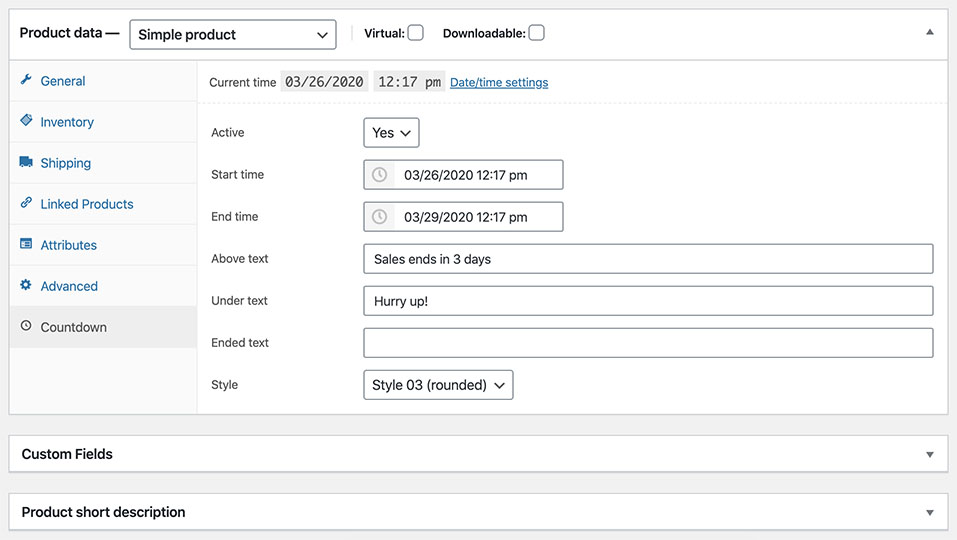
Users can choose to enable/ disable the active status for the timer separately on each product by choosing “Yes/No” in the Active option.
Setting up the Timer
When setting up the time, if you leave the starting time box empty, by default, the timer will start counting down from your current time (it starts right after you’re pressing the button to save the changes).
The ending time box must be filled with a specific date and time by choosing from the calendar popup, so that the timer will learn when the countdown ends and display the ending notification or hiding the timer accordingly based on your setting.
The ending notification text will be displayed in both the shop archive and single product page when the timer ends in replacement of the whole timer block. If this box is left empty, by default, when the counting down ends, the timer will disappear completely from your store.
Position Selection
From the admin dashboard, navigate to WPClever >> Countdown Timer to adjust the position of the countdown timer block on the archive page and product page manually. You can put it under the products’ title, rating, price, under/ above the Add to cart button or Hide it.
Need more features?
Please try other plugins from us:
Installation
- Please make sure that you installed WooCommerce
- Go to plugins in your dashboard and select “Add New”
- Search for “WPC Countdown Timer,” Install & Activate it
- When adding/editing the product, you can choose the “Countdown” tab, then add your countdown timer
Changelog
3.2.3
- Fixed: Minor JS/CSS issues in the backend
3.2.2
- Updated: Optimized the code
- Updated: Compatible with WP 7.0 & Woo 10.9
3.2.1
- Fixed: Minor JS/CSS issues in the backend
3.2.0
- Updated: Optimized the code
- Updated: Compatible with WP 7.0 & Woo 10.8
3.1.9
- Updated: Optimized the code
- Updated: Compatible with WP 6.9 & Woo 10.7
3.1.8
- Fixed: Minor JS/CSS issues in the backend
- Updated: Compatible with WP 6.9 & Woo 10.6
Screenshots


For developers
Is this your plugin? Show off the numbers.
Add a live badge to your site, docs or GitHub README. It updates on its own — no account needed.
Best WPC Countdown Timer for WooCo… alternatives
All clock plugins →





FAQ
WPC Countdown Timer for WooCommerce: quick answers
Straight answers, pulled from live WordPress.org data.
Live data from WordPress.org · checked Sep 27, 2026
Is WPC Countdown Timer for WooComm… free?
Yes. WPC Countdown Timer for WooComm… is free to download and use from the official WordPress.org plugin directory.
Is WPC Countdown Timer for WooComm… safe to use in 2026?
WPC Countdown Timer for WooComm… is a solid plugin choice in 2026, with a few things worth checking first. It runs on 1K+ sites, is rated 5/5 and was last updated 2 weeks ago, and scores 77/100 on our health check.
How many websites use WPC Countdown Timer for WooComm…?
WPC Countdown Timer for WooComm… is active on 1K+ WordPress websites and has been downloaded 71,230 times since it launched in March 2020. It was downloaded 1,164 times in the last 30 days.
Does WPC Countdown Timer for WooComm… work with WordPress 7.1?
Yes. The developer has tested WPC Countdown Timer for WooComm… up to WordPress 7.1.2, the latest release. It requires WordPress 5.9 or newer.
When was WPC Countdown Timer for WooComm… last updated?
The latest version, 3.2.3, was released on September 17, 2026 (2 weeks ago).
Who makes WPC Countdown Timer for WooComm…?
WPC Countdown Timer for WooComm… is developed and maintained by WPClever.
What are the best alternatives to WPC Countdown Timer for WooComm…?
The most popular alternatives to WPC Countdown Timer for WooComm… are CoolClock (1K+ installs), Easy Timer (1K+ installs) and MX Time Zone Clocks (1K+ installs).
Powered by PageForge
Want thousands of pages that rank like these? Build them in an afternoon.
This directory runs on the same engine as PageForge. Turn any spreadsheet, CSV or API into thousands of fast, SEO-ready WordPress pages — with schema, internal links and AI-written copy baked in.
- CSV, Google Sheets & API data sources
- AI content, schema & internal links per page
- Works with Elementor, Gutenberg, Yoast & Rank Math
- Free on WordPress.org — no credit card


