


Local Time Clock
Display a clock on your sidebar set automatically to your location's timezone. Select from a choice of clocks, colors and sizes.

Consider an alternative
Local Time Clock shows warning signs in 2026 — compare the alternatives below before installing. It runs on 1K+ sites, is rated 3.1/5 and was last updated 2 years ago, and scores 31/100 on our health check.
- Mixed reviews — 3.1/5 from 10 ratings
- No update in 2 years
- Only tested up to WordPress 6.5 (latest is 7.1)
How does it stack up?
Side-by-side on installs, updates, ratings & support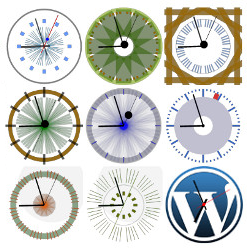


Daily downloads
Download spikes usually follow a new release — each site that auto-updates counts as a download.
Rankings
Where Local Time Clock stands todayWordPress.org search rankings
Live position in the plugin search, top 100| Keyword | Position |
|---|---|
| clock | #42 |
| clock widget | #28 |
| Flash clock | #6 |
| html5 clock | #3 |
| mobile clock | #17 |
Version adoption
Share of active sites per release.
Rating breakdown
★★★★★★★★★★ 3.1 from 10 reviews
About Local Time Clock
From the official readme · v1.3Description
Display a clock on your sidebar set automatically to your location’s timezone. Select from a choice of clocks, colors and sizes.
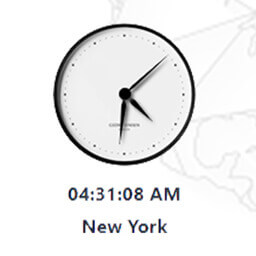
- A wide range of analog and digital clocks. See screenshots tab or designs shown in localtimes.info/getwidget
- Choice of size, colors of text, border and background,
- Automatic adjustment of daylight saving time from the localtimes.info servers
- HTML5 responsive plugin, detects device and serves flash, html5, javascript progressively
- Easy addition of multiple clocks
Installation
- Download the zip file and extract the contents,
- Upload the folder
local-time-clockto your WP plugin folder/wp-content/plugins/directory, - Go to Plugins > Plugins, and activate the plugin,
- Go to Appearance > Widgets, and drag the widget to a sidebar,
- Select the country, city, size, and colors from the menu
- Please email us with any problems, at widgets at localtimes.info. We appreciate your help in improving the clock plugin.
- If you are happy with the widget, we would appreciate if you take the time to give us a positive rating. Thanks.
Frequently asked questions
My city is not displayed
Remember to save settings after each drop down selection
How do I customize the colours?
Go to the Appearance->Widgets tab in your wordpress admin panel, and choose click on settings for the local time clock, select text, border and background colors from the drop downs
Can I choose my colour?
You can select the clock to be transparent, so the clock’s background will be that of your web page
Can I paste the clock directly into a page in a post, not on the sidebar ?
Yes, the javascript is available directly from localtimes.info. You must paste your clock’s javascript into the post in HTML mode.
Do I need to set the city ?
Choosing the city is not necessary for an accurante timezone. Setting the clock’s city changes adjusts the clocks clickthrough URL to go to the correct localtimes.info page for the city.
Is my city supported ?
localtimes.info has 100,000 cities in its database
Does world clock widget adjust for changing Daylight Saving Time?
Yes, the clock automatically changes for all Daylight Saving Time changes in the world, using the localtimes.info database.
What is Daylight Saving Time?
Daylight saving time is the convention of advancing clocks so that afternoons have more daylight and mornings have less. Click here for more information
Is there support ?
Further support is available at localtimes.info/support, or localtimes.info/conditions
Contact
Email us at widgets at localtimes.info or send us a message on twitter.com/localtimes
Changelog
1.3
- Released 24/08/2016
- Upgrade for https
1.2
- Released 12/06/2011
- Upgraded plugin internals with WordPress Widget Class for (i) multiple clocks on the sidebar, (ii) improved admin panel, and (iii) compatibility with future WordPress releases
1.1
- Released 25/02/2011
- Upgraded the range of clock designs with the most popular clocks on localtimes.info (see Screenshots)
1.0
- Released 08/02/2010
- First release includes two most popular analog and digital clocks
Screenshots


For developers
Is this your plugin? Show off the numbers.
Add a live badge to your site, docs or GitHub README. It updates on its own — no account needed.
Best Local Time Clock alternatives
All clock plugins →





FAQ
Local Time Clock: quick answers
Straight answers, pulled from live WordPress.org data.
Live data from WordPress.org · checked Sep 27, 2026
Is Local Time Clock free?
Yes. Local Time Clock is free to download and use from the official WordPress.org plugin directory.
Is Local Time Clock safe to use in 2026?
Local Time Clock shows warning signs in 2026 — compare the alternatives below before installing. It runs on 1K+ sites, is rated 3.1/5 and was last updated 2 years ago, and scores 31/100 on our health check.
How many websites use Local Time Clock?
Local Time Clock is active on 1K+ WordPress websites and has been downloaded 117,754 times since it launched in February 2010. It was downloaded 161 times in the last 30 days.
Does Local Time Clock work with WordPress 7.1?
Local Time Clock is officially tested up to WordPress 6.5.12, while the latest release is 7.1.2. It may still work, but try it on a staging site first.
When was Local Time Clock last updated?
The latest version, 1.3, was released on May 14, 2024 (2 years ago).
Who makes Local Time Clock?
Local Time Clock is developed and maintained by enclick.
What are the best alternatives to Local Time Clock?
The most popular alternatives to Local Time Clock are CoolClock (1K+ installs), Easy Timer (1K+ installs) and MX Time Zone Clocks (1K+ installs).
Powered by PageForge
Want thousands of pages that rank like these? Build them in an afternoon.
This directory runs on the same engine as PageForge. Turn any spreadsheet, CSV or API into thousands of fast, SEO-ready WordPress pages — with schema, internal links and AI-written copy baked in.
- CSV, Google Sheets & API data sources
- AI content, schema & internal links per page
- Works with Elementor, Gutenberg, Yoast & Rank Math
- Free on WordPress.org — no credit card


