


Time Clock – A WordPress Employee & Volunteer Time Clock Plugin
An employee / volunteer time clock for WordPress

Solid choice
Time Clock is a solid plugin choice in 2026, with a few things worth checking first. It runs on 500+ sites, is rated 4.9/5 and was last updated 3 months ago, and scores 72/100 on our health check.
- Tested with the latest WordPress (7.1)
- Small user base (500+ active installs)
How does it stack up?
Side-by-side on installs, updates, ratings & support


Daily downloads
Download spikes usually follow a new release — each site that auto-updates counts as a download.
Rankings
Where Time Clock stands todayWordPress.org search rankings
Live position in the plugin search, top 100| Keyword | Position |
|---|---|
| clock | #1 |
| employee | #4 |
| time | #15 |
| Timeclock | #1 |
| volunteer | #5 |
Version adoption
Share of active sites per release.
Rating breakdown
★★★★★★★★★★ 4.9 from 8 reviews
About Time Clock
From the official readme · v1.3.2Description
Overview
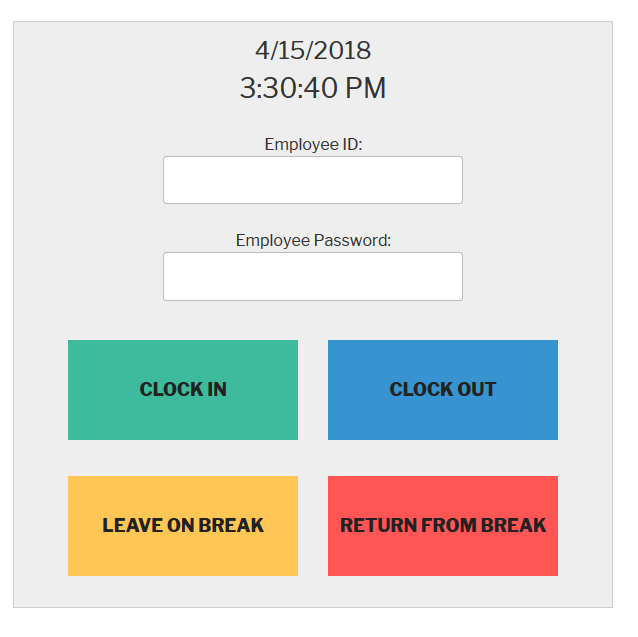
This plugin allows employees or volunteers to clock in and out for their work shifts.
From the Developer: I built this plugin because I’ve frequently volunteered at bicycle and computer repair non-profits, and each one was using a buggy, custom-made time clock to track hours. It caused the non-profit extra work and was a headache. So I built this plugin to help out other organizations in the same situation.
If you have a non-profit or a business, this plugin will help you track hours.
Having Problems?
If you are having problems or see a bug, please create a support thread here.
Watch this 2 minute video of how the plugin works:
Time Clock Features
- Users can clock in and out from shifts
- Users can clock in and out from lunch breaks
- Admins can easily make new user accounts
- Admins can view the number of hours worked for each day
- Admins can change the color and text of the time clock
Time Clock Pro
We offer a Pro version of this plugin for business owners who need more features.
- Export Activity to CSV File
- Time Clock can be used as a widget
- Admin Metrics
- See how many users are currently working
- Link a WordPress account to a Time Clock Account so users don’t have to login
About the Plugin Developer
This plugin was created by WP Plugin.
Installation
Automatic Installation
- Sign in to your WordPress site as an administrator.
- In the main menu go to Plugins -> Add New.
- Search for TimeClock and click install.
Changelog
Initial release
1.3.2
- 10/22/25
- Security Fix – Fixed Stored Cross-Site Scripting vulnerability (CVE-2025-10701)
- Security – Added input validation for clock action parameters
- Security – Added proper output escaping for HTML attributes and content
- Security – Implemented whitelist validation for all action types
1.3.1
- 5/1/25
- Fixed PHP Error – https://wordpress.org/support/topic/php-fatal-error-481/
1.3
- 5/1/25
- New – Plugin is now correctly setup for multi language support.
- Change – Modified deactivation survey.
- Fix – Security Fix
- Test – Tested with latest WordPress version
1.2.3
- 10/17/24
- Fix – Fixed browser autofill issue for logged out users / employees
- Fix – Made input boxes and font larger for the employee id and password fields
- Fix – Fixed tooltip / help text background color and opacity
- Fix – Security Fix
- Test – Tested with latest WordPress version
1.2.2
6/7/23
* Fix – Compatibility with PHP 8
1.2.1
7/18/18
* New – Added abiilty to change event type when editing user activity view
Screenshots

For developers
Is this your plugin? Show off the numbers.
Add a live badge to your site, docs or GitHub README. It updates on its own — no account needed.
Best Time Clock alternatives
All clock plugins →





FAQ
Time Clock: quick answers
Straight answers, pulled from live WordPress.org data.
Source: WordPress.org
Is Time Clock free?
Yes. Time Clock is free to download and use from the official WordPress.org plugin directory. The developer also sells premium add-ons or a Pro version with extra features.
Is Time Clock safe to use in 2026?
Time Clock is a solid plugin choice in 2026, with a few things worth checking first. It runs on 500+ sites, is rated 4.9/5 and was last updated 3 months ago, and scores 72/100 on our health check.
How many websites use Time Clock?
Time Clock is active on 500+ WordPress websites and has been downloaded 21,367 times since it launched in April 2018. It was downloaded 1,019 times in the last 30 days.
Does Time Clock work with WordPress 7.1?
Yes. The developer has tested Time Clock up to WordPress 7.1.5, the latest release. It requires WordPress 4.0 or newer.
What PHP version does Time Clock need?
Time Clock requires PHP 5.6 or higher. Most hosts run PHP 8.x today, so it works on any modern WordPress hosting.
When was Time Clock last updated?
The latest version, 1.3.2, was released on August 22, 2026 (3 months ago).
Who makes Time Clock?
Time Clock is developed and maintained by Scott Paterson.
What are the best alternatives to Time Clock?
The most popular alternatives to Time Clock are CoolClock (1K+ installs), Easy Timer (1K+ installs) and MX Time Zone Clocks (1K+ installs).
Powered by PageForge
One template and a spreadsheet. A real page for every search.
PageForge turns each row of a CSV into a WordPress page with its own title, URL, SEO fields and schema, built on the layout you already designed. Free on WordPress.org.
- CSV and XLSX, plus Google Sheets on Professional and Enterprise
- Its own title, URL, SEO fields and schema for every page
- Works with the block editor, Elementor, Divi and Avada
- Free on WordPress.org, no credit card