


WP Updates Notifier
Get an email when your WordPress site has core, plugin or theme updates waiting.

Safe pick
Yes — WP Updates Notifier is a safe, well-maintained plugin to use in 2026. It runs on 20K+ sites, is rated 4.2/5 and was last updated 3 weeks ago, and scores 86/100 on our health check.
- Proven at scale on 20K+ active sites
- Actively developed — last update 3 weeks ago
- Tested with the latest WordPress (7.1)
- Momentum — downloads up 946.9% vs the previous 30 days
How does it stack up?
Side-by-side on installs, updates, ratings & support



Daily downloads
Download spikes usually follow a new release — each site that auto-updates counts as a download.
Rankings
Where WP Updates Notifier stands todayWordPress.org search rankings
Live position in the plugin search, top 100| Keyword | Position |
|---|---|
| >100 | |
| monitor | #49 |
| Notifications | >100 |
| updates | #4 |
Version adoption
Share of active sites per release.
Rating breakdown
★★★★★★★★★★ 4.2 from 35 reviews
About WP Updates Notifier
From the official readme · v2.0.0Description
WP Updates Notifier checks your site on a schedule and emails you when WordPress core, a plugin or a theme has an update waiting, so you know without logging in. It is made for sites you rarely visit and for sites you look after for clients.
Each new version is reported once, not on every check. Version 2.0.0 is a ground-up rewrite of a plugin first released in 2011: the same simple promise, with the testing, accessibility and security work a plugin on this many sites deserves.
What it does
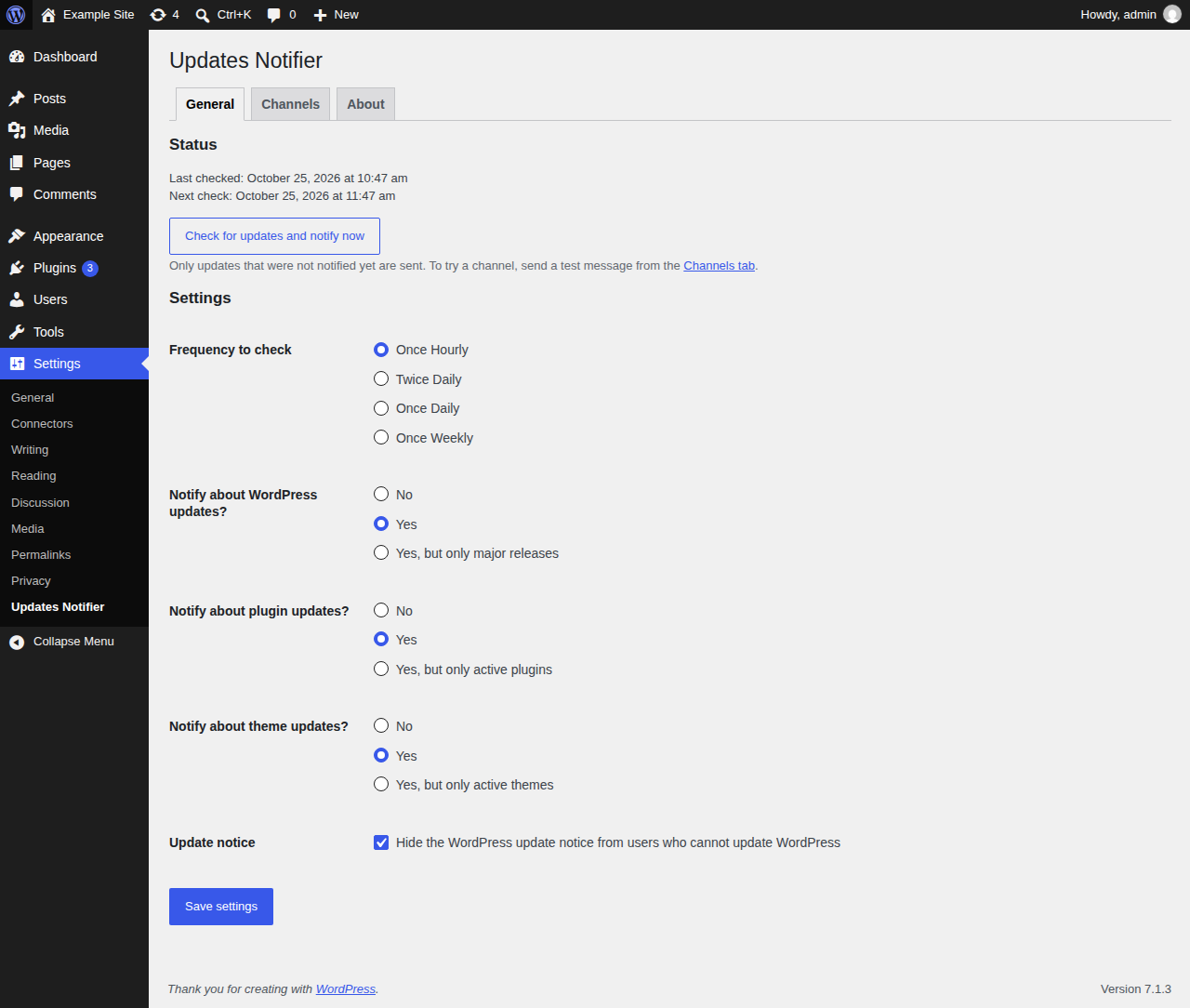
- Checks for core, plugin and theme updates hourly, twice daily, daily or weekly.
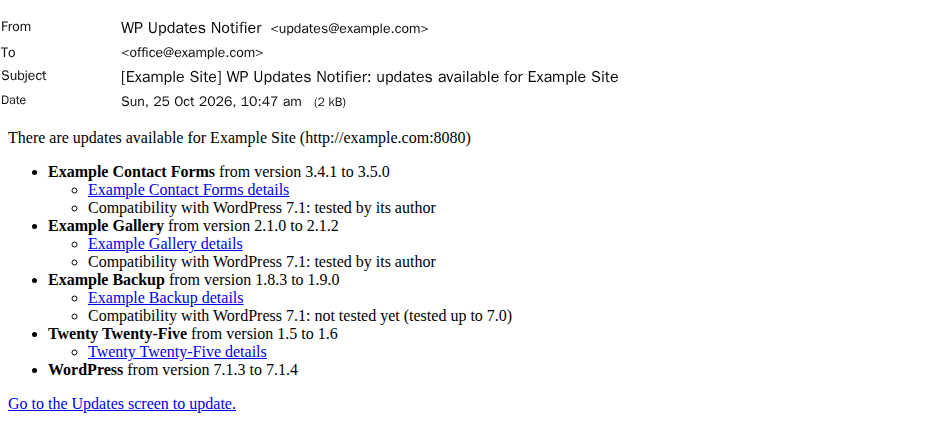
- Tells you about each new version once, with optional daily or weekly reminders about updates you haven’t installed yet.
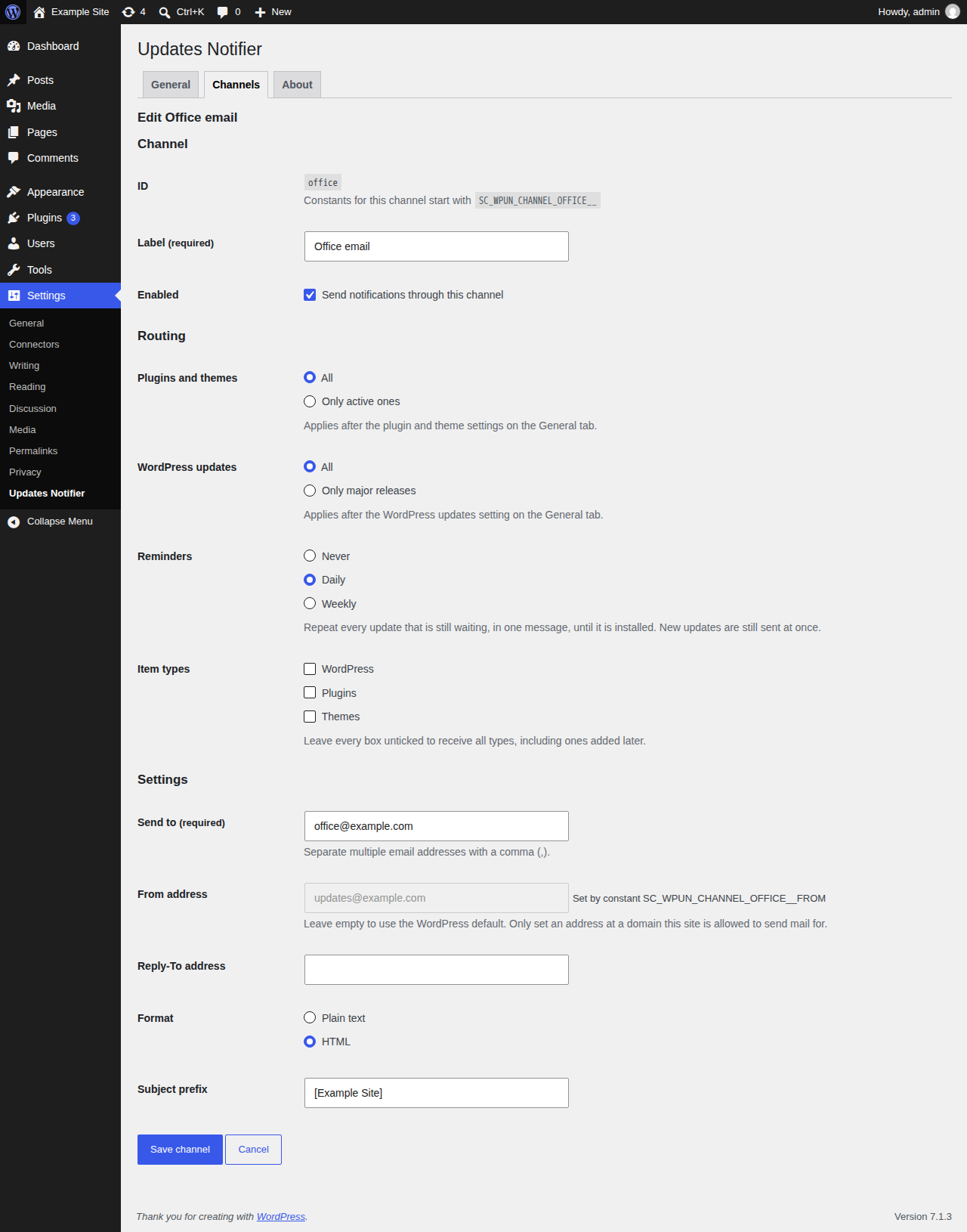
- Sends email to one or more addresses, with a test send to check it arrives.
- Lets you set up more than one email channel, each with its own recipients, its own choice of updates and its own reminders.
- Can watch only the plugins and themes you have active.
- Runs a check on demand with Check for updates and notify now.
- Hides the WordPress update notice from users who cannot update WordPress.
- Takes its channels and settings from code if you like:
wp-config.phpconstants, environment variables or your own configuration source, so a fleet of sites can share one setup. - Comes in 11 languages besides English: Chinese (Simplified), Dutch, French, German, Hebrew, Italian, Japanese, Polish, Portuguese (Brazil), Russian and Spanish.
Built for developers
- A public, versioned API lets add-ons bring their own notification channels, item types, routing rules and configuration sources. See the developer guide.
- Every action and filter is documented in the hook reference.
Accessible and security conscious
- The settings screen is checked against WCAG 2.2 AA with axe and keyboard tests on every change.
- A published threat model, security tests for every request handler, static and taint analysis on every change, and signed releases with build provenance you can verify.
Free and open source
GPL-2.0-or-later and developed in the open on GitHub. No tracking, no analytics and no account to sign up for.
The full documentation, including the user guide, is at wpun.cariss.dev.
Requirements
WordPress 6.7 or newer and PHP 7.4 or newer, on a single site. Version 2.0.0 does not support multisite networks.
Installation
- In WordPress, go to Plugins → Add New, search for “WP Updates Notifier”, click Install Now, then Activate.
- Go to Settings → Updates Notifier. The first check runs on one of the next page loads of your site, and emails go to the administration email address in Settings → General.
- On the Channels tab, click Send test under Email to check that the email arrives. Click Edit to change where it goes.
You can also install it with Composer through WordPress Packagist (composer require wpackagist-plugin/wp-updates-notifier), or upload the zip attached to each GitHub release.
The getting started guide walks through the rest.
Changelog
From 1.5 or 1.6: activate the plugin again after updating (main file renamed, settings kept). Slack is no longer supported; its settings are kept. WordPress's auto-update emails now go to the admin email. Emails have a new subject, the default From unless set, and no HTML entities.
2.0.0
Breaking changes
- WordPress’s core auto-update emails now always go to the site admin email. Sites that sent them to another address must change the admin email or use the auto_core_update_email filter. The notify_automatic setting, its SC_WPUN_SETTING_NOTIFY_AUTOMATIC constant and the sc_wpun_default_settings key are no longer read.
- removed Settings_Page methods sc_wpun_settings_email_notifications_field_email_notifications(), sc_wpun_settings_email_notifications_field_notify_to(), sc_wpun_settings_email_notifications_field_notify_from(), sc_wpun_settings_email_notifications_field_notify_reply_to(), email_enabled_schema(), email_read_only(), email_note(), instance_setting(), instance_enabled(), save_instance() and value_attribute(), and the SC_WP_Updates_Notifier wrappers sc_wpun_settings_email_notifications_text(), sc_wpun_settings_email_notifications_field_email_notifications(), sc_wpun_settings_email_notifications_field_notify_to() and sc_wpun_settings_email_notifications_field_notify_from(). The keys notify_to, notify_from, notify_reply_to and email_notifications in a sc_wpun_settings save are ignored: they are not migrated or forwarded.
- Channel::validate_settings() takes a second parameter, array $stored = array(), the instance’s stored settings. A channel that overrides it must declare the same signature.
- the sc_wpun_settings option stores notify_automatic and hide_updates as booleans instead of 1/0, and the sc_wpun_default_settings filter documents them as bool. Code reading the option directly sees true/false. A settings save that leaves out notify_automatic, hide_updates or email_notifications no longer turns them off.
- the default Channel::validate_settings() now rejects a
checkboxorbooleanfield whose value is not true/false, 1/0, ‘1’/’0′ or ”, returning a WP_Error naming the field, and stores the value as a bool. - the sc_wpun_settings option stores notify_plugins and notify_themes as ‘none’, ‘all’ or ‘active’ instead of 0, 1 and 2, and the sc_wpun_default_settings filter and SC_WPUN_SETTING_NOTIFY_PLUGINS / SC_WPUN_SETTING_NOTIFY_THEMES take only those keys. Code that reads the option directly must compare the keys.
- the main file is now wp-updates-notifier.php. Sites updating from 1.5 or 1.6 must activate the plugin again; settings are kept.
- channel instance IDs may no longer contain “__” or start or end with “_”, so they map to unambiguous constant names.
- the plugin no longer removes already-notified items through sc_wpun_plugins_need_update and sc_wpun_themes_need_update, so callbacks on those filters receive every pending item on each run. SC_WP_Updates_Notifier::check_plugins_against_notified() and check_themes_against_notified() are deprecated.
- the email subject is now “WP Updates Notifier: updates available for ” and the body uses the new plain-text layout. sc_wpun_email_content receives unescaped text and both email filters get the notification and channel instance as extra arguments. No From address is set unless one is configured; a 1.x From equal to the admin email is cleared on upgrade. The “Save settings with test email” button is replaced by “Send test email”. send_email_message() and the sc_wpun_wp_mail_* methods of SC_WP_Updates_Notifier are deprecated.
- Slack notifications are no longer sent. The Slack settings are kept in the slack channel instance but are not used. SC_WP_Updates_Notifier::send_slack_message(), send_test_slack() and the Slack settings field callbacks are deprecated and do nothing.
- the email and Slack settings (email_notifications, notify_to, notify_from, slack_notifications, slack_webhook_url, slack_channel_override) are no longer in the sc_wpun_settings option. Code that read them directly should use sc_wpun_channels() instead.
- the plugin now requires PHP 7.4 or newer and WordPress 6.7 or newer. WordPress.org does not offer the update to sites below those versions, so they stay on 1.6.0.
Features
- add a boolean field type with checkbox, radio or select display
- add a check now button to the settings screen
- add a plugin header for the api version an add-on needs
- add an action to run the update check on demand
- add an enum field type and store notify settings as keys
- add and edit channel instances from schema-driven forms
- add length-limited rendering for channel modules
- add settings screen tabs with general and channels tabs
- add text, textarea, url, email_list, secret, number field types
- add the notification module API, registry and dispatcher
- add the public hook API for checks, notifications and delivery
- add version constraints for the public api
- add an about tab, hidden by a code-only setting
- link the documentation from the plugin’s row
- mark required fields with “(required)” and aria-required
- name the view and flag errors in the page title
- add optional reminders for pending updates
- defer a channel instance until its retry-after time
- drop Slack notifications and keep their settings
- bundle translations for 11 locales
- let add-ons check the plugin API version they need
- let modules declare the api version they need
- list channel instances on the channels tab with row actions
- load channel settings and whole channels from outside the database
- load global settings from constants, env or custom sources
- move the email settings to the channels tab
- route update items to each notification channel
- send email through a built-in notification module
- add a global setting for wordpress core updates
- stop redirecting wordpress core auto-update emails
- store each channel instance’s last delivery result
- store notification channels as instances
- track what each notification channel was told
Bug fixes
- describe saved secrets and name each clear checkbox
- escape the settings api titles on the general tab
- explain empty item types and global settings in routing
- give every settings view a heading outline
- head the error summary and link groups to a control
- hide the update notice by the update_core capability
- let only super admins manage the plugin on multisite
- link set-by and check now notes to their controls
- show check times in the site timezone, with the next one
- show general tab validation errors on their fields
- stop the channel list row header holding row actions
- hide outside values from custom field types by default
- redact channel instances when serialized
- check the capability on the settings page and harden the autoloader
- read the core update data safely
- correct settings screen markup and accessibility
- offer fixed frequencies and handle missing schedules
- schedule the update check when the plugin is activated
- send HTML email as a full document with lang and dir
- stop the auto-update email filter from fatally erroring
- attach translators comments to the right strings
- stop translating on plugins_loaded and tidy strings
- keep resolved channel secrets out of dumps, forms and custom types
- let the local site reach its own url
- meet the WordPress.org Plugin Check rules
- list only http and https links in plain text
- only link http(s) urls in markdown and keep item values on one line
- send auto-update emails through an enabled email channel only
- normalise settings and keep the run state separately
- stop the settings sanitizer dying outside the form
- tidy the channel list into core-style row actions
- remove the cron event, transients and multisite data
- read files only for installed plugins and themes
- count child themes and network plugins as active
- link plugins correctly and cope with other updaters
- work out plugin compatibility from the update data
- word notification versions and name the item in link text
Code refactoring
- draw settings screen from schemas with consistent displays
- make wp-updates-notifier.php the main file
- require PHP 7.4 and WordPress 6.7
1.6
- Added slack notifications and testing button
- Separated notifications so they can be email, slack, or both
- Reorganized settings page
- Changed validation to not turn on notifications for email or slack unless required fields are valid
- Test email or slack message are now triggered with a temporary transient
- Removed javascript functions
1.5.1
- Removed ability to trigger with external cron job (a potential security risk)
The full changelog is in CHANGELOG.md.
Screenshots

For developers
Is this your plugin? Show off the numbers.
Add a live badge to your site, docs or GitHub README. It updates on its own — no account needed.
Best WP Updates Notifier alternatives
All email plugins →





FAQ
WP Updates Notifier: quick answers
Straight answers, pulled from live WordPress.org data.
Source: WordPress.org
Is WP Updates Notifier free?
Yes. WP Updates Notifier is free to download and use from the official WordPress.org plugin directory.
Is WP Updates Notifier safe to use in 2026?
Yes — WP Updates Notifier is a safe, well-maintained plugin to use in 2026. It runs on 20K+ sites, is rated 4.2/5 and was last updated 3 weeks ago, and scores 86/100 on our health check.
How many websites use WP Updates Notifier?
WP Updates Notifier is active on 20K+ WordPress websites and has been downloaded 253,693 times since it launched in June 2011. It was downloaded 12,458 times in the last 30 days.
Does WP Updates Notifier work with WordPress 7.1?
Yes. The developer has tested WP Updates Notifier up to WordPress 7.1.5, the latest release. It requires WordPress 6.7 or newer.
What PHP version does WP Updates Notifier need?
WP Updates Notifier requires PHP 7.4 or higher. Most hosts run PHP 8.x today, so it works on any modern WordPress hosting.
When was WP Updates Notifier last updated?
The latest version, 2.0.0, was released on October 26, 2026 (3 weeks ago).
Who makes WP Updates Notifier?
WP Updates Notifier is developed and maintained by Scott Cariss.
What are the best alternatives to WP Updates Notifier?
The most popular alternatives to WP Updates Notifier are WP Mail SMTP by WPForms (4M+ installs), MC4WP: Mailchimp for WordPr… (1M+ installs) and Easy WP SMTP (500K+ installs).
Powered by PageForge
One template and a spreadsheet. A real page for every search.
PageForge turns each row of a CSV into a WordPress page with its own title, URL, SEO fields and schema, built on the layout you already designed. Free on WordPress.org.
- CSV and XLSX, plus Google Sheets on Professional and Enterprise
- Its own title, URL, SEO fields and schema for every page
- Works with the block editor, Elementor, Divi and Avada
- Free on WordPress.org, no credit card