


Easy WP SMTP – WordPress SMTP and Email Logs: Gmail SMTP, Office 365, Outlook, Custom SMTP, and more
Make SMTP email sending and delivery easy. Configure Gmail SMTP, Outlook, Brevo, SendGrid, Mailgun, SendLayer or connect to any SMTP server.

Safe pick
Yes — Easy WP SMTP is a safe, well-maintained plugin to use in 2026. It runs on 500K+ sites, is rated 4.6/5 and was last updated 3 months ago, and scores 85/100 on our health check.
- Proven at scale on 500K+ active sites
- Loved by users — 4.6/5 from 710 reviews
- Tested with the latest WordPress (7.1)
How does it stack up?
Side-by-side on installs, updates, ratings & support



Daily downloads
Download spikes usually follow a new release — each site that auto-updates counts as a download.
Rankings
Where Easy WP SMTP stands todayWordPress.org search rankings
Live position in the plugin search, top 100| Keyword | Position |
|---|---|
| #25 | |
| email logs | #3 |
| gmail | #4 |
| outlook | #2 |
| smtp | #4 |
Version adoption
Share of active sites per release.
Rating breakdown
★★★★★★★★★★ 4.6 from 710 reviews
About Easy WP SMTP
From the official readme · v2.15.1Description
Are your WordPress emails not being delivered?
Install Easy WP SMTP and you’ll resolve your email delivery issues.
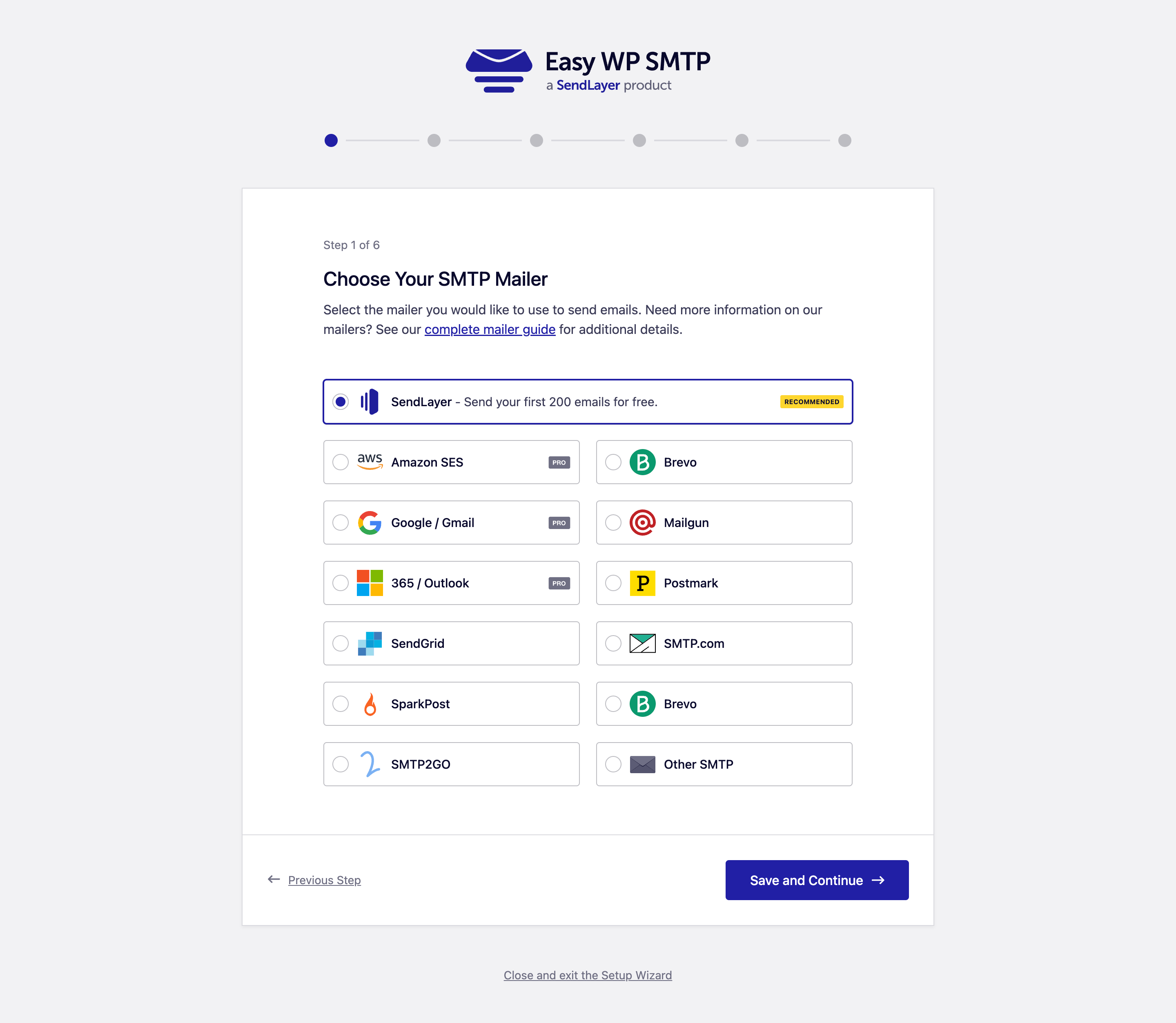
Easy WP SMTP allows you to configure and send all outgoing emails via 8 transactional mailers or an SMTP server. This will prevent your emails from landing in the spam folder and improve your deliverability.
Now with a new Gmail/Google integration for the quickest set-up and reliable email sending. All you need to do is log into your Google account and allow Easy WP SMTP to send emails on your behalf. You will be up and running in less than a minute! Available in the Easy WP SMTP Pro.
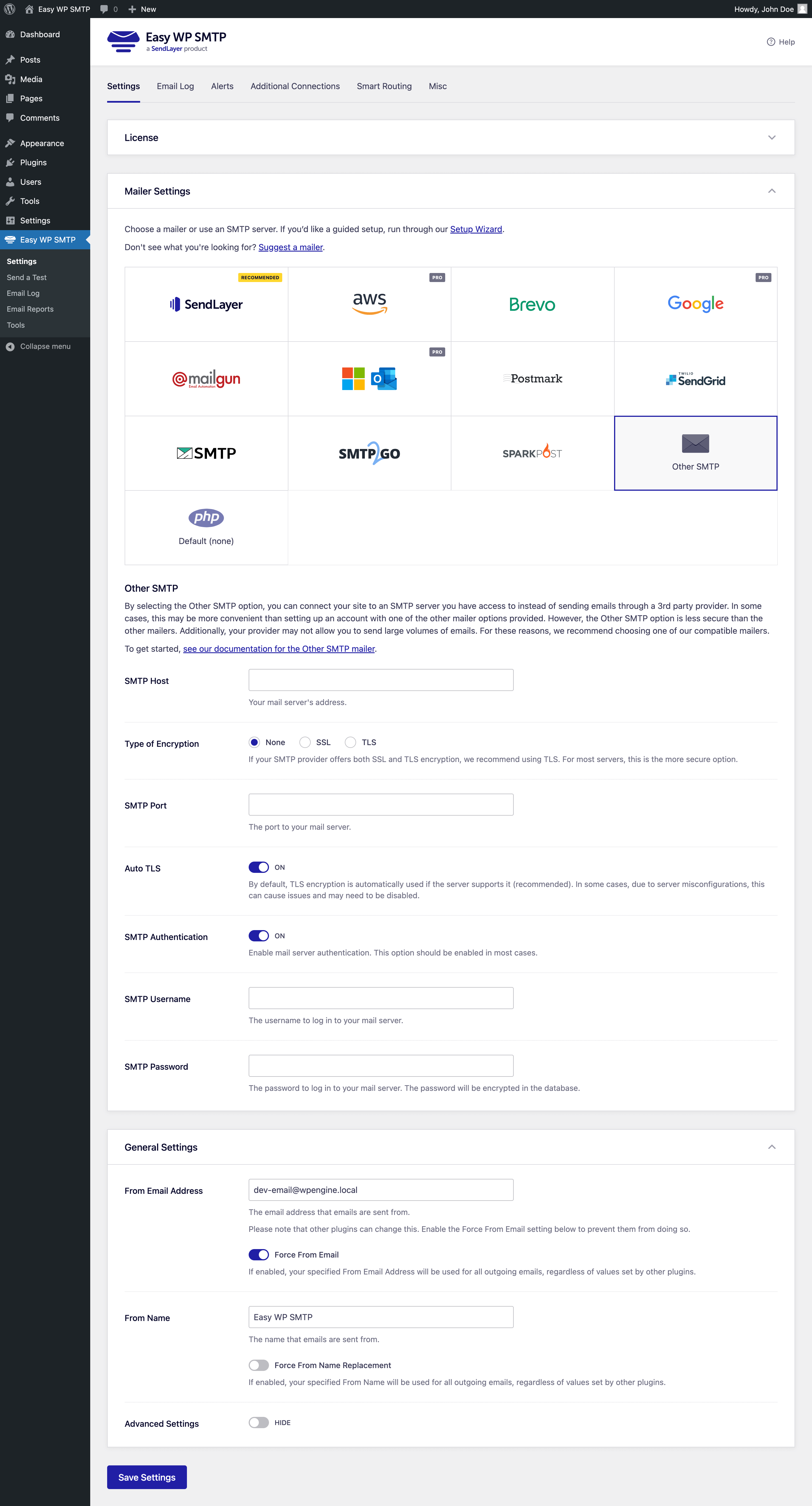
You can resolve your email deliverability issues by configuring one of these SMTP mailers:
- SendLayer (recommended)
- Amazon SES [Pro]
- Gmail / Google Mail / Google Workspace [Pro]
- Mailgun
- Mailjet
- Microsoft 365 / Outlook [Pro]
- SendGrid
- Brevo (formerly Sendinblue)
- SMTP.com
- Postmark
- SparkPost
- SMTP2GO
- Zoho Mail [Pro]
- Other SMTP – configure any SMTP mail server
How Easy WP SMTP Fixes WordPress Email Delivery
By default, WordPress sends mail using the PHP mail() function, which most hosting servers don’t configure correctly. That’s the number one cause of WordPress email delivery problems, and it’s why your emails land in spam or never arrive at all. Easy WP SMTP fixes WordPress email delivery by routing every outgoing message through a proper SMTP connection or transactional mailer.
SMTP (Simple Mail Transfer Protocol) is the industry standard for sending email. When your WordPress site sends email through an authenticated SMTP server, mailbox providers can verify your messages, which dramatically improves email delivery and inbox placement. Easy WP SMTP makes SMTP setup simple – connect your SMTP server or mailer once, and the plugin handles SMTP authentication and reliable email delivery for every WordPress email you send.
Whether you connect a custom SMTP server, use Gmail SMTP, Outlook SMTP, or a transactional SMTP service, Easy WP SMTP gives you dependable WordPress email delivery with no technical SMTP knowledge required. It is the easiest way to set up SMTP in WordPress and finally fix your email delivery for good.
Easy WP SMTP Features
- Send WordPress emails using one of the transactional mailers or an SMTP server.
- Our Setup Wizard helps you configure your mailer or SMTP provider in no time.
- The fastest Gmail / Google mail integration on the market (configure it in just a couple of clicks).
- You can use different transactional mailers or SMTP: SendLayer, Amazon SES (Pro), Gmail / Google (Pro), Mailgun, Microsoft 365 / Outlook (Pro), SendGrid, Brevo (formerly Sendinblue), SMTP.com.
- Powerful Email Logging – log all mail sent from your WordPress site, resend emails, store attachments, and more. [Pro]
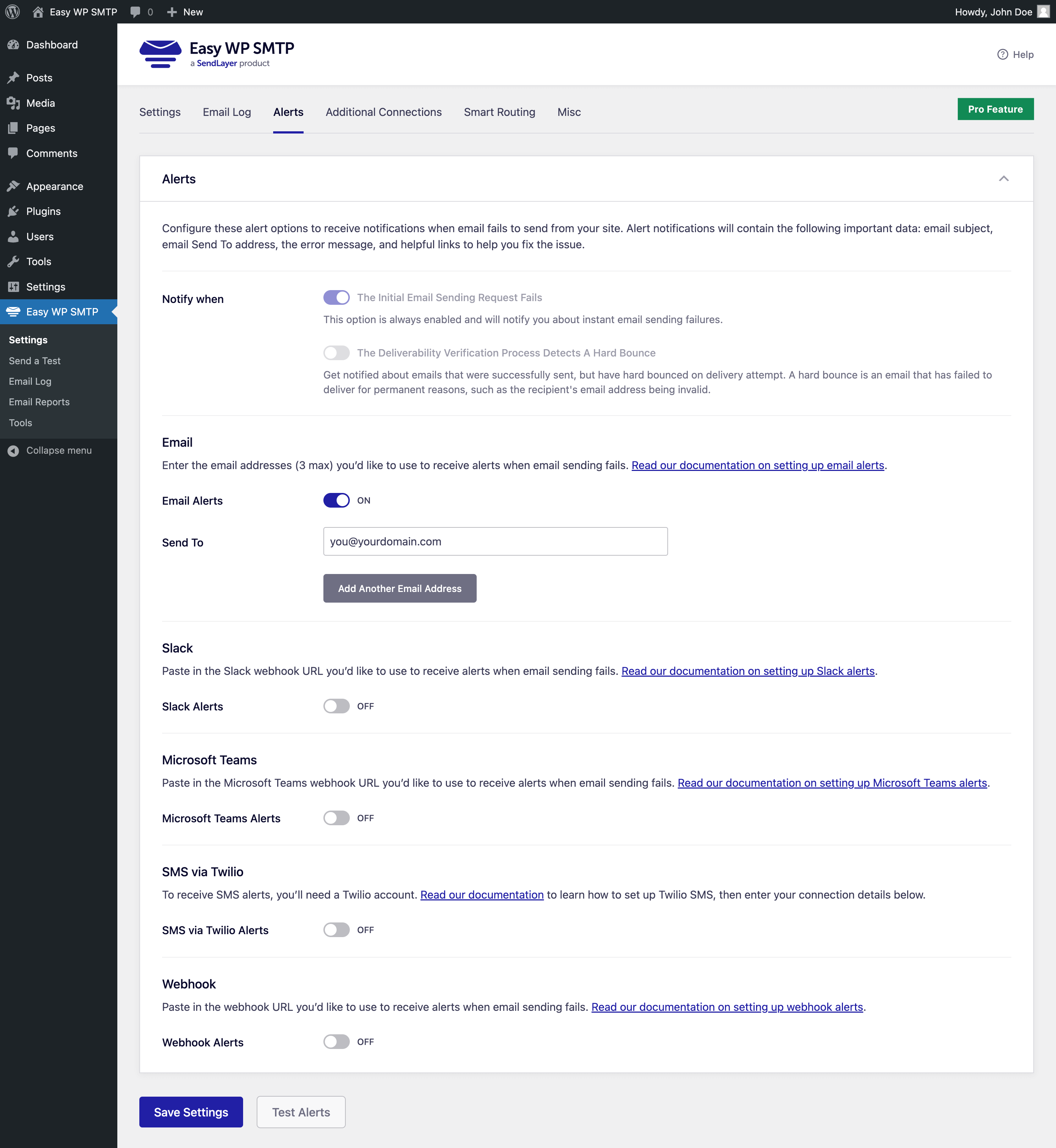
- Email Alerts – receive notifications via email, Slack, Microsoft Teams, Discord, SMS, or custom webhooks, when email fails to send from your site. [Pro]
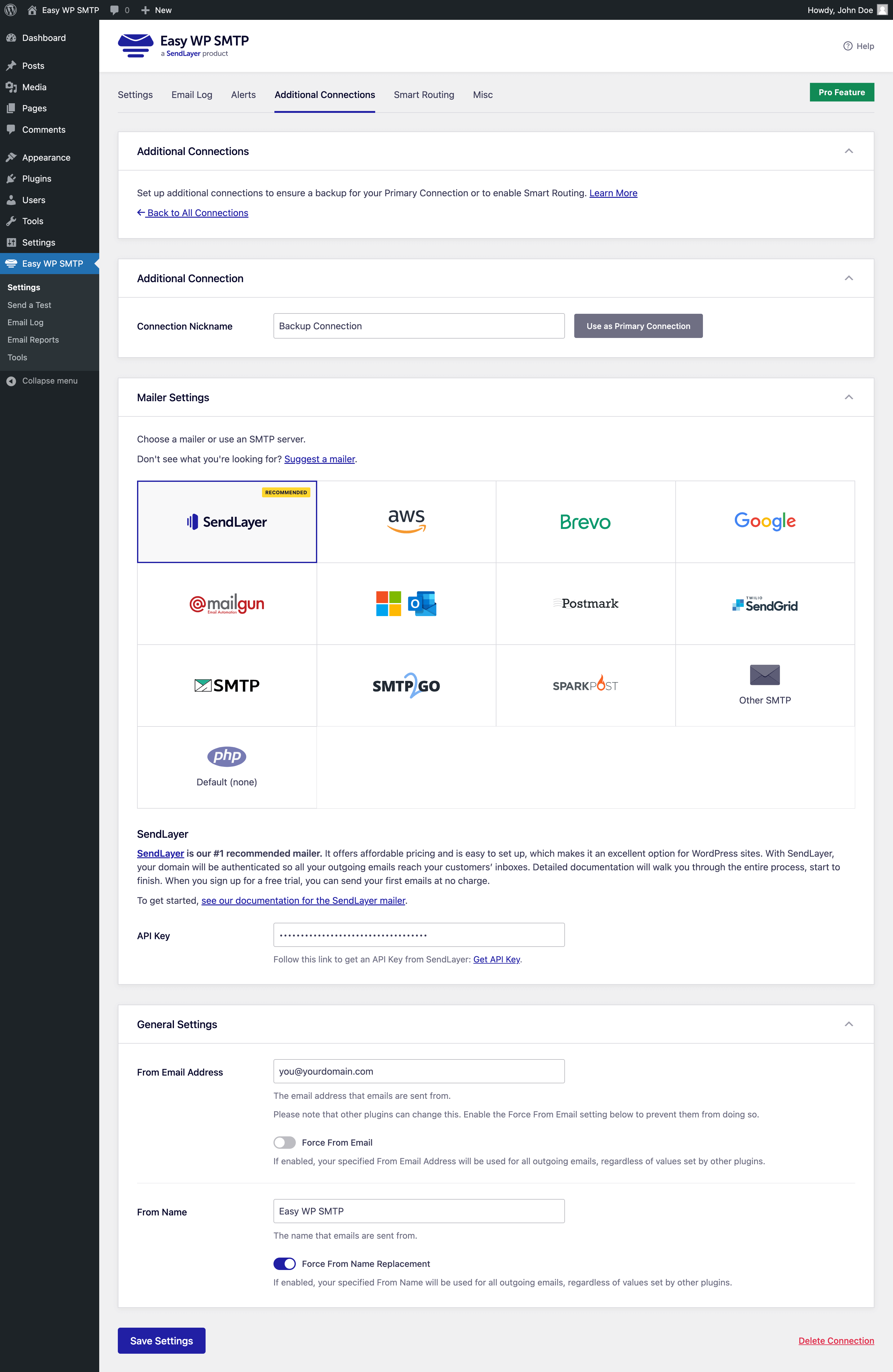
- Backup Connection – if your primary connection fails to send an email, your backup connection will make sure your email will still get delivered. [Pro]
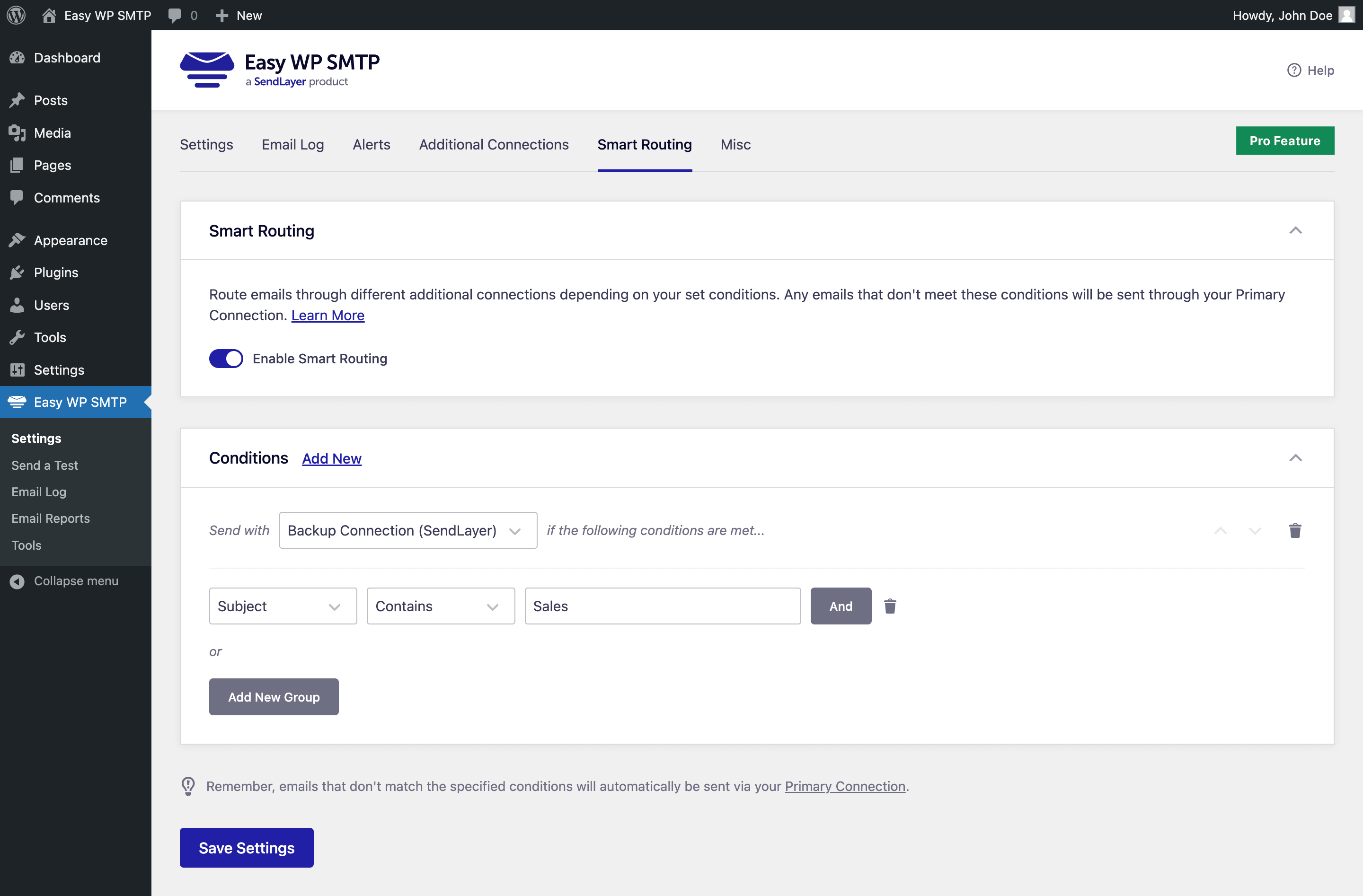
- Smart Conditional Routing – set up rules to route different types of emails through various mailers, based on many supported filters. [Pro]
- Rate Limiting – control the frequency of emails sent from your WordPress site within a given time to stay aligned with your SMTP provider’s limitations. [Pro]
- Optimized Email Sending – send emails in background to avoid site slowdowns and bottlenecks. [Pro]
- Generate email and delivery reports in your WordPress dashboard – see how many emails were sent, opened and clicked, with the Email Reports feature. [Pro]
- The Dashboard Widget shows you sent, delivered, failed, opened and clicked stats at a glance. [Pro]
- You can use Gmail, Outlook, Yahoo, Hotmail, Zoho, or any other SMTP server.
- Seamlessly connect your WordPress site with a reliable mailer or SMTP provider to handle all outgoing emails.
- Securely deliver emails to your recipients.
- Debug Events that log any failed email sending attempts and the error that caused them.
- Ability to specify a Reply-to or BCC email address.
- All features supported regardless of mailer or SMTP configuration!
- Custom SMTP server support – connect any SMTP host with your own SMTP port, SMTP username, SMTP password, and SMTP encryption settings.
- WordPress SMTP made easy – replace the unreliable default WordPress mailer with authenticated SMTP for better email delivery.
- Fix WordPress email delivery – stop WordPress emails from going to spam and improve email delivery across contact forms, WooCommerce, and notifications.
Mailer Options
Easy WP SMTP plugin includes different SMTP mailers, so you can choose the one that fits your needs.
SendLayer
SendLayer is our recommended transactional SMTP email service.
SendLayer is very affordable, reliable, and fast, plus it has a simple setup. You can configure it in a few minutes.
It offers 30 days of email logs history, with email open and click tracking. SendLayer offers hundreds of emails for free when you sign up for their trial.
Read our SendLayer documentation for more details.
Amazon SES
Amazon SES is a great mailer for advanced or technical users who want to take advantage of Amazon Web Services (AWS) SES service to send high volume of emails.
Read our Amazon SES documentation for more details.
Gmail / Google Mail / Google Workspace
With our Gmail integration you will be able to send emails from your Gmail or Google Workspace account. There is no technical setup required. All you need to do is log into your Gmail/Google Workspace account and allow Easy WP SMTP to send emails on your behalf. That’s it! It really is that easy.
Other SMTP WordPress plugins will require you to go through a very long and technical setup in order to send emails via your Gmail account, but not Easy WP SMTP. We have made the process as simple as possible.
Read our Gmail / Google documentation for more details.
Mailgun
Easy WP SMTP uses Mailgun API to reliably and quickly send out your WordPress emails.
Read our Mailgun documentation for more details.
Mailjet
Enhance your WordPress email deliverability with Easy WP SMTP’s seamless Mailjet integration. Send transactional emails effortlessly, enjoying 6000 free emails per month via Mailjet.
Read our Mailjet documentation for more details.
Microsoft 365 (Outlook and Office 365)
If your business utilizes Outlook.com, Microsoft Office 365, or Azure for email, our Microsoft 365 / Outlook mailer integration can help you enhance your email deliverability by enabling you to send emails from WordPress using your existing Outlook.com or Microsoft 365 account.
Read our Microsoft 365 / Outlook documentation for more details.
SendGrid
Easy WP SMTP uses SendGrid’s API to send your WordPress emails. If you have an SendGrid account, all you’ll need is the API key to connect your account with our plugin.
They offer a free account, so you can test its reliability.
Read our SendGrid documentation for more details.
Brevo (formerly Sendinblue)
Our plugin offers native integration with Brevo (formerly Sendinblue). All you have to do is open a Sendinblue account and copy the API key.
They offer a free account with 300 emails per day.
Read our Brevo documentation for more details.
SMTP.com
SMTP.com is a powerful transactional email service, with over 23 years of experience.
You can get started with a 30-day trial account, where you can send up to 50,000 emails.
Read our SMTP.com documentation for more details.
Postmark
Postmark is a transactional email service with great deliverability and budget-friendly pricing.
You can start out with their free trial option, which allows you to send up to 100 emails per month through their secure API.
Read our Postmark documentation for more details.
SparkPost
SparkPost is a transactional email provider, designed to provide high-speed, reliable, and secure email delivery.
You can get started with the free test account that lets you send up to 500 emails per month.
Read our SparkPost documentation for more details.
SMTP2GO
SMTP2GO delivers a powerful and reliable email service for transactional emails, supported by a worldwide infrastructure, detailed real-time analytics, and robust security measures. New users can take advantage of SMTP2GO’s free plan, which includes up to 1000 emails per month.
Read our SMTP2GO documentation for more details.
Zoho Mail
If you use Zoho Mail for email communication, our Zoho mailer integration offers a robust solution to streamline your WordPress email delivery. This integration allows you to send emails directly through your Zoho account, leveraging its reliable infrastructure for improved deliverability.
Read our Zoho Mail documentation for more details.
Other SMTP
With our Other SMTP mailer, you can configure any SMTP server to send your WordPress emails. You can use your own SMTP server, or any of the popular email providers: Gmail, Outlook, Yahoo, Zoho, Hotmail, …
Read our Other SMTP documentation for more details.
Debug Events
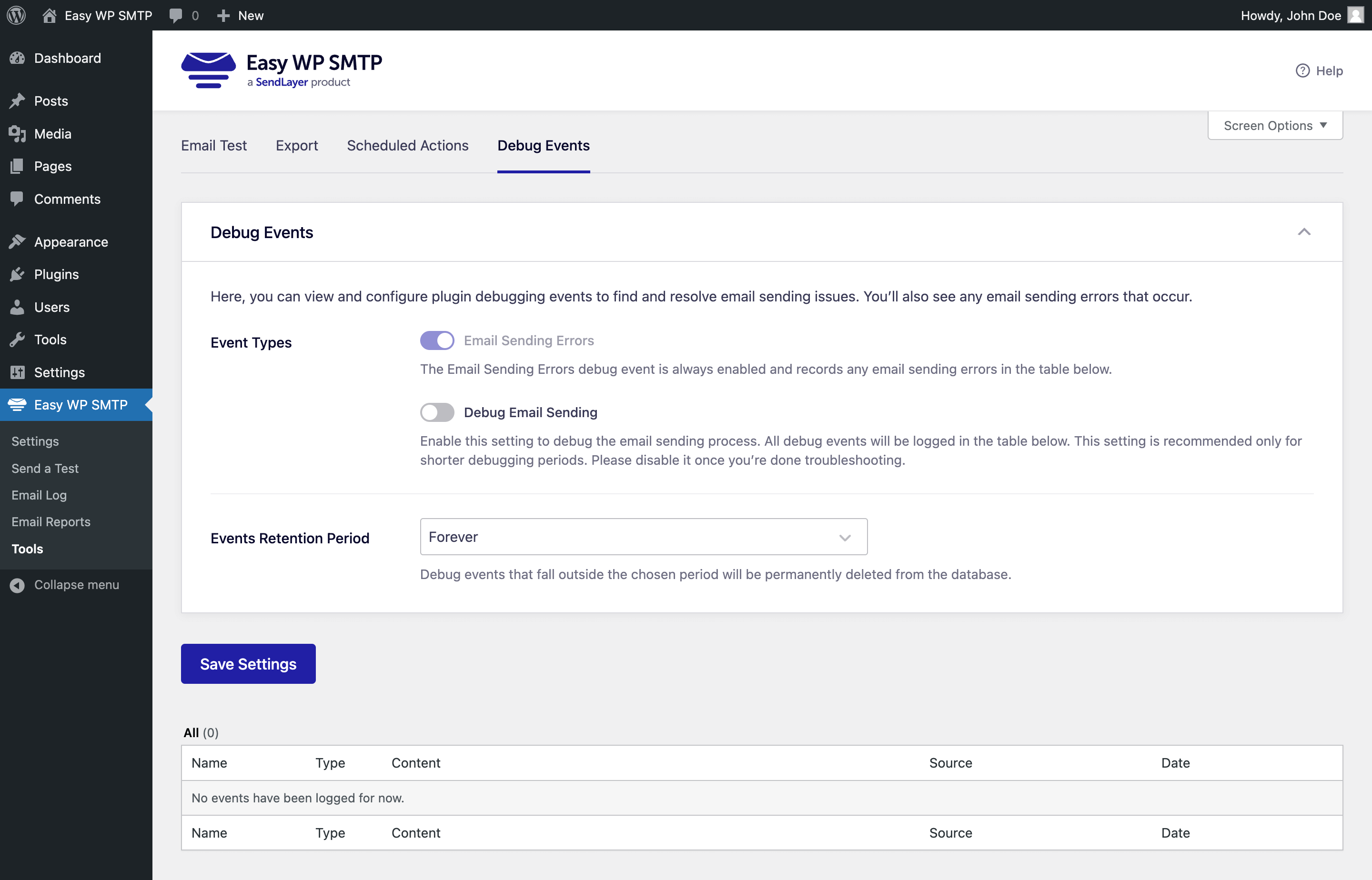
Debug Events is a feature that will log all your failed email sending attempts and provide additional information on why it failed and from which plugin the email was sent from.
You can enable the Debug Email Sending option and all email sending attempts will be logged (not just the failing ones), so you can debug any delivery issues.
Easy WP SMTP Pro
Easy WP SMTP Pro provides awesome features that will improve your email deliverability (Amazon SES, Gmail / Google and Microsoft 365 / Outlook mailers) and help you monitor all your WordPress emails (Email Logs, Email Reports, enhanced Dashboard Widget, enhanced Weekly Email Summary, and more).
Click here to purchase Easy WP SMTP Pro now!
Email Log
With our Email Logging, you can easily store and view a record of all emails sent from your website, providing you with a valuable resource for record-keeping, ensuring email compliance, and debugging during site development.
Our WordPress email logs go beyond just recording emails. With advanced analytics and features, you can measure email engagement and improve email deliverability:
Resend Emails
Email Logs make it simple to resend or forward any email directly from the log, which can be incredibly helpful for resending failed emails or forwarding important messages. You can also take advantage of the bulk resend option to quickly resend multiple emails at once.
Open and Click Email Tracking
Gain deeper insights into the performance of your WordPress emails by using our email log feature to track opens and clicks. This feature allows you to measure engagement rates and optimize your messaging and calls-to-action for better results.
Save Email Attachments
Keep track of all email attachments sent from your WordPress site. This feature allows you to store attachments in one place, making it easy to review and archive them.
Export Email Logs
Export your WordPress emails to CSV, EML, or Excel with ease using our intuitive exporter. You can filter the logs by date range, search term, or other criteria to extract only the data you need for your reporting or analysis.
Print Emails
Our email logging feature allows you to easily print any email in a clear and easy-to-read format, making it simple to keep track of important email communications. Additionally, you can export email logs to PDF format for convenient digital archiving.
Email Alerts
Receive instant notifications if your emails fail to send, with alerts available through Slack, Microsoft Teams, Discord, SMS/Twilio, webhooks, or email via a secure API.
Combined with our email logging and resending capabilities, Email Alerts guarantee that no critical email will ever be overlooked.
Backup Connection
Add a secondary connection that takes over if your main one fails. Easy WP SMTP identifies connection errors and effortlessly shifts to the backup mailer, ensuring that failed emails are automatically retried.
Smart Conditional Routing
Set up rules to route different types of emails through various mailers. You can filter by the email’s Subject, Message content, From or To addresses, the plugin that generated the email, and more.
This approach lets you combine transactional and marketing providers for enhanced deliverability.
Rate Limiting
Control the frequency of emails sent from your WordPress site within a given time to stay aligned with your SMTP provider’s limitations.
Easy WP SMTP lets you set limits on how many emails can be sent each minute, hour, day, week, or month and automatically manages the email queue to keep you within the allowed rate.
Optimized Email Sending
Is email sending affecting your site’s speed? Easy WP SMTP can queue your emails to enhance performance.
With optimized sending, emails are sent in the background when server resources are available, helping to avoid site slowdowns and bottlenecks.
Email Reports
Track email deliverability and engagement with our email reports feature, which displays open and click-through rates grouped by subject line, regardless of mailer or SMTP service. The reports also include information on sent and failed emails each week, ensuring that you’re always aware of potential issues. Plus, you can view an email report chart right in your WordPress dashboard for quick and easy access.
Weekly Email Summary
Stay on top of your WordPress email statistics with our weekly email reports, sent to your inbox. These reports provide in-depth information on the number of emails sent, as well as opens and clicks. The Summary also shows failed email delivery stats, allowing you to quickly identify any potential issues without having to log into WordPress.
WordPress Multisite
WordPress Multisite Network Settings
Manage Easy WP SMTP settings for all your multisite subsites in one place, simplifying administration for your multisite network.
Easily Manage Multisite Emails
Network administrators can easily monitor and manage email logs, email reports, debug events, and exports for all subsites in the network from a central dashboard.
Who Is Easy WP SMTP For?
Easy WP SMTP works on any WordPress site that sends email, from a small blog to a high-traffic store. Here is who gets the most value from reliable email delivery.
WooCommerce and Online Stores
Order confirmations, shipping updates, and password resets have to land in the inbox. Easy WP SMTP sends your WooCommerce emails through an authenticated mailer so customers actually receive them.
Contact Forms and Lead Notifications
When form entries from WPForms, Contact Form 7, or Gravity Forms stop arriving, the cause is almost always the default WordPress mailer. Connect an SMTP mailer once and every notification gets delivered.
Membership, LMS, and Community Sites
Welcome emails, account notices, and course updates keep your members active. Authenticated SMTP makes sure new sign-ups can confirm their account and log in without emails getting lost.
Agencies and Freelancers
Set up …
Installation
- Install Easy WP SMTP either via the WordPress.org plugin repository or by uploading the files to your server. (See instructions on how to install a WordPress plugin)
- Activate Easy WP SMTP.
Changelog
2.15.1 – 2026-08-12
- Changed: Updated the order of mailers in the plugin settings and the Setup Wizard.
2.15.0 – 2026-06-30
- IMPORTANT: Support for WordPress versions 5.4.x or lower has been discontinued. If you are using one of those versions, you MUST upgrade WordPress before installing or upgrading to Easy WP SMTP v2.15.0. Failure to do that will disable Easy WP SMTP functionality.
- Added: WP-CLI commands to configure Easy WP SMTP from the command line, including SMTP and API-key mailer setup and individual setting management.
- Added: Support for the WordPress Abilities API (WordPress 6.9), letting connected tools and AI assistants securely read your debug events.
- Added: A one-click option to deactivate a conflicting plugin directly from the conflict notice.
- Added: Confirmation prompt before enabling the “Hide Email Delivery Errors” option, so the setting is not turned on by accident.
- Changed: Improved error handling and troubleshooting guidance when an email fails to send.
- Changed: Updated Action Scheduler library to 4.0.0.
- Fixed: The “Last week” stat in the weekly summary email showed the just-started current week’s count instead of the actual previous week’s total.
- Fixed: Hardened permission checks and request handling across several admin features to address potential security issues.
- Fixed: Prevent orphaned Action Scheduler log entries from completed task cleanup.
2.14.0 – 2026-03-31
- Changed: Improved plugin security.
- Added: SendLayer Quick Connect – allows connecting to SendLayer without DNS setup in 2 minutes.
2.13.1 – 2025-11-27
Added: WordPress playground blueprint file.
Changed: Added Return-Path option to align with WordPress core.
2.13.0 – 2025-11-19
- Added: New transactional mailer: Resend integration.
- Fixed: Recurring task filling up task meta table.
2.12.0 – 2025-09-01
- Added: New transactional mailer: Mandrill integration.
- Fixed: References and In-Reply-To email headers are now correctly preserved for API-based mailers.
Screenshots

For developers
Is this your plugin? Show off the numbers.
Add a live badge to your site, docs or GitHub README. It updates on its own — no account needed.
Best Easy WP SMTP alternatives
All email plugins →





FAQ
Easy WP SMTP: quick answers
Straight answers, pulled from live WordPress.org data.
Live data from WordPress.org · checked Nov 16, 2026
Is Easy WP SMTP free?
Yes. Easy WP SMTP is free to download and use from the official WordPress.org plugin directory.
Is Easy WP SMTP safe to use in 2026?
Yes — Easy WP SMTP is a safe, well-maintained plugin to use in 2026. It runs on 500K+ sites, is rated 4.6/5 and was last updated 3 months ago, and scores 85/100 on our health check.
How many websites use Easy WP SMTP?
Easy WP SMTP is active on 500K+ WordPress websites and has been downloaded 14,826,287 times since it launched in April 2013. It was downloaded 60,888 times in the last 30 days.
Does Easy WP SMTP work with WordPress 7.1?
Yes. The developer has tested Easy WP SMTP up to WordPress 7.1.4, the latest release. It requires WordPress 5.5 or newer.
What PHP version does Easy WP SMTP need?
Easy WP SMTP requires PHP 7.4 or higher. Most hosts run PHP 8.x today, so it works on any modern WordPress hosting.
When was Easy WP SMTP last updated?
The latest version, 2.15.1, was released on August 12, 2026 (3 months ago).
Who makes Easy WP SMTP?
Easy WP SMTP is developed and maintained by Syed Balkhi.
What are the best alternatives to Easy WP SMTP?
The most popular alternatives to Easy WP SMTP are WP Mail SMTP by WPForms (4M+ installs), MC4WP: Mailchimp for WordPr… (1M+ installs) and WP Mail Logging (300K+ installs).
Powered by PageForge
Want thousands of pages that rank like these? Build them in an afternoon.
This directory runs on the same engine as PageForge. Turn any spreadsheet, CSV or API into thousands of fast, SEO-ready WordPress pages — with schema, internal links and AI-written copy baked in.
- CSV, Google Sheets & API data sources
- AI content, schema & internal links per page
- Works with Elementor, Gutenberg, Yoast & Rank Math
- Free on WordPress.org — no credit card


