



WP Mail SMTP by WPForms – SMTP for Reliable Email Delivery with Gmail, Outlook, Amazon SES, Brevo, Other SMTP & More
Make email delivery easy for WordPress. Connect with SMTP, Gmail, Brevo, SendGrid, Amazon SES + more, with powerful WordPress SMTP Email plugin.

Safe pick
Yes — WP Mail SMTP by WPForms is a safe, well-maintained plugin to use in 2026. It runs on 4M+ sites, is rated 4.8/5 and was last updated 3 weeks ago, and scores 95/100 on our health check.
- One of the most-used plugins on the web — 4M+ active sites
- Loved by users — 4.8/5 from 5,214 reviews
- Actively developed — last update 3 weeks ago
- Tested with the latest WordPress (7.1)
- Responsive support — 83% of recent threads resolved
How does it stack up?
Side-by-side on installs, updates, ratings & support


Daily downloads
Download spikes usually follow a new release — each site that auto-updates counts as a download.
Rankings
Where WP Mail SMTP by WPForms stands todayWordPress.org search rankings
Live position in the plugin search, top 100| Keyword | Position |
|---|---|
| brevo | #1 |
| #2 | |
| gmail | #1 |
| outlook | #1 |
| smtp | #1 |
Version adoption
Share of active sites per release.
Rating breakdown
★★★★★★★★★★ 4.8 from 5,214 reviews
About WP Mail SMTP by WPForms
From the official readme · v4.10.3Description
WordPress Mail SMTP Plugin
Is your WordPress site not sending emails? You’re not alone. 4+ million websites use WP Mail SMTP to send emails reliably.
Our goal is to make email deliverability easy so that your emails reach the inbox.
WP Mail SMTP fixes your email deliverability issues by reconfiguring WordPress to use a proper SMTP provider when sending emails.
Best of all, our easy-to-use Setup Wizard and detailed documentation guide you through the process.
WP Mail SMTP is free and has everything you need to reliably send your WordPress emails!
WP Mail SMTP Pro adds even more powerful features like email logging, advanced email reporting and stats, backup connections, email alerts, smart conditional routing, and much more.
What is SMTP?
SMTP (Simple Mail Transfer Protocol) is an industry-standard for sending emails. Proper SMTP configuration helps increase email deliverability by adding authentication to the emails sent from your site.
Popular email clients like Gmail, Yahoo, Office 365, and Zoho are in a constant battle with email spammers, so they check whether emails are originating from a genuine sender. If the proper authentication isn’t there, emails either go in the SPAM folder or, worse, disappear.
This is a problem for a lot of WordPress sites. By default, WordPress uses the PHP mail function to send emails generated by WordPress or any contact form plugin like WPForms.
But most WordPress hosting companies don’t have their servers properly configured for sending PHP emails.
This is why WordPress emails aren’t delivered.
How does WP Mail SMTP work?
WP Mail SMTP plugin easily resolves email delivery problems by changing the way your WordPress site sends email. We reconfigure the wp_mail() function to use proper SMTP host credentials or an SMTP mail provider.
With our built-in SMTP mail provider integrations (recommended), emails are sent using the provider’s direct API. This works even if your web host is blocking SMTP ports.
This helps you fix common WordPress not sending email issues.
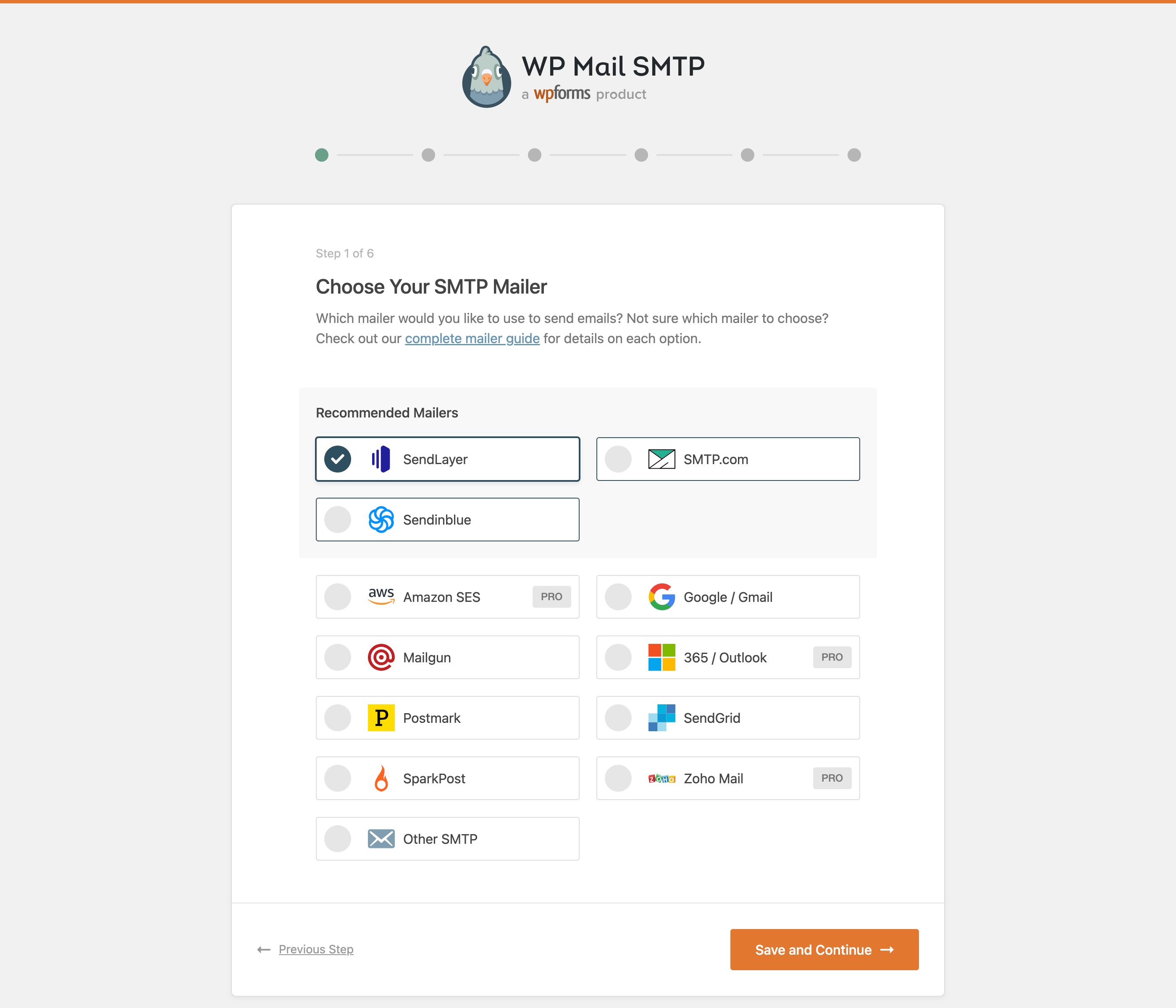
WP Mail SMTP plugin includes many different SMTP mailers:
- SendLayer (Recommended)
- SMTP.com (Recommended)
- Brevo (formerly Sendinblue) (Recommended)
- Gmail SMTP (Gmail, Google Workspace, G Suite)
- Elastic Email
- Mailgun
- Mailjet
- MailerSend
- Mandrill
- Postmark
- Resend
- SendGrid
- SMTP2GO
- SparkPost
- Microsoft One-Click Setup (Outlook.com and Office 365) [Pro]
- Amazon SES [Pro]
- Zoho Mail [Pro]
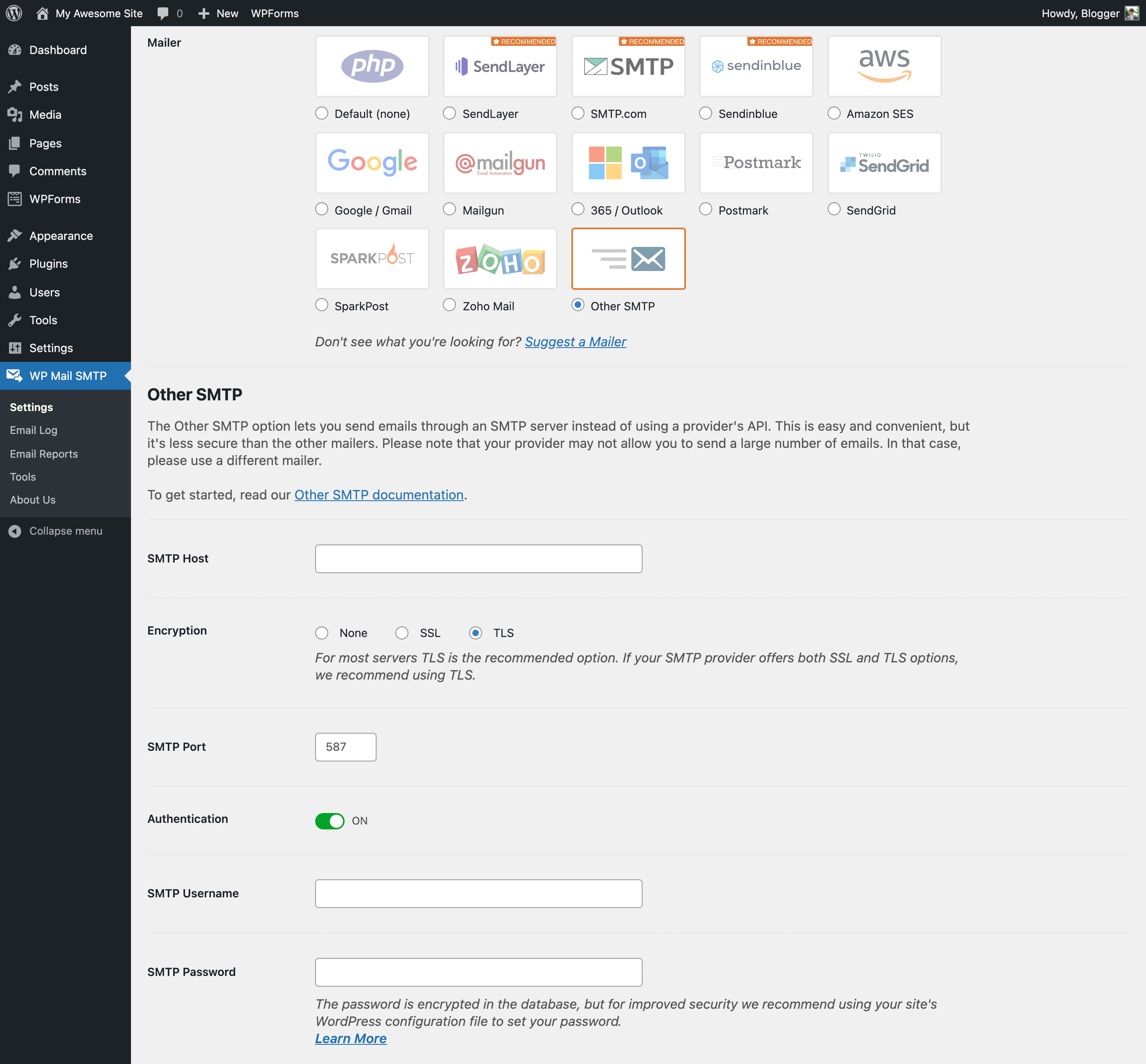
- Other SMTP
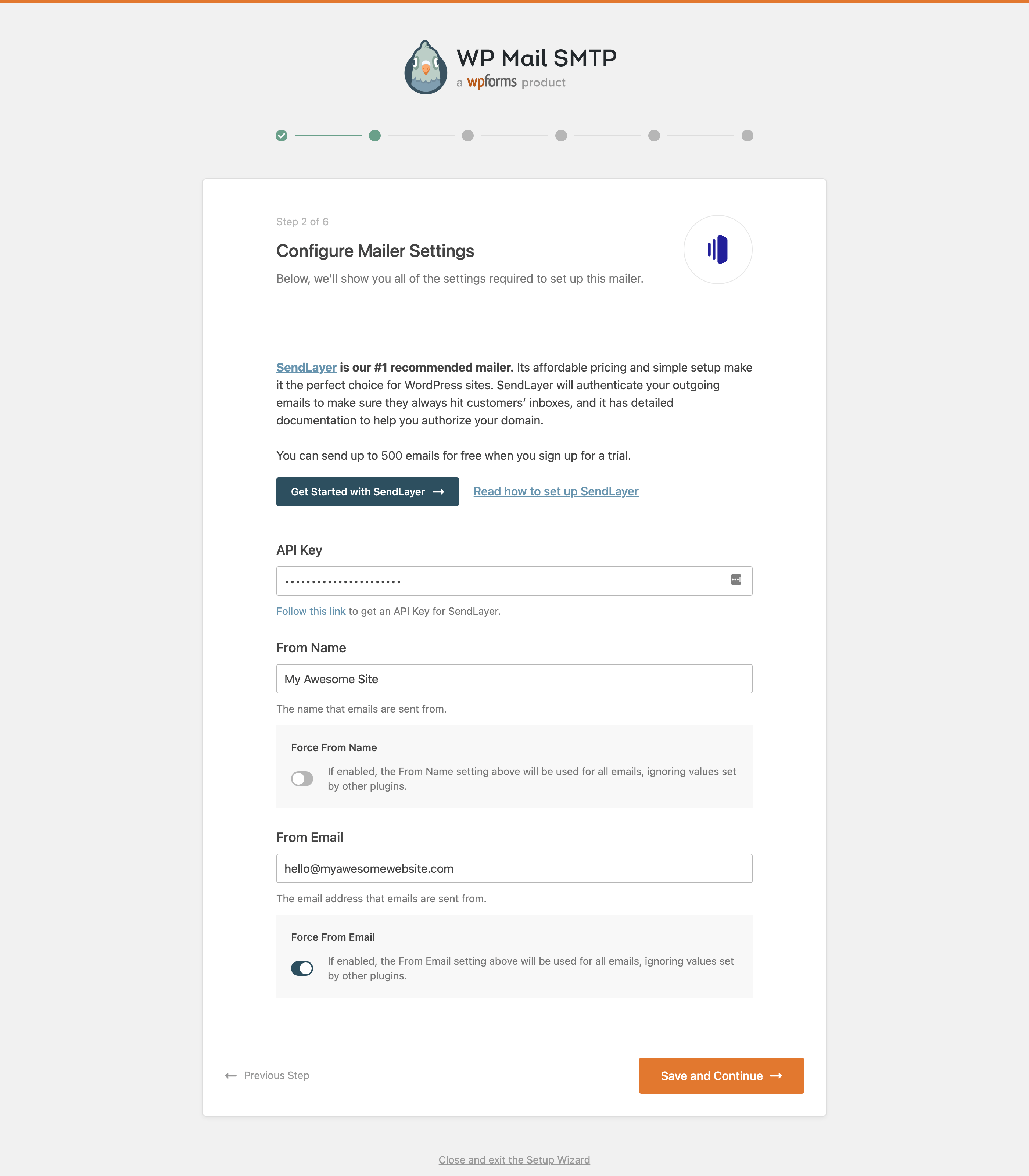
For most options, you can specify the “from name” and “email address” for outgoing emails too.
If you don’t know which mailer to choose, see our Complete Guide to WP Mail SMTP Mailers.
SendLayer
SendLayer is our recommended transactional email service.
Its affordable pricing and super fast setup make it a great choice for sending emails from WordPress. It also has open and click tracking and email logs.
SendLayer is reliable, fast, and easy to set up. You can send hundreds of emails for free when you sign up for a trial.
Read our SendLayer documentation for more details.
SMTP.COM
SMTP.com is a recommended transactional email service.
With over 22 years of email delivery expertise, SMTP.com has a reputation as a reliable sender.
You can start sending emails in minutes and benefit from 50,000 free emails in your first 30 days.
Read our SMTP.com documentation for more details.
Brevo (formerly Sendinblue)
Brevo is a recommended transactional email service. It serves 80,000+ companies worldwide.
Brevo is reliable, fast, and gives you 300 free emails per day.
Read our Brevo documentation for more details.
WP Mail SMTP PRO
WP Mail SMTP Pro is a separate paid plugin. Everything in this section is only available in Pro and isn’t part of this free plugin. In addition to native Microsoft, Amazon SES, and Zoho Mail integrations, Pro includes:
Click here to purchase WP Mail SMTP Pro now!
Email Log (Pro)
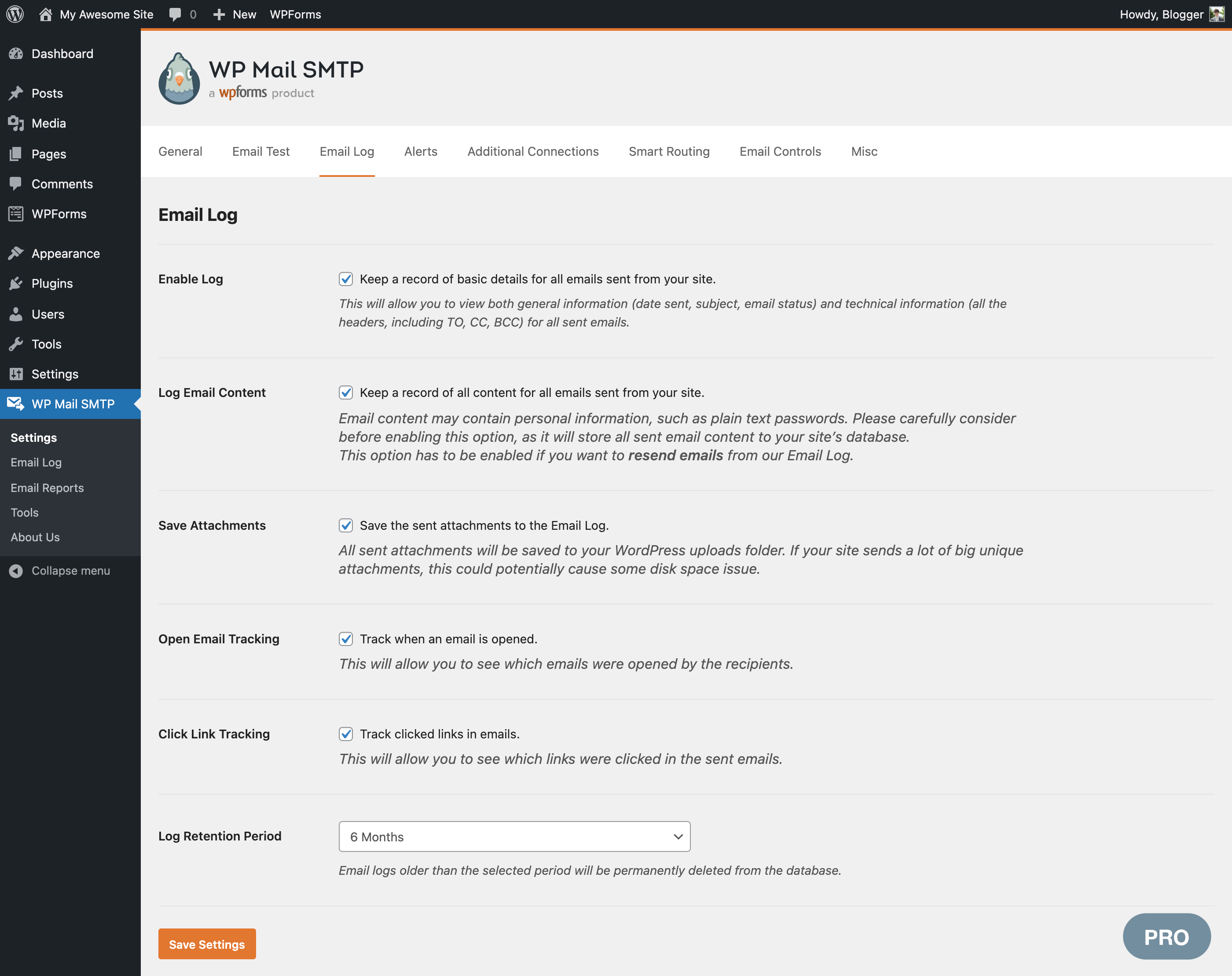
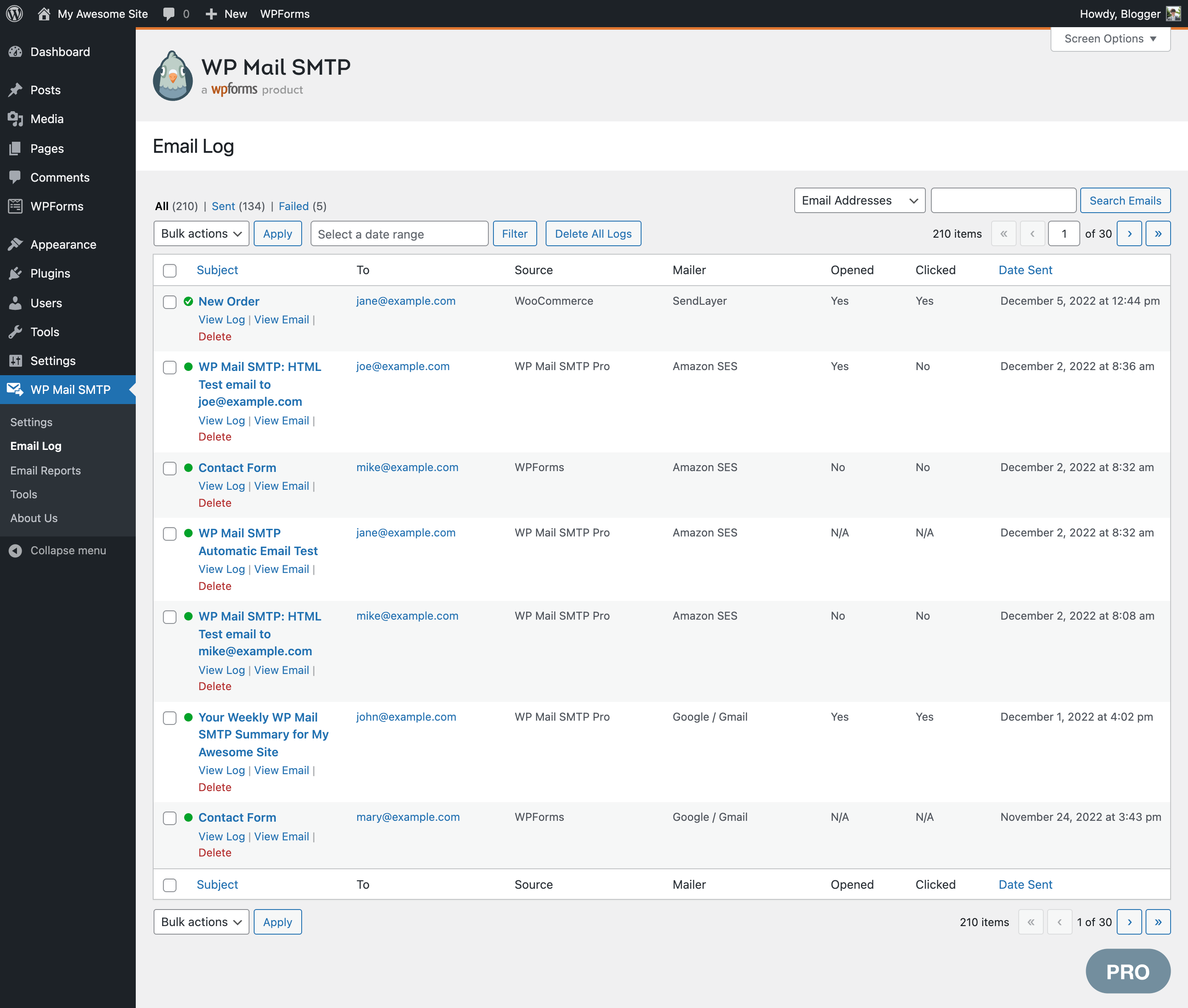
Email logging is a powerful feature that keeps a record of all sent emails in WordPress. Email logging helps you to archive, audit, resend, or test email delivery and formatting.
Our WordPress email logs also include:
Email Log Details
Our email logs provide a complete history of all emails sent from WordPress. View the subject, sender, recipients, content, headers, open and click rates, delivery status, source plugin, and more!
Resend Emails
Resend emails individually or in bulk, whether they failed or were delivered successfully. You can also forward important emails to an alternative email address.
And many more Email Log Features
Store all email attachments, export email logs, print emails, see delivery status, and more.
Email Reports (Pro)
Review weekly sent and failed emails in a dashboard chart.
Email reports make it easy to track deliverability and engagement. Open rates and click-through rates are grouped by subject line, making it easy to see the performance of your campaigns or notifications.
Weekly Email Summary
Get statistics about WordPress emails, including how many emails are being sent and which ones are being opened and clicked. The Summary also shows you deliverability statistics without the need to log in to WordPress to check them.
Track Email Opens and Clicks
View open and click stats for WordPress emails, grouped by subject line in your Email Report.
Email Alerts (Pro)
If your emails stop sending, get notified instantly via Slack, Microsoft Teams, Discord, SMS/ Twilio, webhooks, or email (via secure API).
In combination with our email logging and resending features, Email Alerts help make sure important emails don’t go missing.
Backup Connection (Pro)
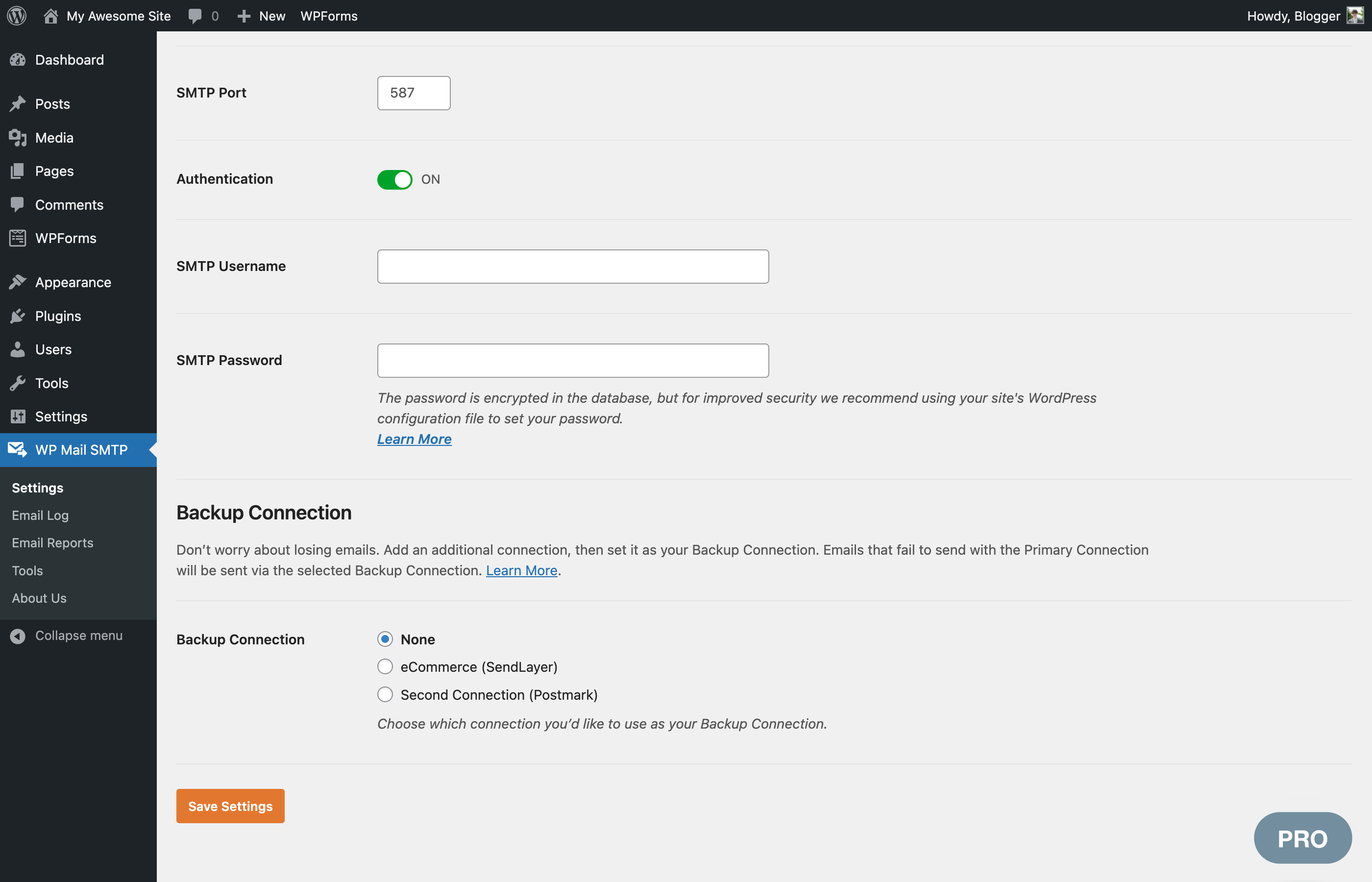
Configure an extra connection that kicks in if your primary connection fails. WP Mail SMTP automatically detects connection issues and automatically switches to the backup mailer. It will also automatically retry emails that failed.
Smart Conditional Routing (Pro)
Create criteria to send different types of emails using different mailers. Filter by the contents of the email Subject or Message, From or To addresses, the plugin that generated the email, and more.
This allows you to mix transactional and marketing providers to improve deliverability.
Rate Limiting (Pro)
Control the number of emails your WordPress site sends in a specific amount of time so you stay within your SMTP provider’s rate limits.
WP Mail SMTP allows you to specify the maximum number of emails that will be sent every minute, hour, day, week, or month and automatically queues emails to stay within those limits.
Optimized Email Sending (Pro)
Are emails slowing down your site? Let WP Mail SMTP queue your emails for better performance.
With optimized sending, emails are queued in the background and sent when your server has sufficient resources, avoiding bottlenecks that can slow down your site.
Manage WordPress Emails and Notifications (Pro)
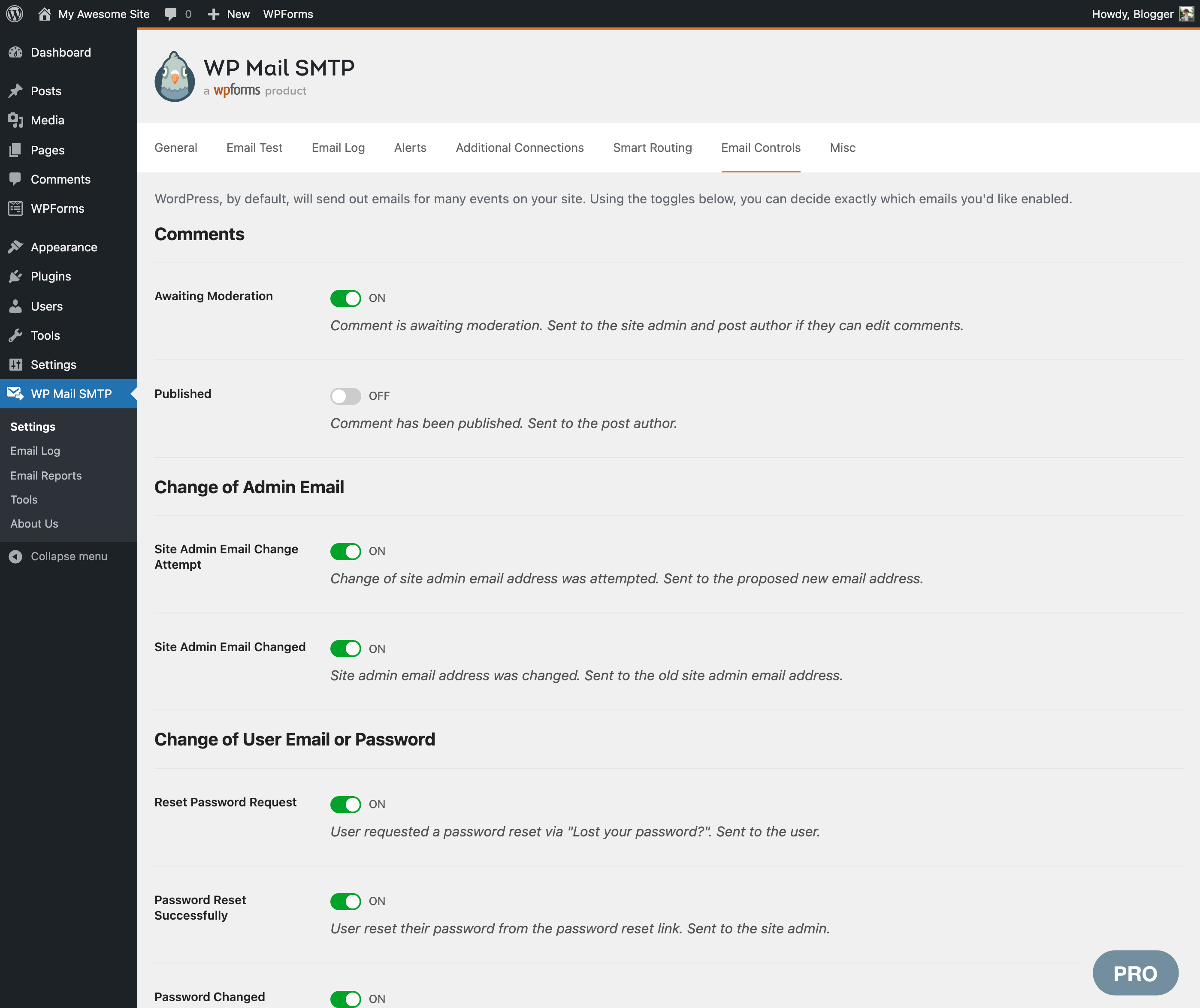
Control the default notifications WordPress sends. Use a simple switch to disable specific types of notifications if you don’t want to receive them.
WordPress Multisite (Pro)
WordPress Multisite Network Settings
For users running a multisite network, save time with a centralized location to easily configure your SMTP settings for all sites.
Manage Multisite Email Logs Easily
Network Admins can view and manage email logs for subsites with easy switching and dashboard views.
Expert Support
We provide limited support on the WordPress.org forums. One-on-one email support is available to WP Mail SMTP Pro users.
White Glove Setup (paid service)
If you’re not sure how to fix your emails, sit back and relax. We’ll set up WP Mail SMTP for you!
White Glove Setup includes installation, configuration in WordPress, DNS configuration, full mailer setup, and testing. White Glove Setup is available for our recommended mailers: SendLayer, Brevo, and SMTP.com.
Credits
WP Mail SMTP plugin was originally created by Callum Macdonald. It is now owned and maintained by the team behind WPForms – a drag & drop form builder for WordPress.
You can try the free version of WPForms plugin to give your visitors an easy way to contact you.
External services
WP Mail SMTP connects to the external services listed below. Each entry explains what is sent and when. Unless an entry says otherwise, requests to WP Mail SMTP services identify only the plugin version (for example WPMailSMTP/4.10.0). If you turn on usage tracking, they also include your WordPress version, site URL and license type.
Email sending providers
Your emails are sent through the mailer you choose in WP Mail SMTP > Settings. When WordPress sends an email, the message (recipients, subject, content, headers and attachments) and the credentials you entered are sent to that provider. Connecting an account (for example SendLayer Quick Connect or signing in with Google) and checking your mailer settings in the Setup Wizard also contact the provider you selected. No provider is contacted until you select and configure it.
Depending on the email provider you connect, the email data is sent using their SMTP servers subject to their respective Terms of Service and Privacy Policy which you can review individually by looking at respective integration provider you choose to connect with.
WP Mail SMTP API (wpmailsmtpapi.com)
- Error documentation: when an email fails to send, and you open a WP Mail SMTP admin page, a public list of help articles for known sending errors is downloaded, so the error notice can link to the right article. The request doesn’t include your mailer, site URL or any other details about your site. Results are cached for one week.
- Announcements Feed: plugin release announcements are downloaded via our announcement feed. This request doesn’t include your site URL or any other details about your site. You can also turn it off with “Hide Announcements” in WP Mail SMTP > Settings > Misc.
- Hosted Setup Wizard: when you click “Let’s Get Started” in the Setup Wizard, your site URL details are sent, so the wizard can recommend WP Mail SMTP settings for your site.
Terms: https://wpmailsmtp.com/terms/
Privacy policy: https://wpmailsmtp.com/privacy-policy/
WP Mail SMTP Connect (connect.wpmailsmtp.com)
- Domain check: your From email address, mailer and sending domain are sent to check your domain’s DNS records. This runs when you send a test email and at the end of the Setup Wizard. Tools > Site Health shows the result of your last check.
- Google sign-in: when you connect a Gmail account, Google’s authorization response passes through this service on its way back to your site.
Terms: https://wpmailsmtp.com/terms/
Privacy policy: https://wpmailsmtp.com/privacy-policy/
WP Mail SMTP usage tracking (wpmailsmtpusage.com)
Only when you turn on “Allow Usage Tracking” in WP Mail SMTP > Settings > Misc, which is off by default. If enabled, the plugin sends us relevant product usage diagnostics to help us improve the plugin and our service.
Terms: https://wpmailsmtp.com/terms/
Privacy policy: https://wpmailsmtp.com/privacy-policy/
Email Detective by SendLayer (detective.sendlayer.com)
When you run a deliverability test on the Email Detective page, your site sends a test email through your mailer to an address the service provides, and the result of that send (success, or the error message) is reported back. To perform this test, your site URL, mailer, plugin version and license type are sent to this service. If you ask for the report by email, the email address you enter is sent too.
Terms: https://sendlayer.com/terms-of-service/
Privacy policy: https://sendlayer.com/privacy-policy/
WPCode snippet library (library.wpcode.com)
When you open the Code Snippets page and the WPCode plugin isn’t active, a list of email-related code snippets is downloaded. The request identifies only the plugin version, unless usage tracking is on. Results are cached for one day.
Terms: https://wpcode.com/terms-of-service/
Privacy policy: https://wpcode.com/privacy-policy/
Installation
- Install WP Mail SMTP by WPForms either via the WordPress.org plugin repository or by uploading the files to your server. (See instructions on how to install a WordPress plugin)
- Activate WP Mail SMTP by WPForms.
- Navigate to the Settings area of WP Mail SMTP in the WordPress admin.
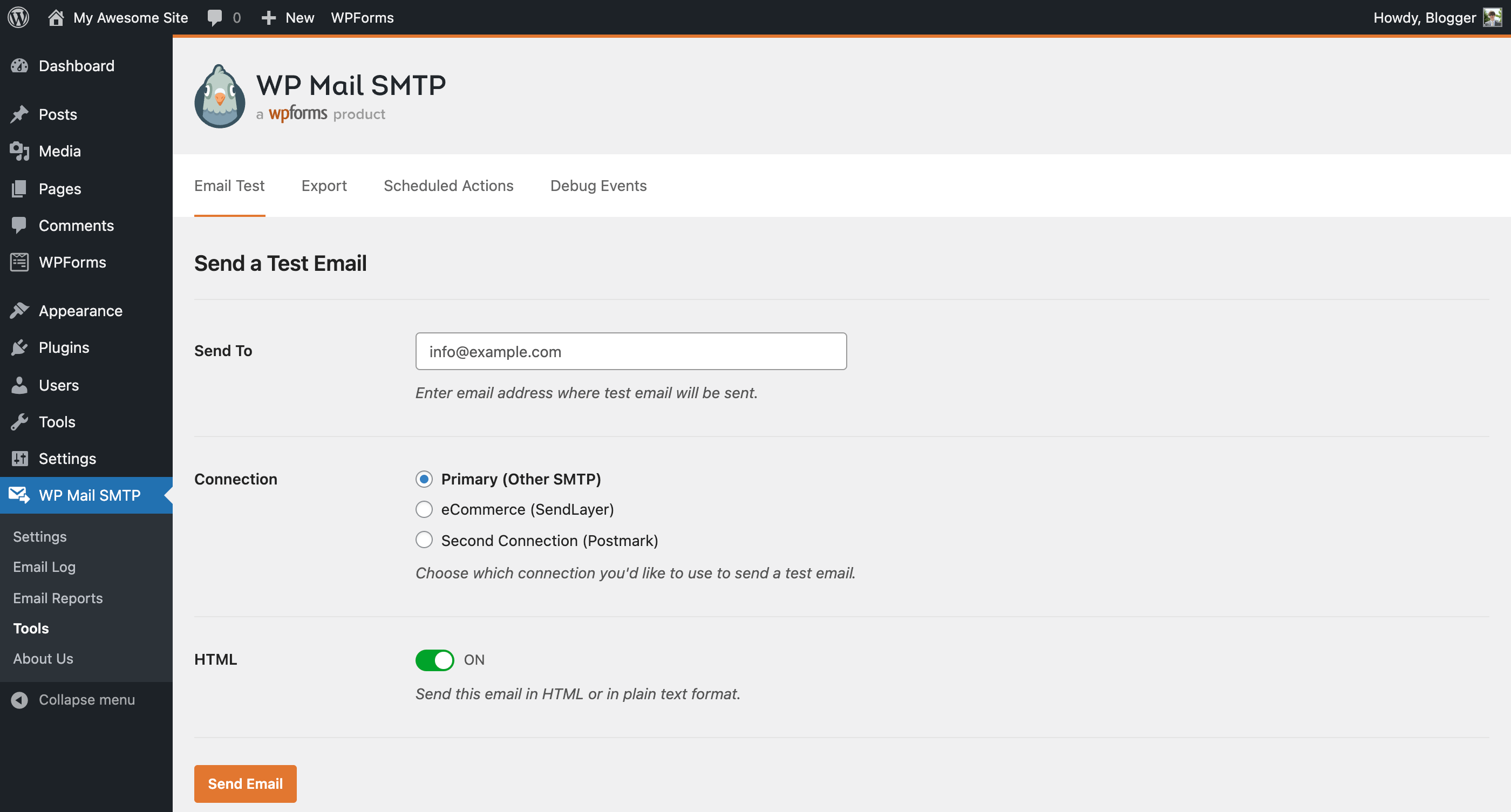
- Choose your SMTP option (SendLayer, SMTP.com, Brevo (formerly Sendinblue), Gmail SMTP, Elastic Email, Mailgun SMTP, Mailjet, SendGrid SMTP, Postmark, SparkPost, SMTP2GO, or Other SMTP) and follow the instructions to set it up.
- Need more help? Get support with WP Mail SMTP PRO.
Changelog
4.10.3 – 2026-10-20
- Changed: Improved the Setup Wizard steps.
4.10.2 – 2026-10-08
- Changed: Setup Wizard now returns to the Dashboard page instead of Settings when it is finished or closed.
- Changed: Improved translations across the admin area and the emails the plugin sends.
- Fixed: A “Class not found” fatal error could occur right after updating the plugin on sites with PHP OPcache enabled.
4.10.1 – 2026-10-07
- Changed: Improved security and privacy across the plugin, including temporary file storage and requests to external services.
- Fixed: Some Setup Wizard labels and the Lite install date in Site Health could not be translated.
- Fixed: The Posts, Pages and post editor screens failed with a fatal error on hosts without the PHP intl extension when another plugin, such as All in One SEO, used the intl IDN functions while the Gmail mailer was in use.
4.10.0 – 2026-09-30
- Added: New Dashboard page, now the default screen for WP Mail SMTP, with email statistics, a setup overview, connection status, and recommended next steps.
- Added: Setup Checklist: a new page that guides you through connecting a mailer, sending a test email, and the rest of your email setup, with progress tracked automatically.
- Added: Email Detective: a new tab on the Tools page that sends a test email through your primary connection and emails you a free deliverability report covering authentication, blocklists, and spam filter scoring.
- Added: Setup Wizard now verifies your mailer settings with your email provider before saving them, and guides you through each mailer’s required settings as numbered steps.
- Changed: Setup Wizard’s email test now reports the exact sending error with the fix steps for it, names the setting at fault where it can be identified, and shows the domain checker results.
- Changed: Updated Action Scheduler library to 4.1.0.
- Fixed: The plugin could not be activated on some sites and failed with a fatal error when its stored activation dates were saved in an unexpected format.
- Fixed: A database error was logged and the Dashboard widget’s email error alert never appeared on sites whose MySQL server treats double quotes as identifiers (ANSI_QUOTES mode).
- Fixed: The Setup Wizard’s test email did not send while the “Do Not Send” option was enabled.
- Fixed: Hardened permission checks and request handling across several admin features to address potential security issues.
4.9.0 – 2026-06-26
- Added: WP-CLI commands to configure WP Mail SMTP from the command line, including SMTP and API-key mailer setup and individual setting management.
- Added: Code Snippets tab on the Tools page to browse, preview, and install WP Mail SMTP’s WPCode snippets.
- Added: Support for the WordPress Abilities API (WordPress 6.9), letting connected tools and AI assistants securely read your debug events.
- Added: A one-click option to deactivate a conflicting plugin directly from the conflict notice.
- Added: Confirmation prompt before enabling the “Hide Email Delivery Errors” option, so the setting is not turned on by accident.
- Changed: Improved error handling and troubleshooting guidance when an email fails to send.
- Changed: Updated Action Scheduler library to 4.0.0.
- Fixed: The “Last week” stat in the Lite weekly summary email showed the just-started current week’s count instead of the actual previous week’s total, because the email is sent on Monday at 2pm.
- Fixed: Hardened permission checks and request handling across several admin features to address potential security issues.
4.8.0 – 2026-04-16
- Added: SendLayer Quick Connect – allows connecting to SendLayer without DNS setup in 2 minutes.
- Changed: Improved plugin security.
Screenshots

For developers
Is this your plugin? Show off the numbers.
Add a live badge to your site, docs or GitHub README. It updates on its own — no account needed.



Best WP Mail SMTP by WPForms alternatives
All brevo plugins →





FAQ
WP Mail SMTP by WPForms: quick answers
Straight answers, pulled from live WordPress.org data.
Live data from WordPress.org · checked Nov 10, 2026
Is WP Mail SMTP by WPForms free?
Yes. WP Mail SMTP by WPForms is free to download and use from the official WordPress.org plugin directory.
Is WP Mail SMTP by WPForms safe to use in 2026?
Yes — WP Mail SMTP by WPForms is a safe, well-maintained plugin to use in 2026. It runs on 4M+ sites, is rated 4.8/5 and was last updated 3 weeks ago, and scores 95/100 on our health check.
How many websites use WP Mail SMTP by WPForms?
WP Mail SMTP by WPForms is active on 4M+ WordPress websites and has been downloaded 90,917,288 times since it launched in September 2007. It was downloaded 2,903,846 times in the last 30 days.
Does WP Mail SMTP by WPForms work with WordPress 7.1?
Yes. The developer has tested WP Mail SMTP by WPForms up to WordPress 7.1.4, the latest release. It requires WordPress 5.5 or newer.
What PHP version does WP Mail SMTP by WPForms need?
WP Mail SMTP by WPForms requires PHP 7.4 or higher. Most hosts run PHP 8.x today, so it works on any modern WordPress hosting.
When was WP Mail SMTP by WPForms last updated?
The latest version, 4.10.3, was released on October 20, 2026 (3 weeks ago).
Who makes WP Mail SMTP by WPForms?
WP Mail SMTP by WPForms is developed and maintained by Syed Balkhi.
What are the best alternatives to WP Mail SMTP by WPForms?
The most popular alternatives to WP Mail SMTP by WPForms are Brevo (100K+ installs), Connect Contact Form 7 to M… (40K+ installs) and Integration for Elementor f… (8K+ installs).
Powered by PageForge
Want thousands of pages that rank like these? Build them in an afternoon.
This directory runs on the same engine as PageForge. Turn any spreadsheet, CSV or API into thousands of fast, SEO-ready WordPress pages — with schema, internal links and AI-written copy baked in.
- CSV, Google Sheets & API data sources
- AI content, schema & internal links per page
- Works with Elementor, Gutenberg, Yoast & Rank Math
- Free on WordPress.org — no credit card