


WP Edit
Welcome to WP Edit. Finally, take control of the default WordPress editor and unlock the power of additional editor tools. Arrange buttons into toolbars the way you want; to ease your workflow. WP Edit adds dozens of…

Use with caution
WP Edit works, but test it on a staging site before relying on it in 2026. It runs on 40K+ sites, is rated 4/5 and was last updated 8 years ago, and scores 43/100 on our health check.
- Proven at scale on 40K+ active sites
- No update in 8 years
- Only tested up to WordPress 4.9 (latest is 7.1)
How does it stack up?
Side-by-side on installs, updates, ratings & support


Daily downloads
Download spikes usually follow a new release — each site that auto-updates counts as a download.
Rankings
Where WP Edit stands todayWordPress.org search rankings
Live position in the plugin search, top 100| Keyword | Position |
|---|---|
| button | >100 |
| buttons | >100 |
| editor | >100 |
| wp edit | >100 |
| wpedit | #1 |
Version adoption
Share of active sites per release.
Rating breakdown
★★★★★★★★★★ 4 from 159 reviews
About WP Edit
From the official readme · v4.0.4Description
Welcome
Welcome to WP Edit. Finally, take control of the default WordPress editor and unlock the power of additional editor tools. Arrange buttons into toolbars the way you want; to ease your workflow. WP Edit adds dozens of additional custom options to the WordPress editor.
NEW Custom Buttons API
WP Edit now uses a custom buttons API which allows other plugin/theme developers to add their editor buttons into the WP Edit button configuration; allowing a WP Edit user to place the plugin/theme buttons into any desired location.
Refer your favorite plugin/theme developers to the WP Edit Custom Buttons API documentation to get your favorite buttons added to WP Edit.
Description
WP Edit is built around three years of custom WordPress development. WP Edit adds extensive, additional editing functionality to the default WordPress editor. Begin creating content like the pros; without knowing a single bit of HTML or CSS.
Subscribe to our Feedblitz List, and receive news, update notices and more.
Most Powerful Features
WP Edit will provide new buttons, additional options, and extended formatting abilities to the exisiting content editor.
- Easily insert images, media, YouTube videos, and clip art.
- Create tables via a graphical interface.
- Adjust table cell border and background colors.
- No need to learn HTML and CSS (although the basics can certainly help); use buttons with visual interfaces instead!
- Easily access all shortcodes available to your WordPress environment; and insert them into the content editor.
- Use shortcodes to insert columns.. similar to “magazine” style layouts, in your content areas.
Why should you use this plugin?
Because WP Edit is the culmination of three years development in the WordPress content editor. You can begin creating content (with advanced layouts); easily insert all types of external media (YouTube, Vimeo, etc.); adjust fonts, styles, colors, and sizes; and much more!
What is included in the free version?
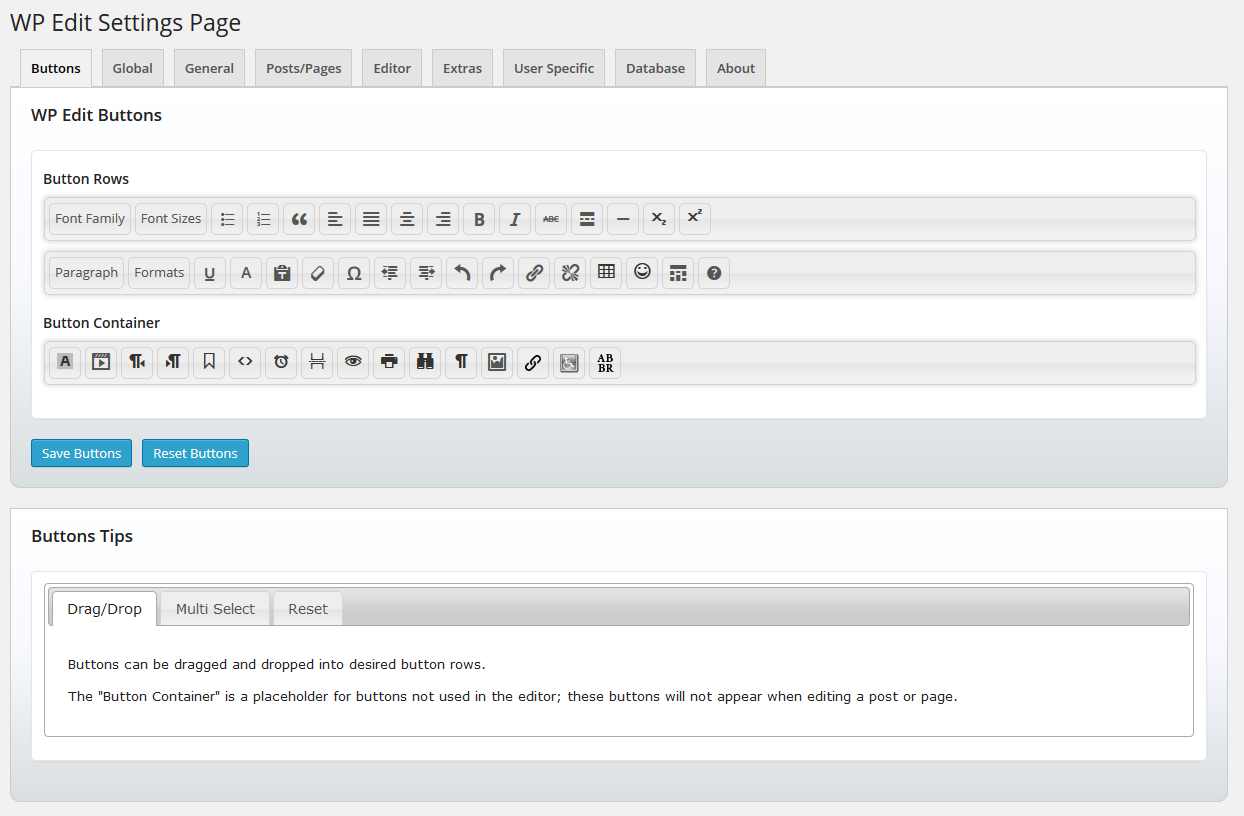
- Drag and drop functionality for custom creation of the top row of editor buttons.
- Adds additional editor buttons such as subscript, superscript, insert media, emoticons, search and replace, html editor, preview.. and many more.
- Add your custom editor to excerpt areas and profile descriptions.
- Allow shortcodes in excerpt and widget areas.
- Highlight admin posts/pages based on status (green = published, yellow = draft, etc.)
- Easily import/export plugin options.
Why should you upgrade to WP Edit Pro?
- Drag and drop functionality for custom creation of all rows of editor buttons.
- Powerful network installation functionality; WP Network Ready.
- User roles for custom button arrangements; allow different user roles access to different editor buttons.
- Extreme Custom Widget Builder – create custom widgets just like posts or pages.. and insert them into any widget area or the content editor.
Translations
- Spanish – Provided by Andrew Kurtis with “WebHostingHub”.
Notes
- This plugin is provided “as-is”; within the scope of WordPress. We will update this plugin to remain secure, and to follow WP coding standards.
- If you prefer more “dedicated” support, with more advanced and powerful plugin features, please consider upgrading to “WP Edit Pro”.
Resources
Installation
- From the WP admin panel, click “Plugins” -> “Add new”.
- In the browser input box, type “WP Edit”.
- Select the “WP Edit” plugin (authored by “josh401”), and click “Install”.
- Activate the plugin.
OR…
- Download the plugin from this page.
- Save the .zip file to a location on your computer.
- Open the WP admin panel, and click “Plugins” -> “Add new”.
- Click “upload”.. then browse to the .zip file downloaded from this page.
- Click “Install”.. and then “Activate plugin”.
OR…
- Download the plugin from this page.
- Extract the .zip file to a location on your computer.
- Use either FTP or your hosts cPanel to gain access to your website file directories.
- Browse to the
wp-content/pluginsdirectory. - Upload the extracted
wp_editfolder to this directory location. - Open the WP admin panel.. click the “Plugins” page.. and click “Activate” under the newly added “WP Edit” plugin.
Changelog
Nothing at the moment.
4.0.4
- Updated function for php7 and backwards compatibility (to rid php warning). Thanks @kendawes!
4.0.3
- Updated readme.
- Ensured plugin not generating any errors/warnings/notices with current version of WordPress.
- WordPress 5.0 will include “Gutenberg” (please research); and I am working on a compatible WP Edit version.
4.0.2
- 11/17/2017
- Tested to ensure WP 4.9 compatibility.
- Fixed icon to insert date/time.
- Fixed advanced link nofollow checkbox.
4.0.1
- 04/20/2017
- Fixed warnings when plugin is network activated (pertaining to buttons options).
- Altered readme file to better display in new WordPress plugins repository design.
4.0
- 10/03/2016
- Added Custom Buttons API; other plugins/themes can add buttons to WP Edit.
- Added dismissable admin notice for Custom Buttons API (help spread the word!).
- Added plugin rating statistics to sidebar (Please rate and review).
- Added nonce fields for every form submission used to save database options.
- Moved plugins.php page styles to properly enqueue (used for notices).
3.9
- 09/05/2016
- Added functionality to enable visual editor on BBPress forums (Editor tab).
- Fixed strict standards error on wp_widget_rss_output() function (final fix will be done upstream when WordPress 4.7 is released).
- Adjusted plugin css file.
Screenshots


For developers
Is this your plugin? Show off the numbers.
Add a live badge to your site, docs or GitHub README. It updates on its own — no account needed.
Best WP Edit alternatives
All button plugins →





FAQ
WP Edit: quick answers
Straight answers, pulled from live WordPress.org data.
Live data from WordPress.org · checked Nov 16, 2026
Is WP Edit free?
Yes. WP Edit is free to download and use from the official WordPress.org plugin directory.
Is WP Edit safe to use in 2026?
WP Edit works, but test it on a staging site before relying on it in 2026. It runs on 40K+ sites, is rated 4/5 and was last updated 8 years ago, and scores 43/100 on our health check.
How many websites use WP Edit?
WP Edit is active on 40K+ WordPress websites and has been downloaded 1,643,543 times since it launched in March 2014. It was downloaded 1,120 times in the last 30 days.
Does WP Edit work with WordPress 7.1?
WP Edit is officially tested up to WordPress 4.9.35, while the latest release is 7.1.4. It may still work, but try it on a staging site first.
When was WP Edit last updated?
The latest version, 4.0.4, was released on October 15, 2018 (8 years ago).
Who makes WP Edit?
WP Edit is developed and maintained by Josh.
What are the best alternatives to WP Edit?
The most popular alternatives to WP Edit are AddQuicktag (100K+ installs), Forget About Shortcode Butt… (20K+ installs) and jQuery Pin It Button for Im… (10K+ installs).
Powered by PageForge
Want thousands of pages that rank like these? Build them in an afternoon.
This directory runs on the same engine as PageForge. Turn any spreadsheet, CSV or API into thousands of fast, SEO-ready WordPress pages — with schema, internal links and AI-written copy baked in.
- CSV, Google Sheets & API data sources
- AI content, schema & internal links per page
- Works with Elementor, Gutenberg, Yoast & Rank Math
- Free on WordPress.org — no credit card


