


Forget About Shortcode Buttons
A visual way to add CSS buttons in the rich text editor and to your themes.

Consider an alternative
Forget About Shortcode Buttons shows warning signs in 2026 — compare the alternatives below before installing. It runs on 20K+ sites, is rated 4.7/5 and was last updated 2 years ago, and scores 35/100 on our health check.
- Proven at scale on 20K+ active sites
- Loved by users — 4.7/5 from 69 reviews
- Momentum — downloads up 25% vs the previous 30 days
- No update in 2 years
- Only tested up to WordPress 6.7 (latest is 7.1)
How does it stack up?
Side-by-side on installs, updates, ratings & support


Daily downloads
Download spikes usually follow a new release — each site that auto-updates counts as a download.
Rankings
Where Forget About Shortcode Butt… stands todayWordPress.org search rankings
Live position in the plugin search, top 100| Keyword | Position |
|---|---|
| button | >100 |
| css | >100 |
| edit | >100 |
| shortcode | >100 |
| visual editor | >100 |
Version adoption
Share of active sites per release.
Rating breakdown
★★★★★★★★★★ 4.7 from 69 reviews
About Forget About Shortcode Buttons
From the official readme · v2.1.3Description
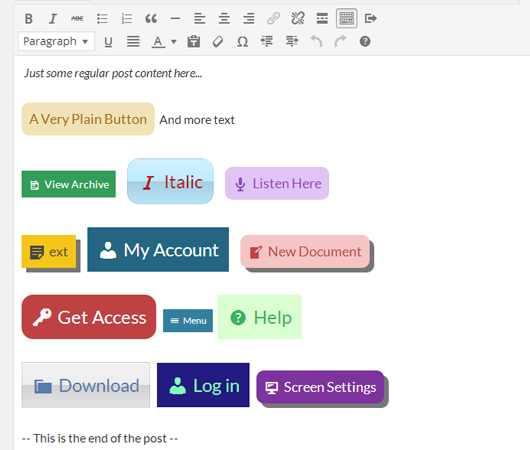
Forget About Shortcode (FASC) Buttons are a visual way to add CSS buttons in the rich text editor and to your themes. Instead of adding shortcodes in the post editor, you insert real, styled buttons – making the process of adding buttons to your posts and pages much more natural whilst improving the appearance and usability of the post editor.
FASC Buttons tries to be as clean as possible with the html, only using data attributes for necessary features – the buttons you use in the post editor use the exact same classes as on the front end of your site with no extra or hidden markup to make them behave this way.
-
New – add FASC buttons to widgets in WP 4.8 🙂
-
Editing a button couldn’t be easier – just double click a button and an options panel appears allowing you to completely reconfigure the current button – beats tedious shortcodes and using precise syntax!
-
Utilises the latest CSS properties for styling
-
Includes Dashicons & Font Awesome Icons to add to your buttons and use in your themes.
Your ratings mean a lot – if you like the plugin please consider leaving a review.
This plugin is only compatible with WordPress 4.2 and upwards (download version 1.x for compatibility with WP 3.9 – 4.1)
Links
Installation
- Upload the entire
forget-about-shortcode-buttonsfolder to the/wp-content/plugins/directory. - Activate the plugin through the ‘Plugins’ menu in WordPress.
For basic usage, you can also have a look at the plugin homepage.
Changelog
Users from 1.x should have no issues updating to 2.x - CSS & code have remained the same
2.1.3
- Fix – a potential security issue with nonce validation for authenticated users
2.1.2
- Fix – JS issues when no TinyMCE instance is loaded on the page
- Fix – better conditional loading of CSS and JS
2.1.1
- Fix – various issues with loading & the TinyMCE Editor
2.1.0
- New – added support for FASC buttons in WP 4.8 widget areas 🙂
- Fix – an issue with button styles in the admin area, only when they were selected (this is due to some new CSS classes being added in WP 4.8)
- Fix – some copy / paste issues and buttons losing their styles (WP 4.8 bug)
- Fix – a compatibility with other TinyMCE related plugins – FASC was extending the view object incorrectly
- Fix – some issues on the
PostProcessTinyMCE event, made sure FASC only handles this when there are FASC buttons to be handled
2.0.1
- Fix – an issue with the border effect on glossy buttons
- Fix – remove
box-shadowproperties from FASC buttons by default, some themes such as twentyseventeen add this to all anchor tags - Fix – remove button rollover/hover effects from TinyMCE editor
- Fix – some issues when using multiple buttons in a post, and their setting not being saved/retrieved correctly
2.0.0
- Rewritten the core to use WP standards – no more iframes – much quicker to load
- New – integrated with WP Views – inline toolbars for editing and deleting – more options to come
- New – UI refresh – should make it easier to edit buttons as you are going through button options – the new UI also paves the way for some upcoming new features 🙂
- New – Added bold, italic & strikethrough options from within the button editor – these are also saved to your templates
- New – nofollow option
- New – Add icons after buttons
- Fix – a bug where the popup wasn’t loading / showing forbidden
- Fully backwards compatible with buttons created in 1.x
Screenshots


For developers
Is this your plugin? Show off the numbers.
Add a live badge to your site, docs or GitHub README. It updates on its own — no account needed.
Best Forget About Shortcode Buttons alternatives
All button plugins →




FAQ
Forget About Shortcode Buttons: quick answers
Straight answers, pulled from live WordPress.org data.
Live data from WordPress.org · checked Nov 17, 2026
Is Forget About Shortcode Buttons free?
Yes. Forget About Shortcode Buttons is free to download and use from the official WordPress.org plugin directory.
Is Forget About Shortcode Buttons safe to use in 2026?
Forget About Shortcode Buttons shows warning signs in 2026 — compare the alternatives below before installing. It runs on 20K+ sites, is rated 4.7/5 and was last updated 2 years ago, and scores 35/100 on our health check.
How many websites use Forget About Shortcode Buttons?
Forget About Shortcode Buttons is active on 20K+ WordPress websites and has been downloaded 403,815 times since it launched in April 2014. It was downloaded 1,175 times in the last 30 days.
Does Forget About Shortcode Buttons work with WordPress 7.1?
Forget About Shortcode Buttons is officially tested up to WordPress 6.7.11, while the latest release is 7.1.4. It may still work, but try it on a staging site first.
When was Forget About Shortcode Buttons last updated?
The latest version, 2.1.3, was released on November 4, 2024 (2 years ago).
Who makes Forget About Shortcode Buttons?
Forget About Shortcode Buttons is developed and maintained by Code Amp.
What are the best alternatives to Forget About Shortcode Buttons?
The most popular alternatives to Forget About Shortcode Buttons are AddQuicktag (100K+ installs), WP Edit (40K+ installs) and jQuery Pin It Button for Im… (10K+ installs).
Powered by PageForge
Want thousands of pages that rank like these? Build them in an afternoon.
This directory runs on the same engine as PageForge. Turn any spreadsheet, CSV or API into thousands of fast, SEO-ready WordPress pages — with schema, internal links and AI-written copy baked in.
- CSV, Google Sheets & API data sources
- AI content, schema & internal links per page
- Works with Elementor, Gutenberg, Yoast & Rank Math
- Free on WordPress.org — no credit card


