


AddQuicktag
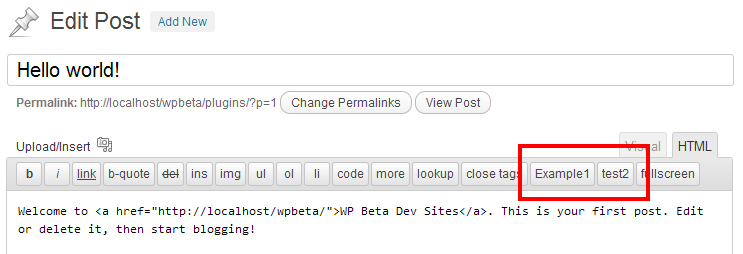
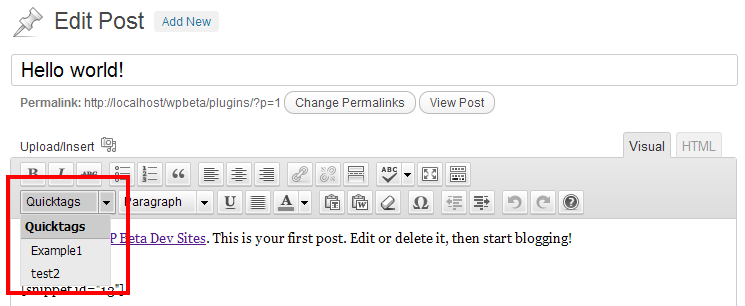
This plugin makes it easy to add Quicktags to the html - and visual-editor.

Safe pick
Yes — AddQuicktag is a safe, well-maintained plugin to use in 2026. It runs on 100K+ sites, is rated 4.7/5 and was last updated 2 months ago, and scores 87/100 on our health check.
- Proven at scale on 100K+ active sites
- Loved by users — 4.7/5 from 44 reviews
- Tested with the latest WordPress (7.1)
How does it stack up?
Side-by-side on installs, updates, ratings & support


Daily downloads
Download spikes usually follow a new release — each site that auto-updates counts as a download.
Rankings
Where AddQuicktag stands todayWordPress.org search rankings
Live position in the plugin search, top 100| Keyword | Position |
|---|---|
| button | >100 |
| editor | >100 |
| quicktag | #1 |
| tinyMCE | #11 |
Version adoption
Share of active sites per release.
Rating breakdown
★★★★★★★★★★ 4.7 from 44 reviews
About AddQuicktag
From the official readme · v2.6.2Description
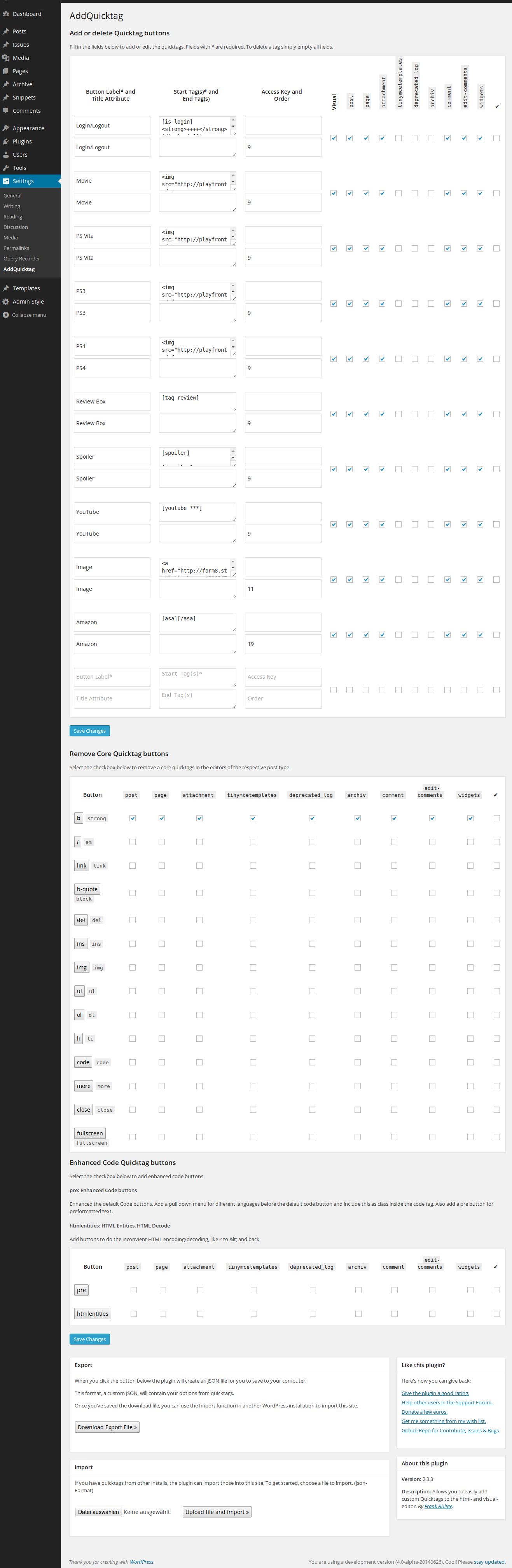
This plugin makes it easy to add Quicktags to the html – and visual-editor. It is possible to export your Quicktags as a JSON – file that can be imported in other installations of the plugin.
WP-AddQuicktag for WordPress is originally created by Roel Meurders. The versions in the Repo of AddQuicktag are newer versions, this is a complete rewrite of version 2.0.0 with more functionality.
The plugin can add configurable custom quicktags to the editor of every post type, including custom post types from other sources. You may choose a post type for which a quicktag shall show up in the editor.
If this should not work perfectly well for you, you may also use the hooks inside the plugin. See the examples and hint inside the tab “Other Notes“.
Bugs, technical hints or contribute
Please give me feedback, contribute and file technical bugs on GitHub Repo. The Wiki on this page has also several hints for the plugin.
Hook for custom post types
The plugin adds the quicktag by default to post types/ID post, page and comment. To use the plugin for other post types also you may use a filter; see the following example or an example plugin in the Gist 1595155.
// add custom function to filter hook 'addquicktag_post_types'
add_filter( 'addquicktag_post_types', 'my_addquicktag_post_types' );
/**
 * Return array $post_types with custom post types
 *
 * @param   $post_type Array
 * @return  $post_type Array
 */
function my_addquicktag_post_types( $post_types ) {

    $post_types[] = 'edit-comments';
    return $post_types;
}
Hook for custom pages
It is possible also to filter the pages inside the backend. By default the scripts include the pages post.php, comment.php. The following example changes this for an another page.
add_filter( 'addquicktag_pages', 'my_addquicktag_pages' );
/**
 * Return array $page with custom page strings
 *
 * @param   $page Array
 * @return  $page Array
 */
function my_addquicktag_pages( $page ) {

    $page[] = 'edit-comments.php';
    return $page;
}
See this Gist as an example for how to add the Quicktags to the editor of comments: Gist: 3076698.
If you want the Quicktags of this plugin to work on the Quickedit of comments as well, remove the .example-part of addquicktag_quickedit_comment.php.example filename. The file is a stand alone helper plugin for Add Quicktag. You’ll need to activate this file (plugin) separately in ‘Manage Plugins’.
Hook for custom buttons
It is possible to add custom buttons to the editor, if the plugin is active.
The following example adds buttons. The params inside the array are the same as in the settings of the plugin.
if ( class_exists( 'Add_Quicktag' ) ) :
add_filter( 'addquicktag_buttons', 'my_addquicktag_buttons' );

function my_addquicktag_buttons( $buttons ) {

    $buttons[] = array(
        'text'          => 'Permalink',
        'title'         => '',
        'start'         => '[permalink]',
        'end'           => '[/permalink]',
        'access'        => '',
        'order'         => 1,
        'visual'        => 1,
        'post'          => 0,
        'page'          => 1,
        'comment'       => 0,
        'edit-comments' => 0
    );
    $buttons[] = array(
        'text'          => 'Button',
        'title'         => '',
        'start'         => '<span class="border blue">',
        'end'           => '</span>',
        'access'        => '',
        'order'         => 2,
        'visual'        => 1,
        'post'          => 0,
        'page'          => 1,
        'comment'       => 0,
        'edit-comments' => 0
    );
    return $buttons;
}
endif;
License
Good news, this plugin is free for everyone! Since it’s released under the GPL, you can use it free of charge on your personal or commercial blog. But if you enjoy this plugin, you may consider to thank me and leave a positive review for the time I’ve spent writing and supporting this plugin. And I really don’t want to know how many hours of my life this plugin has already eaten 😉
Installation
Requirements
- WordPress version 4.0 and later (see Compatible up to)
Installation
- Unpack the download-package
- Upload the files to the
/wp-content/plugins/directory - Activate the plugin through the ‘Plugins’ menu in WordPress or for the Network, if you will use in Multisite for all Sites
- Got to ‘Settings’ menu and configure the plugin
Changelog
2.6.2 (2026-09-30)
- Fix: PHP 8.x “Undefined array key” warning when the network (multisite) settings form is submitted without a nonce (inc/class-settings.php). No behavior change — that path already rejected the request either way, just without the warning noise.
- Verified clean (no warnings, no errors) under PHP 8.2 and WordPress 7.1.
2.6.1 (2021-05-20)
- Fix storage and update of post type checkboxes in the settings pages.
2.6.0 (2021-04-29)
- Maintenance for the jQuery Update to run with the last WP Core update, jQuery 3.5*
- Maintenance several code styles, testing PHP7/8
- Remove dependecies for WP version smaller 3.3
2.5.3 (2018-11-06)
- Fix error warning in edit mode without button settings.
2.5.2 (2017-11-16)
- Fixed several code strict style issues.
- Fixed javascript topics to write more strict.
2.5.1 (2017-03-09)
- Fixed Multisite error for check, is the plugin active in the MU Environment.
Screenshots
For developers
Is this your plugin? Show off the numbers.
Add a live badge to your site, docs or GitHub README. It updates on its own — no account needed.
Best AddQuicktag alternatives
All button plugins →





FAQ
AddQuicktag: quick answers
Straight answers, pulled from live WordPress.org data.
Live data from WordPress.org · checked Nov 16, 2026
Is AddQuicktag free?
Yes. AddQuicktag is free to download and use from the official WordPress.org plugin directory.
Is AddQuicktag safe to use in 2026?
Yes — AddQuicktag is a safe, well-maintained plugin to use in 2026. It runs on 100K+ sites, is rated 4.7/5 and was last updated 2 months ago, and scores 87/100 on our health check.
How many websites use AddQuicktag?
AddQuicktag is active on 100K+ WordPress websites and has been downloaded 1,449,257 times since it launched in May 2007. It was downloaded 21,391 times in the last 30 days.
Does AddQuicktag work with WordPress 7.1?
Yes. The developer has tested AddQuicktag up to WordPress 7.1.4, the latest release. It requires WordPress 4.0 or newer.
When was AddQuicktag last updated?
The latest version, 2.6.2, was released on October 1, 2026 (2 months ago).
Who makes AddQuicktag?
AddQuicktag is developed and maintained by Frank Bueltge.
What are the best alternatives to AddQuicktag?
The most popular alternatives to AddQuicktag are WP Edit (40K+ installs), Forget About Shortcode Butt… (20K+ installs) and jQuery Pin It Button for Im… (10K+ installs).
Powered by PageForge
Want thousands of pages that rank like these? Build them in an afternoon.
This directory runs on the same engine as PageForge. Turn any spreadsheet, CSV or API into thousands of fast, SEO-ready WordPress pages — with schema, internal links and AI-written copy baked in.
- CSV, Google Sheets & API data sources
- AI content, schema & internal links per page
- Works with Elementor, Gutenberg, Yoast & Rank Math
- Free on WordPress.org — no credit card


