


Custom Add To Cart Button for WooCommerce
Custom Add To Cart Button for WooCommerce is a simple plugin to customize your store’s add to cart buttons. It makes it easy to change the ‘Add to cart’ button text, add a cart icon to the button, replace the text with…

Consider an alternative
Custom Add To Cart Button for W… shows warning signs in 2026 — compare the alternatives below before installing. It runs on 9K+ sites, is rated 3.9/5 and was last updated 2 years ago, and scores 40/100 on our health check.
- No update in over a year
- Only tested up to WordPress 6.7 (latest is 7.1)
How does it stack up?
Side-by-side on installs, updates, ratings & support


Daily downloads
Download spikes usually follow a new release — each site that auto-updates counts as a download.
Rankings
Where Custom Add To Cart Button f… stands todayWordPress.org search rankings
Live position in the plugin search, top 100| Keyword | Position |
|---|---|
| button | >100 |
| cart | >100 |
| woocommerce | >100 |
Version adoption
Share of active sites per release.
Rating breakdown
★★★★★★★★★★ 3.9 from 8 reviews
About Custom Add To Cart Button for WooCommer…
From the official readme · v1.2.6Description
Custom Add To Cart Button for WooCommerce is a simple plugin to customize your store’s add to cart buttons. It makes it easy to change the ‘Add to cart’ button text, add a cart icon to the button, replace the text with just an icon, or change the background and text color.
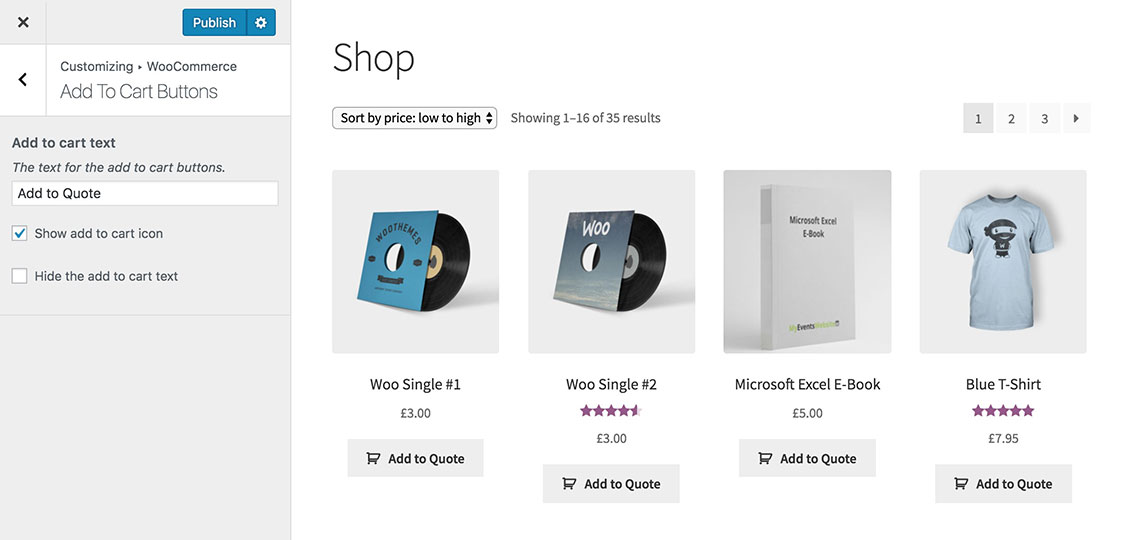
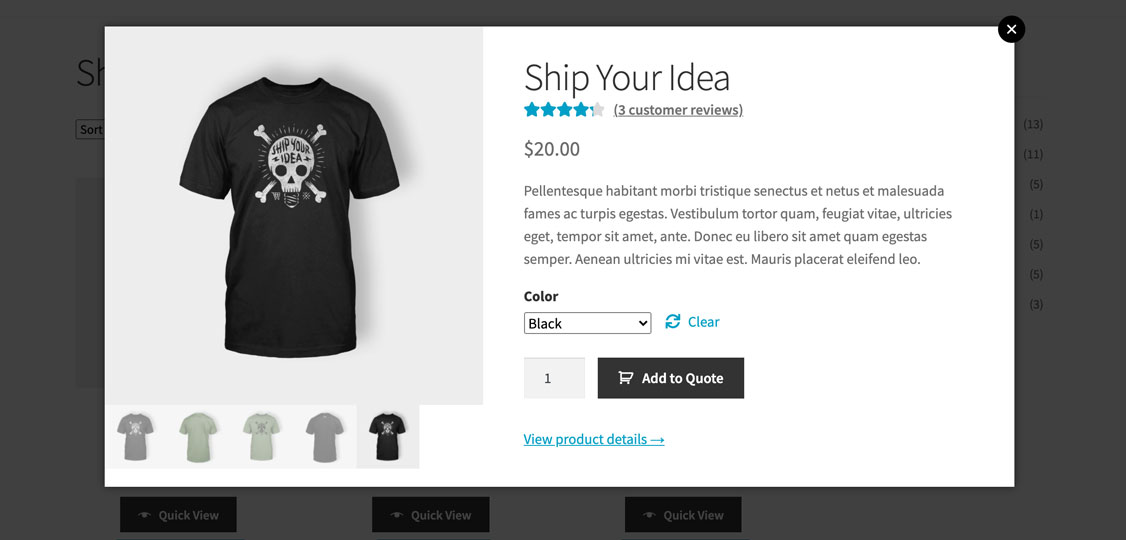
There are lots of reasons why you might want to change the add to cart text. Depending on how you’re using WooCommerce you might want the button to say something different like ‘Add to quote’, ‘Buy Now’, ‘BOOK EVENT’, ‘Enrol’ or ‘Make an Enquiry’.
You might want to make the button more visual by adding a cart icon before the text. Or you may want to replace the button text and just show a cart icon. The plugin uses the same cart icon that is built into WooCommerce itself.
Add to cart button options:
- Change the WooCommerce add to cart button text
- Add a cart icon next to the text
- Remove the text and just show a cart icon
- Case sensitive, so you get full control over whether the add to cart button text appears in uppercase, lowercase or sentence case
- Change the WooCommerce add to cart button color
- Change the color of WooCommerce add to cart button text
Custom Add To Cart Button for WooCommerce is fully accessible. If you choose to display just the cart icon, the text is still present in the HTML and can be read by screen readers.
Options are set in the Customizer. Once installed, go to Appearance -> Customize -> WooCommerce -> Add to Cart Buttons and choose your settings.
Custom Add To Cart Button for WooCommerce is fully compatible with other Kestrel plugins, including:
- Express Shop Page – Select variations and quantities without leaving the shop page.
- Discontinued Products – Set WooCommerce products as “discontinued” without removing them from your store.
- Variation Prices – Improve the display of variation prices in your WooCommerce store.
- Product Sample – Let customers “try before they buy” with free or paid product samples.
Installation
- Install via the Plugins screen in your WordPress dashboard, or download the ZIP, extract it, and upload to the
/wp-content/plugins/directory. - Activate the plugin through the Plugins screen.
- Go to Appearance -> Customize, then go to WooCommerce -> Add to Cart Buttons to choose your settings.
- Change the Add To Cart button text and/or select the other options on this screen.
Frequently asked questions
Will it work with my theme?
The plugin inherits the styles from your theme. This means that the button size and font will be the same as the existing add to cart buttons in your store. The plugin will change the text and add an icon without affecting the overall button styling.
Can I choose a different icon, change the size, change colors, etc?
We’ve kept the plugin deliberately simple and it’s not currently possible to make other changes such as different icons. Please use the support tab or our feature request form if there’s anything else you’d like the plugin to do. We will add new features if there is enough demand.
Changelog
The plugin now requires a minimum PHP version of 5.4.
1.2.6
Release date 24 March 2025
- Misc: Update plugin name to Custom Add To Cart Button for WooCommerce
- Dev: Tested up to WordPress 6.7.2 and WooCommerce 9.7.1
1.2.5
Release date 22 May 2024
- Fix: Ensure the plugin does not activate if WooCommerce is not active
1.2.4
Release date 27 March 2024
- Misc: Update author to Kestrel
- Dev: Tested up to WordPress 6.5 and WooCommerce 8.7
1.2.3
Release date 14 November 2023
- Fix: The color was not changing for the block themes
- Dev: Tested up to WordPress 6.4 and WooCommerce 8.2.2
1.2.2
Release date 15 Aug 2023
- Dev: Added HPOS compatibility
- Dev: Tested up to WooCommerce 8.0.1
1.2.1
Release date 20 June 2023
- Fix: Apply the background and text color to all buttons
Screenshots




For developers
Is this your plugin? Show off the numbers.
Add a live badge to your site, docs or GitHub README. It updates on its own — no account needed.
Best Custom Add To Cart Button for… alternatives
All button plugins →





FAQ
Custom Add To Cart Button for WooCo…: quick answers
Straight answers, pulled from live WordPress.org data.
Live data from WordPress.org · checked Sep 26, 2026
Is Custom Add To Cart Button for W… free?
Yes. Custom Add To Cart Button for W… is free to download and use from the official WordPress.org plugin directory.
Is Custom Add To Cart Button for W… safe to use in 2026?
Custom Add To Cart Button for W… shows warning signs in 2026 — compare the alternatives below before installing. It runs on 9K+ sites, is rated 3.9/5 and was last updated 2 years ago, and scores 40/100 on our health check.
How many websites use Custom Add To Cart Button for W…?
Custom Add To Cart Button for W… is active on 9K+ WordPress websites and has been downloaded 189,193 times since it launched in February 2018. It was downloaded 407 times in the last 30 days.
Does Custom Add To Cart Button for W… work with WordPress 7.1?
Custom Add To Cart Button for W… is officially tested up to WordPress 6.7.9, while the latest release is 7.1.2. It may still work, but try it on a staging site first.
What PHP version does Custom Add To Cart Button for W… need?
Custom Add To Cart Button for W… requires PHP 7.4 or higher. Most hosts run PHP 8.x today, so it works on any modern WordPress hosting.
When was Custom Add To Cart Button for W… last updated?
The latest version, 1.2.6, was released on March 24, 2025 (2 years ago).
Who makes Custom Add To Cart Button for W…?
Custom Add To Cart Button for W… is developed and maintained by Kestrel.
What are the best alternatives to Custom Add To Cart Button for W…?
The most popular alternatives to Custom Add To Cart Button for W… are AddQuicktag (100K+ installs), WP Edit (40K+ installs) and Forget About Shortcode Butt… (20K+ installs).
Powered by PageForge
Want thousands of pages that rank like these? Build them in an afternoon.
This directory runs on the same engine as PageForge. Turn any spreadsheet, CSV or API into thousands of fast, SEO-ready WordPress pages — with schema, internal links and AI-written copy baked in.
- CSV, Google Sheets & API data sources
- AI content, schema & internal links per page
- Works with Elementor, Gutenberg, Yoast & Rank Math
- Free on WordPress.org — no credit card


