


WilderWoods AltText – AI Alt Text Generator for WordPress
Bulk AI alt text generator. No API keys. 40 free credits. Credits don't expire. Share one balance across sites. No subscriptions.

Solid choice
WilderWoods AltText is a solid plugin choice in 2026, with a few things worth checking first. It runs on 10+ sites, is rated 5/5 and was last updated 1 day ago, and scores 73/100 on our health check.
- Actively developed — last update 1 day ago
- Tested with the latest WordPress (7.1)
- Small user base (10+ active installs)
- Very few reviews so far
How does it stack up?
Side-by-side on installs, updates, ratings & support



Daily downloads
Download spikes usually follow a new release — each site that auto-updates counts as a download.
Rankings
Where WilderWoods AltText stands todayWordPress.org search rankings
Live position in the plugin search, top 100| Keyword | Position |
|---|---|
| accessibility | >100 |
| AI alt text | #96 |
| Alt Text | #79 |
| seo | >100 |
| wcag | >100 |
Version adoption
Share of active sites per release.
Rating breakdown
★★★★★★★★★★ 5 from 1 reviews
About WilderWoods AltText
From the official readme · v1.0.3Description
Generate accessible AI alt text for your WordPress Media Library in bulk or one click – without API keys, subscriptions, or complicated setup. It analyzes your existing images and generates accessible, natural-sounding alt text in your site’s language, plus optional titles, captions, and descriptions, to help you work towards WCAG compliance.
Connect your site with one click and get 40 free credits to start generating. Need more later? Buy a credit pack directly from the Settings page whenever you run low – packs never expire, so there’s no subscription and no clock ticking on unused credits.
Credits don’t expire, and one credit balance can be shared across multiple WordPress sites using your Sync Key. Bulk jobs run in the background, so you can process large Media Libraries without keeping your browser open.
This plugin connects to a remote cloud service to function. Using it requires an explicit opt-in: click “Save Key & Connect to Cloud” on the Settings page, or click “Generate” on any image. Each image generation uses one credit. See “External Services” below for exactly what’s sent, where, and why.
🛠️ Key Features
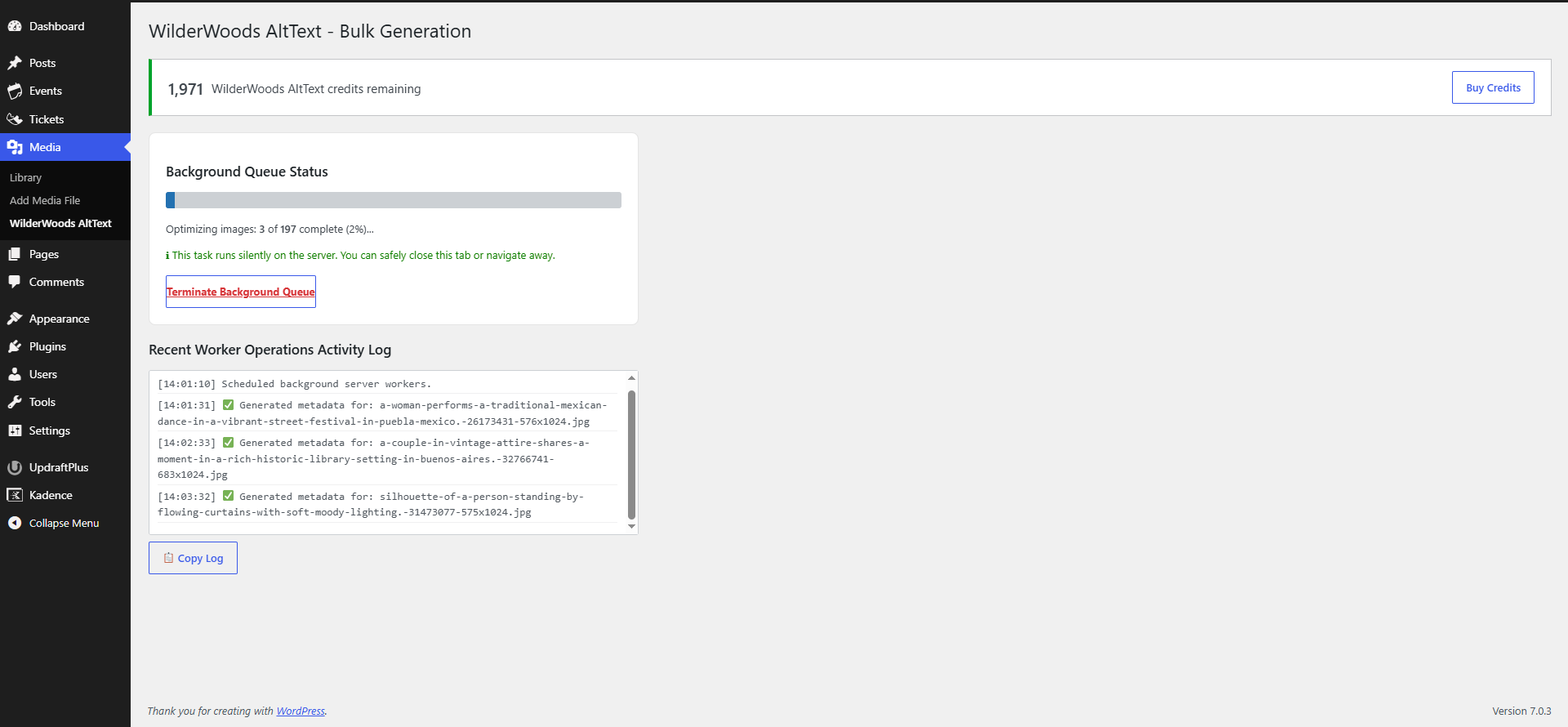
- Bulk Generation: Queue your entire Media Library for background processing.
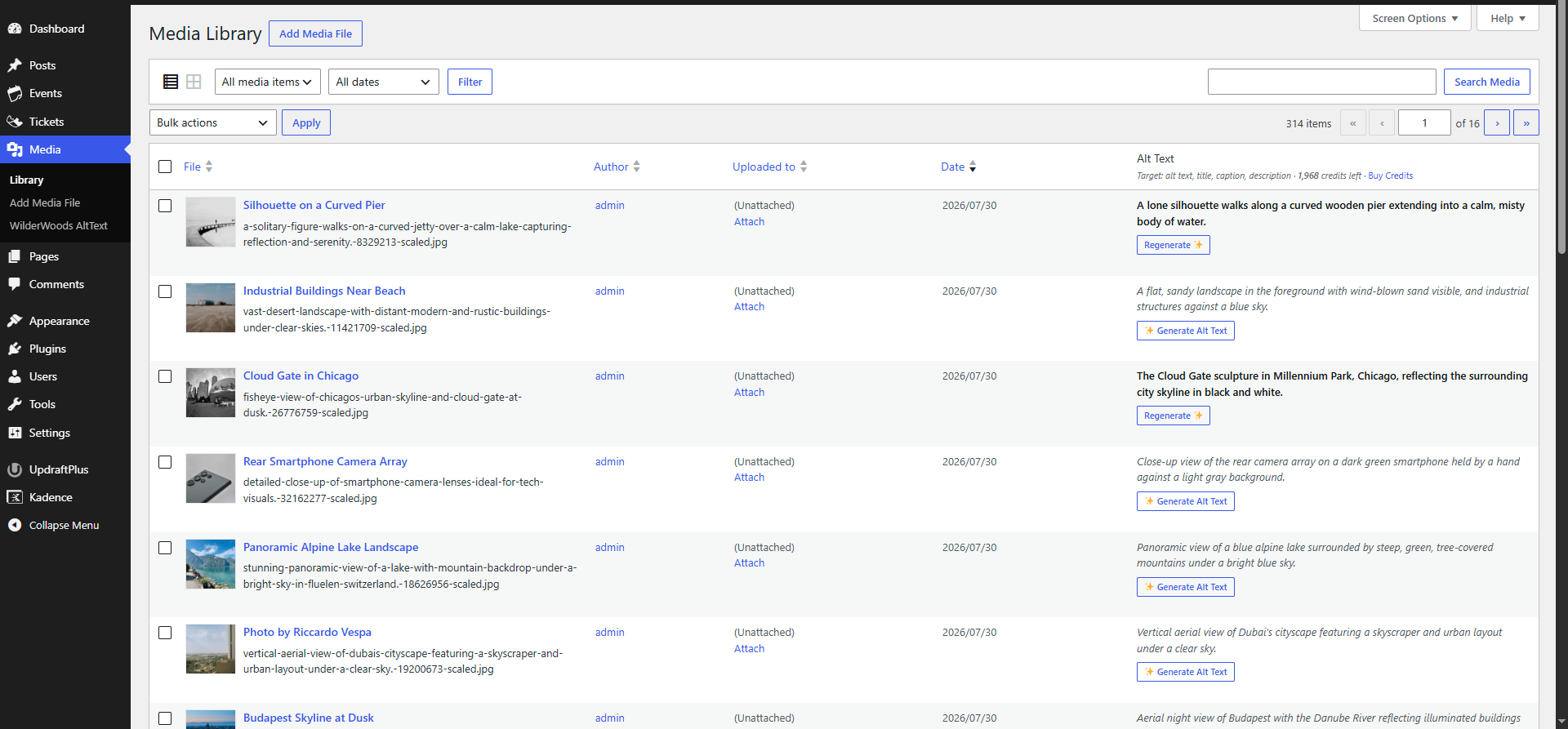
- On-Demand Generation: Generate metadata for individual images directly from the Media Library grid or list view.
- Smart & Respectful: Existing metadata isn’t overwritten unless Force overwrite is enabled.
- Total Control: Choose independently which metadata fields to generate.
- Accessibility First: Generate descriptive, meaningful alt text to help make content more accessible to screen reader users and work towards WCAG compliance.
- Multi-Site Credits: Share one credit balance across multiple WordPress sites using your Sync Key.
- Multi-Language Support: Automatically matches your site’s language, or override it to generate metadata in any language you choose.
🚀 How It Works
- Install and activate the plugin.
- Connect your site in Settings to receive your 40 free credits.
- Generate metadata for individual images or run a Bulk Job and let the AI process your images.
🔒 External Services & Privacy
This plugin connects to a remote cloud service to function. AI processing happens securely in the cloud. By using this service, you agree to our Terms of Service and Privacy Policy. Specifically:
- Image analysis: When generating metadata, the image’s public URL and a short site summary (site name, homepage description, navigation labels – just enough for the AI to understand your niche, e.g. woodworking rather than travel) are sent to WilderWoods AltText Cloud, which forwards the image to Google’s Gemini API and returns the generated text. No image files are sent directly from your server to Google. Google’s Privacy Policy applies.
- Account & payments: Your site is identified by a randomly generated Sync Key – never your name, email, or WordPress account. Credit pack purchases are processed by Freemius; see their Privacy Policy and Terms of Service.
- No visitor content is sent. Only image URLs and the site summary above are transmitted, and only when you explicitly generate metadata, start a bulk job, or connect via Settings.
Installation
- Upload the plugin files to
/wp-content/plugins/wilderwoods-alttext, or install directly through the Plugins screen in WordPress. - Activate the plugin through the Plugins screen in WordPress.
- Visit Settings → WilderWoods AltText Settings and click Save Key & Connect to Cloud to register your site and receive your 40 free credits.
- Open your Media Library and click Generate Alt Text to generate metadata for any image.
- To configure which metadata fields are generated or run a bulk generation job, visit Media → WilderWoods AltText or Settings → WilderWoods AltText Settings.
Frequently asked questions
Do I need a Google Gemini API key?
No. The cloud service handles the Gemini API connection for you.
Can I process my entire Media Library?
Yes. Queue your existing Media Library for background processing, allowing large libraries to be processed even after you close your browser.
Do my credits expire?
No. Purchased credits don’t expire while the service is active.
Can I use one credit pack across multiple sites?
Yes. Use your Sync Key to share one credit balance across the WordPress sites you manage.
What happens when I run out of credits?
Generation stops with a clear message prompting you to top up. You can buy a new credit pack directly from the Settings page – packs never expire. Nothing breaks, and any bulk job in progress halts cleanly.
Does this overwrite metadata I’ve already written?
Not by default. Bulk generation only fills fields that are currently empty unless you enable Force overwrite in Settings. Manually clicking Generate or Regenerate on a single image always overwrites that image because it’s an intentional action.
Is my data sent anywhere?
See the External Services section above for a full explanation of what is sent, where it is sent, and why.
Changelog
Adds multi-language support for metadata generation and eliminates the need for manual page refreshes in the Media Library Grid View.
1.0.3
- Added: Generation Language setting. Metadata is now generated in your site’s native language by default, with the ability to override it to any predefined or custom language.
- Improved: Media Library Grid View modal now updates all metadata fields (Alt, Title, Caption, Description) instantly without requiring a manual page refresh.
- Fixed: Hardened backend credit accounting to ensure users are never charged for temporary external AI outages or transient database connection hiccups.
1.0.2
- Improved: Account Sync Key is now masked by default with Show/Hide and Copy controls to prevent accidental exposure in screenshots and screen shares.
- Improved: Replaced UI emojis with native WordPress Dashicons for a cleaner, more professional admin aesthetic.
1.0.1
- Fixed: Image generation now works on hosts with strict security firewalls (e.g. SiteGround) via a new hybrid image delivery architecture.
- Fixed: Resolved a race condition where cancelling the bulk queue while an image was processing could cause the queue to resume unexpectedly.
- Improved: More robust local media file detection for sites using media folder plugins or that have been migrated between hosts.
1.0.0
- Initial release.
Screenshots

For developers
Is this your plugin? Show off the numbers.
Add a live badge to your site, docs or GitHub README. It updates on its own — no account needed.
Best WilderWoods AltText alternatives
All accessibility plugins →





FAQ
WilderWoods AltText: quick answers
Straight answers, pulled from live WordPress.org data.
Live data from WordPress.org · checked Oct 9, 2026
Is WilderWoods AltText free?
Yes. WilderWoods AltText is free to download and use from the official WordPress.org plugin directory.
Is WilderWoods AltText safe to use in 2026?
WilderWoods AltText is a solid plugin choice in 2026, with a few things worth checking first. It runs on 10+ sites, is rated 5/5 and was last updated 1 day ago, and scores 73/100 on our health check.
How many websites use WilderWoods AltText?
WilderWoods AltText is active on 10+ WordPress websites and has been downloaded 524 times since it launched in August 2026. It was downloaded 191 times in the last 30 days.
Does WilderWoods AltText work with WordPress 7.1?
Yes. The developer has tested WilderWoods AltText up to WordPress 7.1.3, the latest release. It requires WordPress 6.4 or newer.
What PHP version does WilderWoods AltText need?
WilderWoods AltText requires PHP 7.4 or higher. Most hosts run PHP 8.x today, so it works on any modern WordPress hosting.
When was WilderWoods AltText last updated?
The latest version, 1.0.3, was released on October 8, 2026 (1 day ago).
Who makes WilderWoods AltText?
WilderWoods AltText is developed and maintained by danewoods.
What are the best alternatives to WilderWoods AltText?
The most popular alternatives to WilderWoods AltText are Web Accessibility (formally… (500K+ installs), Auto Image Attributes From… (100K+ installs) and Accessibility by UserWay (80K+ installs).
Powered by PageForge
Want thousands of pages that rank like these? Build them in an afternoon.
This directory runs on the same engine as PageForge. Turn any spreadsheet, CSV or API into thousands of fast, SEO-ready WordPress pages — with schema, internal links and AI-written copy baked in.
- CSV, Google Sheets & API data sources
- AI content, schema & internal links per page
- Works with Elementor, Gutenberg, Yoast & Rank Math
- Free on WordPress.org — no credit card


