


AccessibleWP – Accessibility Toolbar
Add a professional accessibility toolbar to your WordPress site and make it easier for users with disabilities.

Use with caution
AccessibleWP works, but test it on a staging site before relying on it in 2026. It runs on 10K+ sites, is rated 4.5/5 and was last updated 2 years ago, and scores 45/100 on our health check.
- Proven at scale on 10K+ active sites
- Loved by users — 4.5/5 from 47 reviews
- Momentum — downloads up 17.1% vs the previous 30 days
- No update in 2 years
- Only tested up to WordPress 6.6 (latest is 7.1)
How does it stack up?
Side-by-side on installs, updates, ratings & support



Daily downloads
Download spikes usually follow a new release — each site that auto-updates counts as a download.
Rankings
Where AccessibleWP stands todayWordPress.org search rankings
Live position in the plugin search, top 100| Keyword | Position |
|---|---|
| a11y | #37 |
| accessibility | >100 |
| Section 508 | #22 |
| WAI | #11 |
| wcag | >100 |
Version adoption
Share of active sites per release.
Rating breakdown
★★★★★★★★★★ 4.5 from 47 reviews
About AccessibleWP – Accessibility Toolbar
From the official readme · v5.4.0Description
Add a professional accessibility toolbar to your WordPress site and make it easier for users with disabilities.
Toolbar Options
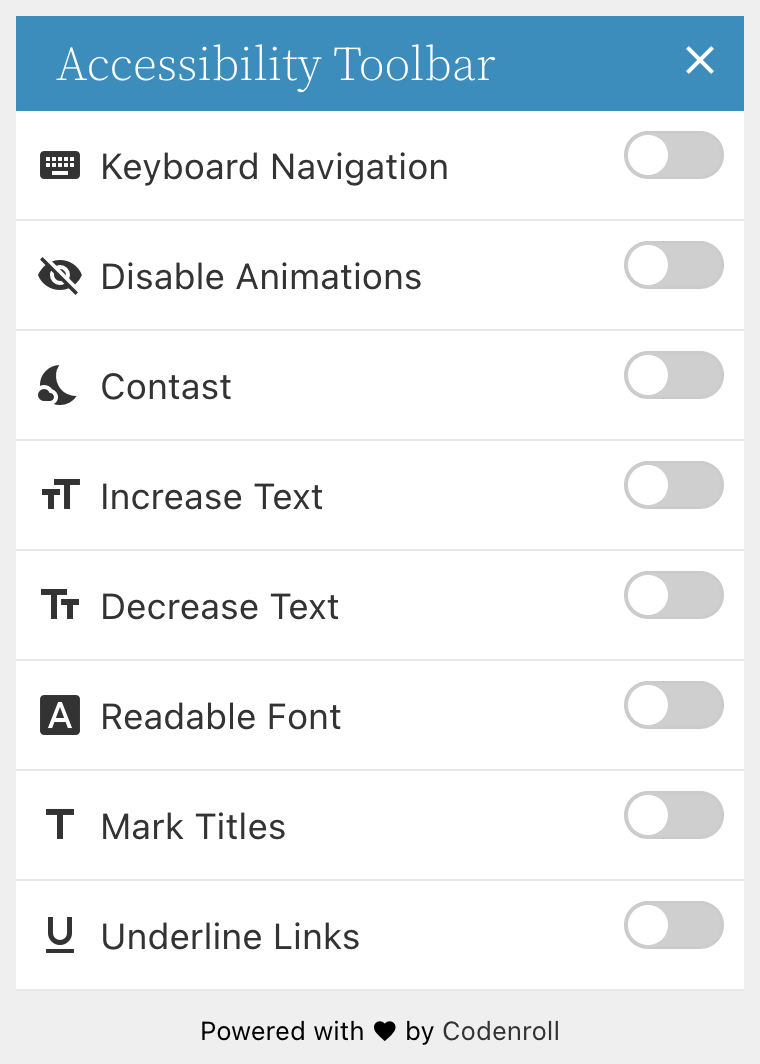
- Keyboard Navigation – Allows to navigate using the keyboard
- Disable Animation – Allows to disable CSS3 animations
- Dark Contrast – Allows to change the site colors to colors with dark contrast (also let you choose the colors if you want)
- Change Font Size – Allows to increase or decrease the font size
- Readable Font – Allows to change the font-family to more readable font (also let you choose which font is the readable font if you want)
- Mark Titles – Allows to mark the titles
- Highlight Links – Allows to mark all links
Please Note
- This plugin aims to solve challenges in the accessibility of WordPress sites, it does not cover all the guidelines required according to the WCAG but helps to reach it. To make your website fully accessible in accordance with the regulations, please consult an accessibility expert.
- The authors of the plugin are not responsible to your website, to the user or to any third party for any direct or indirect damage of any kind from any use of this plugin.
Installation
- Download the link and upload the zip file to your plugins folder, or search for it on WordPress plugins.
- Activate the plugin.
- Go to the “Toolbar” admin page under the new “Accessibility” admin menu item and follow the instructions there.
Changelog
5.1.4
- Adds an option to stick the toolbar and the button to the bottom.
- Fix broken social links on the plugin dashboard.
5.1.3
- Fix issue with the last version where the user need to click twice on each option.
5.1.2
- Saves user actions in cookies for reuse on other pages.
- Adds an option to disable the use of cookies.
- Fixes incompatibility with NextGen gallery.
- Does not load Material Icons font face when icons are disabled.
- Improves admin style.
- Merge style tags.
- Remove unnecessary wp_enqueue_media callback.
5.1.1
- Replaces h1 tag appears on the toolbar with p tag.
- Makes the toolbar heading text color more compatible.
- Fixes spelling error on the Contrast toggle button.
- Fixes the border color of the main toggle button when user set to custom color.
- Adds a checkbox to validate if we really want to use the toolbar custom color, this fixes an issue of the toolbar getting a black color.
5.1.0
- Add an option to exclude items from contrast mode
- Add an option to exclude items from the font-size changer
- Improve admin panel style
- Improve admin panel accessibility
- Fix the option to positioning the icon from side and from top
- Remove plugin settings data from WordPress REST API
- Add an option to connect with our server for further features
5.0.3
- Toggle icon design improvement
- Fix visual issue with the toggle button on contrast mode
- Update admin menu icon
- Upgrade the Underline Links option to Highlight Links with a background color
- Fix the position of the toggle buttons on the toolbar
- New option in the Additional Links for Site Map
- Fix accessibility issues on the administration side
- Improve the translation to Hebrew
Screenshots


For developers
Is this your plugin? Show off the numbers.
Add a live badge to your site, docs or GitHub README. It updates on its own — no account needed.
Best AccessibleWP alternatives
All a11y plugins →


FAQ
AccessibleWP – Accessibility Toolbar: quick answers
Straight answers, pulled from live WordPress.org data.
Live data from WordPress.org · checked Nov 16, 2026
Is AccessibleWP free?
Yes. AccessibleWP is free to download and use from the official WordPress.org plugin directory.
Is AccessibleWP safe to use in 2026?
AccessibleWP works, but test it on a staging site before relying on it in 2026. It runs on 10K+ sites, is rated 4.5/5 and was last updated 2 years ago, and scores 45/100 on our health check.
How many websites use AccessibleWP?
AccessibleWP is active on 10K+ WordPress websites and has been downloaded 146,309 times since it launched in April 2015. It was downloaded 1,319 times in the last 30 days.
Does AccessibleWP work with WordPress 7.1?
AccessibleWP is officially tested up to WordPress 6.6.11, while the latest release is 7.1.4. It may still work, but try it on a staging site first.
When was AccessibleWP last updated?
The latest version, 5.4.0, was released on October 3, 2024 (2 years ago).
Who makes AccessibleWP?
AccessibleWP is developed and maintained by UserWay.
What are the best alternatives to AccessibleWP?
The most popular alternatives to AccessibleWP are Web Accessibility (formally… (500K+ installs), WP Accessibility (60K+ installs) and WP Accessibility Helper (WA… (10K+ installs).
Powered by PageForge
Want thousands of pages that rank like these? Build them in an afternoon.
This directory runs on the same engine as PageForge. Turn any spreadsheet, CSV or API into thousands of fast, SEO-ready WordPress pages — with schema, internal links and AI-written copy baked in.
- CSV, Google Sheets & API data sources
- AI content, schema & internal links per page
- Works with Elementor, Gutenberg, Yoast & Rank Math
- Free on WordPress.org — no credit card


