


W2P: Pipedrive CRM Integration for WooCommerce
Sync your WooCommerce store with Pipedrive to effortlessly manage customer activity and orders in one place.

Use with caution
W2P: Pipedrive CRM Integration… works, but test it on a staging site before relying on it in 2026. It runs on 40+ sites, is rated 5/5 and was last updated 3 months ago, and scores 59/100 on our health check.
- Small user base (40+ active installs)
- Very few reviews so far
How does it stack up?
Side-by-side on installs, updates, ratings & support



Daily downloads
Download spikes usually follow a new release — each site that auto-updates counts as a download.
Rankings
Where W2P: Pipedrive CRM Integrat… stands todayWordPress.org search rankings
Live position in the plugin search, top 100| Keyword | Position |
|---|---|
| automation | >100 |
| export | >100 |
| integration | >100 |
| Pipedrive | #5 |
| woocommerce | >100 |
Version adoption
Share of active sites per release.
Rating breakdown
★★★★★★★★★★ 5 from 4 reviews
About W2P: Pipedrive CRM Integration for WooC…
From the official readme · v1.5.17Description
W2P: WooCommerce to Pipedrive Integration is a powerful plugin designed to seamlessly connect your WooCommerce store with Pipedrive CRM.
Automatically sync your orders and customers activity, ensuring your sales team has access to the most up-to-date information, enabling better decision-making and customer interactions.
This plugin requires an API key to function. You can try it for free for 15 days, after which a paid subscription is required to continue using the service.
Learn More here : https://woocommerce-to-pipedrive.com/
Features
- Seamless WooCommerce ↔ Pipedrive Sync: Automatically sync your orders and customers so your sales team always has the latest data at their fingertips.
- Smart Activities from Hooks: Turn WooCommerce events into actionable Pipedrive activities. For example, automatically schedule a follow-up call when a cart is abandoned. Never miss an opportunity to close a sale.
- Abandoned Cart Tracking: Detect when a cart is abandoned and instantly create a deal or activity in Pipedrive. Choose how long a cart must be inactive before it’s considered abandoned (default: 2 hours).
- Instant Access to Custom Fields: Automatically fetch your Pipedrive settings – custom fields, users, pipelines – so configuration is fast and accurate.
- Full Historical Sync: Need to catch up on past data? Import all your previous WooCommerce customers and orders, even those created before installing the plugin.
- Flexible Field Mapping & Conditions: Map WooCommerce data to Pipedrive with precision. Add conditions and advanced options to fit your exact business needs.
- Automatic Order Status Mapping: Keep your Pipedrive deals perfectly in sync with WooCommerce order status changes – no manual updates required.
- Multi-Pipeline Support: Assign different WooCommerce orders to specific Pipedrive pipelines for smarter sales tracking.
- Error Logging & Debugging Made Easy: Detailed logs let you monitor syncs, spot issues, and fix them quickly – ensuring your sales data is always reliable.
Check all our features on our dedicated page:
Use this plugin to
- Gain a centralized view of your WooCommerce sales in Pipedrive.
- Automate sales processes and follow-ups.
- Enhance customer relationship management.
- Analyze and track sales performance with better insights.
External Services
This plugin connects to an external API to facilitate the synchronization between WooCommerce and Pipedrive. It acts as an intermediary, processing and forwarding requests between your WooCommerce store and Pipedrive’s CRM system.
During synchronization, the plugin transmits order details, customer information, and product data through a secure API. This ensures that your sales data is accurately and efficiently integrated into Pipedrive.
All data transmissions follow industry-standard security protocols to protect user information. No personal data is stored on intermediary servers beyond the time required to process the request.
For more details, please refer to our Terms and Conditions and Privacy Policy.
Installation
Automatic Installation
- Go to your WordPress dashboard.
- Navigate to “Plugins > Add New”.
- Search for “W2P WooCommerce to Pipedrive”.
- Click “Install Now” and then “Activate”.
Changelog
Performance improvements and enhanced synchronization logic. Updating is recommended to optimize API usage.
= 1.5.17 – 2026-08-08 =
– Added warnings on Pipedrive options that have destructive side effects: selecting the “Deleted” deal status now shows an alert explaining that the deal is moved to the Pipedrive trash (restorable for 30 days) and that the other fields configured for this event are not applied
= 1.5.16 – 2026-06-16 =
– Confirmed compatibility with WordPress 7.0
= 1.5.15 – 2026-06-16 =
– Fixed abandoned cart detection that could trigger at the wrong time depending on the site timezone, and prevented duplicate queries from concurrent sends
= 1.5.14 – 2026-06-03 =
– Fixed settings save not storing your Pipedrive configuration (custom fields, users, pipeline stages, and activity types) since 1.5.13: this data is now sent and saved again, restoring reliable synchronization
= 1.5.13 – 2026-05-14 =
– Improved settings save reliability on hosts with strict security filters: the payload sent when saving is now significantly smaller, and the request method has been adjusted to avoid being rejected by some hosting providers
– The “Save settings” button now visually indicates when there are unsaved changes and is disabled when everything is already up to date
– Clearer error messages when saving settings fails: the HTTP status code is now shown when the server does not return a descriptive message
– Fixed the “unsaved changes” warning that could appear when leaving the settings page without any actual modification
– Fixed Persons and Organizations options being briefly reset to default values when opening those tabs
= 1.5.12 – 2026-04-07 =
– The “find and link in Pipedrive” deduplication option is now available on all Pipedrive fields, not just default ones (name, email, phone, title)
= 1.5.11 – 2026-03-03 =
– Fixed stages display with Pipedrive v2 and various optimizations
= 1.5.1 – 2026-01-13 =
– Added synchronization preview modal to review data before starting full sync
– Improved Pipedrive fields loading performance with optimized limit handling
= 1.5.0 – 2025-12-17 =
– Switched to Pipedrive v2 API endpoints
– Added activity type filtering when activity types are disabled
– Added automatic migration of Pipedrive fields format from v1 to v2
– Improved synchronization delays for more reliable sync scheduling
= 1.4.15 – 2025-12-10 =
– Added external API endpoint /logs to retrieve error logs for support purposes (requires API key authentication)
– Added external API endpoint /send-queries to manually trigger query sending for support purposes (requires API key authentication)
= 1.4.14 – 2025-12-09 =
– Added product custom field support with line break functionality (e.g., for product descriptions)
= 1.4.13 – 2025-11-20 =
– Fixed issue where activity deal_id field contained WooCommerce order ID instead of Pipedrive deal ID
= 1.4.12 – 2025-11-14 =
– Added user role normalization (user_role, roles) for WordPress/WooCommerce users
– Added missing order fields: order_number, payment_method_title, shipping_method_title, customer_user_id, date_created
– Added product fields: stock_status, type, image data (ID/URL), gallery, variation data
– Added WooCommerce customer statistics: total spent, order count, first/last order dates
– Added WordPress user fields: display_name, user_registered, user_nicename
= 1.4.11 – 2025-10-27 =
– Guest order synchronization is now fully integrated with the full site sync feature, ensuring all customer data is captured during historical imports.
= 1.4.10 – 2025-10-24 =
– You can now enable and configure which customer fields are synchronized to Pipedrive persons and organizations for WooCommerce guest orders.
= 1.4.03 – 2025-09-10 =
– Added order-level billing and shipping variables. Guest orders are now fully supported without having to rely on the customer profile.
= 1.4.02 – 2025-09-01 =
– Optimization: Improved query creation logic to avoid generating duplicate requests when all fields were already sent in a previous query.
– Fix: Resolved an issue that could cause the synchronization status to remain stuck in “running” mode, preventing requests from being sent to Pipedrive.
= 1.4.0 – 2025-08-22 =
✨ New Features
- Activities from hooks – It is now possible to define activities that are automatically created based on the user-defined hooks. This allows you to better track and act upon events triggered in WooCommerce.
- New event: Abandoned Cart – A new event is available for sending cart data from WooCommerce to Pipedrive.
- Like other events, you can map the fields to send to Pipedrive.
- You can also choose to create an activity (for example, to notify a sales rep to follow up with the customer).
- The time threshold for considering a cart as abandoned is configurable (default: 2 hours).
🛠 Improvements
- Highlighting of enabled fields without a defined value has been improved for better visibility.
- Restoring Pipedrive settings now also removes any saved Pipedrive data from stored queries.
- Restore settings now clears all existing queries for a fresh start.
- Better highlighting of the “Load default settings” option in the UI.
- Improved compatibility with WooCommerce High-Performance Order Storage (HPOS):
- Fixed an issue where the new order event could be triggered prematurely at checkout instead of on order submission.
= 1.3.04 – 2025-06-24 =
- Fixed the
Shipping methodconstant to correctly return the method title (e.g., “Flat rate”) instead of the raw object.
= 1.3.0 – 2025-05-29 =
- You can now resume an interrupted synchronization (e.g., due to Pipedrive API rate limits) at any time using the “Resume Sync” button, without starting over.
- Site synchronization now automatically stops if your Pipedrive API key is invalid. You can resume it once the key is updated.
- Several new fields have been added to the default settings.
- Resetting Pipedrive settings now also clears the associated Pipedrive IDs from orders and users.
- Optimized the request-sending process to the server.
= 1.2.42 – 2025-05-15 =
- Fixed an issue that could prevent a full synchronization from resuming after the Pipedrive API rate limit was exceeded.
= 1.2.4 – 2025-05-13 =
- Memory usage optimized during full site synchronization to support large WooCommerce stores.
- Fixed an issue where the synchronization progress required a page reload to update.
- Fixed a bug during default settings initialization that could assign Pipedrive custom fields to the wrong category if ID conflicts occurred.
= 1.2.2 – 2025-03-31 =
- Added handling of Pipedrive’s daily rate limit during the historical synchronization process (for more details: https://pipedrive.readme.io/docs/core-api-concepts-rate-limiting)
= 1.2.0 – 2025-03-27 =
- Added the meta keys ‘Order paid date’ and ‘Order processing date’ for orders
- Added management of the won time in the deals fields
- Added management of the won time in the default settings to ensure correct dates on Pipedrive when synchronizing orders
- Possibility to migrate settings from the previous version of the plugin for users who did not use WordPress for plugin download
= 1.1.21 – 2025-03-7 =
- The plugin can now run without WooCommerce if you only want to sync user activity
= 1.1.2 – 2025-02-25 =
- You can now check the deal title in Pipedrive to avoid duplicates if you set a custom title for an event.
= 1.1.1 – 2025-02-20 =
- You can now check the deal title in Pipedrive to avoid duplicates if you set a custom title for an event.
- Removed Pipedrive response from the query in your website database to prevent data leaks. Only the Pipedrive ID is retained.
- Fixed an error related to transients that were inadequately filtering duplicate queries, which could result in an excessive number of requests to Pipedrive.
- Fixed an issue where only one page of orders was displayed.
= 1.1.0 – 2025-02-20 =
- Manual synchronization now also triggers the synchronization of the Person and Organization in Pipedrive (via the
user_updatedhook), ensuring that the Deal is correctly linked to the Person. - Requests to Pipedrive are no longer created if no changes have been detected for the WooCommerce entity since the last synchronization. This prevents unnecessary API calls and optimizes resource usage.
= 1.0.0 – 2025-01-22 =
- Initial release with order, customer, and product sync.
- Added custom field mapping functionality.
- Implemented logging and error handling.
- Tested compatibility with WooCommerce 9.6.0.
Screenshots
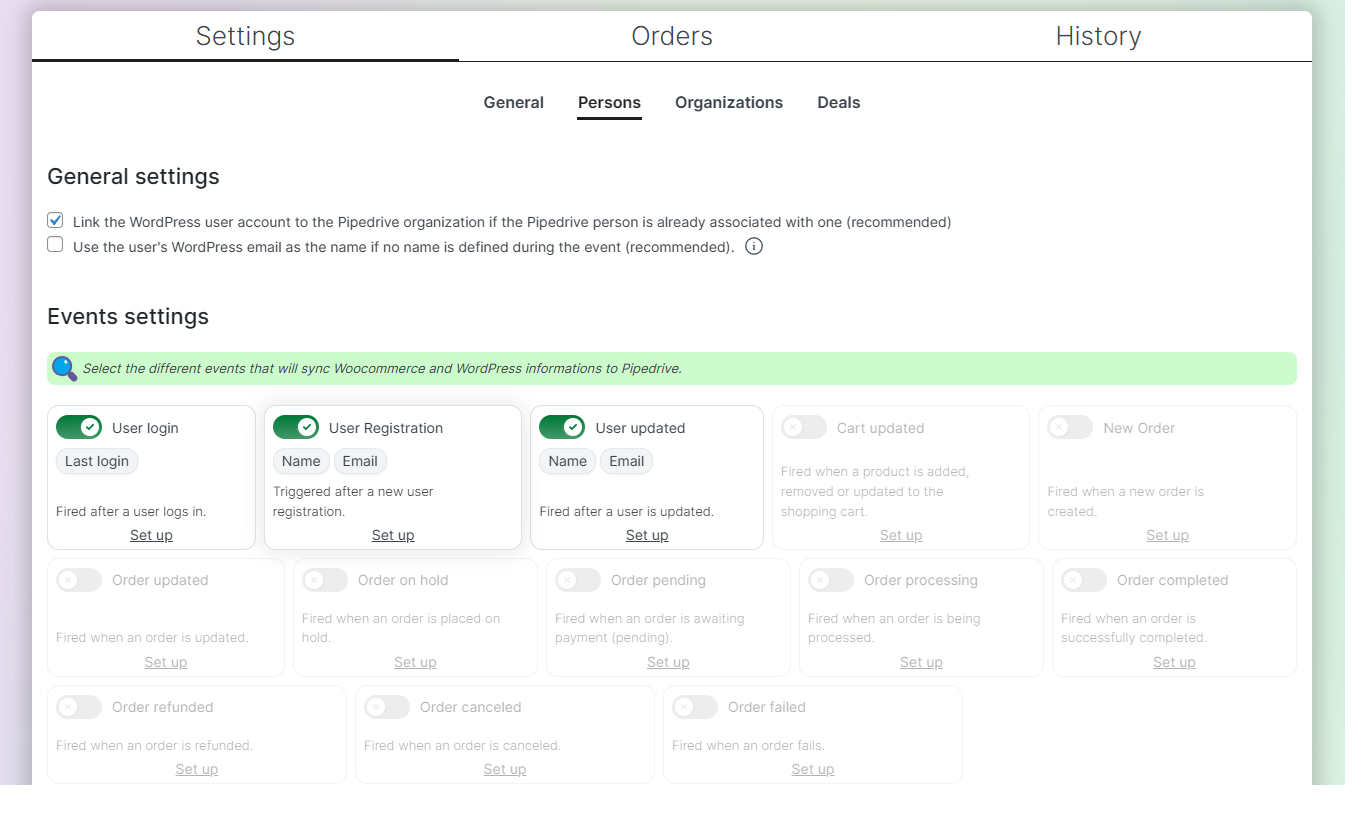


For developers
Is this your plugin? Show off the numbers.
Add a live badge to your site, docs or GitHub README. It updates on its own — no account needed.
Best W2P: Pipedrive CRM Integratio… alternatives
All automation plugins →





FAQ
W2P: Pipedrive CRM Integration for…: quick answers
Straight answers, pulled from live WordPress.org data.
Live data from WordPress.org · checked Nov 17, 2026
Is W2P: Pipedrive CRM Integration… free?
Yes. W2P: Pipedrive CRM Integration… is free to download and use from the official WordPress.org plugin directory.
Is W2P: Pipedrive CRM Integration… safe to use in 2026?
W2P: Pipedrive CRM Integration… works, but test it on a staging site before relying on it in 2026. It runs on 40+ sites, is rated 5/5 and was last updated 3 months ago, and scores 59/100 on our health check.
How many websites use W2P: Pipedrive CRM Integration…?
W2P: Pipedrive CRM Integration… is active on 40+ WordPress websites and has been downloaded 3,492 times since it launched in March 2025. It was downloaded 197 times in the last 30 days.
Does W2P: Pipedrive CRM Integration… work with WordPress 7.1?
W2P: Pipedrive CRM Integration… is officially tested up to WordPress 7.0.8, while the latest release is 7.1.4. It may still work, but try it on a staging site first.
What PHP version does W2P: Pipedrive CRM Integration… need?
W2P: Pipedrive CRM Integration… requires PHP 8.0 or higher. Most hosts run PHP 8.x today, so it works on any modern WordPress hosting.
When was W2P: Pipedrive CRM Integration… last updated?
The latest version, 1.5.17, was released on August 8, 2026 (3 months ago).
Who makes W2P: Pipedrive CRM Integration…?
W2P: Pipedrive CRM Integration… is developed and maintained by Tristan DIENY.
What are the best alternatives to W2P: Pipedrive CRM Integration…?
The most popular alternatives to W2P: Pipedrive CRM Integration… are OttoKit: All-in-One Automat… (80K+ installs), Zapier for WordPress (50K+ installs) and Uncanny Automator (40K+ installs).
Powered by PageForge
Want thousands of pages that rank like these? Build them in an afternoon.
This directory runs on the same engine as PageForge. Turn any spreadsheet, CSV or API into thousands of fast, SEO-ready WordPress pages — with schema, internal links and AI-written copy baked in.
- CSV, Google Sheets & API data sources
- AI content, schema & internal links per page
- Works with Elementor, Gutenberg, Yoast & Rank Math
- Free on WordPress.org — no credit card


