



ACF Theme Code for Advanced Custom Fields
The ACF Theme Code plugin automatically generates the code needed to implement Advanced Custom Fields in your themes.

Use with caution
ACF Theme Code for Advanced Cus… works, but test it on a staging site before relying on it in 2026. It runs on 10K+ sites, is rated 5/5 and was last updated 3 years ago, and scores 47/100 on our health check.
- Proven at scale on 10K+ active sites
- Loved by users — 5/5 from 42 reviews
- No update in 2 years
- Only tested up to WordPress 6.4 (latest is 7.1)
How does it stack up?
Side-by-side on installs, updates, ratings & support



Daily downloads
Download spikes usually follow a new release — each site that auto-updates counts as a download.
Rankings
Where ACF Theme Code for Advanced… stands todayWordPress.org search rankings
Live position in the plugin search, top 100| Keyword | Position |
|---|---|
| acf | >100 |
| advanced custom fields | >100 |
| automation | >100 |
| php | >100 |
Version adoption
Share of active sites per release.
Rating breakdown
★★★★★★★★★★ 5 from 42 reviews
About ACF Theme Code for Advanced Custom Fiel…
From the official readme · v2.5.6Description
The ACF Theme Code plugin automatically generates the code needed to implement Advanced Custom Fields in your themes.
Video note: This free version of ACF Theme Code now supports ACF 6.
Features
Reduce your development time.
- When you publish, edit or update an ACF Field Group, the code required to implement your fields is displayed in the Theme Code section at the bottom of your Edit Field Group page.
- Use the clipboard icons in this section quickly copy and paste the code blocks into your theme templates.
Quality, flexible, custom code.
- The code generated by Theme Code Pro is based on the official Advanced Custom Fields documentation and includes escaping for secure output.
- All code generated has been thoroughly tested and is created with speed and flexibility of implementation in mind.
Comprehensive field support
- This version of ACF Theme Code generates code for all the field types included in the free version of Advanced Custom Fields (see the full list of field types and settings below).
- The code generated is specific to the field names and field settings you use for each of your fields.
ACF Theme Code PRO
ACF Theme Code PRO is the premium version of this plugin. It has the following additional features.
- Support for all the complex field types that are included in Advanced Custom Fields PRO.
- Repeater
- Flexible Content
- Gallery
- Clone
- The addition of a Theme Code Location Registration Tool to the ACF Tools page that generates code for registering locations.
- Blocks
- Options Pages
- Support for more complex ACF Field Group Locations.
- Block
- Options Page
- Widget
- Taxonomy
- Comment
- Attachment
- Current User
- User Form
- Support for a range of third party fields.
Upgrade or learn more about ACF Theme Code PRO.
ACF fields supported
This free version of ACF Theme Code generates code for the following ACF field types and settings:
- Text
- Text Area
- Number
- Range
- URL
- Password
- Image (return types Array, URL and ID)
- File (return types Array, URL and ID)
- WYSIWYG Editor
- oEmbed
- Select (values Single and Multiple, return types Value, Label and Array)
- Checkbox (return types Value, Label and Array)
- Radio Button (return types Value, Label and Array)
- Button Group (return types Value, Label and Array)
- True / False
- Link (return types Array and URL)
- Post Object (values Single and Multiple, return types Post Object and Post ID)
- Page Link (values Single and Multiple)
- Relationship (return types Post Object and Post ID)
- Taxonomy (appearances Checkbox, Multi Select, Radio Buttons and Select, return types Term Object and Term ID)
- User (values Single and Multiple, return types User Array, User Object and User ID)
- Google Map
- Date Picker
- Date Time Picker
- Colour Picker
- Group
Requirements
- Advanced Custom Fields or ACF PRO (version 5.8.9 or higher)
Thank you
Thanks to all of our beta testers. Including Elliot Condon, Phil Smart, Richard Johnston and James Bundey.
Translations
Would you like to use the ACF Theme Code plugin in your native language? Then why not contribute a translation via translate.wordpress.org.
If you are new to translating plugins, there is a helpful First Steps guide available.
View the current state translations for ACF Theme Code.
Any and all assistance with translations is greatly appreciated. Please let us know if you need any help with submitting translations.
Installation
From your WordPress dashboard
- Visit Plugins > Add New.
- Search for “ACF Theme Code”.
- Activate ACF Theme Code for Advanced Custom Fields from your Plugins page.
- Publish, Edit or Update an ACF Field Group.
- Scroll down the Edit Field Group page to the Theme Code section to see the code generated.
Frequently asked questions
Does this plugin support ACF PRO?
This free version of ACF Theme Code supports all the field types from ACF PRO that are also found in the free version of Advanced Custom Fields. The ACF Theme Code PRO plugin also supports extra fields found only in ACF PRO. These include the Repeater, Flexible Content, Gallery and Clone fields. It also supports ACF PRO features ACF Blocks and Options Pages.
Does this plugin generate the code needed for different field group Locations?
This free version of ACF Theme Code supports all the Post and Page field group Locations. The ACF Theme Code PRO plugin also supports a bunch of other field group Locations. These include Block, Options Page, Widget, Taxonomy, Comment, Attachment, Current User and User Form.
Changelog
2.5.6
- Compatibility with WordPress 6.4
2.5.5
- Add new stylesheet to integrate all components with ACF 6
- Update scroll to code functionality to support ACF 6
2.5.4
- Add support for ACF 6
2.5.3
- Add full support for localization (i18n)
- Please let us know if you’re interested in helping translate ACF Theme Code into your language.
2.5.2
- Compatibility with WordPress 5.8.0
- Fix CSS and JS enqueue bugs
2.5.0
- Improve support for WordPress 5.4.
- Improve support for all field types included in ACF PRO 5.8.9 (including all their various settings).
- Improve codebase by syncing both free and pro foundations to facilitate faster development cycles and future features.
- Add escaping to code rendered to bring it in line with recent updates to ACF field documentation. See https://twitter.com/wp_acf/status/1181344882775875584.
- Add ‘Copy All’ fields button (previously only Theme Code Pro feature).
- Add various enhancements to code rendered for the following fields and field settings:
- Gallery field (return types Array, URL and ID)
- Image (return types Array, URL and ID)
- File (return types Array, URL and ID)
- Select (values Single and Multiple, return types Value, Label and Array)
- Checkbox (return types Value, Label and Array)
- Radio Button (return type Array)
- Button Group (return type Array)
- True / False
- Link (return types Array and URL)
- Post Object (values Single and Multiple, return types Post Object and Post ID)
- Page Link (values Single and Multiple)
- Relationship (return types Post Object and Post ID)
- Taxonomy (appearances Checkbox, Multi Select, Radio Buttons and Select, return types Term Object and Term ID)
- User (values Single and Multiple, return types User Array, User Object and User ID)
- Google Map
- Add Location UI and move location related upgrade notice to code block
- Fix issue with location related upgrade notice where it wouldn’t show if only Options location was selected.
Screenshots
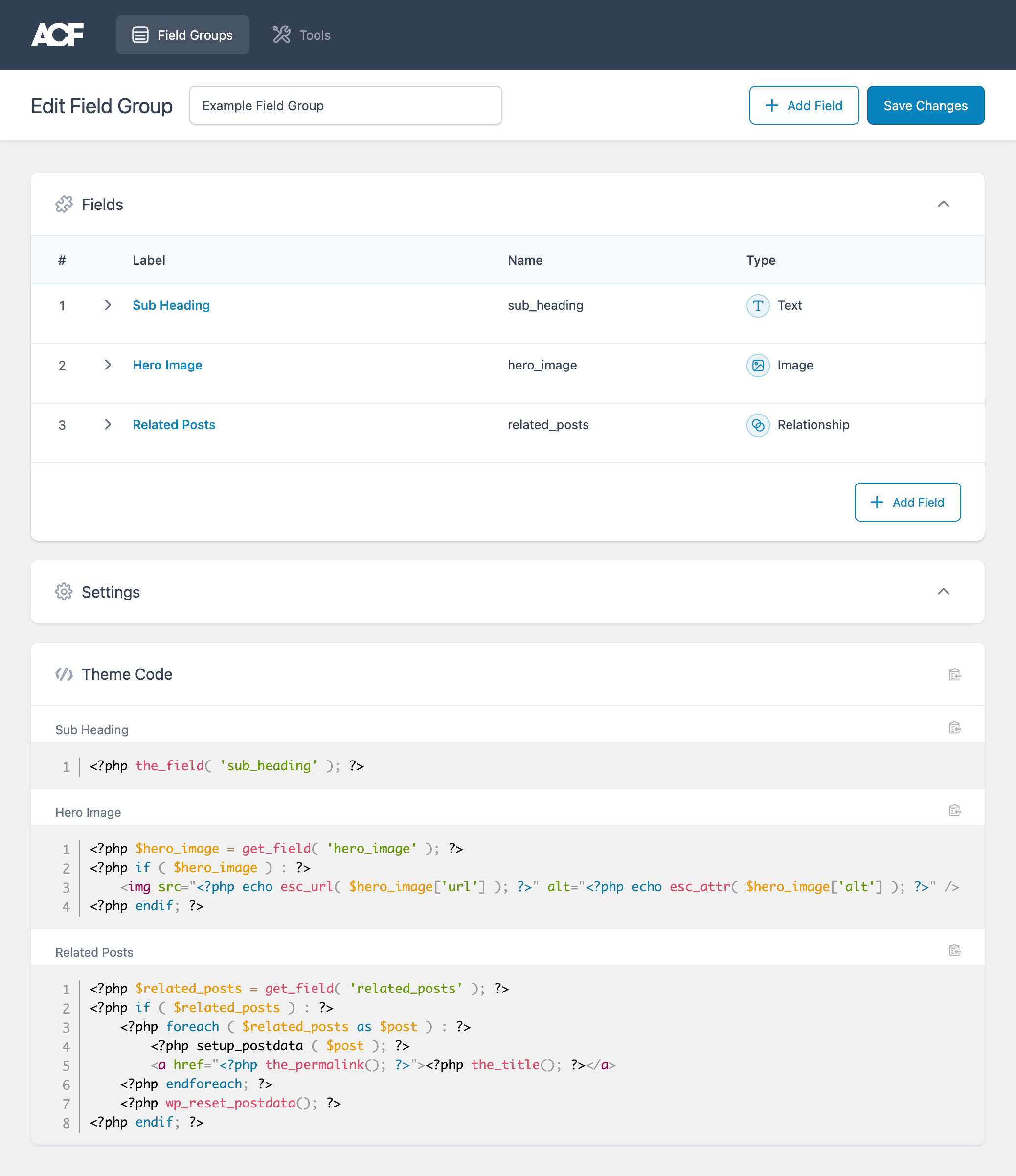
For developers
Is this your plugin? Show off the numbers.
Add a live badge to your site, docs or GitHub README. It updates on its own — no account needed.
Best ACF Theme Code for Advanced C… alternatives
All acf plugins →





FAQ
ACF Theme Code for Advanced Custom…: quick answers
Straight answers, pulled from live WordPress.org data.
Live data from WordPress.org · checked Sep 26, 2026
Is ACF Theme Code for Advanced Cus… free?
Yes. ACF Theme Code for Advanced Cus… is free to download and use from the official WordPress.org plugin directory. The developer also sells premium add-ons or a Pro version with extra features.
Is ACF Theme Code for Advanced Cus… safe to use in 2026?
ACF Theme Code for Advanced Cus… works, but test it on a staging site before relying on it in 2026. It runs on 10K+ sites, is rated 5/5 and was last updated 3 years ago, and scores 47/100 on our health check.
How many websites use ACF Theme Code for Advanced Cus…?
ACF Theme Code for Advanced Cus… is active on 10K+ WordPress websites and has been downloaded 153,438 times since it launched in July 2016. It was downloaded 507 times in the last 30 days.
Does ACF Theme Code for Advanced Cus… work with WordPress 7.1?
ACF Theme Code for Advanced Cus… is officially tested up to WordPress 6.4.12, while the latest release is 7.1.2. It may still work, but try it on a staging site first.
What PHP version does ACF Theme Code for Advanced Cus… need?
ACF Theme Code for Advanced Cus… requires PHP 5.6 or higher. Most hosts run PHP 8.x today, so it works on any modern WordPress hosting.
When was ACF Theme Code for Advanced Cus… last updated?
The latest version, 2.5.6, was released on November 28, 2023 (3 years ago).
Who makes ACF Theme Code for Advanced Cus…?
ACF Theme Code for Advanced Cus… is developed and maintained by Aaron Rutley.
What are the best alternatives to ACF Theme Code for Advanced Cus…?
The most popular alternatives to ACF Theme Code for Advanced Cus… are Advanced Custom Fields (ACF… (2M+ installs), ACF Content Analysis for Yo… (100K+ installs) and Advanced Custom Fields: Ext… (100K+ installs).
Powered by PageForge
Want thousands of pages that rank like these? Build them in an afternoon.
This directory runs on the same engine as PageForge. Turn any spreadsheet, CSV or API into thousands of fast, SEO-ready WordPress pages — with schema, internal links and AI-written copy baked in.
- CSV, Google Sheets & API data sources
- AI content, schema & internal links per page
- Works with Elementor, Gutenberg, Yoast & Rank Math
- Free on WordPress.org — no credit card


