



Advanced Custom Fields: Font Awesome Field
Adds a new 'Font Awesome Icon' field to the popular Advanced Custom Fields plugin.

Safe pick
Yes — Advanced Custom Fields: Font Aw… is a safe, well-maintained plugin to use in 2026. It runs on 90K+ sites, is rated 4.9/5 and was last updated 6 days ago, and scores 91/100 on our health check.
- Proven at scale on 90K+ active sites
- Loved by users — 4.9/5 from 36 reviews
- Actively developed — last update 6 days ago
- Tested with the latest WordPress (7.1)
- Momentum — downloads up 208.7% vs the previous 30 days
How does it stack up?
Side-by-side on installs, updates, ratings & support



Daily downloads
Download spikes usually follow a new release — each site that auto-updates counts as a download.
Rankings
Where Advanced Custom Fields: Fon… stands todayWordPress.org search rankings
Live position in the plugin search, top 100| Keyword | Position |
|---|---|
| acf | #37 |
| advanced custom fields | #2 |
| Font Awesome | #2 |
| FontAwesome | #2 |
Version adoption
Share of active sites per release.
Rating breakdown
★★★★★★★★★★ 4.9 from 36 reviews
About Advanced Custom Fields: Font Awesome Fi…
From the official readme · v6.2.2Description
Add a Font Awesome icon field type to Advanced Custom Fields.
- Specify which FontAwesome icon sets to use (Solid, Regular, Light, Thin, Duotone, Duotone Sharp, Brands, and Custom Upload Icons) (Some features only available with FontAwesome 5.x or 6.x icons)
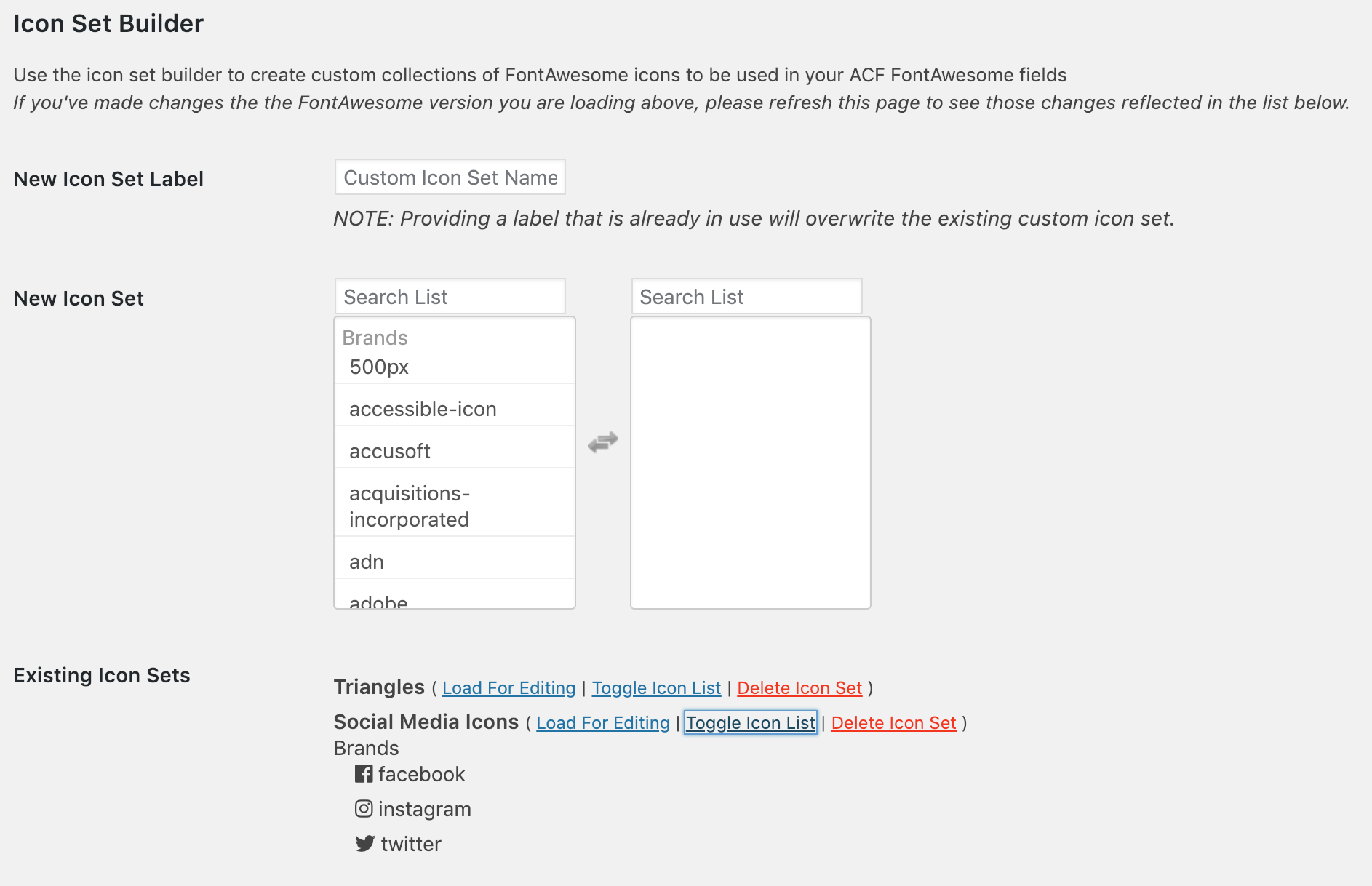
- Create your own custom filtered list of FontAwesome icons to use with your fields. Use different custom icon sets with different fields
- Returns Icon Element, Icon Class, Icon Unicode, or an Object including the element, class, unicode value, and SVG data (if applicable)
- Optionally enqueues Font Awesome in footer where needed (when a FontAwesome field is being used on the page))
- Integrates with the FontAwesome GraphQL for loading your FontAwesome Kits, searching for icons, and loading the latest version of FontAwesome
Note: It is recommended to let this plugin enqueue the latest version of Font Awesome on your front-end; or include the latest version yourself using your FontAwesome Kit; so that available icons in the admin area will be displayed properly on your sites front-end.
Compatibility
This ACF field type is compatible with:
* ACF 5.7+
* FontAwesome 4.x, 5.x, 6.x and 7.x fonts
Optional Configuration
Filters
- ACFFA_always_enqueue_fa: Return true to always enqueue FontAwesome on the frontend, even if no ACF FontAwesome fields are in use on the page. This will enqueue FontAwesome in the header instead of the footer.
- ACFFA_admin_enqueue_fa: Return false to stop enqueueing FontAwesome in the admin area. Useful if you already have FontAwesome enqueued by some other means.
- ACFFA_get_icons: (Applies to FontAwesome 4.x and 5.x icons only) Filter the array of icons and icon details loaded from the database
- ACFFA_get_fa_url: Filter the URL used for enqueuing FontAwesome in the frontend and admin areas of the site.
- ACFFA_override_major_version: Filter to manually set the ‘major’ version of FontAwesome to load (accepts either 4, 5, or 6). NOTE: This filter must be registered before any calls to ACF get_field() function are made.
- ACFFA_fa_api_key: Filter to programmatically set the FontAwesome API key.
- ACFFA_fa_kit_token: Filter to programmatically set the FontAwesome kit token.
Installation
Typical Installation:
- Copy the
advanced-custom-fields-font-awesomefolder into yourwp-content/pluginsfolder - Activate the Font Awesome plugin via the plugins admin page
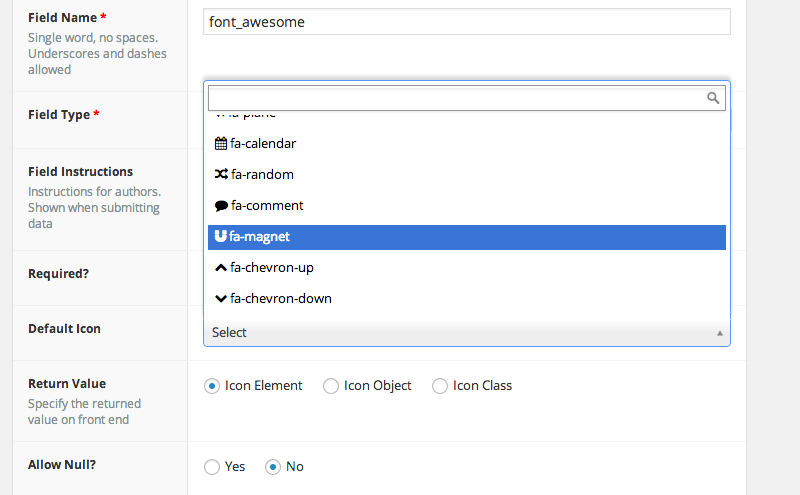
- Create a new field via ACF and select the Font Awesome type
Theme Installation:
If you are a theme author who wants to bundle this plugin with your theme, starting in version 4.0.1 this plugin has been designed to work from within a theme directory.
It is still more ideal to use something like TGM Plugin Activation to include required/recommended plugins with your theme. However if you choose to bundle this plugin please follow these instructions:
- Copy the ‘advanced-custom-fields-font-awesome’ folder into your theme folder. Preferably into a path like ‘includes/advanced-custom-fields-font-awesome’
- Include the plugin from your theme functions.php. Example:
include_once( get_stylesheet_directory() . '/includes/advanced-custom-fields-font-awesome/acf-font-awesome.php' );
Plugins included this way are not able to receive regular plugin updates. It is up to theme developer to instead release these plugin updates to their users.
However this plugin does attempt to let the user know if they are on an out of date version of the plugin. Out of date theme installations show an admin notification message at the top of the WordPress admin plugins page. The message is as follows:
There is a new version of Advanced Custom Fields: Font Awesome available. Installed Version: {current_version}, Latest Version: {latest_version}
It looks like this plugin is bundled with your theme: ({theme_name}) and is not able to receive updates. It is recommended that you contact your theme author for updates. Alternatively you can install this plugin through the WordPress Plugin Repository to get the latest version.
If the user installs this plugin from the plugin repository, that version of the plugin will override the one installed in their theme directory.
This notification message is filterable so you can customize it to better represent how you handle plugin updates for your theme users. See example below:
function my_acffa_update_message( $out_of_date_message, $current_version, $latest_version ) {
    // Customize the message here
    return $out_of_date_message;
}
add_filter( 'ACFFA_theme_install_update_message', 'my_acffa_update_message', 10, 3 );
Changelog
Bugfix plugin textdomain can load too early if ACF fields are used before WordPress 'init'
6.2.2
- Bugfix: Icon fields inside ACF Blocks (e.g. in a repeater) returned a broken string like “styleregularidphone…” after updating to 6.2.1. Affected values are repaired automatically, no re-saving needed.
6.2.1
- Security: Fixed a stored XSS vulnerability where icon values saved by low-privileged users (e.g. via a field on the user profile form) could inject HTML attributes through the ‘Icon Object’ return format. Icon data is now sanitized when saved and when output, including values saved before this update.
- Security: Escaped all icon object properties at output.
- Bugfix: The default icon sets of Font Awesome 7.x fields did not include Brand icons.
- Improvement: The Font Awesome 7.x icon chooser opens faster thanks to request caching.
6.2.0
- New: When using a FontAwesome Kit, icon search and the icon showcase now only show icons and styles that are actually included in your kit, instead of the full FontAwesome library.
6.1.4
- Security: Replaced the FontAwesome API query validator with a server-built request.
- Bugfix: FontAwesome 5.x icon search results were being grouped under the wrong icon style, causing only Brand icons to appear correctly.
- Added: FontAwesome 5.x icon search now also matches against FontAwesome’s icon search terms/aliases (e.g. searching “test” now finds the “vial” icon), not just icon names.
6.1.3
- Security: Further hardened the FontAwesome API query feature.
6.1.2
- Security: Hardened the FontAwesome API query feature against unauthorized use.
Screenshots
For developers
Is this your plugin? Show off the numbers.
Add a live badge to your site, docs or GitHub README. It updates on its own — no account needed.
Best Advanced Custom Fields: Font… alternatives
All acf plugins →





FAQ
Advanced Custom Fields: Font Awesom…: quick answers
Straight answers, pulled from live WordPress.org data.
Live data from WordPress.org · checked Nov 16, 2026
Is Advanced Custom Fields: Font Aw… free?
Yes. Advanced Custom Fields: Font Aw… is free to download and use from the official WordPress.org plugin directory.
Is Advanced Custom Fields: Font Aw… safe to use in 2026?
Yes — Advanced Custom Fields: Font Aw… is a safe, well-maintained plugin to use in 2026. It runs on 90K+ sites, is rated 4.9/5 and was last updated 6 days ago, and scores 91/100 on our health check.
How many websites use Advanced Custom Fields: Font Aw…?
Advanced Custom Fields: Font Aw… is active on 90K+ WordPress websites and has been downloaded 2,139,809 times since it launched in February 2014. It was downloaded 67,849 times in the last 30 days.
Does Advanced Custom Fields: Font Aw… work with WordPress 7.1?
Yes. The developer has tested Advanced Custom Fields: Font Aw… up to WordPress 7.1.4, the latest release. It requires WordPress 6.5 or newer.
What PHP version does Advanced Custom Fields: Font Aw… need?
Advanced Custom Fields: Font Aw… requires PHP 5.6 or higher. Most hosts run PHP 8.x today, so it works on any modern WordPress hosting.
When was Advanced Custom Fields: Font Aw… last updated?
The latest version, 6.2.2, was released on November 10, 2026 (6 days ago).
Who makes Advanced Custom Fields: Font Aw…?
Advanced Custom Fields: Font Aw… is developed and maintained by Justin Kruit.
What are the best alternatives to Advanced Custom Fields: Font Aw…?
The most popular alternatives to Advanced Custom Fields: Font Aw… are Advanced Custom Fields (ACF… (2M+ installs), ACF Content Analysis for Yo… (100K+ installs) and Advanced Custom Fields: Ext… (100K+ installs).
Powered by PageForge
Want thousands of pages that rank like these? Build them in an afternoon.
This directory runs on the same engine as PageForge. Turn any spreadsheet, CSV or API into thousands of fast, SEO-ready WordPress pages — with schema, internal links and AI-written copy baked in.
- CSV, Google Sheets & API data sources
- AI content, schema & internal links per page
- Works with Elementor, Gutenberg, Yoast & Rank Math
- Free on WordPress.org — no credit card


