



Advanced Form Integration — Connect Forms to 300+ Apps
Send WordPress form and order data to 300+ CRMs, email tools, and sheets — no code, no per-task fees, data stays on your site.

Safe pick
Yes — Advanced Form Integration is a safe, well-maintained plugin to use in 2026. It runs on 9K+ sites, is rated 4.8/5 and was last updated 4 days ago, and scores 92/100 on our health check.
- Loved by users — 4.8/5 from 91 reviews
- Actively developed — last update 4 days ago
- Tested with the latest WordPress (7.1)
How does it stack up?
Side-by-side on installs, updates, ratings & support



Daily downloads
Download spikes usually follow a new release — each site that auto-updates counts as a download.
Rankings
Where Advanced Form Integration stands todayWordPress.org search rankings
Live position in the plugin search, top 100| Keyword | Position |
|---|---|
| automation | >100 |
| contact form 7 | #65 |
| crm | #47 |
| form integration | #3 |
| webhooks | #15 |
Version adoption
Share of active sites per release.
Rating breakdown
★★★★★★★★★★ 4.8 from 91 reviews
About Advanced Form Integration
From the official readme · v2.9.0Description
Send WordPress form and order data to 300+ CRMs, email tools, and sheets — no code, no per-task fees, data stays on your site.
Overview
Stop paying per-task fees to move your own data.
Advanced Form Integration (AFI) connects your WordPress forms and site events to 300+ external platforms (CRMs, email marketing, Google Sheets, helpdesks, webhooks) with zero code. Set it up once and form submissions, WooCommerce orders, bookings, and more flow into the tools you already use, in real time.
AFI runs entirely on your own site, so integrations fire directly from WordPress to each platform’s API. There are no task limits, no metering, and no per-action billing. Whether you process 100 submissions a month or 100,000, the plugin works the same, and your form data and credentials never leave your server.
AFI requires no coding knowledge and can be configured in minutes. It is built for marketers, sales teams, agencies, and business owners who want to streamline workflows and improve data accuracy.
Website | Documentation | Tutorial Videos
Why Choose AFI
- No per-task fees. AFI has no task meter, so your submissions are unlimited on every plan, free or paid.
- Your data never leaves your server. Integrations fire directly from your site to each platform’s API. No third-party service sits in the middle of your leads, orders, or customer details. Better for privacy and GDPR.
- Built for WordPress. Native triggers for 70+ form plugins plus WooCommerce, LMS, memberships, and bookings. No brittle webhook glue to maintain.
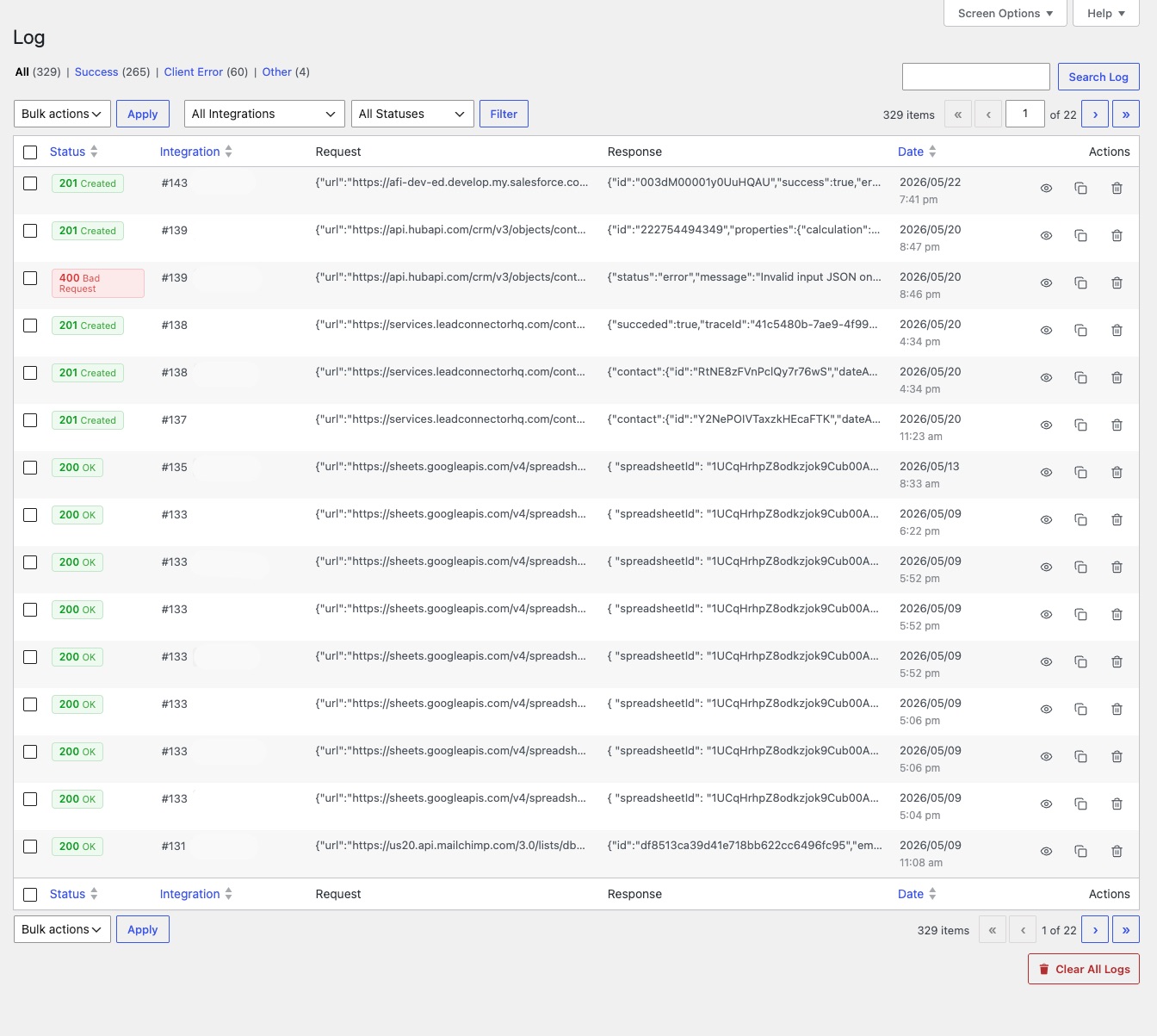
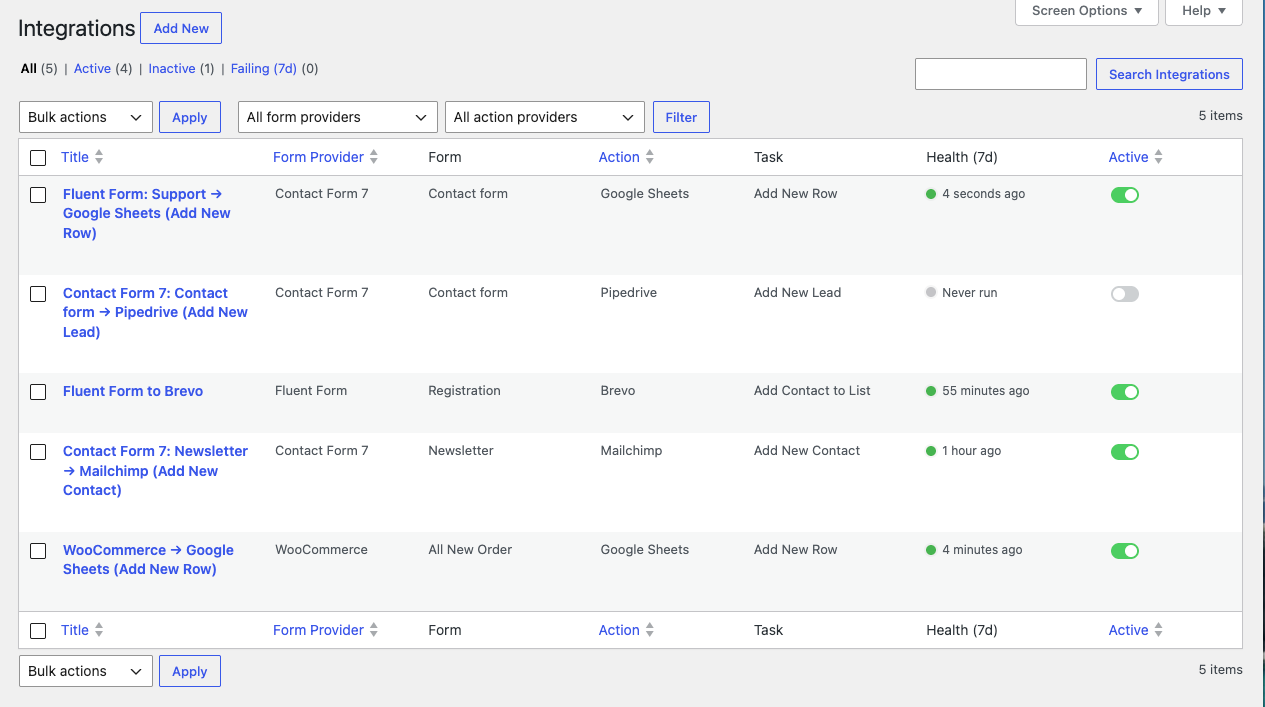
- Fix and resend, not lost data. Every API call is logged. If one fails, view the exact request and response, edit the data, and resend in one click. No need to ask anyone to re-submit the form.
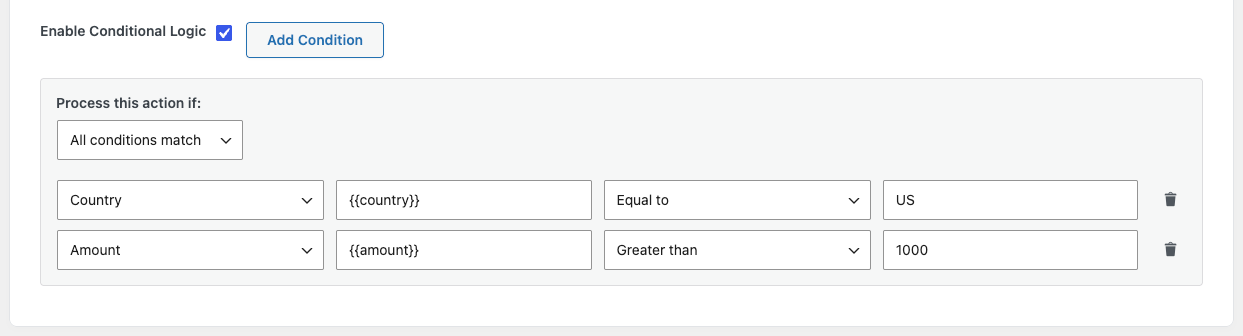
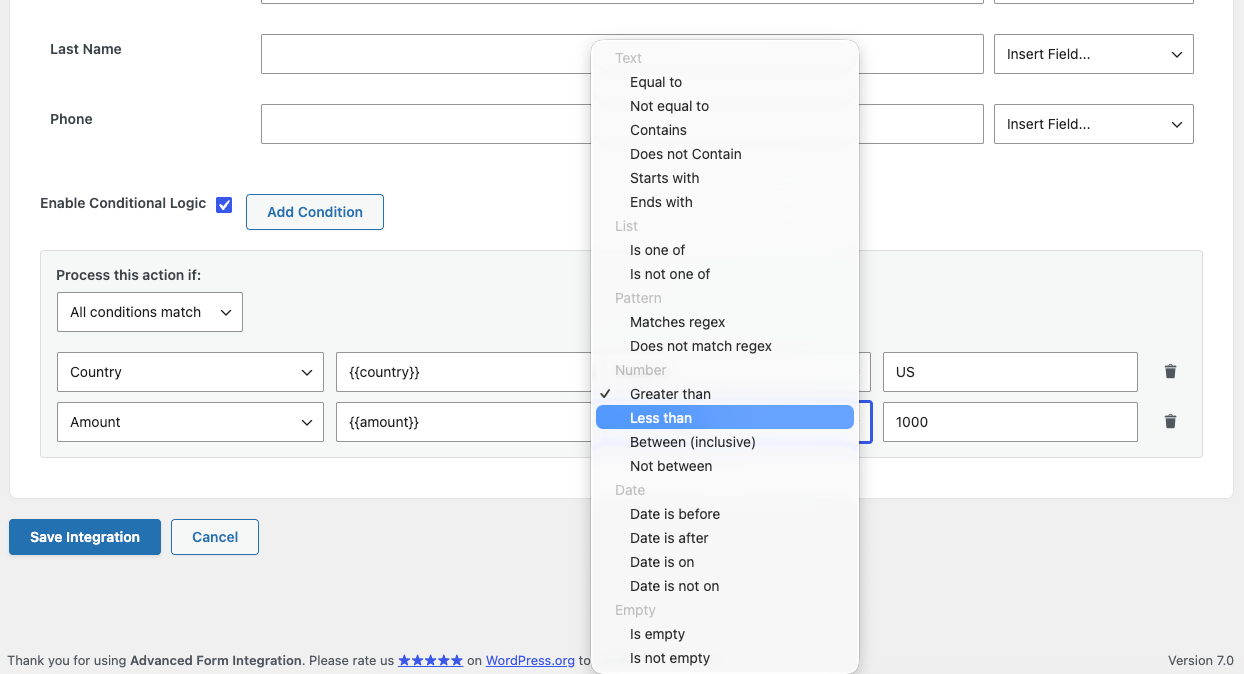
- Conditional logic on every integration. Route submissions to different destinations based on their content, so you never push junk into your CRM.
Common Use Cases
- E-commerce. Send WooCommerce orders to Google Sheets, create CRM leads for high-value purchases, and keep your fulfilment tools in sync.
- Lead generation. Add Contact Form 7, WPForms, or Gravity Forms submissions to HubSpot, Mailchimp, or ActiveCampaign automatically.
- Agencies. Connect many clients’ forms to different CRM and email accounts, and manage every integration from one dashboard.
- Membership and LMS sites. Sync new MemberPress signups and course enrolments to your email platform or CRM.
- Events and bookings. Register attendees from your booking or events plugin into Zoom Webinar, a calendar, or a spreadsheet.
- Customer support. Create Freshdesk or Zendesk tickets from form submissions and route urgent ones to Slack.
Key Features
Universal Form Support
Connect virtually any WordPress form plugin, including Contact Form 7, WPForms, Elementor Pro Forms, Gravity Forms, Ninja Forms, Fluent Forms, and 70+ others. Triggers also extend beyond forms to WooCommerce orders, LMS enrolments, memberships, bookings, forum posts, donations, and more.
Smart Field Mapping
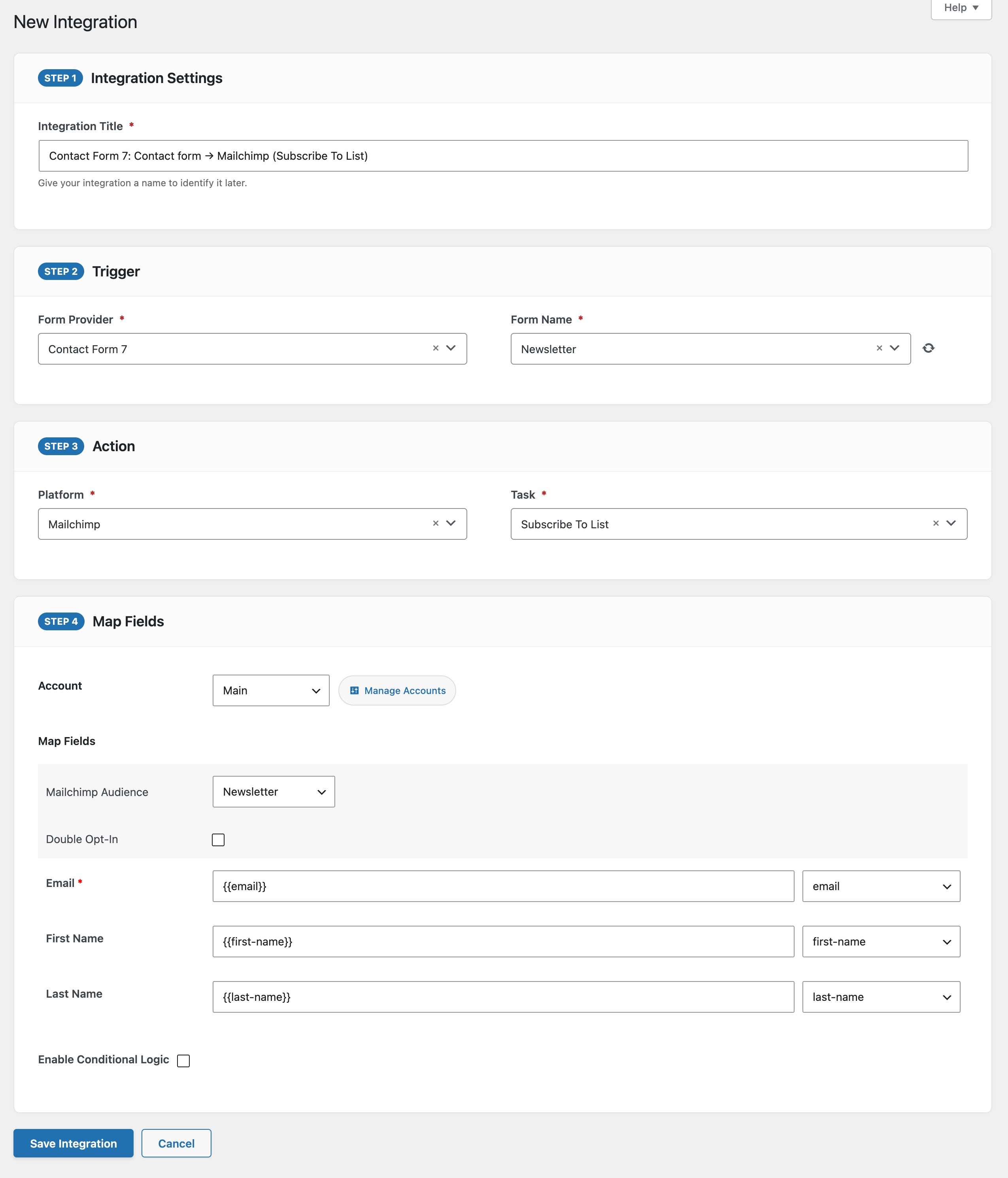
Map form fields to destination fields with support for combining multiple fields and mixing static text with dynamic tags. For example, set a destination field to “New lead from {{_site_title}}” or combine {{first_name}} and {{last_name}} into one value.
Conditional Logic
Control when data is sent using visual conditional rules. Send only when specific criteria are met, and route different submissions to different destinations.
System and UTM Tags
Access dynamic system information using tags like {{_date}}, {{_user_ip}}, and {{_site_title}}, and capture campaign data with {{utm_source}}, {{utm_medium}}, {{utm_campaign}}, {{gclid}}, and more.
Activity Log and Resend
Every outbound API call is recorded with its full request and response. When something fails, view exactly what went wrong, edit the data inline, and resend with one click.
Multi-Account Support
Connect multiple accounts for the same platform from one site, for example several Mailchimp, Salesforce, or Zoho accounts, each labelled and tracked separately. Ideal for agencies.
Built for Performance
Integrations run asynchronously in the background via Action Scheduler, so form submissions stay instant. Database tables are indexed for fast log queries even on busy sites, and credentials are not autoloaded on front-end pageviews.
Multisite Support
Full compatibility with WordPress multisite installations.
Supported Trigger Platforms (Senders)
AFI can start an integration from any of these forms, plugins, and events.
Form builders: Contact Form 7, WPForms, Gravity Forms, Elementor Pro Form, Fluent Forms, Ninja Forms, Formidable Forms, Forminator, WS Form, ARForms, Avada Forms, Beaver Builder Form, Bit Form, Breakdance Builder Form, Bricks Builder Form, Caldera Forms, ConvertPro Forms, Cool FormKit, Crowdsignal Forms, Divi Forms, eForm, Everest Forms, FormCraft 3, FormCraft Basic, Happyforms, JetFormBuilder, Kadence Blocks Form, Live Forms, Metform, Quform, Smart Forms, User Registration, weForms, WP User Frontend, SureForms, Jetpack Forms, Kali Forms, MW WP Form, NEX-Forms, QuillForms, RegistrationMagic, RomeTheme Form, Simple Basic Contact Form, SiteOrigin Contact Form, Snow Monkey Forms, Spectra Pro Forms, VS Contact Form, HTML Forms, HT Contact Form, Hash Form, Gutena Forms, Gutenverse Form, Form Maker by 10Web, WPZOOM Forms, Depicter, Otter Blocks Form, FormLayer, Nextend Social Login and Register, ProfilePress
E-commerce: WooCommerce, Easy Digital Downloads, SureCart, FluentCart, CartFlows, WP Simple Pay, WP Pizza, Advanced Coupons, Customer Reviews for WooCommerce, Dokan, WooCommerce Analytics, WooCommerce Subscriptions, Cart Abandonment Recovery for WooCommerce, YITH WooCommerce Wishlist, WCBoost Wishlist, WPC Smart Wishlist for WooCommerce, RestroPress, FunnelKit Funnel Builder
Memberships: MemberPress, Paid Membership Pro, ARMember, SureMembers, Ultimate Member, WP-Members, DigiMember, Restrict Content Pro, WooCommerce Memberships, Simple Membership, WP User Manager
LMS and courses: LearnDash, LifterLMS, TutorLMS, LearnPress, Sensei LMS, MasterStudy LMS, Academy LMS, Thrive Apprentice, WPLMS
Events and bookings: The Events Calendar, Events Manager, Event Tickets, Eventin, Event Espresso, FooEvents, Amelia Booking, Bookly, LatePoint, Easy Appointments, WP Booking Calendar, Fluent Booking, Appointment Hour Booking, Simply Schedule Appointments, Timetable and Event Schedule, Webba Booking Lite, WP Travel Engine, WooCommerce Bookings, Tickera
Community and forums: BuddyBoss, BuddyPress, bbPress, PeepSo, wpForo, Asgaros Forum, AnsPress, Fluent Community, wpDiscuz
Affiliates: AffiliateWP, Easy Affiliate, SliceWP, Fluent Affiliate
Donations: GiveWP, Charitable, Fundraising for WooCommerce
Gamification and engagement: GamiPress, myCred, WP ULike, WP Post Ratings, RafflePress, Site Reviews, kk Star Ratings, WP Recipe Maker, WP-Polls, Strong Testimonials
Email capture and newsletters: MailPoet Forms, Newsletter, Thrive Leads, Hustle, Email Subscribers & Newsletters
Quizzes and surveys: Quiz and Survey Master, Thrive Quiz Builder, UserFeedback
Support and CRM: Awesome Support, Jetpack CRM, Groundhogg, FluentCRM, Fluent Support, CiviCRM, Tawk.to, FunnelKit Automations
Security: All-In-One Security (AIOS), Defender Security, Kadence Security (formerly Solid Security / iThemes Security), Two Factor, Temporary Login Without Password
Other WordPress plugins: Business Directory Plugin, Fluent Boards, FluentAuth, FluentSMTP, My Sticky Elements, Ninja Tables, WP Job Manager, Download Manager, Download Monitor, PrettyLinks, Advanced Custom Fields, UpdraftPlus, WordPress core events
You can also capture UTM parameters from any trigger by enabling the feature in settings.
Supported Action Platforms (Receivers)
AFI can send your data to any of these 300+ destinations.
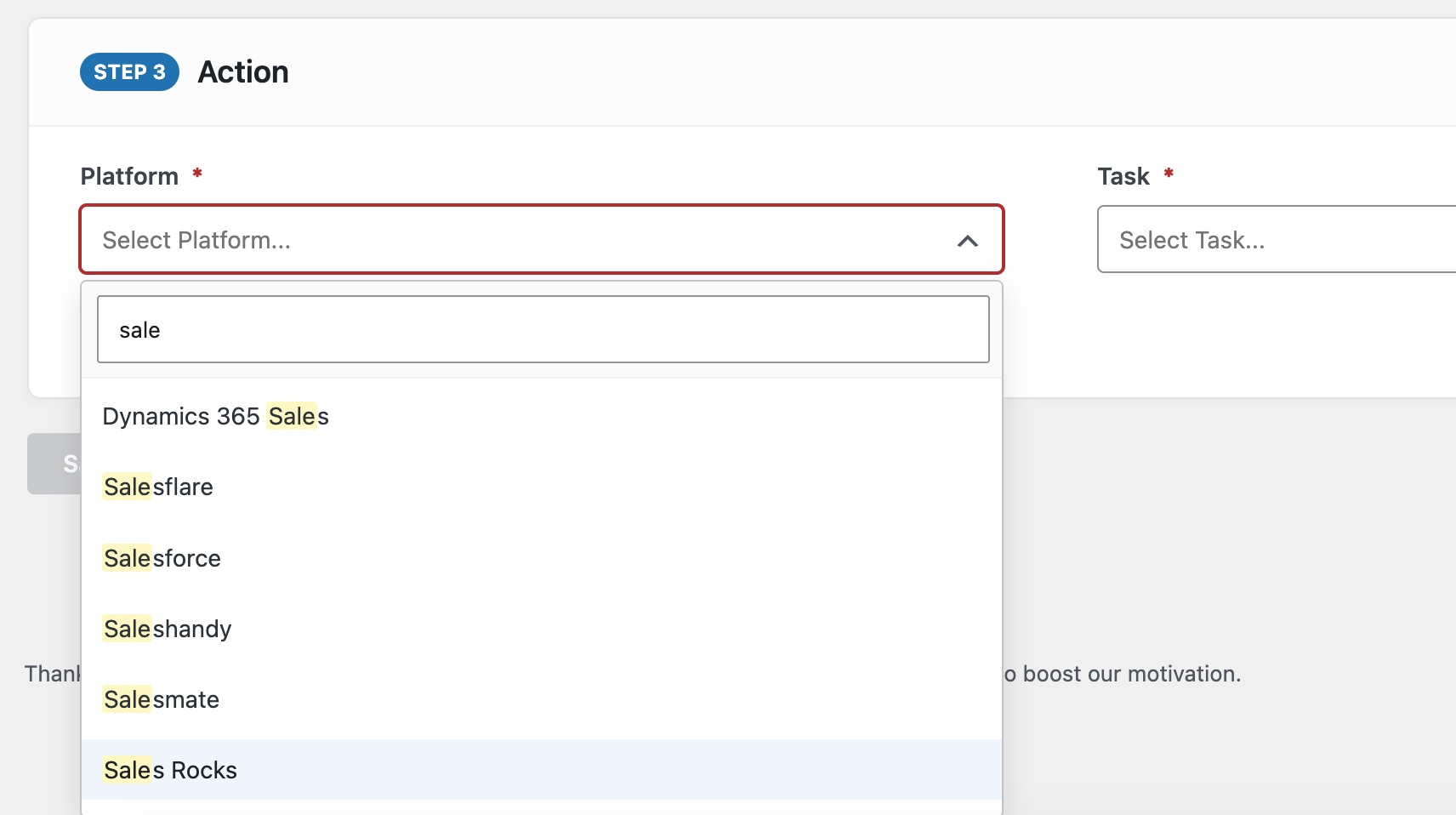
CRM and sales: Salesforce, HubSpot, Zoho CRM, Zoho Bigin, Pipedrive, Copper CRM, Insightly, Close CRM, Capsule CRM, Agile CRM, Apptivo, Attio, CiviCRM, ClinchPad CRM, CompanyHub, Dynamics 365 CRM, Dynamics 365 Sales, Dynamics 365 Marketing, Flowlu, FollowUpBoss, Freshworks CRM (Freshsales), HighLevel, Less Annoying CRM, LionDesk, Nimble, Nutshell CRM, Onehash.ai, Salesflare, Salesmate, SuiteDash, Vtiger CRM, Wealthbox CRM, Zendesk Sell, Apollo.io, Fluent CRM, Jobber, Keap, LocaliQ, Mailshake, Ontraport, Outreach, Salesloft, Scoro CRM, SharpSpring, Success.ai, SuperOffice CRM, Teamleader Focus, noCRM.io
Real estate: Lofty (formerly Chime), Real Geeks, Wise Agent, Sierra Interactive, CINC, IXACT Contact, DealMachine, Podio, Dotloop, SkySlope, Brokermint
Mortgage: Total Expert, Jungo, Shape Software, Encompass (ICE Mortgage), Velocify, Insellerate, Big Purple Dot
Legal: Clio, PracticePanther, Filevine
Healthcare and wellness: Practice Better, DrChrono, Mindbody
Home services: ServiceTitan, Housecall Pro, JobNimbus, AccuLynx
Nonprofit and church management: Bloomerang, DonorPerfect, NeonCRM, Givebutter, Breeze ChMS, Donorbox
Insurance: EZLynx
Email marketing and automation: Mailchimp, ActiveCampaign, Brevo, Constant Contact, AWeber, GetResponse, Klaviyo, Kit, MailerLite, MailerLite Classic, Omnisend, Drip, Encharge, EngageBay, Mautic, Ortto, Customer.io, Braze, Attentive, Autopilot, Benchmark Email, BombBomb, Acelle Mail, Acumbamail, Audienceful, beehiiv, Cakemail, Campaigner, Campaign Monitor, Campayn, CleverReach, Copernica, Curated, DirectIQ, Doppler, EasySendy, Elastic Email, Emailchef, Emailit, EmailOctopus, Enormail, Flodesk, iContact, Instantly, Keila, Laposta, lemlist, Loops, MailBluster, Mailcoach, Maileon, Mailercloud, Mailify, Mailjet, Mail Mint, Mailmodo, MailPoet, Mailrelay, Mailster, MailUp, MailWizz, Moosend, Newsletter, Pabbly Email Marketing, Rapidmail, Resend, Robly, Saleshandy, Sales.Rocks, Sarbacane, Selzy, Sender, SendFox, Sendlane, SendPulse, SendX, Sendy, Smartlead.ai, SmartrMail, Snov.io, System.io, Vertical Response, Woodpecker.co, Zoho Campaigns, Zoho Marketing Automation, Iterable, MailerSend, Maropost, SendGrid, Vision6, Adobe Campaign / Journey Optimizer, Kartra, Marketo, Pardot (Account Engagement), Courrielleur, Emma, Listmonk, Mailgun Transactional, MailingBoss, Mumara, Sendinblue (legacy Brevo)
Spreadsheets and databases: Google Sheets, Airtable, Smartsheet, Zoho Sheet, Zoho Creator, Knack, Quickbase, Ragic, Microsoft Dataverse, Kintone, Notion, Softr
Project management and productivity: Asana, ClickUp, Trello, Monday.com, Microsoft To Do, Fluent Boards, Google Tasks, Field Nation, ServiceM8, Teamwork, Todoist, Wrike
Calendars and scheduling: Google Calendar, Cal.com, Calendly, Acuity Scheduling, AddCal, Appointment Hour Booking, Fluent Booking
Helpdesk and customer service: Freshdesk, Zendesk, Zoho Desk, Zoho FSM, Fluent Support, Intercom, Dynamics 365 Customer Service, Dynamics 365 Field Service, Help Scout, Gist, LiveChat, Tawk.to, Tidio, Crisp, Front, Re:amaze
Team communication and SMS: Slack, Microsoft Teams, Twilio, Pushover, EZ Texting, JustCall, SlickText, WhatsApp Business Platform, Aircall, OpenPhone
Webinars and events: Zoom Webinar, WebinarJam, EverWebinar, Demio, Livestorm, Airmeet, BigMarker, Eventbrite, eWebinar, GoToWebinar, WebinarGeek, Zoho Meeting, Adobe Connect, ON24
E-signature and documents: DocuSign, PandaDoc
Ad conversion tracking and analytics: Google Analytics 4, Meta Conversions API
Customer data platforms: Twilio Segment
File storage: Google Drive, Dropbox
E-commerce: WooCommerce, Shopify
Courses and memberships: Teachable, Thinkific, Memberful
Finance and operations: Zoho Books, Zoho Inventory, Zoho Invoice, Zoho Billing (Subscriptions), Zoho People, Fortnox, FreeAgent, FreshBooks, e-conomic, Lexoffice, Moneybird, MYOB, QuickBooks Online, sevDesk, Stripe, Visma eAccounting, Xero
HR and workforce management: Deputy, Employment Hero, Personio, Recruitee, Workable, Zoho Recruit, Greenhouse
WordPress plugins: WordPress (create post), Gravity Forms, WPForms, bbPress, BuddyBoss, BuddyPress, Charitable, GiveWP, AffiliateWP, Fluent Affiliate, Fluent Community, GamiPress, Events Manager, Academy LMS, LatePoint, myCred, Ninja Tables, The Events Calendar, Groundhogg, Jetpack CRM, SupportCandy, WP Job Manager, Paid Memberships Pro, LearnDash, Tutor LMS, Easy Digital Downloads, Advanced Custom Fields, Flamingo, Awesome Support, SliceWP, PropertyHive, WP ERP, Sensei LMS, SureMembers, WP Booking Calendar, WP Event Manager, Eventin, LifterLMS, Fluent Cart, Site Reviews, MasterStudy LMS, WP CRM System, Ultimate Member
Developer and webhooks: Webhook (any method, custom headers and body), Zapier (send data to a Zapier webhook)
Cannot find your platform? Email support@advancedformintegration.com to request it. Many integrations were added by user request.
Free vs Pro
AFI is fully functional for free. Every platform above is available in the free version with core field support, unlimited integrations, conditional logic, the activity log with resend, and multi-account support.
A Pro license adds:
- All form fields, not just the core set.
- Custom fields and tags for CRMs and email platforms (for example Salesforce, HubSpot, Mailchimp, Zoho, and many more).
- Inbound webhooks, so external systems can trigger actions inside your WordPress site.
- Platform-specific advanced actions, for example HubSpot companies, deals, tickets, and tasks; Salesforce record types; and separate Google Sheets rows for each WooCommerce line item.
- Priority email support and frequent feature updates.
Installation
Automatic install from the WordPress dashboard
- Log in to your admin panel.
- Navigate to Plugins, then Add New.
- Search for Advanced Form Integration.
- Click Install Now, then Activate.
- Open Advanced Form Integration, then Add New Integration to begin.
Manual install
- Download the plugin ZIP file from WordPress.org.
- In your admin panel, go to Plugins, then Add New, then Upload Plugin.
- Choose the file and click Install Now, then Activate.
Frequently asked questions
Do I need coding skills?
No. Everything is point and click with visual field mapping. If you can build a WordPress form, you can set up AFI.
Will this slow down my site?
No. Integrations run asynchronously in the background using Action Scheduler. Forms submit instantly and the data sync happens behind the scenes.
Does the free version have limits?
The free version supports unlimited integrations and all 300+ platforms with core fields. Custom fields, tags, inbound webhooks, and some platform-specific advanced actions require a Pro license.
What happens if an integration fails?
Open the Activity Log to see the exact error. Common fixes are re-authorizing an expired token, adjusting a field mapping, or clicking Resend to retry. Most issues are resolved in a couple of minutes.
Can I connect multiple accounts for the same platform?
Yes. You can connect several accounts for one platform, each labelled separately. This is ideal for agencies managing multiple clients.
How is my data handled?
Integrations make direct API calls from your site to each platform using OAuth 2.0 or API keys. Credentials are stored on your own server and your submission data does not pass through any AFI servers.
Connection error, how can I re-authorize Google Sheets?
If authorization stops working, go to https://myaccount.google.com/permissions, remove the app permission, then authorize again from the plugin settings.
Getting a “The requested URL was not found on this server” error while authorizing Google Sheets?
Check your permalink settings. Go to Settings, then Permalinks, select Post name, then Save.
Do I need to map all fields when creating an integration?
No, but any required fields must be mapped.
How can I get support?
Email support@advancedformintegration.com and the team will be happy to help.
Changelog
Adds 15 new trigger sources, including WordPress core events (registrations, posts, comments, media uploads), FluentCRM, CiviCRM, WPLMS, UpdraftPlus, and FunnelKit. Also fixes wpForo and Thrive Quiz Builder, which were listed as trigger sources but loaded no triggers when selected. No action needed after updating; existing integrations are unaffected.
2.9.0 [2026-09-22]
New Trigger Platforms
- [New] WordPress – Start an integration from core site events: new user registration, profile updated, user logs in, post published, new comment, and new media uploaded.
- [New] FluentCRM – Contact created, contact updated, tags added, lists added, and status changed.
- [New] WP User Manager – User approved or rejected, and group membership joins, leaves, approvals, and rejections.
- [New] CiviCRM – Contact created, contact updated, contribution created, and membership created.
- [New] WPLMS – Course, quiz, assignment, and unit completion, each carrying course details, user name and email, and marks where the event provides them.
- [New] UpdraftPlus – Backup succeeded, backup finished with errors, and backup failed.
- [New] Webba Booking – Booking created, booking paid, and booking cancelled.
- [New] Fluent Support – Ticket opened by an agent, and ticket opened by a client.
- [New] Tawk.to – Pre-chat and offline form submissions.
- [New] FunnelKit Funnel Builder – Funnel step viewed, and funnel step converted.
- [New] FunnelKit Automations – Contact added to a list, and tag added to a contact.
- [New] Tickera – New ticket order.
- [New] RestroPress – Order completed.
- [New] Advanced Custom Fields – Post with ACF fields updated.
Fixed
- [Fixed] wpForo – wpForo was listed as a trigger source but showed no triggers when selected, because the function that supplies them was named incorrectly and was never called. Its topic and reply triggers now work.
- [Fixed] Thrive Quiz Builder – Listed the same way and equally unusable, from a misspelled internal key that meant its trigger file was never loaded. Quiz completion now works.
Improved
- [Improved] wpForo – Topic and reply triggers now also send created and modified timestamps, moderation status, the privacy flag, slug, tags, attachment flag, view and reply counts, SEO meta, the direct reply URL, and parent and thread IDs for nested replies. Added a “User registers” trigger that fires only on registrations made through wpForo, not on every WordPress user created anywhere on the site.
- [Improved] Hustle – First Name and Last Name are now available as mappable fields.
2.8.6 [2026-09-13]
Fixed
- [Fixed] Emma – The Group dropdown saved each group’s position in the list instead of its Emma group id, so every submission failed with either “group(s) do not exist” or “The field [group_ids] is required”. Emma identifies a group by
member_group_id. Existing Emma integrations need their Group selected again once after updating, because the previously stored value cannot be mapped to a real group id automatically. - [Fixed] Monday.com – An apostrophe in any mapped field broke the generated GraphQL mutation and Monday.com rejected the whole request with a 400 PARSING_ERROR. Line breaks and other control characters in a field value were affected the same way. Values are now escaped as GraphQL and JSON strings require.
- [Fixed] Zoho Sheet – Row values and the worksheet name were placed in the request URL without encoding, so an “&” or “#” in a submitted field silently truncated or corrupted the row, a “+” arrived as a space, and worksheet names containing spaces could fail.
- [Fixed] VerticalResponse, Robly, EngageBay – The existing-contact lookup sent the email address unencoded, so plus-addressed addresses such as name+tag@example.com never matched and a duplicate contact was created instead of the existing one being updated.
- [Fixed] Salesforce – Convert Lead could be rejected when a mapped value contained an HTML entity such as ” “. Values in the SOAP request are now escaped as XML requires.
Improved
- [Improved] Action settings now enforce their required fields. An integration can no longer be saved without choosing the list, board, group, sheet or account it sends to, which previously produced an integration that saved cleanly but then failed on every submission. Genuinely optional selections, such as record owner or assigned user, remain optional.
- [Added] Monday.com – New
adfoin_monday_create_item_mutationfilter for overriding the generated Create Item mutation.
2.8.5 [2026-08-31]
Fixed
- [Fixed] Emma – Fixed subscriber email placement in signup payload to comply with Emma API requirements, and improved group ID handling.
2.8.4 [2026-08-25]
Fixed
- [Fixed] Zendesk Support – Widened the OAuth scope requested when connecting an account so account-configuration endpoints (e.g. ticket field definitions) authorize correctly instead of being silently denied.
- [Fixed] Zendesk Support – The “Update & Authorize” action on an already-connected account now always re-runs authorization instead of silently keeping the existing grant, so accounts can be re-authorized after a scope change without re-entering credentials. Existing accounts should reconnect once to pick up the wider scope.
2.8.3 [2026-08-21]
Compatibility
- [Improved] Confirmed compatibility with WordPress 7.1.
2.8.2 [2026-08-11]
Improved
- [Improved] Pipedrive – Migrated organization, person, deal, and activity create/update requests to Pipedrive API v2 ahead of API v1’s deprecation. Custom fields of every type (enum, set, monetary, address, date/daterange, time/timerange, and more) are now sent with the exact structure v2 requires, company-domain routing is handled automatically, and Activity due date/time values are normalized to the format v2 expects. Existing accounts require no changes — just update the plugin.
Screenshots
For developers
Is this your plugin? Show off the numbers.
Add a live badge to your site, docs or GitHub README. It updates on its own — no account needed.
Best Advanced Form Integration alternatives
All automation plugins →





FAQ
Advanced Form Integration: quick answers
Straight answers, pulled from live WordPress.org data.
Live data from WordPress.org · checked Sep 26, 2026
Is Advanced Form Integration free?
Yes. Advanced Form Integration is free to download and use from the official WordPress.org plugin directory.
Is Advanced Form Integration safe to use in 2026?
Yes — Advanced Form Integration is a safe, well-maintained plugin to use in 2026. It runs on 9K+ sites, is rated 4.8/5 and was last updated 4 days ago, and scores 92/100 on our health check.
How many websites use Advanced Form Integration?
Advanced Form Integration is active on 9K+ WordPress websites and has been downloaded 730,460 times since it launched in July 2019. It was downloaded 14,382 times in the last 30 days.
Does Advanced Form Integration work with WordPress 7.1?
Yes. The developer has tested Advanced Form Integration up to WordPress 7.1.2, the latest release. It requires WordPress 3.0.1 or newer.
What PHP version does Advanced Form Integration need?
Advanced Form Integration requires PHP 7.4 or higher. Most hosts run PHP 8.x today, so it works on any modern WordPress hosting.
When was Advanced Form Integration last updated?
The latest version, 2.9.0, was released on September 22, 2026 (4 days ago).
Who makes Advanced Form Integration?
Advanced Form Integration is developed and maintained by Nasir Ahmed.
What are the best alternatives to Advanced Form Integration?
The most popular alternatives to Advanced Form Integration are OttoKit: All-in-One Automat… (90K+ installs), Zapier for WordPress (50K+ installs) and Uncanny Automator (40K+ installs).
Powered by PageForge
Want thousands of pages that rank like these? Build them in an afternoon.
This directory runs on the same engine as PageForge. Turn any spreadsheet, CSV or API into thousands of fast, SEO-ready WordPress pages — with schema, internal links and AI-written copy baked in.
- CSV, Google Sheets & API data sources
- AI content, schema & internal links per page
- Works with Elementor, Gutenberg, Yoast & Rank Math
- Free on WordPress.org — no credit card


