



Bit integrations – Form Integration, Webhook, Spreadsheets, CRM, LMS & Email Automation
Contact Form, Google Sheet, MailChimp, Brevo, Webhook, Zoho CRM Automation and Integration plugin that Connect 320+ platforms

Solid choice
Bit integrations is a solid plugin choice in 2026, with a few things worth checking first. It runs on 20K+ sites, is rated 4.9/5 and was last updated 1 day ago, and scores 79/100 on our health check.
- Proven at scale on 20K+ active sites
- Loved by users — 4.9/5 from 160 reviews
- Actively developed — last update 1 day ago
- Tested with the latest WordPress (7.1)
How does it stack up?
Side-by-side on installs, updates, ratings & support



Daily downloads
Download spikes usually follow a new release — each site that auto-updates counts as a download.
Rankings
Where Bit integrations stands todayWordPress.org search rankings
Live position in the plugin search, top 100| Keyword | Position |
|---|---|
| automation | #17 |
| automator | #8 |
| form integration | #7 |
| google sheets integration | #10 |
| WooCommerce Integration | #33 |
Version adoption
Share of active sites per release.
Rating breakdown
★★★★★★★★★★ 4.9 from 160 reviews
About Bit integrations
From the official readme · v2.11.1Description
Bit Integrations is a Easy Automation & Integration Plugin for WordPress
Bit Integrations help WordPress users integrate WordPress and plugin data to 320+ platforms.
🎯 Why Bit Integrations?
When a user submit contact form, enroll a course, create order in WooCommerce then the data send to google sheet, MailChimp, Brevo, Zoho CRM and more. It save you time, resource and effort.
Whether you’re:
- Running a small business
- Automating an eCommerce store
- Scaling your digital marketing automation
Bit Integrations helps you connect apps, collect data, and trigger actions automatically.
Easy WordPress Automation with Bit Integrations – by WPTuts
🔌 Integration Across Your WordPress Stack
No-code automation and automator plugin for WordPress help you create workflows with Webhooks, WooCommerce, CRMs, LMS, Zapier, and more.
- Connect with:
- WooCommerce
- Form builders
- Email marketing tools
- CRM
- Learning Management Systems (LMS)
- Spreadsheets and Booking tools
- Top integration plugins, including Zapier, OttoKit (SureTriggers), Uncanny Automator, FlowMattic, and more
- Webhooks
- REST API
Integrate Elementor Forms to a Notion CRM [with Bit Integrations] – by Jeffrey @ Lytbox
✅ Key Features:
-
⚡ No-code automation: No-code automation for small businesses, marketers, and eCommerce sites.
-
🔁 Automated workflows: Create automated workflows across hundreds of apps and services.
-
🌐 Webhooks Integration: Send and receive data via webhooks to hundreds of platforms.
-
🧩 Powerful data mapping: Powerful data mapping for seamless data transfer automation.
-
🎯 Custom Trigger & Conditional Logic: Use custom triggers and conditional logic to tailor actions.
-
🔄 Real-time data sync: Ensure real-time data sync across tools.
-
🧩 CRM integrations: Automate lead generation and manage customer data across CRMs like Zoho CRM, Salesforce, HubSpot.
-
💌 Email marketing automation: Email marketing automation with Mailchimp, Sendinblue, and more.
-
🛍️ WooCommerce Automation: Native e-commerce integrations and Automatically sync orders, customers, and products.
-
📥 Form Builder Integration: Automated data collection from popular form builder integrations. Connect form data from Contact Form 7, WPForms, Bit Form, Elementor Forms, etc., to CRMs, email marketing platforms, and more.
-
📱 Social Media Automation: Send data to platforms like Telegram, WhatsApp, Slack, Discord and more.
-
⚙️ Easy Setup: Get started with simple, no-code automation setups for all your integrations.
-
🧠 Detailed Logging: Error handling with view logs of all your data submissions and automated actions.
-
🔁 Access to 320+ Integrations: Easily connect with tools like Zapier, Google Sheets, Trello, Slack, and more.
Elementor, Contact Form 7 & other Contact Form Integration
After user submit Elementor form, Contact Form 7 or any contact form send those data to google sheet, mailchimp, brevo, zoho crm realtime.
Follow simple three steps, select form as action, authorized action, map field and done. It save user time, money and resource.
WooCommerce Integration
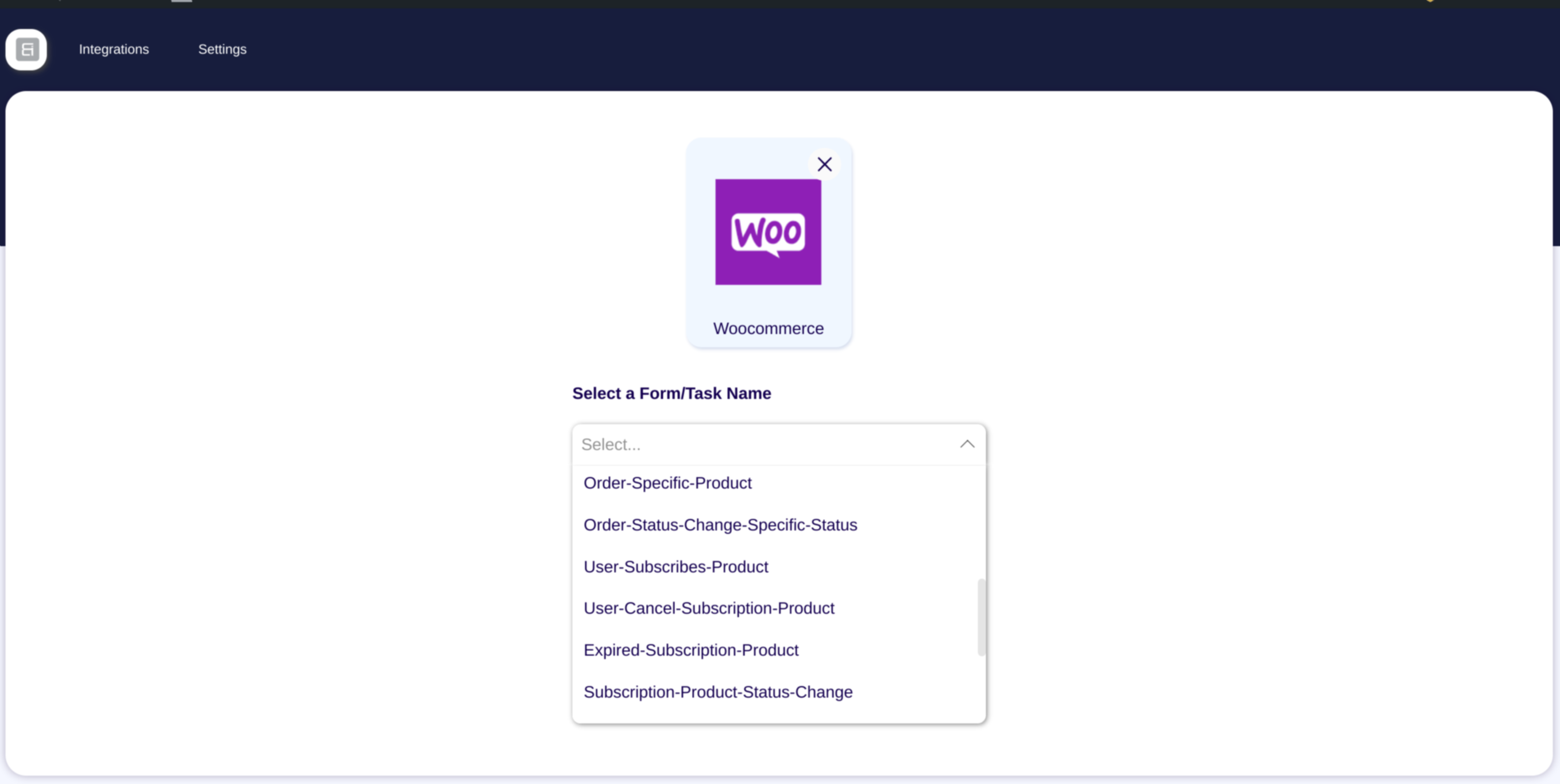
You can easily integrate WooCommerce with Google Sheet, CRM, Email Marketing & more. After Customer Create, Product Create, Order create, Order Status Change then those data send connect platform. It help you track WooCommerce store.
WordPress Integration
Automating WordPress tasks is now smarter with Bit Integrations.
Connect plugins like Elementor, Fluent Forms, Tutor LMS, or Contact Form 7 to your workflows.
For example, when a form is submitted, Bit Integrations can create a post, send emails, and update CRM records (e.g. FluentCRM) automatically.
MailChimp Integration
After submit Elementor, Contact form 7, Bit Form, Enroll Course in LearnDash, Create order in WooCommerce then this user added in Mailchimp subscriber list automatically.
Google Sheet automation
Google Sheet is widely used application. You can easily integrate Google Sheet with WordPress. After user submit a contact form, or any other event created in WordPress this data you can easily send google sheet using Bit Integrations.
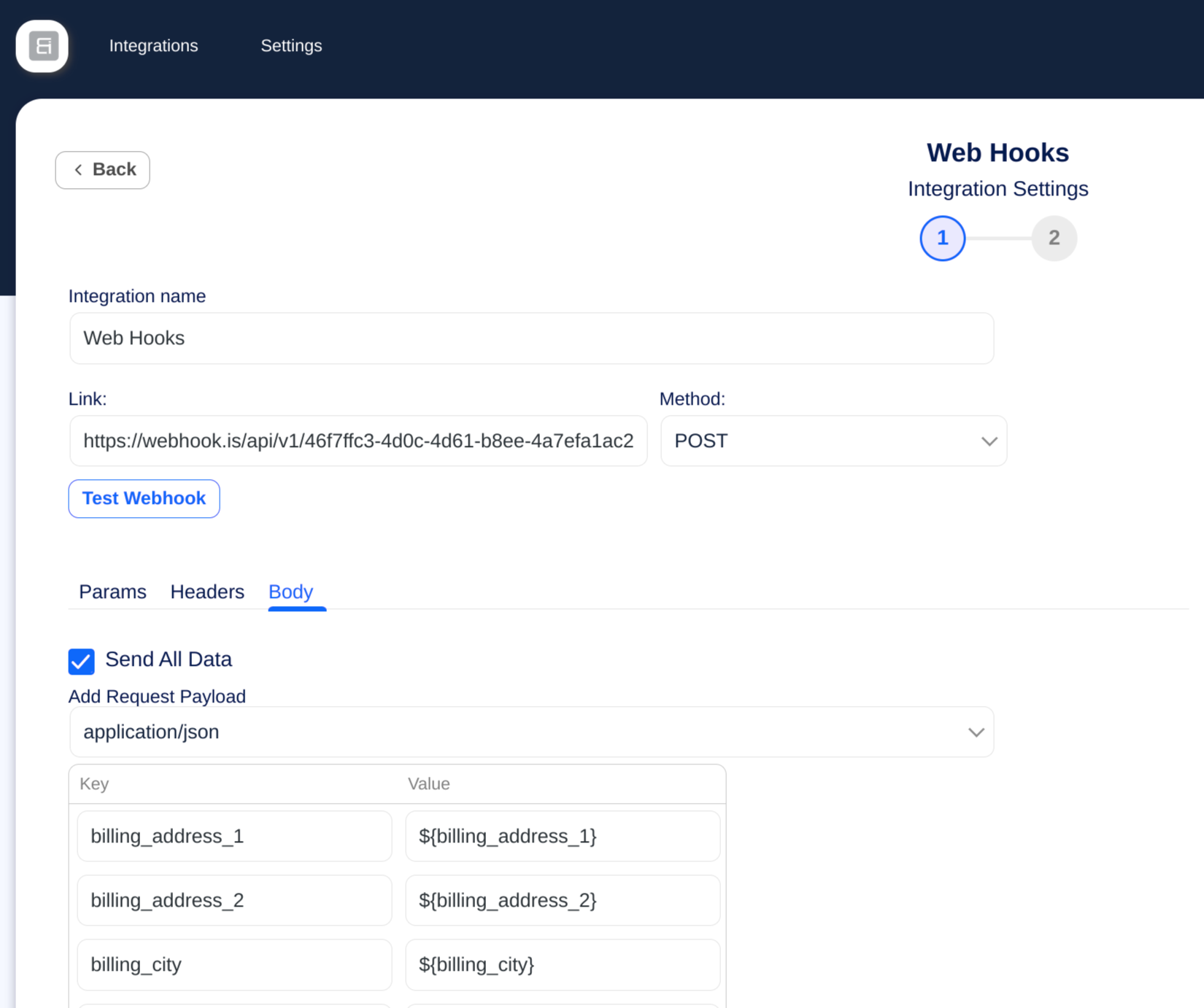
Incoming and Outgoing Webhook
You can receive third party data using webhook then process and send other platform. If some time native integrations missing then webhook is helpful.
Some platform don’t have API but the collect receive data from webhook. That Bit Integrations outgoing webhook help you send data.
⚙️ Automate Everything from One Dashboard
Automate your WordPress workflow with Bit Integrations — the easy no-code automation plugin, send unlimited data to third party platforms:
- WooCommerce
- Contact Form
- CRM
- LMS
- Bookings
- Google Sheet
- Webhooks
- Social Media
- Email Marketing Tools
- Automation Platforms like Zapier and more
Bit Integrations is the automator plugin WordPress users rely on for smart, scalable automation.
🚀 Useful Links
🧪 Try Pro Version
🙋 Live Support
🚀 Upgrade to Pro
🐱 Bit Integrations Repository
🔗 Explore all supported Integrations.
📚 Need help? Visit our Documentation.
▶️ Need help? Visit our Video Tutorials.
📢 Join our Bit Apps Community & get updates on our plugins.
💻 Full source code is available at
🔗 GitHub Repository: https://github.com/Bit-Apps-Pro/bit-integrations
With Bit Integrations, automation is at your fingertips. Automate tasks across your WordPress site, boost efficiency, and simplify your business operations with powerful automation features.
Bit Integrations | Best WordPress Automation Software! – by SiteKrafter
Bit Integrations help you Automate everything from simple tasks to complex task.
WP Simple Hacks – WordPress tips and tricks” youtube channels thoughts about WordPress automation plugin Bit Integrations.
Bit Integrations is a go-to automation and automator plugin for WordPress, enabling you to automate tasks and enhance productivity.
Connect WordPress Automatically To All Your Favorite Marketing Platforms – Bit Integrations – by SaaS Master
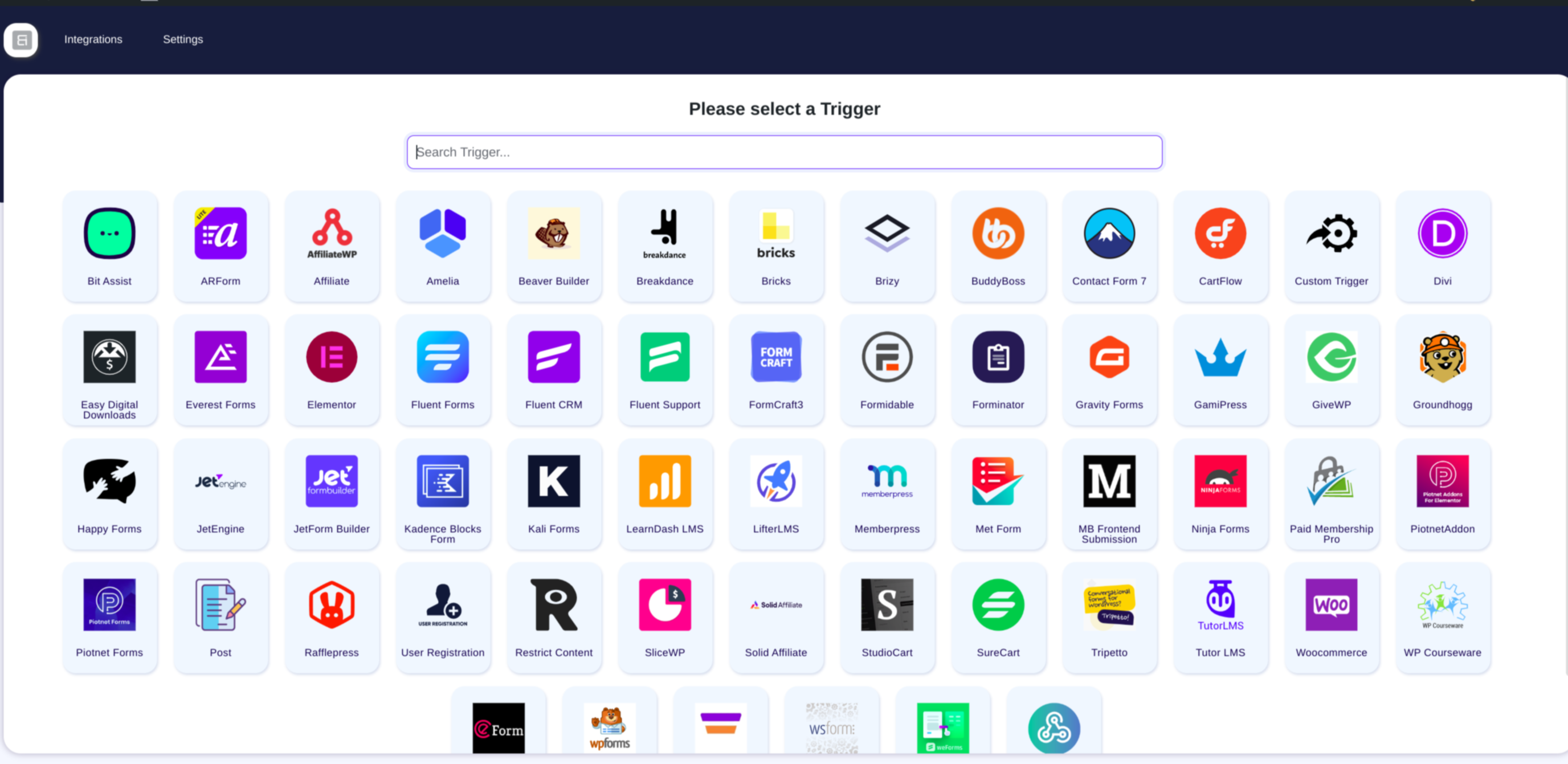
✔ List of Available Free Triggers:
- Elementor Automation
- Contact Form 7 Automation
- WooCommerce Integration
- WPForms Automation
- Bit Form Automation
✔ List of Available Pro Triggers:
- Fluent Forms
- Gravity Forms
- Advanced Custom Fields (ACF)
- WooCommerce Subscriptions
- WooCommerce Bookings
- WooCommerce Memberships
- Ninja Forms
- Piotnet Addons For Elementor
- Divi
- LearnDash
- Tutor LMS
- MemberPress
- Webhook
- Paid Memberships Pro
- Easy Digital Downloads
- JetEngine
- JetFormBuilder
- Beaver Builder
- Formidable
- MetaBox Frontend Submission
- Fluent CRM
- Groundhogg
- WP User Registration
- MailPoet
- Bricks
- Forminator
- Everest Forms
- bbPress
- BuddyPress
- BuddyBoss
- Dokan
- Advanced Coupons For WooCommerce
- Amelia
- MasterStudy LMS
- Academy LMS
- ARForms
- eForm
- FormCraft
- Happyforms
- SureForms
- Tripetto
- weForms
- WSForm
- Newsletter
- Wishlist Member
- SliceWP Affiliate
- Solid Affiliate
- SureCart
- SureFeedback
- SureMembers
- Voxel
- WPFunnels
- FunnelKits CRM
- Jetpack CRM
- … See More
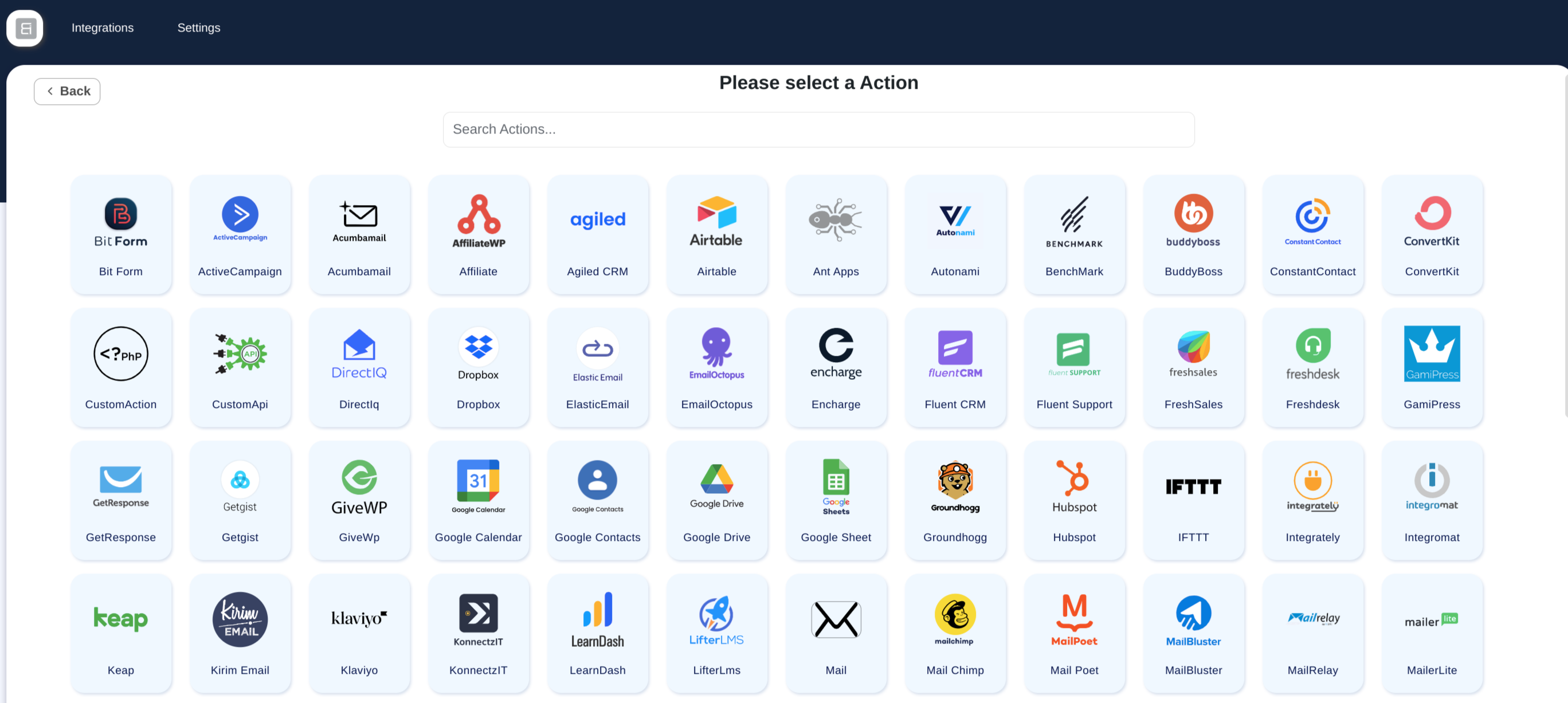
✔List of Available Free Actions:
- Zapier
- Make (Integromat)
- Uncanny Automator
- SureTriggers (OttoKit)
- AutomatorWP
- FlowMattic
- WooCommerce
- ActiveCampaign
- Mailchimp
- HubSpot
- Google Sheet
- Google Calendar
- Google Drive
- Google Contacts
- LearnDash
- Tutor LMS
- MemberPress
- FluentCRM
- Drip
- Klaviyo
- Salesforce
- MailPoet
- BuddyBoss
- Dokan
- Groundhogg
- GiveWP
- GamiPress
- Bit Form
- Advanced Form Integration
- Freshdesk
- Freshsales
- Pipedrive
- Zoho CRM
- Zoho Campaigns
- Zoho Sheet
- Zoho Desk
- Zoho Flow
- Zoho Marketing Hub
- Zoho Recruit
- Zoom Meeting
- Zoom Webinar
- Slack
- Telegram
- Discord
- Trello
- Asana
- ClickUp
- Notion
- Airtable
- Dropbox
- OneDrive
- SendinBlue(Brevo)
- MailerLite
- Moosend
- Omnisend
- Sarbacane(Mailify)
- Pabbly
- N8N
- SystemeIO
- Thrive Automator
- WP Webhooks
- WPFusion
- Academy LMS
- MasterStudy LMS
- Fluent Support
- Pods
- JetEngine
- wpForo
- License Manager for WooCommerce
- SliceWP Affiliate
- GoHighLevel
- Perfex CRM
- Propovoice CRM
- Zoho Bigin
- Flowlu
- Voxel
- Webhooks
- … See More
Most popular integrations use cases below for more understanding about this automation plugin
-
Automate order management, customer data syncing, product updates, and more. Common integrations include WooCommerce + Zoho CRM, WooCommerce + GoHighLevel, and WooCommerce + Google Sheets.
-
WooCommerce + Mailchimp for automated email marketing and WPForms + Mailchimp for form-based sign-ups or newsletters.
-
Bit Form + HubSpot to automatically sync leads or form submissions with your CRM, and WooCommerce + HubSpot to enhance eCommerce customer tracking.
-
Bit Integrations + Zapier to extend the platform’s capabilities by connecting to more platforms that aren’t natively supported.
-
LearnDash + WooCommerce for automating course registration and payments, or LearnDash + Perfex CRM to sync user enrollment data.
-
WooCommerce + Google Sheets for automating order records, or WPForms + Google Sheets for automatically populating form submissions.
-
Bit Form + ActiveCampaign to automate the process of adding form submissions to the email list, or WooCommerce + ActiveCampaign to trigger marketing campaigns based on purchase behavior.
-
WooCommerce + Salesforce to sync customer and order data, or Bit Form + Salesforce to capture leads from forms directly into Salesforce.
-
WPForms + Trello to create cards or tasks automatically when a form is submitted, or WooCommerce + Trello to create tasks or track orders as cards in Trello.
♻ How does this plugin work?
This plugin acts as a bridge between platforms, using Triggers and Actions. Triggers capture data, like form submissions (Contact Form 7, WP Forms, etc.), while Actions send it to CRM, Email Marketing Software, Project Management Tools, Data Collection Tools, and other WordPress plugins.
For example, a contact form (Bit Form, WP Forms, etc.)
is submitted, and you want to send data in your CRM, Email Marketing Software, Project Management Tools, Data Collection Tools, and other WordPress plugins.
❣ What our customer say about Bit Integrations :
💠 Best of class
-by @saschinger
💠 Bit Integrations is an affordable alternative to Pabbly Connect and Zapier
-by @barrynthdegreegroupnet
💠 A Game Changer for My WordPress automation
-by @angelitos
💠 Zapier-like Integrations, No Fees Required!
-by @peterode
💠 Zapier for WordPress Made Easy!
-by @onedogsolutions
💠 Pure Automation at Play!
-by @vaishakdamu
✨ Overview of other products we are offering :
📝Bit Form: One of our bestselling product. Drag & drop form builder for WordPress. Create custom contact forms, surveys, and more – no coding required!
📝Bit Flows: A powerful automation(like Zapier) plugin that sends your WordPress & outside of WordPress data to all types of platforms like WordPress plugins, saas, Shopify & all.
📧 Bit Assist: Connect with users via Messenger, WhatsApp, Telegram, Slack, Viber, and more, with custom forms and links.
📧 Bit Social: Auto-post, schedule, and share WordPress posts on Facebook, LinkedIn, and Twitter with ease.
📧 Bit File Manager: The ultimate WordPress file manager for uploading, deleting, moving, renaming, and managing files—100% free!
📧 Bit SMTP: Secure and improve your WordPress email deliverability.
📧 Webhooks.is: Test incoming and outgoing webhooks for free.
📢 We are open for freelance work/custom development. Connect with us for further information.
External Services
This plugin connects to various third-party external services to enable automation workflows between WordPress and 320+ platforms. Apart from the optional usage data described below, data is only sent to external services when you actively configure and enable an integration. No integration data is transmitted unless you explicitly create a workflow that connects to a specific service.
For a comprehensive list of all external services, including detailed information about what data is sent, when it’s sent, and links to each service’s terms and privacy policies, please see our complete external services documentation:
Complete External Services Documentation
This documentation covers 320+ services including Google (Sheets, Calendar, Drive), Zoho (CRM, Campaigns, Desk), Meta/Facebook (WhatsApp), Email Marketing platforms, CRM systems, Communication tools (Slack, Telegram), Automation platforms (Zapier, Make), Project Management tools, and many more.
Bit Apps usage data (optional, off by default)
Bit Integrations can send usage data to Bit Apps, the plugin’s developer, at https://wp-api.bitapps.pro. Bit Apps uses it to understand how the plugin is used and to decide what to improve and build next. Nothing is sent until a site administrator agrees: by clicking “Allow & Continue” in the notice on the Dashboard or Plugins screen, by clicking “Accept and continue” in the plugin’s What’s New window, or by turning on “Share usage data” in Bit Integrations > Settings. You can turn it off there at any time; nothing more is sent after that.
After you agree, the plugin sends a report right away and then once a week. The report contains:
- Site name and URL
- Site admin email address and the first administrator’s name
- Server environment (server software, PHP and MySQL versions, PHP settings, whether the site is local)
- WordPress version, language and settings (memory limit, debug mode, multisite)
- Active theme (name, version, author, website)
- Number of users, in total and per role
- Number of active and inactive plugins, and the names and versions of active plugins
- Bit Integrations version and telemetry library version
- Which page you opted in from, and whether you skipped this before
- Your integration flows: the trigger and action each one uses, whether it is enabled, and how many times it has run
When you deactivate the plugin, you can answer a short optional survey. Only if you submit it, the plugin sends your site URL, site language, the plugin version and your answer to the same server. Skipping the survey sends nothing.
Service provider: Bit Apps. Terms of service, Privacy policy.
Installation
- Download the automation plugin.
- From the WordPress Admin Panel, click on Plugins => Add New.
- For Uploading the automator plugin click on upload, so you can directly upload your plugin zip file.
- Use the browse button to select the plugin zip file that was downloaded, and then click on Install Now.
- Once installed the integration plugin, click “Activate”.
- Now you can start building your first automated workflow using available platform connectors.
- Visit Start Automation Now to create your first automation with triggers.
- Refer to the Documentation for detailed setup help.
Changelog
2.11.1
Release Date – 16th November 2026
-
New Triggers
- Bit Connect: 12 new events added.
- PaymentForm.io: New webhook trigger added.
-
New Features
- Webhook: Fetched webhook data now shows in groups, with a sample value under every field. Field names show where the value comes from, such as “Submission › Orders #1 › Name”.
- Elementor: The Form ID set in the form’s Additional Options can now be mapped as a field.
-
Bug Fixes
- Bit Connect: Post Published, Post Status or Stage Changed and Post Voted stopped running after the Bit Connect 1.1.0 update. They work again.
- New integration: The setup screen for Microsoft Excel, WP Activity Log, Follow Up Boss and Bit Connect showed “Five Star Restaurant Reservations” as its title. Each one now shows its own name.
2.11.0
Release Date – 9th November 2026
-
New Triggers
- WP Activity Log: 45 new events added (Pro).
- The Events Calendar: 17 new events added (Pro).
- Bit Connect: 15 new events added.
- NiroHelp: 13 new events added (Pro).
- WP Hotel Booking: 12 new events added (Pro).
- Booknetic: 10 new events added (Pro).
- Five Star Restaurant Reservations: 9 new events added (Pro).
- Paid Memberships Pro: 2 new events added (Pro).
-
New Actions
- Follow Up Boss: 62 new events added (Pro).
- Booknetic: 40 new events added (Pro).
- WP Hotel Booking: 24 new events added (Pro).
- NiroHelp: 19 new events added (Pro).
- WP Activity Log: 19 new events added (Pro).
- The Events Calendar: 15 new events added (Pro).
- Five Star Restaurant Reservations: 11 new events added (Pro).
- Microsoft Excel: 7 new events added (Pro).
- Bit Connect: 7 new events added.
- Paid Memberships Pro: 2 new events added (Pro).
-
New Features
- Klaviyo: New “Email Marketing Consent” option subscribes the profile to email marketing, so it can receive your campaigns.
- The Events Calendar: Custom fields can now be mapped when you create or update an event.
- Connections: Integrations created before version 2.10.0 can now switch to a saved connection from the connection dropdown.
-
Bug Fixes
- Bit Form: A flow could send its data to this site instead of the site saved in the selected connection.
- Connections: Some older integrations, such as SendinBlue, ConvertKit and Kirim Email, could not find their saved connections. Kirim Email failed with “Authorization class not found”.
- Freshdesk: Emails with special characters, such as “+”, could not find an existing contact, and the ticket was not linked to the contact.
- Bit Social: Editing a Bit Social flow opened the wrong edit screen.
- Removed broken documentation links from some triggers and actions.
2.10.9
Release Date – 26th October 2026
-
New Features
- Systeme.io: New Update Contact and Update Tags utilities. When a contact with the same email already exists, its fields are updated and the selected tag is added to it (Pro).
-
Security Fixes
- Pro AJAX requests now require integration write access in addition to a valid nonce (Pro).
- HappyForms: Signature image uploads now accept PNG images only and sanitize the file name (Pro).
-
Bug Fixes
- Systeme.io: Some failed requests were still logged as successful. Success is now decided by the response status.
- Systeme.io: Adding a tag now gets its own log entry, so a failed tag no longer hides the result of the contact.
- Edit Flow: Form fields were missing from the field map when you opened a saved flow. They now load with the flow.
- WP Post Creation: The settings screen could fail with “map is not a function” when the author list did not load. Administrators can now always load the author list, and the screen opens even if the list fails to load.
2.10.8
Release Date – 12th October 2026
- Bug Fixes
- Zoom: Failed Create Attendee and Create User actions were logged as successful. Failures now show the error from Zoom.
- Zoom: Delete Attendee and Delete User always reported success and only checked the first 30 records. They now search every page and report an error when no registrant or user has that email.
- Zoom: A field map row with a form field but no Zoom field could be saved. Both columns are now required.
- PerfexCRM: The Customer and Assigned By dropdowns stayed empty. Customers, leads and staff now load from every page.
- PerfexCRM: Projects are now always linked to a customer. The “Project Related With” option is removed, because PerfexCRM cannot link a project to a lead.
2.10.7
Release Date – 6th October 2026
-
New Triggers
- Bookings And Appointments For WooCommerce: 19 new events added (Pro).
- Charitable: 18 new events added (Pro).
- ElementsKit: 13 new events added (Pro).
- WP Simple Booking Calendar: 12 new events added (Pro).
- Quiz And Survey Master (QSM): 10 new events added (Pro).
- Rox Appointment Booking: 10 new events added (Pro).
- Quiz Maker: 3 new events added (Pro).
-
New Actions
- Rox Appointment Booking: 25 new events added (Pro).
- Quiz Maker: 22 new events added (Pro).
- WP Simple Booking Calendar: 18 new events added (Pro).
- Bookings And Appointments For WooCommerce: 14 new events added (Pro).
- Charitable: 12 new events added (Pro).
- Google Sheets: 9 new events added (Pro).
- ElementsKit: 8 new events added (Pro).
- Flodesk: 8 new events added (Pro).
- Quiz And Survey Master (QSM): 8 new events added (Pro).
-
New Features
- Paid Memberships Pro: Triggers now include the full member data – membership dates, billing and order details, subscription status and PMPro user fields such as Member Directory Entry (Pro).
- License: New Reconnect button refreshes your license status after a renewal, without disconnecting the site (Pro).
-
Security Fixes
- Timeline: Re-executing a log now runs the flow as the user who made the original submission, not as the administrator who presses Re-execute.
- BuddyBoss: Notification content and links are now sanitized, so HTML from a form submission can no longer run scripts in a user’s notifications.
-
Bug Fixes
- Zoom: The Zoom screen crashed after you selected a meeting.
- Google Sheets: When Google returned an error, the spreadsheet and worksheet lists stayed empty with no reason shown. The error message now appears.
- License: Licenses showed as expired one day early (Pro).
- License: A failed disconnect showed “Unknown error occurred” instead of the real error (Pro).
2.10.6
Release Date – 27th September 2026
- Bug Fixes
- wpDataTables: Manual tables now work. Their columns load in the field map and new rows are added to the table (Pro).
- Zoho CRM: Records with a lookup field, such as Account Name, failed with a “MANDATORY_NOT_FOUND” error.
- MailerLite: The “Update subscriber” option was disabled when groups were selected, so existing subscribers failed with “Subscriber already exist”.
Screenshots

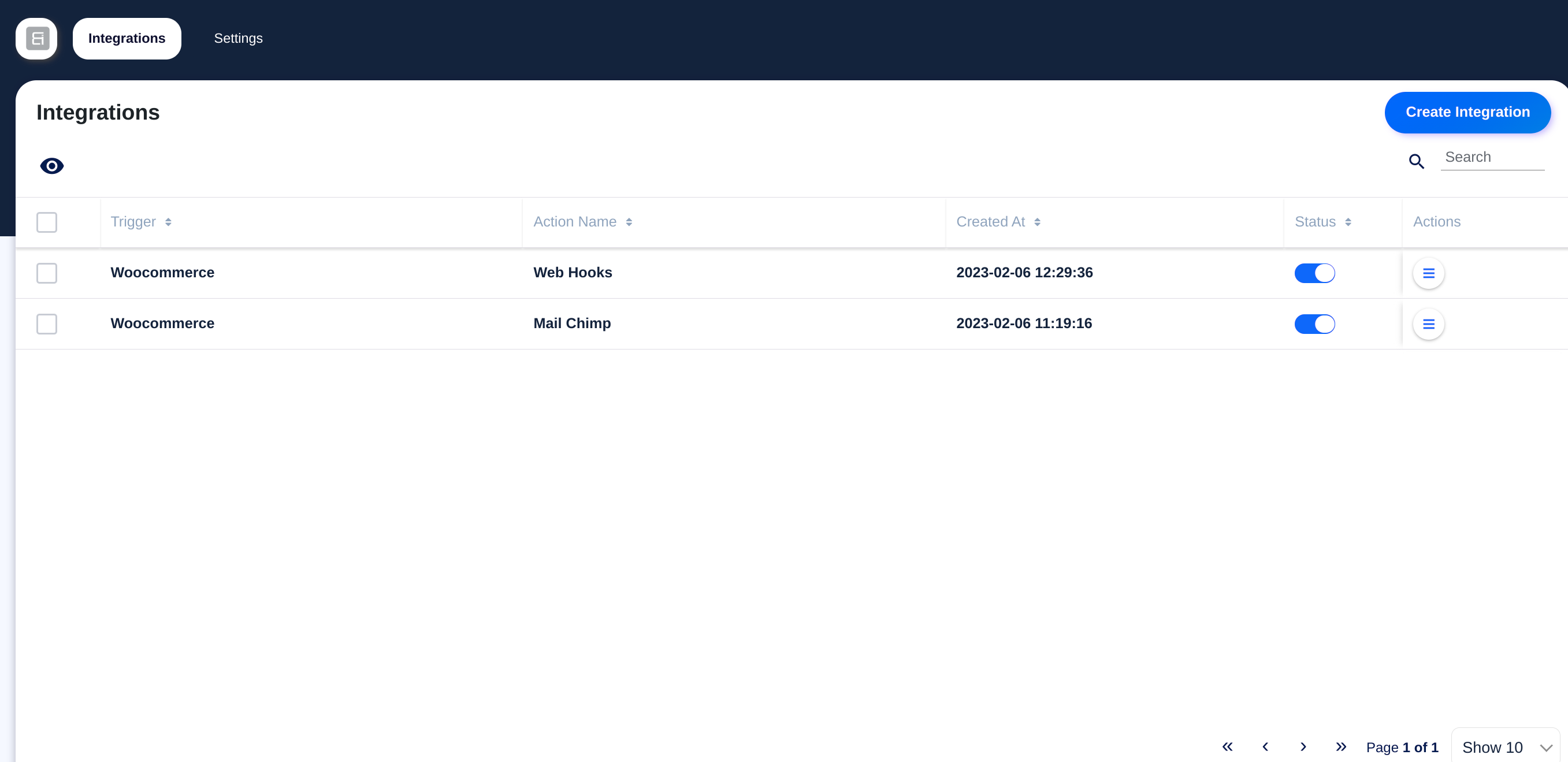
For developers
Is this your plugin? Show off the numbers.
Add a live badge to your site, docs or GitHub README. It updates on its own — no account needed.
Best Bit integrations alternatives
All automation plugins →





FAQ
Bit integrations: quick answers
Straight answers, pulled from live WordPress.org data.
Live data from WordPress.org · checked Nov 17, 2026
Is Bit integrations free?
Yes. Bit integrations is free to download and use from the official WordPress.org plugin directory. The developer also sells premium add-ons or a Pro version with extra features.
Is Bit integrations safe to use in 2026?
Bit integrations is a solid plugin choice in 2026, with a few things worth checking first. It runs on 20K+ sites, is rated 4.9/5 and was last updated 1 day ago, and scores 79/100 on our health check.
How many websites use Bit integrations?
Bit integrations is active on 20K+ WordPress websites and has been downloaded 938,476 times since it launched in January 2022. It was downloaded 28,698 times in the last 30 days.
Does Bit integrations work with WordPress 7.1?
Yes. The developer has tested Bit integrations up to WordPress 7.1.4, the latest release. It requires WordPress 5.1 or newer.
What PHP version does Bit integrations need?
Bit integrations requires PHP 7.4 or higher. Most hosts run PHP 8.x today, so it works on any modern WordPress hosting.
When was Bit integrations last updated?
The latest version, 2.11.1, was released on November 16, 2026 (1 day ago).
Who makes Bit integrations?
Bit integrations is developed and maintained by Bit Apps.
What are the best alternatives to Bit integrations?
The most popular alternatives to Bit integrations are OttoKit: All-in-One Automat… (80K+ installs), Zapier for WordPress (50K+ installs) and Uncanny Automator (40K+ installs).
Powered by PageForge
Want thousands of pages that rank like these? Build them in an afternoon.
This directory runs on the same engine as PageForge. Turn any spreadsheet, CSV or API into thousands of fast, SEO-ready WordPress pages — with schema, internal links and AI-written copy baked in.
- CSV, Google Sheets & API data sources
- AI content, schema & internal links per page
- Works with Elementor, Gutenberg, Yoast & Rank Math
- Free on WordPress.org — no credit card


