


Users Registration Date – Sortable Users Column
Sort and filter users by registration date on the Users page: a sortable "Registered" column and a date range picker, in your site timezone.

Safe pick
Yes — Users Registration Date is a safe, well-maintained plugin to use in 2026. It runs on 3K+ sites, is rated 5/5 and was last updated 1 month ago, and scores 83/100 on our health check.
- Tested with the latest WordPress (7.1)
How does it stack up?
Side-by-side on installs, updates, ratings & support



Daily downloads
Download spikes usually follow a new release — each site that auto-updates counts as a download.
Rankings
Where Users Registration Date stands todayWordPress.org search rankings
Live position in the plugin search, top 100| Keyword | Position |
|---|---|
| admin columns | #16 |
| registration date | #2 |
| user management | #26 |
| users | #6 |
| users list | #1 |
Version adoption
Share of active sites per release.
Rating breakdown
★★★★★★★★★★ 5 from 6 reviews
About Users Registration Date
From the official readme · v1.2.0Description
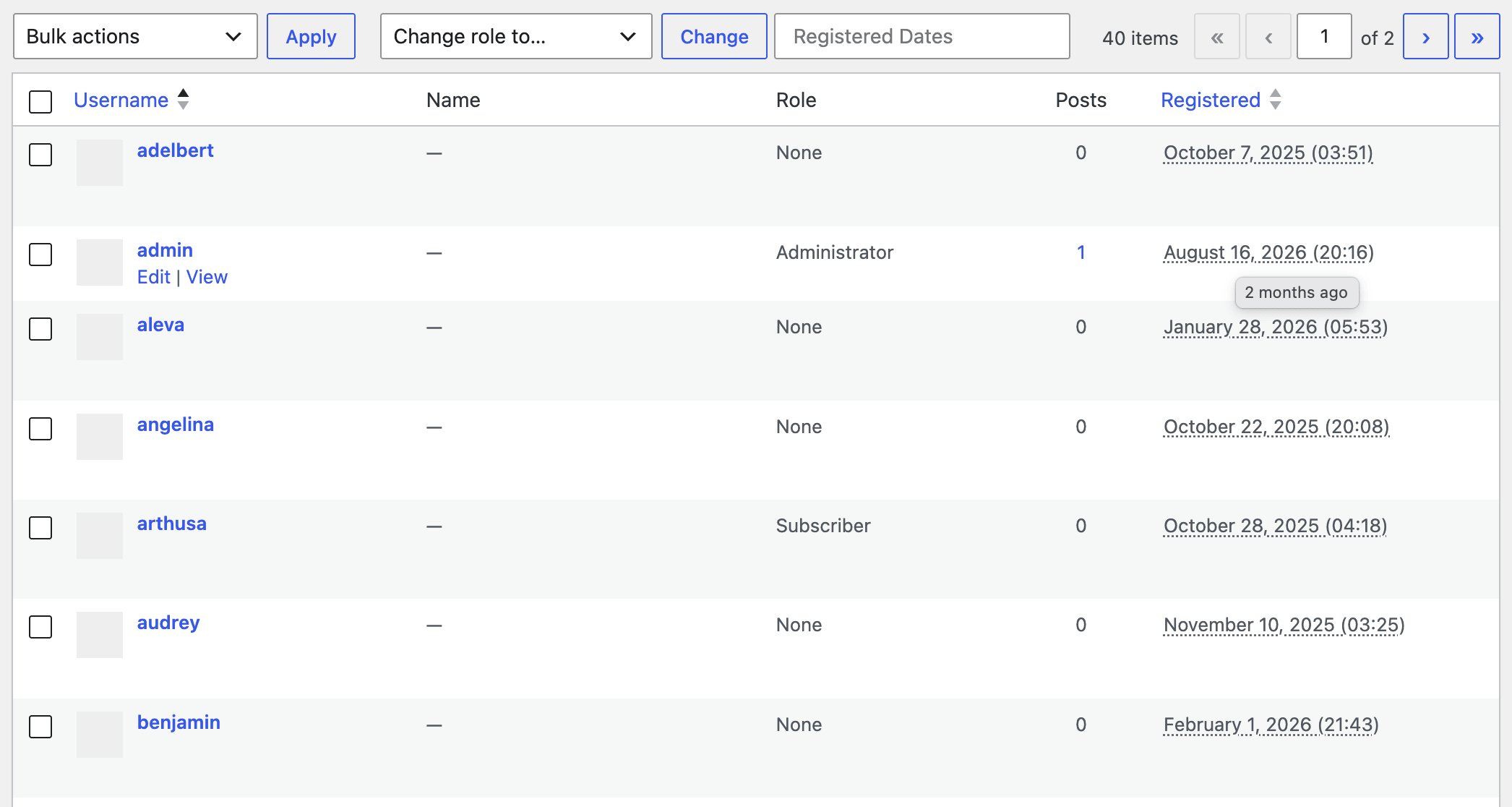
Users Registration Date adds a sortable “Registered” date column to the Users page in the wp-admin area, so you can see when each user registered on your site and sort users by registration date. A date range filter above the list narrows it down to the users who registered between two dates.
WordPress stores the registration date for every user account, but the users list never shows it. Without a plugin, checking it means digging into the database or reaching for WP-CLI. This plugin shows that date on the screen you already use for user management. Activate it, open the Users page, and the “Registered” column is there.
Key Features
- Sortable “Registered” column: click the column header to sort users by registration date, ascending (oldest users first) or descending (newest users first).
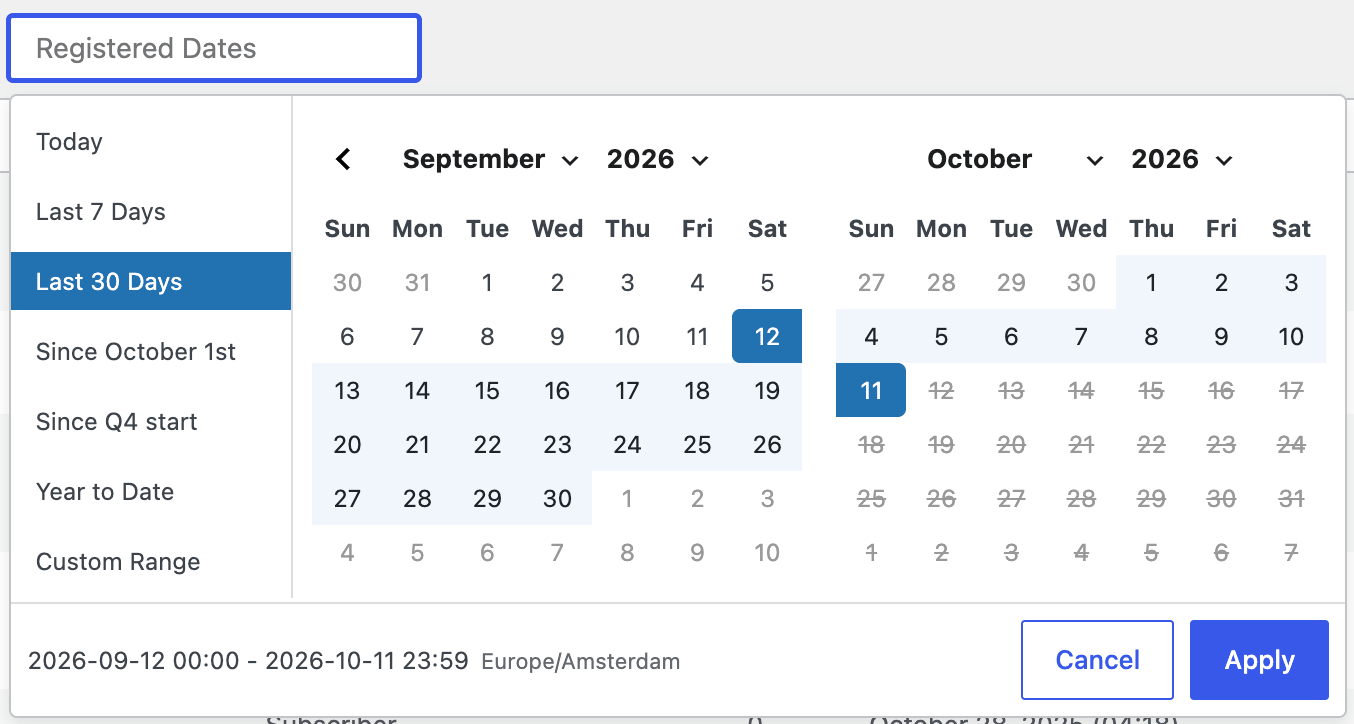
- Date range filter: narrow the users list to the accounts registered between two dates, or pick a ready-made range for today, the last 7 days, the last 30 days, this month, this quarter, or the year so far.
- Human-readable age on hover: hover over any date to see how long ago the user registered, like “5 days ago” or “3 years ago”.
- Respects your site settings: the column uses the date format, time format, and timezone you set on the Settings > General page.
- Zero configuration: there is no settings page and nothing to set up, and the plugin stores nothing in your database.
- Lightweight: built on the native WordPress admin column and users query hooks. It adds no database queries of its own and loads the date picker only on the Users page. Nothing runs on the front end of your site.
Filter Users by Registration Date
Click the “Registered Dates” field above the users list to open a calendar. Pick a start and an end date, or one of the ready-made ranges down the side (Today, Last 7 Days, Last 30 Days, since the first of this month, since the start of this quarter, or Year to Date), then press “Apply”.
Ranges are read in your site timezone. A range runs from 00:00 on its first day to 23:59 on its last, where your site lives, and “this month” follows your site’s calendar rather than the one on your computer. The date picker shows both times and the timezone before you apply a range.
The filter works with search, sorting, and paging. To filter a single role, open its role link first, then pick the range. The dates stay in the address bar, so you can bookmark or share a filtered list. A bookmarked range keeps its dates rather than rolling forward.
Find Recently Registered Users
Sort the “Registered” column in descending order to bring recently registered users to the top of the users list, or pick Last 7 Days in the date filter to see only this week’s signups. This is handy for spotting spam registrations, checking that new user registration works, or keeping an eye on how your audience grows.
Works With Any WordPress Users
The column shows the registration date for every WordPress user account, no matter how it was created:
- Customers created by WooCommerce and other eCommerce plugins.
- Members registered through membership, community, or LMS plugins.
- Subscribers added by newsletter and form plugins.
- Users created manually in wp-admin or via WP-CLI.
Get Started
Install and activate the plugin, and the next time you open the Users page you will know exactly when every user joined your site. Thousands of WordPress sites already run it.
If the plugin helps you, please leave a review. Reviews help other WordPress users find it.
Languages
You can translate the plugin into your language at translate.wordpress.org. Every completed translation makes the plugin easier to find for WordPress users in that language.
Installation
Backend installation:
- Install the plugin via Plugins > Add New Plugin. Search for “users registration date”.
- Click the “Install Now” button, and then “Activate”.
Manual installation:
- Download and unzip the plugin.
- Upload the
users-registered-listdirectory to the/wp-content/plugins/directory. - Activate the plugin through the “Plugins” menu in WordPress.
Then open the Users page to see the “Registered” column, with the “Registered Dates” filter above the list.
Changelog
Adds a date range filter above the users list, alongside internal code restructuring. The Registered column looks and behaves exactly as it did in 1.1.0.
1.2.0 (Oct 11, 2026)
- Added: Filter the users list by registration date by picking a range: today, the last 7 days, the last 30 days, this month, this quarter, the year so far, or custom range.
- Added: Every range is read in your site timezone, and the date picker shows the exact start and end times before you apply it.
- Changed: Reworked the plugin internals to make room for the features coming next. The Registered column is unchanged.
1.1.0 (Aug 16, 2026)
- IMPORTANT: The minimum required PHP version is now 7.4.
- Added: Hover over the registration date to see how long ago the user registered in a human readable format (“5 days ago”).
- Changed: Confirmed compatibility with WordPress 7.1.
- Changed: The minimum required WordPress version is now 5.3.
- Fixed: Slightly improved performance of the plugin on sites (realistically visible on busy sites with a lot of users).
- Fixed: The registration date and time are now displayed in the site timezone instead of UTC.
1.0.1 (Jan 20, 2024)
- Changed: Confirmed compatibility with WordPress 6.4.
- Fixed: There were several localization issues
- Fixed: Cleaned up the code.
1.0.0 (Nov 11th, 2013)
- Initial release
Screenshots
For developers
Is this your plugin? Show off the numbers.
Add a live badge to your site, docs or GitHub README. It updates on its own — no account needed.
Best Users Registration Date alternatives
All admin columns plugins →





FAQ
Users Registration Date: quick answers
Straight answers, pulled from live WordPress.org data.
Source: WordPress.org
Is Users Registration Date free?
Yes. Users Registration Date is free to download and use from the official WordPress.org plugin directory.
Is Users Registration Date safe to use in 2026?
Yes — Users Registration Date is a safe, well-maintained plugin to use in 2026. It runs on 3K+ sites, is rated 5/5 and was last updated 1 month ago, and scores 83/100 on our health check.
How many websites use Users Registration Date?
Users Registration Date is active on 3K+ WordPress websites and has been downloaded 18,129 times since it launched in November 2013. It was downloaded 1,686 times in the last 30 days.
Does Users Registration Date work with WordPress 7.1?
Yes. The developer has tested Users Registration Date up to WordPress 7.1.5, the latest release. It requires WordPress 5.3 or newer.
What PHP version does Users Registration Date need?
Users Registration Date requires PHP 7.4 or higher. Most hosts run PHP 8.x today, so it works on any modern WordPress hosting.
When was Users Registration Date last updated?
The latest version, 1.2.0, was released on October 11, 2026 (1 month ago).
Who makes Users Registration Date?
Users Registration Date is developed and maintained by Slava Abakumov.
What are the best alternatives to Users Registration Date?
The most popular alternatives to Users Registration Date are Admin Columns (100K+ installs), Admin Columns for ACF Fields (9K+ installs) and Adminify (6K+ installs).
Powered by PageForge
One template and a spreadsheet. A real page for every search.
PageForge turns each row of a CSV into a WordPress page with its own title, URL, SEO fields and schema, built on the layout you already designed. Free on WordPress.org.
- CSV and XLSX, plus Google Sheets on Professional and Enterprise
- Its own title, URL, SEO fields and schema for every page
- Works with the block editor, Elementor, Divi and Avada
- Free on WordPress.org, no credit card