


Word Counter Plus
🔥 Supercharge your content workflow with Word Counter Plus — the ultimate tool for tracking, sorting, and filtering word counts in your WordPress posts!

Use with caution
Word Counter Plus works, but test it on a staging site before relying on it in 2026. It runs on 80+ sites, is rated 5/5 and was last updated 12 months ago, and scores 47/100 on our health check.
- Small user base (80+ active installs)
- Very few reviews so far
- Only tested up to WordPress 6.8 (latest is 7.1)
Daily downloads
Download spikes usually follow a new release — each site that auto-updates counts as a download.
Rankings
Where Word Counter Plus stands todayWordPress.org search rankings
Live position in the plugin search, top 100| Keyword | Position |
|---|---|
| count words | #18 |
| word counter | #2 |
| Word Counter Plus | #1 |
| Word Counter Plus in post column | #2 |
| word counter wordpress post | #6 |
Version adoption
Share of active sites per release.
Rating breakdown
★★★★★★★★★★ 5 from 1 reviews
About Word Counter Plus
From the official readme · v1.2.5Description
🔥 Supercharge your content workflow with Word Counter Plus — the ultimate tool for tracking, sorting, and filtering word counts in your WordPress posts!
Designed for bloggers, writers, editors, and content teams, this powerful yet lightweight plugin automatically calculates and displays the word count of each post — directly inside your admin dashboard. Now includes a Word Count Filter to help you quickly find posts by length ranges.
Key Features:
✅ Automatic Word Count Calculation – Instantly counts words when you create or update a post.
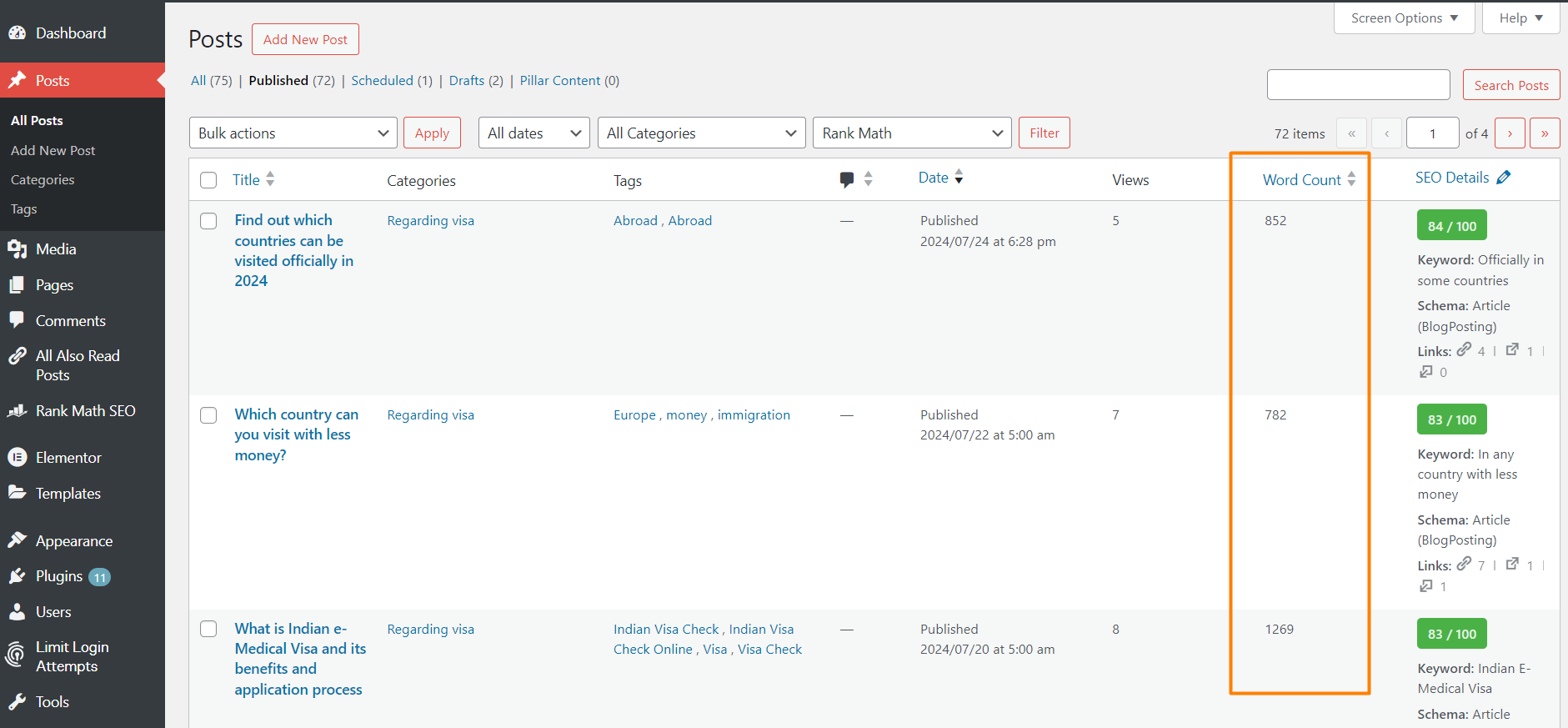
📊 Word Count Column – Adds a sortable ‘Word Count’ column to the Posts table in the admin dashboard.
🔍 Word Count Filter – Easily filter posts by word count ranges like 0–600, 601–1000, and beyond.
🧩 Seamless Integration – Designed to fit naturally into the WordPress interface with no extra clutter.
⚙️ Lightweight & Efficient – No performance hit; updates word count only on save or update.
🎯 Writing Goal Support – Great for content creators targeting specific word counts.
Stay organized, improve readability, and meet your editorial goals with precision. Whether you’re managing a blog, magazine, or marketing site, Word Counter Plus gives you the insights you need — at a glance.
Short Description
🔥 Supercharge your content workflow with Word Counter Plus — the ultimate tool for tracking, sorting, and filtering word counts in your WordPress posts!
Video Tutorial
Will be added soon.
Frequently asked questions
How does the Word Counter Plus plugin work?
The Word Counter Plus plugin automatically calculates the word count of each post as you create or update your content. It then displays the word count in a new ‘Word Count’ column in the Posts table of your WordPress dashboard.
Is the word count updated automatically?
Yes, the word count is updated automatically every time you save or update a post. You don’t need to perform any additional actions.
Will the Word Counter Plus plugin affect my website’s performance?
No, the Word Counter Plus plugin is designed to be lightweight and efficient. It only performs word count calculations during post save and update operations, ensuring minimal impact on your website’s performance.
Can I see the word count for custom post types?
Currently, the Word Counter Plus plugin is designed to work with the default post type. We are working on adding support for custom post types in future updates.
Is the Word Counter Plus column sortable?
Yes, you can sort your posts by word count by clicking on the ‘Word Count’ column header in the Posts table.
Does the plugin count words in custom fields or meta boxes?
No, the Word Counter Plus plugin only counts words in the main content area of each post. It does not include words from custom fields or meta boxes in the word count.
Is the plugin compatible with the latest version of WordPress?
Yes, we ensure that the Word Counter Plus plugin is always compatible with the latest version of WordPress. We recommend keeping your plugin updated to the latest version to ensure compatibility and access to new features.
How can I get support if I encounter issues with the plugin?
If you encounter any issues or have questions about the Word Counter Plus plugin, you can visit our support forum on the WordPress repository or contact us directly through our support page. If you are existing user and want to use the new feature of the plugin, please deactivate and reactivate the plugin to see the new feature.
Can I contribute to the development of the Word Counter Plus plugin?
Absolutely! We welcome contributions from the community. You can contribute by providing feedback, reporting bugs, or submitting code improvements through our GitHub repository.
Can I hide the Word Count column if I don’t need it?
Yes, you can customize the columns displayed in the Posts table by using the ‘Screen Options’ tab at the top right of the screen. Simply uncheck the ‘Word Count’ option to hide the column.
What is the Word Count Filter feature?
The Word Count Filter lets you easily filter your posts in the admin Posts table based on predefined word count ranges. This helps you quickly locate short, medium, or long posts without manual sorting or guesswork.
How do I use the Word Count Filter in the admin area?
To use the Word Count Filter, go to your Posts table in the WordPress dashboard. Above the table, you’ll see a dropdown labeled “Word Count Range.” Simply select a range (e.g., 0–600, 1001–2000, etc.), then click the “Filter” button to view only posts within that range.
Changelog
Welcome to the first release of the Word Counter Plus plugin! We’re excited to bring you this tool to help manage and track your content's word count easily with WordPress. Thank you for choosing Word Counter Plus! If you encounter any issues or have feedback, please ask questions in forum. We'll bring next update very soon.
1.2.1
Added post-filter screenshot and edited the plugin description.
1.2.0
Increase the plugin security.
1.1.0
Add Word Count Filter feature to filter posts by word count ranges. Improved code structure and performance optimizations.
1.0.0
Initial release of the Word Counter Plus plugin.
Screenshots
For developers
Is this your plugin? Show off the numbers.
Add a live badge to your site, docs or GitHub README. It updates on its own — no account needed.
FAQ
Word Counter Plus: quick answers
Straight answers, pulled from live WordPress.org data.
Live data from WordPress.org · checked Oct 7, 2026
Is Word Counter Plus free?
Yes. Word Counter Plus is free to download and use from the official WordPress.org plugin directory.
Is Word Counter Plus safe to use in 2026?
Word Counter Plus works, but test it on a staging site before relying on it in 2026. It runs on 80+ sites, is rated 5/5 and was last updated 12 months ago, and scores 47/100 on our health check.
How many websites use Word Counter Plus?
Word Counter Plus is active on 80+ WordPress websites and has been downloaded 1,984 times since it launched in July 2024. It was downloaded 69 times in the last 30 days.
Does Word Counter Plus work with WordPress 7.1?
Word Counter Plus is officially tested up to WordPress 6.8.11, while the latest release is 7.1.3. It may still work, but try it on a staging site first.
What PHP version does Word Counter Plus need?
Word Counter Plus requires PHP 5.2.4 or higher. Most hosts run PHP 8.x today, so it works on any modern WordPress hosting.
When was Word Counter Plus last updated?
The latest version, 1.2.5, was released on October 25, 2025 (12 months ago).
Who makes Word Counter Plus?
Word Counter Plus is developed and maintained by Mofizul Islam.
Powered by PageForge
Want thousands of pages that rank like these? Build them in an afternoon.
This directory runs on the same engine as PageForge. Turn any spreadsheet, CSV or API into thousands of fast, SEO-ready WordPress pages — with schema, internal links and AI-written copy baked in.
- CSV, Google Sheets & API data sources
- AI content, schema & internal links per page
- Works with Elementor, Gutenberg, Yoast & Rank Math
- Free on WordPress.org — no credit card


