



Admin Columns for ACF Fields
Show your Advanced Custom Fields (ACF) in columns for posts, pages, taxonomies, and users in the Wordpress admin backend.

Safe pick
Yes — Admin Columns for ACF Fields is a safe, well-maintained plugin to use in 2026. It runs on 9K+ sites, is rated 4.9/5 and was last updated 1 week ago, and scores 89/100 on our health check.
- Loved by users — 4.9/5 from 20 reviews
- Actively developed — last update 1 week ago
- Tested with the latest WordPress (7.1)
- Momentum — downloads up 478.8% vs the previous 30 days
How does it stack up?
Side-by-side on installs, updates, ratings & support



Daily downloads
Download spikes usually follow a new release — each site that auto-updates counts as a download.
Rankings
Where Admin Columns for ACF Fields stands todayWordPress.org search rankings
Live position in the plugin search, top 100| Keyword | Position |
|---|---|
| acf | #6 |
| admin columns | #4 |
| advanced custom fields | #22 |
Version adoption
Share of active sites per release.
Rating breakdown
★★★★★★★★★★ 4.9 from 20 reviews
About Admin Columns for ACF Fields
From the official readme · v0.3.3.1Description
This plugin requires the plugin “Advanced Custom Fields” (ACF) to work.
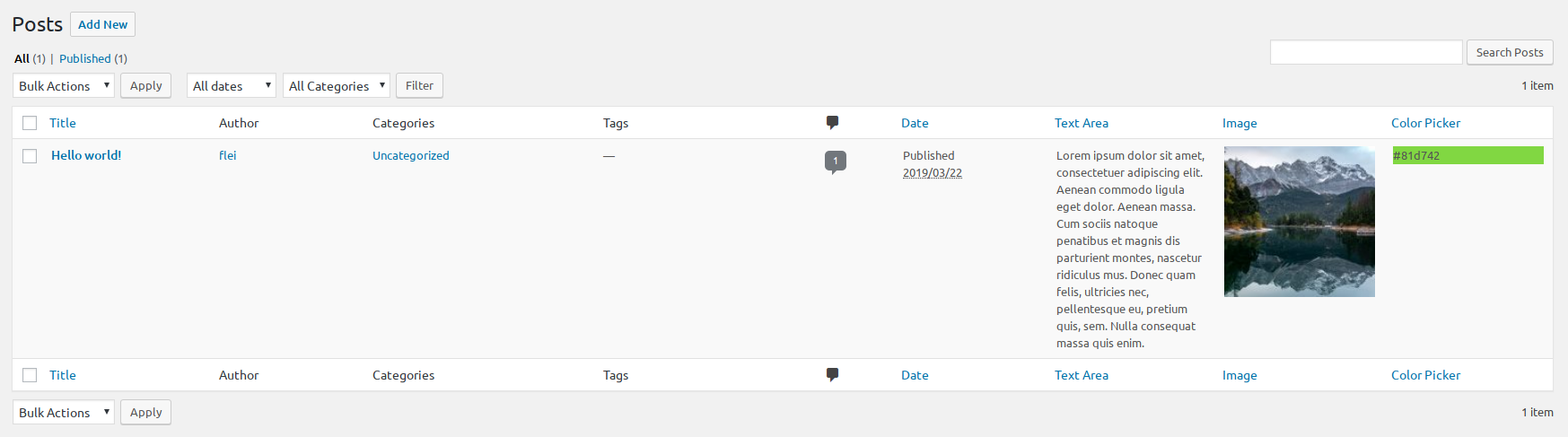
Use this plugin to show ACF fields in the “All Posts”, “All Pages”, Taxonomy or User table view in the WordPress admin backend.
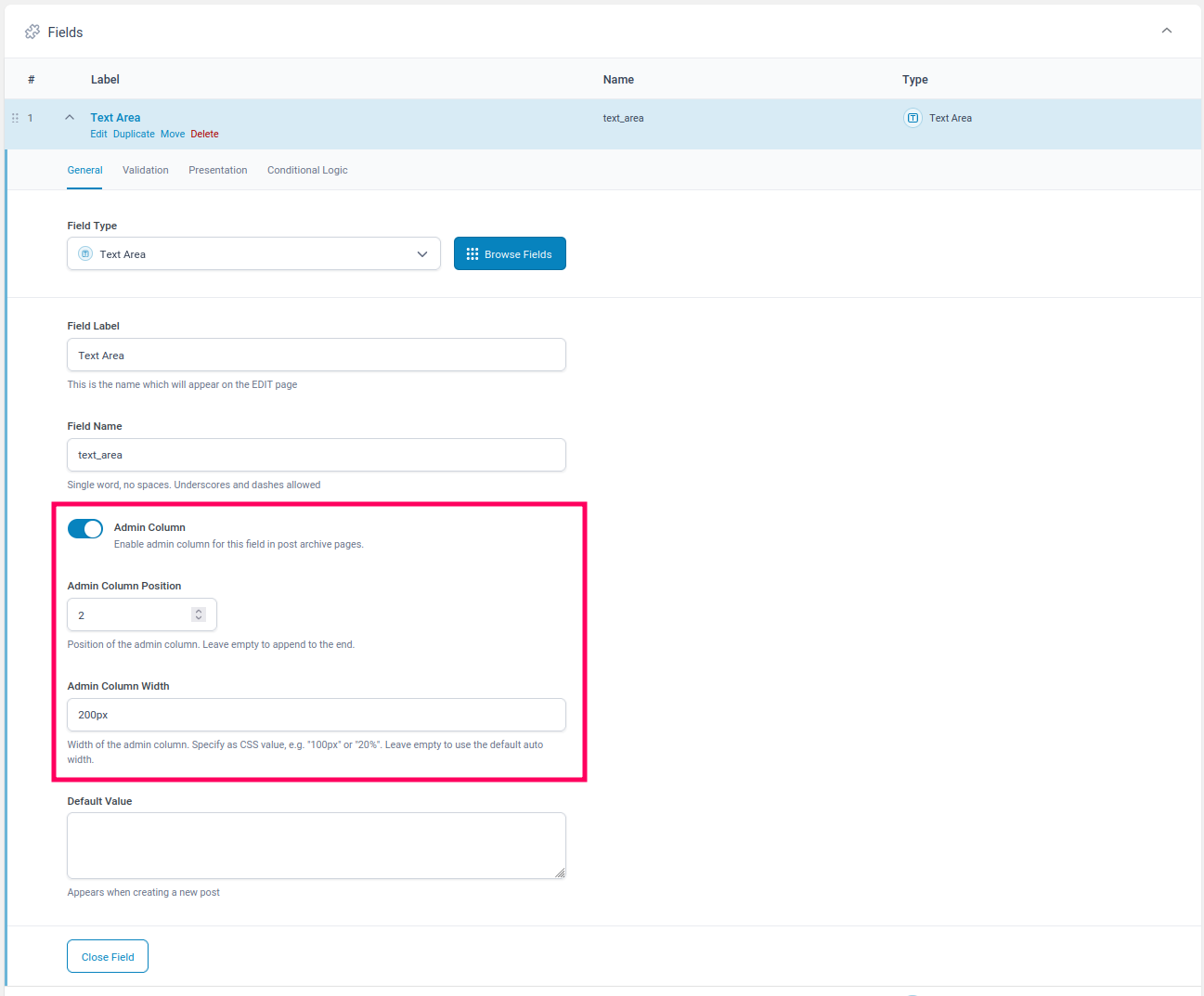
Simply enable the new option “Admin Column” in your ACF field settings for any regular field (see exceptions below), and optionally set the columns position and width. Now there will be an extra column for your field shown in any overview of built-in or custom posts, pages, taxonomies (e.g. “All Pages”), and users.
You can use filters (see below) to control the plugins behaviour even more precisely.
Works on any regular ACF field (see exceptions below).
Compatible with Advanced Custom Fields 5.x and 6.x.
Github: https://github.com/fleiflei/acf-admin-columns
If you like this plugin please kindly leave your review and feedback here: https://wordpress.org/plugins/admin-columns-for-acf-fields/#reviews
Usage:
- Install ACF and this plugin (see below)
- In ACF open/create a “field group” and open any field for editing (see exceptions below).
- Enable the “Admin Column” option in the field settings.
- Specify the desired column position (optional).
- Specify the desired column width (optional).
- Save the field group and go to the “All posts” view of the post type or taxonomy (e.g. “Posts > All Posts”, or “Pages > All Pages”) and notice the newly added column for your field.
Excluded ACF Fields
Due to their nature the option “Admin Column” is not shown in ACF for these fields:
- Accordion
- Clone
- Flexible Content
- Google Map
- Group
- Message
- Repeater
- Tab
Filters
“acf/admin_columns/admin_columns”
Allows you to change which columns are displayed on the current admin screen.
Parameters
$acf_columns - Array of all ACF fields to be shown in current screen. Note that the column key is always prefixed with 'acf_'.
$field_groups - Array of all ACF field groups to be shown in current screen.
Example:
Remove ‘my_field’ from the columns of the post type ‘my_custom_post_type’, even if it is set to be shown in the field settings. Note that the column key is always prefixed with ‘acf_’.
function my_admin_columns($acf_columns, $field_groups) {

    $screen = get_current_screen();
    if (!empty($screen) && $screen->post_type == 'my_custom_post_type' && isset($acf_columns['acf_my_field'])) {
        unset($acf_columns['acf_my_field']); // the key is always prefixed with 'acf_'
    }
    return $acf_columns;
}
add_filter('acf/admin_columns/admin_columns','my_admin_columns', 10, 2);
“acf/admin_columns/sortable_columns”
Change which columns should be sortable. By default, every column is sortable.
Parameters
$columns - Array of all ACF fields to be shown in current screen.
“acf/admin_columns/sort_order_type”
Change the sort order type for a certain field. By default, most fields are sorted by string comparison. Number fields are ordered by numeric comparison.
Parameters
$sort_order_type - The sort order type (either 'meta_value' or 'meta_value_num')
$field_properties - the ACF field properties
Example:
Change the sort order type for the field ‘my_field’ to ‘meta_value_num’ (see https://developer.wordpress.org/reference/classes/wp_query/#order-orderby-parameters).
function my_sort_order_type($sort_order_type, $field_properties) {
    if ($field_properties['name'] == 'my_field') {
        return 'meta_value_num';
    }
    return $sort_order_type;
}
add_filter('acf/admin_columns/sort_order_type','my_sort_order_type', 10, 2);
“acf/admin_columns/render_output”
Allows you to modify the output of a certain $field in every row of a posts table.
Parameters
$render_output - The field value after it was prepared for output
$field_properties - the ACF field properties
$field_value - the original raw field value
$post_id - the post id
Example:
Output then length of text field ‘my_text_field’ instead of its contents.
function my_column_value($rendered_output, $field_properties, $field_value, $post_id) {
    if ($field_properties['name'] == 'my_text_field') {
        return strlen($field_value);
    }
    return $rendered_output;
}
add_filter('acf/admin_columns/render_output','my_column_value', 10, 4);
“acf/admin_columns/render_raw”
Output a field value without any formatting. This is useful e.g. for image fields, where you might want to output the raw image url instead of a rendered image tag.
Parameters
$render_raw - boolean, set to true to render raw field value
$field_properties - the ACF field properties
$field_value - the original raw field value
$post_id - the post id
Example:
Output the raw image url for image field ‘my_image_field’ for post ID 123.
function my_render_raw($render_raw, $field_properties, $field_value, $post_id) {
    if ($field_properties['name'] == 'my_image_field' && $post_id == 123) {
        return true;
    }
    return $render_raw;
}
add_filter('acf/admin_columns/render_raw','my_render_raw', 10, 4);
“acf/admin_columns/default_value”
Allows you to override the default value for a certain field if it is empty. This only applies, if the field has a default value set in the field settings.
Parameters
$default_value - The default value
$field_properties - the ACF field properties
$field_value - the original raw field value
$post_id - the post id
Example:
Change the default value for field ‘my_field’ to ‘my default value’ if it is empty.
function my_default_value($default_value, $field_properties, $field_value, $post_id) {
    if ($field_properties['name'] == 'my_field' && empty($field_value)) {
        return 'my default value';
    }
    return $default_value;
}
add_filter('acf/admin_columns/default_value','my_default_value', 10, 4);
“acf/admin_columns/before_render_output”
Allows you to modify the field value of a certain $field before it is prepared for rendering. This filter is applied before ‘acf/admin_columns/render_output’.
Parameters
$field_value - the original raw field value
$field_properties - the ACF field properties
$post_id - the post id
“acf/admin_columns/preview_image_size”
Change the preview image size for image or gallery fields. Default value is “thumbnail”.
Parameters
$preview_image_size - string with image size name
$field_properties - the ACF field properties
$post_id - the post id
Example
Change preview image size to “medium”
function my_preview_image_size($preview_image_size, $field_properties, $post_id) {
        return 'medium';
}
add_filter('acf/admin_columns/preview_image_size','my_preview_image_size', 10, 3);
“acf/admin_columns/preview_image_url”
Allows for manipulation of the url of the preview image for image or gallery fields.
Parameters
$preview_image_url - string with image url
$field_properties - the ACF field properties
$post_id - the post id
Example
Replace preview image of field ‘my_image_field’ for post ID 123 to a random 100x100px image from https://picsum.photos.
function my_preview_image_url($preview_image_url, $field_properties, $post_id) {
    if ($field_properties['name'] == 'my_image_field' && $post_id == 123) {
        return 'https://picsum.photos/100/100';
    }
    return $preview_image_url;
}
add_filter('acf/admin_columns/preview_image_url','my_preview_image_url', 10, 3);
“acf/admin_columns/link_wrap_url”
Automatically wrap url in link to that url. This is useful e.g. for text fields that contain a url, where you might want to output a link to the url instead of the url itself.
Parameters
$link_wrap_url - boolean, set to true to wrap url in link
$field_properties - the ACF field properties
$field_value - the original raw field value
$post_id - the post id
Example:
Wrap url in link for text field ‘my_link_text_field’.
function my_link_wrap_url($link_wrap_url, $field_properties, $field_value, $post_id) {
    if ($field_properties['name'] == 'my_link_text_field') {
        return true;
    }
    return $link_wrap_url;
}
add_filter('acf/admin_columns/link_wrap_url','my_link_wrap_url', 10, 4);
“acf/admin_columns/array_render_separator”
Allows you to change the separator for array fields (e.g. repeater, flexible content, gallery). Default value is “, “.
Parameters
$array_render_separator - string with separator, default = ", "
$field_properties - the ACF field properties
$field_value - the original raw field value
$post_id - the post id
Example:
Output every array item on a new line, using the <br> tag.
function my_array_render_separator($array_render_separator, $field_properties, $field_value, $post_id) {
    return "<br>";
}
add_filter('acf/admin_columns/array_render_separator','my_array_render_separator', 10, 4);
“acf/admin_columns/no_value_placeholder”
Change the placeholder for empty values. Default value is “-“.
Parameters
$no_value_placeholder - string with placeholder, default = "-"
$field_properties - the ACF field properties
$field_value - the original raw field value
$post_id - the post id
Example:
Output “n/a” for empty values.
function my_no_value_placeholder($no_value_placeholder, $field_properties, $field_value, $post_id) {
    return "n/a";
}
add_filter('acf/admin_columns/no_value_placeholder','my_no_value_placeholder', 10, 4);
“acf/admin_columns/highlight_search_term_preg_replace_pattern”
Change the preg_replace pattern for highlighting the search term in the column output.
Parameters
$highlight_search_term_preg_replace_pattern - string with preg_replace pattern, default is '<span style="background-color:#FFFF66; color:#000000;">\\0</span>' (yellow background, black font color)
$field_properties - the ACF field properties
$field_value - the original raw field value
$post_id - the post id
Example:
Highlight search terms with red background and white font color.
function my_highlight_search_term_preg_replace_pattern($highlight_search_term_preg_replace_pattern, $field_properties, $field_value, $post_id) {
    return '<span style="background-color:#FF0000; color:#FFFFFF;">\\0</span>';
}
add_filter('acf/admin_columns/highlight_search_term_preg_replace_pattern','my_highlight_search_term_preg_replace_pattern', 10, 4);
“acf/admin_columns/exclude_field_types”
Change which field types should not have the admin column option in the field settings.
Parameters
$excluded_field_types - array of excluded_field_types
Example: disallow the admin column option for TEXT fields
function my_exclude_field_types($excluded_field_types) {
  $excluded_field_types[] = 'text';
  return $excluded_field_types;
}
add_filter('acf/admin_columns/exclude_field_types','my_exclude_field_types');
“acf/admin_columns/column_position”
Change the column position for a certain field.
Parameters
$column_position - integer with column position
$field_name - the ACF field name
$field_properties - the ACF field properties
Example:
Change the column position for field ‘my_field’ to 2.
function my_column_position($column_position, $field_name, $field_properties) {
    if ($field_name == 'my_field') {
        return 2;
    }
    return $column_position;
}
add_filter('acf/admin_columns/column_position','my_column_position', 10, 3);
“acf/admin_columns/column_styles”
Change the column styles for a column.
Parameters
$column_styles - string with column styles
$field_name - the ACF field name
$field_properties - the ACF field properties
Example:
Change the column width for field ‘my_field’ to 20% of the screen width and set the max-width of the column to 200px.
function my_column_styles($column_styles, $field_name, $field_properties) {
    if ($field_name == 'my_field') {
        return 'width: 20%; max-width: 200px;';
    }
    return $column_styles;
}
add_filter('acf/admin_columns/column_styles','my_column_styles', 10, 3);
Installation
This section describes how to install the plugin and get it working.
- Upload the plugin files to the
/wp-content/plugins/admin-columns-for-acf-fieldsdirectory, or install the plugin through the WordPress plugins screen directly. - Activate the plugin through the ‘Plugins’ screen in WordPress
- Open ACF and enable “Admin Column” in any fields settings section.
Frequently asked questions
How can I change the preview image size of image and gallery fields?
Use the filter “acf/admin_columns/preview_image_size” to change the preview image size. See “Filters” section above for details.
Changelog
0.3.3.1
Release date: 27.09.2026
- Fix: make double-sure everything is escaped
- Fix: various fixes and improvements according to WP Plugin Check
0.3.3
Release date: 27.09.2026
- Fix: security issue in unescaped field value output
- Fix: fixed taxonomy and user screen column display and sorting issues
0.3.2
Release date: 17.01.2025
- Fix: field columns not rendered for users
- Fix: upwards compatibility with PHP 7.4+ in strip_tags()
- Fix: documentation fix for filter ‘acf/admin_columns/column/render_output’ (old) -> ‘acf/admin_columns/render_output’ (new)
0.3.1
Release date: 17.11.2023
- Fix: error in column positioning
- Fix: improved handling of user fields
0.3.0
Release date: 15.11.2023
- Improvement: Added column position field setting. This allows you to control the position of the column in the overview. Added new filter “acf/admin_columns/column_position” to change a columns position programmatically.
- Improvement: Added column width field setting. This allows you to control the width of the column in the overview. Added new filter “acf/admin_columns/column_styles” to change a columns width or other styles programmatically.
0.2.2
Release date: 10.11.2023
- improved filters and updated filter documentation
Screenshots
For developers
Is this your plugin? Show off the numbers.
Add a live badge to your site, docs or GitHub README. It updates on its own — no account needed.
Best Admin Columns for ACF Fields alternatives
All acf plugins →





FAQ
Admin Columns for ACF Fields: quick answers
Straight answers, pulled from live WordPress.org data.
Live data from WordPress.org · checked Oct 4, 2026
Is Admin Columns for ACF Fields free?
Yes. Admin Columns for ACF Fields is free to download and use from the official WordPress.org plugin directory.
Is Admin Columns for ACF Fields safe to use in 2026?
Yes — Admin Columns for ACF Fields is a safe, well-maintained plugin to use in 2026. It runs on 9K+ sites, is rated 4.9/5 and was last updated 1 week ago, and scores 89/100 on our health check.
How many websites use Admin Columns for ACF Fields?
Admin Columns for ACF Fields is active on 9K+ WordPress websites and has been downloaded 58,481 times since it launched in October 2019. It was downloaded 2,599 times in the last 30 days.
Does Admin Columns for ACF Fields work with WordPress 7.1?
Yes. The developer has tested Admin Columns for ACF Fields up to WordPress 7.1.2, the latest release. It requires WordPress 4.6 or newer.
What PHP version does Admin Columns for ACF Fields need?
Admin Columns for ACF Fields requires PHP 7.4 or higher. Most hosts run PHP 8.x today, so it works on any modern WordPress hosting.
When was Admin Columns for ACF Fields last updated?
The latest version, 0.3.3.1, was released on September 26, 2026 (1 week ago).
Who makes Admin Columns for ACF Fields?
Admin Columns for ACF Fields is developed and maintained by Florian Eickhorst.
What are the best alternatives to Admin Columns for ACF Fields?
The most popular alternatives to Admin Columns for ACF Fields are Advanced Custom Fields (ACF… (2M+ installs), ACF Content Analysis for Yo… (100K+ installs) and Advanced Custom Fields: Ext… (100K+ installs).
Powered by PageForge
Want thousands of pages that rank like these? Build them in an afternoon.
This directory runs on the same engine as PageForge. Turn any spreadsheet, CSV or API into thousands of fast, SEO-ready WordPress pages — with schema, internal links and AI-written copy baked in.
- CSV, Google Sheets & API data sources
- AI content, schema & internal links per page
- Works with Elementor, Gutenberg, Yoast & Rank Math
- Free on WordPress.org — no credit card


