


Post Admin Word Count
Adds a sortable word count column to the admin post list for all public post types. Efficient, lightweight and built with modern best practices.

Use with caution
Post Admin Word Count works, but test it on a staging site before relying on it in 2026. It runs on 2K+ sites, is rated 3.5/5 and was last updated 2 years ago, and scores 43/100 on our health check.
- No update in over a year
- Only tested up to WordPress 6.8 (latest is 7.1)
How does it stack up?
Side-by-side on installs, updates, ratings & support



Daily downloads
Download spikes usually follow a new release — each site that auto-updates counts as a download.
Rankings
Where Post Admin Word Count stands todayWordPress.org search rankings
Live position in the plugin search, top 100| Keyword | Position |
|---|---|
| admin columns | #67 |
| Content analysis | >100 |
| custom post types | >100 |
| post word count | #6 |
| word count | #5 |
Version adoption
Share of active sites per release.
Rating breakdown
★★★★★★★★★★ 3.5 from 6 reviews
About Post Admin Word Count
From the official readme · v2.0Description
Post Admin Word Count adds a sortable “Words” column to the WordPress admin for all public post types. This lightweight plugin automatically calculates and stores word counts when posts are saved or viewed in the admin, ensuring performance and accuracy without scanning your entire site. It supports custom post types, integrates cleanly with the WordPress admin UI and adheres to modern coding standards. Ideal for publishers, bloggers and content editors who want quick insight into post length directly from the dashboard.
Installation
- Upload the plugin files to the
/wp-content/plugins/post-admin-word-countdirectory, or install the plugin through the WordPress plugin repository. - Activate the plugin through the ‘Plugins’ screen in WordPress.
- Go to the ‘Posts’ screen (or any supported post type) in your WordPress admin to see the new “Words” column.
- Click the “Words” column header to sort posts by word count.
Changelog
The current version is 2.0 (2025.05.21)
2.0
- Complete plugin rewrite with modern best practices
- Word count column now supports all public post types (excluding attachments and system types)
- Word counts are lazily saved for existing posts, improving performance and accuracy
- Replaced legacy raw SQL with native WordPress query handling
- Added sortable column support across custom post types
- Improved security, escaping and overall code quality
1.2
- Process post meta before display
- Upload screenshot
1.1
- Fixed sorting
1.0
- First version
Screenshots
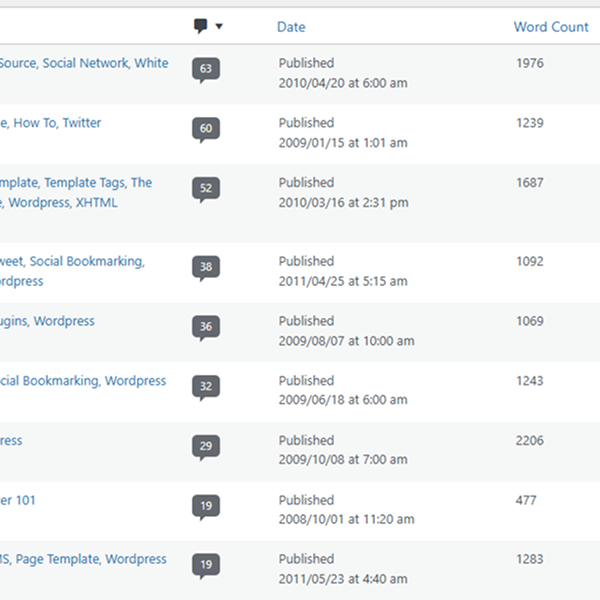
For developers
Is this your plugin? Show off the numbers.
Add a live badge to your site, docs or GitHub README. It updates on its own — no account needed.
Best Post Admin Word Count alternatives
All admin columns plugins →





FAQ
Post Admin Word Count: quick answers
Straight answers, pulled from live WordPress.org data.
Source: WordPress.org
Is Post Admin Word Count free?
Yes. Post Admin Word Count is free to download and use from the official WordPress.org plugin directory.
Is Post Admin Word Count safe to use in 2026?
Post Admin Word Count works, but test it on a staging site before relying on it in 2026. It runs on 2K+ sites, is rated 3.5/5 and was last updated 2 years ago, and scores 43/100 on our health check.
How many websites use Post Admin Word Count?
Post Admin Word Count is active on 2K+ WordPress websites and has been downloaded 13,425 times since it launched in August 2012. It was downloaded 445 times in the last 30 days.
Does Post Admin Word Count work with WordPress 7.1?
Post Admin Word Count is officially tested up to WordPress 6.8.13, while the latest release is 7.1.5. It may still work, but try it on a staging site first.
What PHP version does Post Admin Word Count need?
Post Admin Word Count requires PHP 7.2 or higher. Most hosts run PHP 8.x today, so it works on any modern WordPress hosting.
When was Post Admin Word Count last updated?
The latest version, 2.0, was released on May 22, 2025 (2 years ago).
Who makes Post Admin Word Count?
Post Admin Word Count is developed and maintained by Jon Bishop.
What are the best alternatives to Post Admin Word Count?
The most popular alternatives to Post Admin Word Count are Admin Columns (100K+ installs), Admin Columns for ACF Fields (8K+ installs) and Adminify (6K+ installs).
Powered by PageForge
One template and a spreadsheet. A real page for every search.
PageForge turns each row of a CSV into a WordPress page with its own title, URL, SEO fields and schema, built on the layout you already designed. Free on WordPress.org.
- CSV and XLSX, plus Google Sheets on Professional and Enterprise
- Its own title, URL, SEO fields and schema for every page
- Works with the block editor, Elementor, Divi and Avada
- Free on WordPress.org, no credit card