



Tweakr – Advanced options toolkit
Supercharges your Blog with production grade Tweaks, Features and Utilities

Use with caution
Tweakr works, but test it on a staging site before relying on it in 2026. It runs on 30+ sites, is rated 5/5 and was last updated 6 months ago, and scores 46/100 on our health check.
- Small user base (30+ active installs)
- Very few reviews so far
- Only tested up to WordPress 6.9 (latest is 7.1)
How does it stack up?
Side-by-side on installs, updates, ratings & support



Daily downloads
Download spikes usually follow a new release — each site that auto-updates counts as a download.
Rankings
Where Tweakr stands todayWordPress.org search rankings
Live position in the plugin search, top 100| Keyword | Position |
|---|---|
| >100 | |
| enhancement | >100 |
| security | >100 |
| tools | >100 |
| tweaks | >100 |
Version adoption
Share of active sites per release.
Rating breakdown
★★★★★★★★★★ 5 from 1 reviews
About Tweakr – Advanced options toolkit
From the official readme · v2.2.0Description
This plugin is a collection of common used tweaks and features – each of them can be controlled independently
It is designed as compact all-in-one solution espacially for Web-Agencies and Advanced Users with security in mind: just audit and trust a single plugin.
- Use External SMTP Mailserver to deliver mails transmitted by
wp_mail - No Third Party libraries required! WordPress Internal PHPMailer class is used
- Support for TLS/SSL Connections
- Set the Mail-From-Name and Mail-From-Address manually
- Fix phpmailerExceptions by setting the mail-from parameter to a valid address
- Control New User Registration E-Mails (send to admin and/or user)
Automatic Updates
- Control Automatic-Update policy
- Enable automatic Theme Updates
- Enable automatic Plugin Updates
- Disable Automatic Updates
- Disable Update Notification (E-Mail)
Permalinks/Rewrite Rules
- Add
.htmlextension to pages – e.g.privacy-protecton.html - Add
.htmlextension to categories – e.g.category/uncategorized.html - Optional or enforced html extensions (backward compatibility)
- Remove embed Rewrite Rules
- Remove feed Rewrite Rules
Virtual Permalink URLs
- Placeholders like
link://post.local/1234can be used within the Link-Insert-Dialogs and got replaced by the real link during rendering – this avoids problems with different domains names.
XML Sitemap
- Automatical XML Sitemap generation
sitemap.xml(SEO) - Modern Search-Engines like Google, Bing can easier index your posts/pages
- Only Posts and Pages are displayed
- Password protected posts/pages or unpublished content is ignored!
- XML Format regarding the sitemaps.org specification
Security
- Disable XMLRPC API (Really!)
- Restrict REST (JSON) API Access to Admin and Editor User
TinyMCE Visual Editor
- VisualComponent Extension visualizes the HTML Element Structure (headings,section,p)
- Remove the fixed-width restriction of the Editor-Area (set to 80% max)
System Tweaks
- Disable Emojis
- Disable Smileys
- Disable oEmbeds
- Hide Admin Toolbar
- Hide WordPress Generator Tag
- Hide Windows Live Writer manifest file link
- Hide Meta Pagination Links
- Hide Feed Links
- Hide Resource Hints
- Disable RSS Feeds
- Disable Atom Feeds
- Disable RDF Feeds
Google Analytics
- Google Analytics Support – just add your Tracking-ID
- AnonymizeIP Option
- OPT-OUT Shortcode/Button (required by GDPR/DSGVO) – also works with Caching Plugins or CDN Servers
- IE8 Compatible
Matomo/Piwik Analytics
- Matomo v3 Support – add your Host URL + Site ID – thats it!
- OPT-OUT Shortcode/Button (required by GDPR/DSGVO) – also works with Caching Plugins or CDN Servers
- Simple Page Name Option (Records the Document Title without Blog Name)
- DoNoTrack Option
- Option to add the Hostname to your Document Title (useful for multidomain sites)
Installation
System requirements
- PHP 5.4 or greater
- WordPress 5.4
Installation
- Upload the complete
tweakrfolder (WordPress Plugin) to the/wp-content/plugins/directory - Activate the plugin through the ‘Plugins’ menu in WordPress
- Go to Settings -> Tweakr and configure it
Frequently asked questions
A lot of the Tweaks/Extensions are already available as Single Plugins
Of course! But as a professional Web Agency it is much easier to develope, maintain and audit a single plugin instead of a set of 20+ plugins from different authors!
Why do you use your custom tracking code for Piwik/Google Analytics
Because of the Opt-Out Buttons code and the possibility to control the options via the settings page.
I miss some features / I found a bug
Open a new issue on Codeberg.org
Changelog
2.2.0
- Added: option to set the
.htmlextension as optional - Changed: new plugin menu structure
- Changed:
wp-skltnlibrary updated to 0.22.1 – MPL 2.0 License - Changed: applied new
wp-skltnplugin structure – files moved intomodules/directory - Bugfix: invalid regex in
.htmlextension rewrite rule accepted any character instead of a dot - Bugfix: metadata generator throws a php notice due to non extisting global
$postobject - Bugfix: WordPress
v6.7.0compatibility regarding text domain transltions calls - Changed: PHP
8.4compatibility - Changed: updated Repository URLs to new Codeberg.org repository
- Changed:
wp-skltnlibrary updated to 0.31.0 – MPL 2.0 License - Changed: removed outdated translations and
load_textdomaincall
2.0
License changed to GNU GENERAL PUBLIC LICENSE Version 2 (GPL-2.0)
- Added: option to control automatic updates (enable/disable updates by each component)
- Added: option to hide privacy-policy page from search engines
- Added: option to advertise the
sitemap.xmlinrobots.txtfile to be autoamitcally recognized by search engines - Added: option to disable smiley images (convert_smilies)
- Added: option to center TinyMCE (VisualEditor) content within editing area (enhancement for large screens)
- Added: VisualComponent styles for list elements
ul,ol - Changed: updated the UI components
- Changed:
wp-skltnlibrary updated to 0.16.0 – MPL 2.0 License - Changed: sessionStorage is used to store the current active tab instead of cookies
- Changed: moved sitemap settings to content section
- Changed: renamed Piwik Analytics to Matomo – see https://matomo.org/blog/2018/01/piwik-is-now-matomo/
- Removed:
jquery-cookiedependency
1.4
- Added: Option to remove trailing-slashes from all permalinks
- Added: Option to add
.htmlextensions to custom taxonomies – feature requested on WordPress.org Forums - Added: Virtual Permalinks to the Link-Insert-Dialogs. Placeholders like
link://post.local/1234are used and replaced by the real link during rendering – this avoids problems with different domains - Added: Virtual Permalinks to the Media-Insert-Dialogs. Placeholders like
link://attachment.local/1234are used. - Added: Option to remove shortlink from HTTP-Header
- Added: Option to remove REST-API URL from HTTP-Header
- Added: Option to disable pingbacks/trackbacks for all posts/pages (set to closed)
- Added: REST API Monitoring endpoint
<hostname>/wp-json/tweakr/v1.0/monitoring - Changed: By disabling the XMLRPC API the related HTTP-Header X-Pingback will be disabled
- Changed: Permalink Settings are moved to the Content pane
1.3
- Added: XML Sitemap Generator
- Bugfix: Plugin Re-Activation doesn’t flush (initialize) the rewrite rules
1.2
- Added: VisualComponents Extension to visualize the HTML Element Structure in Visual Editor Mode (headings,section,p)
- Added: SMTP Mail Transport settings to deliver mails via external Mailserver
- Added: Option to remove Rewrite Rules for all types of Feeds (RSS, RTF, ATOM, RSS2)
- Added: Option to add
.htmlextensions to Pages or Categories - Added: E-Mail settings to set the mail-from-address as well as mail-from-name manually
- Changed: Settings Page Structure has been modified
- Changed: New Piwik and Google Analytics Code
- Changed: “Disable XMLRPC” will now force the
xmlrpc.phpEndpoint to return a HTTP403 Response - Changed: TinyMCE Autowidth is set to 95%
- Changed: Disable oEmbeds removes also the related Rewrite Rules as well as the endpoint (embed.php template page)
- Changed: Renamed the setting of “Fix Mail-From” – has to be activated again
1.1
- Added: Google Analytics Tracking Option
- Added: Piwik Analaytics Tracking Option
- Added: Option to set the VisualEditor width to auto (max 80 percent)
- Added: Mailfrom-Fix – it solves problems with phpmailerExceptions which are caused by a malformed/invalid email-from-address.
- Added: New User Notification Control – enable/disable notification E-Mails for admin and/or the new user
- PHP >= 5.4 is required
1.0
- Initial public release.
Screenshots
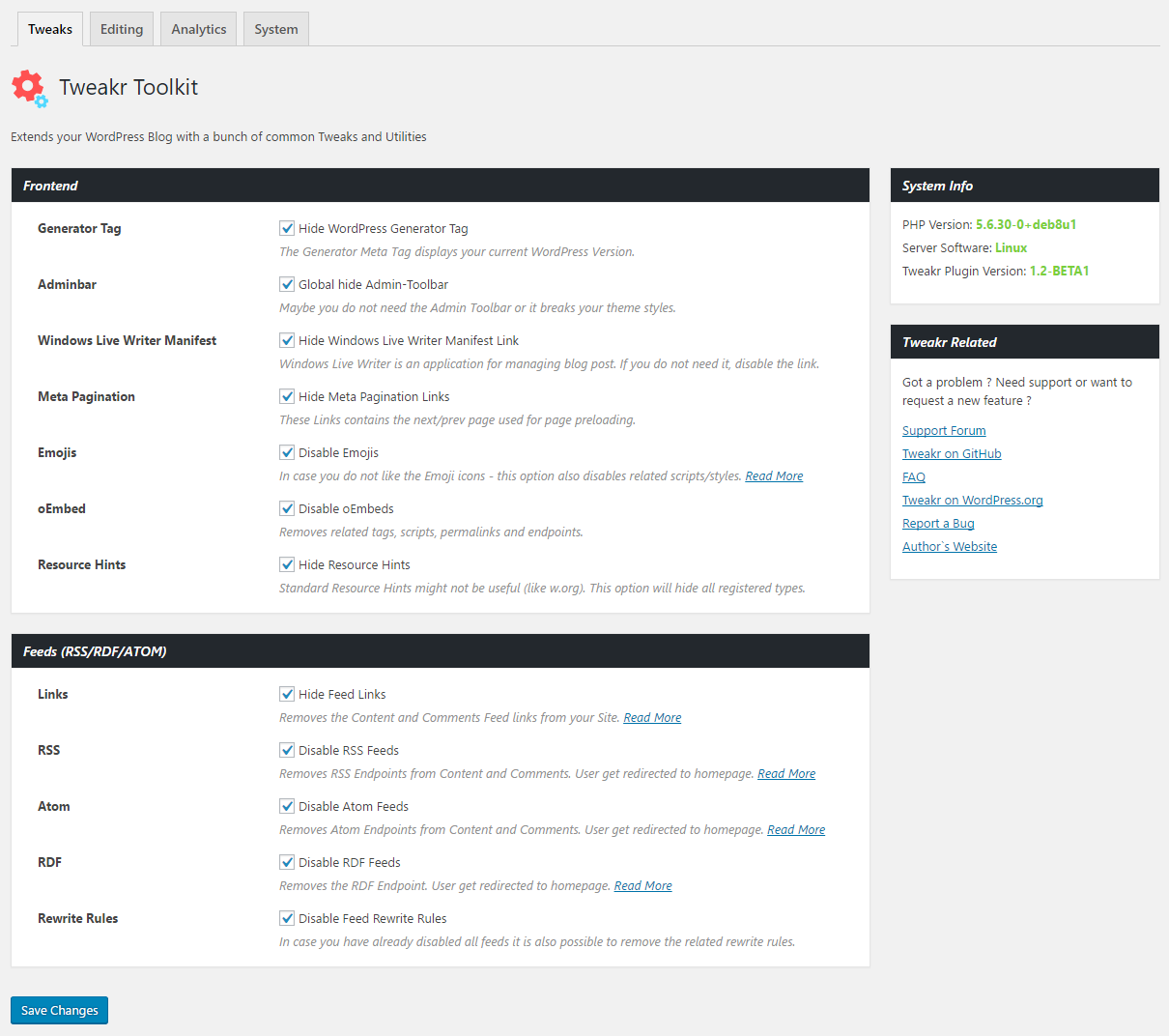


For developers
Is this your plugin? Show off the numbers.
Add a live badge to your site, docs or GitHub README. It updates on its own — no account needed.
Best Tweakr alternatives
All email plugins →





FAQ
Tweakr – Advanced options toolkit: quick answers
Straight answers, pulled from live WordPress.org data.
Live data from WordPress.org · checked Oct 21, 2026
Is Tweakr free?
Yes. Tweakr is free to download and use from the official WordPress.org plugin directory.
Is Tweakr safe to use in 2026?
Tweakr works, but test it on a staging site before relying on it in 2026. It runs on 30+ sites, is rated 5/5 and was last updated 6 months ago, and scores 46/100 on our health check.
How many websites use Tweakr?
Tweakr is active on 30+ WordPress websites and has been downloaded 5,645 times since it launched in February 2017. It was downloaded 109 times in the last 30 days.
Does Tweakr work with WordPress 7.1?
Tweakr is officially tested up to WordPress 6.9.10, while the latest release is 7.1.3. It may still work, but try it on a staging site first.
What PHP version does Tweakr need?
Tweakr requires PHP 7.4 or higher. Most hosts run PHP 8.x today, so it works on any modern WordPress hosting.
When was Tweakr last updated?
The latest version, 2.2.0, was released on April 12, 2026 (6 months ago).
Who makes Tweakr?
Tweakr is developed and maintained by Andi Dittrich.
What are the best alternatives to Tweakr?
The most popular alternatives to Tweakr are WP Mail SMTP by WPForms (4M+ installs), MC4WP: Mailchimp for WordPr… (1M+ installs) and Easy WP SMTP (500K+ installs).
Powered by PageForge
Want thousands of pages that rank like these? Build them in an afternoon.
This directory runs on the same engine as PageForge. Turn any spreadsheet, CSV or API into thousands of fast, SEO-ready WordPress pages — with schema, internal links and AI-written copy baked in.
- CSV, Google Sheets & API data sources
- AI content, schema & internal links per page
- Works with Elementor, Gutenberg, Yoast & Rank Math
- Free on WordPress.org — no credit card


