


Text to Speech – TTSWP
Text to speech for WordPress with natural ElevenLabs AI voices, an accessible audio player, and 10,000 free credits to start.

Safe pick
Yes — Text to Speech – TTSWP is a safe, well-maintained plugin to use in 2026. It runs on 200+ sites, is rated 5/5 and was last updated 5 days ago, and scores 85/100 on our health check.
- Actively developed — last update 5 days ago
- Tested with the latest WordPress (7.1)
- Small user base (200+ active installs)
How does it stack up?
Side-by-side on installs, updates, ratings & support



Daily downloads
Download spikes usually follow a new release — each site that auto-updates counts as a download.
Rankings
Where Text to Speech – TTSWP stands todayWordPress.org search rankings
Live position in the plugin search, top 100| Keyword | Position |
|---|---|
| accessibility | >100 |
| elevenlabs | #2 |
| text to audio | #5 |
| text to speech | #3 |
| tts | #3 |
Version adoption
Share of active sites per release.
Rating breakdown
★★★★★★★★★★ 5 from 6 reviews
About Text to Speech – TTSWP
From the official readme · v3.3.35Description
Text to speech for WordPress with natural ElevenLabs AI voices, an accessible audio player, and 10,000 free credits to start.
Add Text to Speech to WordPress in Seconds
Text to Speech – TTSWP is built for sites that need more than a basic read-aloud button. One plugin covers ElevenLabs voices, speech-to-text, voice cloning, members-only audio, visitor-triggered generation with a daily credit cap, and white-label reselling for agencies.
The plugin is published and operated by Norse Digital Group LLC, a Wyoming-registered company (Sheridan, WY, USA). Engineering work is performed by Mementor Webdesign & Digitalt Markedsføringsbyrå AS, our Norwegian development partner.
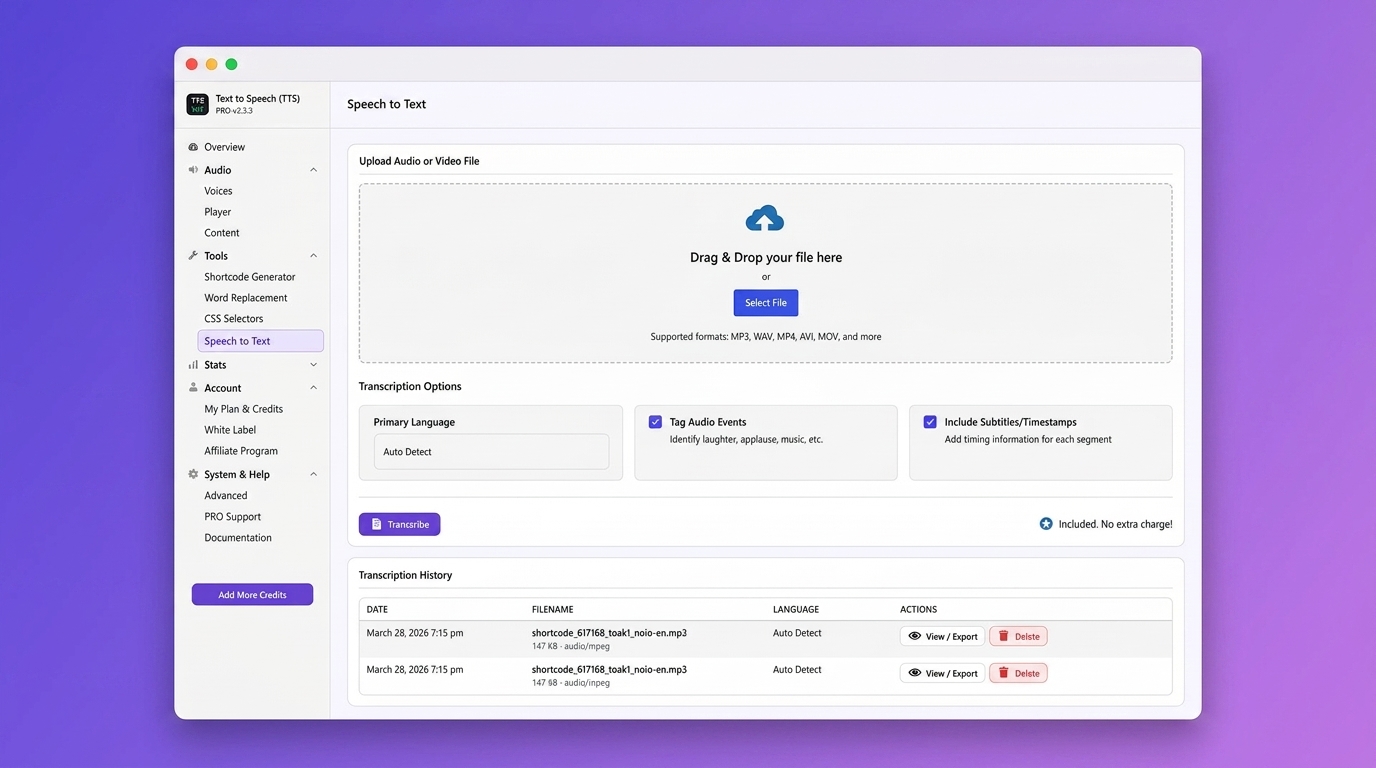
The plugin uses ElevenLabs to generate lifelike speech that sounds human, warm and clear, and gives visitors another way to consume your content. PRO and Agency add Speech-to-Text, useful for transcripts, captions, or turning podcasts and video into readable text.
Key Benefits
- No ElevenLabs account or API key needed. Install, connect your site, and start converting text to speech
- Natural male, female and multilingual ElevenLabs voices, in a range of tones and styles to match your brand
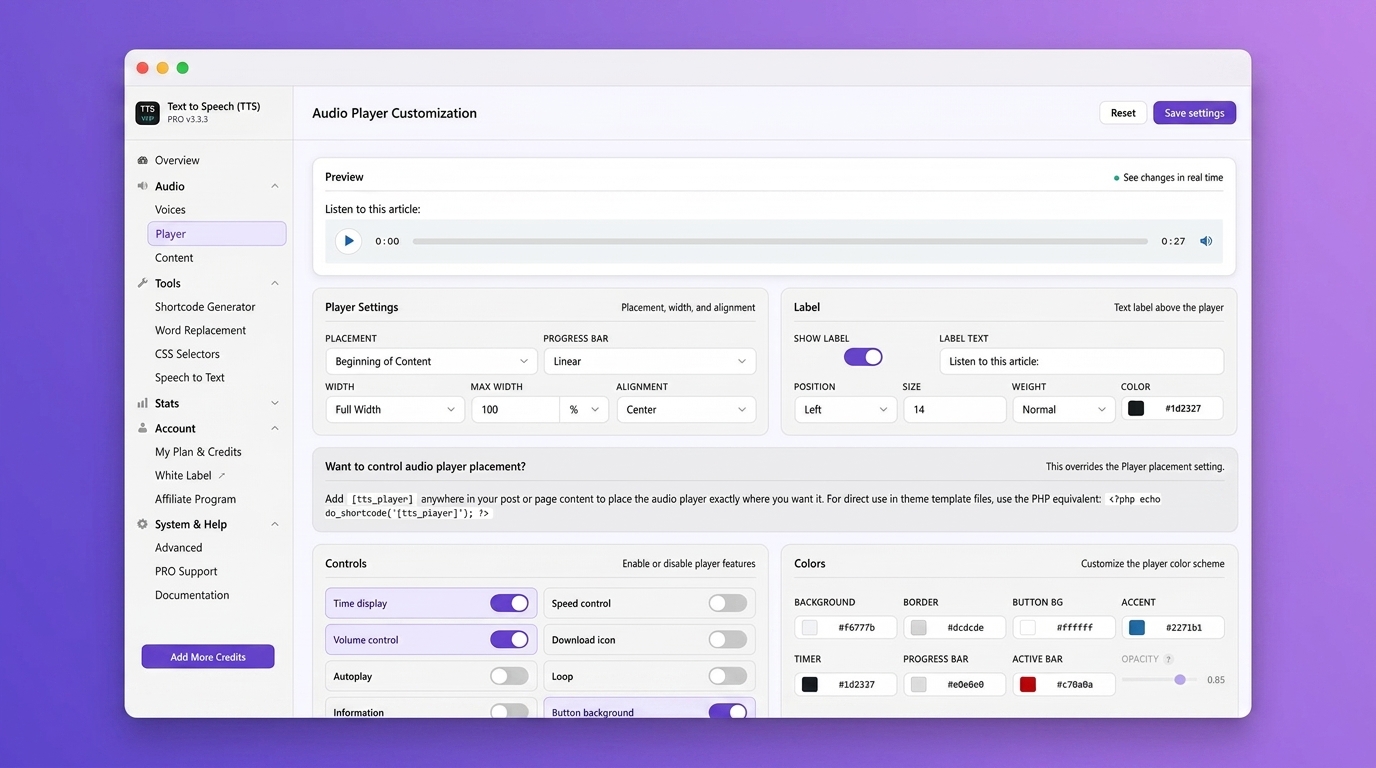
- Automatic, mobile-friendly audio player that fits any screen size, with sensible defaults out of the box
- Accessible player with ARIA labels, keyboard support and colour-contrast options, built to support your WCAG work
- Tested with Elementor, Gutenberg, Divi, Avada, Themify and other popular builders, and designed to fit alongside common caching, translation and SEO plugins
- 10,000 free text-to-speech characters when you connect your site, so you can try it at no cost
- Lazy-loaded and minified assets, loaded only on pages that actually have audio, to keep page weight low
- AudioObject structured data on every post with audio, so search engines can read the file, its title and its duration (PRO)
- Speech-to-Text transcription to create written transcripts from your audio content (PRO)
Features
Free Features
- 10,000 free characters to convert text to audio. Enough to get started without paying
- Natural male and female voices in multiple languages for a professional listening experience
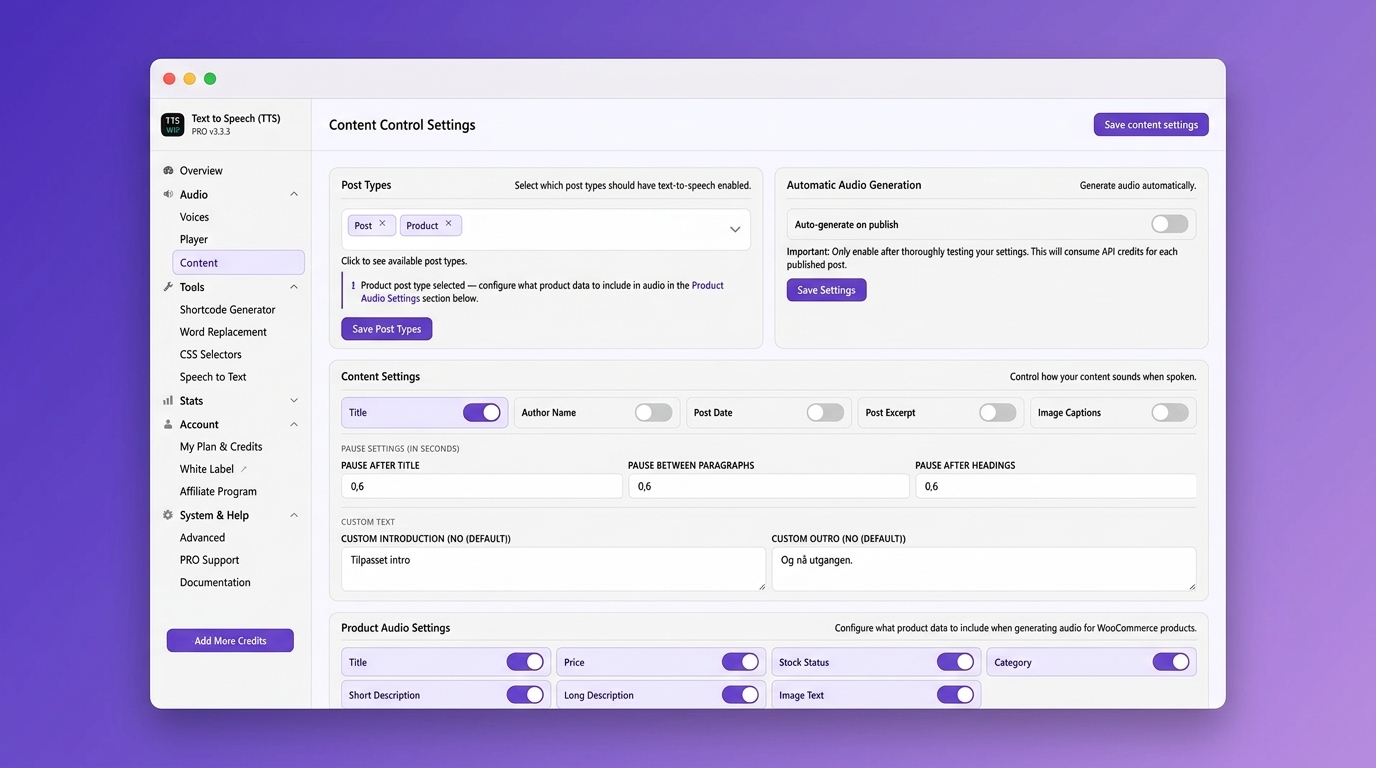
- Automatic player for posts, pages, and WooCommerce products with no manual setup needed
- Flexible player placement – before title, after title, after content, before excerpt, or after excerpt
- RTL support for languages like Arabic, Hebrew, and Persian so the player displays correctly in right-to-left layouts
- Quick start. Activate, connect, and the audio player is ready
- Mobile-first player with speed control and download so visitors can listen anywhere
- Regenerate audio for a post in one click after you edit it, from the post list or the editor
- My Content & Audio page, a single hub to generate, regenerate, download, and delete audio for any post, page, or WooCommerce product, one at a time or in bulk, with live credit balance and per-language support
- Statistics dashboard to track how many visitors listen to your content
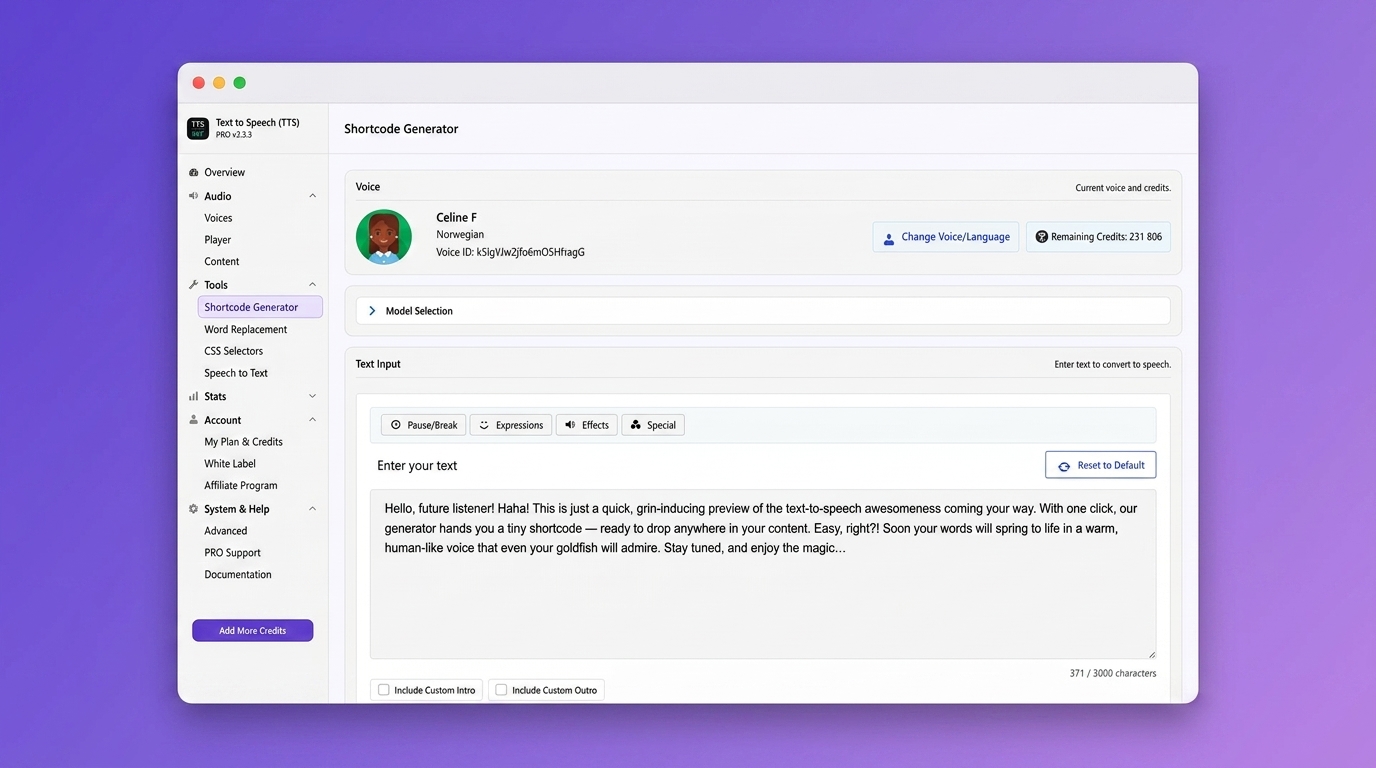
- Shortcode and block support for custom player placement anywhere on your site
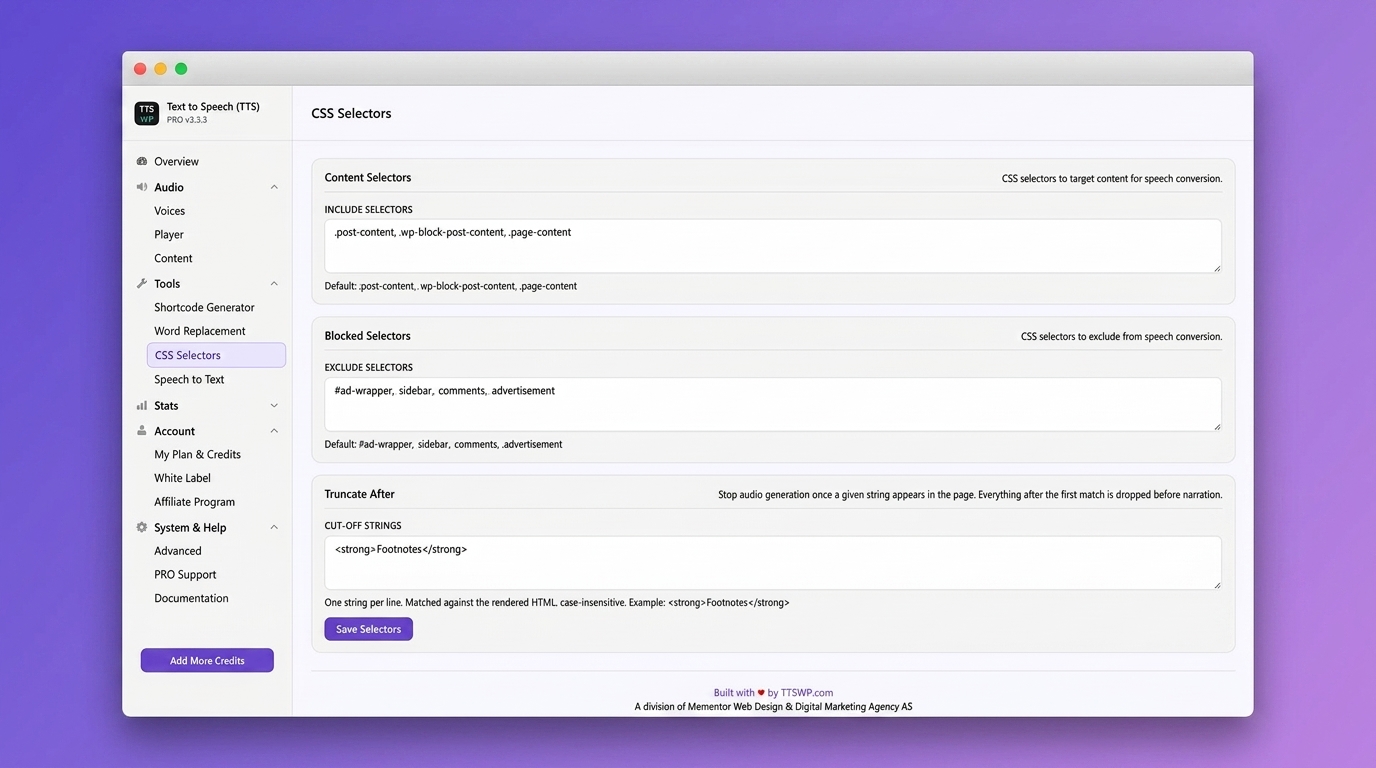
- Content filtering with CSS selectors or no-audio class to exclude specific sections from narration
- Built for caching and performance plugins like WP Rocket, LiteSpeed Cache, and W3 Total Cache
- Multisite support for managing text-to-speech across multiple WordPress sites from one network
- Sticky Footer Player. A persistent audio player bar pinned to the bottom of the page. Visitors can keep reading while listening. Includes play, pause, seek, volume, speed, and close controls
- Waveform Progress Bar. A visual waveform replaces the standard progress bar. Each post gets a unique pattern. Shows real-time playback progress with accent-colored bars
- Background Opacity. Adjust the sticky footer’s background transparency so page content shows through while the player stays accessible
PRO & Agency Features
- 600+ voices across 70+ languages to match your audience worldwide, on credit-inclusive plans
- Premium 44.1 kHz (192 kbps) audio quality for studio-grade narration
- ElevenLabs v2 and Eleven v3 models for the latest and most natural-sounding voice technology
- Speech-to-Text transcription to create written transcripts from audio
- Voice cloning with ElevenLabs Voice ID to create a custom brand voice
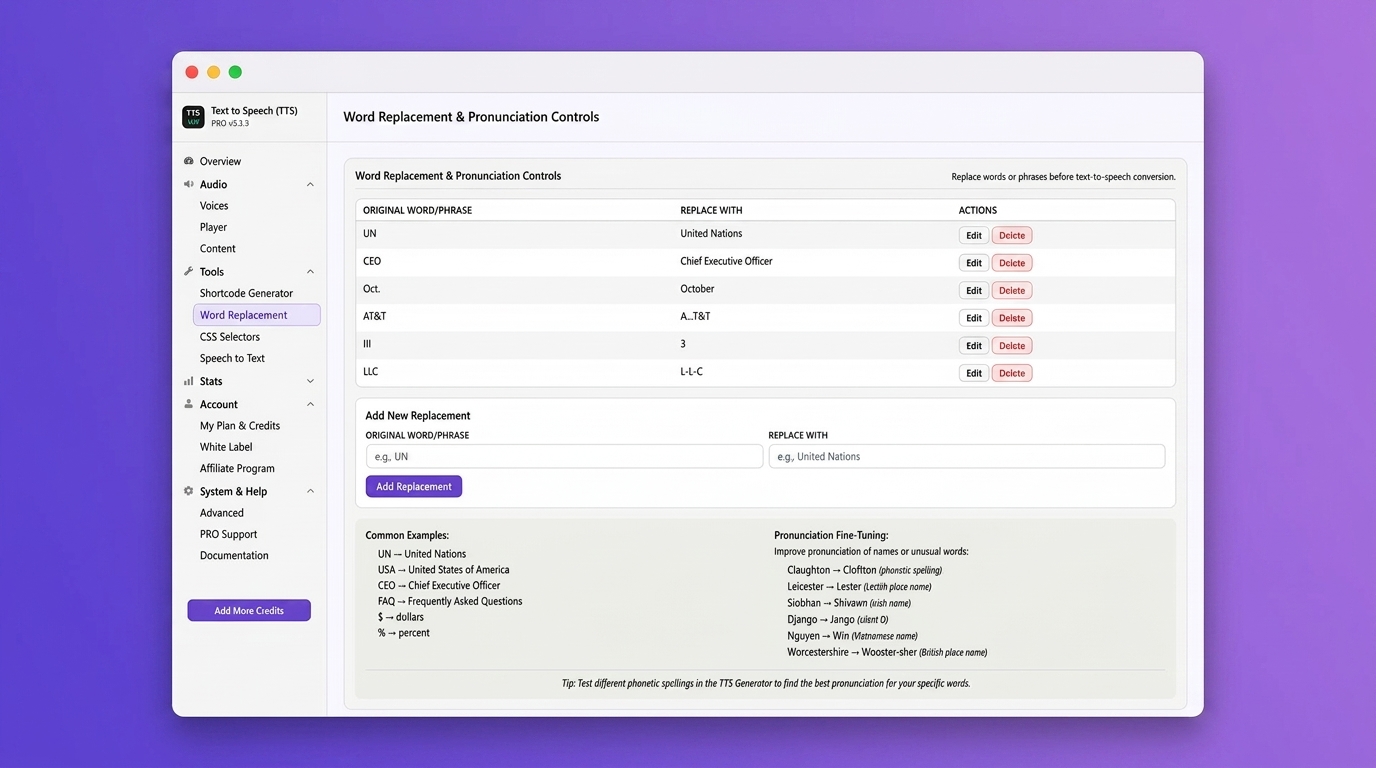
- Word replacement and pronunciation correction for names, abbreviations, and technical terms
- SSML support for fine-tuned control over speech output
- Custom pauses to add natural breaks between sections, headings, or paragraphs
- AudioObject schema for SEO. Structured data that helps search engines index your audio content
- Custom intro and outro to add branding or disclaimers to every audio file
- WPML, GTranslate, and Weglot multi-language voice mapping to assign different voices per language
- Amazon S3 media offload to reduce server load and speed up audio delivery
- Audio statistics per post: play clicks, completions, listening time and unique sessions, recorded on your own site
- White-label mode (Agency plan) to remove plugin branding from the backend and the text-to-speech player
- White-label the player info tooltip with your own attribution text or agency branding
- Resell or share our Text-to-Speech plugin (Agency plan) under your own brand and pricing. Offer text-to-speech as a service to your clients and create a recurring revenue stream
- Credit Allocation per Site (Agency plan). Distribute credits across client sites from one account. Control usage per site to manage costs and ensure fair allocation
- Priority support with faster response times from the development team
- Custom audio files. Upload your own audio files.
- Player Visibility. Show the audio player to everyone, logged-in users only, or selected user roles. Works with membership plugins such as MemberPress, so you can offer audio as a members-only perk across your whole site with no per-post setup
- Auto-generate on first visit. Let your readers decide what is worth narrating. Once a post has been read a few times, its audio is queued in the background, so the posts nobody opens never cost you a credit. Ideal for large archives. You set the visit threshold and a daily credit cap, and pages stay fast because audio is never created while a visitor is waiting
- Generate on click. Show a “Listen to the content” button on posts without audio, so a reader never lands on a page with nothing to play. A click generates the audio on demand and the player appears when it is ready. The button follows your Player Visibility setting, which makes it perfect for paid audio subscriptions, and it shares the daily credit cap with Generate on first visit
How It Works
- Install and activate the plugin from your WordPress dashboard
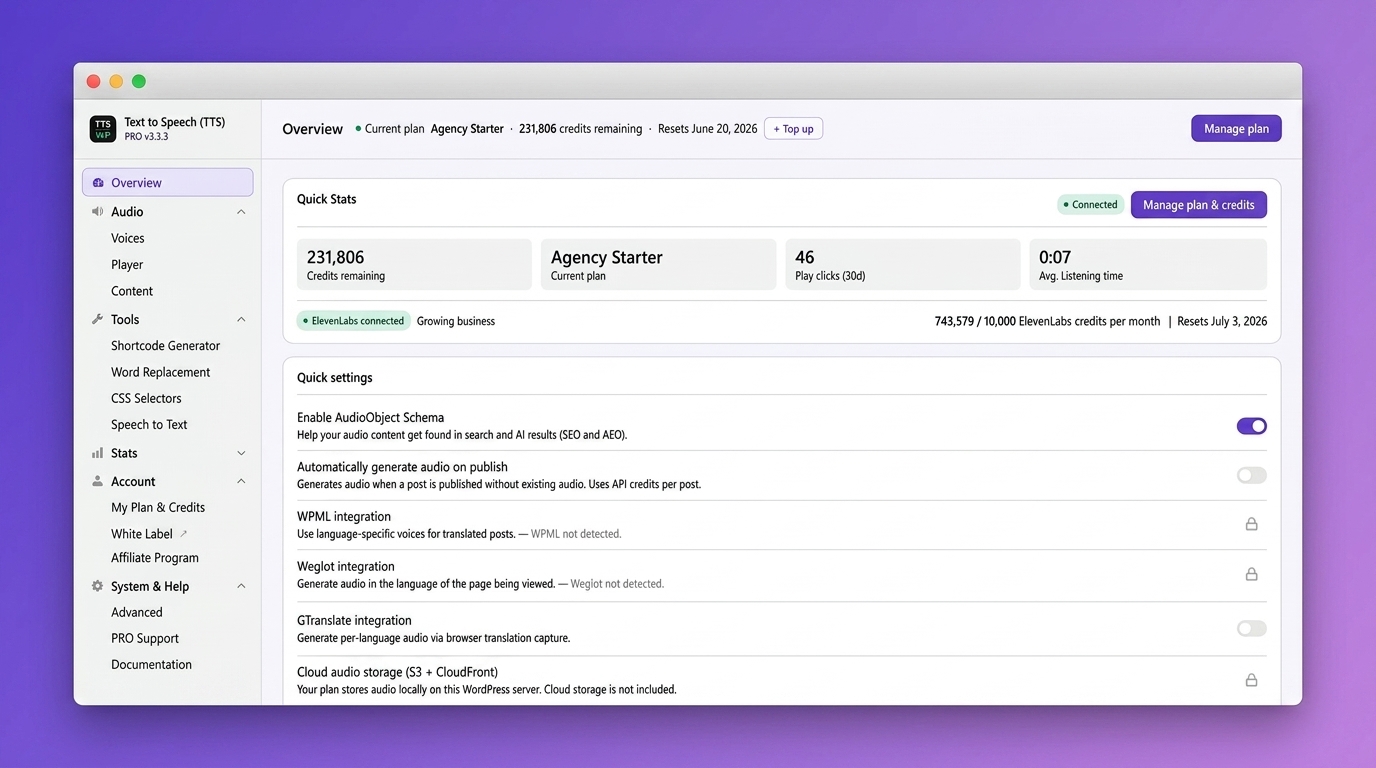
- Click “Connect Site” on the Overview page. Your 10,000 welcome credits are added at this point
- Open a post and click Generate in the Text to Speech box, or turn on automatic generation on publish (PRO)
- A text-to-speech audio player appears on the page with no extra configuration
- Visitors can play, pause, adjust speed, or download the audio file
Video Walkthrough
Features:
https://ttswp.com/features
Pricing:
https://ttswp.com/pricing
Documentation and setup guides:
https://ttswp.com/docs
Supported Languages
The plugin generates speech in 70+ languages, and its admin screens are translated by the WordPress community at translate.wordpress.org. It works alongside WPML, Polylang, TranslatePress, GTranslate and Weglot, with per-language voice mapping on PRO.
Localised information is available in English and Norwegian.
Use Cases
- Accessibility and inclusion. Offer an audio version of written content, and help readers with dyslexia, ADHD or visual impairments listen hands-free
- Blogs and news. Let readers listen to articles while on the go
- E-commerce product descriptions. Give shoppers the option to hear product details before buying
- Education. Help students absorb course material through audio learning
- Long-form content. Turn guides, reports, and documentation into easy-to-consume audio
- Multitaskers. Serve visitors who prefer listening while commuting, exercising, or working
- Membership sites. Offer article audio as a members-only perk by showing the player only to logged-in members or selected roles (PRO)
- Multilingual sites. Reach audiences in their preferred language with per-language voices
- Content creators. Repurpose written content into audio format without extra recording effort
Other Tools and Plugins
- Broken Link Checker: WordPress Plugin Page – Check for Broken Links
Standard Installation
- Go to Plugins, then Add New, in your WordPress admin
- Search for “Text to Speech – TTSWP”
- Click Install Now and then Activate
- Click “Connect Site” on the Overview page to link your site to TTSWP
- You receive 10,000 free welcome credits instantly
- Optional: connect your own ElevenLabs API key for 10,000 extra monthly credits, subject to ElevenLabs’ plan terms. Their free plan does not include a commercial licence, so a commercial site needs a paid ElevenLabs plan to use it this way. Their free plan also requires attribution to ElevenLabs on published content
- Optional: upgrade to Pro or Agency for more credits and features
Quick Start Guide
- Overview – see your plan, credits, and setup checklist at a glance
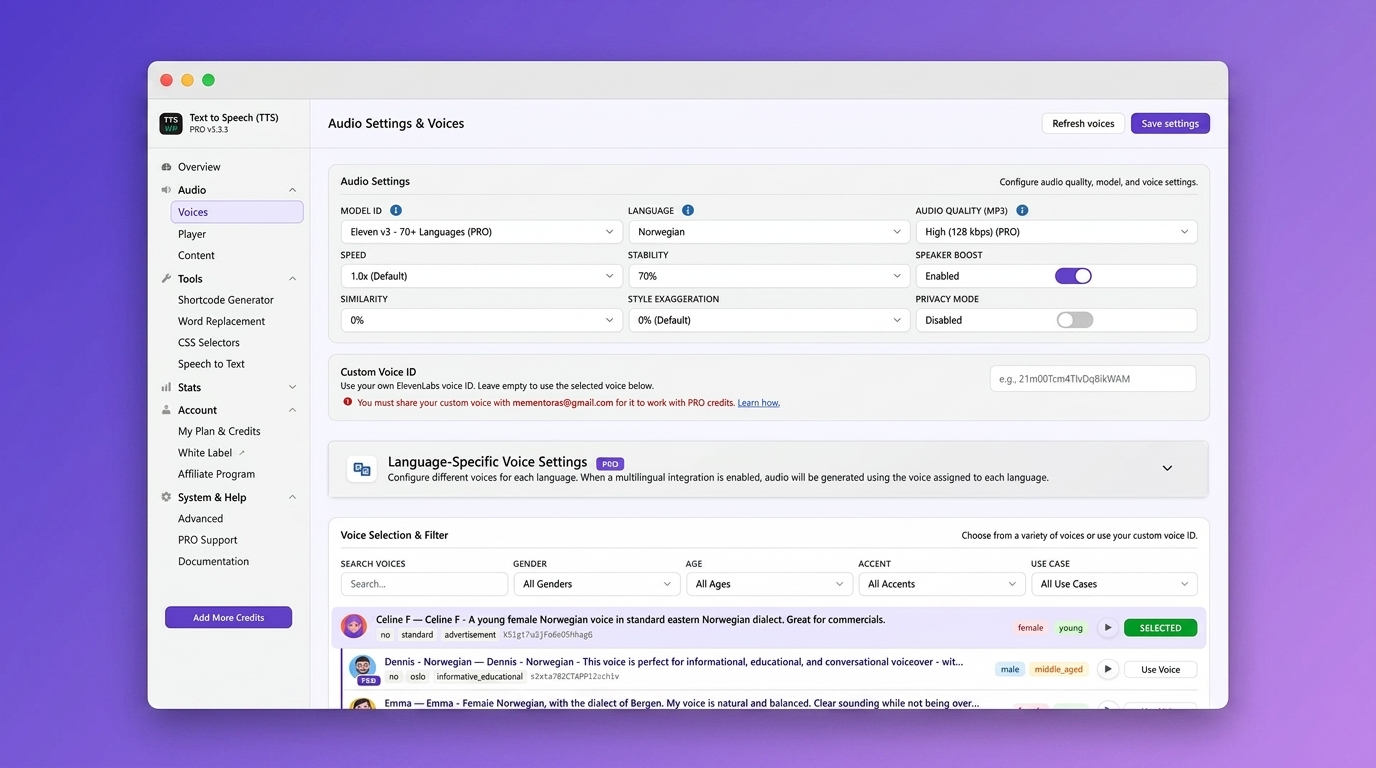
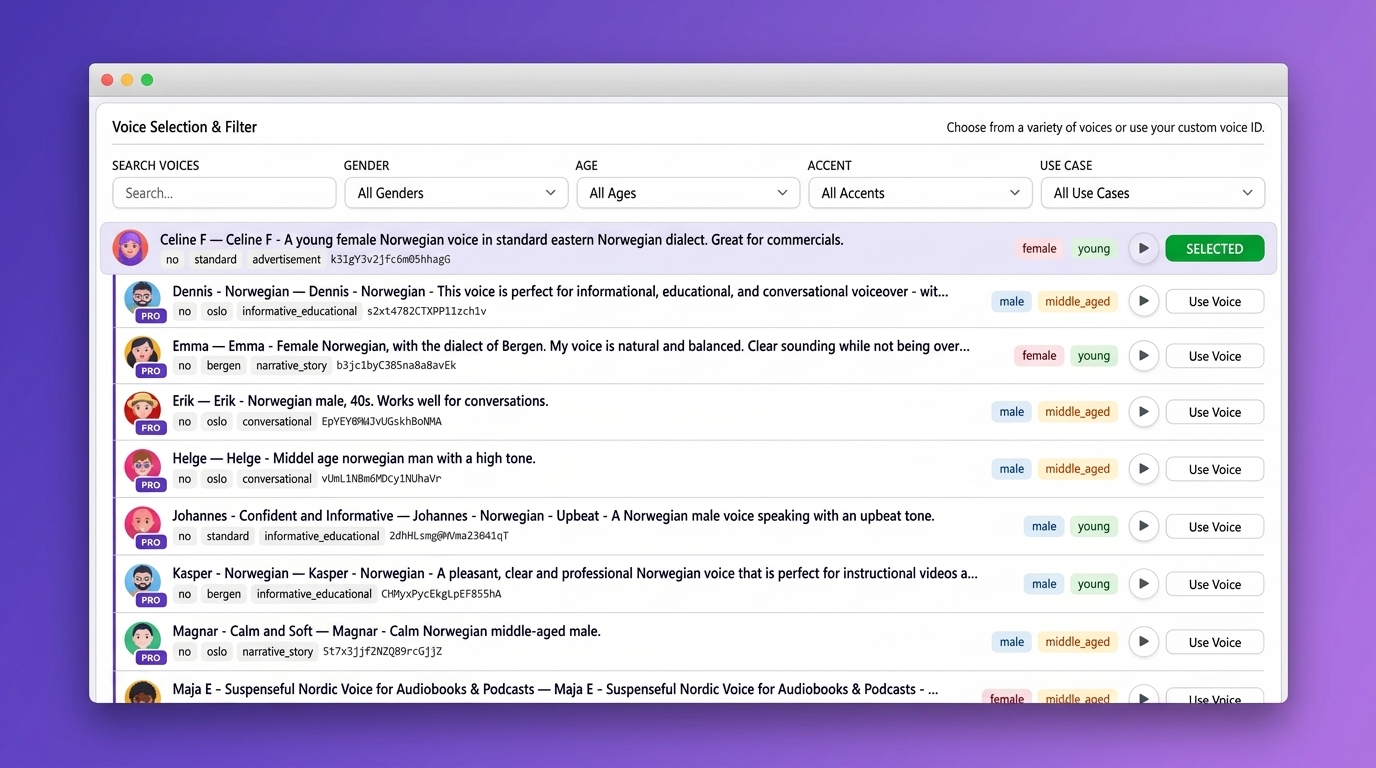
- Voices – pick a default voice and language for your audio
- Player – customize colors, size, position, and player label
- Content – choose which post types generate audio and set content rules
- My Content & Audio – browse, search, and manage all generated audio files
- Statistics – track play counts and listener engagement
- Shortcode Generator – create custom player embeds for any content
- Bulk generation – select multiple posts on My Content & Audio and generate their audio in one run
External Services
ElevenLabs API
Purpose: Converts your text into natural-sounding speech. Speech generation is routed through the TTSWP service below, which calls ElevenLabs on your behalf, so your text never goes to ElevenLabs straight from your site. If you connect your own ElevenLabs key, that key is used for the call instead of ours, and the plugin also contacts ElevenLabs directly from your site to read that account’s own usage and subscription status for display in the admin.
Data sent: The post text you chose to convert, the selected voice and model, the language code, and for Speech-to-Text the audio file to transcribe. On the direct calls described above, your own ElevenLabs API key, sent as a request header so ElevenLabs can identify the account.
When: On manual or automatic audio generation, on Speech-to-Text transcription, and whenever a plugin admin screen shows your ElevenLabs account status, usage or remaining characters.
Storage: MP3 files saved on your own server, or on TTSWP cloud storage (Amazon S3 and CloudFront) on plans that include it.
Limits: The free plan includes 10,000 one-time welcome credits. Paid plans either run on your own ElevenLabs key or include a monthly TTSWP credit allowance. Current plans and prices are at ttswp.com/pricing.
Terms: https://elevenlabs.io/terms-of-use
Privacy: https://elevenlabs.io/privacy-policy
TTSWP Cloud Platform (Norse Digital Group LLC)
Purpose: Generates your audio and handles checkout, subscriptions, and licence validation. All speech generation is routed through this service, which calls ElevenLabs on your behalf.
Data sent: The post text you choose to convert, the selected voice and model, your site’s connection token, and the plugin version. Your own ElevenLabs API key, if you connect one, which the service stores encrypted and uses to call ElevenLabs on your behalf. With Remote Debug Logging enabled, diagnostic events, and with “Include Content Samples” also enabled, text samples from the post being generated. For Speech-to-Text, the address of the audio file to transcribe.
When: When you generate audio or request a transcription, when visitor-triggered generation runs, and when the plugin refreshes your plan and credit balance.
Terms: https://ttswp.com/terms
Privacy: https://ttswp.com/docs/trust/privacy
Amazon Web Services (S3 and CloudFront)
Purpose: Stores and delivers generated audio files for plans that use TTSWP cloud storage. Audio is uploaded to Amazon S3 and served through the Amazon CloudFront CDN.
Data sent: The generated MP3 file. When a visitor plays that audio, their browser requests the file from CloudFront, so their IP address and user agent are visible to AWS in the same way as any CDN-hosted file.
When: On audio generation (upload) and on every playback of cloud-hosted audio (delivery).
Note: Free and Pro Lite plans store audio on your own server instead, so no audio is sent to AWS.
Privacy: https://aws.amazon.com/privacy/
Translations
We’re looking for contributors to help translate this plugin. If you can help, we’d love to hear from you. Contact us and we’ll guide you through the process.
Privacy
No usage analytics or telemetry
This plugin sends no usage data, analytics or telemetry to the plugin author.
Your ElevenLabs API key
If you connect your own ElevenLabs key, it is stored in two places. An encrypted copy stays in your site’s own database, and a copy is held encrypted by the TTSWP service, which uses it server-side to call ElevenLabs when your plan runs on your own key, or as a fallback when your TTSWP credits run out. A key you had already saved in the plugin is sent to the service during Connect Site, directly from your server to ours rather than through your browser, and the local copy is kept, not deleted. Remove the key from your TTSWP account to stop the service using it, and clear it in the plugin settings to remove the local copy.
Player statistics stay on your site
The Player Statistics feature records how your audio is used: play clicks, completions, listening time, and a randomly generated id used to tell one listening session from another. If the visitor is logged in, their WordPress user ID is stored with the event. Those rows are written to tables in your own WordPress database, are shown only to you in the plugin’s Statistics screen, and are never transmitted anywhere. No IP address is stored: a visitor’s address is hashed into a short-lived key purely to rate-limit the endpoint, and it expires after a minute. Statistics are on by default and can be switched off under Settings, which stops collection immediately.
What leaves your site
Every external service the plugin uses, what is sent to each one and when, is listed under External Services above. In short: your text goes out when you generate audio, visitor activity can trigger that generation if you enable the PRO on-visit or on-click features, and cloud-hosted audio is delivered to visitors from Amazon CloudFront. CloudFront access logging is switched off on our distribution, so we keep no log of who played what.
Uninstalling the plugin removes its options, database tables and post meta when full data removal is enabled under Advanced settings. That clears the local copy of your ElevenLabs key, but not the copy held by the TTSWP service: remove that from your TTSWP account if you want it gone.
We never collect:
- Personal information about your visitors
- The content of posts you have not chosen to convert
- Your WordPress password or database credentials
Credits
Natural voice synthesis by ElevenLabs
Published by Norse Digital Group LLC. Engineering by Mementor Webdesign & Digitalt Markedsføringsbyrå AS under contract with Norse Digital Group LLC.
Frequently asked questions
Do I need an API key or an ElevenLabs account?
No. You get 10,000 free welcome credits when you connect your site, and no ElevenLabs account is needed. You can optionally connect your own ElevenLabs API key for an extra 10,000 monthly credits, subject to ElevenLabs’ plan terms: their free plan does not include a commercial licence, so a commercial site needs a paid ElevenLabs plan for that route. Their free plan also requires attribution to ElevenLabs on published content.
What is TTSWP Dashboard?
It is the TTSWP cloud dashboard where you manage your plan, credits, connected sites, and billing. Connect your WordPress site from the plugin’s Overview page with one click.
What is the difference between Free, Pro and Agency?
Free includes 10,000 welcome credits and standard voices in 30+ languages. Pro Lite is the entry paid plan. It unlocks the PRO feature set, but it includes no TTSWP credits: you connect your own ElevenLabs key and pay ElevenLabs for the speech itself. Audio is stored on your own server rather than on the TTSWP cloud and CDN, and which voices you can use depends on your own ElevenLabs plan. The credit-inclusive Pro plans start at 50,000 credits per month. They cover the speech cost, add TTSWP cloud storage and CDN delivery, and give access to the full 600+ voice library across 70+ languages…
Is the text to speech player accessible?
The audio controls include ARIA labels, keyboard navigation, and colour-contrast options, so the player supports your accessibility work. Whether a whole site meets a standard such as WCAG 2.1 AA depends on the rest of the site, not on any single plugin.
Which languages does text to speech support?
Free includes standard voices in 30+ languages. Credit-inclusive Pro and Agency plans unlock 600+ premium voices across 70+ languages. On Pro Lite you get the voices your own ElevenLabs plan allows.
Does text to speech work with Elementor, Divi, or Gutenberg?
It is tested with Elementor, Gutenberg, Divi, Avada, Themify and other popular builders, with specific compatibility fixes for each. If your theme or builder renders content in an unusual way, the CSS Selectors page lets you tell the plugin exactly which elements to read.
Does it work with WooCommerce?
Yes. You can generate audio for product descriptions, including title, price, stock status, and category.
Can I bulk-convert existing posts to audio?
Yes. Open My Content & Audio, select the posts you want, and choose Generate selected. It runs one post at a time and stops if your credits run out.
Will text to speech slow down my site?
The player’s scripts and styles are minified and load only on pages that actually have audio, so pages without audio carry no plugin assets at all. The player also works with caching plugins such as WP Rocket, LiteSpeed Cache and W3 Total Cache.
Can I use my own voice?
Yes. Pro users can enter their custom ElevenLabs Voice ID for voice cloning.
What happens when I run out of credits?
Existing audio stays playable. New audio will not generate until you top up credits, your monthly credits renew, or your ElevenLabs API key fallback kicks in.
Can I manage multiple sites from one account?
Yes. Connect multiple WordPress sites to your TTSWP account. Agency plans include unlimited sites with per-site credit allocation.
Changelog
3.3.35 – 2026-09-29
- Fixed: Pauses added with the Pause button in the Text to Speech Generator are now heard in the audio.
3.3.34 – 2026-09-25
- New: Volume slider in the audio player. Hover or tab to the speaker icon to open it, and click the icon to mute. The chosen volume is remembered across pages. On phones and tablets the icon stays a mute button.
- New: Label text field in the Shortcode Customizer, and custom labels such as label=”Listen” now work in shortcodes.
- New: Width, Alignment and Progress style options in the Shortcode Customizer.
- Improved: Shortcode players now follow your player settings, like the automatic player. The Customizer starts from those settings and only adds what you change.
- Improved: Saved generations in the Shortcode Generator keep their own options, and copying a shortcode no longer creates a duplicate.
- Improved: A sticky footer player with reduced opacity now blurs the page behind it, so the controls stay readable.
- Improved: Settings export always includes every plugin setting and is always up to date. Export and import now contain plugin settings only.
- Improved: Security hardening for uploads and front-end requests.
- Performance: Faster pages. The player no longer loads Dashicons, its scripts are smaller, it makes fewer database requests and the progress bar runs more smoothly.
- Fixed: The play button and the shortcode player now respond reliably to every click.
- Fixed: The audio quality chosen on the Voices page is used when generating audio, and all pages show the same quality.
- Fixed: Upgrade screens now show the correct maximum quality of 192 kbps.
- Fixed: The Shortcode Generator shows the correct number of remaining credits.
- Fixed: The Timer colour setting now applies to the inline player.
- Fixed: Controls no longer overlap in the floating sticky footer styles. Long titles are shortened instead.
- Fixed: On phones the waveform fills the available width and keeps the same layout as on desktop.
- Fixed: Generate on first visit no longer writes to the database on every page view.
3.3.33 – 2026-09-25
- Improved: The plugin sidebar now opens with every menu section expanded except System & Help. Sections you open or close are still remembered.
- Improved: New installs now show the audio player at full width by default. Existing sites keep their current width setting.
- Fixed: The Getting Started steps “Customize the audio player” and “Generate your first audio” now show as Done once you have completed them.
- Fixed: When a site gets no welcome credits because they were already claimed for the same domain, the notice now says so instead of saying your credits are used up.
3.3.32 – 2026-09-22
- New: The audio box in the post editor shows roughly what generating that post will cost, and how many credits you have, before you generate it. Plans that run on your own ElevenLabs key do not show it, since ElevenLabs bills that generation directly.
- Improved: Security hardening for connecting your site, settings import, visitor-triggered generation, audio downloads and stored keys. If you connected your own ElevenLabs key before this version, we recommend replacing it with a new key as a precaution.
- Performance: While a visitor waits for audio they triggered, the page checks for the result on a widening interval. It responds sooner at the start and makes less than half as many background requests over a long wait.
- Performance: Sites using visitor-driven generation no longer accumulate leftover daily counters in the database. Old ones are cleared automatically, keeping the last week.
- Performance: The audio length used in structured data is worked out once per audio file instead of on every visit to the post.
- Performance: The player styling used by the audio column is no longer loaded on every screen in the WordPress admin. It now loads only where that column actually appears: the post list and the post editor, for the post types you have enabled.
- Performance: The voice list the Voices page downloads is about 200 KB smaller, a fifth less than before, after dropping two pieces of voice data the picker never used. Nothing changes in what you see or can filter by.
- Fixed: Publishing or importing several posts at once could leave most of them without audio, because they all started generating at the same moment. Posts now generate one after another, and a request turned away because the service is busy is retried rather than abandoned.
- Fixed: Voices your connected ElevenLabs account is not allowed to use can no longer be selected. They now show as unavailable in the picker, with what to do about it, instead of failing at generation time.
- Fixed: When your credits run out, generation now stops at the first post instead of trying every remaining one, and the notice tells you how many credits the post needed and how many you have.
- Fixed: One error message from the player’s recovery script could appear in a visitor’s browser console even with diagnostics turned off. It now follows the same setting as the rest of that script’s output.
- Fixed: Player statistics for a day the site did not run its scheduled job were lost for good. Any day still inside the 30-day window is now caught up on the next run, and the daily summary is much lighter on the database.
3.3.31 – 2026-09-14
- Improved: Security hardening for player statistics, Generate on click, settings export and structured data. Unused code was removed.
- Performance: Frontend scripts and styles now ship minified. The player page payload drops from about 300 KB to about 140 KB of plugin JavaScript and CSS. Set SCRIPT_DEBUG to load the readable sources.
- Performance: The check that decides whether player assets are needed now runs once per page instead of around ten times, and theme compatibility no longer builds a fresh player object for every content filter call.
- Performance: The transcriptions table is verified with the other plugin tables once a day instead of on every admin page load, the Custom Voice ID lookup runs once per generation instead of once per setting read, and archive pages skip the excerpt detection work that only matters on single posts.
- Performance: The info popup script is only loaded when the Info control is enabled.
3.3.30 – 2026-09-08
- Improved: Security hardening for the Shortcode Generator and debug logs.
- Improved (PRO): The daily credit cap for Generate on click and Generate on first visit now also counts generations that are still queued, and each visitor can trigger a limited number of generations per hour.
- Improved: Password-protected posts keep their audio player hidden until the password is entered, and are not offered to visitors for generation.
- Performance: Frontend pages load all plugin settings in one query instead of one query per setting. On sites without an object cache this removes about 36 database queries per page view.
- Performance: Player statistics no longer run a cache-clearing query on the options table for every tracked event, and the 30-second playback progress events, which were never used in reports, are no longer sent.
- Performance: The plugin no longer tells WP Rocket to leave jQuery undeferred on every page of the site. Our own scripts wait for jQuery when a cache plugin delays it.
- Performance: The Overview page reuses the account data it already has instead of making two live requests to the TTSWP service on every view. Add ?refresh=1 to the URL to force a fresh fetch.
- Performance: Publishing from the classic editor now hands audio generation to the background queue, the same way the block editor already did, instead of holding the publish request until the audio is finished.
Screenshots
For developers
Is this your plugin? Show off the numbers.
Add a live badge to your site, docs or GitHub README. It updates on its own — no account needed.
Best Text to Speech – TTSWP alternatives
All accessibility plugins →





FAQ
Text to Speech – TTSWP: quick answers
Straight answers, pulled from live WordPress.org data.
Live data from WordPress.org · checked Oct 4, 2026
Is Text to Speech – TTSWP free?
Yes. Text to Speech – TTSWP is free to download and use from the official WordPress.org plugin directory. The developer also sells premium add-ons or a Pro version with extra features.
Is Text to Speech – TTSWP safe to use in 2026?
Yes — Text to Speech – TTSWP is a safe, well-maintained plugin to use in 2026. It runs on 200+ sites, is rated 5/5 and was last updated 5 days ago, and scores 85/100 on our health check.
How many websites use Text to Speech – TTSWP?
Text to Speech – TTSWP is active on 200+ WordPress websites and has been downloaded 29,240 times since it launched in April 2025. It was downloaded 2,762 times in the last 30 days.
Does Text to Speech – TTSWP work with WordPress 7.1?
Yes. The developer has tested Text to Speech – TTSWP up to WordPress 7.1.2, the latest release. It requires WordPress 6.0 or newer.
What PHP version does Text to Speech – TTSWP need?
Text to Speech – TTSWP requires PHP 7.2 or higher. Most hosts run PHP 8.x today, so it works on any modern WordPress hosting.
When was Text to Speech – TTSWP last updated?
The latest version, 3.3.35, was released on September 29, 2026 (5 days ago).
Who makes Text to Speech – TTSWP?
Text to Speech – TTSWP is developed and maintained by Norse Digital Group LLC.
What are the best alternatives to Text to Speech – TTSWP?
The most popular alternatives to Text to Speech – TTSWP are Web Accessibility (formally… (500K+ installs), Auto Image Attributes From… (100K+ installs) and Accessibility by UserWay (80K+ installs).
Powered by PageForge
Want thousands of pages that rank like these? Build them in an afternoon.
This directory runs on the same engine as PageForge. Turn any spreadsheet, CSV or API into thousands of fast, SEO-ready WordPress pages — with schema, internal links and AI-written copy baked in.
- CSV, Google Sheets & API data sources
- AI content, schema & internal links per page
- Works with Elementor, Gutenberg, Yoast & Rank Math
- Free on WordPress.org — no credit card


