



SmartPro Database Optimiser & Cleaner
Smart, lightweight tool to clean, optimize, and back up your WordPress database for better speed and performance.

Use with caution
SmartPro Database Optimiser & C… works, but test it on a staging site before relying on it in 2026. It runs on 10+ sites, is rated 5/5 and was last updated 4 months ago, and scores 51/100 on our health check.
- Small user base (10+ active installs)
- Very few reviews so far
- Only tested up to WordPress 6.9 (latest is 7.1)
How does it stack up?
Side-by-side on installs, updates, ratings & support



Daily downloads
Download spikes usually follow a new release — each site that auto-updates counts as a download.
Rankings
Where SmartPro Database Optimiser… stands todayWordPress.org search rankings
Live position in the plugin search, top 100| Keyword | Position |
|---|---|
| backup | >100 |
| clean | >100 |
| database | >100 |
| Optimize | >100 |
| performance | >100 |
Version adoption
Share of active sites per release.
Rating breakdown
★★★★★★★★★★ 5 from 1 reviews
About SmartPro Database Optimiser & Cleaner
From the official readme · v1.0Description
SmartPro Database Optimiser & Cleaner helps you maintain a faster, cleaner, and more efficient WordPress website by removing unnecessary database clutter and optimizing all database tables.
It features a beautiful modern interface, one-click actions, real-time item counts, and AJAX-powered cleaning for a seamless experience.
This tool also includes an integrated full database backup system, allowing you to download your entire WordPress database in .sql format before cleaning.
No technical skills required — simply open Tools → SmartPro Database Optimiser & Cleaner, click “Clean”, and enjoy improved performance instantly.
🚀 Key Benefits
- Faster database performance
- Reduced storage usage
- Ability to safely back up your WordPress database
- Clean, modern, user-friendly UI
- No page reloads (AJAX-based)
- Safe queries using
$wpdb - No bloat, lightweight, and optimized
🧹 Cleanup Features
Clean up unnecessary and unused database entries with a single click:
- Remove post revisions
- Delete auto-saved drafts
- Remove trashed posts and trashed pages
- Clean spam and trashed comments
- Remove expired transients
- Delete all transients
- Remove orphaned post meta
- Remove orphaned comment meta
- Delete orphaned user meta
- Remove unused tags
- Delete empty taxonomy terms
- Optimize all WordPress tables
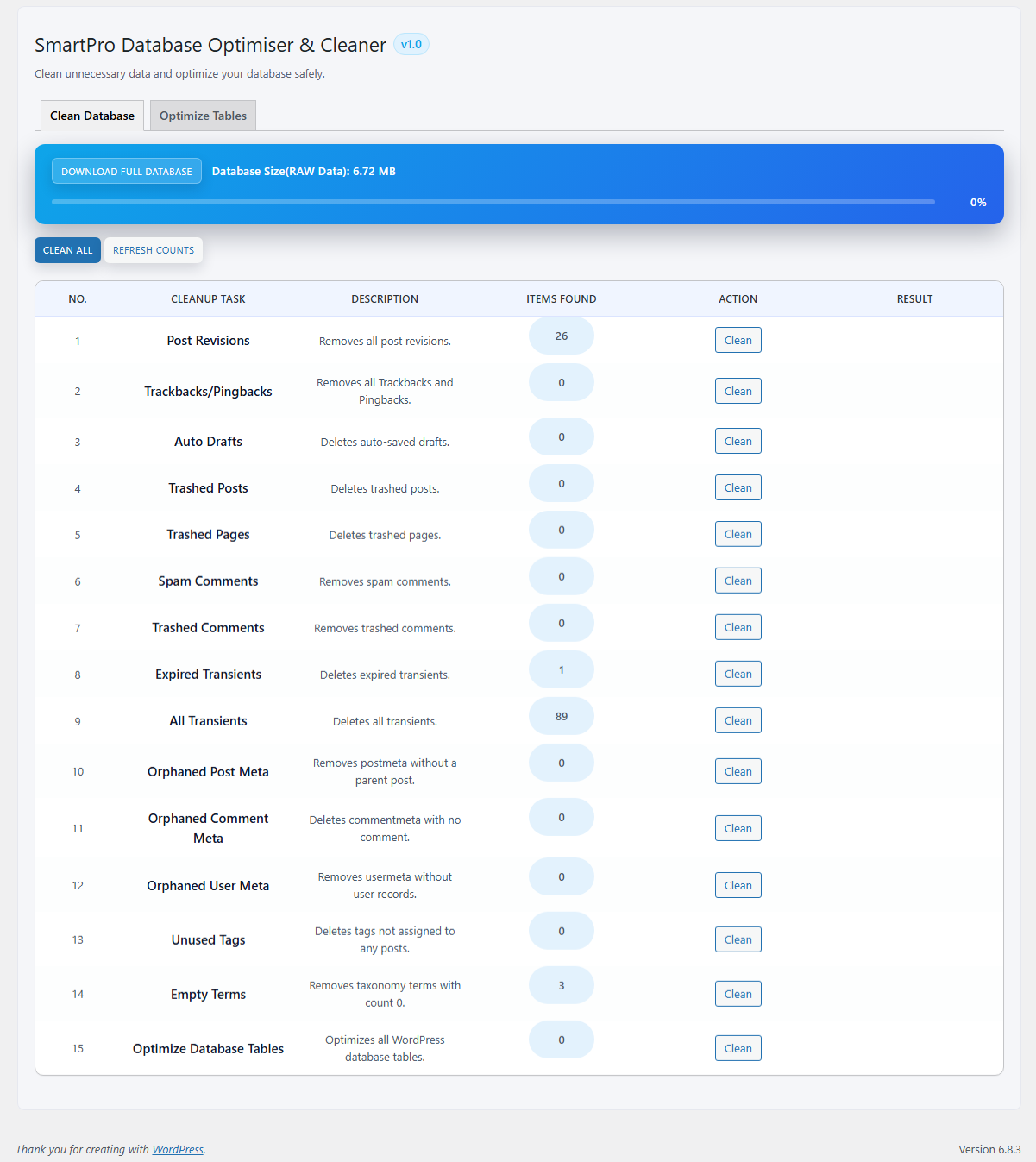
Each cleanup item displays:
– Real-time items count
– Action button
– Instant results message
Also includes:
– Clean All button
– Refresh Counts button
🛢️ Database Backup Features
Before cleaning, download your full database for safety.
- One-click SQL backup download
- Shows total database size
- Backups stored in:
/wp-content/uploads/smartpro-database-optimiser-cleaner/ - Backup is generated safely using WordPress standards
🗂️ Database Table Optimization
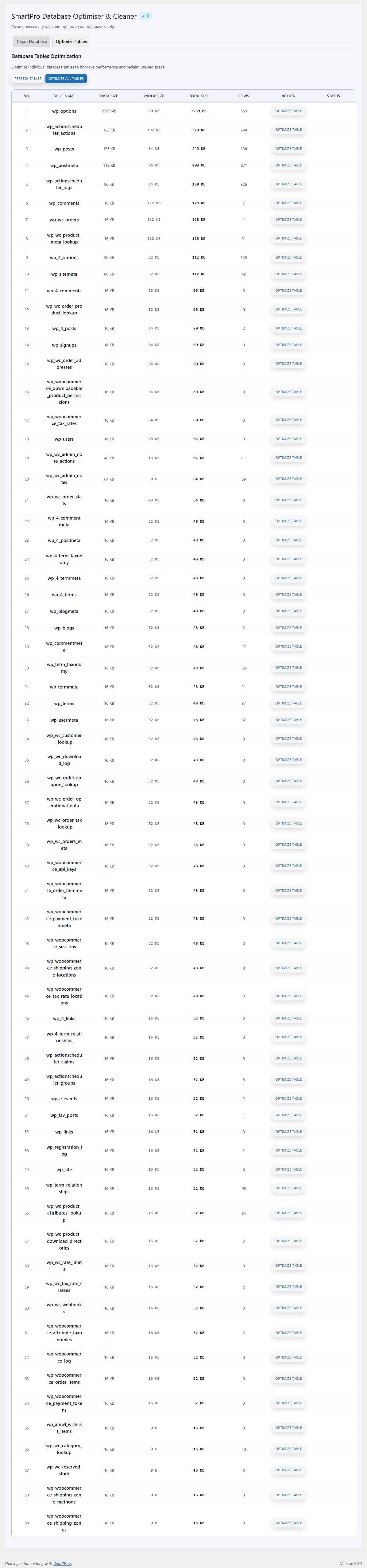
From the Optimize Tables tab, you can:
- View every database table
- See table size, index size, total size, row count
- Optimize each table individually
- Or use Optimize All Tables
All database optimization is handled using safe, built-in SQL operations.
🖥️ Smart, Modern UI
The plugin includes a clean and intuitive interface:
- AJAX-powered actions
- Smooth progress indicators
- Live counts
- Field-based table listing
- Fully responsive design
- Admin-friendly layout
🔒 Security & Permissions
- Nonce-protected AJAX requests
- Sanitized inputs
- Works only for administrators
- No risky SQL execution
- Follows strict WordPress coding standards
Installation
- Upload the plugin folder to the
/wp-content/plugins/directory - Activate the plugin through the “Plugins” menu in WordPress
- Go to Tools → SmartPro Database Optimiser & Cleaner
- Click Refresh Counts
- Clean or optimize the database using the action buttons
Frequently asked questions
❓ Is it safe to clean my database?
Yes — all operations use safe WordPress and SQL methods. However, it’s recommended to take a backup using the built-in download tool.
❓ Where are backups stored?
Backups are saved inside: /wp-content/uploads/smartpro-database-optimiser-cleaner/
❓ Does this plugin work with WooCommerce?
Yes. It can clean and optimize WooCommerce database tables safely.
❓ Can this break my site?
No. The plugin only removes unnecessary and unused entries. It does not modify posts, pages, users, WooCommerce products, or active content.
❓ Does the plugin use AJAX?
Yes — all cleaning and optimization actions run without page reloads.
Changelog
First stable release. Update recommended for better performance and optimized database cleanup.
1.0
- Initial release
- Added full database backup system
- Added real-time counts for all cleanup types
- Added cleanup tools (revisions, drafts, trash, comments, transients, orphaned meta)
- Added table optimization module
- Added Clean All and Refresh Counts buttons
- Added progress UI and AJAX engine
- Stable, optimized, and secure release
Screenshots
For developers
Is this your plugin? Show off the numbers.
Add a live badge to your site, docs or GitHub README. It updates on its own — no account needed.
Best SmartPro Database Optimiser &… alternatives
All backup plugins →





FAQ
SmartPro Database Optimiser & Clean…: quick answers
Straight answers, pulled from live WordPress.org data.
Live data from WordPress.org · checked Sep 28, 2026
Is SmartPro Database Optimiser & C… free?
Yes. SmartPro Database Optimiser & C… is free to download and use from the official WordPress.org plugin directory.
Is SmartPro Database Optimiser & C… safe to use in 2026?
SmartPro Database Optimiser & C… works, but test it on a staging site before relying on it in 2026. It runs on 10+ sites, is rated 5/5 and was last updated 4 months ago, and scores 51/100 on our health check.
How many websites use SmartPro Database Optimiser & C…?
SmartPro Database Optimiser & C… is active on 10+ WordPress websites and has been downloaded 516 times since it launched in November 2025. It was downloaded 56 times in the last 30 days.
Does SmartPro Database Optimiser & C… work with WordPress 7.1?
SmartPro Database Optimiser & C… is officially tested up to WordPress 6.9.9, while the latest release is 7.1.2. It may still work, but try it on a staging site first.
What PHP version does SmartPro Database Optimiser & C… need?
SmartPro Database Optimiser & C… requires PHP 7.4 or higher. Most hosts run PHP 8.x today, so it works on any modern WordPress hosting.
When was SmartPro Database Optimiser & C… last updated?
The latest version, 1.0, was released on May 23, 2026 (4 months ago).
Who makes SmartPro Database Optimiser & C…?
SmartPro Database Optimiser & C… is developed and maintained by Kirtikumar Solanki.
What are the best alternatives to SmartPro Database Optimiser & C…?
The most popular alternatives to SmartPro Database Optimiser & C… are All-in-One WP Migration and… (5M+ installs), UpdraftPlus: WP Backup & Mi… (4M+ installs) and Jetpack (3M+ installs).
Powered by PageForge
Want thousands of pages that rank like these? Build them in an afternoon.
This directory runs on the same engine as PageForge. Turn any spreadsheet, CSV or API into thousands of fast, SEO-ready WordPress pages — with schema, internal links and AI-written copy baked in.
- CSV, Google Sheets & API data sources
- AI content, schema & internal links per page
- Works with Elementor, Gutenberg, Yoast & Rank Math
- Free on WordPress.org — no credit card


