



UpdraftPlus: WP Backup & Migration Plugin
Backup, restore or migrate your WordPress website to another host or domain. Schedule backups or run manually. Migrate in minutes.

Safe pick
Yes — UpdraftPlus: WP Backup & Migrat… is a safe, well-maintained plugin to use in 2026. It runs on 4M+ sites, is rated 4.8/5 and was last updated 5 days ago, and scores 96/100 on our health check.
- One of the most-used plugins on the web — 4M+ active sites
- Loved by users — 4.8/5 from 8,660 reviews
- Actively developed — last update 5 days ago
- Tested with the latest WordPress (7.1)
- Responsive support — 87% of recent threads resolved
How does it stack up?
Side-by-side on installs, updates, ratings & support



Daily downloads
Download spikes usually follow a new release — each site that auto-updates counts as a download.
Rankings
Where UpdraftPlus: WP Backup & Mi… stands todayWordPress.org search rankings
Live position in the plugin search, top 100| Keyword | Position |
|---|---|
| backup | #1 |
| cloud backup | #2 |
| database backup | #1 |
| migration | #1 |
| wordpress backup | #1 |
Version adoption
Share of active sites per release.
Rating breakdown
★★★★★★★★★★ 4.8 from 8,660 reviews
About UpdraftPlus: WP Backup & Migration Plug…
From the official readme · v1.26.8Description
The UpdraftPlus Backup & Migration Plugin is trusted by the WordPress community to backup, restore and migrate their WordPress websites. UpdraftPlus is actively installed on more than 3 million websites around the world.
Backup with UpdraftPlus
UpdraftPlus is the world’s highest ranking and most popular scheduled backup and migration plugin. Backup to your preferred storage location and restore in just three clicks.
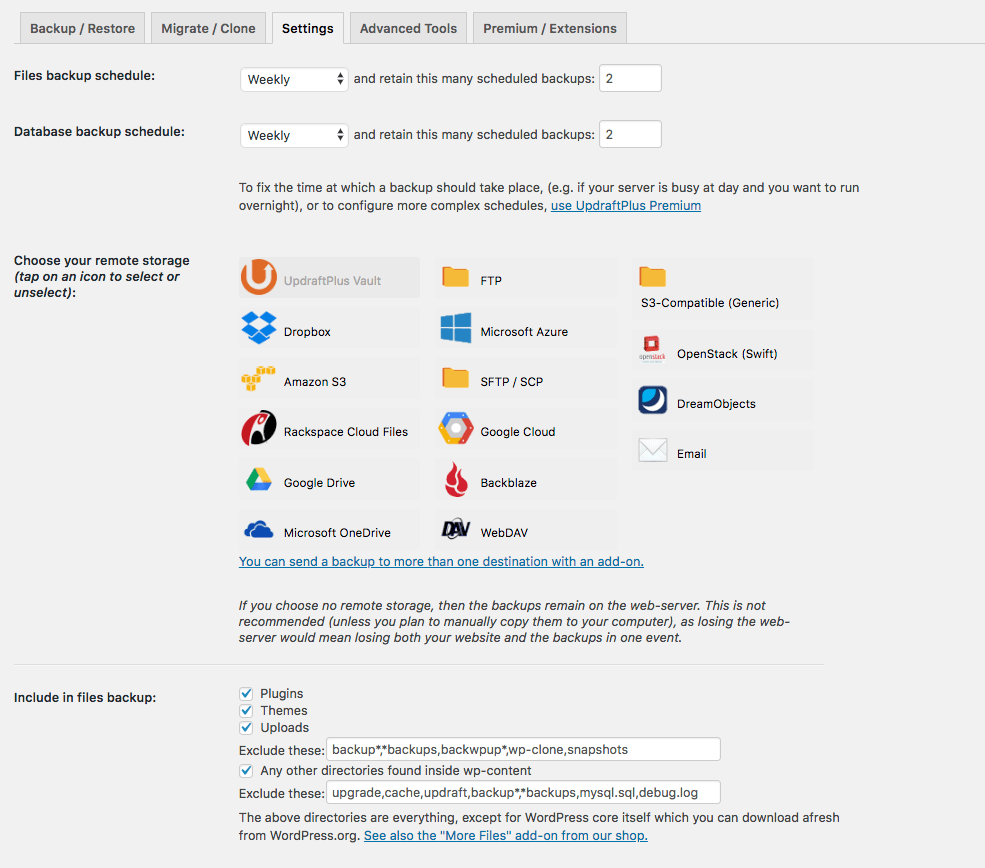
Backup to Dropbox, Google Drive, Amazon S3 (or compatible), Rackspace Cloud, FTP, DreamObjects, Openstack Swift or email.
The paid version also allows you to backup to Microsoft OneDrive, Microsoft Azure, Google Cloud, Backblaze B2, SFTP, SCP, pCloud, WebDAV or UpdraftVault, our integrated storage option for UpdraftPlus.
Backup manually or schedule to run every 2, 4, 8 or 12 hours, daily, weekly, monthly or fortnightly.
Restore with UpdraftPlus
Your WordPress website is vulnerable. Your site may get hacked. Something could go wrong with an update or your server could crash. You might need to reverse a change made or a mistake caused by human error.
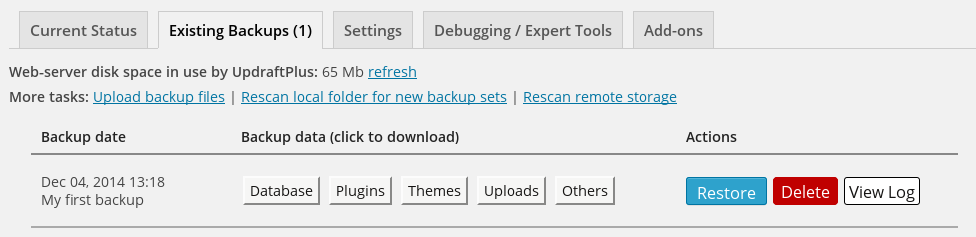
Whatever the reason, you can restore your WordPress website in just a few clicks with UpdraftPlus. Choose which components to restore (e.g. plugins, themes, database etc.), click again to restore, then click again to return to the main screen.
Migrate with UpdraftPlus
It’s easy to migrate your WordPress website to another web host, server or domain with this free version of UpdraftPlus.
To migrate, simply download your database, plugins, themes etc. from the source site, then upload them into your destination site.
When migrating, a built-in search-and-replace engine identifies old strings and replaces these to reflect the new location. UpdraftPlus saves you time and reduces the risk of broken links or missing files associated with manual migrations.
Why UpdraftPlus?
Writing a reliable backup and migration plugin that ‘just works’ consistently across millions of different WordPress deployments is hard. UpdraftPlus is relied upon to do exactly that. We’re trusted and actively deployed on more websites around the world than any other WordPress backup and migration plugin.
UpdraftPlus:
- Backs up, migrates and restores
- Offers a huge number of remote storage locations
- Allows you to schedule backups, so you can ‘set and forget’
- Is comprehensive and easy to use
- Is proven to work on over 3 million sites.
UpdraftPlus Premium
The free version of UpdraftPlus will back up and migrate your website perfectly well. However if you need more features and options you can purchase our Premium version.
Backup and Migrate with UpdraftPlus Premium, and:
-
Get automatic backups before updates. Restore the very latest version if a WordPress or plugin update breaks your site.
-
Backup Incrementally. Changes are added to the master, saving server resources vs repeatedly backing up in full.
-
Get more remote storage options including Microsoft OneDrive, SFTP, Microsoft Azure, WebDAV, Google Cloud, SCP, Backblaze and pCloud.
-
Get 1GB of integrated storage with UpdraftVault for 99.999% reliability, redundancy and scalability.
-
Get more control over how many backups are stored in a specified interval.
Restore from other backup plugins including BackWPup, BackupWordPress, Simple Backups and more. -
Run backups at set times e.g. during periods of low traffic.
-
Backup to more than one location for added protection.
-
Get detailed reports. Includes cryptographic checksums so you can verify the integrity of the backup files and more.
-
Get Premium migration. Migrating to the destination site is more direct and can be done from the source site.
-
Get Multisite / multi-network compatibility.
-
Backup non-WP files and databases e.g. tables belonging to your e-commerce store or customisations to WordPress core.
-
Get database encryption.
-
Manage your backups and migrations from the WP-CLI.
-
Get Premium Support.
Find out more on our comparison page. UpdraftPlus Premium is available for purchase here.
Managing multiple websites?
UpdraftCentral is a powerful remote control dashboard for WordPress that allows you to manage your backups, as well as updates, users, pages, posts, plugins and themes from one central location. Choose between:
- UpdraftCentral (free, self-hosted)
- UpdraftCentral Premium (paid-for, self-hosted)
- UpdraftCentral Cloud (paid-for, fully-hosted)
Optimize your sites centrally by combining the power of WP-Optimize and UpdraftCentral or manage your backups centrally by combining the power of UpdraftPlus with UpdraftCentral.
Need to create a temporary clone of your site?
UpdraftClone makes it quick and easy to create a temporary sandbox for changes you want to try out. Simply select the versions of WordPress and PHP that you want, and we’ll do the rest. More about UpdraftClone
The full suite of plugins from Team Updraft and friends
-
UpdraftPlus.
Backup, migrate and restore. Rated 5* on the plugin directory and trusted by more than 3 million WordPress website owner -
WP-Optimize.
Clean the database, compress images and caching. Optimize your WordPress website. 5* user rating. 1 million + active installs. -
All-In-One Security (AIOS).
Secure your WordPress website. Comprehensive, feature rich and easy to use. 5* user rating and 1 million + active installs. -
WP Overnight.
Quality Extensions for your WooCommerce store. 5* rated invoicing, order and product management, customer management solutions and more. -
Easy Updates Manager.
Take control of updates. Lots of features for free, and a Premium version with even more – over 300,000 users. -
Internal Link Juicer.Boost your SEO. Automate internal links within your WordPress website. Save time and rank higher in the search engines.
For other useful, free plugins see our lead developer’s profile, here.
Are you multilingual? Can you translate?
Do you want to help people that speak your language to backup, migrate and restore their WordPress websites?
The UpdraftPlus backup, migration and restoration plugin is ready and waiting. The translation process is easy, and web-based – please go here for instructions: https://updraftplus.com/translate/.
Or, if you’re already an expert WordPress translator, just pick out the .pot file from the wp-content/plugins/updraftplus/languages/ directory – if you scan for translatable strings manually, then you need to get these functions: _x(), __(), _e(), _ex(), log_e().
Many thanks to our existing translators.
License
Copyright 2011-24 David Anderson

This program is free software; you can redistribute it and/or modify
it under the terms of the GNU General Public License as published by
the Free Software Foundation; either version 3 of the License, or
(at your option) any later version.

This program is distributed in the hope that it will be useful,
but WITHOUT ANY WARRANTY; without even the implied warranty of
MERCHANTABILITY or FITNESS FOR A PARTICULAR PURPOSE.  See the
GNU General Public License for more details.

You should have received a copy of the GNU General Public License
along with this program; if not, write to the Free Software
Foundation, Inc., 51 Franklin St, Fifth Floor, Boston, MA  02110-1301  USA
Non-English translators are provided by volunteers, and wordpress.org does not give plugin developers control over their translations; thus relying on them is at your own risk; UpdraftPlus cannot guarantee that translations from the original English are accurate.
We recognise and thank those mentioned at https://updraftplus.com/acknowledgements/ for code and/or libraries used and/or modified under the terms of their open source licences.
Frequently asked questions
How do I install the UpdraftPlus backup & migration plugin?
Here are the installation guidelines from our YouTube channel or from our website.
What if I have a problem / need support ?
If you’re struggling to backup, migrate or restore there’s help available. Search existing topics on the WordPress support forum or post a new one. Our support and development teams check and respond to queries everyday. UpdraftPlus Premium customers can log a ticket directly with our support and development teams via the UpdraftPlus support hub. Before you get in touch, please ensure that you have read through our FAQs and that you’ve updated to the latest release of our plugin. It helps greatly if you can include the backup log and as much other information as possible in your report, for…
When it comes to migration, what does the premium plugin do that the free plugin can’t?
Migrating in the free plugin involves downloading the backups from the source site then uploading these to the destination site. To find the backup log: there are links to download the logs on the UpdraftPlus settings page- or you may be emailed it. Failing that, FTP into the directory wp-content/updraft and look for it there. Both free and Premium plugins include a built-in search-and-replace engine to replace old strings with the new location. If migration is all you require, and for simple single site migrations the free plugin will likely be enough to meet your needs. If you have…
UpdraftPlus runs out of time when it’s trying to backup, after I have left it for some time to give it a good chance. What can I do?
This problem is probably caused by your account being starved of resources by your (cheap) web host provider. This is far from ideal; although UpdraftPlus supports resuming backup runs right from the beginning to avoid everything having to be done at once, it has its limits. The best thing is to choose a more reputable web host. Failing this, try going into the “Expert settings” and reducing the size at which zip files are split. UpdraftPlus is known to successfully backup websites that run into the multiple-gigabytes on web servers that are not resource-starved.
Changelog
1.26.8: Onboarding Wizard, Azure legacy blob storage retirement, PHP < 5.6.1 feature deprecation warning, plus various fixes and small tweaks - see the changelog for details. A recommended update for all; please update immediately.
The UpdraftPlus backup blog is the best place to learn in more detail about any important changes.
N.B. Paid versions of UpdraftPlus Backup / Restore have a version number which is 1 higher in the first digit, and has an extra component on the end, but the changelog below still applies. i.e. changes listed for 1.16.32.x of the free version correspond to changes made in 2.16.32.x of the paid version.
= 1.26.8 – 17/Sep/2026
- SECURITY: On a site which has been migrated (i.e. moved to a new address using UpdraftPlus’s migration feature), and is using an .htaccess file, and the .htaccess file has not been updated with the new site reference, and where the site owner does not respond to the notice to do so, and where the site has non-admin users who can login to the WP dashboard, and where the site had saved storage login credentials in the UpdraftPlus settings, such a logged-in user could access some of those credentials (e.g. could access FTP, but not Dropbox). Thanks to Jakub Herman for notifying us of this issue (via WPScan).
- FEATURE: Implemented an onboarding wizard to assist first-time users with plugin configuration (requires WordPress 6.2+ and PHP 7.4+).
- FIX: Error caused by the FTP wrapper referencing the STDIN constant when configuring the cURL CURLOPT_INFILE option. Since STDIN is only defined under the PHP CLI SAPI, this caused failures in PHP-FPM environments.
- FIX: WebDAV backup failures caused by a deprecated regular expression escape since PCRE2 version 10.45.
- TWEAK: The “Tour” functionality has been removed from the UI and deactivated. Its underlying code remains temporarily and will be fully removed in a future release.
- TWEAK: Remove bundled translations which are now complete and automatically downloaded from wordpress.org
- TWEAK: Added an admin notice to inform users about the upcoming retirement of legacy Azure Blob Storage accounts.
- TWEAK: Warn sites running PHP older than 5.6.1 that phpseclib-dependent features (Dropbox, SFTP/SCP, Database Encryption, UpdraftCentral, Migrator) will require a newer PHP version in future releases; the dashboard notice is also shown again to users who dismissed the previous version of this notice.
- TWEAK: Update all text labels to use teamupdraft.com instead of updraftplus.com.
- TWEAK: Fixed the ‘Bad filename format’ error when uploading small backup files via the UpdraftPlus dashboard on older WordPress versions.
- TWEAK: Clarifying WebDAV settings test popup when server does not support chunked uploads.
- TWEAK: Addressed several issues identified during Plugin Check (PCP) validation and improved overall plugin compatibility and code quality.
1.26.7 – 21/Aug/2026
- SECURITY: Restoration now requires provision of a nonce, and not only the epoch-second timestamp of a backup. This prevents an insider threat in which a previous administrator who has been removed from a site could seek to persuade a logged-in current administrator to follow a link to restore a backup which he had previous knowledge of. Thanks to Jashid Sany for raising this issue (via WPScan).
- TWEAK: In UpdraftPlus Premium, for scheduled monthly backups, change the behaviour to backup on the chosen day every month (better matching user expectation).
- TWEAK: UpdraftClone no longer supports clones launched with PHP 5.4 or 5.5.
1.26.6 – 23/Jul/2026
- FEATURE: Upon plugin deactivation, a popup will appear with data removal options, enabling users to opt-in to deleting saved data.
- FIX: “Unattached” media filter lists attached images when no unattached items exist
- TWEAK: Added Burst Statistics to TeamUpdraft family admin notices.
- TWEAK: Create a better UX for free users around premium remote storage locations
- TWEAK: Prefer http_get_last_response_headers() (PHP 8.4+) to avoid PHP 8.5 deprecation warnings for $http_response_header.
- TWEAK: Replace the calls to the native PHP ‘unserialize()’ function in the Google Drive and HTTP_Request2 libraries.
1.26.5 – 05/Jun/2026
- SECURITY: Previous versions contained a defect allowing sites with an active Migrator key (paid versions only) or UpdraftCentral key (free and paid versions) to have unauthorised operations carried out on them. All users should update immediately.
- TWEAK: Added explicit HTTP timeout of 60 seconds to pCloud chunk upload requests to prevent cURL error 28 on slow server connections
- TWEAK: Guard curl_close(), finfo_close() and xml_parser_free() calls with a PHP version check to prevent deprecation warnings on PHP 8.5+
- TWEAK: Update the bundled common-libs version
- TWEAK: Replace all usages of wpdb::esc_like() with UpdraftPlus_Database_Utility::esc_like() across the codebase to maintain consistency.
- TWEAK: Add “auto-backup before update” tour guide
1.26.4 – 07/May/2026
- FIX: In version 1.26.2, a regression prevented the backup schedule, including the day name or number, as well as backup entity exclusion rules, from being saved.
- TWEAK: Alert users who wrongly enter URLs instead of an actual hostname for SFTP and FTP remote storage.
- TWEAK: Updated DreamObjects endpoints by removing the deprecated objects-us-west-1, marking objects-us-east-1.dream.io as unavailable (Nov. 12th, 2025), and adding admin notices to inform users of this change.
- TWEAK: get_structured_data() now accepts params to avoid timeouts.
1.26.3 – 23/Apr/2026
- FEATURE: Implemented enhanced streaming extraction for large files during restoration to handle cases where the file size exceeds the PHP memory limit.
- FIX: Fix users role filter empty state shows generic “Failed to Fetch Data” error.
- FIX: Fixed backup failures on tables with invisible columns and large data volumes.
- FIX: Unable to uncheck all categories on post in UDC dashboard
- TWEAK: Added a new internal command to get given plugins’ installation info.
- TWEAK: Ensure autobackup notice is always a string to prevent PHP 8.1+ deprecation in wp_kses()
- TWEAK: Fix the JS errors that occur when deleting the last generated UDC keys.
- TWEAK: Implemented adjustments for UI misalignment issues caused by the WordPress 7 visual design refresh across the admin dashboard. The plugin’s interface now aligns correctly with the updated design standards.
- TWEAK: Prevent broken settings pages in other plugins in multisite when UpdraftPlus is active due to modified menu URLs.
- TWEAK: Update all links in the addons folder to use teamupdraft.com instead of updraftplus.com.
- TWEAK: Replaced esc_html_e() with esc_html__() where string concatenation was silently discarding the colon separator in SFTP connection failure message and noscript JavaScript warning notice
- TWEAK: Switched to native phpseclib API/function for Dropbox token decryption, replacing deprecated mcrypt_decrypt since PHP 7.1 and removed in PHP 7.2.
- TWEAK: Clear out PHP “Undefined offset” notice that occurred while restoring a backup of single site to multisite. It happened during the search-replace operation due to the absence of the users and usermeta tables.
- TWEAK: Enhance the unzip file function to handle more folder inclusion/exclusion
- TWEAK: Update all links in the methods folder to use teamupdraft.com instead of updraftplus.com.
- TWEAK: Add post status and date fields to get_posts API response for UDC
1.26.2 – 03/Mar/2026
- TWEAK: Added PHP 8.5 support to UpdraftClone
- TWEAK: Fix deprecation warnings in PHP 8.4 for the Dropbox integration
- TWEAK: Make abort backup warning icon responsive with percentage-based sizing
- TWEAK: Prevent the suppressed PHP warnings from being output in the backup and restore log on PHP 8.0+
- TWEAK: On a site where the site owner has restricted (super-)administrators (so that they can’t restore backups), require a constant to first be set to use the HTTP debug tool for internal IP addresses.
- TWEAK: Update all links in the settings folder to use teamupdraft.com instead of updraftplus.com.
- TWEAK: When deleting backup sets created through a direct site-to-site migration, the ‘Also delete from remote storage’ checkbox is unnecessary.
Screenshots


For developers
Is this your plugin? Show off the numbers.
Add a live badge to your site, docs or GitHub README. It updates on its own — no account needed.
Best UpdraftPlus: WP Backup & Migr… alternatives
All backup plugins →





FAQ
UpdraftPlus: WP Backup & Migration…: quick answers
Straight answers, pulled from live WordPress.org data.
Live data from WordPress.org · checked Sep 26, 2026
Is UpdraftPlus: WP Backup & Migrat… free?
Yes. UpdraftPlus: WP Backup & Migrat… is free to download and use from the official WordPress.org plugin directory.
Is UpdraftPlus: WP Backup & Migrat… safe to use in 2026?
Yes — UpdraftPlus: WP Backup & Migrat… is a safe, well-maintained plugin to use in 2026. It runs on 4M+ sites, is rated 4.8/5 and was last updated 5 days ago, and scores 96/100 on our health check.
How many websites use UpdraftPlus: WP Backup & Migrat…?
UpdraftPlus: WP Backup & Migrat… is active on 4M+ WordPress websites and has been downloaded 166,311,069 times since it launched in May 2012. It was downloaded 2,212,322 times in the last 30 days.
Does UpdraftPlus: WP Backup & Migrat… work with WordPress 7.1?
Yes. The developer has tested UpdraftPlus: WP Backup & Migrat… up to WordPress 7.1.2, the latest release. It requires WordPress 3.9 or newer.
When was UpdraftPlus: WP Backup & Migrat… last updated?
The latest version, 1.26.8, was released on September 21, 2026 (5 days ago).
Who makes UpdraftPlus: WP Backup & Migrat…?
UpdraftPlus: WP Backup & Migrat… is developed and maintained by David Anderson / Team Updraft.
What are the best alternatives to UpdraftPlus: WP Backup & Migrat…?
The most popular alternatives to UpdraftPlus: WP Backup & Migrat… are All-in-One WP Migration and… (5M+ installs), Jetpack (3M+ installs) and Duplicator (1M+ installs).
Powered by PageForge
Want thousands of pages that rank like these? Build them in an afternoon.
This directory runs on the same engine as PageForge. Turn any spreadsheet, CSV or API into thousands of fast, SEO-ready WordPress pages — with schema, internal links and AI-written copy baked in.
- CSV, Google Sheets & API data sources
- AI content, schema & internal links per page
- Works with Elementor, Gutenberg, Yoast & Rank Math
- Free on WordPress.org — no credit card


