



BackWPup – WordPress Backup & Restore Plugin
Back up, restore, and protect your WordPress website with automated backups, cloud storage, one-click recovery, and AI-assisted backup management.

Safe pick
Yes — BackWPup is a safe, well-maintained plugin to use in 2026. It runs on 400K+ sites, is rated 4/5 and was last updated 3 weeks ago, and scores 92/100 on our health check.
- Proven at scale on 400K+ active sites
- Actively developed — last update 3 weeks ago
- Tested with the latest WordPress (7.1)
- Responsive support — 100% of recent threads resolved
- Momentum — downloads up 140.3% vs the previous 30 days
How does it stack up?
Side-by-side on installs, updates, ratings & support



Daily downloads
Download spikes usually follow a new release — each site that auto-updates counts as a download.
Rankings
Where BackWPup stands todayWordPress.org search rankings
Live position in the plugin search, top 100| Keyword | Position |
|---|---|
| backup | #7 |
| cloud backup | #5 |
| database backup | #5 |
| restore | #2 |
| wordpress backup | #3 |
Version adoption
Share of active sites per release.
Rating breakdown
★★★★★★★★★★ 4 from 1,321 reviews
About BackWPup
From the official readme · v5.7.6Description
A WordPress site represents real work: content, customers, sales, and reputation. A failed update, a server problem, or a single mistake can take it all offline in seconds. BackWPup exists to make sure that never becomes a disaster.
BackWPup is a complete WordPress backup and restore solution. It automatically backs up your database and files, stores them securely on your server or in the cloud, and helps you restore your site when something goes wrong. Trusted by more than 500,000 WordPress websites and refined over more than a decade, BackWPup helps keep your data protected without adding unnecessary complexity.
BackWPup Free includes everything needed to automate, store, and restore WordPress backups with confidence. BackWPup Pro adds advanced recovery, migration, security, and multisite capabilities for professionals, agencies, and businesses. Starting with version 5.7, BackWPup also supports AI-assisted backup management, making it easier to check backup status, run backups, and troubleshoot issues using natural language.
🚀 Why Choose BackWPup
Reliable backups when you need them most.
A backup is only valuable if it works when something goes wrong. BackWPup creates complete backups of your WordPress files and database, stores them securely, and gives you clear visibility into backup status and history.
Simple to get started. Powerful when you need more.
The guided setup helps you create your first backup in minutes. As your needs grow, BackWPup gives you the flexibility to customize schedules, destinations, retention rules, automation, and multisite workflows.
Built for modern WordPress workflows, BackWPup lets you manage backups through the WordPress dashboard, automate them with WP-CLI, or use AI assistants through MCP (Model Context Protocol).
🛡️ Back Up Your Way
Good protection adapts to how you work. BackWPup is built around three simple decisions: what to back up, when to back it up, and where to keep it.
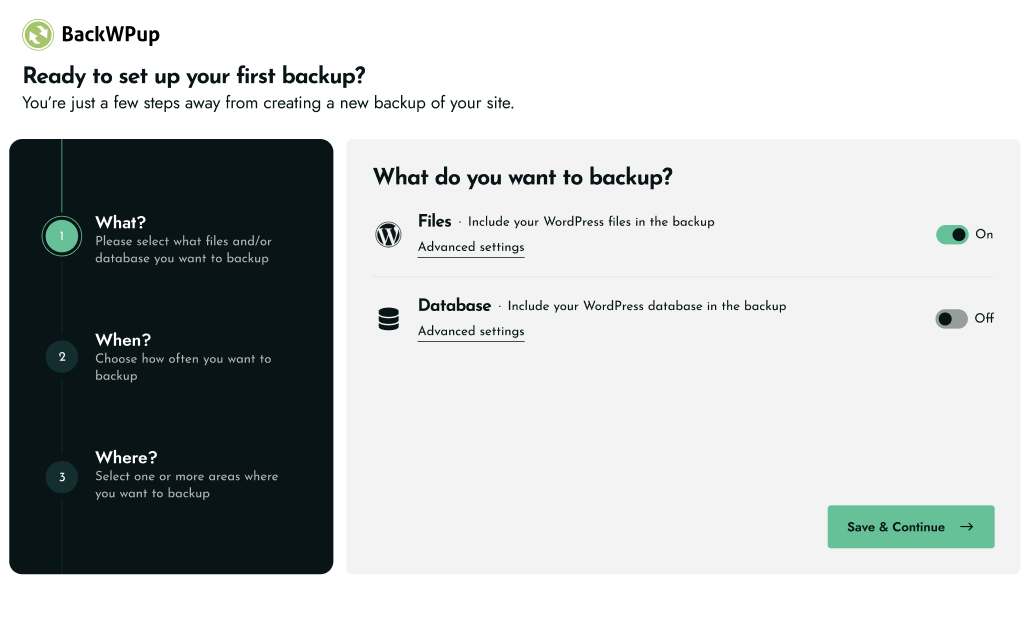
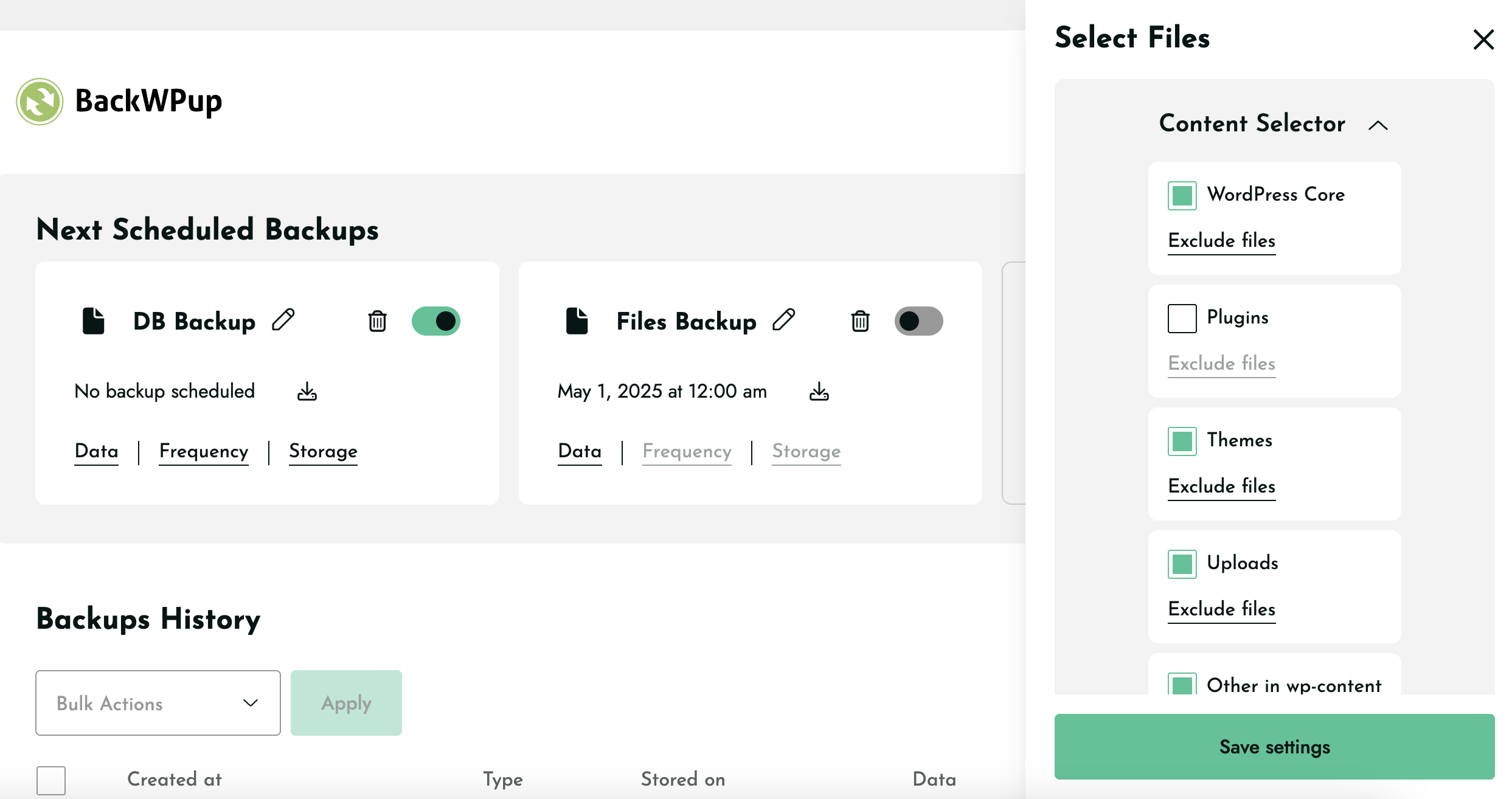
What to back up. Create a complete backup of your entire WordPress installation: your full database and all your files, including the wp-content folder, themes, plugins, and uploads. Prefer a targeted backup? Back up just your database or just your files. BackWPup also supports WordPress multisite, so an entire network is covered.
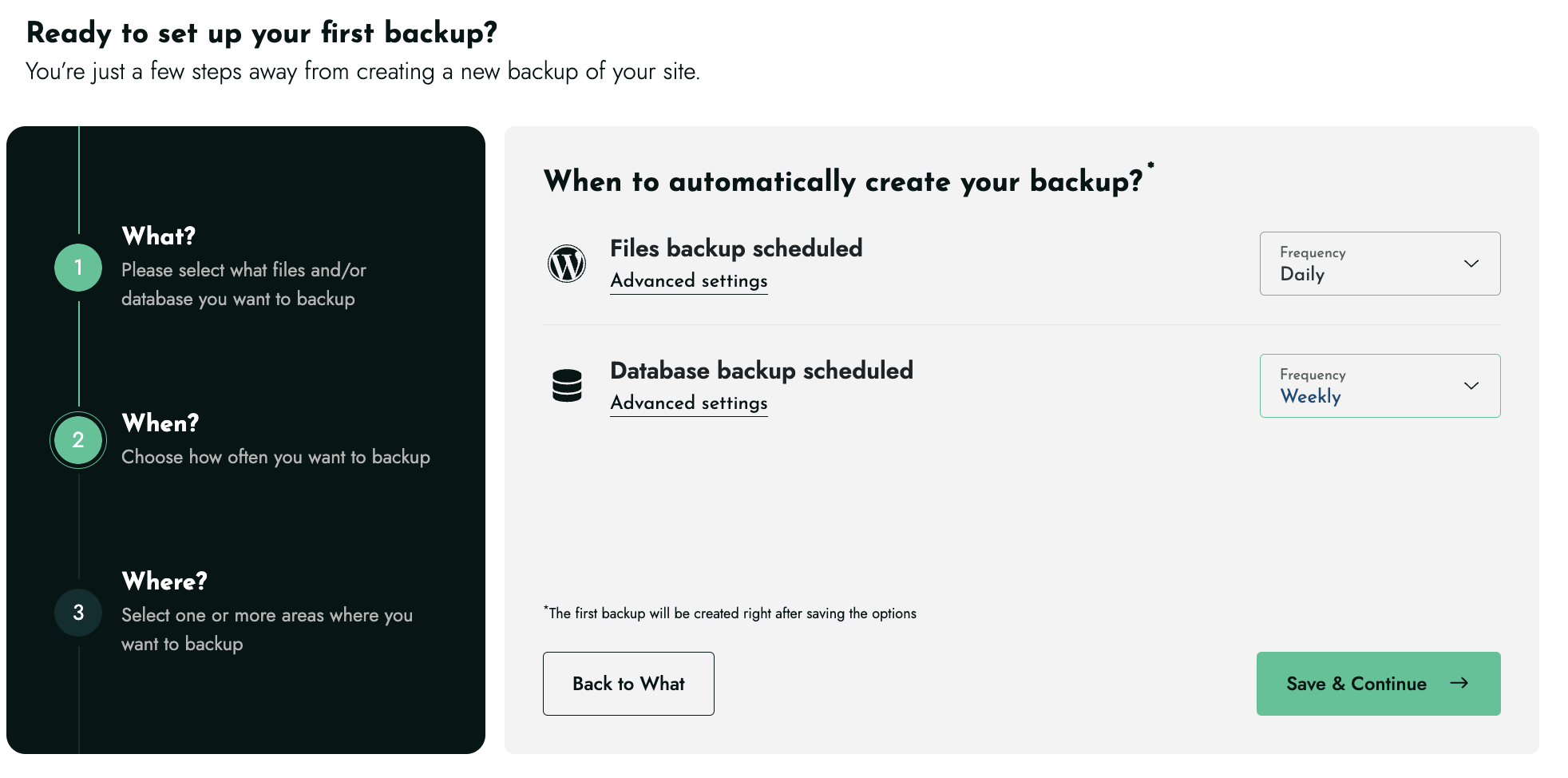
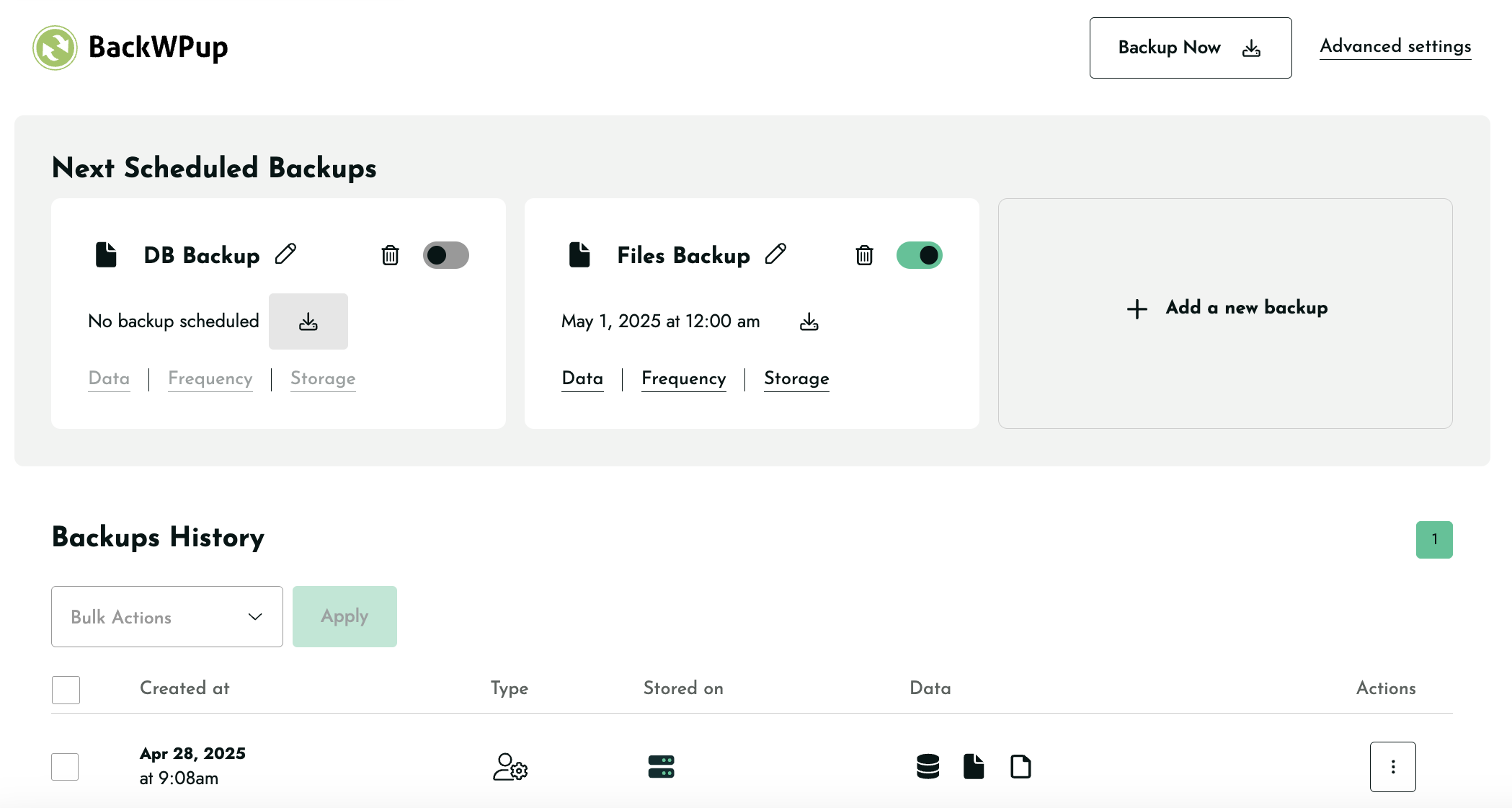
When to back up. Set automatic backups to run hourly, daily, weekly, or monthly, so protection keeps pace with how often your site changes. A high-traffic store can back up several times a day; a brochure site can run weekly. Need one right now, before a plugin update or a round of edits? Run a backup on demand in a single click.
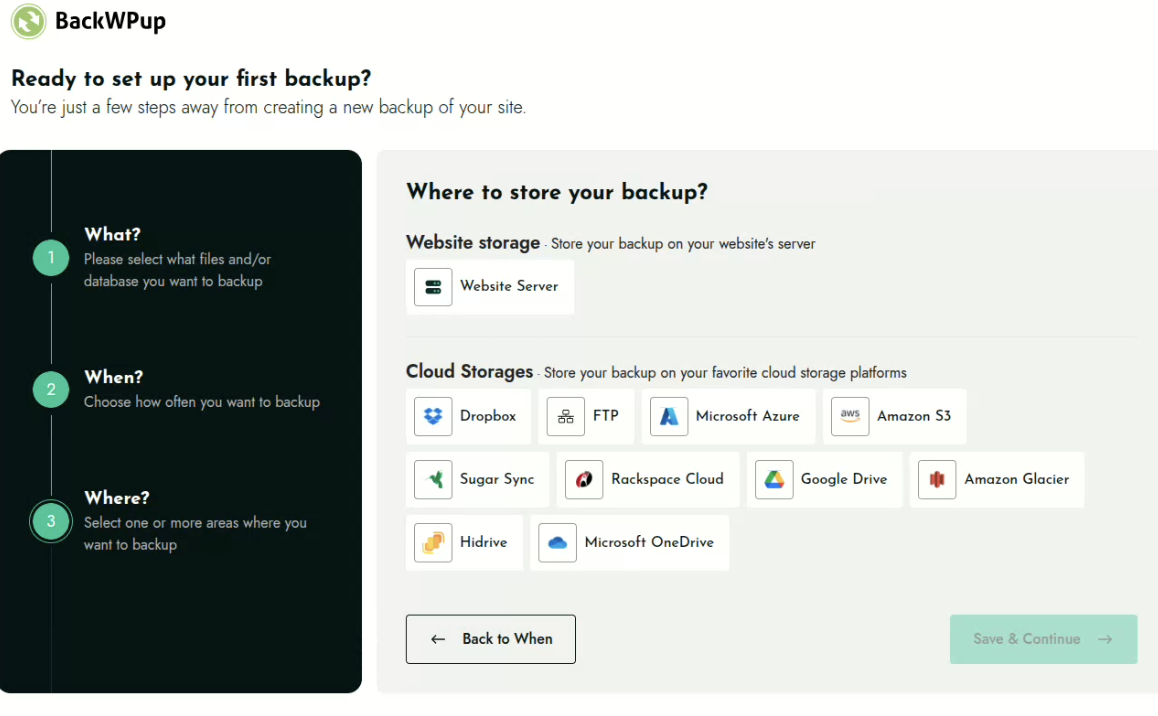
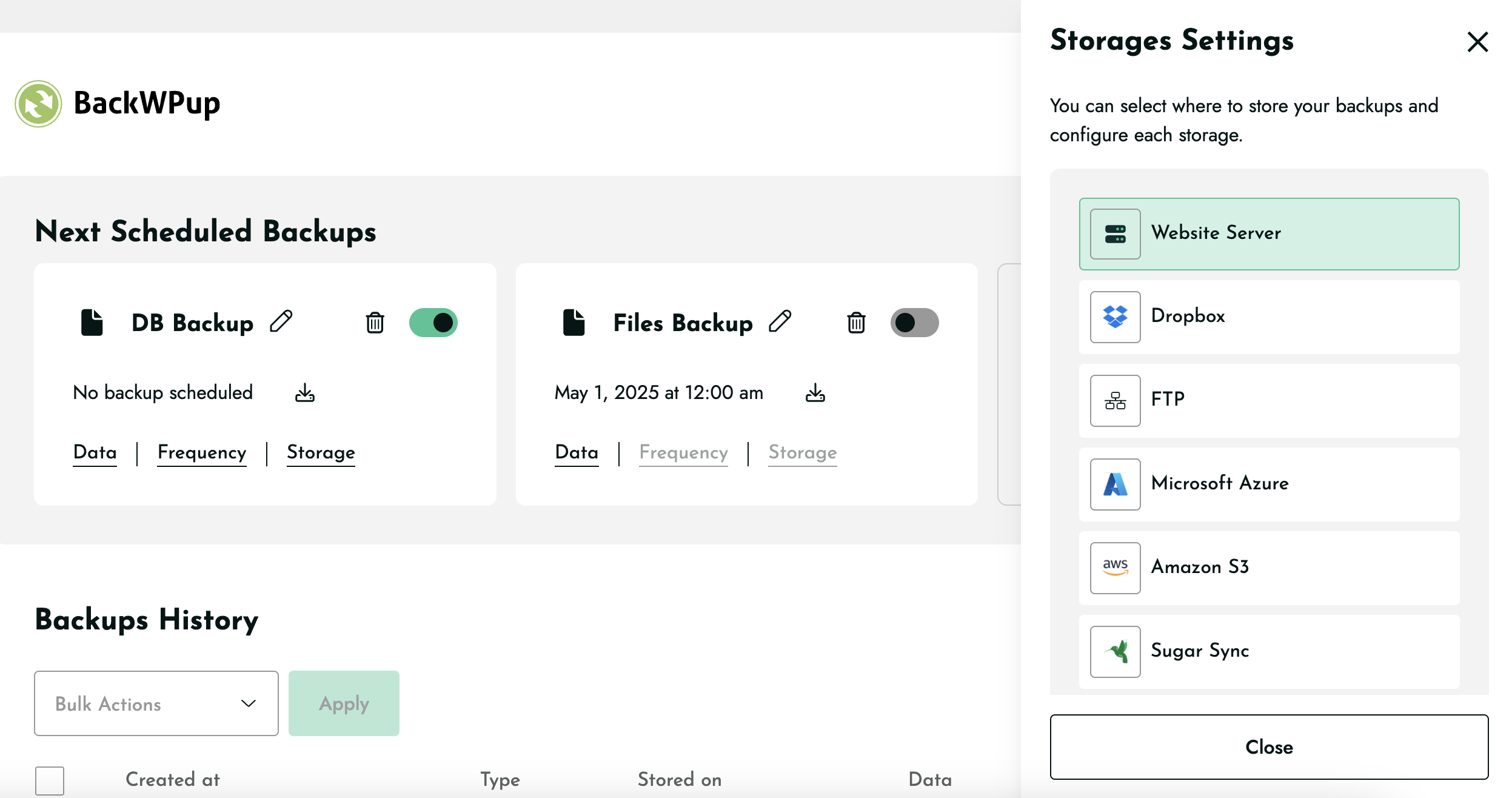
Where to store backups. Your backups shouldn’t depend on a single location. BackWPup lets a single backup job store the same backup across multiple destinations at once: keep a copy on your own web space and send copies off-site to the cloud, so you’re protected even if one location becomes unavailable. The free version supports Website Server (local), Dropbox, FTP, Microsoft Azure, Amazon S3 and compatible storage, SugarSync, and Rackspace Cloud Files, and you can combine any of them in the same job. Each destination has its own configuration and retention settings, so you control how many copies are kept where.
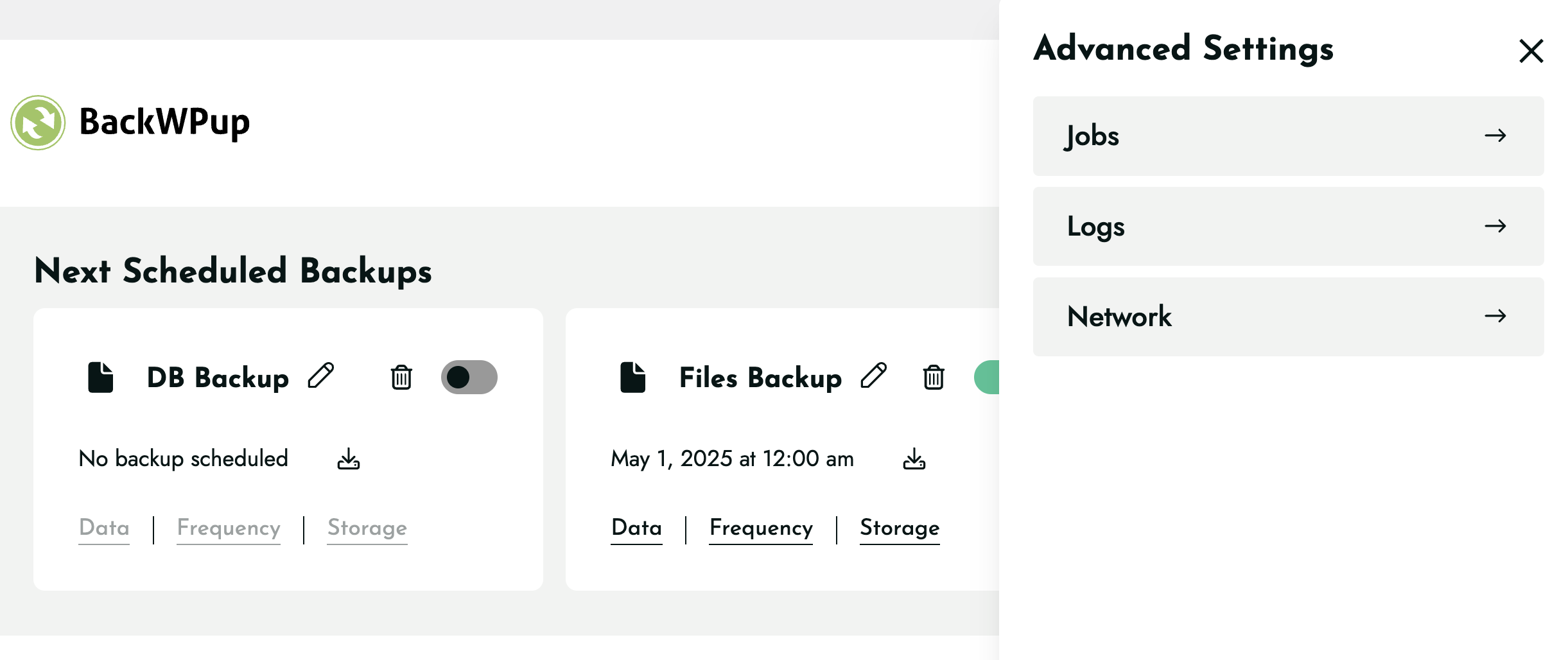
Every backup is tracked in one place. With clear logs and backup history, you can easily verify when a backup ran, whether it succeeded, and where it was stored. When something does go wrong, restoring is just as straightforward: review your backups, choose one, and restore your site to a known-good state.
⚡ Improve Your Site’s Reliability and Performance
Did you know that regular backups and database maintenance can improve the performance and reliability of your WordPress site? With BackWPup, you can ensure that your data is always protected and that your site is always running smoothly.
By scheduling regular backups and database maintenance, you can avoid data loss and downtime. BackWPup makes it easy to protect your data and keep your site running at its best.
Even Google recommends regular backups and database maintenance to ensure the reliability and performance of your site. With BackWPup, you can follow best practices and keep your site secure and reliable.
🤖 AI-Assisted Backup Management with BackWPup 5.7
Backups are not just about creating archives. They are about knowing your site is protected before an update, confirming scheduled backups completed successfully, and quickly investigating problems when they occur.
BackWPup 5.7 brings these tasks into the tools many WordPress professionals already use every day. Through MCP (Model Context Protocol), BackWPup connects directly to AI assistants such as Claude Desktop, GitHub Copilot, and OpenAI Codex, allowing you to manage backups using natural language.
Instead of navigating dashboards and logs, you can simply ask questions, run backups, review status, and troubleshoot issues directly from your AI assistant while keeping your backup data securely on your own WordPress site.
⚙️ Built for Modern Technical Workflows: WP-CLI and MCP
BackWPup gives you two powerful ways to manage backups beyond the WordPress dashboard:
- WP-CLI enables command-line automation for deployments, scripts, scheduled maintenance, and repeatable operational tasks.
- MCP (Model Context Protocol) enables AI-assisted backup management through assistants such as Claude Desktop, GitHub Copilot, and OpenAI Codex. Check backup status, run backups, review logs, and troubleshoot issues using natural language.
WP-CLI is ideal for automation. MCP is ideal for visibility, troubleshooting, and day-to-day backup management. Together, they give technical teams the flexibility to work the way they prefer.
💎 BackWPup Pro Features
BackWPup Pro is designed for professionals, agencies, online stores, and businesses that need advanced recovery, migration, security, and multisite capabilities.
BackWPup Pro adds:
- Direct restore from cloud storage: restore directly from supported cloud and server destinations without manually uploading backup archives.
- Additional cloud destinations: including Google Drive, Microsoft OneDrive, Amazon Glacier, and HiDrive.
- Backup encryption and encrypted restores: protect sensitive backup data with an additional layer of security.
- Website migration: move your site to a new domain or hosting provider with automatic URL and database updates.
- Advanced multisite support: manage and protect WordPress multisite networks more efficiently.
- Standalone restore application: recover your website even when WordPress itself is unavailable.
- Premium support: direct access to the BackWPup support team.
Upgrade to Pro if you need faster recovery, stronger security, multisite workflows, website migration capabilities, or business-critical backup protection. Get BackWPup Pro
📚 Support, Documentation, and Additional Resources
- Documentation: step-by-step guides for backups, restores, migration, and AI-assisted management at backwpup.com/docs.
- Community support: free help in the WordPress.org support forum.
- Premium support: BackWPup Pro customers get direct, ticket-based support from our team.
- Product and Pro details: backwpup.com.
Protecting your site with BackWPup? Leave a review on WordPress.org to help other site owners discover it.
ℹ️ Who Are We?
We are WP Media, the company behind WP Rocket, the best performance plugin for WordPress.
Our mission is to improve the web. We are making it faster with WP Rocket, lighter with Imagify and safer with BackWPup.
👋 Get in Touch!
- Website: backwpup.com
- Contact Us: https://backwpup.com/contact/
🔌 Related Plugins
- WP Rocket: The best performance plugin to speed up your WordPress website.
- Imagify: The best image optimization plugin to speed up your website with lighter images.
- Lazy Load: The best Lazy Load script to reduce the number of HTTP requests and improve the website’s loading time.
- Heartbeat Control by WP Rocket: The best plugin to control the WordPress Heartbeat API and reduce CPU usage.
- RocketCDN: The best CDN plugin for WordPress to propel your content at the speed of light, no matter where your users are located in the world.
- Increase Max upload file size: The best plugin to increase the upload file size limit to any value with one click.
License: GPLv2 or later
License URI: http://www.gnu.org/licenses/gpl-2.0.html
Installation
- In your WordPress admin, go to Plugins > Add New and search for BackWPup. Click Install Now, then Activate. (You can also upload the plugin ZIP under Plugins > Add New > Upload Plugin.)
- Open BackWPup in your admin menu and follow the guided setup.
- Choose what to back up (your full site, or just files or database), when it should run (hourly, daily, weekly, or monthly), and where to store it (your server and/or a cloud destination).
- Save your job and run your first backup. That’s it: your site is now protected automatically.
FTP Method
- Upload the complete
backwpupfolder to the/wp-content/plugins/directory. - Activate the plugin through the ‘Plugins’ menu in WordPress.
Frequently asked questions
How do I create my first backup?
Open BackWPup in your WordPress admin and follow the setup. Choose what to back up, set a schedule, pick a storage destination, and save. You can run a backup immediately with a single click.
How do I restore my site?
Go to your backups in the BackWPup dashboard, select the backup you want, and restore. In the free version you can restore backups you upload manually; BackWPup Pro lets you restore directly from any storage destination, including the cloud.
Is BackWPup free?
Yes, BackWPup Free includes full database and file backups, automated scheduling, multiple cloud storage destinations, restore functionality, and support for both WP-CLI and MCP (Model Context Protocol). BackWPup Pro adds direct cloud restores, encryption, website migration, advanced multisite capabilities, the standalone restore application, and premium support.
Where can I store my backups?
On your own web space, in the cloud, or both at once. A single backup job can store the same backup across multiple destinations, so you can combine local and cloud storage for extra protection. The free version includes Website Server (local), Dropbox, FTP, Microsoft Azure, Amazon S3 and compatible storage, SugarSync, and Rackspace Cloud Files; Pro adds Google Drive, Microsoft OneDrive, Amazon Glacier, and HiDrive. Each destination has its own settings, including how many backups to retain, and if one storage destination becomes unavailable, your backups stored in other destinations remain…
Can I move my site to a new domain or host?
Yes, with BackWPup Pro. Migration restores your backup to a new URL and updates the database automatically, so you can move hosts or change domains without a manual rebuild.
Does BackWPup work with WP-CLI?
Yes. BackWPup supports WP-CLI in both Free and Pro, so you can trigger and automate backups from the command line and in your deployment scripts.
What is AI-assisted backup management, and do I need to be technical to use it?
It lets you manage your backups by chatting with an AI assistant like Claude Desktop, GitHub Copilot, or OpenAI Codex, for example, “run a backup before I update my plugins” or “was my last backup successful?” You don’t need to write code. You connect your site once, then manage backups in plain language. It’s available in BackWPup 5.7 and later.
Does my backup data leave my site when I use an AI assistant?
No. Your backups and site data stay on your WordPress install. The assistant connects to your site through a secure, credentialed connection and acts on your behalf, so your site remains the source of truth.
Will BackWPup work on my host?
BackWPup is designed to run across a wide range of WordPress hosting environments and supports WordPress multisite. If you run into a host-specific issue, our documentation and support can help.
Changelog
5.7.6
Release date: September 7, 2026
- Security fix: Restricted access to BackWPup debug information to users with Settings access.
- Security fix: Restricted license activation and deactivation to users with Settings access.
- Security fix: Restricted BackWPup redirects to trusted destinations to prevent unsafe off-site redirects.
- Security fix: Fixed a potential Cross-Site Scripting (XSS) vulnerability in backup download error messages.
- Fix: Fixed an issue that could cause duplicate entries in Tar/TarGz backups after an interrupted backup was resumed.
5.7.5
Release date: July 21, 2026
- Security fix: Resolved a Cross-Site Scripting (XSS) vulnerability on the Restore page.
- Fix: Fixed an incorrect backup aborted notice and a page freeze when using the Backup Now button.
- Fix: Fixed an issue affecting the “Don’t show again” admin notice action.
5.7.4
Release date: July 6, 2026
- New feature: Added a security notice that detects stale restore files and allows them to be deleted with one click.
- Enhancement: Restore working directories are now automatically cleaned up after a successful restore.
- Fix: Fixed inconsistent file counts in interrupted and resumed ZIP backups.
- Fix: Resolved a fatal error caused by outdated
.htaccessrules on Apache 2.4.
5.7.3
Release date: June 22, 2026
- Enhancement: Added the backwpup_mcp_server_enabled filter to allow disabling MCP functionality.
- Fix: MCP backup history now reports correct file sizes across all storage destinations.
- Fix: Resolved a WooCommerce compatibility issue that could generate log errors.
- Fix: Resolved PHP 8.1+ compatibility issues affecting MCP operations.
5.7.2
Release date: June 8, 2026
- Fix: Resolved PHP namespace conflicts in bundled vendor libraries to prevent fatal errors caused by dependency collisions with other plugins.
5.7.0
Release date: June 8, 2026
- New feature: Added MCP support, allowing AI assistants to manage backups, run jobs, monitor progress, cancel jobs, and access logs.
Screenshots
For developers
Is this your plugin? Show off the numbers.
Add a live badge to your site, docs or GitHub README. It updates on its own — no account needed.
Best BackWPup alternatives
All backup plugins →





FAQ
BackWPup: quick answers
Straight answers, pulled from live WordPress.org data.
Live data from WordPress.org · checked Sep 26, 2026
Is BackWPup free?
Yes. BackWPup is free to download and use from the official WordPress.org plugin directory. The developer also sells premium add-ons or a Pro version with extra features.
Is BackWPup safe to use in 2026?
Yes — BackWPup is a safe, well-maintained plugin to use in 2026. It runs on 400K+ sites, is rated 4/5 and was last updated 3 weeks ago, and scores 92/100 on our health check.
How many websites use BackWPup?
BackWPup is active on 400K+ WordPress websites and has been downloaded 24,917,431 times since it launched in July 2009. It was downloaded 241,953 times in the last 30 days.
Does BackWPup work with WordPress 7.1?
Yes. The developer has tested BackWPup up to WordPress 7.1.2, the latest release. It requires WordPress 5.3 or newer.
What PHP version does BackWPup need?
BackWPup requires PHP 7.4 or higher. Most hosts run PHP 8.x today, so it works on any modern WordPress hosting.
When was BackWPup last updated?
The latest version, 5.7.6, was released on September 7, 2026 (3 weeks ago).
Who makes BackWPup?
BackWPup is developed and maintained by WP Media.
What are the best alternatives to BackWPup?
The most popular alternatives to BackWPup are All-in-One WP Migration and… (5M+ installs), UpdraftPlus: WP Backup & Mi… (4M+ installs) and Jetpack (3M+ installs).
Powered by PageForge
Want thousands of pages that rank like these? Build them in an afternoon.
This directory runs on the same engine as PageForge. Turn any spreadsheet, CSV or API into thousands of fast, SEO-ready WordPress pages — with schema, internal links and AI-written copy baked in.
- CSV, Google Sheets & API data sources
- AI content, schema & internal links per page
- Works with Elementor, Gutenberg, Yoast & Rank Math
- Free on WordPress.org — no credit card


