



Send Images to RSS
Send Images to RSS bridges the gap between large websites and small emails, by replacing images in your feed with smaller, email friendly images, and attempting to add markup which email clients can handle.

Use with caution
Send Images to RSS works, but test it on a staging site before relying on it in 2026. It runs on 3K+ sites, is rated 5/5 and was last updated 6 years ago, and scores 45/100 on our health check.
- Loved by users — 5/5 from 26 reviews
- No update in 6 years
- Only tested up to WordPress 5.5 (latest is 7.1)
How does it stack up?
Side-by-side on installs, updates, ratings & support



Daily downloads
Download spikes usually follow a new release — each site that auto-updates counts as a download.
Rankings
Where Send Images to RSS stands todayWordPress.org search rankings
Live position in the plugin search, top 100| Keyword | Position |
|---|---|
| >100 | |
| feed | >100 |
| images | >100 |
| mailchimp | >100 |
| rss | >100 |
Version adoption
Share of active sites per release.
Rating breakdown
★★★★★★★★★★ 5 from 26 reviews
About Send Images to RSS
From the official readme · v3.4.1Description
Send Images to RSS bridges the gap between large websites and small emails, by replacing images in your feed with smaller, email friendly images, and attempting to add markup which email clients can handle.
Between larger monitors, retina screens, and better image optimization, the images we serve up on our websites are larger than they’ve ever been. RSS to email services such as MailChimp, however, are constrained to what email clients can display, which is small, small, small. And although it’s possible to try to style images with a max-width in your emails, not all clients will honor it (I’m looking at you, Outlook).
Send Images to RSS makes it easy to create beautiful, email friendly RSS campaigns, with minimal setup required, regardless of your feed setup.
Full Text RSS Feeds
If your site’s RSS feed is set to Full Text, this plugin makes sure your emails look more like your website:
- Replace overly large images with email friendly size images.
- Convert galleries from thumbnails to full width images.
- Add email friendly styling/alignment to your images.
Summary Text Feeds
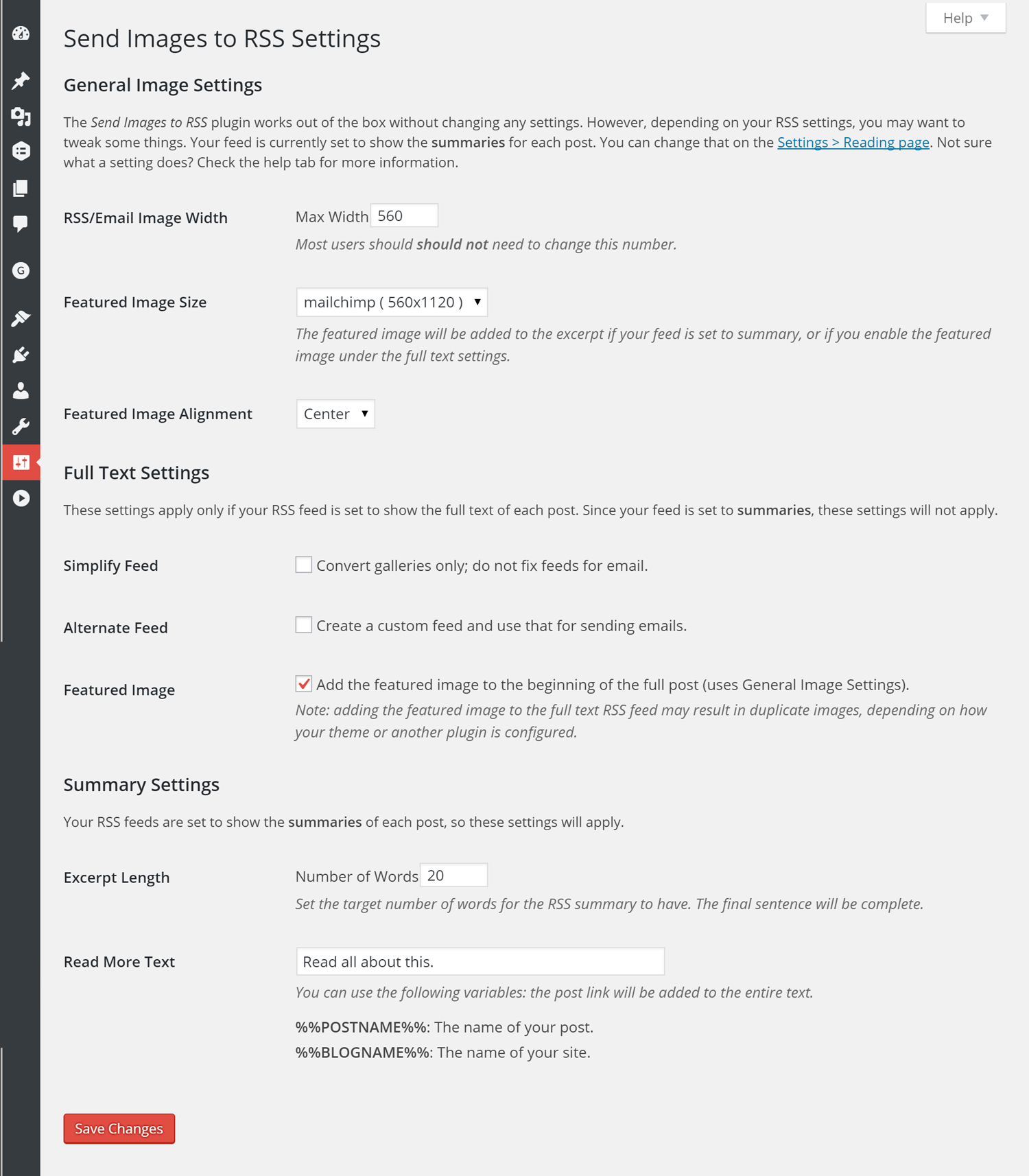
If you’ve used Summaries as your RSS feed settings, this plugin has not been for you. Until now. As of 3.0.0, Send Images to RSS brings the awesome to you, too. Here’s the magic for your Summary feed:
- Add the post’s featured image to your excerpt. Choose the size and alignment. If no featured image is set, the plugin will use the first image uploaded to the post.
- Set a custom length for your RSS summary/excerpt. Pick the number of words you want your summary to have, and the plugin will aim for that, but with the added bonus of making sure the final sentence is complete.
- If you add a manual excerpt to your post, because you like to have full control, the plugin will properly use that instead.
- Automatically add a custom “read more” link to the end of every post summary, to keep your feed pointed back to your site.
Known (non)Issues
This plugin should work with any theme. Some themes and plugins do modify the feed for their own purposes. Where possible, I’ve tried to account for them:
- For summary feeds, the Yoast SEO RSS link is removed (the full text feed and front end output are not changed).
- For summary feeds, the excerpt filter added by the Woo Canvas theme is removed (the full text feed and front end output are not changed).
- For summary feeds, this plugin will replace the image settings for Display Featured Image for Genesis for versions 2.3.0 and later (because this plugin is smarter). If you’re using Display Featured Image for Genesis 2.2.2 or lower, this plugin will concede graciously. But you should update, please.
- For full text feeds, this plugin will not duplicate featured images if they are being added by Display Featured Image for Genesis–you will want to disable that feature in Display Featured Image for Genesis.
NOTE: it is up to you to check that your feed output is still working, especially in your email system of choice, once it’s installed. I’ve attempted to set it up to handle XHTML or HTML5, and function even if your feed is wonky, but please double check, and let me know if you have issues, and if so, what specifically they are.
Props
Special thanks to Gretchen Louise for her summary feed contributions.
Spanish translation offered by Web Hosting Hub
Installation
- Upload the entire
send-images-rssfolder to your/wp-content/pluginsdirectory. - Activate the plugin through the ‘Plugins’ menu in WordPress.
- Visit the Settings > Send Images to RSS page to change the default behavior of the plugin.
Changelog
3.4.1: bug fix for users on WordPress 4.9 3.4.0: Adds support for core gallery block; updated minimum WP and PHP versions
3.4.1
- fixed: undefined function for sites running WordPress 4.9
3.4.0
- added: support for core gallery block
- updated: new minimum WordPress version 4.9
- updated: new minimum PHP version 5.6.20
- fixed: image IDs not being properly retrieved if the original image is larger than 2560 px wide
3.3.2
- fixed: error with external images/captions on full feeds
3.3.1
- fixed: overzealous tag stripping on excerpts (props @gretchenlouise for reporting)
3.3.0
- added: filter for the excerpt permalink
- added: filter to allow users to keep shortcodes in excerpts
- added: support for embeds in full text feeds
- changed: additional max-width set on images to help prevent overflow (props @ivanpr)
- fixed: margins on featured images set to align: none
- fixed: featured images added to full content no longer remove iframes
3.2.2
- changed: link back to site from excerpt is now nofollow, but can be overridden via filter
- changed: added margin to excerpt style filter parameters
Screenshots
For developers
Is this your plugin? Show off the numbers.
Add a live badge to your site, docs or GitHub README. It updates on its own — no account needed.
Best Send Images to RSS alternatives
All email plugins →





FAQ
Send Images to RSS: quick answers
Straight answers, pulled from live WordPress.org data.
Live data from WordPress.org · checked Sep 26, 2026
Is Send Images to RSS free?
Yes. Send Images to RSS is free to download and use from the official WordPress.org plugin directory.
Is Send Images to RSS safe to use in 2026?
Send Images to RSS works, but test it on a staging site before relying on it in 2026. It runs on 3K+ sites, is rated 5/5 and was last updated 6 years ago, and scores 45/100 on our health check.
How many websites use Send Images to RSS?
Send Images to RSS is active on 3K+ WordPress websites and has been downloaded 80,404 times since it launched in August 2014. It was downloaded 326 times in the last 30 days.
Does Send Images to RSS work with WordPress 7.1?
Send Images to RSS is officially tested up to WordPress 5.5.22, while the latest release is 7.1.2. It may still work, but try it on a staging site first.
What PHP version does Send Images to RSS need?
Send Images to RSS requires PHP 5.6.20 or higher. Most hosts run PHP 8.x today, so it works on any modern WordPress hosting.
When was Send Images to RSS last updated?
The latest version, 3.4.1, was released on August 31, 2020 (6 years ago).
Who makes Send Images to RSS?
Send Images to RSS is developed and maintained by Robin Cornett.
What are the best alternatives to Send Images to RSS?
The most popular alternatives to Send Images to RSS are WP Mail SMTP by WPForms (4M+ installs), MC4WP: Mailchimp for WordPr… (1M+ installs) and Easy WP SMTP (500K+ installs).
Powered by PageForge
Want thousands of pages that rank like these? Build them in an afternoon.
This directory runs on the same engine as PageForge. Turn any spreadsheet, CSV or API into thousands of fast, SEO-ready WordPress pages — with schema, internal links and AI-written copy baked in.
- CSV, Google Sheets & API data sources
- AI content, schema & internal links per page
- Works with Elementor, Gutenberg, Yoast & Rank Math
- Free on WordPress.org — no credit card


