


Readivo – Text to Speech Audio Player
Convert WordPress posts and pages into audio using a text-to-speech player. Let visitors listen to your articles with the Readivo audio player.

Consider an alternative
Readivo shows warning signs in 2026 — compare the alternatives below before installing. Was last updated 7 months ago, and scores 36/100 on our health check.
- Small user base (<10 active installs)
- Very few reviews so far
- Only tested up to WordPress 6.9 (latest is 7.1)
How does it stack up?
Side-by-side on installs, updates, ratings & support



Daily downloads
Download spikes usually follow a new release — each site that auto-updates counts as a download.
Rankings
Where Readivo stands todayWordPress.org search rankings
Live position in the plugin search, top 100| Keyword | Position |
|---|---|
| accessibility | >100 |
| audio | >100 |
| audio player | >100 |
| text to speech | #95 |
| tts | #77 |
About Readivo – Text to Speech Audio Player
From the official readme · v1.1.1Description
Readivo Audio Player allows you to add an audio version of your WordPress posts and pages using the Readivo text-to-speech embed script.
The plugin provides a simple integration with minimal configuration:
• Insert the player manually using the shortcode [readivo]
• Add the player anywhere in content using the Readivo Player Gutenberg block
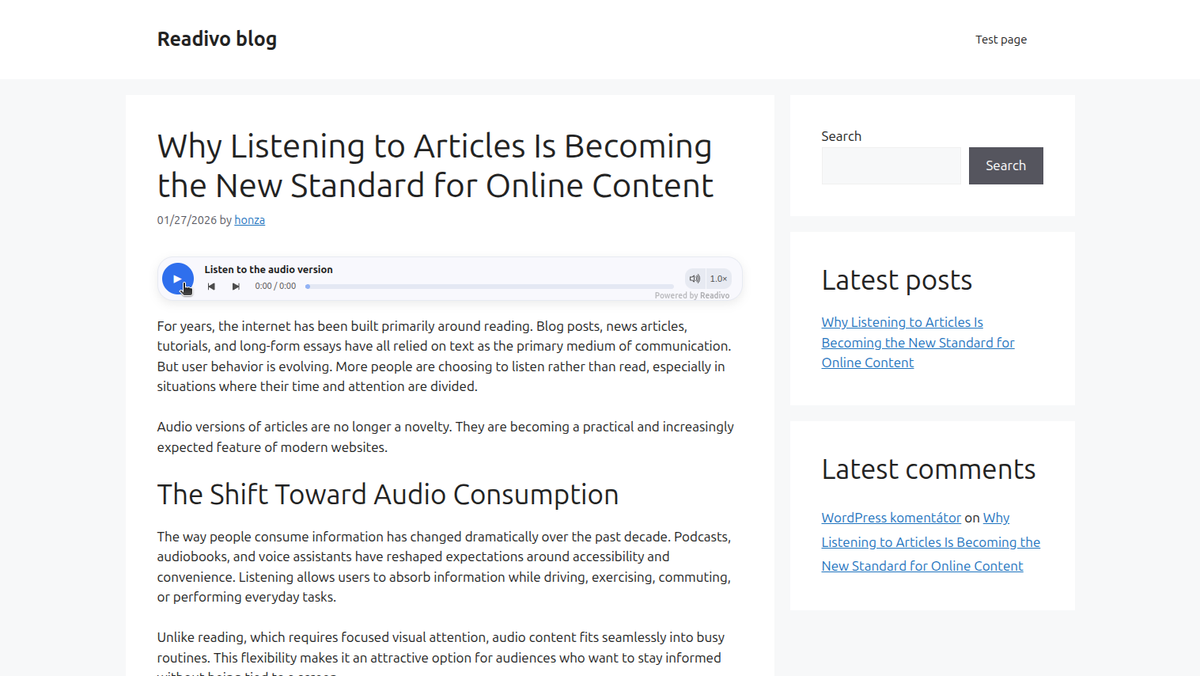
• Automatically insert the player at the top or bottom of posts based on plugin settings
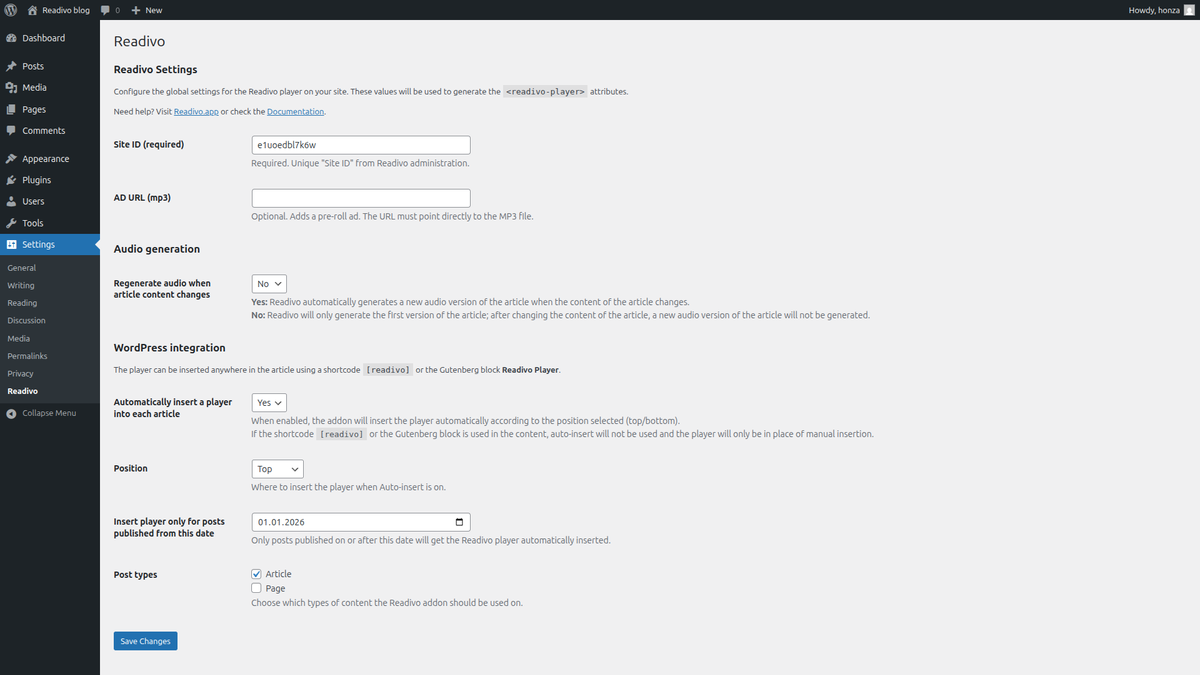
• Limit automatic insertion to posts published after a selected date
• Assign a specific audio recording to a post using Play ID
• Customize player text using Default text
• Control visibility per post using a dedicated editor panel
The player is rendered dynamically on the frontend and does not modify stored post content in the database.
Audio playback and processing are powered by the Readivo service.
Full documentation: https://readivo.app/docs
Readivo.app homepage: https://readivo.app
Readivo account: https://app.readivo.app/register
Usage
Manual insertion (shortcode):
– Add [readivo] to the content where you want the player.
– Optional attributes:
– Play ID – use a specific audio recording
– Default text – custom player text
Gutenberg block:
– Add the Readivo Player block anywhere in the content.
– Optional settings:
– Play ID – use a specific audio or uploaded MP3
– Default text – custom player text
– If the block is used, automatic insertion is disabled.
Automatic insertion:
– Enable “Automatically insert a player into each article” in Settings -> Readivo.
– Choose position (top/bottom) and post types.
– Set the date from which posts should include the player.
Per-post control:
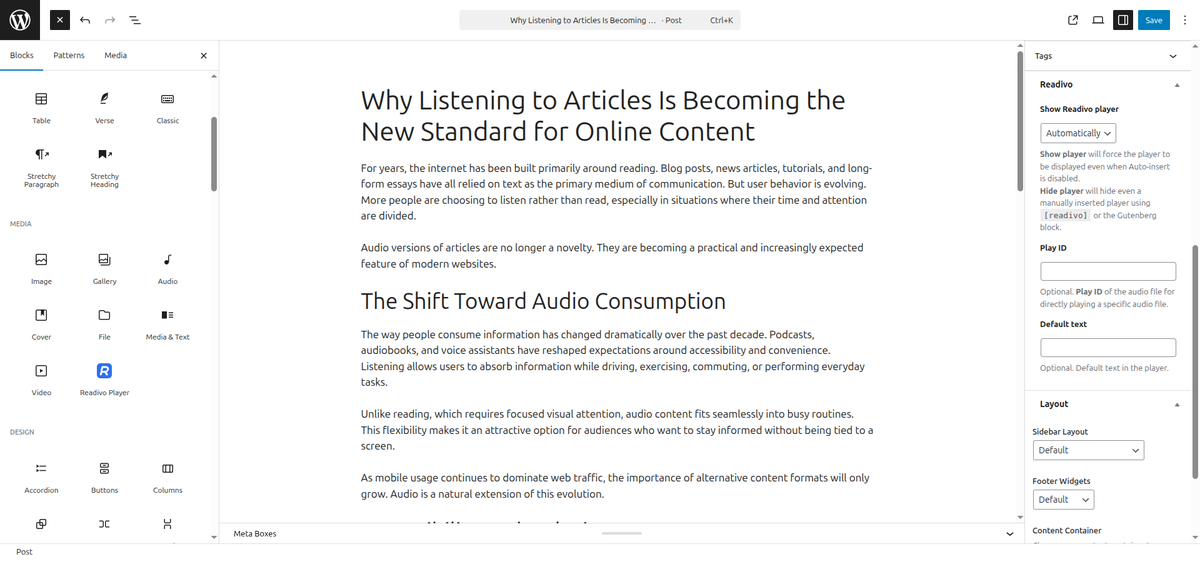
– Use the “Readivo” panel in the editor:
– Automatically – follow global settings
– Show player – force display
– Hide player – disable player for this post
– You can also set:
– Play ID – assign specific audio to the post
– Default text – customize player text
Priority logic:
– Gutenberg block → shortcode → automatic insertion
– Only one player is rendered per post.
External services
This plugin loads an external JavaScript embed script from:
https://cdn.readivo.app/dist/loader.js
The script renders the Readivo audio player and loads the player endpoint:
https://cdn.readivo.app/player/
What the service is used for:
Readivo converts article text into audio and provides an audio player that can play the generated audio on the website. It can also be used to play your own audio files or podcasts — simply upload an MP3 file in the Readivo administration and embed it into your article using a Play ID.
What data is sent:
When audio generation is triggered, the following data may be sent to the Readivo API:
– page title
– page URL
– a stable custom identifier (post ID based identifier)
– optionally extracted article text for audio generation
When data is sent:
No data is sent to the Readivo API when the page loads.
Data is sent only when a visitor starts audio playback and the audio for the article needs to be generated.
Service provider: https://readivo.app
Terms of service: https://readivo.app/legal/terms
Privacy policy: https://readivo.app/legal/privacy
Features
• Convert articles to audio using text-to-speech
• Play your own audio files or podcasts using Play ID
• Lightweight frontend player
• Gutenberg block for precise player placement
• Manual insertion using shortcode [readivo]
• Automatic insertion into posts and pages
• Limit automatic insertion to posts published after a selected date
• Per-post settings: Play ID, Default text, visibility control
• Smart insertion logic to prevent duplicate players
• Audio is generated once and served from cache
• Does not modify stored post content
• Works with standard WordPress themes
Installation
- Upload the plugin folder to /wp-content/plugins/ or install it through the WordPress Plugins screen.
- Activate the plugin through the ‘Plugins’ screen in WordPress.
- Go to Settings -> Readivo and set your Site ID.
- (Optional) Configure auto-insert, position, post types, and other settings.
Frequently asked questions
Do I need a Site ID?
Yes. The plugin requires a Readivo Site ID to render the player.
Does the plugin modify my post content in the database?
No. The player element is inserted only when rendering the post on the frontend. The stored post content is not permanently modified.
What data does Readivo receive?
The player uses an external Readivo embed script and player endpoint. Depending on your Readivo administration settings, Readivo may receive page metadata (such as title and URL) and optionally the extracted article text for audio generation.
Changelog
Initial release.
1.1.1
- Added site verification meta tag
1.1.0
- Added Gutenberg block for Readivo Player
- Added Play ID and Default text per post
- Added date-based automatic insertion
- Removed global player ID and voice settings
- Improved insertion logic to prevent duplicate players
- Added support for custom uploaded audio via Play ID
1.0.1
- Improve plugin name for discoverability
- Improved settings labels and consistency with Readivo dashboard
- Added documentation links
1.0.0
- Initial release.
Screenshots
For developers
Is this your plugin? Show off the numbers.
Add a live badge to your site, docs or GitHub README. It updates on its own — no account needed.
Best Readivo alternatives
All accessibility plugins →





FAQ
Readivo: quick answers
Straight answers, pulled from live WordPress.org data.
Live data from WordPress.org · checked Oct 4, 2026
Is Readivo free?
Yes. Readivo is free to download and use from the official WordPress.org plugin directory.
Is Readivo safe to use in 2026?
Readivo shows warning signs in 2026 — compare the alternatives below before installing. Was last updated 7 months ago, and scores 36/100 on our health check.
How many websites use Readivo?
Readivo is active on <10 WordPress websites and has been downloaded 621 times since it launched in March 2026. It was downloaded 54 times in the last 30 days.
Does Readivo work with WordPress 7.1?
Readivo is officially tested up to WordPress 6.9.9, while the latest release is 7.1.2. It may still work, but try it on a staging site first.
What PHP version does Readivo need?
Readivo requires PHP 7.4 or higher. Most hosts run PHP 8.x today, so it works on any modern WordPress hosting.
When was Readivo last updated?
The latest version, 1.1.1, was released on March 19, 2026 (7 months ago).
Who makes Readivo?
Readivo is developed and maintained by honzanovacek / Readivo.
What are the best alternatives to Readivo?
The most popular alternatives to Readivo are Web Accessibility (formally… (500K+ installs), Auto Image Attributes From… (100K+ installs) and Accessibility by UserWay (80K+ installs).
Powered by PageForge
Want thousands of pages that rank like these? Build them in an afternoon.
This directory runs on the same engine as PageForge. Turn any spreadsheet, CSV or API into thousands of fast, SEO-ready WordPress pages — with schema, internal links and AI-written copy baked in.
- CSV, Google Sheets & API data sources
- AI content, schema & internal links per page
- Works with Elementor, Gutenberg, Yoast & Rank Math
- Free on WordPress.org — no credit card


