


PressedMail – Email Client, Inbox & Webmail
A complete email client for WordPress. Read, compose, search and organize your existing mailbox directly from the dashboard.

Solid choice
PressedMail is a solid plugin choice in 2026, with a few things worth checking first. Is rated 5/5 and was last updated 1 day ago, and scores 71/100 on our health check.
- Actively developed — last update 1 day ago
- Tested with the latest WordPress (7.1)
- Small user base (<10 active installs)
- Very few reviews so far
- Needs PHP 8.2 or newer
How does it stack up?
Side-by-side on installs, updates, ratings & support



Daily downloads
Download spikes usually follow a new release — each site that auto-updates counts as a download.
Rankings
Where PressedMail stands todayWordPress.org search rankings
Live position in the plugin search, top 100| Keyword | Position |
|---|---|
| >100 | |
| email client | >100 |
| imap | #15 |
| smtp | >100 |
| webmail | #6 |
Rating breakdown
★★★★★★★★★★ 5 from 2 reviews
About PressedMail
From the official readme · v1.4.0Description
Read and manage your email without leaving WordPress.
PressedMail turns your dashboard into an email workspace. Connect the mailbox you already have over IMAP and SMTP, then read, write, search and organize mail in WordPress. Your address and mail provider stay the same. It suits site owners, freelancers and agencies.
A real email client inside WordPress
- Read and reply from the dashboard.
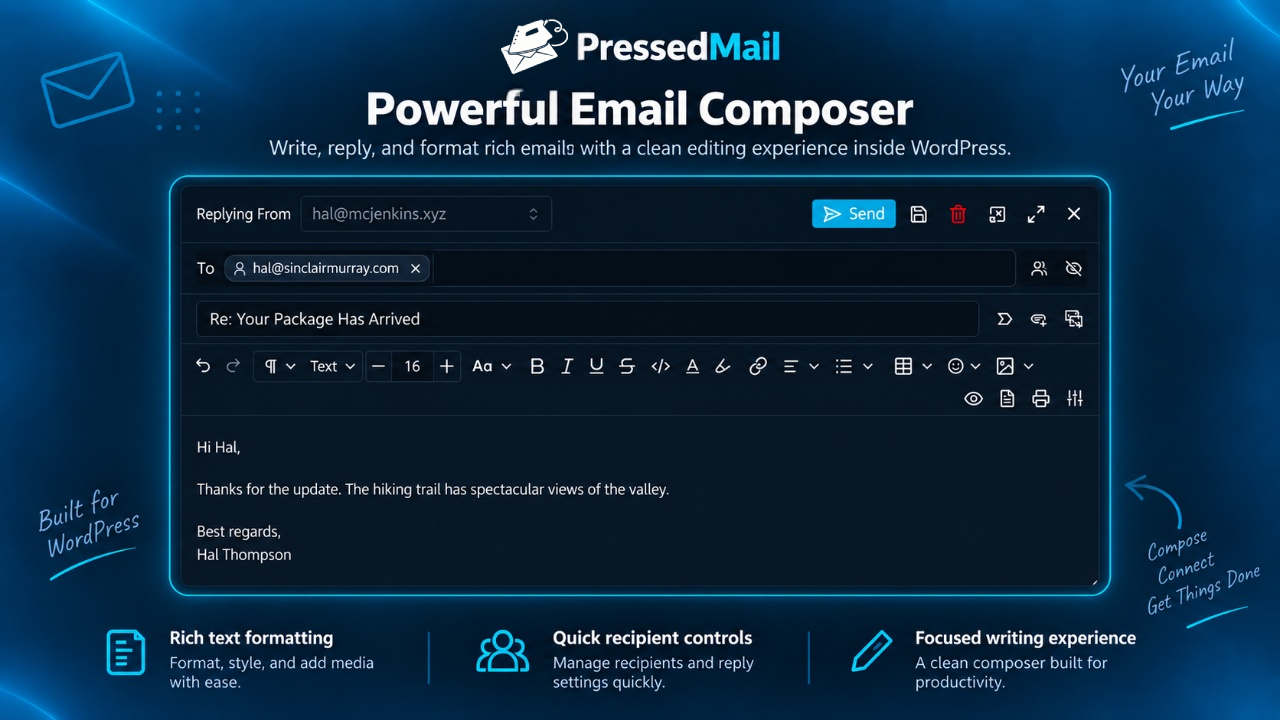
- Compose in rich text, Markdown or plain text.
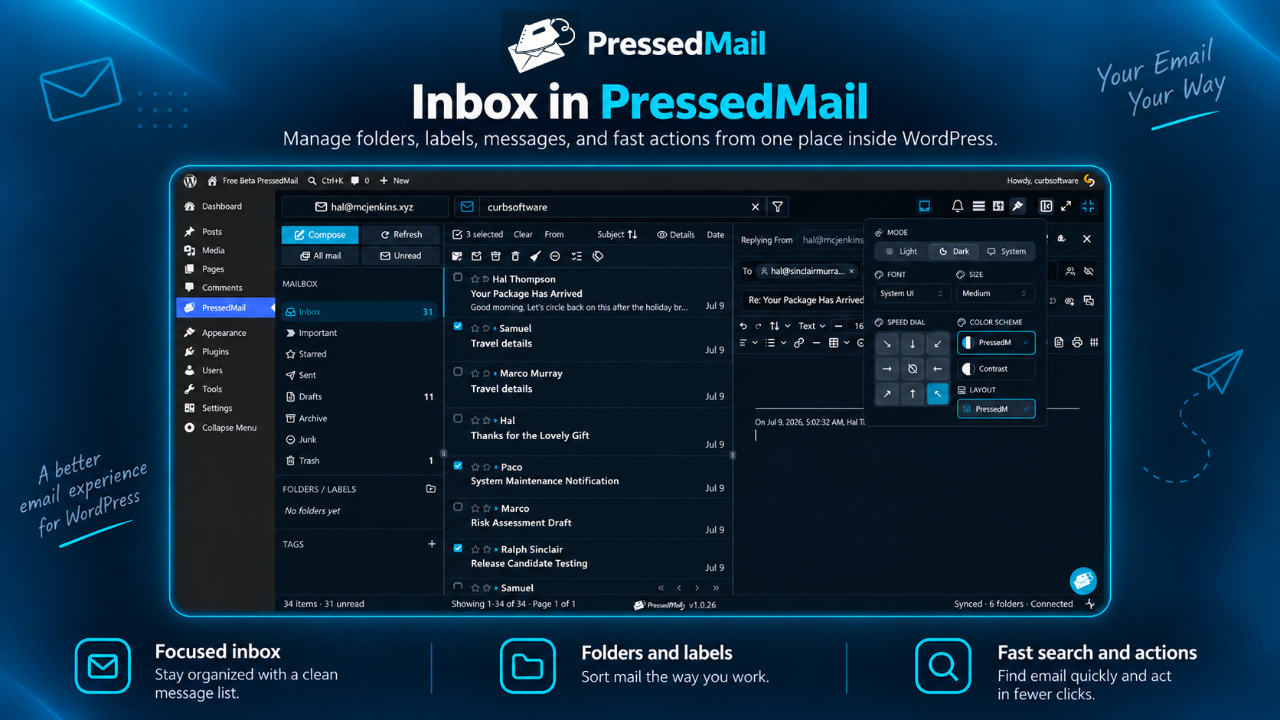
- Browse Inbox, Sent, Drafts, Trash and your other folders.
- Follow threads, and search your mail.
- Move messages, mark them read, unread or important, and star them.
- Create email rules and custom tags to organize mail.
- Open and send attachments.
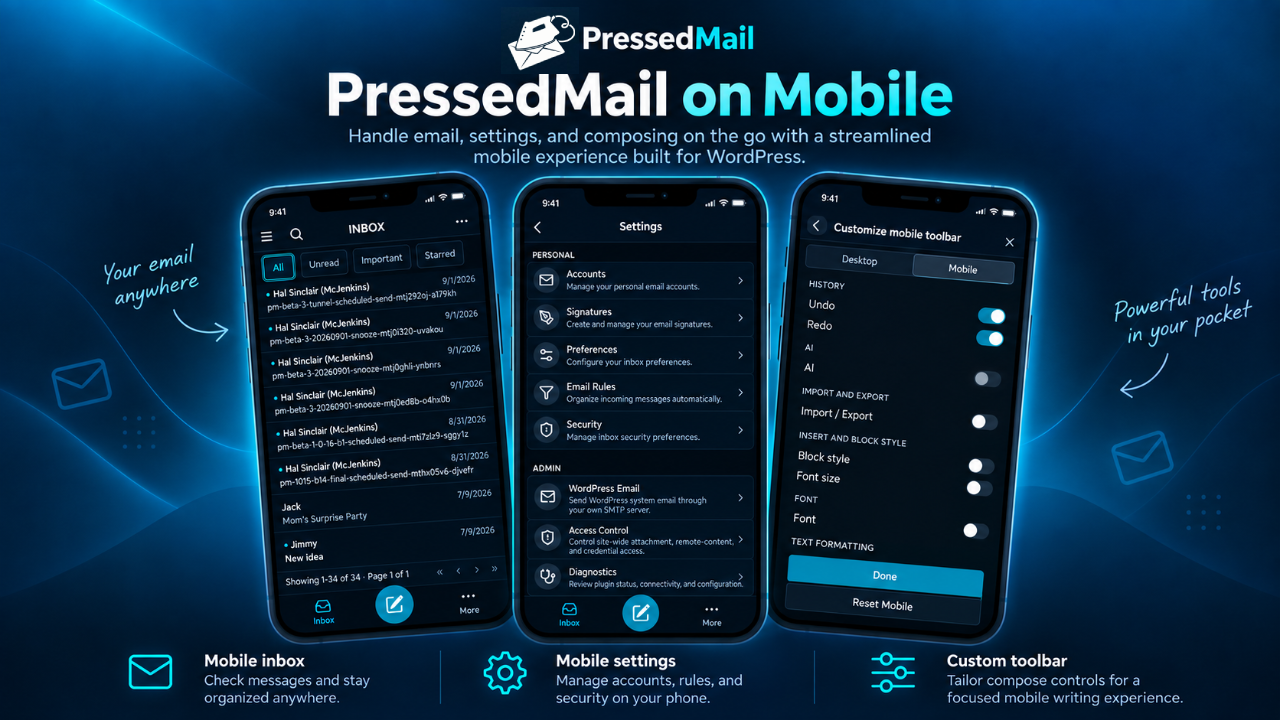
- Use it on a desktop, tablet or phone.
PressedMail Free
PressedMail Free connects one mailbox per site and gives it the whole client: inbox, reading, composing, search, folders, tags, rules and mailbox management, with no subscription.
PressedMail Pro, a separate edition
Pro, for several mailboxes or a wider workspace, adds:
- Connect multiple mailboxes and read them in one combined inbox.
- Contacts, a calendar, more themes and layouts.
- AI tools and phishing checks, with your own provider or PressedMail AI.
- Auto-replies, scheduled send, snooze and undo send.
- Ultimate plan: shared inboxes, calendars and contact lists, white labelling with a brand theme.
Pro shares this interface, and replacing Free with Pro keeps your accounts, settings and local data. Pro is a separate GPL-compatible paid plugin, not part of this download. Compare plans, documentation.
Security controls for reading email
Messages open in an isolated viewer with sanitized HTML. Remote images are blocked by default, so opening a message contacts no image server. WordPress permissions keep the mailbox with its owner.
Use your existing email provider
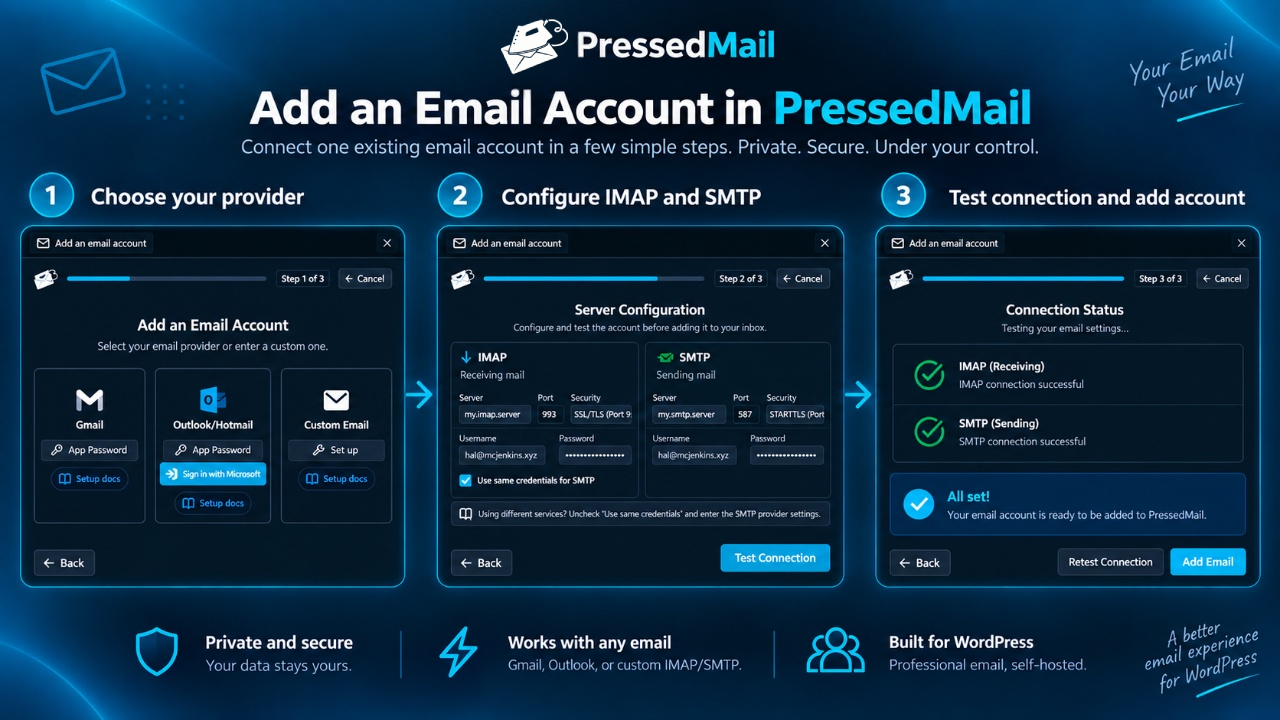
Any IMAP/SMTP account works if your host permits the connection. Setup offers Gmail (with an app password), Outlook and Hotmail, and Custom Email for cPanel, Zoho Mail, Fastmail and similar. Microsoft accounts use Microsoft sign-in, the only method Microsoft 365 accepts for IMAP.
Send WordPress site email through SMTP
Password resets, notifications, receipts and other wp_mail() messages can go through SMTP, set up and tested separately under Settings, WordPress Email.
WordPress integration
On WordPress 6.9 and later, mail actions register as WordPress abilities for MCP Adapter agents and WP-CLI, with the same permission checks.
No PressedMail account needed
No license key required and no trial expiration. There is no telemetry and no analytics. There are no license checks and no custom update checks. Updates come from WordPress.org. Provider terms, limits and charges apply.
Privacy and External Services
Installing or activating sends no mail content or mailbox metadata to CurbSoftware or an AI service. Connections serve your configured accounts or actions you take.
Your IMAP and SMTP servers
PressedMail connects to the IMAP host and port you configure to list folders, sync, search, read, move, flag or delete mail, sending your username or address, credential or OAuth token, and each command. The server returns folders, message IDs, senders, recipients, dates, subjects, headers, bodies, attachments, flags, labels and sync state.
Sending mail or a site notification gives your SMTP host and port your authentication, sender, recipients, subject, headers, body and attachments. Your provider’s terms and privacy policy apply to both.
Optional Microsoft sign-in
Microsoft sign-in uses Microsoft’s identity services and the PressedMail OAuth relay; password and app-password connections do not.
- https://pressedmail.com/oauth/microsoft/start receives the site URL, callback URL and nonce at sign-in.
- https://pressedmail.com/oauth/microsoft/redeem receives the one-time transfer code, site URL and same nonce after the redirect.
- https://pressedmail.com/oauth/microsoft/refresh receives the refresh token, site URL and a fresh nonce before the access token expires.
The relay returns mailbox identity, access and refresh tokens, scope and expiry, and never receives bodies, attachments or mailbox contents. Microsoft receives the sign-in data it requires.
PressedMail terms, PressedMail privacy, Microsoft terms, Microsoft privacy.
Remote images
Images are blocked by default. Showing one contacts its host, which may receive the URL, IP address, user agent, browser headers and cookies, and can tell the sender you viewed it. The host’s terms and privacy policy apply.
Video embeds in the composer
Pasting a YouTube, Vimeo, Dailymotion, Youku or Coub link, or choosing Video, previews it in the provider’s iframe. Nothing loads before that, sent mail carries only the link, and other links render as plain cards that load nothing. The iframe receives the video address, your IP address, user agent and any provider cookies already set; its terms and privacy policy apply.
- YouTube: https://www.youtube.com/; privacy: https://policies.google.com/privacy; terms: https://www.youtube.com/t/terms
- Vimeo: https://vimeo.com/; privacy: https://vimeo.com/privacy; terms: https://vimeo.com/terms
- Dailymotion: https://www.dailymotion.com/
- Youku: https://www.youku.com/
- Coub: https://coub.com/
Local storage and sending logs
Account settings, encrypted credentials or OAuth tokens, and synced mail live in your WordPress database or filesystem: every selectable folder (Junk, Trash, Drafts included) is synced with headers, metadata and bodies, with no count limit and no expiry. Turning off Store email on this site asks to confirm and removes the cached mail. The site owner controls hosting, backups and retention.
Deleting the plugin keeps that data unless “Delete plugin data on uninstall” is on under Settings, then Data and uninstall.
Your browser keeps message content and mailbox lists in session storage until the tab closes. Drafts, account names, account choice and recent searches stay in local storage for the signed-in user until sign-out, readable by anyone using that browser profile, so avoid shared computers. Panel widths use a session cookie with no mail data.
Rich text and Markdown draft structure can live in the site database, bound to its owner and draft, and never enters sent mail. It stays until the draft is sent or deleted, the account is removed, a privacy erasure or uninstall purges it, or its owner turns off Store email on this site. Delete stored email retries failed cleanup.
The site email delivery log is off by default. Choose 30, 60 or 90 days to record date, first recipient, recipient count, subject, sender, mail server and result, never bodies, headers or attachments. Entries expire on schedule, and you can clear or disable the log. A logged success means the SMTP server accepted the message, not that it arrived.
Development
Use Node.js 22.13 or later and corepack enable for the pinned pnpm, then from the repository root run pnpm install --frozen-lockfile && pnpm build. Output goes to assets/admin/dist/. Pro source is excluded.
PHP ships readable with its Composer vendor tree. One library’s local patch and licensing note are in the source repository.
React, ReactDOM and the JSX runtime come from WordPress. Libraries: Plate.js, Slate, Vite, Tailwind CSS, Radix UI, date-fns, Lodash, juice, unified, remark and micromark (MIT); highlight.js (BSD-3-Clause); DOMPurify (Apache-2.0 or MPL-2.0); shadcn/ui (MIT); WpApi routing (haruncpi/wp-api) by Harun (CC BY 4.0).
The build writes assets/admin/dist/THIRD-PARTY-NOTICES.txt, listing every bundled package with version, licence and notice. OpenDyslexic ships under the SIL Open Font License 1.1, in assets/fonts/OFL.txt.
Provenance of adapted files: https://github.com/CurbSoftware/pressedmail/blob/v1.4.0-source.2/apps/wp-pressedmail/THIRD-PARTY-PROVENANCE.md
Installation
- In Plugins > Add New, search for PressedMail, then install and activate it.
- Open PressedMail in the sidebar and connect your mailbox.
Frequently asked questions
What does PressedMail need to run?
WordPress 6.6+, PHP 8.2+, MySQL 5.7+ or MariaDB 10.2+, with the user metadata table on InnoDB. PressedMail needs MySQL named locks, so SQLite, including WordPress Playground, cannot finish mailbox setup. Site Health flags this under “PressedMail database requirements”.
Changelog
Older releases: https://pressedmail.com/changelog
1.4.0
- Messages open faster: bodies download in the background.
- Other plugins’ notices no longer cover PressedMail.
- Block menu: convert, delete, or move a block out of its container.
- Diagnostics explains an Overdue sync.
- Status colours follow the palette.
Screenshots
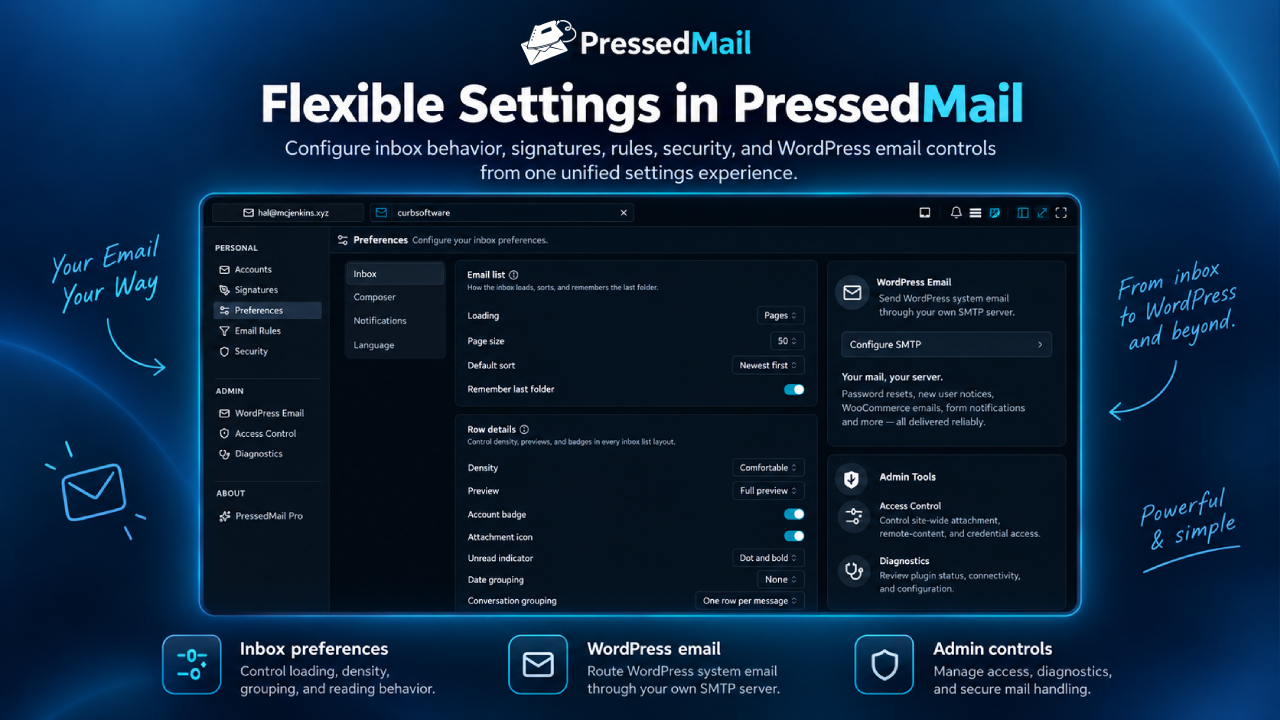
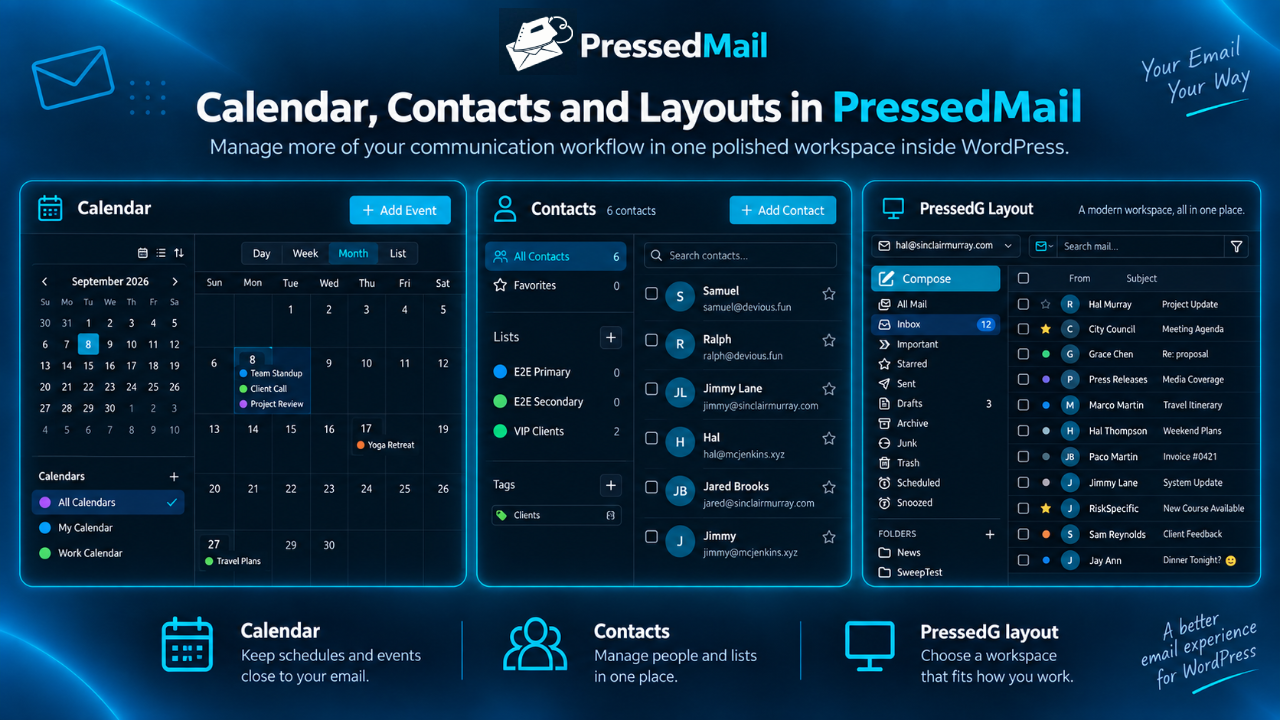
For developers
Is this your plugin? Show off the numbers.
Add a live badge to your site, docs or GitHub README. It updates on its own — no account needed.
Best PressedMail alternatives
All email plugins →





FAQ
PressedMail: quick answers
Straight answers, pulled from live WordPress.org data.
Live data from WordPress.org · checked Oct 5, 2026
Is PressedMail free?
Yes. PressedMail is free to download and use from the official WordPress.org plugin directory.
Is PressedMail safe to use in 2026?
PressedMail is a solid plugin choice in 2026, with a few things worth checking first. Is rated 5/5 and was last updated 1 day ago, and scores 71/100 on our health check.
How many websites use PressedMail?
PressedMail is active on <10 WordPress websites and has been downloaded 579 times since it launched in September 2026. It was downloaded 546 times in the last 30 days.
Does PressedMail work with WordPress 7.1?
Yes. The developer has tested PressedMail up to WordPress 7.1.2, the latest release. It requires WordPress 6.6 or newer.
What PHP version does PressedMail need?
PressedMail requires PHP 8.2 or higher. Most hosts run PHP 8.x today, so it works on any modern WordPress hosting.
When was PressedMail last updated?
The latest version, 1.4.0, was released on October 4, 2026 (1 day ago).
Who makes PressedMail?
PressedMail is developed and maintained by CurbSoftware Tech Innovations.
What are the best alternatives to PressedMail?
The most popular alternatives to PressedMail are WP Mail SMTP by WPForms (4M+ installs), MC4WP: Mailchimp for WordPr… (1M+ installs) and Easy WP SMTP (500K+ installs).
Powered by PageForge
Want thousands of pages that rank like these? Build them in an afternoon.
This directory runs on the same engine as PageForge. Turn any spreadsheet, CSV or API into thousands of fast, SEO-ready WordPress pages — with schema, internal links and AI-written copy baked in.
- CSV, Google Sheets & API data sources
- AI content, schema & internal links per page
- Works with Elementor, Gutenberg, Yoast & Rank Math
- Free on WordPress.org — no credit card


