


PlugVersions – Easily roll back to previous versions of your plugins.
Retains up to three versions when you update a plugin. It works with premium and custom plugins too.

Solid choice
PlugVersions is a solid plugin choice in 2026, with a few things worth checking first. It runs on 1K+ sites, is rated 4.4/5 and was last updated 1 week ago, and scores 69/100 on our health check.
- Actively developed — last update 1 week ago
- Tested with the latest WordPress (7.1)
- Momentum — downloads up 435% vs the previous 30 days
How does it stack up?
Side-by-side on installs, updates, ratings & support



Daily downloads
Download spikes usually follow a new release — each site that auto-updates counts as a download.
Rankings
Where PlugVersions stands todayWordPress.org search rankings
Live position in the plugin search, top 100| Keyword | Position |
|---|---|
| backup | >100 |
| plugin versions | #12 |
| restore | #80 |
| rollback | #14 |
| update | >100 |
Version adoption
Share of active sites per release.
Rating breakdown
★★★★★★★★★★ 4.4 from 8 reviews
About PlugVersions
From the official readme · v0.3.1Description
PlugVersions lets you retain up to three versions each time you update a plugin, including premium and custom plugins.
If a new version doesn’t work as expected, you can easily roll back by selecting a previous version with a single click. It works similarly to post revisions, but for plugins.
While WP Rollback is a great solution for plugins hosted on the WordPress repository, PlugVersions supports all plugins, including those not available on the repo.
This broader compatibility is currently the key difference between PlugVersions and other rollback plugins.
Additional features, such as version previews, are on the roadmap.
How to roll back to a previous version of a plugin
- Install and activate PlugVersions.
- Go to the Plugins page in your WordPress dashboard.
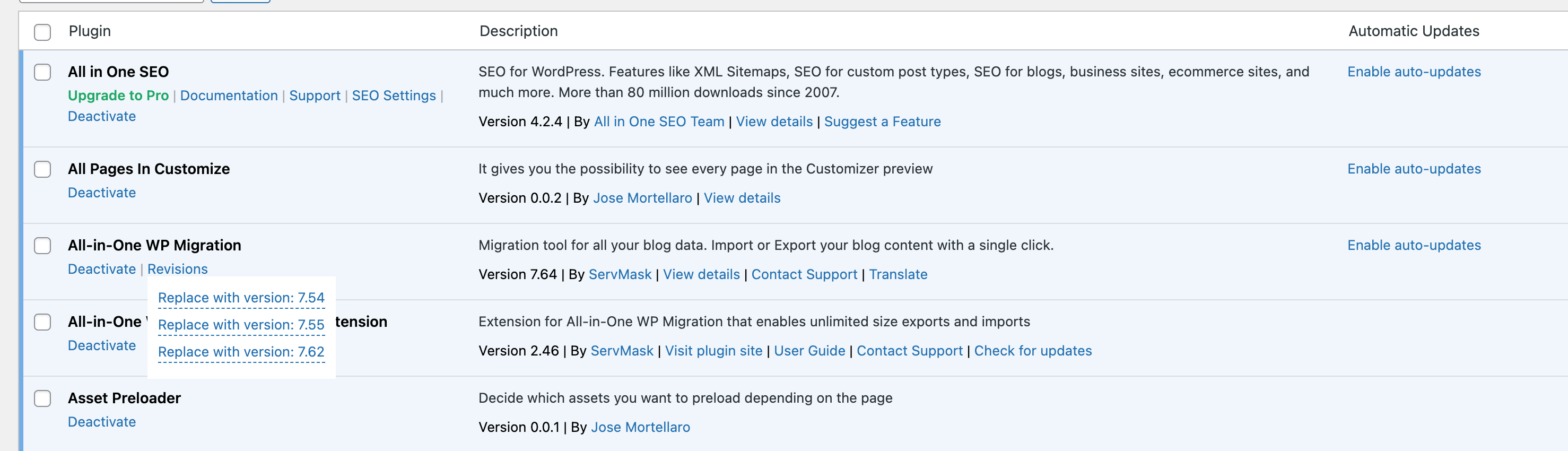
- For any plugin that has been updated, you’ll see a “Revisions” action link. Hover over it to view the list of previously stored versions.
- Click on the version you want to restore.
- That’s it. Your plugin is rolled back!
There are no settings to configure.
This free version allows you to retain up to three previous plugin versions.
You’ll find them listed under the “Revisions” link on the Plugins page.
How to Safely Update a WordPress Plugin
To learn how to safely update a WordPress plugin, please read the detailed guide here:
How to Safely Update a WordPress Plugin
Help in case of issues after a plugin update
Want peace of mind when updating your plugins? Check out our Plugin Update Rescue – Annual Protection Plan
If something breaks after an update, we’ll step in and fix it.
Changelog
0.3.1
- Fix: restoring a revision from the Plugins screen failed on WordPress 7.1+, where the plugin name cell is a table header instead of a table cell. The restore link still works on earlier WordPress versions.
0.3.0
- Fix: no ZIP was selected for deletion in the retention function
0.2.1
- Added: Link to the Annual Protection Plan for the plugin updates in the plugins page
0.2.0
- Fixed: Extra version entry added during plugin backup
0.1.0
- Added: Replaced the PlugVersions backup filter to handle all updates, including manual plugin updates. A big thank you to Vincenzo Casu for providing the code!
0.0.8
- Fix: Vulnerability when a new version is restored. Thanks to Arkadiusz Hydzik for finding the vulnerability.
- Fix: Revisions list not working in the page of plugins.
Screenshots
For developers
Is this your plugin? Show off the numbers.
Add a live badge to your site, docs or GitHub README. It updates on its own — no account needed.
Best PlugVersions alternatives
All backup plugins →





FAQ
PlugVersions: quick answers
Straight answers, pulled from live WordPress.org data.
Live data from WordPress.org · checked Oct 8, 2026
Is PlugVersions free?
Yes. PlugVersions is free to download and use from the official WordPress.org plugin directory.
Is PlugVersions safe to use in 2026?
PlugVersions is a solid plugin choice in 2026, with a few things worth checking first. It runs on 1K+ sites, is rated 4.4/5 and was last updated 1 week ago, and scores 69/100 on our health check.
How many websites use PlugVersions?
PlugVersions is active on 1K+ WordPress websites and has been downloaded 24,239 times since it launched in September 2022. It was downloaded 2,199 times in the last 30 days.
Does PlugVersions work with WordPress 7.1?
Yes. The developer has tested PlugVersions up to WordPress 7.1.3, the latest release. It requires WordPress 4.6 or newer.
What PHP version does PlugVersions need?
PlugVersions requires PHP 7.4 or higher. Most hosts run PHP 8.x today, so it works on any modern WordPress hosting.
When was PlugVersions last updated?
The latest version, 0.3.1, was released on September 28, 2026 (1 week ago).
Who makes PlugVersions?
PlugVersions is developed and maintained by Jose Mortellaro.
What are the best alternatives to PlugVersions?
The most popular alternatives to PlugVersions are All-in-One WP Migration and… (5M+ installs), UpdraftPlus: WP Backup & Mi… (4M+ installs) and Jetpack (3M+ installs).
Powered by PageForge
Want thousands of pages that rank like these? Build them in an afternoon.
This directory runs on the same engine as PageForge. Turn any spreadsheet, CSV or API into thousands of fast, SEO-ready WordPress pages — with schema, internal links and AI-written copy baked in.
- CSV, Google Sheets & API data sources
- AI content, schema & internal links per page
- Works with Elementor, Gutenberg, Yoast & Rank Math
- Free on WordPress.org — no credit card


