



Pinny’s Simple SMTP – Lightweight SMTP Mailer
Ultra lightweight SMTP plugin (~4KB). Encrypted passwords, zero bloat, and simple setup for Gmail, Outlook, and any mail server.

Solid choice
Pinny’s Simple SMTP is a solid plugin choice in 2026, with a few things worth checking first. It runs on 100+ sites, is rated 5/5 and was last updated 4 weeks ago, and scores 79/100 on our health check.
- Actively developed — last update 4 weeks ago
- Tested with the latest WordPress (7.1)
- Small user base (100+ active installs)
- Very few reviews so far
How does it stack up?
Side-by-side on installs, updates, ratings & support



Daily downloads
Download spikes usually follow a new release — each site that auto-updates counts as a download.
Rankings
Where Pinny’s Simple SMTP stands todayWordPress.org search rankings
Live position in the plugin search, top 100| Keyword | Position |
|---|---|
| >100 | |
| gmail | #30 |
| >100 | |
| no-bloat | #11 |
| smtp | #20 |
Version adoption
Share of active sites per release.
Rating breakdown
★★★★★★★★★★ 5 from 1 reviews
About Pinny’s Simple SMTP
From the official readme · v1.2.0Description
Pinny’s Simple SMTP is a ultra lightweight SMTP plugin weighing in at just 4KB. It’s simple to use, highly secure, and includes all the basic features you need to send emails reliably.
🚀 Super Easy 30-Second Configuration
Tired of bloated setup wizards, “Connect Account” popups, and endless menus?
Pinny’s Simple SMTP is designed to be invisible. We removed the fluff so you can get back to work.
1. Enter your Host & Port.
2. Enter your Login.
3. Click Save.
That’s it. You are done.
There is no complex UI to learn. No dashboards to manage. It is a true “Set and Forget” solution that just works.
Unlike most SMTP plugins (which are typically 2MB+ in size), Pinny’s Simple SMTP is ultra-lightweight, easy to set up, and never compromises on security. We ensure your sensitive credentials are always protected with automatic encryption—no more storing passwords in plain text.
This plugin is different. It’s smaller than a favicon, works with any mail provider, and takes just seconds to set up.
Features:
- Ultra Lightweight (4KB): This is the a ultra lightweight SMTP plugin. It has zero impact on your site speed.
- Encrypted Security: We take security seriously. Your SMTP password is encrypted in the database using native WordPress salts. We never store credentials in plain text.
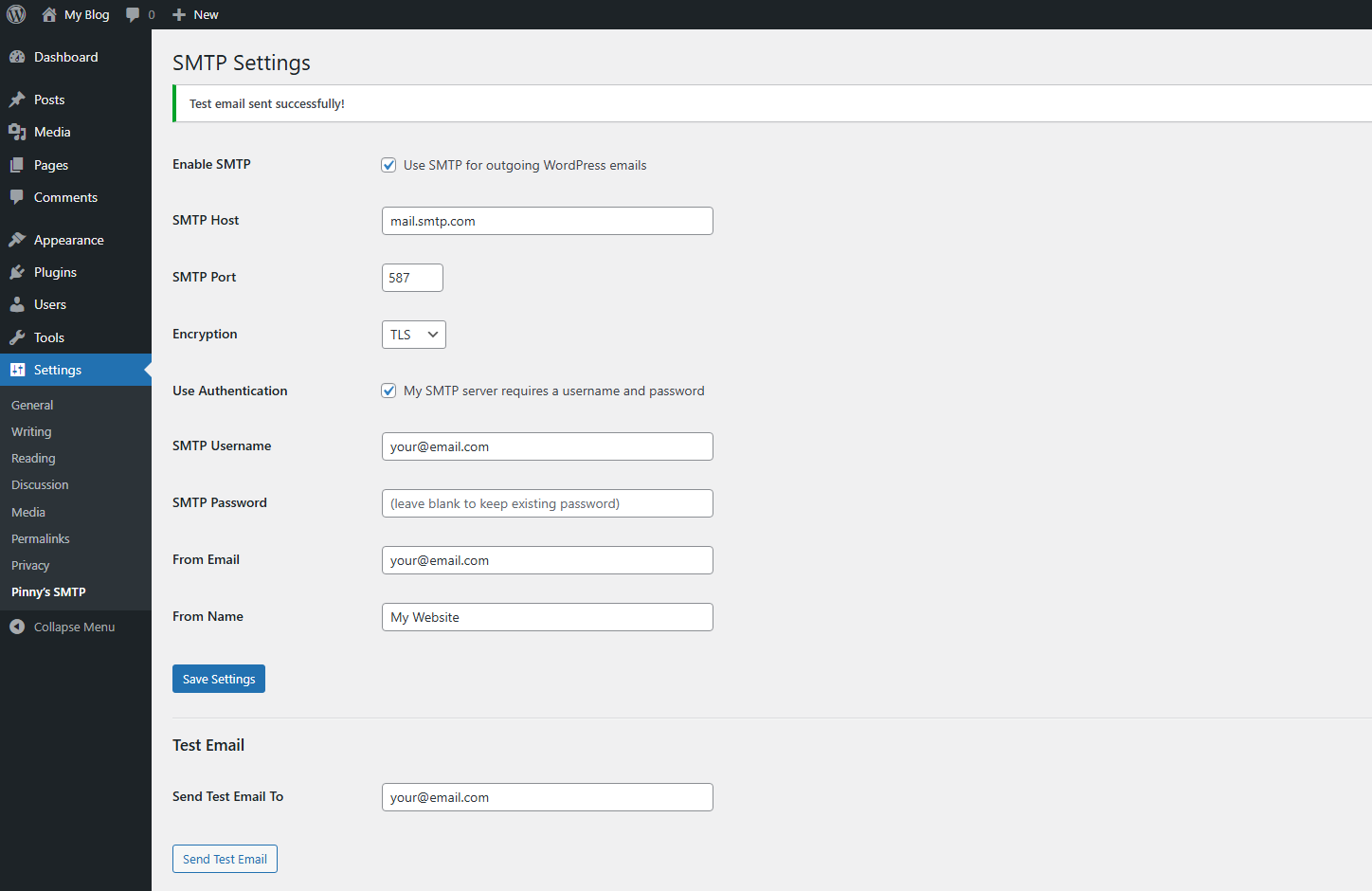
- Dead Easy Setup: No confusing wizards or tutorials needed. Just enter your Host, Port, and Login, then click Save.
- All Basic Features: Supports TLS/SSL, custom ports, “From” email/name overrides, and includes a 1-Click Test Email tool.
- Zero Bloat: No ads, no dashboard widgets, no usage tracking, and no upsells.
- wp-config Configuration Mode: For added security, define SMTP settings in
wp-config.phpand lock the admin UI.
⚙️ Advanced: Configure SMTP via wp-config.php
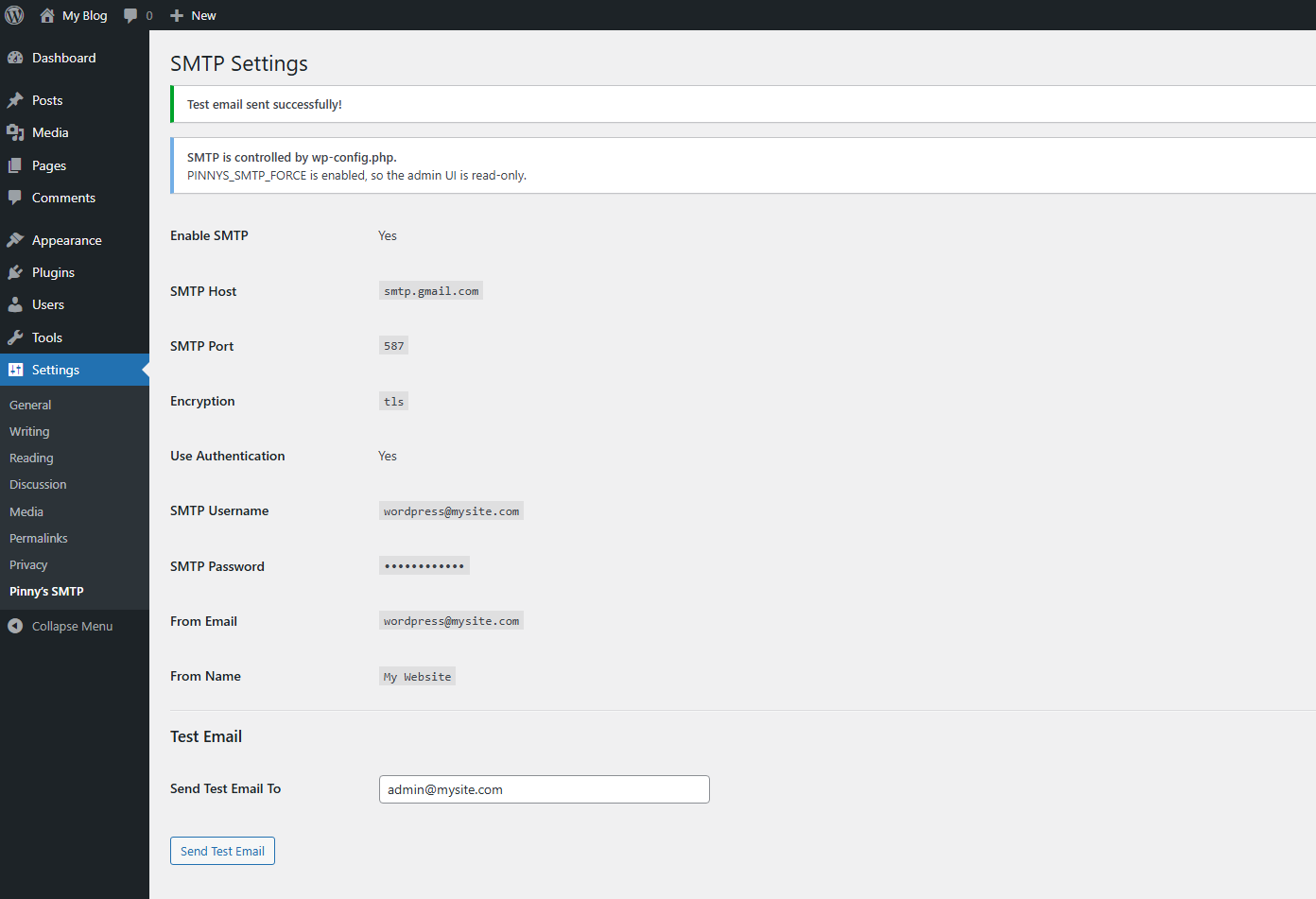
Pinny’s Simple SMTP supports configuration directly from wp-config.php, allowing administrators and developers to lock SMTP settings and prevent changes from the WordPress dashboard.
When enabled, the plugin automatically switches the admin interface to read-only mode.
To enable this mode, add the following constants to your wp-config.php file
define('PINNYS_SMTP_FORCE', true);

define('PINNYS_SMTP_ENABLED', true);
define('PINNYS_SMTP_HOST', 'smtp.gmail.com');
define('PINNYS_SMTP_PORT', 587);
define('PINNYS_SMTP_ENCRYPTION', 'tls');

define('PINNYS_SMTP_AUTH', true);
define('PINNYS_SMTP_USERNAME', 'your@email.com');
define('PINNYS_SMTP_PASSWORD', 'your_app_password');

define('PINNYS_SMTP_FROM_EMAIL', 'your@email.com');
define('PINNYS_SMTP_FROM_NAME', 'Your Website');
Once PINNYS_SMTP_FORCE is enabled:
- SMTP settings are loaded from
wp-config.php - The WordPress settings page becomes read-only
- Dashboard changes cannot override your configuration
Note: If PINNYS_SMTP_FORCE is not defined, the plugin behaves normally and settings can be configured from the WordPress dashboard.
🛡️ The “Zero-Retention” Security Promise
Pinny’s Simple SMTP is built on a strict security philosophy: WordPress is a CMS, not an Email Archive.
Most SMTP plugins log every email sent from your site into your WordPress database. While this seems convenient, it introduces massive security risks, database bloat, and privacy violations.
We feature a Zero-Retention Architecture. We connect, deliver, and vanish. Here is why this is safer for you:
1. The Security Risk (Why we don’t log)
Storing email logs in your database creates a high-value target for hackers.
- The “Big Hack” Reality: In 2024 and 2025, major SMTP plugins (such as Post SMTP) suffered critical vulnerabilities (CVE-2023-6875 and CVE-2025-11833). Hackers were able to bypass authentication, trigger password reset emails, read the plugin’s email logs to capture the reset link, and take over the entire website.
- Our Fix: You cannot steal what isn’t there. By not logging emails, Pinny’s Simple SMTP renders this entire class of “Account Takeover” attacks impossible.
2. The Database & Privacy Problem
- Bloat: Transactional logs grow indefinitely. A busy store sends thousands of emails a month. Storing these in
wp_optionsor custom tables slows down your site and bloats your backups. - GDPR & Privacy: Your database should not permanently store customer PII (Personally Identifiable Information) like password reset links, purchase receipts, or private contact form messages. If your site is compromised, those logs are a leak waiting to happen.
3. The Right Way to Log
If you need to track email delivery, do it where it belongs: At your Email Provider.
- Gmail / Google Workspace: Has a “Sent” folder and comprehensive audit logs.
- SendGrid / Mailgun / SES: These services are built to archive millions of emails securely, with proper rotation policies and access controls.
- Microsoft / Outlook: Native “Sent Items” retention.
Pinny’s Simple SMTP keeps your WordPress database clean, fast, and secure by letting your email provider do its job.
🚫 The “Anti-Bloat” Architecture: Why We Rejected OAuth
Pinny’s Simple SMTP is built on a strict performance philosophy: Do not load code you do not use.
The industry standard is to force users into OAuth (Log in with Google/Microsoft). While this looks fancy, for a WordPress plugin, it is technically inferior to standard SMTP. Here is why we deliberately stripped OAuth out of Pinny’s:
1. The “Universal Adapter” Trap (Bloat)
Most users connect to one provider (e.g., just Gmail). However, to support OAuth, other plugins must bundle massive SDK libraries for 10–15 different services (Google, Microsoft, Amazon, Yahoo, Zoho, etc.).
- The Result: You install megabytes of vendor code just to send a simple email.
- Our Fix: Pinny’s uses standard SMTP. We don’t force you to host 14 unused API libraries on your server just to use the 15th. This keeps our codebase at ~4KB.
2. The Complexity Risk (Security)
In security, Complexity is the Enemy. OAuth flows require redirects, token storage, refresh tokens, and constant API updates. Every external library added to a plugin increases the “Attack Surface”—more code means more places for bugs to hide.
- The Reality: If a plugin’s bundled “Google API Client” has a vulnerability, your site is at risk—even if you are using Outlook.
- Our Fix: We use native WordPress functions. No external dependencies. No third-party SDKs. No supply-chain vulnerabilities.
3. The Reality of “Shared OAuth Infrastructure”
Many plugins advertise “one-click OAuth login” for Gmail or Microsoft 365. To provide this convenience without requiring users to create their own developer credentials, these plugins typically authenticate through a shared OAuth application (Client ID and Secret) owned by the plugin developer.
This creates several potential risks including:
- Shared API rate limits OAuth quotas apply to the shared application, not your individual site.
- Abuse impact If other sites using the same OAuth application send spam or violate provider policies, the provider may restrict or flag the application, potentially affecting all connected users.
- Application suspension When the shared OAuth application is disabled or restricted by the provider, authentication will fail for every site using it.
- Developer infrastructure dependency Some plugins route OAuth authentication through servers operated by the plugin developer. If that infrastructure experiences downtime, users may be unable to connect accounts or refresh authentication tokens.
- Maintenance risk OAuth integrations require ongoing API updates. If a plugin is abandoned and the OAuth application is not maintained, authentication may eventually stop working.
Pinny’s Simple SMTP avoids these dependencies entirely by using direct SMTP authentication, allowing your site to communicate directly with your mail server without shared OAuth infrastructure.
4. App Passwords: The Superior Choice
We use App Passwords (Standard SMTP Authentication). This is the secure, recommended method for server-side mailing (Gmail/Workspace & Microsoft 365).
- Strictly Scoped: An App Password usually only has permission to send mail. Unlike an OAuth token (which can sometimes be scoped too broadly), an App Password cannot be used to change your account settings or read your Drive files.
- Instantly Revocable: If you suspect a breach, you can revoke that specific App Password instantly from your Google/Microsoft dashboard without changing your main login credentials.
- Zero Downtime: OAuth tokens expire or disconnect if the API changes. App Passwords work until you say stop.
Pinny’s Simple SMTP chooses stability over shiny buttons. Enter your Host, Port, and App Password → Save. Done.
Installation
- Upload the Plugin
– Download the plugin ZIP file.
– In your WordPress admin dashboard, navigate to Plugins > Add New, and click Upload Plugin.
– Choose the ZIP file you downloaded and click Install Now.
- Activate the Plugin
– Once installed, click Activate to enable Pinny’s Simple SMTP.
- Configure SMTP Settings
– Go to Settings > Pinny’s SMTP in the admin menu.
– Enter your SMTP host, port, and other settings.
– Save your changes.
- Send a Test Email
– Enter a test email address and click Send Test Email to verify your SMTP configuration.
Frequently asked questions
How do I set up Pinny’s Simple SMTP?
Setting it up is easy! Just enter your SMTP Host, Port, and Login credentials in the plugin settings, then click Save. That’s it!
Does this work with Gmail or Outlook?
Yes! However, because we don’t use bloated OAuth libraries, you must use an App Password generated by Google or Microsoft in place of your standard login password.
How is my password stored?
Your SMTP password is automatically encrypted in the database using WordPress salts. We never store credentials in plain text, ensuring your data is secure.
What makes this plugin different from other SMTP plugins?
Pinny’s Simple SMTP is 4KB, the ultra lightweight SMTP plugin on WordPress. It’s quick to set up, secure with encrypted passwords, and has zero bloat—no ads, upsells, or unnecessary features.
Changelog
New: Optional wp-config configuration mode. Define SMTP settings in wp-config.php to lock the admin UI and prevent dashboard changes. Includes additional edge-case hardening and reliability improvements.
1.2.0
- NEW: Optional wp-config configuration mode (
PINNYS_SMTP_FORCE) allows SMTP settings to be defined in wp-config.php. - NEW: Admin UI automatically switches to read-only mode when settings are controlled via wp-config.php.
- IMPROVEMENT: SMTP configuration handling refactored for improved reliability and consistency.
- HARDENING: Additional edge-case handling and internal stability improvements.
- CODE: Internal architecture improvements while keeping the plugin extremely lightweight.
1.1.0
- IMPROVEMENT: Major refactor to use the native WordPress Settings API.
- FIX: Resolved caching issue where “Settings Saved” notices were not appearing.
- OPTIMIZATION: Massive code reduction. Now only ~3KB.
1.0.0
- Initial release
Screenshots
For developers
Is this your plugin? Show off the numbers.
Add a live badge to your site, docs or GitHub README. It updates on its own — no account needed.
Best Pinny’s Simple SMTP alternatives
All email plugins →





FAQ
Pinny’s Simple SMTP: quick answers
Straight answers, pulled from live WordPress.org data.
Live data from WordPress.org · checked Sep 28, 2026
Is Pinny’s Simple SMTP free?
Yes. Pinny’s Simple SMTP is free to download and use from the official WordPress.org plugin directory.
Is Pinny’s Simple SMTP safe to use in 2026?
Pinny’s Simple SMTP is a solid plugin choice in 2026, with a few things worth checking first. It runs on 100+ sites, is rated 5/5 and was last updated 4 weeks ago, and scores 79/100 on our health check.
How many websites use Pinny’s Simple SMTP?
Pinny’s Simple SMTP is active on 100+ WordPress websites and has been downloaded 1,118 times since it launched in December 2025. It was downloaded 191 times in the last 30 days.
Does Pinny’s Simple SMTP work with WordPress 7.1?
Yes. The developer has tested Pinny’s Simple SMTP up to WordPress 7.1.2, the latest release. It requires WordPress 5.0 or newer.
What PHP version does Pinny’s Simple SMTP need?
Pinny’s Simple SMTP requires PHP 7.0 or higher. Most hosts run PHP 8.x today, so it works on any modern WordPress hosting.
When was Pinny’s Simple SMTP last updated?
The latest version, 1.2.0, was released on August 30, 2026 (4 weeks ago).
Who makes Pinny’s Simple SMTP?
Pinny’s Simple SMTP is developed and maintained by Pinny Fried.
What are the best alternatives to Pinny’s Simple SMTP?
The most popular alternatives to Pinny’s Simple SMTP are WP Mail SMTP by WPForms (4M+ installs), MC4WP: Mailchimp for WordPr… (1M+ installs) and Easy WP SMTP (500K+ installs).
Powered by PageForge
Want thousands of pages that rank like these? Build them in an afternoon.
This directory runs on the same engine as PageForge. Turn any spreadsheet, CSV or API into thousands of fast, SEO-ready WordPress pages — with schema, internal links and AI-written copy baked in.
- CSV, Google Sheets & API data sources
- AI content, schema & internal links per page
- Works with Elementor, Gutenberg, Yoast & Rank Math
- Free on WordPress.org — no credit card


