



Patchstack – WordPress & Plugins Security
Patchstack automatically identifies and mitigates security vulnerabilities in WordPress plugins, themes, and core.

Solid choice
Patchstack is a solid plugin choice in 2026, with a few things worth checking first. It runs on 60K+ sites, is rated 4.9/5 and was last updated 2 months ago, and scores 71/100 on our health check.
- Proven at scale on 60K+ active sites
- Loved by users — 4.9/5 from 61 reviews
How does it stack up?
Side-by-side on installs, updates, ratings & support



Daily downloads
Download spikes usually follow a new release — each site that auto-updates counts as a download.
Rankings
Where Patchstack stands todayWordPress.org search rankings
Live position in the plugin search, top 100| Keyword | Position |
|---|---|
| firewall | #32 |
| security | #31 |
| virtual patching | #1 |
| vulnerabilities | #14 |
| vulnerability | #16 |
Version adoption
Share of active sites per release.
Rating breakdown
★★★★★★★★★★ 4.9 from 61 reviews
About Patchstack
From the official readme · v2.3.7Description
Patchstack is a powerful tool that helps identify security vulnerabilities within your websites’ plugins, themes, and WordPress core. It is powered by the WordPress ecosystem’s most active community of ethical hackers. Patchstack is trusted by leading WordPress experts such as Pagely, Cloudways, GridPane, Plesk, and others!
Patchstack is a security plugin for WordPress that finds WP core, plugin and theme vulnerabilities in your websites.
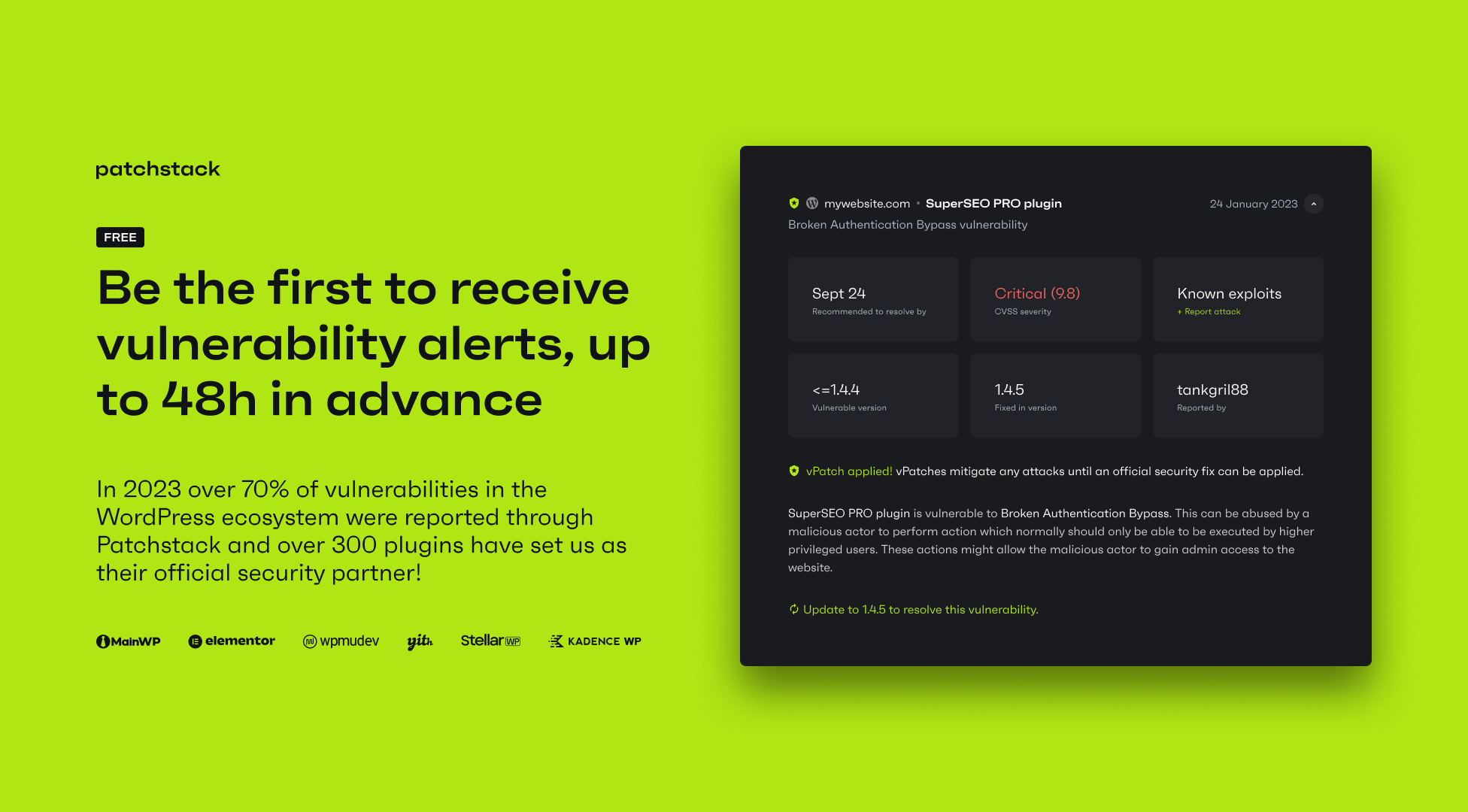
The free version includes up to 48-hour early warning for new vulnerabilities found by our security research community. It also allows you to automatically update vulnerable software, manage updates remotely, and get snapshot reports on your sites’ security status.
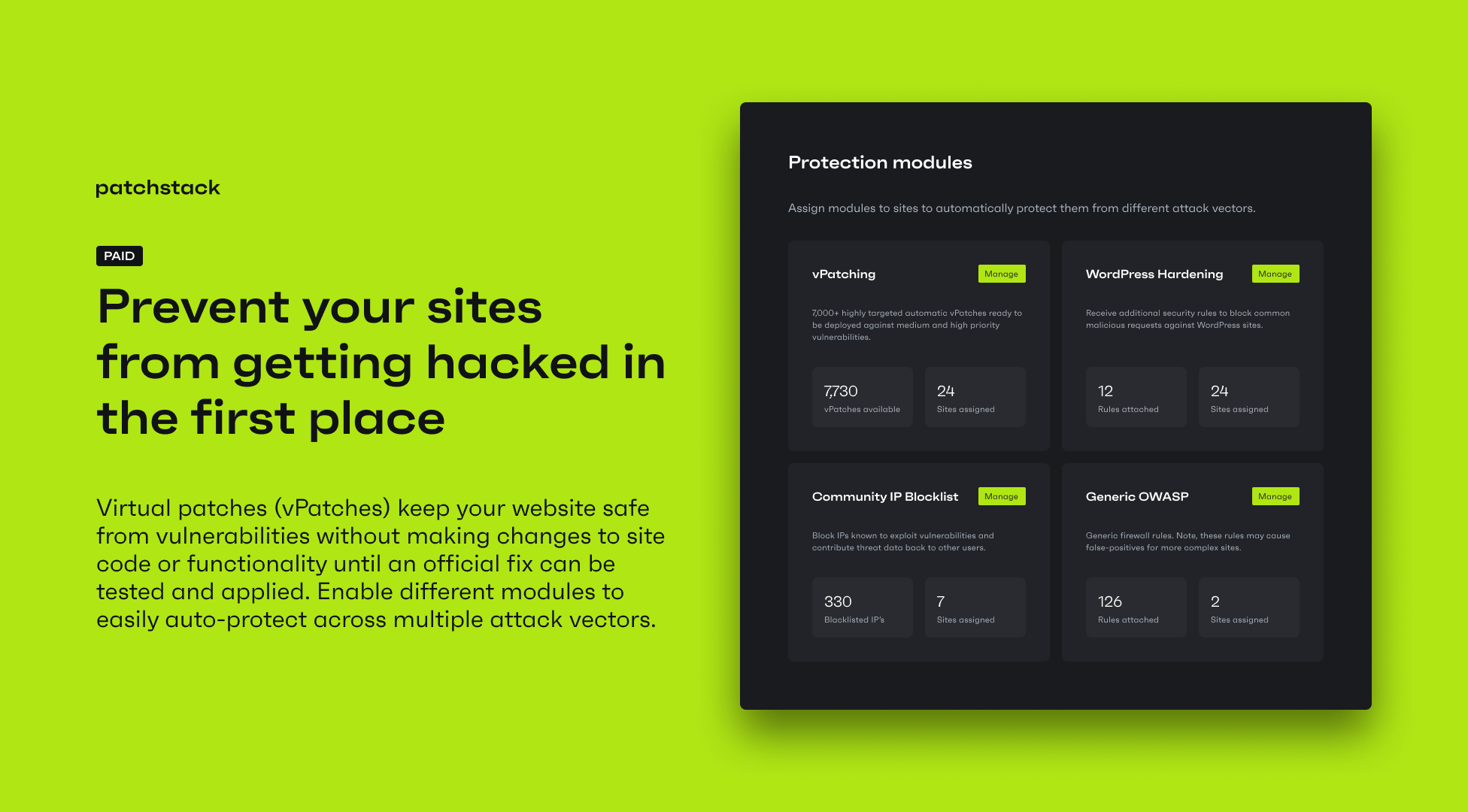
The paid version includes automatic vulnerability protection. Patchstack deploys highly targeted rules on a per-site basis, only when a specific vulnerability is detected on a site.
This prevents vulnerable components from being exploited without modifying website code, or impacting site performance or functionality. Patchstack’s paid version includes access to 12,000+ individual protection rules (vPatches).
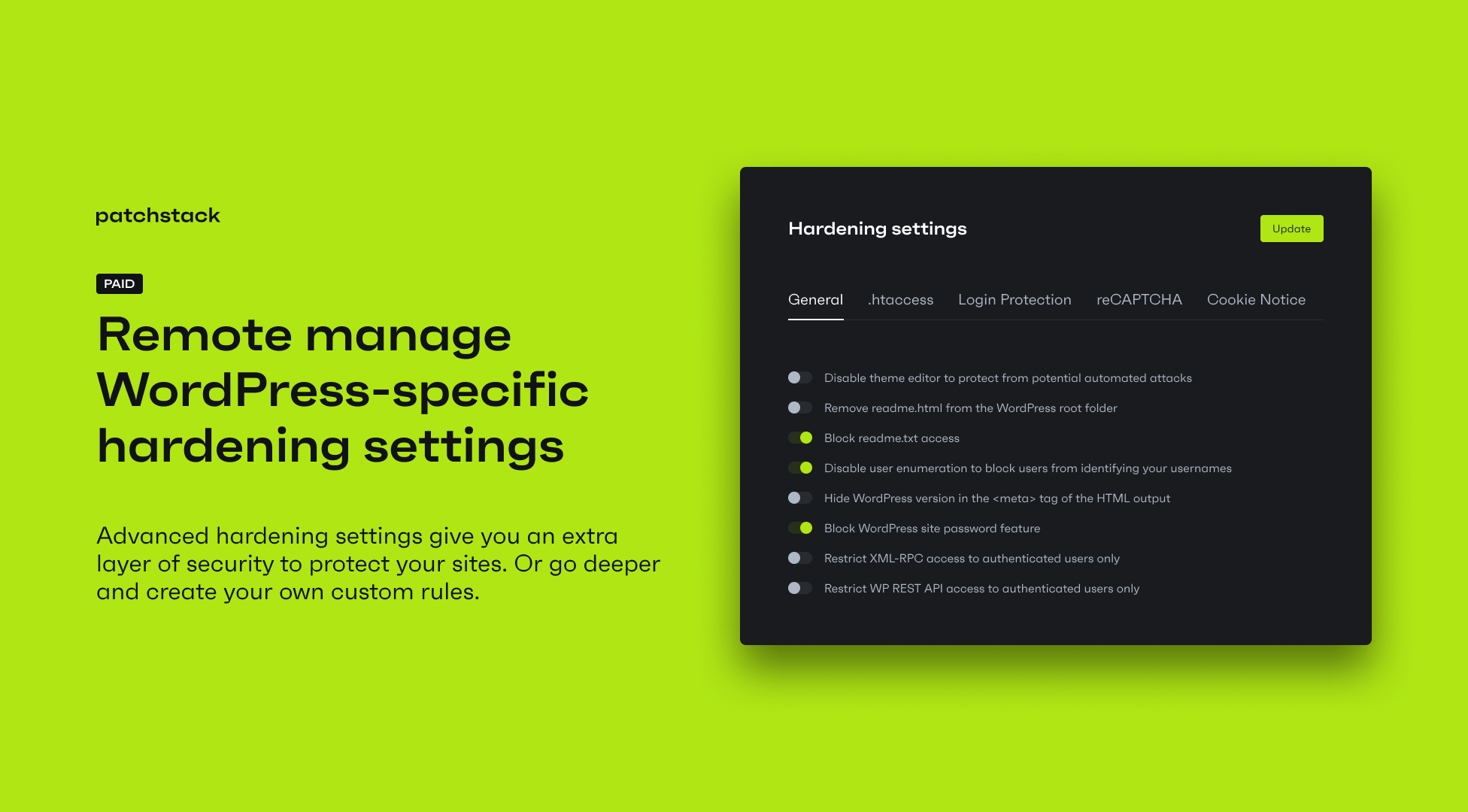
Patchstack paid version also includes other preventive security features, such as 2 factor authentication, WordPress specific hardening rules, a Community IP blocklist for malicious IP addresses, advanced security settings, and custom protection rules.
Post-hack cleanups vs attack prevention in WordPress security
Unlike the standard approach to WordPress security (malware scanning and infection cleanups), Patchstack is focused on preventing infections in the first place.
Thanks to its big WordPress security research community and partnerships with nearly one thousand plugin vendors and developers, Patchstack is regularly among the first to identify new vulnerabilities.
Who is Patchstack’s WordPress security plugin for?
Patchstack’s vulnerability management works extremely well for:
- Agencies with WordPress care/maintenance plans for their customers’ websites
- WooCommerce websites to protect their revenue and customers from attacks
- Hosting companies that want to deliver highly targeted vulnerability protection easily and at scale
Website owners
You don’t have to be highly technical to use it. Install the plugin, connect it with the Patchstack App, and stay safe!
What features are included in the Patchstack Personal (Free) plan?
Patchstack’s Personal plan is a free security service for WordPress that lets you find and manage vulnerabilities in your websites. It includes access to a central security dashboard via the Patchstack web App for more visibility and control over your sites’ security:
- Be the first to know about new vulnerabilities.
- Receive notifications if any installed plugins or themes have security issues.
- Detect the latest security vulnerabilities in WordPress plugins.
- Detect the latest security vulnerabilities in WordPress themes.
- Detect the latest security vulnerabilities in WordPress core.
- Receive real-time alerts via email if any security vulnerabilities are found.
- Manage core, plugin and theme updates from a single dashboard.
- [Optional] Enable automatic updates for vulnerable plugins only.
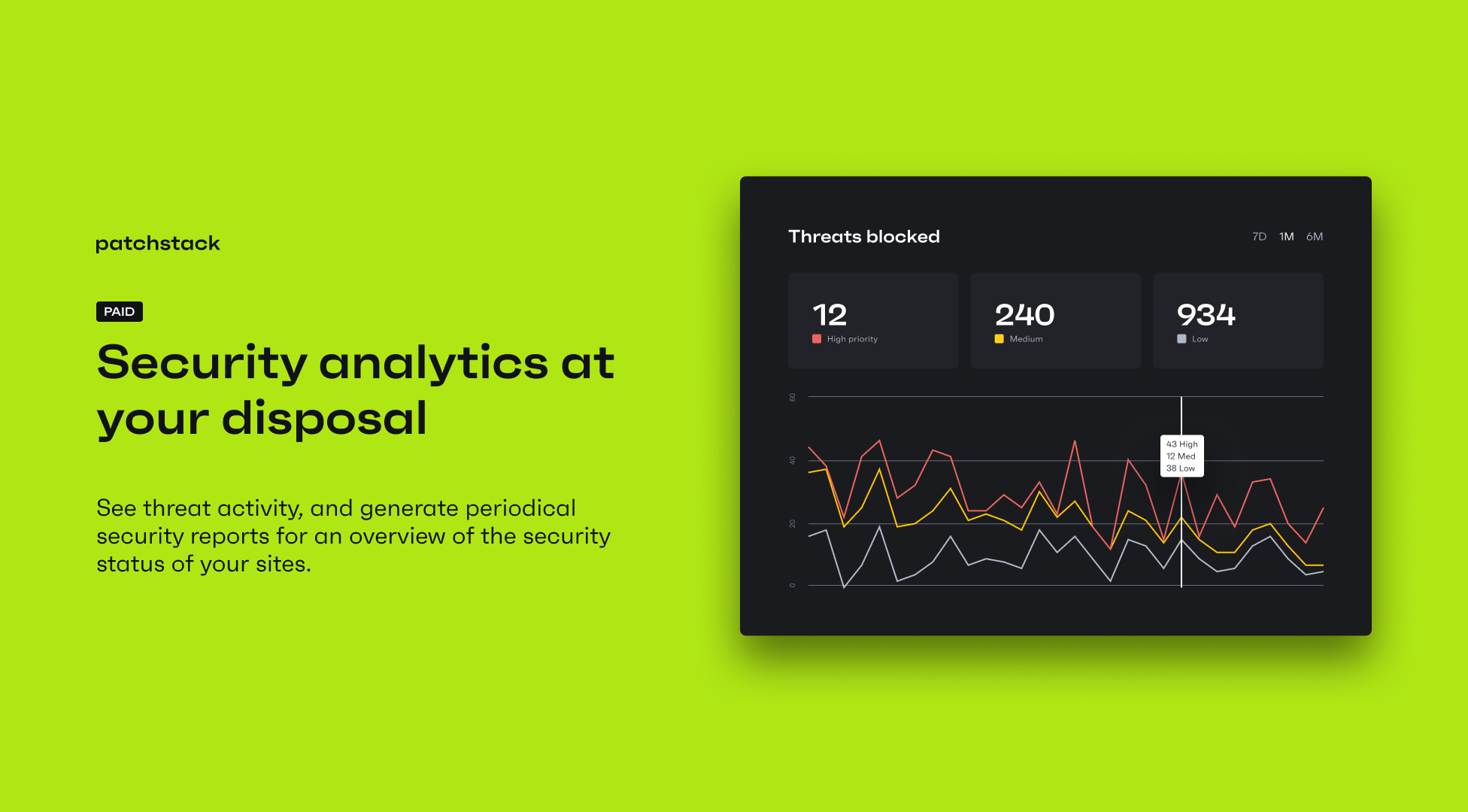
- Generate snapshot reports about the security status of your website.
What features do Patchstack paid subscriptions have?
Patchstack’s paid subscriptions include automatic protection for WordPress vulnerabilities, as well as other protection modules.
- Virtual patching to prevent vulnerable components from being exploited
- Advanced hardening module for added WordPress security
- Remote hardening settings (including .httacess, login protection and reCAPTCHA)
- Community IP Blocklist of known attacker IP addresses
All of these features are included in the Developer and Enterprise plans.
Additionally, Developer and Enterprise plan users have access to custom protection rule creation, periodical security reports and report scheduling.
Personal (Free) plan users can enable these features on a per-site basis for $5 / site per month.
Important Resources
See what our customers say about our paid plans:
- “An excellent and valuable service that’s backed by a company that contributes a significant number of resources and money directly back to the WordPress ecosystem.” – John Blackbourn
- “Patchstack is like CrowdStrike, but for websites!” – Ryan McCue, HumanMade
- “The service here is superb! And they are always right on it with the best solution to solve the problem or question at hand. The tool itself speaks for itself. I am very satisfied with this project and the service they offer.” – Daniel Canup
- “This is a security plugin everyone needs to install. The Patchstack team are incredible at what they do. We have been using them for years and have not been disappointed!” – @craniumstudio
- “We’ve been with Patchstack for a LONG time (even before they were Patchstack). It has always done its job seamlessly and without fail. Ongoing innovation and updates to the Patchstack product mean this plugin is a winner. 5 stars all the way.” – @guapx
(*Comparisons are made by evaluating paid versions.)
Sucuri vs. Patchstack
Wordfence vs. Patchstack
Malcare vs. Patchstack
Sitelock vs. Patchstack
Installation
Simply install the Patchstack plugin by searching for “Patchstack” on the plugin management page of WordPress, or install it manually by following these steps:
- Download the plugin from the WordPress.org Patchstack plugin download page.
- Unzip the
.zipfile. - Upload the entire
patchstackdirectory to the/wp-content/plugins/directory. - Activate Patchstack through the “Plugins” menu in WordPress.
Frequently asked questions
What makes plugin vulnerabilities so dangerous?
A worrisome website hacking statistic is that well over 90% of WordPress vulnerabilities are related to plugins or themes. One report found that up to 98% of WordPress vulnerabilities are due to plugins, while another study reported that 95% were caused by plugins and themes. To stay secure, always keep your WordPress plugins, themes, and core updated and monitored. Be aware of which plugins you’re using and remove any that are no longer needed. When choosing a WordPress security plugin, it’s important to understand how the WordPress security ecosystem works. Look for a tool that offers…
How does the Patchstack Personal (Free) plan protect sites from vulnerabilities?
The Patchstack Personal (Free) plan alerts you if vulnerabilities are present in the plugins, themes, or WordPress core installed on your site. By staying informed, you can reduce the time and resources spent fixing WordPress security issues and avoid costly clean-ups.
What features does the Patchstack Personal (Free) plan include?
You can detect security vulnerabilities in your WordPress plugins, themes, and core. You’ll receive email notifications if vulnerabilities are found, and access a central security overview for up to 3 websites using the Patchstack App. You can optionally enable vPatching for individual sites for $5/month.
What features does the Patchstack Developer (Paid) plan include?
With the Patchstack Developer plan, you can protect your sites against known plugin and theme vulnerabilities through automatic virtual patches — non-intrusive firewall rules that block exploit attempts. You also gain access to advanced hardening options, 2FA, CAPTCHA, security reports, and various alert types.
Included features:
Plugin vulnerability detection (also included in free) Theme vulnerability detection (also included in free) WordPress core vulnerability detection (also included in free) Logs and analytics (also included in free) Snapshot PDF security reports (also included in free) Email alerts (also included in free) vPatches for WordPress plugins vPatches for WordPress themes Unlimited custom firewall rules Unlimited custom alert triggers Weekly/monthly PDF reports Slack alerts Unlimited Patchstack App API usage
What checks does the Patchstack Personal (Free) plan perform?
No external checks are performed. The plugin matches the installed plugins, themes, and WordPress core on your site with our vulnerability database to identify vulnerable versions.
How will I be alerted about a new vulnerability?
With the Personal (Free) plan, you’ll receive alerts via email. Slack alerts are available in the paid Developer plan.
Does Patchstack conflict with other security plugins?
We have not encountered any conflicts. However, we recommend using as few security plugins as possible and avoiding overlapping features to prevent potential issues. If you encounter problems, contact our support team for assistance.
Does the Personal (Free) plan include a firewall?
No, the free version does not include a firewall. It focuses on vulnerability detection and notifications.
Will Patchstack slow down my website?
The free version only runs scheduled tasks, with no noticeable impact on your site speed or server load. The paid version runs tasks on each page load to filter traffic, but our tests and customer feedback confirm minimal performance impact.
Does Patchstack work on multisite?
Yes. After installation, you can activate Patchstack per site within the network. Each subsite must be added individually to your Patchstack account and will take one site slot.
Where can I learn more about Patchstack?
Visit our website and blog for more information.
What support options are available?
Patchstack provides chat support via patchstack.com and documentation through our Help Center. To access chat support, click the green chat bubble in the bottom right corner (note: some ad blockers may hide this).
How long does it take to set up Patchstack?
Setup takes just a few minutes. Install the plugin, register at Patchstack App, add your site, and paste the API key into the plugin. See our Getting Started guide for help.
How do I upgrade from the Personal (Free) plan to the Developer plan?
Upgrade through your dashboard at the Patchstack App or directly at app.patchstack.com/setup.
Do I need to pay for support?
No, support is free. However, free plan users may receive replies within 1 business day, while paid users typically get responses in under 30 minutes.
What information does Patchstack collect?
We take privacy seriously. We sync and store data such as your domains, installed software, and activity logs. For details, see our Terms & Conditions, Privacy Policy, and DPA.
Where can I find the Terms & Conditions, Privacy Policy, and DPA?
Terms & Conditions: patchstack.com/terms-and-conditions Privacy Policy: patchstack.com/privacy-policy DPA: patchstack.com/data-processing-agreement-dpa
How can I get a WordPress plugin security audit from Patchstack?
We offer an AI-powered code review tool for plugin audits. Start by joining our mVDP program. You can also request a manual audit here: patchstack.com/auditing.
Where do I report security bugs?
Report security bugs through the Patchstack Vulnerability Disclosure Program. Our team will assist with verification and CVE assignment.
Screenshots
For developers
Is this your plugin? Show off the numbers.
Add a live badge to your site, docs or GitHub README. It updates on its own — no account needed.
Best Patchstack alternatives
All firewall plugins →





FAQ
Patchstack: quick answers
Straight answers, pulled from live WordPress.org data.
Live data from WordPress.org · checked Sep 26, 2026
Is Patchstack free?
Yes. Patchstack is free to download and use from the official WordPress.org plugin directory.
Is Patchstack safe to use in 2026?
Patchstack is a solid plugin choice in 2026, with a few things worth checking first. It runs on 60K+ sites, is rated 4.9/5 and was last updated 2 months ago, and scores 71/100 on our health check.
How many websites use Patchstack?
Patchstack is active on 60K+ WordPress websites and has been downloaded 713,221 times since it launched in November 2021. It was downloaded 22,332 times in the last 30 days.
Does Patchstack work with WordPress 7.1?
Patchstack is officially tested up to WordPress 7.0.6, while the latest release is 7.1.2. It may still work, but try it on a staging site first.
What PHP version does Patchstack need?
Patchstack requires PHP 5.6 or higher. Most hosts run PHP 8.x today, so it works on any modern WordPress hosting.
When was Patchstack last updated?
The latest version, 2.3.7, was released on July 28, 2026 (2 months ago).
Who makes Patchstack?
Patchstack is developed and maintained by Patchstack.
What are the best alternatives to Patchstack?
The most popular alternatives to Patchstack are Wordfence Security (5M+ installs), Limit Login Attempts Securi… (1M+ installs) and Security Optimizer (1M+ installs).
Powered by PageForge
Want thousands of pages that rank like these? Build them in an afternoon.
This directory runs on the same engine as PageForge. Turn any spreadsheet, CSV or API into thousands of fast, SEO-ready WordPress pages — with schema, internal links and AI-written copy baked in.
- CSV, Google Sheets & API data sources
- AI content, schema & internal links per page
- Works with Elementor, Gutenberg, Yoast & Rank Math
- Free on WordPress.org — no credit card


