


Wordfence Security – Firewall, Malware Scan, and Login Security
Firewall, Malware Scanner, Two Factor Auth, and Comprehensive Security Features, powered by our 24-hour team. Make security a priority with Wordfence.

Safe pick
Yes — Wordfence Security is a safe, well-maintained plugin to use in 2026. It runs on 5M+ sites, is rated 4.7/5 and was last updated 5 days ago, and scores 96/100 on our health check.
- One of the most-used plugins on the web — 5M+ active sites
- Loved by users — 4.7/5 from 5,051 reviews
- Actively developed — last update 5 days ago
- Tested with the latest WordPress (7.1)
- Responsive support — 85% of recent threads resolved
How does it stack up?
Side-by-side on installs, updates, ratings & support



Daily downloads
Download spikes usually follow a new release — each site that auto-updates counts as a download.
Rankings
Where Wordfence Security stands todayWordPress.org search rankings
Live position in the plugin search, top 100| Keyword | Position |
|---|---|
| 2FA | #1 |
| firewall | #1 |
| malware | #1 |
| scanner | #1 |
| security | #1 |
Version adoption
Share of active sites per release.
Rating breakdown
★★★★★★★★★★ 4.7 from 5,051 reviews
About Wordfence Security
From the official readme · v9.1.1Description
THE MOST POPULAR WORDPRESS FIREWALL & SECURITY SCANNER
WordPress security requires a team of dedicated analysts researching the latest malware variants and WordPress exploits, turning them into firewall rules and malware signatures, and releasing those to customers in real-time.
Choose the right protection for you: Wordfence Free, Premium, Care or Response
Wordfence is widely acknowledged as the number one WordPress security research team in the World. Our plugin provides a comprehensive suite of security features, and our team’s research is what powers our plugin and provides the level of security that we are known for.
At Wordfence, WordPress security isn’t a division of our business – WordPress security is all we do. We employ a global 24-hour dedicated incident response team that provides our priority customers with a 1 hour response time for any security incident.
The sun never sets on our global security team and we run a sophisticated threat intelligence platform to aggregate, analyze and produce ground breaking security research on the newest security threats.
Wordfence Security includes an endpoint firewall, malware scanner, robust login security features, live traffic views, and more. Our Threat Defense Feed arms Wordfence with the newest firewall rules, malware signatures, and malicious IP addresses it needs to keep your website safe.
Rounded out by passkeys, 2FA, and a suite of additional features, Wordfence is the most comprehensive WordPress security solution available.
🔥 WORDPRESS FIREWALL
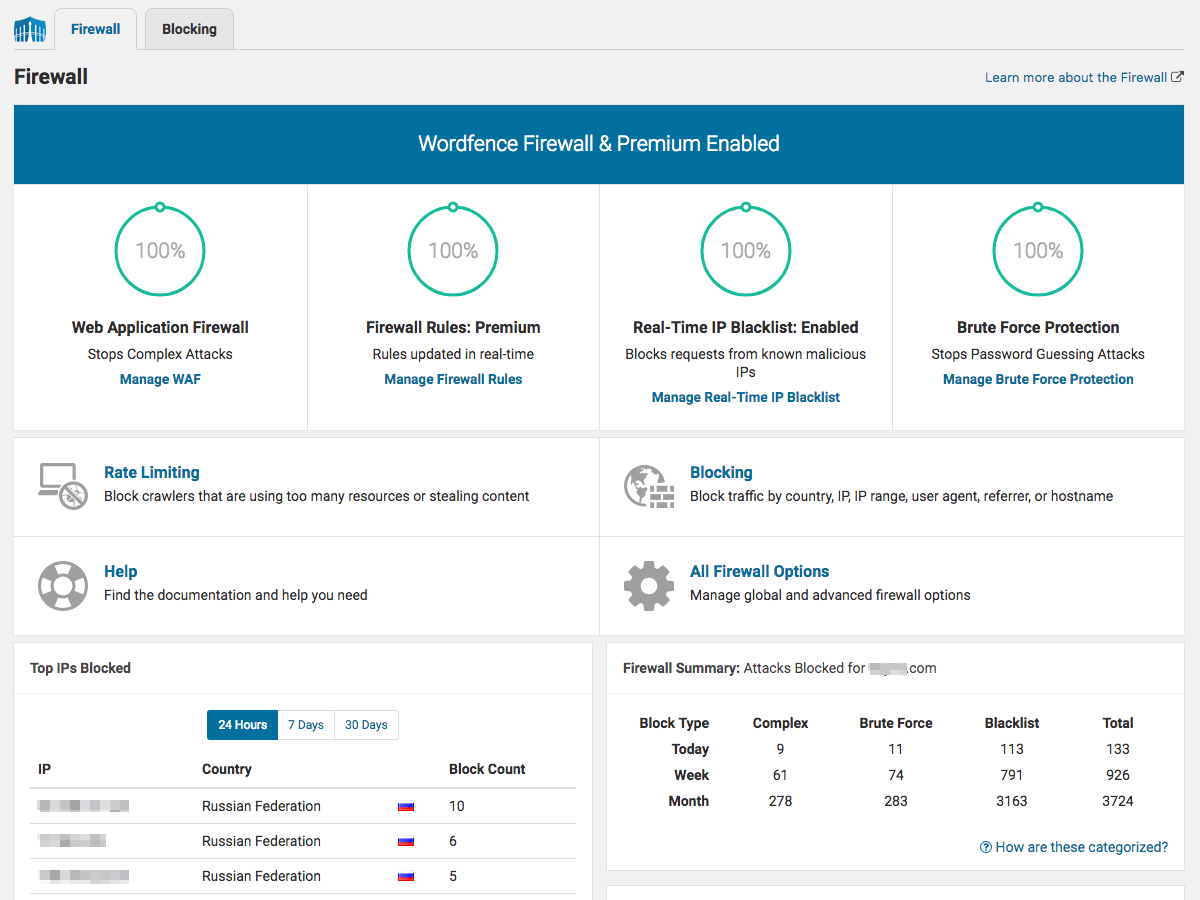
- Web Application Firewall identifies and blocks malicious traffic. Built and maintained by a large team focused 100% on WordPress security.
- Real-time firewall rule and malware signature [Premium] updates via the Threat Defense Feed (free version is delayed by 30 days).
- Real-time IP Blocklist [Premium] blocks all requests from the most malicious IPs, protecting your site while reducing load.
- Protects your site at the endpoint, enabling deep integration with WordPress. Unlike cloud alternatives, it does not break encryption, cannot be bypassed and cannot leak data.
- Integrated malware scanner blocks requests that include malicious code or content.
- Protection from brute force attacks by limiting login attempts.
📡 WORDPRESS SECURITY SCANNER
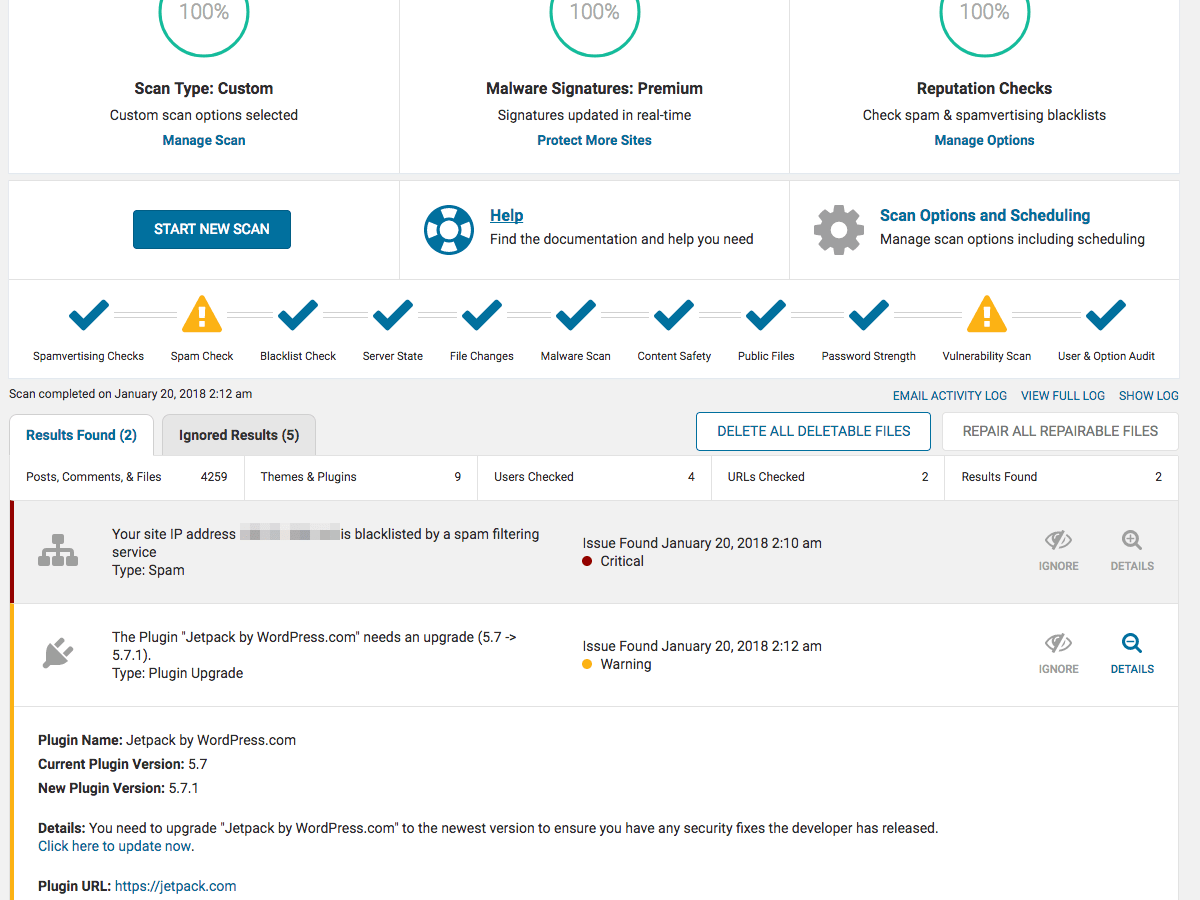
- Malware scanner checks core files, themes and plugins for malware, bad URLs, backdoors, SEO spam, malicious redirects and code injections.
- Real-time malware signature updates [Premium] via the Threat Defense Feed (free version is delayed by 30 days).
- Compares with WordPress.org repository your core files, themes and plugins, checking their integrity and reporting any changes to you.
- Repair WordPress core, theme, and plugin files that have changed by overwriting them with a pristine, original version. Delete any files that don’t belong easily within the Wordfence interface.
- Malware Removal Tools “Delete File” and “Delete All Deletable Files” options allow for efficient malware removal. Remember to investigate the scan results and backup files first!
- Checks your site for known security vulnerabilities and alerts you to any issues. Also alerts you to potential security issues when a plugin has been closed or abandoned.
- Checks your content safety by scanning file contents, posts and comments for dangerous URLs and suspicious content.
- Checks to see if your site or IP have been blocklisted [Premium] for malicious activity, generating spam or other security issues.
🔒 LOGIN SECURITY
- Passkeys let users sign in with touch, facial recognition, a device password, or a PIN as a simple and secure alternative to a password and two-factor credentials.
- Two-factor authentication (2FA), one of the most secure forms of remote system authentication available via any TOTP-based authenticator app or service.
- Login Page CAPTCHA stops bots from logging in.
- Passkey and 2FA management for WooCommerce and custom integrations allows users to manage credentials on custom account pages.
- XML-RPC options including disabling or adding 2FA.
- Password Security: Block logins for administrators using known compromised passwords.
📋 SECURITY AUDIT LOG [Premium]
- The Audit Log monitors all changes and actions in security-sensitive areas of the site.
- Remote tamper-proof data storage via Wordfence Central.
- Monitor events and actions ranging from user creation and editing to plugin/theme installation and updates to post and page changes.
- Configurable to log all events or significant events only, which includes all authentication, site configuration, and site functionality events.
🌐 WORDFENCE CENTRAL
- Wordfence Central is a powerful and efficient way to manage the security for multiple sites in one place.
- Centralized management: Efficiently assess the security status of all your websites in one view. View detailed security findings without leaving Wordfence Central.
- Powerful templates make configuring Wordfence a breeze.
- Highly configurable alerts can be delivered via email, SMS or Slack. Improve the signal to noise ratio by leveraging severity level options and a daily digest option.
- Track and alert on important security events including administrator logins, breached password usage and surges in attack activity.
- Free to use for unlimited sites.
🛠️ SECURITY TOOLS
- Live Traffic monitors visits and hack attempts not shown in other analytics packages in real time; including origin, their IP address, the time of day and time spent on your site.
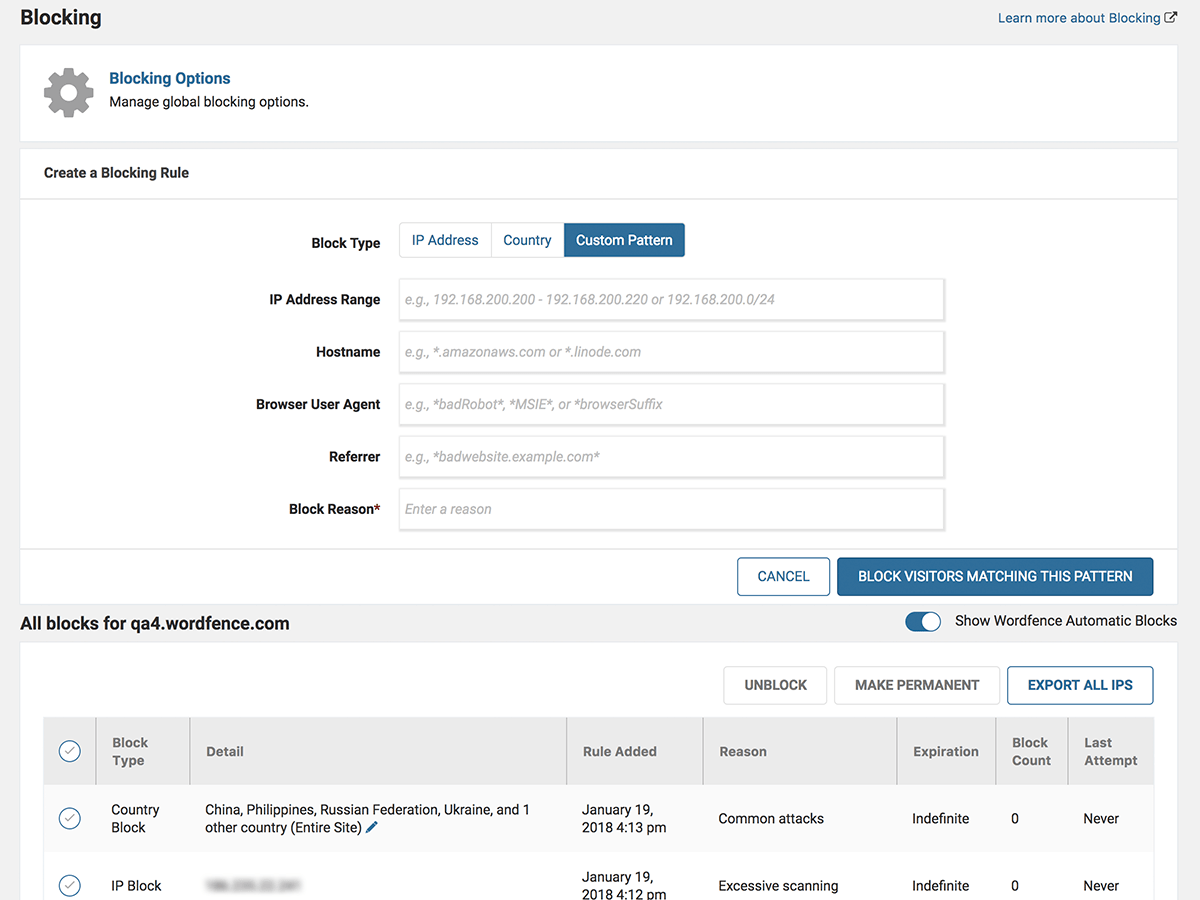
- Block attackers by IP or build advanced rules based on IP Range, Hostname, User Agent and Referrer.
- Country blocking available with Wordfence Premium.
Installation
Secure your website using the following steps to install Wordfence:
- Install Wordfence automatically or by uploading the ZIP file.
- Activate the Wordfence through the ‘Plugins’ menu in WordPress. Wordfence is now activated.
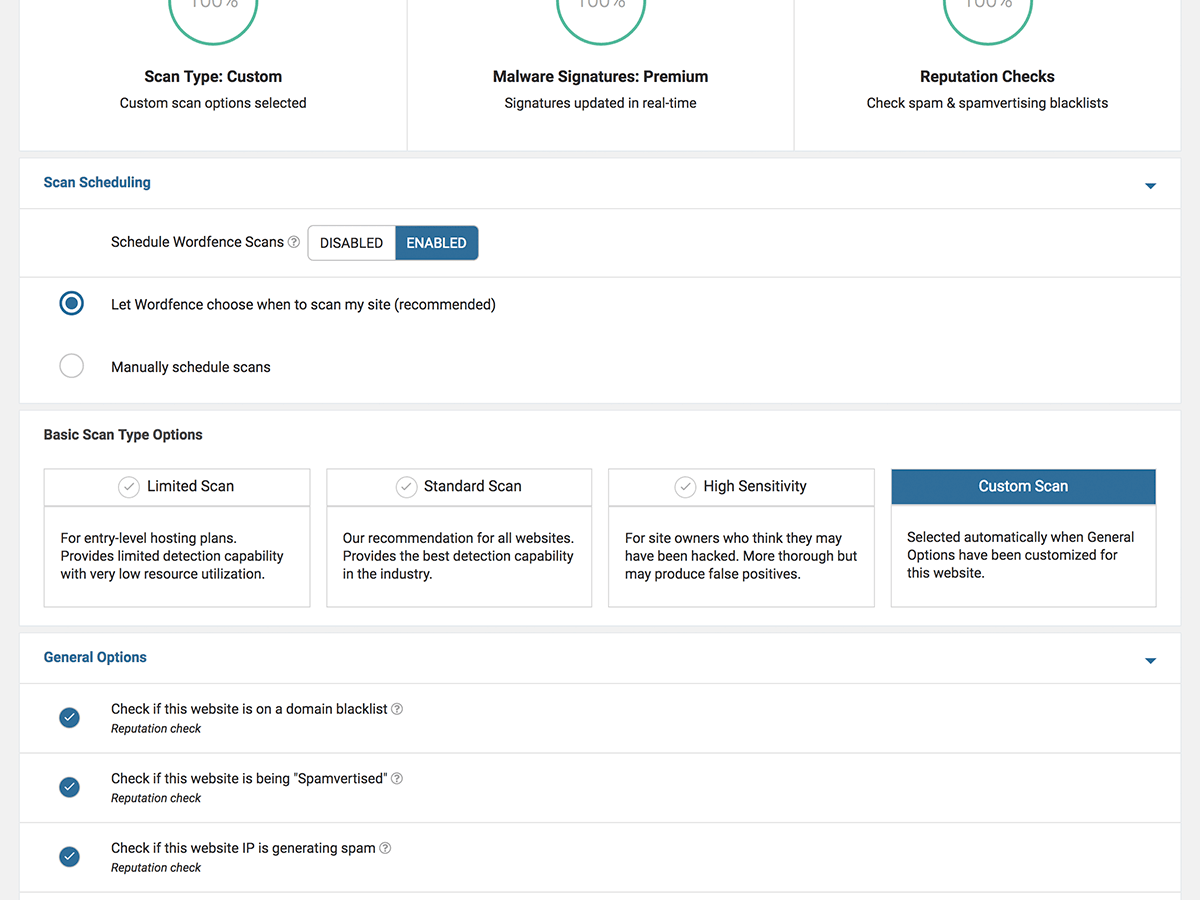
- Go to the scan menu and start your first scan. Scheduled scanning will also be enabled.
- Once your first scan has completed, a list of threats will appear. Go through them one by one to secure your site.
- Visit the Wordfence options page to enter your email address so that you can receive email security alerts.
- Optionally, change your security level or adjust the advanced options to set individual scanning and protection options for your site.
- Click the “Live Traffic” menu option to watch your site activity in real-time. Situational awareness is an important part of website security.
To install Wordfence on WordPress Multi-Site installations:
- Install Wordfence via the plugin directory or by uploading the ZIP file.
- Network Activate Wordfence. This step is important because until you network activate it, your sites will see the plugin option on their plugins menu. Once activated that option disappears.
- Now that Wordfence is network activated it will appear on your Network Admin menu. Wordfence will not appear on any individual site’s menu.
- Go to the “Scan” menu and start your first scan.
- Wordfence will do a scan of all files in your WordPress installation including those in the blogs.dir directory of your individual sites.
- Live Traffic will appear for ALL sites in your network. If you have a heavily trafficked system you may want to disable live traffic which will stop logging to the DB.
- Firewall rules and login rules apply to the WHOLE system. So if you fail a login on site1.example.com and site2.example.com it counts as 2 failures. Crawler traffic is counted between blogs, so if you hit three sites in the network, all the hits are totalled and that counts as the rate you’re accessing the system.
Changelog
9.1.1 – November 10, 2026
- Improvement: Updated bundled cacert.pem
9.1.0 – November 9, 2026
- Improvement: Added security news widget to the WordPress and Wordfence dashboards
- Improvement: Increased frequency of WAF rule update checks
- Improvement: Added Live Traffic logging for application password and REST API authentication failures
- Improvement: Added controls for the WAF attack alert threshold and counting window
- Improvement: Improved attack data synchronization to reduce overhead and avoid cache issues
- Improvement: Improved SQL injection parsing and detection for malformed input
- Improvement: Improved malware scanning handling of uploads
- Improvement: Improved WAF execution and configuration handling in unexpected hosting configurations or unreliable network environments
- Improvement: Updated GeoIP database
- Change: Matched WAF inspection of form request bodies to the same method overrides as WordPress
- Change: Better 2FA recovery code validation
- Change: Adjusted audit log request data handling and limits
- Change: Better handling of PHP diagnostic output during WAF execution
- Change: Corrected JavaScript element lookups in the plugin UI
- Change: Revalidate reCAPTCHA keys on save and improved recovery from browser errors
- Fix: PHP 8.6 compatibility fixes
- Fix: Better validation of cached real-time IP blocklist data
- Fix: Improved WAF compatibility with hosts that disable ini_set
- Fix: Improved WAF handling of nested request arrays
- Fix: The scan activity log now uses the site’s timezone and displays the UTC offset
- Fix: Improved handling of canceled requests to avoid unnecessary errors and stuck controls
- Fix: Fixed the layout and dismissal of the satisfaction survey notice
- Fix: Corrected Live Traffic descriptions for requests without a referrer
- Fix: Prevented passkey availability checks from causing errors when database setup is incomplete or broken
9.0.2 – September 30, 2026
- Change: Changed IPv6 diagnostics result to be informational only
- Change: Added help link to increased attack rate emails
- Improvement: Increased compatibility with WordPress Playground
- Improvement: Harden REST API user enumeration protection
- Fix: Upgraded virtualizer dependency to fix Firefox tab crash on screens with a lot of DOM elements (e.g., a running scan)
- Fix: Better detection and handling of “module” script tagging to avoid conflict with renamed plugin directories
- Fix: Add missed return value from
upgrader_pre_installaudit log filter - Fix: PHP 8.1 deprecation notice fixes
- Fix: Fixed translation support on login page
- Fix: Improve handling of WAF JSON processing to better handle array values
- Fix: Address early translation calls to avoid
_load_textdomain_just_in_timenotices - Fix: Changed a few translated strings to avoid containing HTML due to a broken CZ translation
- Fix: Removed obsolete CSS
- Fix: Fixed typo in “No alerts will be sent for the remain[d]er…”
9.0.1 – September 8, 2026
- Improvement: UX enhancements for passkey authentication and general login security
- Improvement: GeoIP database updated
- Fix: Improved error handling in WAF request handlers and XML-RPC parser
- Fix: Fixed an issue with translations not showing on the Login Security Settings tab
- Fix: Addressed several potential PHP 8.5+ deprecation notices
- Fix: Reworked MD5 hash use in MySQL to avoid deprecation in 9.7+
9.0.0 – August 10, 2026
- Improvement: Added support for passkey authentication
- Available for both free and premium installations
- Can be enabled for any user role (multisite support is currently limited)
- WooCommerce integration
- Support for custom authentication integrations
- Improvement: GeoIP database updated
- Improvement: Several mobile styling and layout improvements on the login security page
- Improvement: Added diagnostics info for authentication hooks to assist with login-related troubleshooting
- Change: Hardened 2FA flow when installed next to plugins with non-standard authentication (credit: Austin Ginder of Anchor Hosting)
- Change: Hardened 2FA remember cookie handling
- Change: The scanner will now display an issue when the standalone Wordfence Login Security plugin is installed because all functionality is already provided by Wordfence itself
- Change: Updated internal libraries used by the Vue UI
- Change: Login error masking setting now also applies to the Login Security functionality
8.2.2 – May 13, 2026
- Improvement: Better presentation of Live Traffic data on wide screens
- Improvement: Increased legibility of token fields
- Improvement: Reworked the pagination of the Blocking page for a better UX
- Improvement: Country blocking token field can now expand to show all entries
- Improvement: Performance improvements for the activity log and better pause behavior on window blur/focus
- Improvement: GeoIP database updated
- Change: Removed deprecated Central endpoint
- Fix: Addressed issue where the last activity log entry could repeatedly appear
- Fix: Using the embedded shortcode for the 2FA form now correctly enqueues core JavaScript dependencies
- Fix: Modals with content that overflows on smaller viewports can now be scrolled
- Fix: The changelog link in plugin upgrade scan issues now links correctly
Screenshots





For developers
Is this your plugin? Show off the numbers.
Add a live badge to your site, docs or GitHub README. It updates on its own — no account needed.
Best Wordfence Security alternatives
All 2FA plugins →





FAQ
Wordfence Security: quick answers
Straight answers, pulled from live WordPress.org data.
Live data from WordPress.org · checked Nov 16, 2026
Is Wordfence Security free?
Yes. Wordfence Security is free to download and use from the official WordPress.org plugin directory. The developer also sells premium add-ons or a Pro version with extra features.
Is Wordfence Security safe to use in 2026?
Yes — Wordfence Security is a safe, well-maintained plugin to use in 2026. It runs on 5M+ sites, is rated 4.7/5 and was last updated 5 days ago, and scores 96/100 on our health check.
How many websites use Wordfence Security?
Wordfence Security is active on 5M+ WordPress websites and has been downloaded 437,905,493 times since it launched in April 2012. It was downloaded 6,484,101 times in the last 30 days.
Does Wordfence Security work with WordPress 7.1?
Yes. The developer has tested Wordfence Security up to WordPress 7.1.4, the latest release. It requires WordPress 4.7 or newer.
What PHP version does Wordfence Security need?
Wordfence Security requires PHP 7.0 or higher. Most hosts run PHP 8.x today, so it works on any modern WordPress hosting.
When was Wordfence Security last updated?
The latest version, 9.1.1, was released on November 10, 2026 (5 days ago).
Who makes Wordfence Security?
Wordfence Security is developed and maintained by Mark Maunder.
What are the best alternatives to Wordfence Security?
The most popular alternatives to Wordfence Security are Really Simple Security (3M+ installs), Limit Login Attempts Securi… (1M+ installs) and Two Factor (100K+ installs).
Powered by PageForge
Want thousands of pages that rank like these? Build them in an afternoon.
This directory runs on the same engine as PageForge. Turn any spreadsheet, CSV or API into thousands of fast, SEO-ready WordPress pages — with schema, internal links and AI-written copy baked in.
- CSV, Google Sheets & API data sources
- AI content, schema & internal links per page
- Works with Elementor, Gutenberg, Yoast & Rank Math
- Free on WordPress.org — no credit card


