


NinjaFirewall (WP Edition) – Advanced Security Plugin and Firewall
A true Web Application Firewall to protect and secure WordPress.

Safe pick
Yes — NinjaFirewall (WP Edition) is a safe, well-maintained plugin to use in 2026. It runs on 100K+ sites, is rated 4.9/5 and was last updated 1 week ago, and scores 94/100 on our health check.
- Proven at scale on 100K+ active sites
- Loved by users — 4.9/5 from 220 reviews
- Actively developed — last update 1 week ago
- Tested with the latest WordPress (7.1)
- Responsive support — 83% of recent threads resolved
How does it stack up?
Side-by-side on installs, updates, ratings & support



Daily downloads
Download spikes usually follow a new release — each site that auto-updates counts as a download.
Rankings
Where NinjaFirewall (WP Edition) stands todayWordPress.org search rankings
Live position in the plugin search, top 100| Keyword | Position |
|---|---|
| firewall | #8 |
| malware | #19 |
| protection | #31 |
| security | #21 |
| virus | #2 |
Version adoption
Share of active sites per release.
Rating breakdown
★★★★★★★★★★ 4.9 from 220 reviews
About NinjaFirewall (WP Edition)
From the official readme · v4.10.1Description
A true Web Application Firewall
NinjaFirewall (WP Edition) is a true Web Application Firewall. Although it can be installed and configured just like a plugin, it is a stand-alone firewall that stands in front of WordPress.
It allows any blog administrator to benefit from very advanced and powerful security features that usually aren’t available at the WordPress level, but only in security applications such as the Apache ModSecurity module or the PHP Suhosin extension.
NinjaFirewall requires at least PHP 7.1, MySQLi extension and is only compatible with Unix-like OS (Linux, BSD). It is not compatible with Microsoft Windows.
NinjaFirewall can hook, scan, sanitise or reject any HTTP/HTTPS request sent to a PHP script before it reaches WordPress or any of its plugins. All scripts located inside the blog installation directories and sub-directories will be protected, including those that aren’t part of the WordPress package. Even encoded PHP scripts, hackers shell scripts and backdoors will be filtered by NinjaFirewall.
Powerful filtering engine
NinjaFirewall includes the most powerful filtering engine available in a WordPress plugin. Its most important feature is its ability to normalize and transform data from incoming HTTP requests which allows it to detect Web Application Firewall evasion techniques and obfuscation tactics used by hackers, as well as to support and decode a large set of encodings. See our blog for a full description: An introduction to NinjaFirewall filtering engine.
Fastest and most efficient brute-force attack protection for WordPress
By processing incoming HTTP requests before your blog and any of its plugins, NinjaFirewall is the only plugin for WordPress able to protect it against very large brute-force attacks, including distributed attacks coming from several thousands of different IPs.
See our benchmarks and stress-tests: Brute-force attack detection plugins comparison
The protection applies to the wp-login.php script but can be extended to the xmlrpc.php one. The incident can also be written to the server AUTH log, which can be useful to the system administrator for monitoring purposes or banning IPs at the server level (e.g., Fail2ban).
Real-time detection
File Guard real-time detection is a totally unique feature provided by NinjaFirewall: it can detect, in real-time, any access to a PHP file that was recently modified or created, and alert you about this. If a hacker uploaded a shell script to your site (or injected a backdoor into an already existing file) and tried to directly access that file using his browser or a script, NinjaFirewall would hook the HTTP request and immediately detect that the file was recently modified or created. It would send you an alert with all details (script name, IP, request, date and time).
File integrity monitoring
File Check lets you perform file integrity monitoring by scanning your website hourly, twicedaily or daily. Any modification made to a file will be detected: file content, file permissions, file ownership, timestamp as well as file creation and deletion.
Watch your website traffic in real time
Live Log lets you watch your website traffic in real time. It displays connections in a format similar to the one used by the tail -f Unix command. Because it communicates directly with the firewall, i.e., without loading WordPress, Live Log is fast, lightweight and it will not affect your server load, even if you set its refresh rate to the lowest value.
Event Notifications
NinjaFirewall can alert you by email on specific events triggered within your blog. Some of those alerts are enabled by default and it is highly recommended to keep them enabled. It is not unusual for a hacker, after breaking into your WordPress admin console, to install or just to upload a backdoored plugin or theme in order to take full control of your website. NinjaFirewall can also attach a PHP backtrace to important notifications.
Monitored events:
- Administrator login.
- Modification of any administrator account in the database.
- Plugins upload, installation, (de)activation, update, deletion.
- Themes upload, installation, activation, deletion.
- WordPress update.
- Pending security update in your plugins and themes.
Stay protected against the latest WordPress security vulnerabilities
To get the most efficient protection, NinjaFirewall can automatically update its security rules daily, twice daily or even hourly. Each time a new vulnerability is found in WordPress or one of its plugins/themes, a new set of security rules will be made available to protect your blog immediately.
Strong Privacy
Unlike a Cloud Web Application Firewall, or Cloud WAF, NinjaFirewall works and filters the traffic on your own server and infrastructure. That means that your sensitive data (contact form messages, customers credit card number, login credentials etc) remains on your server and is not routed through a third-party company’s servers, which could pose unnecessary risks (e.g., decryption of your HTTPS traffic in order to inspect it, employees accessing your data or logs in plain text, theft of private information, man-in-the-middle attack etc).
Your website can run NinjaFirewall and be compliant with the General Data Protection Regulation (GDPR). See our blog for more details.
IPv6 compatibility
IPv6 compatibility is a mandatory feature for a security plugin: if it supports only IPv4, hackers can easily bypass the plugin by using an IPv6. NinjaFirewall natively supports IPv4 and IPv6 protocols, for both public and private addresses.
Multi-site support
NinjaFirewall is multi-site compatible. It will protect all sites from your network and its configuration interface will be accessible only to the Super Admin from the network main site.
Possibility to prepend your own PHP code to the firewall
You can prepend your own PHP code to the firewall with the help of an optional distributed configuration file. It will be processed before WordPress and all its plugins are loaded. This is a very powerful feature, and there is almost no limit to what you can do: add your own security rules, manipulate HTTP requests, variables etc.
Low Footprint Firewall
NinjaFirewall is very fast, optimised, compact, and requires very low system resource.
See for yourself: download and install the Code Profiler plugin and compare NinjaFirewall’s performance with other security plugins.
Non-Intrusive User Interface
NinjaFirewall looks and feels like a built-in WordPress feature. It does not contain intrusive banners, warnings or flashy colors. It uses the WordPress simple and clean interface and is also smartphone-friendly.
Contextual Help
Each NinjaFirewall menu page has a contextual help screen with useful information about how to use and configure it.
If you need help, click on the Help menu tab located in the upper right corner of each page in your admin panel.
Need more security ?
Check out our new supercharged edition: NinjaFirewall WP+ Edition
- Unix shared memory use for inter-process communication and blazing fast performances.
- IP-based Access Control.
- Role-based Access Control.
- Country-based Access Control via geolocation.
- URL-based Access Control.
- Bot-based Access Control.
- Import/Export the configuration from WP-CLI.
- Centralized Logging.
- Antispam for comment and user regisration forms.
- Rate limiting option to block aggressive bots, crawlers, web scrapers and HTTP attacks.
- Response body filter to scan the output of the HTML page right before it is sent to your visitors browser.
- Better File uploads management.
- Better logs management.
- Syslog logging.
Learn more about the WP+ Edition unique features. Compare the WP and WP+ Editions.
Requirements
- WordPress 4.9+
- Admin/Superadmin with
manage_options+unfiltered_html capabilities. - PHP 7.1+
- MySQL or MariaDB with MySQLi extension
- Apache / Nginx / LiteSpeed / Openlitespeed compatible
- Unix-like operating systems only (Linux, BSD etc). NinjaFirewall is NOT compatible with Microsoft Windows.
Installation
- Upload
ninjafirewallfolder to the/wp-content/plugins/directory. - Activate the plugin through the ‘Plugins’ menu in WordPress.
- Plugin settings are located in ‘NinjaFirewall’ menu.
Changelog
Need more security? Take the time to explore our supercharged Premium edition: NinjaFirewall WP+ Edition
4.10
- Added a new policy: Decode base64-encoded GET variable. The policy is not enabled by default and can be found in the “Firewall Policies > Advanced Policies > HTTP GET variable” section.
- Fixed a potential PHP error and a PHP warning in the geolocation library, and PHP error in the firewall log class.
- Several small fixes and adjustments.
- WP+ Edition (Premium): Updated IP location databases.
4.9.2
- Fixed bugs related to the login protection, the user ennumeration REST API hook and the firewall statistics file.
- WP+ Edition (Premium): Updated IP location databases.
4.9.1
- Behind-the-scenes update: A lot of code was rewritten in this release to make NinjaFirewall better. That includes Centralised Logging, Login Protection, File Guard, rules and notification update, configuration import/export, firewall engine (data transformation and normalization) etc., as well as many small fixes and adjustments.
4.9
- Improved the security updates notification.
- WP+ Edition (Premium): Fixed a bug where the dashboard may not always show a warning if the admin is not whitelisted.
- The “Sanitise POST variable” and “Sanitise REQUEST variable” policies were removed.
- Some little modifications to the UI of the plugin.
- It is no longer possible to configure NinjaFirewall to use PHP sessions; If your site was using such configuration, it will automatically switch to NinjaFirewall sessions instead, which were introduced several months ago and are a much better option.
- WP+ Edition (Premium): Updated IP location databases.
- Many small fixes and adjustments.
4.8.8
- Because WordPress.org enforces a mandatory 24-hour update delay on all new plugin releases, as soon as a new security updates is available for a plugin, NinjaFirewall will allow you to update it immediately from the “Plugins” page.
- Small fixes and adjustments.
4.8.7
- Fixed a PHP warning in File Check.
- Fixed a potential “Allowed memory size exhausted” error.
- Several small fixes and adjustments under the hood.
- WP+ Edition (Premium): Updates Stripe and Airwallex webhook notification IP addresses in the Access Control section.
- WP+ Edition (Premium): Updated list of banned bots in the Access Control section.
Screenshots
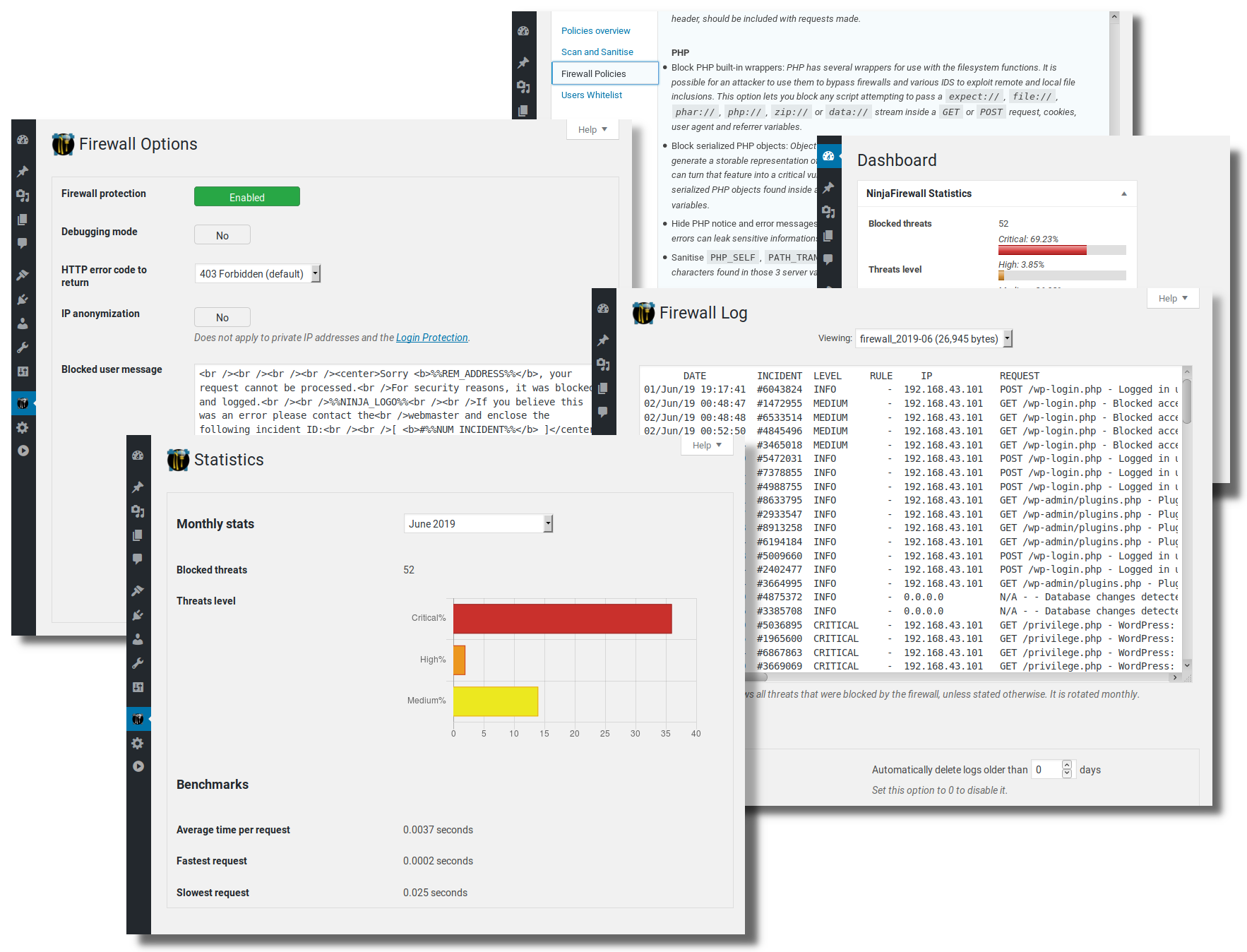
For developers
Is this your plugin? Show off the numbers.
Add a live badge to your site, docs or GitHub README. It updates on its own — no account needed.
Best NinjaFirewall (WP Edition) alternatives
All firewall plugins →





FAQ
NinjaFirewall (WP Edition): quick answers
Straight answers, pulled from live WordPress.org data.
Live data from WordPress.org · checked Nov 17, 2026
Is NinjaFirewall (WP Edition) free?
Yes. NinjaFirewall (WP Edition) is free to download and use from the official WordPress.org plugin directory.
Is NinjaFirewall (WP Edition) safe to use in 2026?
Yes — NinjaFirewall (WP Edition) is a safe, well-maintained plugin to use in 2026. It runs on 100K+ sites, is rated 4.9/5 and was last updated 1 week ago, and scores 94/100 on our health check.
How many websites use NinjaFirewall (WP Edition)?
NinjaFirewall (WP Edition) is active on 100K+ WordPress websites and has been downloaded 3,787,100 times since it launched in March 2013. It was downloaded 95,250 times in the last 30 days.
Does NinjaFirewall (WP Edition) work with WordPress 7.1?
Yes. The developer has tested NinjaFirewall (WP Edition) up to WordPress 7.1.4, the latest release. It requires WordPress 4.9 or newer.
What PHP version does NinjaFirewall (WP Edition) need?
NinjaFirewall (WP Edition) requires PHP 7.1 or higher. Most hosts run PHP 8.x today, so it works on any modern WordPress hosting.
When was NinjaFirewall (WP Edition) last updated?
The latest version, 4.10.1, was released on November 7, 2026 (1 week ago).
Who makes NinjaFirewall (WP Edition)?
NinjaFirewall (WP Edition) is developed and maintained by nintechnet.
What are the best alternatives to NinjaFirewall (WP Edition)?
The most popular alternatives to NinjaFirewall (WP Edition) are Wordfence Security (5M+ installs), Limit Login Attempts Securi… (1M+ installs) and Security Optimizer (1M+ installs).
Powered by PageForge
Want thousands of pages that rank like these? Build them in an afternoon.
This directory runs on the same engine as PageForge. Turn any spreadsheet, CSV or API into thousands of fast, SEO-ready WordPress pages — with schema, internal links and AI-written copy baked in.
- CSV, Google Sheets & API data sources
- AI content, schema & internal links per page
- Works with Elementor, Gutenberg, Yoast & Rank Math
- Free on WordPress.org — no credit card


