



PPWP – Password Protect Pages
Password protect WordPress pages and posts by user roles or with multiple passwords; protect your entire website with a single password.

Safe pick
Yes — PPWP – Password Protect Pages is a safe, well-maintained plugin to use in 2026. It runs on 30K+ sites, is rated 4.7/5 and was last updated 5 days ago, and scores 94/100 on our health check.
- Proven at scale on 30K+ active sites
- Loved by users — 4.7/5 from 270 reviews
- Actively developed — last update 5 days ago
- Tested with the latest WordPress (7.1)
- Momentum — downloads up 40.8% vs the previous 30 days
How does it stack up?
Side-by-side on installs, updates, ratings & support



Daily downloads
Download spikes usually follow a new release — each site that auto-updates counts as a download.
Rankings
Where PPWP stands todayWordPress.org search rankings
Live position in the plugin search, top 100| Keyword | Position |
|---|---|
| password | #3 |
| Password Protect | #3 |
| password protection | #5 |
| restrict content | #26 |
| sitewide | #4 |
Version adoption
Share of active sites per release.
Rating breakdown
★★★★★★★★★★ 4.7 from 270 reviews
About PPWP – Password Protect Pages
From the official readme · v1.9.25Description
Password Protect WordPress (PPWP) plugin offers a powerful and all-in-one solution to secure your website with passwords.
Whether you want to password protect WordPress categories, WooCommerce products, a few posts, or your entire website, PPWP plugin will help you do so with ease.
This plugin does not protect images or uploaded files so if you attach the media files to the protected pages or posts, they are still accessible to anyone with the link. Use Prevent Direct Access (PDA) Gold to block their direct file URL access.
Please note that the passwords will be stored in the post meta and this plugin will set a cookie to allow access to the protected pages or posts.
An Inside Look at Password Protect WordPress – PPWP Pro
Password Protected Features
The Lite version of Password Protect WordPress (PPWP) plugin offers the following features:
Protect WordPress Pages & Posts with Unlimited Passwords
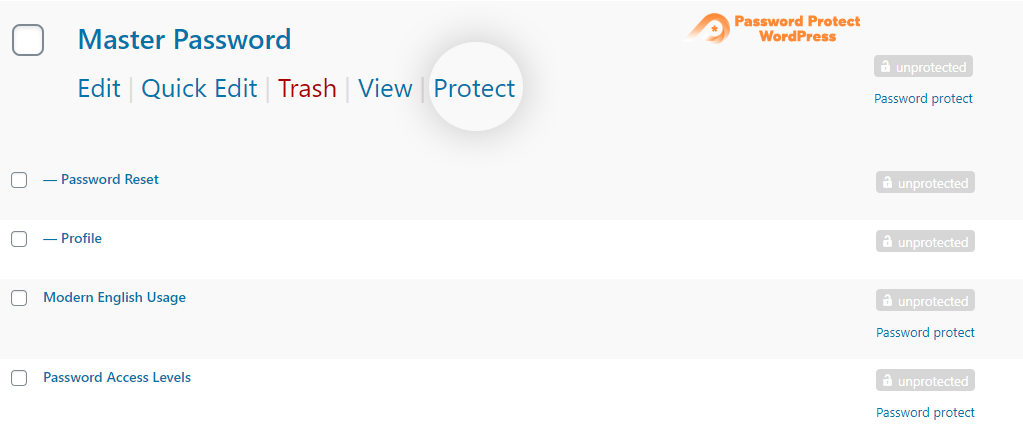
The plugin extends WordPress built-in password protection feature and allows you to set multiple passwords per Page and Post. What’s more, you can protect the content with just a single click. Once protected, a random password will be automatically generated for you.
Password Protect WordPress Pages & Posts by User Roles
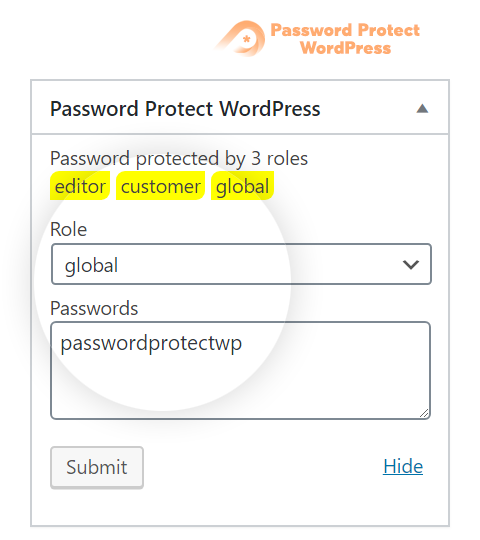
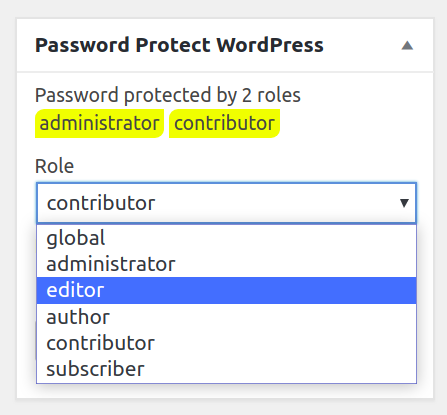
There is an option allowing you to password protect your WordPress Pages & Posts by user roles. In other words, you can set different passwords for different user roles, e.g. one for subscribers and one for editors.
Prevent Password Abuse with reCAPTCHA
Stop password abuse and spam by bots and automated software with Google reCAPTCHA v2 or v3. Real users will be able to access protected content with ease as usual.
Unlock Password Protected Content without Page Refresh
Use Ajax to display protected content without having to reload the entire page. It will help improve user experience and avoid server caching after users enter their password.
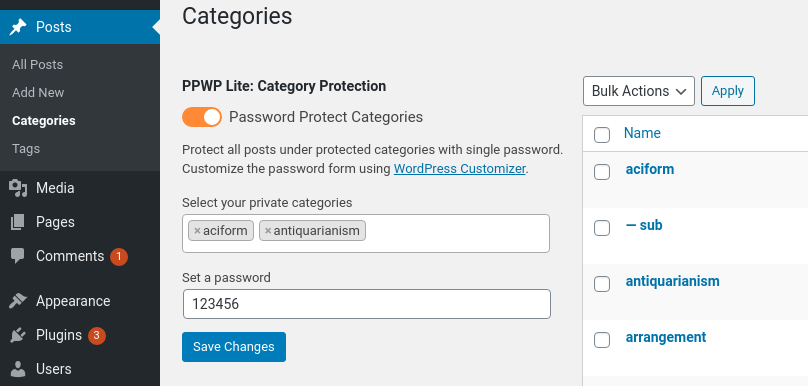
Password Protect WordPress Categories
Instead of creating an individual password for each post, you can protect all posts under one or multiple categories at once. Once users unlock a post successfully, they will be able to access the rest of the content automatically.
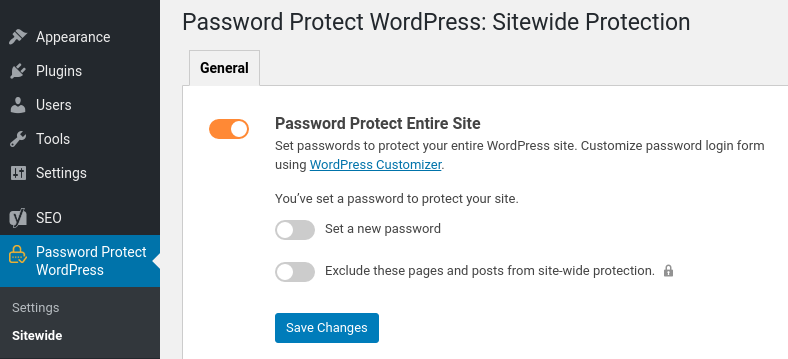
Password Protect Entire WordPress Site
You can password protect the whole WordPress site with a single password. All your website content including pages, posts, and other custom post types (but not media files) are locked as well.
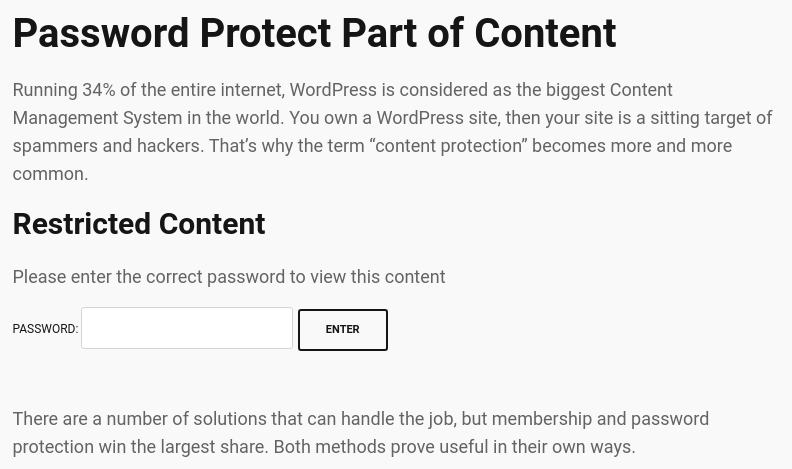
Partial Content Protection
Partial Content Protection feature allows you to password protect certain sections of a page or post instead of hiding the entire content under a password form. This is useful when you want to create a teaser of premium content that encourages visitors to register/sign up to unlock the entire post.
Section Protection
Section Protection takes PCP to the next level. The feature enables you to add password-protected sections even on custom post types & templates created by top page builders such as Elementor and Divi.
Show/Hide Premium Content at a Specific Time
You can also choose when to publish the secure content to users. For example, they’re allowed to see the content without having to enter passwords from XXX to XXX using the following shortcode attributes.
[ppwp passwords=123 on="2020/10/20 14:00:00" off="2020/10/30 14:00:00"] Your protected section will be shown automatically from 2 pm October 20, 2020 to 2 pm October 30, 2020[/ppwp]
Integrate with Page Builders
Instead of using our shortcode to protect part of content, you can use our built-in module for the top page builders including:
- Elementor
- Beaver Builder
- WPBakery Page Builder*
- Divi Builder*
*Supported; built-in UI block to be released soon.
These built-in modules allow you to set passwords, whitelisted roles, customize password forms, and so on via our friendly User Interface. You no longer have to deal with the complex shortcode attributes.
What’s more, with PPWP Pro, you can even protect the entire Elementor’s templates, Beaver Builder’s rows, columns, and page templates as well as limiting and tracking password usage.
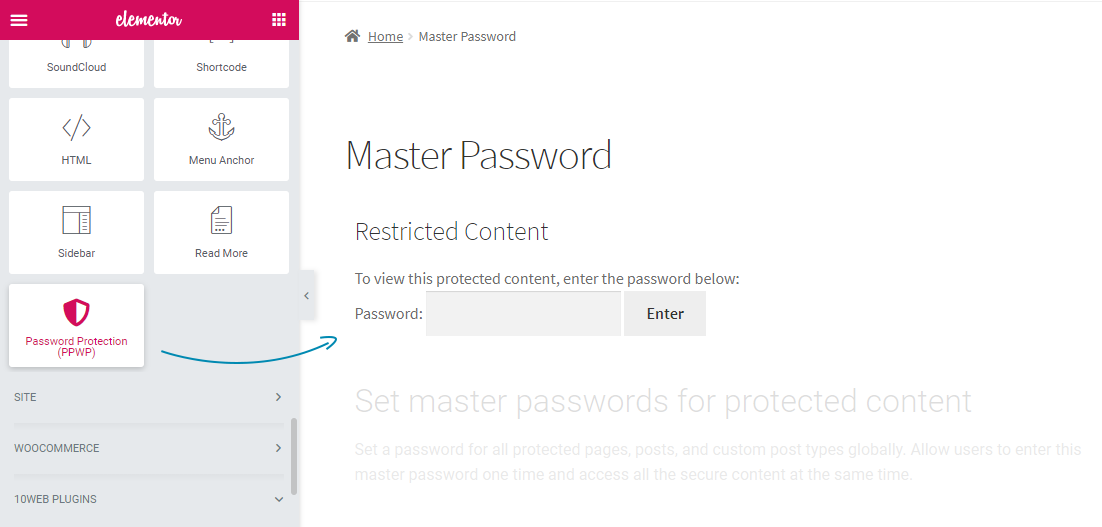
Master Passwords
When there are many password protected posts on your website, it becomes difficult and time-consuming to create or manage passwords for each content. That’s when master passwords come in handy.
Users will be able to unlock all protected posts at once with just one master password.
Please note that this feature does not password protect all posts automatically. It simply allows you to use master passwords to unlock those that you’ve already password protected. Original passwords attached to each post will still be working, together with these master passwords.
The master passwords feature also comes with an easy-to-use interface allowing you to create unlimited master passwords simultaneously and manage all of them in one place. You will have full control to (de)activate, delete passwords as well as restrict usage passwords by usage, time, and user role.
Customize Password Form & Messages with WordPress Customizer
Customize all your password forms, i.e. the sitewide login form, single and partial content protection (PCP) password form, via WordPress Customizer.
You’re allowed to remove or change our default logo to your own in the sitewide login form. You can also change the color, background and design of the form to match your theme’s color scheme.
Besides the default login page, you can now select one from our pre-designed themes that suits your site best.
As for single password form, you’re able to change the WordPress default error message as well as password form instructions, namely headline, descriptions, password input placeholder, and button text.
The button and text’s font-size, color, and background can also be customized through a friendly WYSIWYG HTML Editor.
Hide Password Protected Content
By default, your password protected content will still show up on various pages such as home and category page once published.
This feature allows you to control the visibility of your protected post types in different views:
- Hide posts from Recent Posts widgets
- Hide posts from Next & Previous link on the single post
- Hide posts on search results
- Hide posts from Yoast SEO Google XML Sitemaps, and RSS
- Hide posts on Frontpage, Author, and Archive pages including tag and category page
- Protected pages hidden from search results, home page & everywhere they’re listed
Even though the posts are hidden, those who know the URL will still have access to the pages (but not the protected content).
Show Password Protected Content in RSS Feeds
Even though you choose to show password protected content in RSS, a password form will display instead of its actual content by default. With PPWP plugin, you’re able to show all protected content in RSS feeds. There is also an option to make your RSS feeds public even if your site is hidden.
Show Password Protected Post Excerpts
Many WordPress themes hide the post excerpt and featured image of password protected content by default. Enable this option to show excerpts of your password protect posts.
Password’s Cookies Expiration
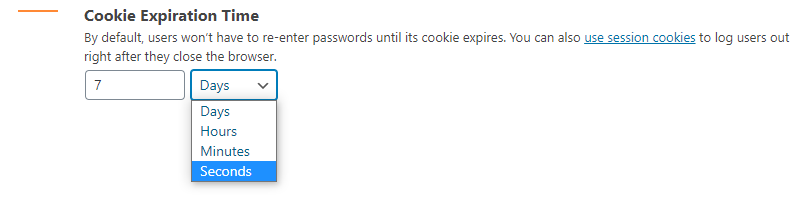
By default, users won’t have to re-enter passwords to access a protected page or post until its cookies expire. You can change the default cookie expiration time on the plugin settings page to whatever suits your use case. Or else, choose session cookies which will be removed automatically whenever users close their browser. As a result, users have to re-enter password when opening the browser again.
Pro Version
Our PPWP Pro version offers many more advanced features:
- Password protect all WordPress custom post types including WooCommerce Products
- Password protect custom fields and custom page templates
- Manage all passwords while editing content or via our friendly popup
- Create unlimited passwords per user role
- Create the same passwords for multiple user roles
- Bypass password protection with Quick Access Links
- Customize Quick Access Links
- Create wildcard passwords
- Unlock Partial Content Protection (PCP) with master passwords
- Automatically protect all sub pages with one password
- Create multiple passwords for each protected category
- Set the same password for multiple pages
- Create unlimited global passwords for partial content protection shortcode
- Redirect to specific URLs after entering site-wide protection passwords
- Unlock all content at once and unlock partial sitewide protection with Group Password Protection extension
- Give users access to password-protected content upon form submissions with Forms Integration extension
- Use reCAPTCHA or Contact Form 7 in place of the password form with Passwordless Authentication extension
- Track password usage, i.e. the time they’re logged in, IP address and browser used, with Statistics extension
- Password protect WordPress categories with different access levels
- Integrate with Prevent Direct Access Gold to password protect files embedded in content
- Sell password-protected content via WooCommerce with WooCommerce Integration extension.
- Protect the entire shop page, including individual products and category pages with the same passwords.
- Import and export passwords as well as requiring users to provide both password and username or email to unlock protected content with Password Suite extension.
- Restrict password usage based on WordPress users or IP addresses as well as setting password expiration time after first use with Smart Restriction extension.
- Password protect files outside Media Library
Check out Password Protect WordPress (PPWP) Pro now!
Get access to all extensions and priority support with any of our PPWP Pro membership plans.
Multilingual supported
Our plugin works out of the box with the top leading multilingual WordPress plugins such as WPML, Polylang, and Loco Translate. In other words, you can translate the password forms, including its headline, description, error message as well as placeholder and button text into the different languages.
Documentation and support
- For documentation and tutorials go to our Documentation
- Check out compatible hostings, themes, and plugins with PPWP
- Visit our PPWP Pro landing pages for more examples
- If you have any more questions or want to request new features, contact us through this form or drop us an email at hello@preventdirectaccess.com
Note that we have to migrate your default WordPress passwords to our systems for our protection to work properly.
You may want to restore all your previously created passwords before deactivating the plugin to avoid all protected pages and posts becoming public.
Please check out these guides on how to password protect WordPress page the right way.
Privacy Policy
PPWP is designed to fully respect and protect personal information of its users. It does not collect any user information without your consent.
We’re using GetResponse to communicate with our users in case they would like to opt in and receive future updates from us.
User’s emails will be first sent to an external API on our secure server before getting managed by GetResponse.
Please see our complete Privacy Policy and GetResponse’s.
Installation
There are 2 easy ways to install our plugin:
1.The standard way
- Go to menu Plugins > Add New from your WordPress admin dashboard
- Search for “WordPress Password Protect Page – PPWP Plugin”
- Click to install
- Activate Password Protect WordPress Lite from your Plugins page
- Go to the editor page and set a secure password to protect your content
- Read the documentation to get started
2.The nerdy way
- Download the plugin (.zip file) on the right column of this page
- In your WordPress Admin, go to menu Plugins > Add New
- Select the tab “Upload”
- Upload the .zip file you just downloaded
- Activate Password Protect WordPress Lite from your Plugins page
- Go to the editor page and set a secure password to protect your content
- Read the documentation to get started
Frequently asked questions
Why do I get an error message after entering the correct password?
Below are 4 common reasons why the issue happens: You’re protecting content on an ACF or WordPress custom field You’re using a custom page template You’re using a conflicting theme and unsupported page builder plugin You’re using an unsupported caching method and/or plugin Please follow this guide on how to quickly troubleshoot these common issues. Learn more about why password protected page is not working.
Does the plugin password protect WooCommerce products?
Yes, the Pro version helps password protect any WordPress custom post types, including WooCommerce product pages.
Will my password protected content show up in Google search results?
The Free version doesn’t block search engines from finding and indexing your content. However, your content won’t appear on Google and other search engine results once password protected by the Pro version.
Can I password protect parts of WordPress page content?
Yes, you can secure parts of your post and page content with a password using our [ppwp] shortcode.
Could I create and manage all shortcode passwords at one place?
Yes, you will be able to generate passwords under our plugin’s settings page and then add them to [ppwp] shortcode in order to protect your content sections with Pro version. All these passwords will be tracked and controlled in one place.
Could users see which passwords they’re typing?
Yes, you can add a “show password” button allowing users to see what they’re typing. This button can be added either via WordPress Customizer or manual template modification.
Could I password protect a parent and all its child pages at once?
Yes, the Pro version enables you to automatically password protect child pages once the parent page is locked up.
Changelog
N/A
1.9.25
- [BugFix] Fixed an issue where changes to certain text fields in the WordPress Customizer were not saved when clicking Publish.
1.9.24
- [BugFix] Fixed authorization issues where several settings-update actions and the sitewide redirect and password-migration processes could be triggered without properly verifying the user’s permission level.
- [Improvement] Strengthened capability checks and access validation across the plugin following a full security review.
1.9.23
- [Compatibility] Confirmed compatibility with WordPress 7.1 and tested the plugin with the latest WordPress version to ensure continued compatibility and stability.
1.9.22
- [BugFix] Escaped placeholder and button label attributes in the [ppwp] shortcode’s password form to prevent HTML/attribute breakout.
1.9.21
- [BugFix] Resolve security bypass by disabling standalone direct URL querying for Section Protection templates.
- [BugFix] Escape attributes in Elementor and Beaver Builder shortcode layouts to prevent HTML/attribute breakout.
- [Improvement] Sanitize and escape theme customizer output settings to prevent CSS rule injections.
1.9.20
- [BugFix] Fixed an authorization issue related to password protection settings for posts and pages.
- [BugFix] Improved capability checks and access validation when managing protected content.
Screenshots
![Wrap your private content section with our [ppwp] shortcode.](https://ps.w.org/password-protect-page/assets/screenshot-7.png?rev=2347808)
For developers
Is this your plugin? Show off the numbers.
Add a live badge to your site, docs or GitHub README. It updates on its own — no account needed.
Best PPWP – Password Protect Pages alternatives
All password plugins →





FAQ
PPWP – Password Protect Pages: quick answers
Straight answers, pulled from live WordPress.org data.
Live data from WordPress.org · checked Sep 26, 2026
Is PPWP – Password Protect Pages free?
Yes. PPWP – Password Protect Pages is free to download and use from the official WordPress.org plugin directory.
Is PPWP – Password Protect Pages safe to use in 2026?
Yes — PPWP – Password Protect Pages is a safe, well-maintained plugin to use in 2026. It runs on 30K+ sites, is rated 4.7/5 and was last updated 5 days ago, and scores 94/100 on our health check.
How many websites use PPWP – Password Protect Pages?
PPWP – Password Protect Pages is active on 30K+ WordPress websites and has been downloaded 1,193,858 times since it launched in July 2018. It was downloaded 59,456 times in the last 30 days.
Does PPWP – Password Protect Pages work with WordPress 7.1?
Yes. The developer has tested PPWP – Password Protect Pages up to WordPress 7.1.2, the latest release. It requires WordPress 5.2 or newer.
What PHP version does PPWP – Password Protect Pages need?
PPWP – Password Protect Pages requires PHP 5.6 or higher. Most hosts run PHP 8.x today, so it works on any modern WordPress hosting.
When was PPWP – Password Protect Pages last updated?
The latest version, 1.9.25, was released on September 21, 2026 (5 days ago).
Who makes PPWP – Password Protect Pages?
PPWP – Password Protect Pages is developed and maintained by WP Folio Team.
What are the best alternatives to PPWP – Password Protect Pages?
The most popular alternatives to PPWP – Password Protect Pages are Theme My Login (50K+ installs), Google Authenticator (20K+ installs) and Frontend Reset Password (10K+ installs).
Powered by PageForge
Want thousands of pages that rank like these? Build them in an afternoon.
This directory runs on the same engine as PageForge. Turn any spreadsheet, CSV or API into thousands of fast, SEO-ready WordPress pages — with schema, internal links and AI-written copy baked in.
- CSV, Google Sheets & API data sources
- AI content, schema & internal links per page
- Works with Elementor, Gutenberg, Yoast & Rank Math
- Free on WordPress.org — no credit card


