


Multiple Post Passwords
Set multiple passwords for your protected pages so you can give them to different users.

Use with caution
Multiple Post Passwords works, but test it on a staging site before relying on it in 2026. It runs on 2K+ sites, is rated 5/5 and was last updated 10 months ago, and scores 59/100 on our health check.
- Momentum — downloads up 62.9% vs the previous 30 days
- Only tested up to WordPress 6.8 (latest is 7.1)
How does it stack up?
Side-by-side on installs, updates, ratings & support


Daily downloads
Download spikes usually follow a new release — each site that auto-updates counts as a download.
Rankings
Where Multiple Post Passwords stands todayWordPress.org search rankings
Live position in the plugin search, top 100| Keyword | Position |
|---|---|
| multiple | #16 |
| page | >100 |
| password | #33 |
| post | >100 |
| protected | #45 |
Version adoption
Share of active sites per release.
Rating breakdown
★★★★★★★★★★ 5 from 11 reviews
About Multiple Post Passwords
From the official readme · v1.1.4Description
This is a simple Plugin that lets you set multiple passwords for your password protected posts and pages.
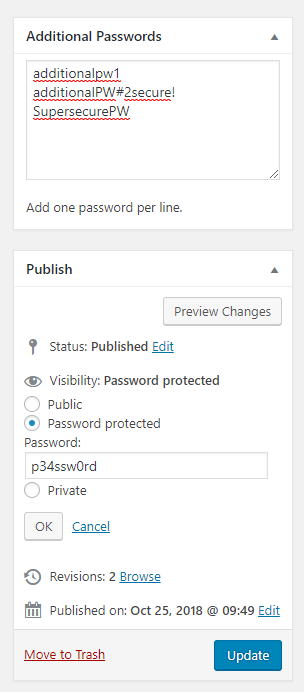
On posts/pages with password protection it will show an extra Metabox with a field to input additional passwords, one in each line.
Note that if you just changed a post/page to password protection you have to save once so that the extra field appears.
Expire passwords
You can also make passwords expire after x hours when being used. You can find the settings under Settings -> Multiple Post Passwords.
Note that the actual deletion of the passwords is triggered by a cronjob which is run every 30 minutes. So even if you set your expiry time to very short, it may still take 30 minutes until the password really expires.
Also note that the expiration only works for the additional passwords, not for the standard WordPress page/post password.
Using lots of passwords on one page
If you are using lots of passwords on one page and the password check takes a long time, you should activate the alternative password check in the settings to speed up the password check.
Installation
- Upload the zip to the
/wp-content/plugins/directory - Activate the plugin through the ‘Plugins’ menu in WordPress
- Edit the post or page you want to protect with multiple passwords
- When you set a password and save once, the field to add multiple passwords will appear in the top right corner
- Set as many passwords as you wish, one in a line
Changelog
1.1.4
- fix PHP Warning: Undefined array key “mpp_alternative_password”
1.1.3
- fix issues with numeral passwords in alternative mode
- fix warning for calling _load_textdomain_just_in_time too early
1.1.2
- fix: improve output escaping in settings
- fix: fix some PHP warnings
1.1.1
- feature: add hook for password manipulation
1.1.0
- feature: add ability to expire used passwords
- feature: implement alternative password checking method -> quicker for alot of passwords
1.0.3
- improvement: implement cache to speed things up for many passwords in one post/page
Screenshots


For developers
Is this your plugin? Show off the numbers.
Add a live badge to your site, docs or GitHub README. It updates on its own — no account needed.
Best Multiple Post Passwords alternatives
All multiple plugins →



FAQ
Multiple Post Passwords: quick answers
Straight answers, pulled from live WordPress.org data.
Source: WordPress.org
Is Multiple Post Passwords free?
Yes. Multiple Post Passwords is free to download and use from the official WordPress.org plugin directory.
Is Multiple Post Passwords safe to use in 2026?
Multiple Post Passwords works, but test it on a staging site before relying on it in 2026. It runs on 2K+ sites, is rated 5/5 and was last updated 10 months ago, and scores 59/100 on our health check.
How many websites use Multiple Post Passwords?
Multiple Post Passwords is active on 2K+ WordPress websites and has been downloaded 26,785 times since it launched in October 2018. It was downloaded 523 times in the last 30 days.
Does Multiple Post Passwords work with WordPress 7.1?
Multiple Post Passwords is officially tested up to WordPress 6.8.13, while the latest release is 7.1.5. It may still work, but try it on a staging site first.
What PHP version does Multiple Post Passwords need?
Multiple Post Passwords requires PHP 5.6 or higher. Most hosts run PHP 8.x today, so it works on any modern WordPress hosting.
When was Multiple Post Passwords last updated?
The latest version, 1.1.4, was released on January 17, 2026 (10 months ago).
Who makes Multiple Post Passwords?
Multiple Post Passwords is developed and maintained by Andreas Münch.
What are the best alternatives to Multiple Post Passwords?
The most popular alternatives to Multiple Post Passwords are Multiple Domain (10K+ installs), Multi Image Metabox (6K+ installs) and Fr Multi Bank Transfer Paym… (2K+ installs).
Powered by PageForge
One template and a spreadsheet. A real page for every search.
PageForge turns each row of a CSV into a WordPress page with its own title, URL, SEO fields and schema, built on the layout you already designed. Free on WordPress.org.
- CSV and XLSX, plus Google Sheets on Professional and Enterprise
- Its own title, URL, SEO fields and schema for every page
- Works with the block editor, Elementor, Divi and Avada
- Free on WordPress.org, no credit card