



Google Authenticator
Google Authenticator for your WordPress blog.

Safe pick
Yes — Google Authenticator is a safe, well-maintained plugin to use in 2026. It runs on 20K+ sites, is rated 4.3/5 and was last updated 1 month ago, and scores 83/100 on our health check.
- Proven at scale on 20K+ active sites
- Tested with the latest WordPress (7.1)
How does it stack up?
Side-by-side on installs, updates, ratings & support



Daily downloads
Download spikes usually follow a new release — each site that auto-updates counts as a download.
Rankings
Where Google Authenticator stands todayWordPress.org search rankings
Live position in the plugin search, top 100| Keyword | Position |
|---|---|
| authentication | #55 |
| login | >100 |
| otp | #25 |
| password | #80 |
| security | >100 |
Version adoption
Share of active sites per release.
Rating breakdown
★★★★★★★★★★ 4.3 from 135 reviews
About Google Authenticator
From the official readme · v0.56Description
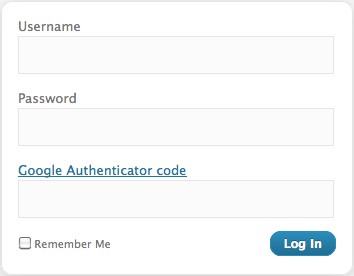
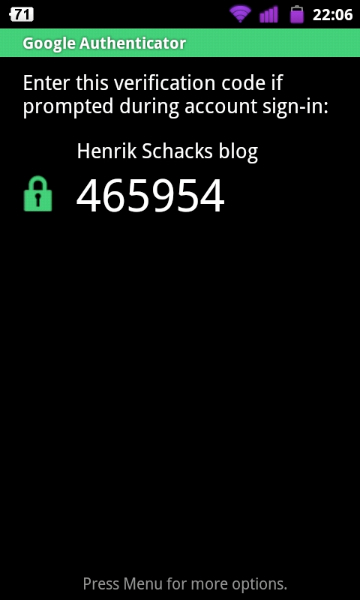
The Google Authenticator plugin for WordPress gives you two-factor authentication using the Google Authenticator app for Android/iPhone/Blackberry.
If you are security aware, you may already have the Google Authenticator app installed on your smartphone, using it for two-factor authentication on Gmail/Dropbox/Lastpass/Amazon etc.
The two-factor authentication requirement can be enabled on a per-user basis. You could enable it for your administrator account, but log in as usual with less privileged accounts.
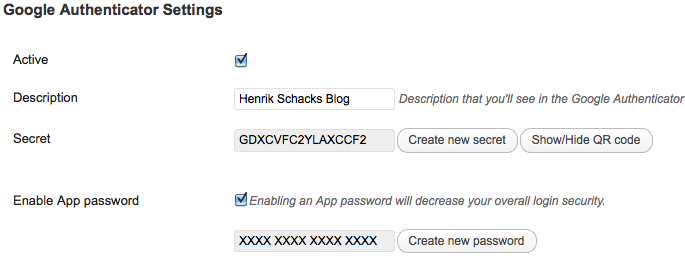
If You need to maintain your blog using an Android/iPhone app, or any other software using the XMLRPC interface, you can enable the App password feature in this plugin,
but please note that enabling the App password feature will make your blog less secure.
Credits
Thanks to:
Miguel Mendez Z for responsibly disclosing a CSRF account lockout vulnerability.
Oleksiy for a bugfix in multisite.
Paweł Nowacki for the Polish translation
Fabio Zumbi for the Portuguese translation
Guido Schalkx for the Dutch translation.
Henrik.Schack for writing/maintaining versions 0.20 through 0.48
Tobias Bäthge for his code rewrite and German translation.
Pascal de Bruijn for his “relaxed mode” idea.
Daniel Werl for his usability tips.
Dion Hulse for his bugfixes.
Aldo Latino for his Italian translation.
Kaijia Feng for his Simplified Chinese translation.
Alex Concha for his security tips.
Jerome Etienne for his jquery-qrcode plugin.
Sébastien Prunier for his Spanish and French translation.
Installation
- Make sure your webhost is capable of providing accurate time information for PHP/WordPress, ie. make sure a NTP daemon is running on the server.
- Install and activate the plugin.
- Enter a description on the Users -> Profile and Personal options page, in the Google Authenticator section.
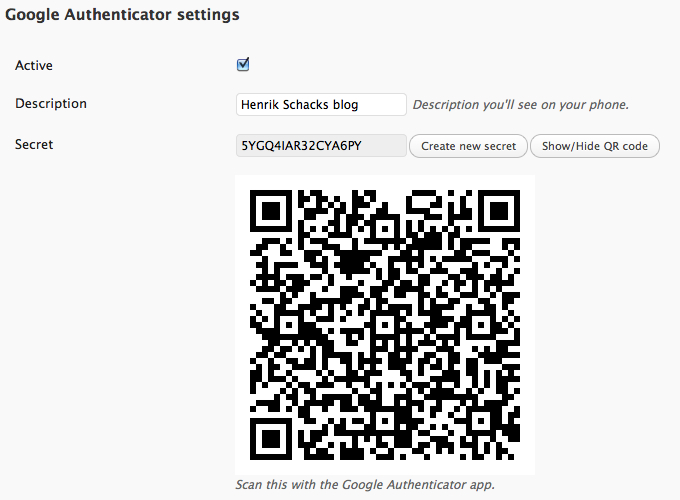
- Scan the generated QR code with your phone, or enter the secret manually, remember to pick the time based one.
You may also want to write down the secret on a piece of paper and store it in a safe place. - Remember to hit the Update profile button at the bottom of the page before leaving the Personal options page.
- That’s it, your WordPress blog is now a little more secure.
Frequently asked questions
Can I use Google Authenticator for WordPress with the Android/iPhone apps for WordPress?
Yes, you can enable the App password feature to make that possible, but notice that the XMLRPC interface isn’t protected by two-factor authentication, only a long password.
I want to update the secret, should I just scan the new QR code after creating a new secret?
No, you’ll have to delete the existing account from the Google Authenticator app on your smartphone before you scan the new QR code, that is unless you change the description as well.
I am unable to log in using this plugin, what’s wrong ?
The Google Authenticator verification codes are time based, so it’s crucial that the clock in your phone is accurate and in sync with the clock on the server where your WordPress installation is hosted. If you have an Android phone, you can use an app like ClockSync to set your clock in case your Cell provider doesn’t provide accurate time information Another option is to enable “relaxed mode” in the settings for the plugin, this will enable more valid codes by allowing up to a 4 min. timedrift in each direction.
I have several users on my WordPress installation, is that a supported configuration ?
Yes, each user has his own Google Authenticator settings.
During installation I forgot the thing about making sure my webhost is capable of providing accurate time information, I’m now unable to login, please help.
If you have SSH or FTP access to your webhosting account, you can manually delete the plugin from your WordPress installation, just delete the wp-content/plugins/google-authenticator directory, and you’ll be able to login using username/password again.
I don’t own a Smartphone, isn’t there another way to generate these secret codes ?
Yes, there is a webbased version here : https://gauth.apps.gbraad.nl/ Github project here : https://github.com/gbraad/gauth
Can I create backupcodes ?
No, but if you’re using an Android smartphone you can replace the Google Authenticator app with Authenticator Plus. It’s a really nice app that can import your existing settings, sync between devices and backup/restore using your sd-card. It’s not a free app, but it’s well worth the money.
Any known incompatabilities ?
Yes, the Man-in-the-middle attack/replay detection code isn’t compatible with the test/setup mode in the “Stop spammer registration plugin”, please remember to remove the “Check credentials on all login attempts” checkmark before installing my plugin.
Changelog
0.56
- Fixed CSRF account lockout bug.
0.55
- Improved PHP compatibility for PHP 7.4 through 8.5.
- Fixed deprecated and strict runtime issues in plugin code.
- Improved compatibility and safety of Base32 handling.
0.54
- Fixed a bug in multisite.
0.53
- Add a Polish translation
0.52
- Add a Dutch translation
- Add a Portuguese translation
0.51
- Fix a regression that broke app passwords
Screenshots

For developers
Is this your plugin? Show off the numbers.
Add a live badge to your site, docs or GitHub README. It updates on its own — no account needed.
Best Google Authenticator alternatives
All authentication plugins →




FAQ
Google Authenticator: quick answers
Straight answers, pulled from live WordPress.org data.
Live data from WordPress.org · checked Sep 27, 2026
Is Google Authenticator free?
Yes. Google Authenticator is free to download and use from the official WordPress.org plugin directory.
Is Google Authenticator safe to use in 2026?
Yes — Google Authenticator is a safe, well-maintained plugin to use in 2026. It runs on 20K+ sites, is rated 4.3/5 and was last updated 1 month ago, and scores 83/100 on our health check.
How many websites use Google Authenticator?
Google Authenticator is active on 20K+ WordPress websites and has been downloaded 758,305 times since it launched in May 2011. It was downloaded 7,433 times in the last 30 days.
Does Google Authenticator work with WordPress 7.1?
Yes. The developer has tested Google Authenticator up to WordPress 7.1.2, the latest release. It requires WordPress 4.5 or newer.
When was Google Authenticator last updated?
The latest version, 0.56, was released on August 23, 2026 (1 month ago).
Who makes Google Authenticator?
Google Authenticator is developed and maintained by Ivan.
What are the best alternatives to Google Authenticator?
The most popular alternatives to Google Authenticator are Limit Login Attempts (300K+ installs), WPS Limit Login (100K+ installs) and Two Factor (100K+ installs).
Powered by PageForge
Want thousands of pages that rank like these? Build them in an afternoon.
This directory runs on the same engine as PageForge. Turn any spreadsheet, CSV or API into thousands of fast, SEO-ready WordPress pages — with schema, internal links and AI-written copy baked in.
- CSV, Google Sheets & API data sources
- AI content, schema & internal links per page
- Works with Elementor, Gutenberg, Yoast & Rank Math
- Free on WordPress.org — no credit card


