



Login for Google Apps
Login for Google Apps allows existing WordPress user accounts to log in to your website using Google to securely authenticate their account. This means that if they are already logged into Gmail – they can simply click…

Use with caution
Login for Google Apps works, but test it on a staging site before relying on it in 2026. It runs on 10K+ sites, is rated 4.6/5 and was last updated 1 year ago, and scores 54/100 on our health check.
- Proven at scale on 10K+ active sites
- Loved by users — 4.6/5 from 64 reviews
- No update in over a year
- Only tested up to WordPress 6.8 (latest is 7.1)
How does it stack up?
Side-by-side on installs, updates, ratings & support



Daily downloads
Download spikes usually follow a new release — each site that auto-updates counts as a download.
Rankings
Where Login for Google Apps stands todayWordPress.org search rankings
Live position in the plugin search, top 100| Keyword | Position |
|---|---|
| authentication | >100 |
| >100 | |
| login | >100 |
| oauth | #71 |
| sso | #40 |
Version adoption
Share of active sites per release.
Rating breakdown
★★★★★★★★★★ 4.6 from 64 reviews
About Login for Google Apps
From the official readme · v3.5.2Description
Login for Google Apps allows existing WordPress user accounts to log in to your website using Google to securely authenticate their account. This means that if they are already logged into Gmail – they can simply click their way through the WordPress login screen – no username or password is explicitly required!
Login for Google Apps uses secure oAuth2 authentication recommended by Google, including 2-factor authentication (2FA) if enabled for your Google Workspace (formerly known as Google Apps and G Suite) accounts.
This is far simpler to configure than the older SAML protocol.
Login for Google Apps is trusted by thousands of organizations from schools to large public companies. Login for Google Apps for WordPress is the most popular enterprise grade plugin enabling login and user management based on your Google Workspace domain.
Its plugin setup requires you to have admin access to any Google Workspace domain, or a regular Gmail account, to register and obtain two simple codes from Google.
Support and Premium features
Full support and premium features are also available for purchase:
Eliminate the need for Google Workspace (previously called “Google Apps and G Suite”) domain admins to separately manage WordPress user accounts, and get peace of mind that only authorized employees have access to your organization’s websites and intranet.
See our website at wp-glogin.com for more details.
The Premium version allows everyone in your Google Workspace (Google Apps / G Suite) domain to log in to WordPress – an account will be automatically created in WordPress if one doesn’t already exist.
Our Enterprise version goes further, allowing you to specify granular access and role controls based on Google Group or Organizational Unit membership.
You can also see logs of accounts created and roles changed by the plugin.
Extensible Platform
Login for Google Apps allows you to centralize your site’s Google functionality and build your own extensions, or use third-party extensions, which require no configuration themselves and share the same user authentication and permissions that users already allowed for Login for Google Apps itself.
Using our platform, your website appears to Google accounts as one unified ‘web application’, making it more secure and easier to manage.
Google Drive Embedder is an extension plugin allowing
users to browse for Google Drive documents to embed directly in their posts or pages.
Google Apps Directory is an extension plugin allowing
logged-in users to search your Google Apps employee directory from a widget on your intranet or client site.
Google Profile Avatars
is available on our website. It displays users’ Google profile photos in place of their avatars throughout your site.
Login for Google Apps works on single or multisite WordPress websites or private intranets.
Requirements
One-click login will work for the following domains and user accounts:
- Google Workspace Starter
- Google Workspace Business Standard
- Google Workspace Business Plus
- Google Workspace Enterprise
- Google Workspace for Nonprofits
- Google Workspace for Government
- Google Classroom (Google Workspace for Education)
- Personal gmail.com and googlemail.com emails
Login for Google Apps uses the latest secure OAuth2 authentication recommended by Google. Other 3rd party authentication plugins may allow you to use your Google username and password to login, but they do not do this securely unless they also use OAuth2. This is discussed further in the FAQ.
Translations
This plugin currently operates in multiple languages.
We welcome volunteers to translate into their own language. If you would like to contribute a translation, please open the WordPress.org Translation portal.
Website and Upgrades
Please see our website https://wp-glogin.com/ for more information about this free plugin and extra features available in our Premium and Enterprise upgrades, plus support details, other plugins, and useful guides for admins of WordPress sites and Google Apps.
The Premium and Enterprise versions eliminate the need to manage user accounts in your WordPress site – everything is synced from Google Apps instead.
If you are building your organization’s intranet on WordPress, try out our All-In-One Intranet plugin.
Installation
To set up the plugin, you will need access to a Google Workspace (previously known as Google Apps or G Suite) domain as an administrator, or just a regular Gmail account.
Easiest way:
- Go to your WordPress admin control panel’s plugin page
- Search for “Login for Google Apps” or “Google Apps Login”
- Click Install
- Click Activate on the plugin
- Go to ‘Login for Google Apps’ under Settings in your WordPress admin area
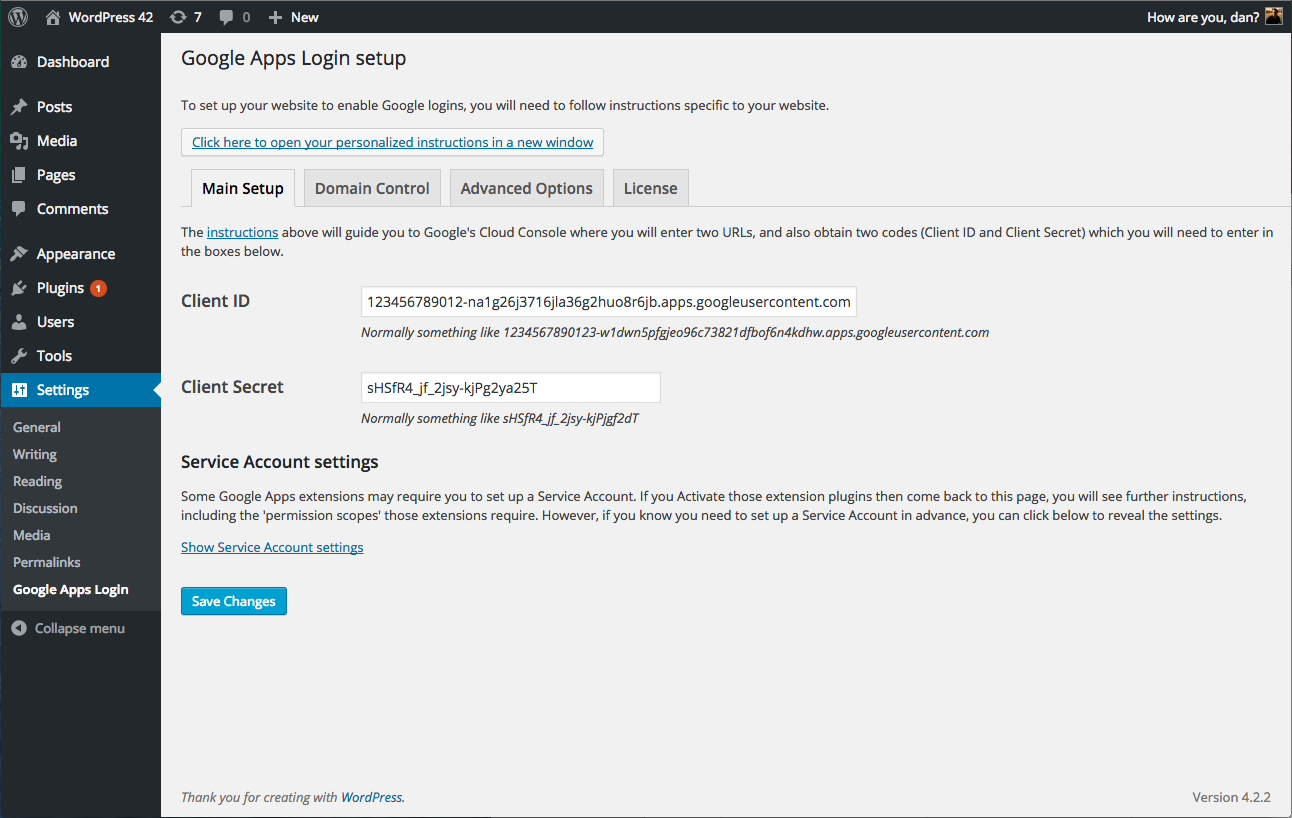
- Follow the instructions on that page to obtain two codes from Google, and also submit two URLs back to Google
If you cannot install from the WordPress plugins directory for any reason, and need to install from ZIP file:
- Upload
google-apps-logindirectory and contents to the/wp-content/plugins/directory, or upload the ZIP file directly in the Plugins section of your WordPress admin - Follow the instructions from step 4 above
Personalized instructions to configure the plugin by registering your site with Google Apps are linked from the WordPress admin panel once you have activated the plugin.
For a (non-personalized) preview of these instructions please click here.
Frequently asked questions
How can I obtain support for this product?
Full support is available if you purchase the appropriate license from the author via: https://wp-glogin.com/glogin/ Please feel free to email contact us on https://wp-glogin.com/ with any questions, as we may be able to help, but you may be required to purchase a support license if the problem is specific to your installation or requirements.
Is login restricted to the Google Workspace domain I use to set up the plugin?
No, once you set up the plugin, any WordPress accounts whose email address corresponds to any Google account, whether on a different Google Workspace domain or even a personal gmail.com account, will be able to use ‘Login with Google’ to easily connect to your WordPress site. However, our premium plugin has features that greatly simplify your WordPress user management if your WordPress users are mostly on the same Google Workspace domain(s).
Does the plugin work with HTTP or HTTPS login pages?
The plugin will work whether your site is configured for HTTP or HTTPS. However, you may have configured your site to run so that the login pages can be accessed by either HTTP or HTTPS. In that case, you may run into problems. We recommend that you set FORCE_SSL_ADMIN to true. This will ensure that all users are consistently using HTTPS for login. You may then need to ensure the Redirect URL and Web Origin in the Google Cloud Console are set as HTTPS (this will make sense if you follow the installation instructions again). If for some reason you cannot set FORCE_SSL_ADMIN, then instead you…
Does the plugin work on Multisite?
It is written, tested, and secure for multisite WordPress, both for subdirectories and subdomains, and must be activated network-wide for security reasons. There are many different possible configurations of multisite WordPress, however, so you must test carefully if you have any other plugins or special setup. In a multisite setup, you will see an extra option in Settings -> Login for Google Apps, named ‘Use sub-site specific callback from Google’. Read details in the configuration instructions (linked from the Settings page). This setting will need to be ON if you are using any domain…
Is it secure?
Yes, and depending on your setup, it can be much more secure than just using WordPress usernames and passwords. However, the author does not accept liability or offer any guarantee, and it is your responsibility to ensure that your site is secure in the way you require. In particular, other plugins may conflict with each other, and different WordPress versions and configurations may render your site insecure.
Does it conflict with any other plugins?
Sometimes conflicts can arise. We have built workarounds for some problems, and would always appreciate your feedback to resolve any issues you might encounter yourself. One known issue is with iThemes Security: the settings ‘filter suspicious query strings’ and ‘filter long URL strings’ can both cause intermittent conflicts and should be turned off if you are happy with the implications. My Private Site – Try setting the My Private Site option “Omit ?redirect_to= from URL (this option is recommended for Custom Login pages)”. WP Email Login – incompatible with Login for Google Apps
How does it compare to other 3rd party auth plugins?
Login for Google Apps uses the latest secure OAuth2 authentication recommended by Google. Other 3rd party authentication plugins may allow you to use your Google username and password to login, but they do not always do this securely: Other plugins: Users’ passwords may be handled by your blog’s server, potentially unencrypted. If these are compromised, hackers would be able to gain access to your Google email accounts! This includes all Google Workspace apps (Gmail, Drive, Calendar, etc.), and any other services which use your Google account to log in. This plugin: Users’ passwords are only…
What are the system requirements?
PHP 7.2.x or higher with JSON extensions WordPress 5.5 or above And you will need a Google account to set up the plugin.
Changelog
3.5.2
- Changed: Updated compatibility with WordPress 6.8.
- Fixed: One Google Services class was missing in the packaged library resulting in Google Drive Embedder Enterprise not working correctly.
- Fixed: Various PHP Deprecation notices and warnings in the Google Services library.
3.5.1
- Fixed: There was a fatal error when editing a single user in the admin area due to the incorrect usage of the built-in WordPress filter.
3.5.0
- IMPORTANT: The minimum WordPress version has been raised to WordPress 5.5. Technically the plugin still works on older versions as well, but we will not actively support them.
- IMPORTANT: The minimum PHP version has been raised to PHP 7.2.
- Changed: Updated compatibility with WordPress 6.7.
- Changed: Updated compatibility with PHP 8.
- Changed: As users may have different Google accounts, and they may not be logged in in the correct one, we now request users to confirm the correct account to use when they want to log in.
- Fixed: A lot of plugin strings in its admin area were not translatable.
- Fixed: Make all URLs in the plugin to use the
httpsprotocol. - Fixed: Fixed all the deprecation and compatibility issues with the latest PHP versions, including in the Google API Services library.
- Fixed: The “Force user to confirm Google permissions every time” option did not work correctly because we were passing an incorrect value to Google.
- Fixed: SVG images used to display Google logo were not rendering properly on various pages.
3.4.6
- Fixed: Auth errors when redirect login is enabled.
- Removed the
gal_login_form_readyjsfilter.
3.4.5
- Updated: Plugin name.
- Fixed: Admin escaping.
3.4.4
- Updated compatibility with the WordPress 5.7 release.
- The “Login with the Google” button removed static images generated same button using HTML code and use google svg icon.
- Bug fixed for header already sent.
Screenshots


For developers
Is this your plugin? Show off the numbers.
Add a live badge to your site, docs or GitHub README. It updates on its own — no account needed.
Best Login for Google Apps alternatives
All authentication plugins →





FAQ
Login for Google Apps: quick answers
Straight answers, pulled from live WordPress.org data.
Live data from WordPress.org · checked Sep 27, 2026
Is Login for Google Apps free?
Yes. Login for Google Apps is free to download and use from the official WordPress.org plugin directory.
Is Login for Google Apps safe to use in 2026?
Login for Google Apps works, but test it on a staging site before relying on it in 2026. It runs on 10K+ sites, is rated 4.6/5 and was last updated 1 year ago, and scores 54/100 on our health check.
How many websites use Login for Google Apps?
Login for Google Apps is active on 10K+ WordPress websites and has been downloaded 680,164 times since it launched in November 2013. It was downloaded 2,795 times in the last 30 days.
Does Login for Google Apps work with WordPress 7.1?
Login for Google Apps is officially tested up to WordPress 6.8.10, while the latest release is 7.1.2. It may still work, but try it on a staging site first.
What PHP version does Login for Google Apps need?
Login for Google Apps requires PHP 7.2 or higher. Most hosts run PHP 8.x today, so it works on any modern WordPress hosting.
When was Login for Google Apps last updated?
The latest version, 3.5.2, was released on May 8, 2025 (1 year ago).
Who makes Login for Google Apps?
Login for Google Apps is developed and maintained by Syed Balkhi.
What are the best alternatives to Login for Google Apps?
The most popular alternatives to Login for Google Apps are Limit Login Attempts (300K+ installs), WPS Limit Login (100K+ installs) and Two Factor (100K+ installs).
Powered by PageForge
Want thousands of pages that rank like these? Build them in an afternoon.
This directory runs on the same engine as PageForge. Turn any spreadsheet, CSV or API into thousands of fast, SEO-ready WordPress pages — with schema, internal links and AI-written copy baked in.
- CSV, Google Sheets & API data sources
- AI content, schema & internal links per page
- Works with Elementor, Gutenberg, Yoast & Rank Math
- Free on WordPress.org — no credit card


