



myRepono WordPress Backup Plugin
Automate your WordPress, website & database backups using the myRepono remote website backup service.

Consider an alternative
myRepono WordPress Backup Plugin shows warning signs in 2026 — compare the alternatives below before installing. It runs on 100+ sites, is rated 3.4/5 and was last updated 10 years ago, and scores 31/100 on our health check.
- Small user base (100+ active installs)
- Mixed reviews — 3.4/5 from 11 ratings
- No update in 10 years
- Only tested up to WordPress 4.6 (latest is 7.1)
How does it stack up?
Side-by-side on installs, updates, ratings & support



Daily downloads
Download spikes usually follow a new release — each site that auto-updates counts as a download.
Rankings
Where myRepono WordPress Backup P… stands todayWordPress.org search rankings
Live position in the plugin search, top 100| Keyword | Position |
|---|---|
| backup | >100 |
| mysql backup | >100 |
| website backup | >100 |
| wordpress backup | >100 |
| wp backup | >100 |
Version adoption
Share of active sites per release.
Rating breakdown
★★★★★★★★★★ 3.4 from 11 reviews
About myRepono WordPress Backup Plugin
From the official readme · v2.0.12Description
Automate your WordPress, website & database backups using the myRepono WordPress Backup Plugin & Service.
myRepono is an online website backup service which enables you to securely backup your WordPress web site files and mySQL database tables using an online and web-based management system. The myRepono online website backup service allows you to automate the process of backing up your entire WordPress web site and database, including all post, comments and user data, and your WordPress PHP, template and plugin files.
We provide an easy-to-install WordPress plugin which automates the myRepono API set-up and configuration process, enabling you to setup automated and remote website backups in a matter of minutes. Comprehensive backup management and restoration tools are provided via myRepono.com, giving you an independent backup management and restoration system if your WordPress installation is unavailable.
myRepono is a commercial backup service which uses a pay-as-you-go balance system. Users receive $5 USD free credit to help them get started, and with prices starting at 2 cents per day that’s enough free credit to backup most WordPress installations for several months!
Features & Benefits:
- Backup unlimited WordPress installations, including all files and database data.
- Backup unlimited individual files or complete folders using web-based file management tools.
- Backup individual mySQL tables or complete mySQL databases.
- Files are encrypted, transmitted and stored securely using up to 256-Bit encryption.
- Restore files individually or on mass from your backups at any time.
- Backups are compressed to as little as 10% of their original size.
- All management is controlled with web-based tool which can be accessed with any web-enabled device.
- Backup your site every hour, day, week, month, it’s up to you.
- Store as many or as few backups as you like at competitive data storage rates.
- View or download backups online using simple file management tools.
- With a single account you can backup an unlimited number of websites.
- Pay-as-you-go pricing from $0.02 USD per day, with $5 USD free trial!
- Fast and friendly online technical support available to assist you with all your questions.
- Compatible with 99% of web servers and hosting companies, and WordPress Multisite/Network compatible.
Installation
Automatic Installation
You can install the myRepono WordPress Backup Plugin using the WordPress plugin installation tool.
Simply log-in to your WordPress administration panel and go to the ‘Plugins’ section. When viewing the ‘Plugins’ section select the ‘Add New’ option to add a new plugin.
The ‘Add New Plugin’ section allows you to search for plugins, simply search for ‘myRepono’ and the ‘myRepono WordPress Backup Plugin’ will be shown along with an ‘Install’ option. Simply select the ‘Install’ option and WordPress will automatically install the plugin.
Once installed, a ‘myRepono’ option will be shown under your WordPress administration panel menu, just below the ‘Settings’ option. Select the ‘myRepono’ option and follow the on-screen instructions to complete the setup process.
Manual Installation
-
Create a directory called
myrepono-wordpress-backup-pluginin your/wp-content/plugins/directory. -
Upload ‘readme.txt’ file and all
*.phpfiles to the/wp-content/plugins/myrepono-wordpress-backup-plugin/directory. -
Upload
img,cssandjsdirectories to the/wp-content/plugins/myrepono-wordpress-backup-plugin/directory. -
Upload
apidirectory to the/wp-content/plugins/myrepono-wordpress-backup-plugin/directory. -
Ensure
datadirectory exists in/wp-content/plugins/myrepono-wordpress-backup-plugin/api/directory. -
If using a Unix/Linux web server, ensure
/wp-content/plugins/myrepono-wordpress-backup-plugin/api/data/directory is writable (e.g. permissions/chmod to755or777). -
Activate the myRepono WordPress Backup Plugin through the ‘Plugins’ menu in WordPress.
-
Go to ‘myRepono’ section listed in your WordPress administration panel menu.
Changelog
Minor code changes to address PHP 7 compatibility issues.
2.0.12
Minor code changes to address PHP 7 compatibility issues.
2.0.11
The plugin will now detect if a connection to the myRepono system has failed and will automatically disable connection attempts for 3 minutes – this is to protect against disruption to the WordPress administration panel if the myRepono system becomes unavailable. A ‘Create .htaccess File’ option has been added to the ‘Plugin’ section to allow for easy creation of a ‘.htaccess’ file to override restrictions which may be affecting access to the API file. Header tags have been updated to aid screenreader usage. Minor changes have been made to data tables to improve appearance in WordPress 4.3+.
2.0.10
Minor code adjustments.
2.0.9
Backup notes may now be added and edited via the ‘Backups’ section of the plugin when the ‘Manage Backups’ permission is enabled.
2.0.8
Support for new ‘Backup Notes’ feature has been added to the plugin enabling you to view any backup notes you have added. Minor adjustments to data table styles have been applied.
2.0.7
Minor adjustment to URL detection.
Screenshots
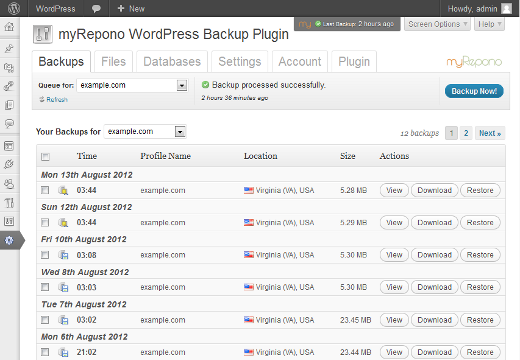


For developers
Is this your plugin? Show off the numbers.
Add a live badge to your site, docs or GitHub README. It updates on its own — no account needed.
Best myRepono WordPress Backup Plu… alternatives
All backup plugins →





FAQ
myRepono WordPress Backup Plugin: quick answers
Straight answers, pulled from live WordPress.org data.
Live data from WordPress.org · checked Oct 5, 2026
Is myRepono WordPress Backup Plugin free?
Yes. myRepono WordPress Backup Plugin is free to download and use from the official WordPress.org plugin directory.
Is myRepono WordPress Backup Plugin safe to use in 2026?
myRepono WordPress Backup Plugin shows warning signs in 2026 — compare the alternatives below before installing. It runs on 100+ sites, is rated 3.4/5 and was last updated 10 years ago, and scores 31/100 on our health check.
How many websites use myRepono WordPress Backup Plugin?
myRepono WordPress Backup Plugin is active on 100+ WordPress websites and has been downloaded 69,023 times since it launched in January 2011. It was downloaded 228 times in the last 30 days.
Does myRepono WordPress Backup Plugin work with WordPress 7.1?
myRepono WordPress Backup Plugin is officially tested up to WordPress 4.6.30, while the latest release is 7.1.2. It may still work, but try it on a staging site first.
When was myRepono WordPress Backup Plugin last updated?
The latest version, 2.0.12, was released on August 24, 2016 (10 years ago).
Who makes myRepono WordPress Backup Plugin?
myRepono WordPress Backup Plugin is developed and maintained by myRepono.
What are the best alternatives to myRepono WordPress Backup Plugin?
The most popular alternatives to myRepono WordPress Backup Plugin are All-in-One WP Migration and… (5M+ installs), UpdraftPlus: WP Backup & Mi… (4M+ installs) and Jetpack (3M+ installs).
Powered by PageForge
Want thousands of pages that rank like these? Build them in an afternoon.
This directory runs on the same engine as PageForge. Turn any spreadsheet, CSV or API into thousands of fast, SEO-ready WordPress pages — with schema, internal links and AI-written copy baked in.
- CSV, Google Sheets & API data sources
- AI content, schema & internal links per page
- Works with Elementor, Gutenberg, Yoast & Rank Math
- Free on WordPress.org — no credit card


