


MojoAuth Passwordless Authentication
The MojoAuth Passwordless Authentication WordPress plugin replaces standard WordPress login forms with the passwordless authentication method. It provides a robust and secure passwordless authentication mechanism to…

Consider an alternative
MojoAuth Passwordless Authentic… shows warning signs in 2026 — compare the alternatives below before installing. It runs on 10+ sites, is rated 3.7/5 and was last updated 4 years ago, and scores 26/100 on our health check.
- Small user base (10+ active installs)
- Very few reviews so far
- No update in 3 years
- Only tested up to WordPress 6.1 (latest is 7.1)
How does it stack up?
Side-by-side on installs, updates, ratings & support



Daily downloads
Download spikes usually follow a new release — each site that auto-updates counts as a download.
Rankings
Where MojoAuth Passwordless Authe… stands todayWordPress.org search rankings
Live position in the plugin search, top 100| Keyword | Position |
|---|---|
| authentication | >100 |
| Email Magic link | >100 |
| Email OTP | >100 |
| SMS Authentication | >100 |
| social login | >100 |
Version adoption
Share of active sites per release.
Rating breakdown
★★★★★★★★★★ 3.7 from 3 reviews
About MojoAuth Passwordless Authentication
From the official readme · v2.7Description
The MojoAuth Passwordless Authentication WordPress plugin replaces standard WordPress login forms with the passwordless authentication method. It provides a robust and secure passwordless authentication mechanism to your WordPress site that offers the users a way to verify themselves while not having to remember or manually type passwords, which in turn provides stronger security and fewer breaches.
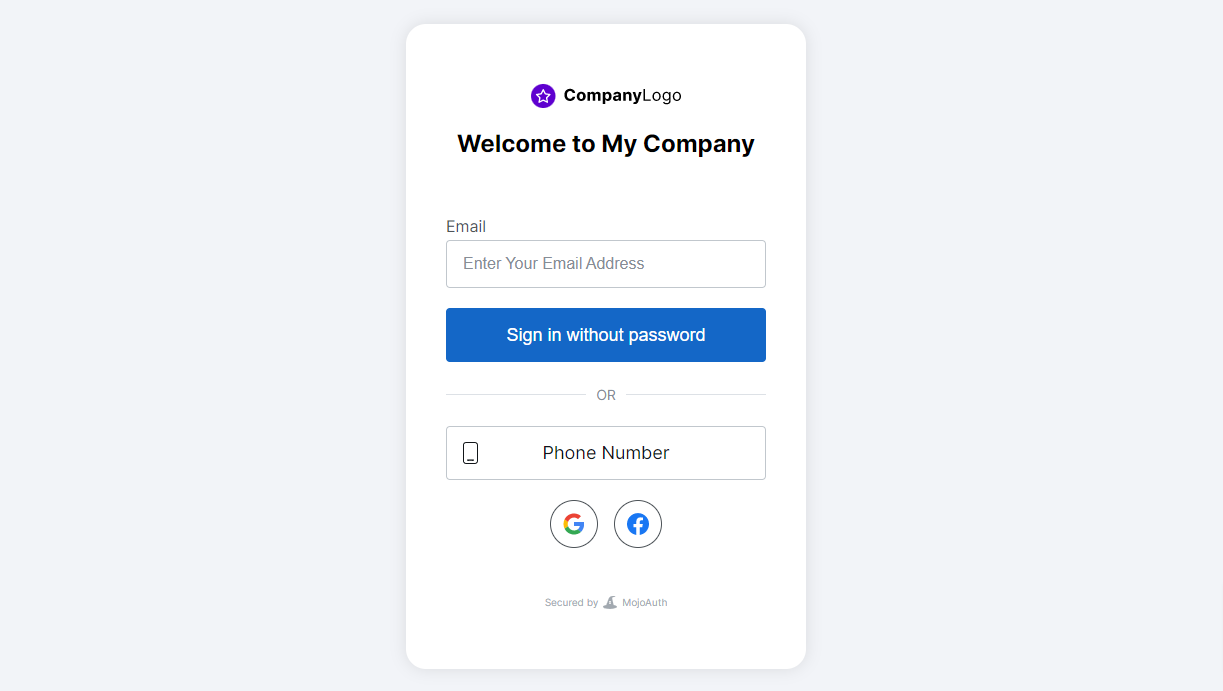
Adding a passwordless authentication mechanism will help to create additional barriers to secure accounts of users. We updated the conventional password method of login with a safer authentication method, for example, log in through Email OTP, Magic Link, Social Login, Phone SMS and WebAuthn. This likewise cuts the additional progression of you fumbling over your failed to remember password.
KEY FEATURES
- Magic Link: A unique link sent directly to your email which allows you to authenticate once and becomes invalid automatically once you are logged in.
- OTP: A unique OTP sent directly to your email which allows you to authenticate once and becomes invalid automatically once you are logged in.
- WebAuthn: Allow users to authenticate with built-in authenticators like fingerprint, pin, or using security keys like YubiKey.
- Social Login: Allow your users to log in using Social login like Google, Facebook, Apple, etc., and increase sign-ups by removing the friction of passwords.
- SMS Authentication: Authenticate and verify your users using SMS OTP across all your applications and enable a secure, frictionless and customizable login experience for everyone.
Contributing
You can contribute or see sources to this plugin on GitHub.
Support
We offer 24/7 support, reach out to our support team, or refer our product documents
- Live chat
- Email Support mailto:support@mojoauth.com
- Support documentation
Installation
Step-by-step installation documents
After downloading the plugin, you will find MojoAuth located under Plugins.
Activate your plugin in WordPress by clicking on “MojoAuth”.
Frequently asked questions
How to add SMS Authentication?
To add SMS Authentication, configure your SMS provider under Marketplace in MojoAuth Dashboard.
How to add Social Login?
Add your provider configuration under Marketplace in MojoAuth Dashboard to add login using your favorite social provider.
What is a public Certificate and where is it used in my application?
A Public Certificate is used to verify that the token is generated by an authenticated server and not tempered. MojoAuth plugin will return the verified token so you don’t need to worry about it.
How can I white label my transactional email?
To send the transactional emails with a custom sender name and email, configure your email service provider under Marketplace in MojoAuth Dashboard.
How MojoAuth is secure?
MojoAuth is fully secured and following best practices to secure our system. We also do follow OIDC standard practices and are compliant with GDPR for data protection.
Is MojoAuth white labeled?
Yes, MojoAuth is a white labeled solution so you can easily customize the look as per your brand identity.
Does my plugin delete all the data once I delete the plugin?
We support both options to keep your data as it is once you delete the plugin or you can delete them.
How much time email magic link or OTP will take?
We provide a 99.99% success rate of mail delivery and it won’t be delayed.
Can I allow users to log in using biometric?
Yes, we do support the webauthn feature and you can enable it from MojoAuth Dashboard. This allows your users to log in with all trusted platforms.
Changelog
Support same page redirection functionality Minor improvements and bug fixes
2.7
- Support same page redirection functionality
- Minor improvements and bug fixes
2.6
- Messaging update for pricing change
2.5
- Added Redirection functionlity
2.4
- Compatible with WordPress 6.0 version
2.3
- Added functionality of SMS
- Added functionality of Email OTP
2.2
- Added language API
Screenshots



For developers
Is this your plugin? Show off the numbers.
Add a live badge to your site, docs or GitHub README. It updates on its own — no account needed.
Best MojoAuth Passwordless Authent… alternatives
All authentication plugins →





FAQ
MojoAuth Passwordless Authentication: quick answers
Straight answers, pulled from live WordPress.org data.
Live data from WordPress.org · checked Sep 29, 2026
Is MojoAuth Passwordless Authentic… free?
Yes. MojoAuth Passwordless Authentic… is free to download and use from the official WordPress.org plugin directory.
Is MojoAuth Passwordless Authentic… safe to use in 2026?
MojoAuth Passwordless Authentic… shows warning signs in 2026 — compare the alternatives below before installing. It runs on 10+ sites, is rated 3.7/5 and was last updated 4 years ago, and scores 26/100 on our health check.
How many websites use MojoAuth Passwordless Authentic…?
MojoAuth Passwordless Authentic… is active on 10+ WordPress websites and has been downloaded 3,093 times since it launched in September 2021. It was downloaded 57 times in the last 30 days.
Does MojoAuth Passwordless Authentic… work with WordPress 7.1?
MojoAuth Passwordless Authentic… is officially tested up to WordPress 6.1.14, while the latest release is 7.1.2. It may still work, but try it on a staging site first.
What PHP version does MojoAuth Passwordless Authentic… need?
MojoAuth Passwordless Authentic… requires PHP 5.6 or higher. Most hosts run PHP 8.x today, so it works on any modern WordPress hosting.
When was MojoAuth Passwordless Authentic… last updated?
The latest version, 2.7, was released on December 13, 2022 (4 years ago).
Who makes MojoAuth Passwordless Authentic…?
MojoAuth Passwordless Authentic… is developed and maintained by MojoAuth.
What are the best alternatives to MojoAuth Passwordless Authentic…?
The most popular alternatives to MojoAuth Passwordless Authentic… are Limit Login Attempts (300K+ installs), WPS Limit Login (100K+ installs) and Two Factor (100K+ installs).
Powered by PageForge
Want thousands of pages that rank like these? Build them in an afternoon.
This directory runs on the same engine as PageForge. Turn any spreadsheet, CSV or API into thousands of fast, SEO-ready WordPress pages — with schema, internal links and AI-written copy baked in.
- CSV, Google Sheets & API data sources
- AI content, schema & internal links per page
- Works with Elementor, Gutenberg, Yoast & Rank Math
- Free on WordPress.org — no credit card


