


Melapress Role Editor
The complete WordPress user roles plugin for everyone

Use with caution
Melapress Role Editor works, but test it on a staging site before relying on it in 2026. It runs on 100+ sites, is rated 5/5 and was last updated 4 months ago, and scores 60/100 on our health check.
- Small user base (100+ active installs)
- Very few reviews so far
How does it stack up?
Side-by-side on installs, updates, ratings & support



Daily downloads
Download spikes usually follow a new release — each site that auto-updates counts as a download.
Rankings
Where Melapress Role Editor stands todayWordPress.org search rankings
Live position in the plugin search, top 100| Keyword | Position |
|---|---|
| access | >100 |
| permissions | >100 |
| role editor | #8 |
| roles | #61 |
| security | >100 |
Version adoption
Share of active sites per release.
Rating breakdown
★★★★★★★★★★ 5 from 2 reviews
About Melapress Role Editor
From the official readme · v1.3.0Description
Melapress Role Editor enables you to easily manage your WordPress user roles. Create, edit, and delete user roles like a pro thanks to the intuitive interface and wizards that hand-hold you every step of the way.
Melapress Role Editor comes with several features, including:
- Ability to create, edit, and delete custom user roles with ease
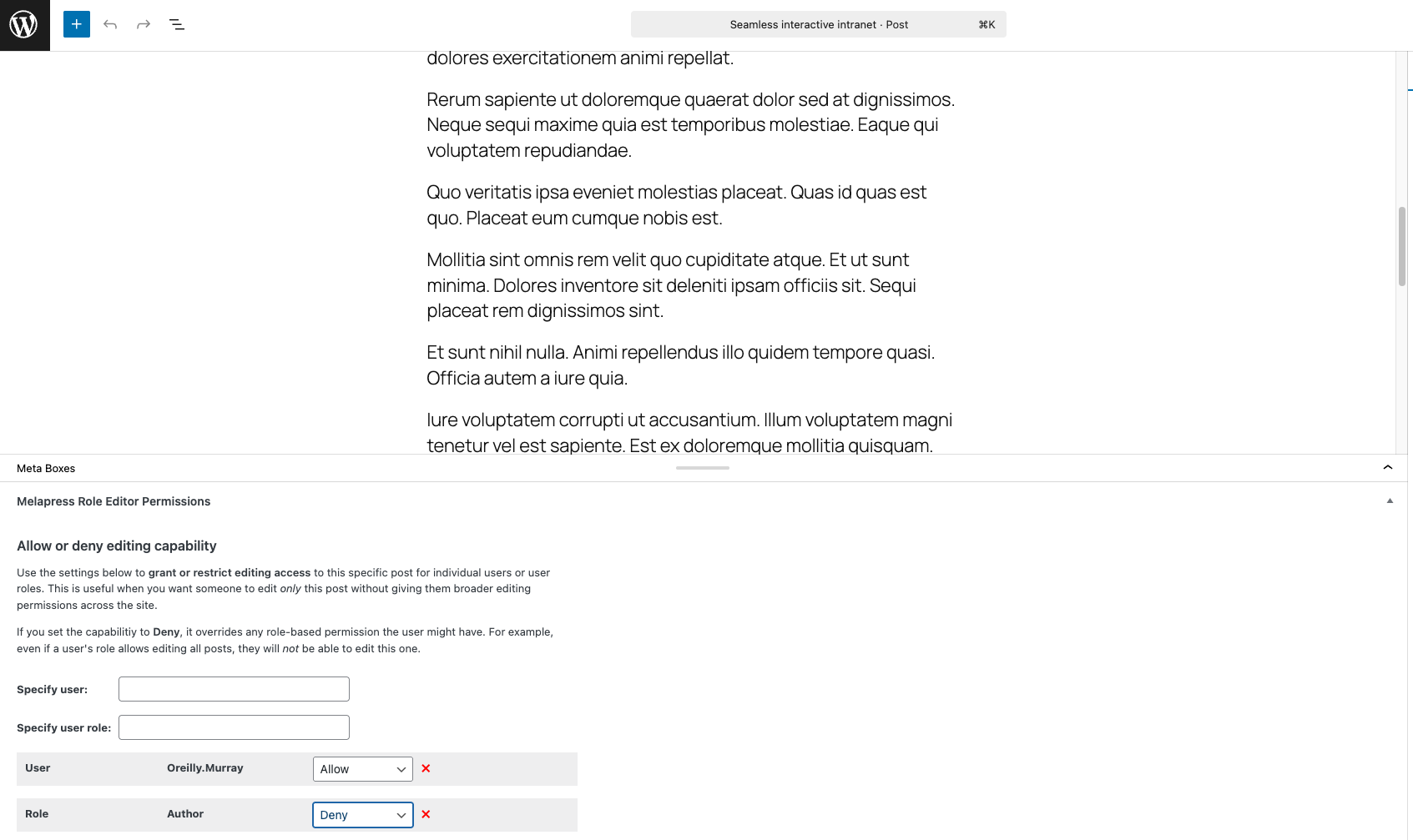
- Granular post-based permissions, enabling you to allow edit access to one post but not another
- Useful out-of-the-box custom roles
- Backup and restore user role configurations
- Auto-detect user role changes with restore prompt
- Add users to multiple roles
- Allow or Deny capabilities
- Out-of-the-box support for Easy Digital Downloads, WooCommerce, and Yoast SEO
- Capability of pretty names for easier referencing
Melapress Role Editor Benefits
Stress-free configuration with step-by-step wizards
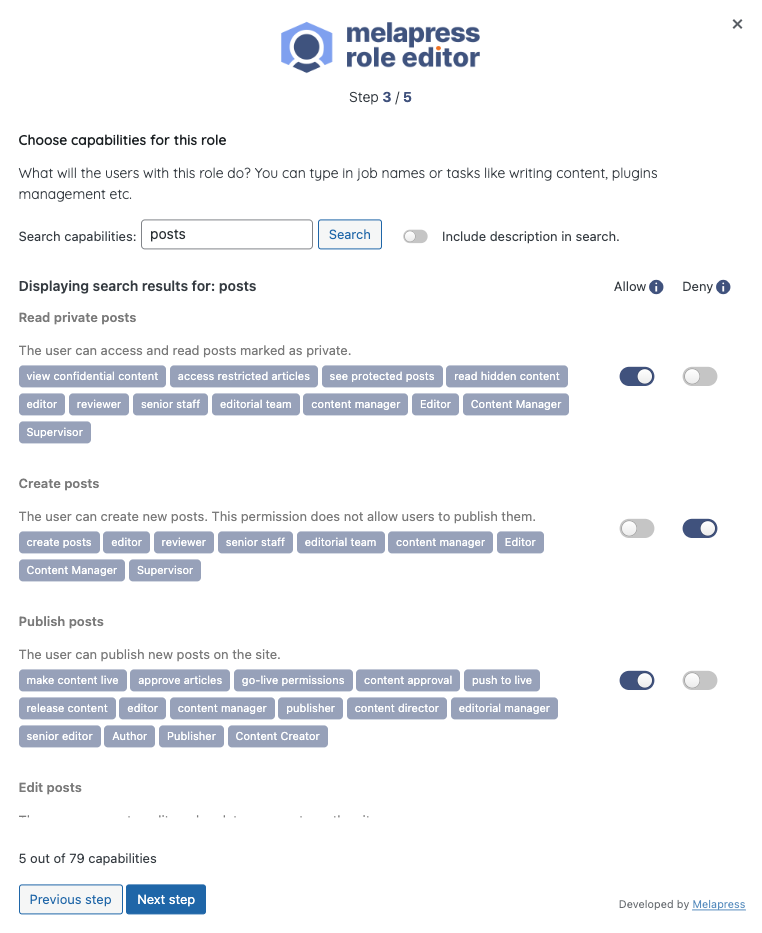
Melapress Role Editor makes it easy to manage roles thanks to its intuitive interface and wizards that walk you through the entire process. By using wizards, you can rest easy knowing that all necessary steps have been accounted for and nothing was missed. Of course, you can also edit roles manually if you wish.
Increased security with auto change detection
Melapress Role Editor keeps a record of each role’s capabilities for security and reliability. It alerts you whenever there is a change so that you can choose to restore roles to the previous configuration or accept the changes, keeping you in the driver’s seat at all times.
Peace of mind with backups and restore
Not sure if planned role changes will pan out? Don’t worry – simply take a backup of the existing configuration from within the plugin so that you can always restore a known working configuration should something break.
Better guidance with out-of-the-box custom roles
Melapress Role Editor comes with a number of pre-configured roles designed to help you get started quickly. Modeled after common roles in the WordPress business, such as Business owner, Developer, and HR manager, each role has been designed to respect the principle of least privilege while giving you a head start in configuring new custom roles.
Simplify complexity with multiple roles and capability deny
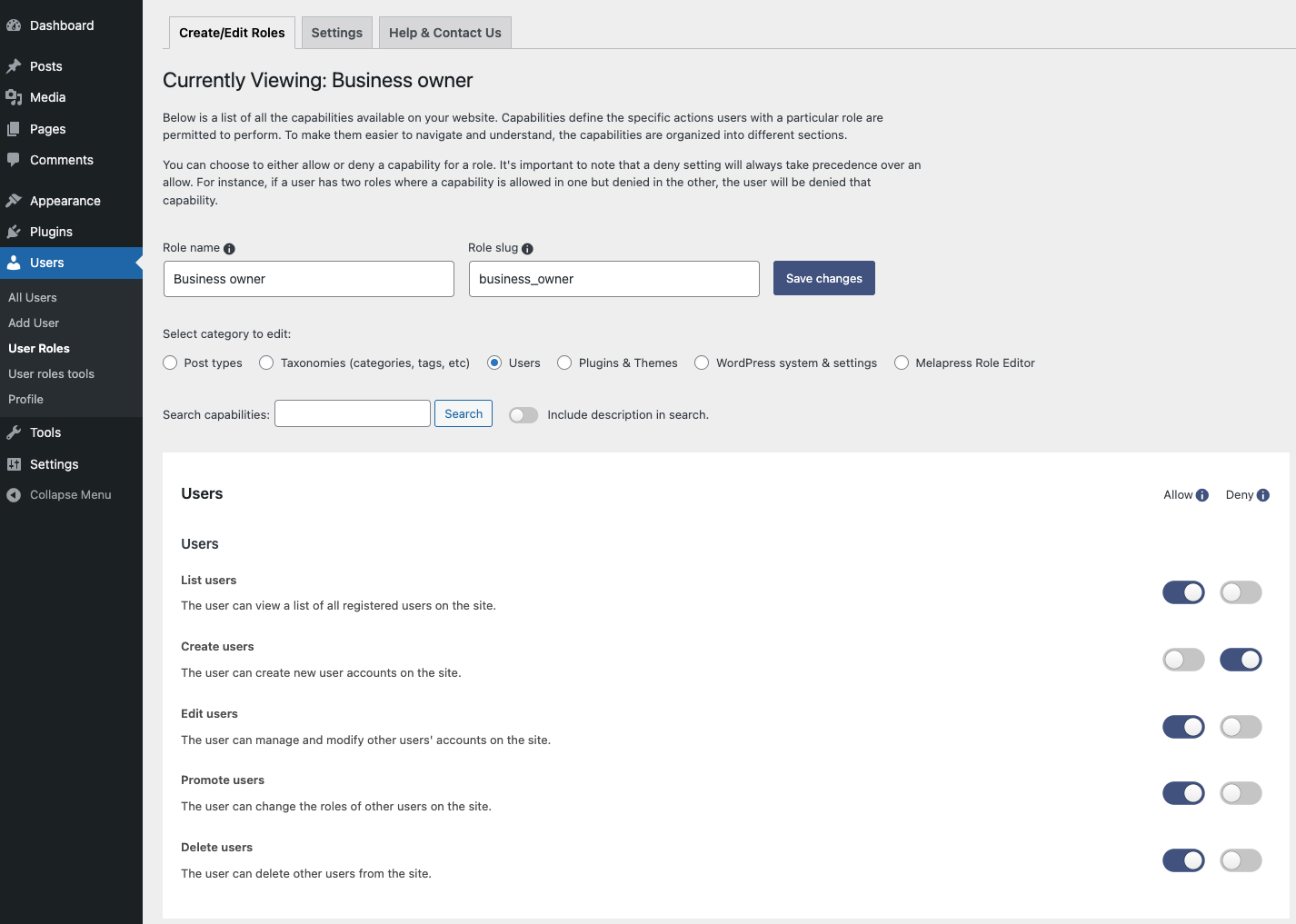
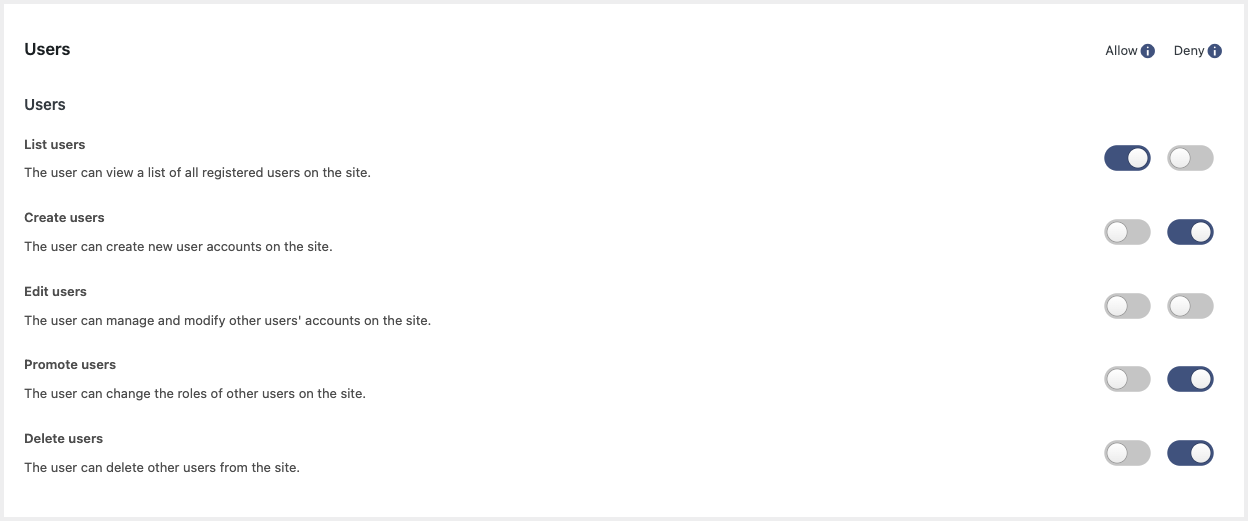
WordPress environments can get pretty complex, so we added features to accommodate every scenario. You can assign users multiple roles to avoid creating additional roles. You can also explicitly deny capabilities to ensure the utmost level of security in complex scenarios.
MAINTAINED & SUPPORTED BY MELAPRESS
Melapress builds high-quality niche WordPress security & management plugins, including WP Activity Log, WP 2FA, Melapress Login Security, and others.
Visit the Melapress website for more information about the company and the plugins it develops.
Install the plugin from within WordPress
Managing roles is easy with Melapress Role Editor. Simply:
- Navigate to Plugins > Add New, from your WordPress dashboard
- Search for Melapress Role Editor
- Install & activate Melapress Role Editor from your Plugins page
Install the plugin manually (via file upload)
- Download the plugin from the WordPress plugins repository
- Unzip the zip file and upload the folder to the
/wp-content/plugins/directory - Activate melapress Role Editor through the Plugins page in WordPress
Translate the plugin in your own language
If you want to help us translate this plugin in your own language please contact us. We will credit all translators.
Frequently asked questions
Is Melapress Role Editor free?
Yes, Melapress Role Editor is a 100% free plugin.
Does the plugin send any data to Melapress?
No, the plugin does not send any data to us whatsoever.
Is Melapress Role Editor easy to use?
Melapress Role Editor has been designed from the ground up with ease of use in mind. You’ll find wizards to walk you through configuration processes, pre-configured roles to help you get started easily and quickly, and many other features to help you make the most out of the plugin.
Does Melapress Role Editor allow you to set different permissions for each role?
Yes, each role is fully customizable so that you can set whichever capabilities you want that role to have. Furthermore, you can explicitly allow or deny capabilities to ensure a specific capability is not allowed.
How can I report security bugs?
You can report security bugs through the Patchstack Vulnerability Disclosure Program. The Patchstack team help validate, triage, and handle any security vulnerabilities. Report a security vulnerability.
Changelog
1.3.0 (2026-06-09)
-
New features
- Added Secondary Role support for invited network users.
- Added a deactivation feedback form to assist with user feedback collection.
-
Bug fixes
- Fixed alignment and styling issues in the plugin UI caused by changes introduced in WordPress Core 7.
- Fixed: PHP Notice raised by WordPress Core 7 where WP_Scripts::add was being called incorrectly.
- Fixed: Posts menu item incorrectly shown in wp-admin for users or roles with page-only permissions.
- Fixed: Role not being created when clicking “Skip the wizard” in the Add New User Role wizard before completing all steps.
- Fixed: Plugin data removal during uninstallation not working correctly – removal now completes as expected.
-
Plugin & functionality improvements
- Removed deprecated WordPress core capabilities from the plugin codebase, eliminating redundant and obsolete code.
- Replaced the Search button with a placeholder in the first-time setup wizard for improved consistency.
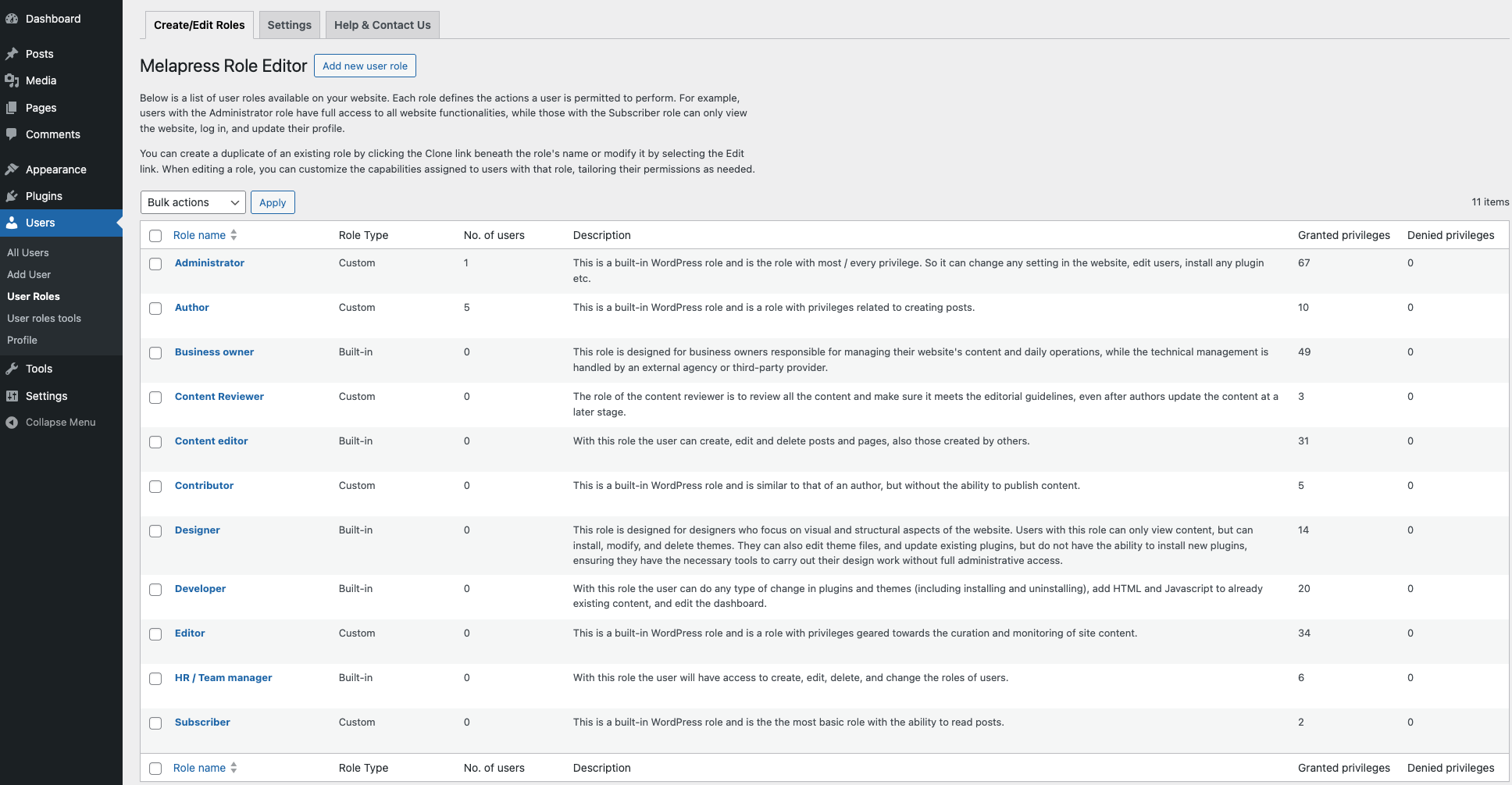
- Role type labels on the role listing page have been simplified for clarity.
- Code and architecture improvements across multiple classes for improved consistency and maintainability.
1.2.0 (2026-01-14)
-
Security fix
- Improper Authorization to Authenticated (Subscriber+) Privilege Escalation via Secondary Role Assignment.
-
Improvements
- Removed redundant Search button from Role Editor as search runs automatically while typing.
- Improved the UX: added notes and description on core roles, and also restricted deletion of core roles.
-
Bug fixes
- Users with post-specific edit permissions can now publish changes directly instead of being forced to submit a post for review.
1.1.0 (2025-10-08)
-
New features
- Added support for creating roles with granular editing permissions, allowing administrators to limit users to edit only selected post types and specific posts within those types (without create or delete access).
- A setup wizard on plugin activation to guide admins through creating and configuring roles more easily.
-
Plugin & functionality improvements
- Improved the Search of capabilities inside plugin wizards
- Moved the plugin menu under the “Users” section and split functionality into two pages: “User Roles” and “User Role Tools” for better organization.
- Improved the Assign Role tool by merging the two separate role selectors into a single form and streamlining the UI/UX.
- Changed the layout of the About us page with improved text and imagery.
- Automated backups removed from the plugins and replaced with a manual backup approach, which is better for the user.
- Reviewed how per-post rules are stored and handled in the database, and prepared improvements for cleaner management and future enhancements.
- Updated the plugin’s internal structure to improve long-term maintainability and make future expansions easier.
- Improved the looks and feels Screen Options area of the plugin.
- Reviewed and updated the plugin codebase to follow security best practices, including proper sanitization, escaping, nonce usage, and permission checks.
- Improved readability across admin pages by shortening long text lines and adjusting copy to more user-friendly line lengths.
- Improved the role editor UX so that after saving capabilities, users remain on the same tab/subsection instead of being redirected to the default view.
- Redesigned the roles table for better clarity by removing hover descriptions, adding a dedicated Description column, and clearly distinguishing built-in roles from custom ones (including creator info).
-
Bug fixes
- Fixed multiple spelling mistakes across plugin pages and interface text.
- Fixed overlapping tag display in role editor search results by adding proper padding when tags wrap onto multiple lines.
- Fixed an issue where pressing Enter in the search field on the role editor page triggered a role save instead of performing the search.
- Standardized all plugin links and now using consistent UTM parameters.
- Fixed an issue where the New Role wizard sometimes displayed an incorrect permission count after reopening the wizard.
- Fixed an issue where per-post permission labels were not updated when a role name was changed, causing old labels (e.g. “Moderator”) to continue appearing instead of the new name.
- Fixed some internally reported PHP Warnings and fatal errors that could occur in certain circumstances.
1.0.1 (2025-02-26)
-
Improvements
- On multisite networks, the plugin now correctly displays the “Super Admin” role for relevant users when they are looked up/filtered through the plugin.
- Improved various UI elements across plugin pages and adjusted help text descriptions.
- Added missing help text for the custom “Content Editor” role created by the plugin.
-
Bug fixes
- Fixed restricted plugin pages for admins on multisite networks.
- Multisite: Resolved an issue preventing users from being added with both a primary and secondary role on a subsite.
- Fixed a bug where users with multiple roles and overlapping capabilities were not following the “DENY” rule correctly.
1.0 (2025-02-18)
* Initial release.
Screenshots
For developers
Is this your plugin? Show off the numbers.
Add a live badge to your site, docs or GitHub README. It updates on its own — no account needed.
Best Melapress Role Editor alternatives
All access plugins →





FAQ
Melapress Role Editor: quick answers
Straight answers, pulled from live WordPress.org data.
Live data from WordPress.org · checked Sep 27, 2026
Is Melapress Role Editor free?
Yes. Melapress Role Editor is free to download and use from the official WordPress.org plugin directory.
Is Melapress Role Editor safe to use in 2026?
Melapress Role Editor works, but test it on a staging site before relying on it in 2026. It runs on 100+ sites, is rated 5/5 and was last updated 4 months ago, and scores 60/100 on our health check.
How many websites use Melapress Role Editor?
Melapress Role Editor is active on 100+ WordPress websites and has been downloaded 2,332 times since it launched in January 2025. It was downloaded 174 times in the last 30 days.
Does Melapress Role Editor work with WordPress 7.1?
Melapress Role Editor is officially tested up to WordPress 7.0.6, while the latest release is 7.1.2. It may still work, but try it on a staging site first.
What PHP version does Melapress Role Editor need?
Melapress Role Editor requires PHP 8.0 or higher. Most hosts run PHP 8.x today, so it works on any modern WordPress hosting.
When was Melapress Role Editor last updated?
The latest version, 1.3.0, was released on June 10, 2026 (4 months ago).
Who makes Melapress Role Editor?
Melapress Role Editor is developed and maintained by Melapress.
What are the best alternatives to Melapress Role Editor?
The most popular alternatives to Melapress Role Editor are Loginizer (1M+ installs), User Role Editor (700K+ installs) and Members (300K+ installs).
Powered by PageForge
Want thousands of pages that rank like these? Build them in an afternoon.
This directory runs on the same engine as PageForge. Turn any spreadsheet, CSV or API into thousands of fast, SEO-ready WordPress pages — with schema, internal links and AI-written copy baked in.
- CSV, Google Sheets & API data sources
- AI content, schema & internal links per page
- Works with Elementor, Gutenberg, Yoast & Rank Math
- Free on WordPress.org — no credit card


