



LiKoToN Debug Logs
A lightweight debugging plugin that collects PHP, WordPress, REST API and login logs with filters, dark mode, infinite scroll and CSV export.

Use with caution
LiKoToN Debug Logs works, but test it on a staging site before relying on it in 2026. Was last updated 1 month ago, and scores 60/100 on our health check.
- Tested with the latest WordPress (7.1)
- Small user base (<10 active installs)
- Very few reviews so far
How does it stack up?
Side-by-side on installs, updates, ratings & support


Daily downloads
Download spikes usually follow a new release — each site that auto-updates counts as a download.
Rankings
Where LiKoToN Debug Logs stands todayWordPress.org search rankings
Live position in the plugin search, top 100| Keyword | Position |
|---|---|
| debug | >100 |
| developer | >100 |
| logs | >100 |
| php | >100 |
| tools | >100 |
About LiKoToN Debug Logs
From the official readme · v1.1.0Description
LiKoToN Debug Logs is a lightweight, modern debugging plugin for WordPress that automatically collects:
- PHP errors and warnings
- WordPress errors (
wp_error_added) - REST API requests (route, method, params)
- User login events
- Custom logs via
Likoton_Debug_Logs_Logger::log()
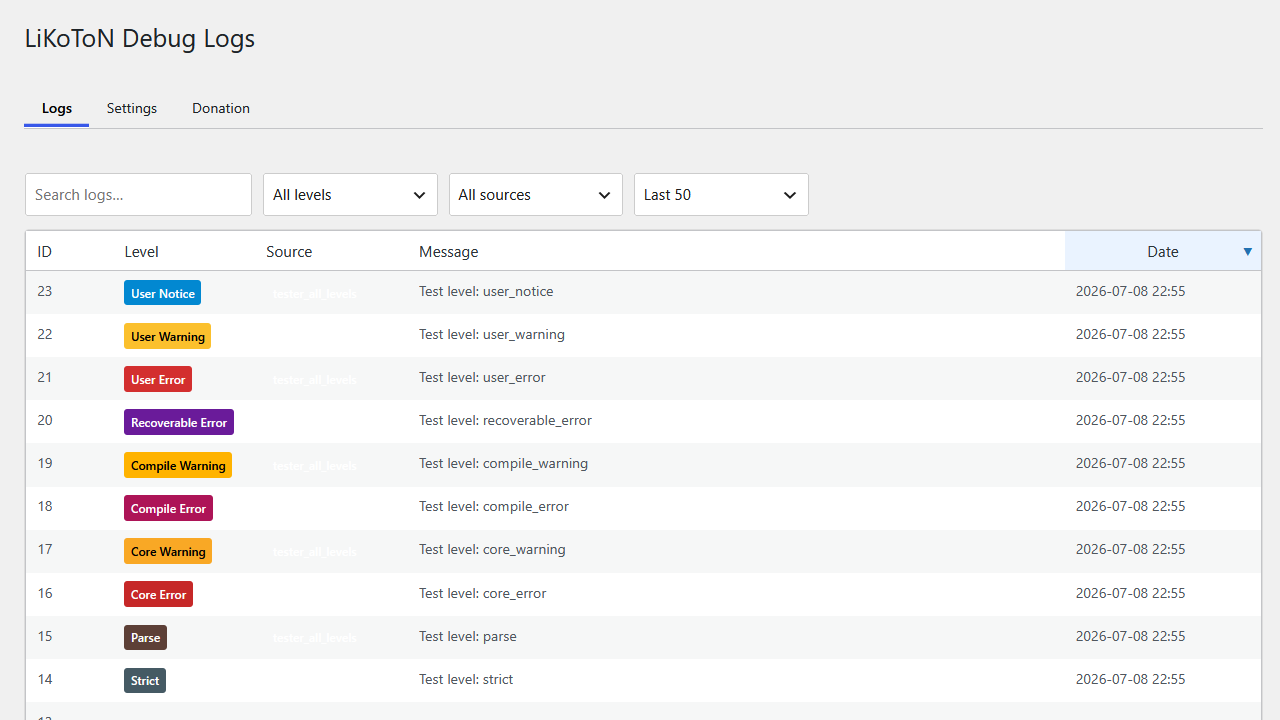
It includes a clean log viewer with:
- AJAX live filtering
- Infinite scroll
- Client-side sorting
- Search, level, source and “last X logs” filters
- Color-coded badges
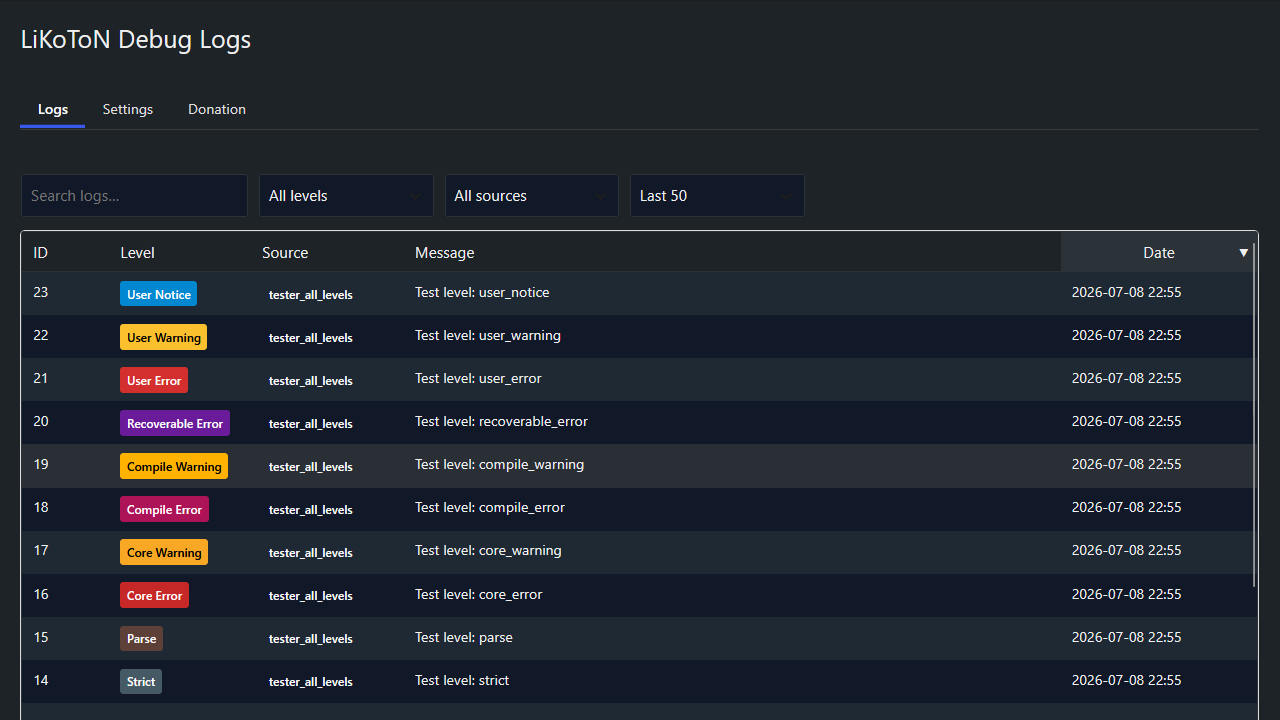
- Dark mode
- CSV export (with UTC and local timestamps)
- Automatic cleanup based on retention settings
Perfect for developers, administrators and anyone who needs a clear view of what happens inside WordPress.
Description (pl_PL)
LiKoToN Debug Logs to lekka i nowoczesna wtyczka debugująca dla WordPressa, która automatycznie zbiera:
- błędy i ostrzeżenia PHP
- błędy WordPressa (
wp_error_added) - wywołania REST API (ścieżka, metoda, parametry)
- logowania użytkowników
- własne logi przez
Likoton_Debug_Logs_Logger::log()
Wtyczka oferuje czytelny panel logów z:
- filtrowaniem AJAX
- nieskończonym przewijaniem (infinite scroll)
- sortowaniem po kolumnach
- wyszukiwaniem, filtrem poziomu, źródła i ostatnich X logów
- kolorowymi znacznikami poziomów i źródeł
- trybem ciemnym
- eksportem CSV (czas UTC + lokalny)
- automatycznym czyszczeniem logów
Idealna dla deweloperów i administratorów, którzy chcą mieć pełną kontrolę nad tym, co dzieje się w WordPressie.
Features
Log Collection
- PHP errors & warnings
- WordPress errors (
wp_error_added) - REST API requests (route, method, params)
- User login events
- Custom logs via
Likoton_Debug_Logs_Logger::log()
Logs Viewer
- AJAX live filtering
- Infinite scroll
- Search, level, source, last X logs
- Client-side sorting
- Color-coded badges
- Responsive table
Dark Mode
- WordPress 7-style toggle
- Applies to all plugin pages
Settings
- Dark mode
- Log retention (30m → 1 month)
- Capability required to view logs
- Auto-save via AJAX with toast notification
- Selectable log levels (only enabled levels are shown in the viewer)
Automatic Cleanup
- WP-Cron based
- Configurable retention
- Table optimization
Export
- Export all logs to CSV
- Includes
created_at_utcandcreated_at_local - Secured with nonce & capability check
Developer API
Custom logs
`php
Likoton_Debug_Logs_Logger::log( ‘info’, ‘custom_source’, ‘Something happened’, [ ‘extra’ => ‘data’ ] );
`
Supported log levels (PSR-3 + extended PHP levels):
- debug,
- info,
- notice,
- warning,
- error,
- critical,
- alert,
- emergency,
- deprecated,
- user_deprecated,
- strict,
- parse,
- core_error,
- core_warning,
- compile_error,
- compile_warning,
- recoverable_error,
- user_error,
- user_warning,
- user_notice
Frequently asked questions
Does this slow down my site?
No, logs are stored in a dedicated table and inserted efficiently.
Can I export logs?
Yes, via the Export logs (CSV) button.
Can I restrict access?
Yes, choose the required capability in Settings.
Multisite support?
Yes, each site has its own logs table.
Changelog
1.1.0
– Persistent table sort order
– Per-level colors in the Log Levels settings control
– Configurable source badge colors via REST API
1.0.0
– Initial release
– PHP/WP/REST/login logging
– AJAX filters
– Infinite scroll
– Dark mode
– CSV export (UTC + local time)
– Automatic cleanup
– Capability control
– Selectable log levels
Screenshots

For developers
Is this your plugin? Show off the numbers.
Add a live badge to your site, docs or GitHub README. It updates on its own — no account needed.
Best LiKoToN Debug Logs alternatives
All debug plugins →




FAQ
LiKoToN Debug Logs: quick answers
Straight answers, pulled from live WordPress.org data.
Live data from WordPress.org · checked Sep 28, 2026
Is LiKoToN Debug Logs free?
Yes. LiKoToN Debug Logs is free to download and use from the official WordPress.org plugin directory.
Is LiKoToN Debug Logs safe to use in 2026?
LiKoToN Debug Logs works, but test it on a staging site before relying on it in 2026. Was last updated 1 month ago, and scores 60/100 on our health check.
How many websites use LiKoToN Debug Logs?
LiKoToN Debug Logs is active on <10 WordPress websites and has been downloaded 251 times since it launched in July 2026. It was downloaded 63 times in the last 30 days.
Does LiKoToN Debug Logs work with WordPress 7.1?
Yes. The developer has tested LiKoToN Debug Logs up to WordPress 7.1.2, the latest release. It requires WordPress 6.0 or newer.
What PHP version does LiKoToN Debug Logs need?
LiKoToN Debug Logs requires PHP 7.4 or higher. Most hosts run PHP 8.x today, so it works on any modern WordPress hosting.
When was LiKoToN Debug Logs last updated?
The latest version, 1.1.0, was released on August 16, 2026 (1 month ago).
Who makes LiKoToN Debug Logs?
LiKoToN Debug Logs is developed and maintained by likoton.
What are the best alternatives to LiKoToN Debug Logs?
The most popular alternatives to LiKoToN Debug Logs are WP Crontrol (300K+ installs), Query Monitor (200K+ installs) and Debug Bar (20K+ installs).
Powered by PageForge
Want thousands of pages that rank like these? Build them in an afternoon.
This directory runs on the same engine as PageForge. Turn any spreadsheet, CSV or API into thousands of fast, SEO-ready WordPress pages — with schema, internal links and AI-written copy baked in.
- CSV, Google Sheets & API data sources
- AI content, schema & internal links per page
- Works with Elementor, Gutenberg, Yoast & Rank Math
- Free on WordPress.org — no credit card


