


WP Debugging
A support/troubleshooting plugin for WordPress.

Solid choice
WP Debugging is a solid plugin choice in 2026, with a few things worth checking first. It runs on 10K+ sites, is rated 5/5 and was last updated 1 month ago, and scores 75/100 on our health check.
- Proven at scale on 10K+ active sites
- Loved by users — 5/5 from 21 reviews
- Tested with the latest WordPress (7.1)
How does it stack up?
Side-by-side on installs, updates, ratings & support



Daily downloads
Download spikes usually follow a new release — each site that auto-updates counts as a download.
Rankings
Where WP Debugging stands todayWordPress.org search rankings
Live position in the plugin search, top 100| Keyword | Position |
|---|---|
| debug | #16 |
| support | >100 |
| wp-config | #5 |
Version adoption
Share of active sites per release.
Rating breakdown
★★★★★★★★★★ 5 from 21 reviews
About WP Debugging
From the official readme · v2.12.6Description
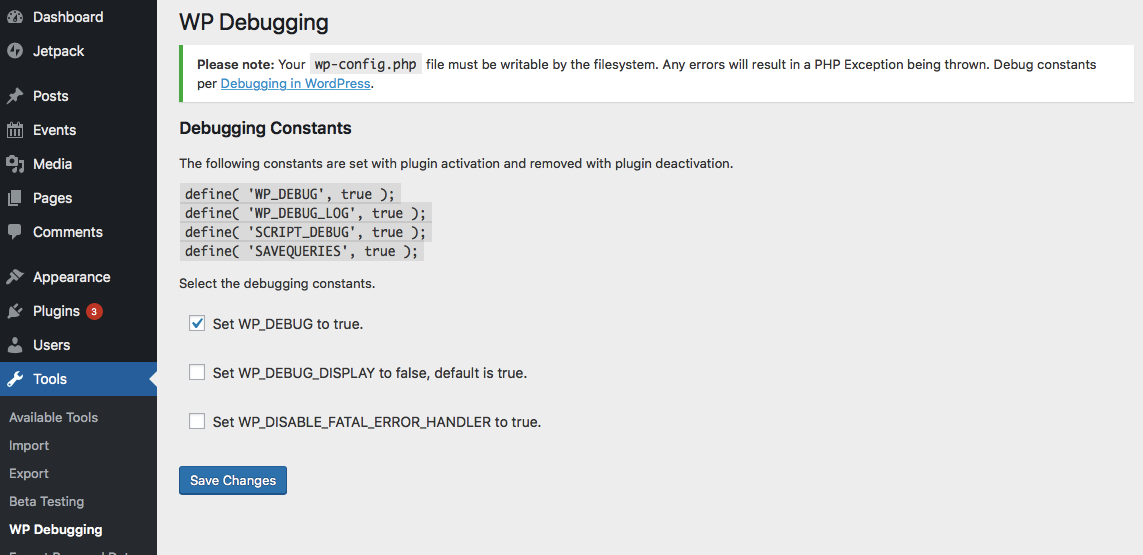
This plugin sets the following debug constants in wp-config.php on plugin activation and removes them on plugin deactivation. Any errors will result in a PHP Exception being thrown. Debug constants per Debugging in WordPress.
Default settings:
define( 'WP_DEBUG_LOG', true );
define( 'SCRIPT_DEBUG', true );
define( 'SAVEQUERIES', true );
@ini_set( ‘display_errors’, 1 ); is set when the plugin is active. WP_DEBUG is set to true when the plugin is first run, thereafter it can be turned off in the Settings.
The Settings page allows the user to set the following.
define( 'WP_DEBUG', true ); // Default on initial plugin installation.
define( 'WP_DEBUG_DISPLAY', false ); // Default when not declared is true.
define( 'WP_DISABLE_FATAL_ERROR_HANDLER', true ); // WordPress 5.2 WSOD Override.
When the plugin is deactivated best efforts are made to re-add pre-existing constants to their former state. When the plugin is activated the default settings and any saved settings are restored.
This plugin uses the wp-cli/wp-config-transformer command for writing constants to wp-config.php.
Debug Quick Look from Andrew Norcross is included with this plugin to assist in reading the debug.log file. If you already have this plugin installed you should delete it when WP Debugging is not active.
Query Monitor and Debug Bar plugins are optional dependencies to aid in debugging and troubleshooting. The notice for installation will recur 45 days after being dismissed.
If you have a non-standard location for your wp-config.php file you can use the filter wp_debugging_config_path to return the file path for your installation.
The filter wp_debugging_add_constants allows the user to add constants to wp-config.php.
The filter returns an array where the key is the name of the constant and the value is an array of data containing the value as a string and a boolean to indicate whether or not the value should be passed without quotes.
$my_constants = [
    'my_test_constant' =>
    [
        'value' => 'abc123',
        'raw' => false,
    ],
    'another_test_constant' => [ 'value' => 'true' ],
];
The value option contains the constant’s value as a string.
The raw option means that instead of placing the value inside the config as a string it will become unquoted. The default is true. Set as false for non-boolean values.
Example:
add_filter(
    'wp_debugging_add_constants',
    function( $added_constants ) {
        $my_constants = [
            'my_test_constant'      => [
                'value' => '124xyz',
                'raw'   => false,
            ],
            'another_test_constant' => [ 'value' => 'true' ],
        ];
        return array_merge( $added_constants, $my_constants );
    },
    10,
    1
);
This will create the following constants.
define( 'MY_TEST_CONSTANT', '124xyz' );
define( 'ANOTHER_TEST_CONSTANT', true );
Development
PRs are welcome against the develop branch on GitHub.
Changelog
2.12.6 / 2026-08-13
- update
norcross/debug-quick-lookto better format JSON - update GitHub Actions
2.12.2 / 2024-12-02
- add GA to generate POT
- update for PCP
2.12.1 / 2024-11-08
- move
register_activation_hookandregister_deactivation_hookup the chain
2.12.0 / 2024-11-01
- exit early(ish) if not on WP Debugging settings page
- composer update
- remove
load_plugin_textdomain()
2.11.24 / 2024-04-29
- update link to Debugging in WordPress, thanks @tobifjellner
- cast variable to array in
Bootstrap::deactivate()fix for PHP 8.3
2.11.23 / 2024-03-04
- composer update
- WPCS updates
Screenshots
For developers
Is this your plugin? Show off the numbers.
Add a live badge to your site, docs or GitHub README. It updates on its own — no account needed.
Best WP Debugging alternatives
All debug plugins →



FAQ
WP Debugging: quick answers
Straight answers, pulled from live WordPress.org data.
Live data from WordPress.org · checked Sep 26, 2026
Is WP Debugging free?
Yes. WP Debugging is free to download and use from the official WordPress.org plugin directory.
Is WP Debugging safe to use in 2026?
WP Debugging is a solid plugin choice in 2026, with a few things worth checking first. It runs on 10K+ sites, is rated 5/5 and was last updated 1 month ago, and scores 75/100 on our health check.
How many websites use WP Debugging?
WP Debugging is active on 10K+ WordPress websites and has been downloaded 493,854 times since it launched in February 2019. It was downloaded 6,182 times in the last 30 days.
Does WP Debugging work with WordPress 7.1?
Yes. The developer has tested WP Debugging up to WordPress 7.1.2, the latest release. It requires WordPress 5.2 or newer.
What PHP version does WP Debugging need?
WP Debugging requires PHP 5.6 or higher. Most hosts run PHP 8.x today, so it works on any modern WordPress hosting.
When was WP Debugging last updated?
The latest version, 2.12.6, was released on August 13, 2026 (1 month ago).
Who makes WP Debugging?
WP Debugging is developed and maintained by Andy Fragen.
What are the best alternatives to WP Debugging?
The most popular alternatives to WP Debugging are WP Crontrol (300K+ installs), Query Monitor (200K+ installs) and Debug Bar (20K+ installs).
Powered by PageForge
Want thousands of pages that rank like these? Build them in an afternoon.
This directory runs on the same engine as PageForge. Turn any spreadsheet, CSV or API into thousands of fast, SEO-ready WordPress pages — with schema, internal links and AI-written copy baked in.
- CSV, Google Sheets & API data sources
- AI content, schema & internal links per page
- Works with Elementor, Gutenberg, Yoast & Rank Math
- Free on WordPress.org — no credit card


