


WP Crontrol
Take control of the cron events on your WordPress website or WooCommerce store with WP Crontrol.

Solid choice
WP Crontrol is a solid plugin choice in 2026, with a few things worth checking first. It runs on 300K+ sites, is rated 4.4/5 and was last updated 1 month ago, and scores 77/100 on our health check.
- Proven at scale on 300K+ active sites
- Tested with the latest WordPress (7.1)
- Slow support — only 13% of recent threads resolved
How does it stack up?
Side-by-side on installs, updates, ratings & support


Daily downloads
Download spikes usually follow a new release — each site that auto-updates counts as a download.
Rankings
Where WP Crontrol stands todayWordPress.org search rankings
Live position in the plugin search, top 100| Keyword | Position |
|---|---|
| cron | #3 |
| crontrol | #1 |
| debug | #19 |
| woocommerce | >100 |
| wp cron | #2 |
Version adoption
Share of active sites per release.
Rating breakdown
★★★★★★★★★★ 4.4 from 167 reviews
About WP Crontrol
From the official readme · v2.0.0Description
Take control of the cron events on your WordPress website or WooCommerce store with WP Crontrol. From the admin screens you can:
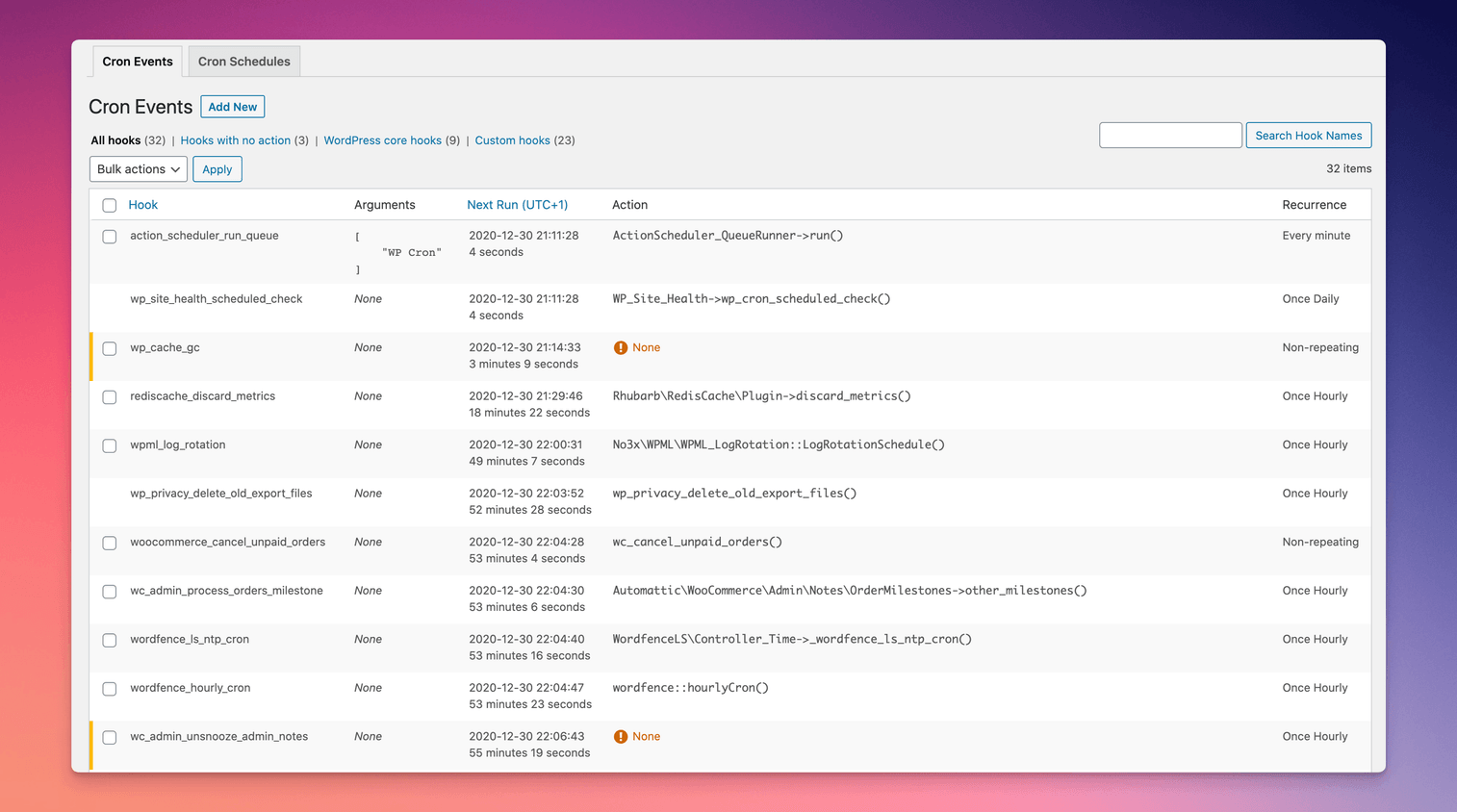
- View all scheduled cron events along with their arguments, schedule, callback functions, and when they are next due.
- Log each run of the events you choose, with its duration, errors, HTTP requests, and emails sent.
- Get an email when a logged event fails.
- Let an AI assistant check, run, and pause cron events and read their logs, through the WordPress Abilities API (WordPress 6.9 and later).
- Edit, delete, pause, resume, and immediately run cron events.
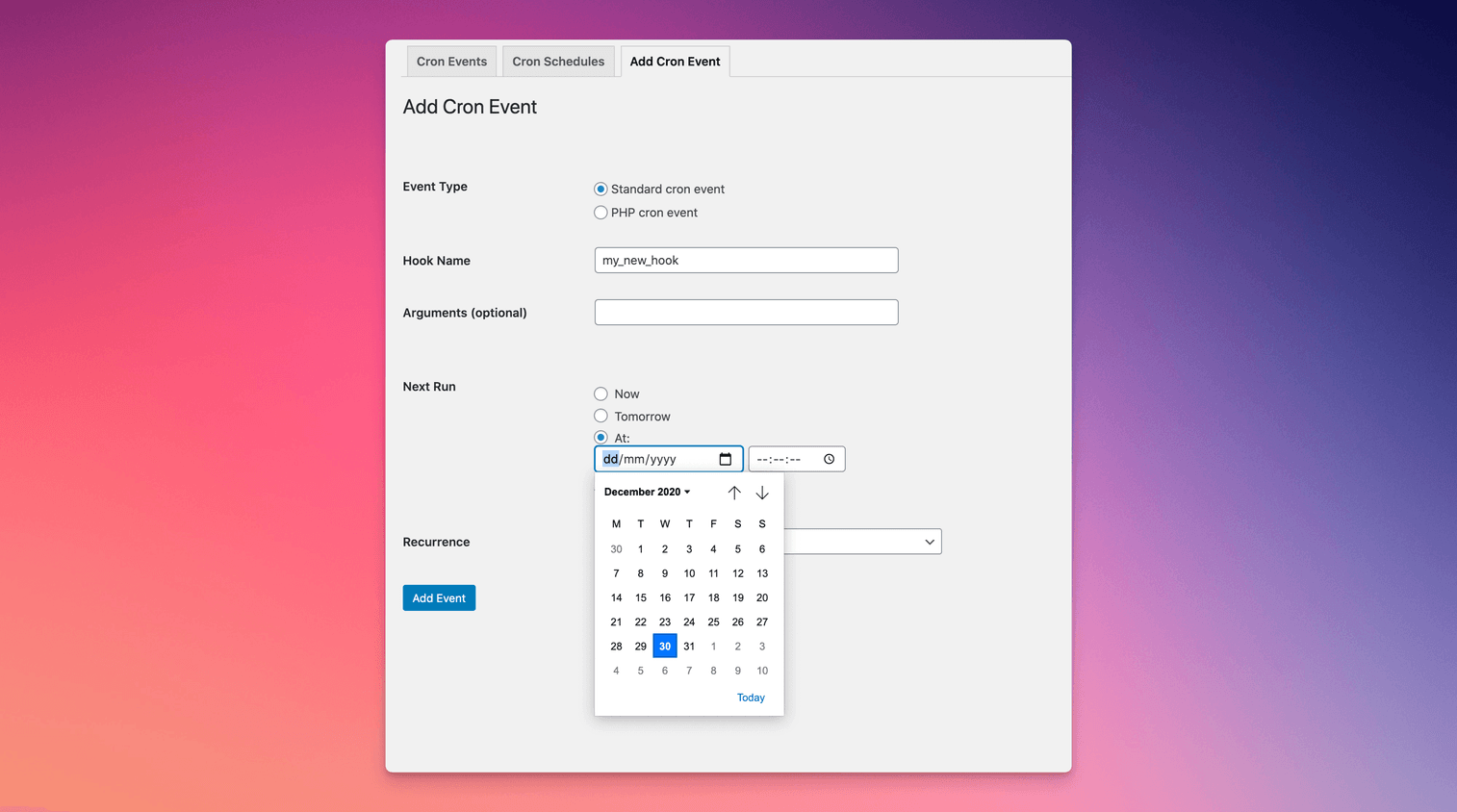
- Add new cron events.
- Bulk delete cron events.
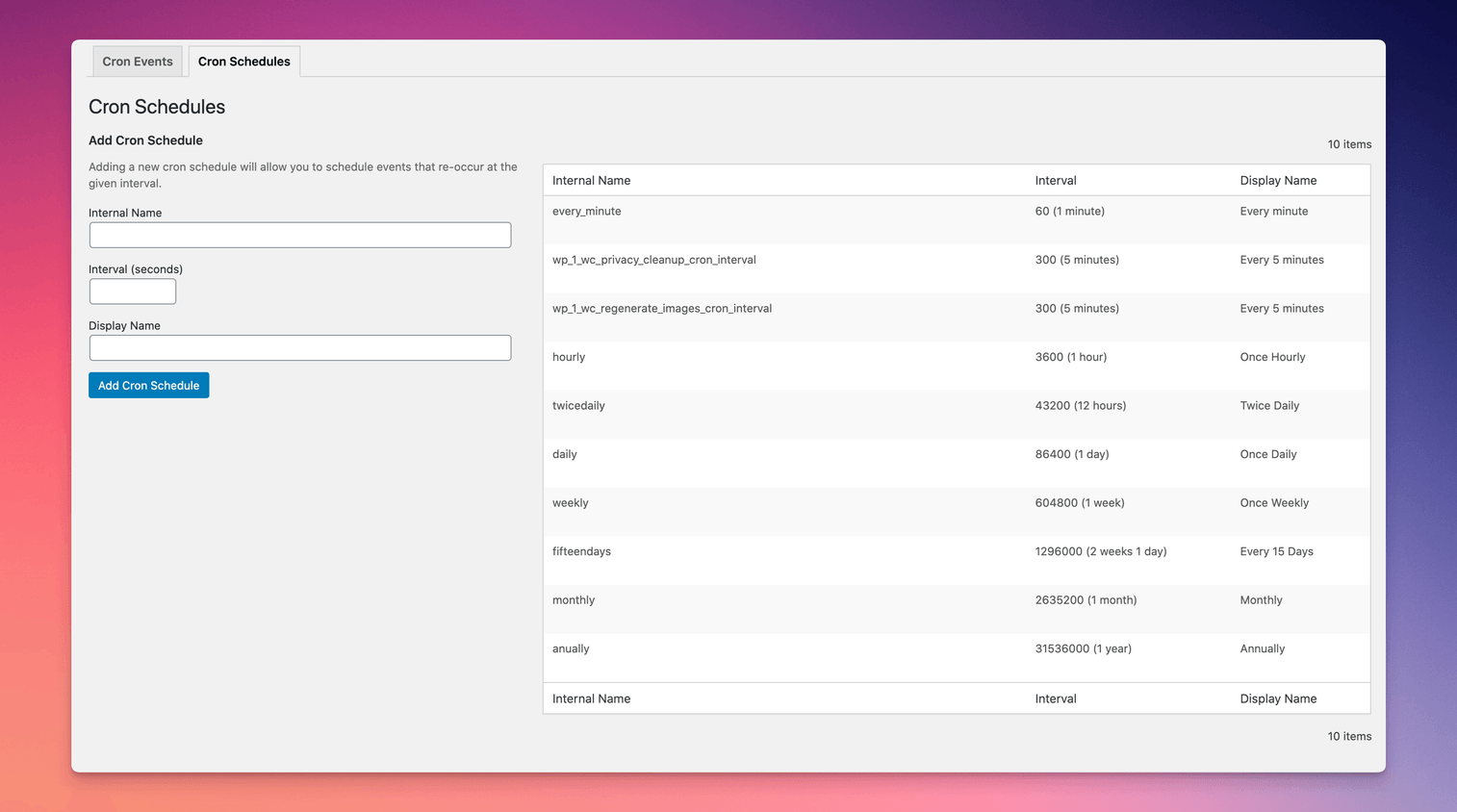
- Add and remove custom cron schedules.
- Export and download cron event lists as a CSV file.
WP Crontrol is aware of timezones, will alert you to events that have no actions or that have missed their schedule, and will show you a helpful warning message if it detects any problems with your cron system.
Usage
- Go to the
Cron → Cron Eventsmenu to manage cron events.Tools → Cron Eventsstill works too. - Go to the
Cron → Cron Logsmenu to see what ran, once you turn on logging for an event. - Go to the
Cron → Cron Insightsmenu to see how your events behaved over the last week. - Go to the
Cron → Cron Alertsmenu to get an email when a logged event fails. - Go to the
Cron → Cron AImenu to see what an AI assistant can do with your cron events. - Go to the
Cron → Cron Schedulesmenu to manage cron schedules.
Documentation
For site owners
Owners of WordPress websites and WooCommerce stores use WP Crontrol to ensure that scheduled cron events run correctly and efficiently. By providing complete control over cron events, WP Crontrol helps you:
- Improve reliability: Address missed or failed cron events, ensuring your website or WooCommerce store continues to function as expected.
- Enhance security: Monitor and control cron events to ensure automatic update checks are performed as they should.
- Simplify management: Add, edit, delete, and pause cron events from a user-friendly interface, without needing to write any code.
- Gain insights: Export cron event data for analysis or reporting.
- Action Scheduler compatibility: Full support for the Action Scheduler system in WooCommerce, which is used to process recurring payments, subscriptions, and background orders.
- Clarity of times and timezones: All times are shown with a clear and accurate indication of which timezone applies. No more guesswork!
For developers
Developers use WP Crontrol to streamline and debug their WordPress development process:
- Enhanced debugging: Identify and troubleshoot issues with scheduled tasks, ensuring your scheduled events and their callbacks run as expected.
- Custom schedules: Create and manage custom cron schedules to fit the specific needs of your website, plugins, or themes, providing greater flexibility than just the core schedules.
- Efficient workflow: Add, edit, and delete cron events directly from the WordPress admin interface, saving time and reducing the need for manual coding.
- Insightful monitoring: Get insight into the performance and behavior of your scheduled tasks, allowing for optimization and better resource management.
- Accurate debugging: WP Crontrol goes to great lengths to ensure that running an event manually does so in a manner which exactly matches how WordPress core runs schdeuled events. This ensures that you can debug events accurately and with confidence.
Other Plugins
WP Crontrol was built by John Blackbourn, who also maintains these plugins for developers:
- Query Monitor is the developer tools panel for WordPress.
- User Switching provides instant switching between user accounts in WordPress.
More Plugins From Our Team
WP Crontrol is now looked after by the Duplicator team. If it’s useful to you, these might be too:
- WPVibe connects AI assistants like Claude and ChatGPT to your WordPress site, so they can build and manage it for you.
- Duplicator backs up, migrates, and clones WordPress sites.
- WP Mail SMTP fixes WordPress email delivery, so the emails your scheduled tasks send actually arrive.
- WPCode adds custom code snippets to WordPress safely, without editing your theme’s functions.php file.
Privacy Statement
WP Crontrol is private by default and always will be. It does not send data to any third party, nor does it include any third party resources. WP Crontrol’s full privacy statement can be found here.
Cron alerts are sent by your site’s own email setup, only to the addresses you choose. When you install or activate one of our other plugins from a WP Crontrol screen, WP Crontrol notes which one in your site’s database, so you can see what came from WP Crontrol. That note stays on your site and is never sent anywhere.
Accessibility Statement
WP Crontrol aims to be fully accessible to all of its users. WP Crontrol’s full accessibility statement can be found here.
Legal
Crontrol® is a registered trademark of Clever Things For The Web Limited.
Changelog
2.0.0 (15 October 2026)
- Cron event logging and Cron Insights, previously part of WP Crontrol Pro, are now free for everyone. Logging is off until you turn it on for an event.
- WP Crontrol now has its own Cron menu in the admin, with Events, Logs, Insights, Alerts, AI, and Schedules in one place. Tools > Cron Events still works.
- New: Cron Alerts. Get an email when a logged cron event fails, as it happens (at most once an hour for each event) or as a daily summary, with a test button to check that alerts arrive.
- New: Cron AI. WP Crontrol registers its features with the WordPress Abilities API (WordPress 6.9 and later), so an AI assistant can list, run, and pause cron events, turn logging on, and read logs and insights, with your account’s permissions. Assistants can’t create or edit PHP or URL cron events.
- Logs now show when an email sent by a logged event failed to send.
- Dates and times in the event list can now be translated, including month names. Thanks to @zalemcitizen for the request.
- Logs never store event arguments, and logged HTTP requests keep only the site address.
- Logs are kept for 30 days, up to 10,000 entries per site. Deleting the plugin removes its log tables and settings.
- Shows a note about WP Crontrol’s new home at the top of the Cron screens until you dismiss it, with plugins from the same team that aren’t active on your site.
- Suggests Duplicator on the Cron Events screen when no backup plugin or scheduled backup is found, and WPCode under the PHP cron event code field. Each suggestion can be dismissed for good.
1.22.0 (8 October 2026)
- WP Crontrol is now maintained by the team at Awesome Motive. Thank you to John Blackbourn for building and looking after WP Crontrol for so many years. It remains free, open source, and private by default.
- Fixes Run Now reporting a failure when the event was scheduled successfully, for example when a plugin such as Cavalcade stores events outside the cron option. Props @abdulraheemalick.
- Security: Hardens several permission and integrity checks for cron events.
- Removes the sponsor link.
1.21.2 (29 August 2026)
- Confirms full support for WordPress 7.1
- Bumps the minimum supported version of WordPress to 6.6
1.21.1 (31 July 2026)
- Fixes some bulk delete behaviour
- Confirms full support for WordPress 7.0
1.21.0 (28 January 2026)
- Adds support for invalid args in cron events by relaxing the strict typing and showing a warning on the listing and editing screens.
1.20.0 (17 December 2025)
- Confirms support for WordPress 6.9
- Minor UI and UX improvements
- Some architectural changes to prepare for future enhancements
1.19.3 (23 October 2025)
- Corrects the handling of closures as cron event actions.
1.19.2 (19 August 2025)
- Security: Hardens the “URL cron event” functionality by rejecting disallowed URLs. More information see the security advisory.
- Tweaks the display of some non-persistent WordPress core hooks when Multisite is enabled.
1.19.1 (3 June 2025)
- Reinstates the ability to edit the Action Scheduler event.
1.19.0 (23 April 2025)
- Confirms support for WordPress 6.8
- Further improvements to the display of dates, intervals, and timezones for increased clarity
- Adds more contextual help links for problematic events
- Various UI and UX improvements
1.18.0 (13 January 2025)
- Introduces support for a
CRONTROL_DISALLOW_PHP_EVENTSconstant to fully disable the PHP cron event functionality. Full documentation here. - Further improvements to how time durations and timezone information is displayed.
1.17.1 (22 November 2024)
- Confirms support for WordPress 6.7
- Avoids some warnings when running on PHP 8.3 and 8.4
Earlier versions
For the changelog of earlier versions, refer to the releases page on GitHub.
Screenshots
For developers
Is this your plugin? Show off the numbers.
Add a live badge to your site, docs or GitHub README. It updates on its own — no account needed.
Best WP Crontrol alternatives
All cron plugins →





FAQ
WP Crontrol: quick answers
Straight answers, pulled from live WordPress.org data.
Live data from WordPress.org · checked Nov 17, 2026
Is WP Crontrol free?
Yes. WP Crontrol is free to download and use from the official WordPress.org plugin directory.
Is WP Crontrol safe to use in 2026?
WP Crontrol is a solid plugin choice in 2026, with a few things worth checking first. It runs on 300K+ sites, is rated 4.4/5 and was last updated 1 month ago, and scores 77/100 on our health check.
How many websites use WP Crontrol?
WP Crontrol is active on 300K+ WordPress websites and has been downloaded 9,033,141 times since it launched in January 2008. It was downloaded 211,114 times in the last 30 days.
Does WP Crontrol work with WordPress 7.1?
Yes. The developer has tested WP Crontrol up to WordPress 7.1.4, the latest release. It requires WordPress 6.6 or newer.
What PHP version does WP Crontrol need?
WP Crontrol requires PHP 7.4 or higher. Most hosts run PHP 8.x today, so it works on any modern WordPress hosting.
When was WP Crontrol last updated?
The latest version, 2.0.0, was released on October 15, 2026 (1 month ago).
Who makes WP Crontrol?
WP Crontrol is developed and maintained by Syed Balkhi.
What are the best alternatives to WP Crontrol?
The most popular alternatives to WP Crontrol are Advanced Cron Manager (30K+ installs), Missed Scheduled Posts Publ… (20K+ installs) and Transients Manager (20K+ installs).
Powered by PageForge
Want thousands of pages that rank like these? Build them in an afternoon.
This directory runs on the same engine as PageForge. Turn any spreadsheet, CSV or API into thousands of fast, SEO-ready WordPress pages — with schema, internal links and AI-written copy baked in.
- CSV, Google Sheets & API data sources
- AI content, schema & internal links per page
- Works with Elementor, Gutenberg, Yoast & Rank Math
- Free on WordPress.org — no credit card


