



PDF Compressor & Watermark – iLovePDF
Optimize and protect your PDFs with automatic compression and watermarking. Save space and secure your documents effortlessly.

Use with caution
PDF Compressor & Watermark works, but test it on a staging site before relying on it in 2026. It runs on 500+ sites, is rated 3.4/5 and was last updated 5 months ago, and scores 54/100 on our health check.
- Small user base (500+ active installs)
- Low rating so far — 3.4/5 from only 5 reviews
- Only tested up to WordPress 6.9 (latest is 7.1)
- Needs PHP 8.2 or newer
How does it stack up?
Side-by-side on installs, updates, ratings & support



Daily downloads
Download spikes usually follow a new release — each site that auto-updates counts as a download.
Rankings
Where PDF Compressor & Watermark stands todayWordPress.org search rankings
Live position in the plugin search, top 100| Keyword | Position |
|---|---|
| compress | #32 |
| Optimize | >100 |
| pdf optimizer | #10 |
| performance | >100 |
| watermark | #16 |
Version adoption
Share of active sites per release.
Rating breakdown
★★★★★★★★★★ 3.4 from 5 reviews
About PDF Compressor & Watermark – iLovePDF
From the official readme · v3.0.6Description
Compress your PDF files and Stamp Images or text into PDF files. This is the Official iLovePDF plugin for WordPress. You can optimize all your PDF and stamp them automatically as you do in ilovepdf.com.
How it works
The plugin has two modes of work, automatic or manual.
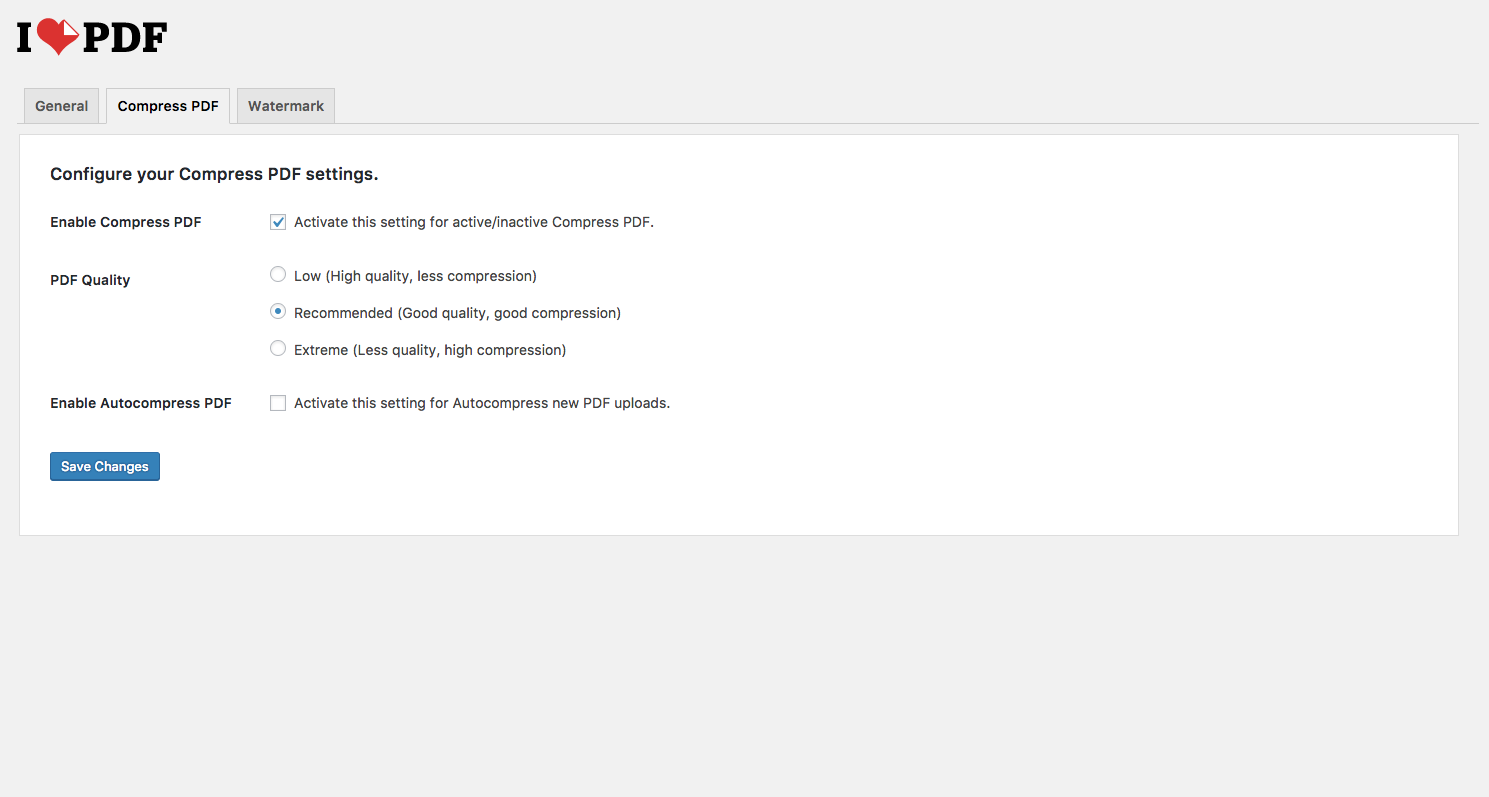
Compress PDF: Every time a PDF file is uploaded to your Media Library, is compressed by our iLovePDF API and saved in your WordPress site already optimized, saving you disk space. This feature can be disabled.
It can also compress all PDF already in your Media Library at once or compress PDF files one by one. The compression ratio depends on the PDF but on average you can save up to 50% of disk space occupied by PDF files without loosing quality.
Watermark PDF: Every time a PDF file is uploaded to your Media Library, is stamped by our iLovePDF API and saved in your WordPress. This feature can be disabled.
It can also stamp images or text in PDF already in your Media Library at once or stamp PDF files one by one.
Bulk actions
All tools can be done for an individual files or applied to all your existing files.
Automatic process
All tools can be applied automatically when a PDF file is upload, so you don’t need to apply any manual anymore.
Configure your iLoveAPI Developer Account
Install this plugin and go to Settings -> iLovePDF to create your iLoveAPI Developer account (if you already registered previously on iLoveAPI Developer you can login directly) and choose your Project, but by default it will be selected Default Project. A project is what defines which API keys will be used. If you need it, you can manage your projects in your iLoveAPI developer account. With your iLoveAPI Free account you get 2500 free credits to process per month. If you need more you can purchase them
By going to Settings -> iLovePDF -> Compress PDF you can set the compression level you prefer to optimize your PDF files. We strongly recommend you to use ‘Recommended Compression’ which offers the perfect balance between compression and quality. In this section you can disable the auto compression of new uploaded PDF files in your Media Library.
By going to Settings -> iLovePDF -> Watermark PDF you can set many options on what to stamp and how into your PDF files. In this section you can disable the auto stamping of new uploaded PDF files in your Media Library.
To Compress or Stamp PDF files that are already in your Media Library go to Media -> iLovePDF -> Compress PDF or Media -> iLovePDF -> Watermark
Installation
From your Admin panel:
1. Visit Plugins > Add New.
2. Search for iLovePDF and press the Install Now button.
3. Activate the plugin from your Plugins page.
Manual:
1. Upload ilovepdf to the /wp-content/plugins/ directory
2. Activate the plugin through the ‘Plugins’ menu in WordPress
3. Create a free account in the plugin settings page, or use your existing one
4. Configure the plugin as you like
Frequently asked questions
Do I need a iLoveAPI account?
Yes, you need a developer account. It can be created easily from your WordPress, or you can use your existing one.
Is this service free?
With a free account you can process up to 2500 credits each month. If you need more, you can upgrade your account.
What happens when the limit is reatched?
We will send you an email before limit is reached. When limit is reached, no more PDF files will be processed. But remember each month, 2500 credits are free, so in next month you will be able to process more files again!
Changelog
3.0.6
Fixed
* Updated library compatibility with PHP ^8.2
3.0.5
Fixed
* Corrected changelog for clarity
3.0.4
Fixed
* Corrected changelog for clarity
3.0.3
Fixed
* Updated library retrocompatibility with PHP 8.2
3.0.2
Fixed
* Chinese (zh_CN, zh_TW) language’s popup have been fixed.
Improved
* Updated library compatibility with PHP 8.2
* Updated library retrocompatibility with WordPress 6.1
3.0.1
Fixed
* Capabilities to acces Media sections: Library, Add Media File, iLovePDF
Screenshots


For developers
Is this your plugin? Show off the numbers.
Add a live badge to your site, docs or GitHub README. It updates on its own — no account needed.
Best PDF Compressor & Watermark alternatives
All compress plugins →





FAQ
PDF Compressor & Watermark: quick answers
Straight answers, pulled from live WordPress.org data.
Live data from WordPress.org · checked Sep 27, 2026
Is PDF Compressor & Watermark free?
Yes. PDF Compressor & Watermark is free to download and use from the official WordPress.org plugin directory.
Is PDF Compressor & Watermark safe to use in 2026?
PDF Compressor & Watermark works, but test it on a staging site before relying on it in 2026. It runs on 500+ sites, is rated 3.4/5 and was last updated 5 months ago, and scores 54/100 on our health check.
How many websites use PDF Compressor & Watermark?
PDF Compressor & Watermark is active on 500+ WordPress websites and has been downloaded 52,970 times since it launched in September 2017. It was downloaded 240 times in the last 30 days.
Does PDF Compressor & Watermark work with WordPress 7.1?
PDF Compressor & Watermark is officially tested up to WordPress 6.9.9, while the latest release is 7.1.2. It may still work, but try it on a staging site first.
What PHP version does PDF Compressor & Watermark need?
PDF Compressor & Watermark requires PHP 8.2 or higher. Most hosts run PHP 8.x today, so it works on any modern WordPress hosting.
When was PDF Compressor & Watermark last updated?
The latest version, 3.0.6, was released on April 30, 2026 (5 months ago).
Who makes PDF Compressor & Watermark?
PDF Compressor & Watermark is developed and maintained by iLovePDF.
What are the best alternatives to PDF Compressor & Watermark?
The most popular alternatives to PDF Compressor & Watermark are EWWW Image Optimizer (1M+ installs), Minify HTML (10K+ installs) and Cimo (10K+ installs).
Powered by PageForge
Want thousands of pages that rank like these? Build them in an afternoon.
This directory runs on the same engine as PageForge. Turn any spreadsheet, CSV or API into thousands of fast, SEO-ready WordPress pages — with schema, internal links and AI-written copy baked in.
- CSV, Google Sheets & API data sources
- AI content, schema & internal links per page
- Works with Elementor, Gutenberg, Yoast & Rank Math
- Free on WordPress.org — no credit card


