



Offload, AI & Optimize with Cloudflare Images
Offload you media library images to the Cloudflare Images service. Store, resize, optimize and deliver images in a fast and secure manner.

Solid choice
Offload, AI & Optimize with Clo… is a solid plugin choice in 2026, with a few things worth checking first. It runs on 1K+ sites, is rated 4.9/5 and was last updated 4 months ago, and scores 72/100 on our health check.
- Loved by users — 4.9/5 from 33 reviews
- Momentum — downloads up 23.3% vs the previous 30 days
How does it stack up?
Side-by-side on installs, updates, ratings & support



Daily downloads
Download spikes usually follow a new release — each site that auto-updates counts as a download.
Rankings
Where Offload, AI & Optimize with… stands todayWordPress.org search rankings
Live position in the plugin search, top 100| Keyword | Position |
|---|---|
| cdn | #88 |
| cloudflare images | #4 |
| compress | #51 |
| image AI | #50 |
| Optimize | #36 |
Version adoption
Share of active sites per release.
Rating breakdown
★★★★★★★★★★ 4.9 from 33 reviews
About Offload, AI & Optimize with Cloudflare…
From the official readme · v1.10.3Description
Offload your media library to Cloudflare Images and let it handle everything for you – store, resize, optimize and deliver images in the best possible format to your users.
Why Overpay for CDN Plugins?
With the avalanche of expensive plugins out there, it’s time to switch to a smarter choice. Why should you pay more for something that deserves to be free?
Simplify Your Image Management
Offload your media library to Cloudflare Images! Let our plugin take charge:
- Store your images securely;
- Resize images to perfection without any manual hassle;
- Optimize them to ensure they load blazingly fast;
- Deliver in the most user-friendly format, ensuring satisfaction at every user’s end.
But wait, there’s more!
Image CDN – deliver images from a global network of servers.
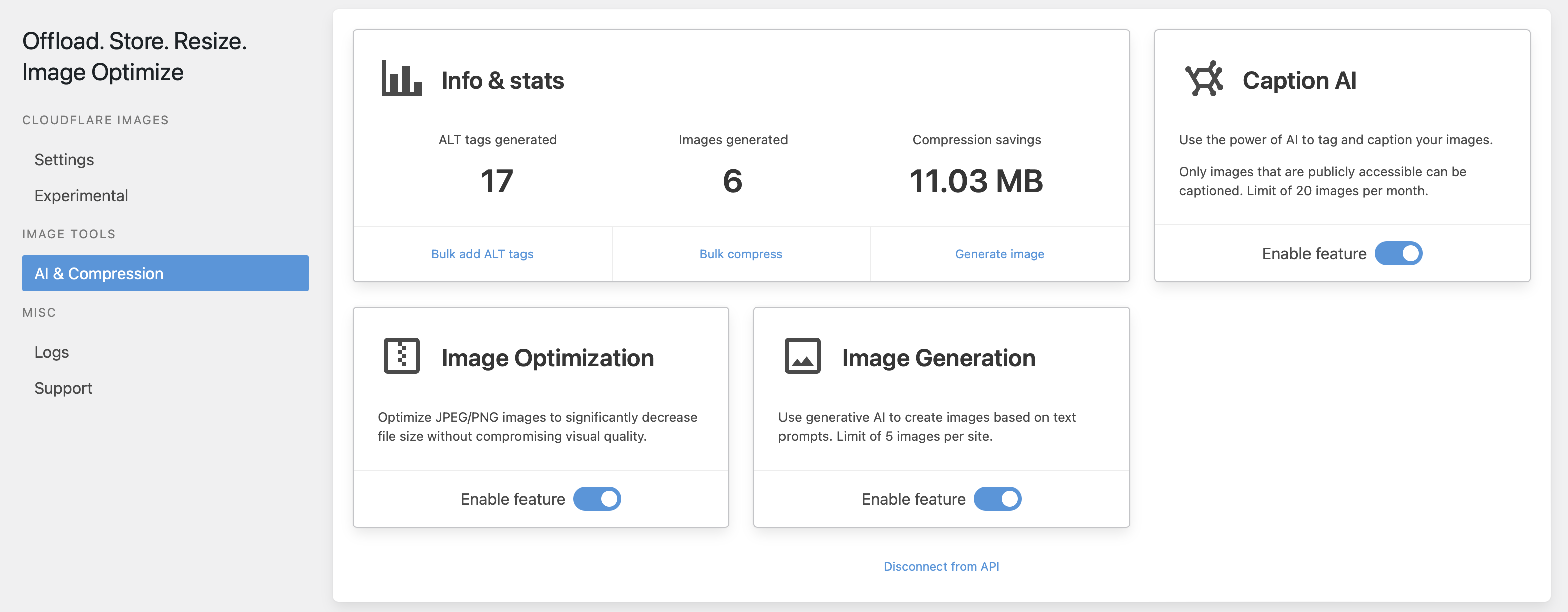
Image AI – tag, caption and generate new images using AI.
Compression – optimize JPEG/PNG images to decrease file size without compromising visual quality.
A Developer’s Promise
Born from personal need, this plugin represents a developer’s dedication to the community. While it’s still a work in progress, remember – it’s crafted with real user needs in mind, not profit.
Your Feedback Makes Us Better
Found a hiccup? Yearning for a feature? Just shoot us a support request. Our commitment is to continually evolve to serve you better. Your wish is our command!
Disclaimer
Cloudflare, the Cloudflare logo, and Cloudflare Workers are trademarks and/or registered trademarks of Cloudflare, Inc. in the United States and other jurisdictions.
Installation
- Upload the plugin to the
/wp-content/plugins/directory - Activate the plugin through the ‘Plugins’ menu in WordPress
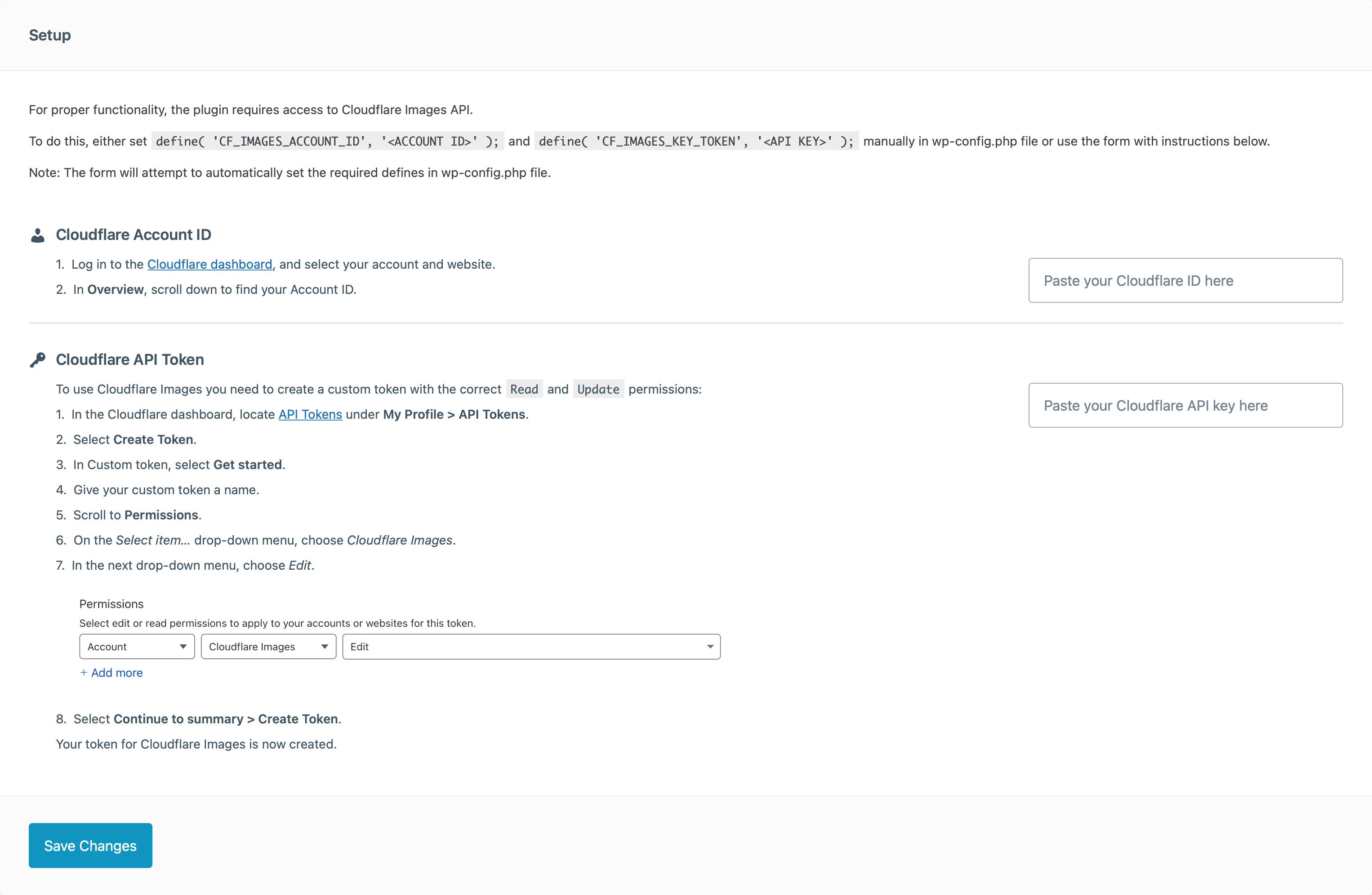
- Follow the instructions in the setup wizard through the ‘Media – Offload Settings’ menu in WordPress
- Enjoy
Frequently asked questions
How does this work?
The plugin will use the Cloudflare Images service to host all supported images and serve them with the best possible settings to the user.
Is this free?
Yes, the plugin is 100% free. A Cloudflare account with activated Cloudflare Images option is required. Cloudflare may charge a fee for the use of this feature, depending on the plan used.
What are the supported image formats?
You can upload the following image formats to Cloudflare Images: * PNG * GIF * JPEG * WebP
Are there any other limitations?
These are the maximum allowed sizes and dimensions Cloudflare Images supports: Images’ height and width are limited to 10,000 pixels. Image metadata is limited to 1024 bytes. Images have a 10 megabyte (MB) size limit. Animated GIFs, including all frames, are limited to 100 megapixels (MP).
Why are not all images being replaced in content?
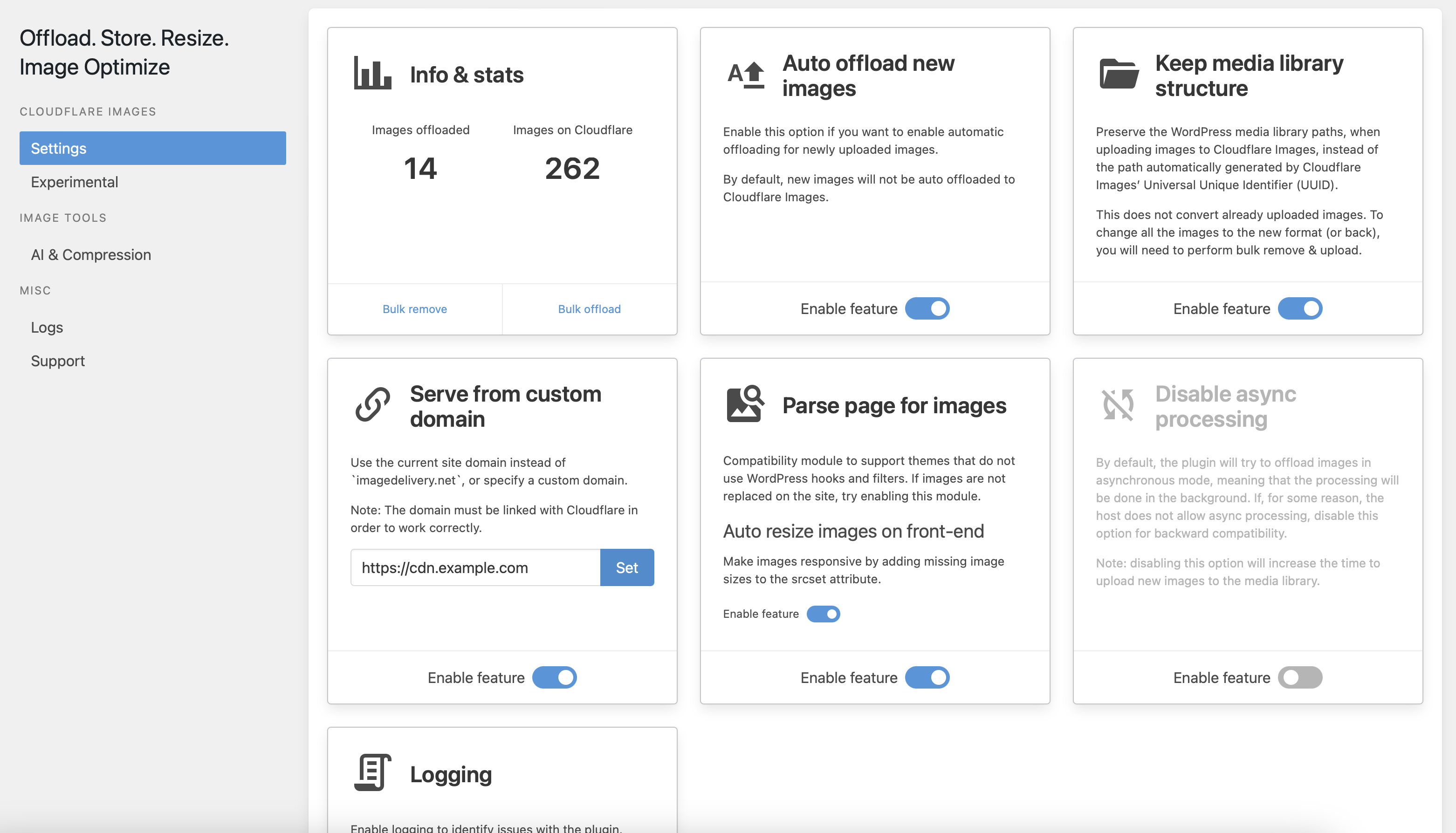
By default, the plugin relies on WordPress core functions to process images. Some themes and plugins can implement their own image processing functions, which can prevent the plugin from replacing the image URLs in content. If you are experiencing this, try to enable the Parse page for images module in the plugin settings. If something is still not working for you, please let me know by creating a support ticket on the plugin support forums.
Changelog
EOY update. Bunny CDN integration, custom URLs and stats with Cloudflare workers and much more.
1.10.3 – 08.06.2026
Fixed:
* Improve account ID and API key validation
1.10.2 – 29.05.2026
Fixed:
* Security issue (CVE-2026-9860)
* Bulk delete (full offload) stops on error
1.10.1 – 18.03.2026
Fixed:
* Malformed links in image srcset
1.10.0 – 17.03.2026
Added:
* Integration with Geodirectory plugin
* Compatibility with WordPress 7.0
Enhance:
* Network settings management
* Code quality improvements
Fixed:
* Fix HTML links on dropdowns in media library
* Page parser not properly detecting images sizes for WebP and AVIF formats
* PHP warning: Implicitly marking parameter $value as nullable is deprecated
* PHP notice: Function _load_textdomain_just_in_time was called incorrectly
* Broken srcset parsing caused by unencoded commas in Cloudflare Image URLs
* Memory leak from setTimeout without cleanup in progress bar component
1.9.8 – 31.12.2025
Fixed:
* Version conflict
1.9.7 – 31.12.2025
Fixed:
* Fatal error with latest RankMath update
Screenshots
For developers
Is this your plugin? Show off the numbers.
Add a live badge to your site, docs or GitHub README. It updates on its own — no account needed.
Best Offload, AI & Optimize with C… alternatives
All cdn plugins →





FAQ
Offload, AI & Optimize with Cloudfl…: quick answers
Straight answers, pulled from live WordPress.org data.
Live data from WordPress.org · checked Sep 27, 2026
Is Offload, AI & Optimize with Clo… free?
Yes. Offload, AI & Optimize with Clo… is free to download and use from the official WordPress.org plugin directory.
Is Offload, AI & Optimize with Clo… safe to use in 2026?
Offload, AI & Optimize with Clo… is a solid plugin choice in 2026, with a few things worth checking first. It runs on 1K+ sites, is rated 4.9/5 and was last updated 4 months ago, and scores 72/100 on our health check.
How many websites use Offload, AI & Optimize with Clo…?
Offload, AI & Optimize with Clo… is active on 1K+ WordPress websites and has been downloaded 45,011 times since it launched in September 2022. It was downloaded 999 times in the last 30 days.
Does Offload, AI & Optimize with Clo… work with WordPress 7.1?
Offload, AI & Optimize with Clo… is officially tested up to WordPress 7.0.6, while the latest release is 7.1.2. It may still work, but try it on a staging site first.
What PHP version does Offload, AI & Optimize with Clo… need?
Offload, AI & Optimize with Clo… requires PHP 7.0 or higher. Most hosts run PHP 8.x today, so it works on any modern WordPress hosting.
When was Offload, AI & Optimize with Clo… last updated?
The latest version, 1.10.3, was released on June 7, 2026 (4 months ago).
Who makes Offload, AI & Optimize with Clo…?
Offload, AI & Optimize with Clo… is developed and maintained by Anton Vanyukov.
What are the best alternatives to Offload, AI & Optimize with Clo…?
The most popular alternatives to Offload, AI & Optimize with Clo… are W3 Total Cache (900K+ installs), SpeedyCache (600K+ installs) and Breeze Cache (300K+ installs).
Powered by PageForge
Want thousands of pages that rank like these? Build them in an afternoon.
This directory runs on the same engine as PageForge. Turn any spreadsheet, CSV or API into thousands of fast, SEO-ready WordPress pages — with schema, internal links and AI-written copy baked in.
- CSV, Google Sheets & API data sources
- AI content, schema & internal links per page
- Works with Elementor, Gutenberg, Yoast & Rank Math
- Free on WordPress.org — no credit card


